Try the new view →
9618-2021-mj-41-q01
May/June 2021 · Paper 41 · Question 1 · 24 marks
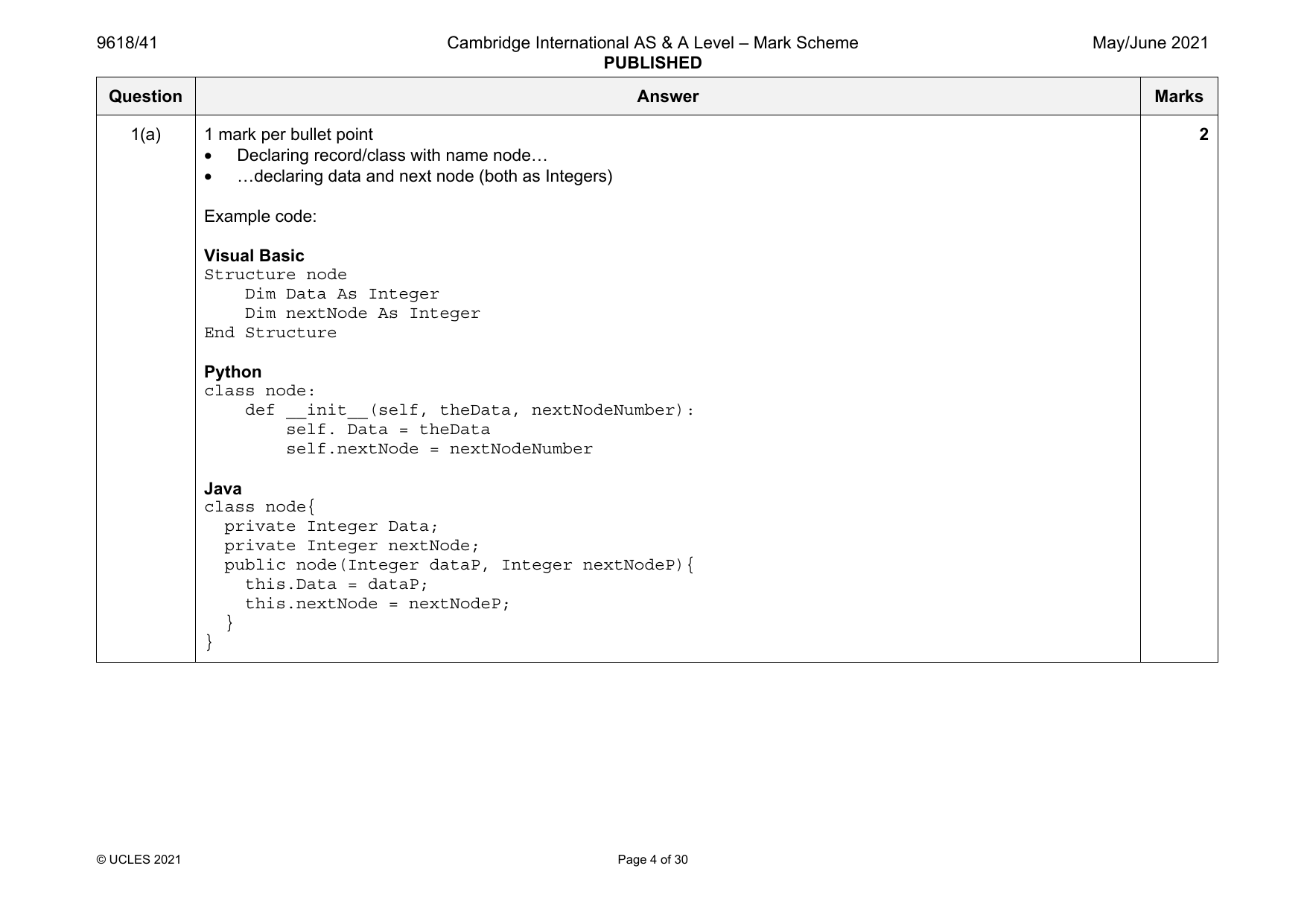
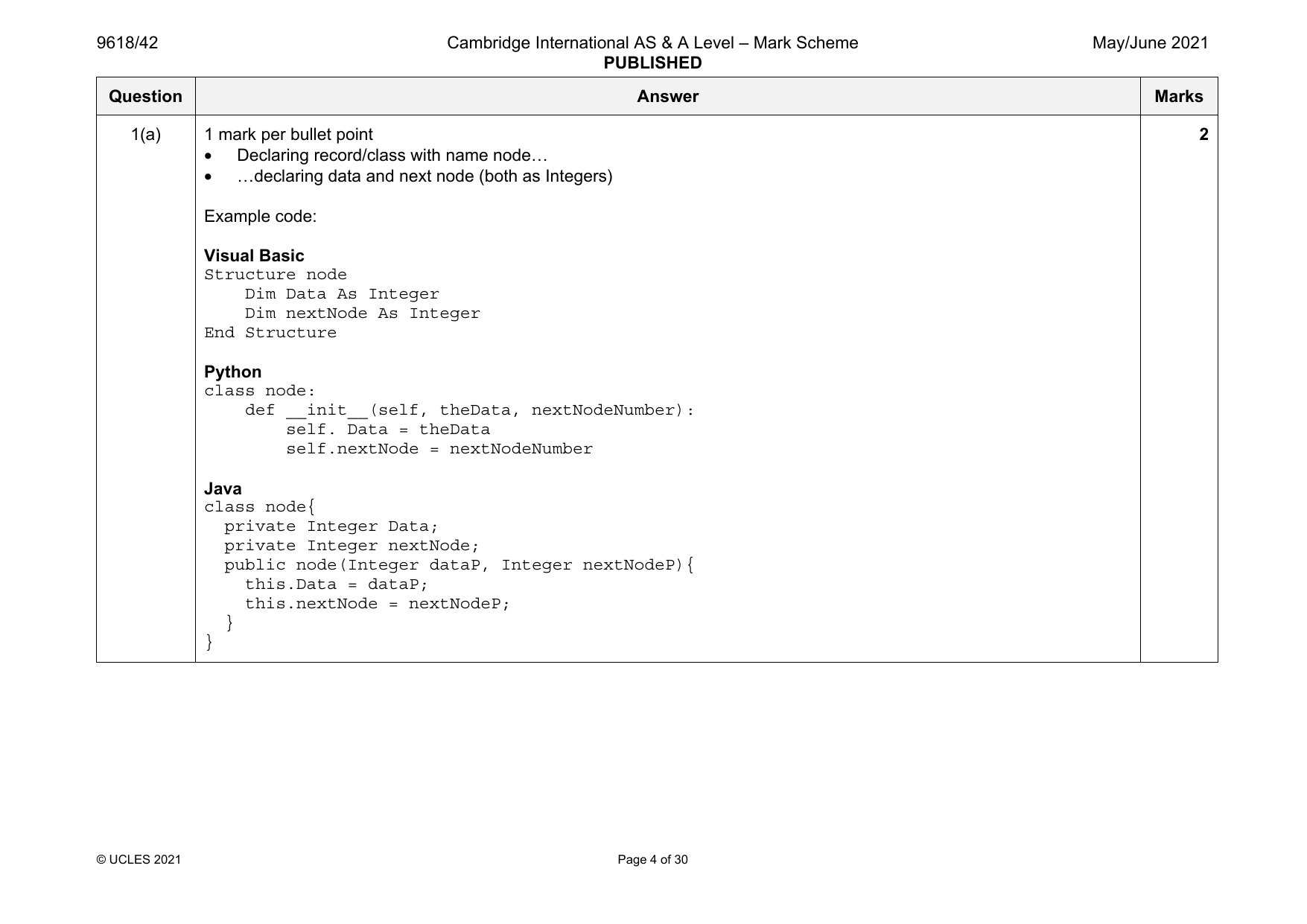
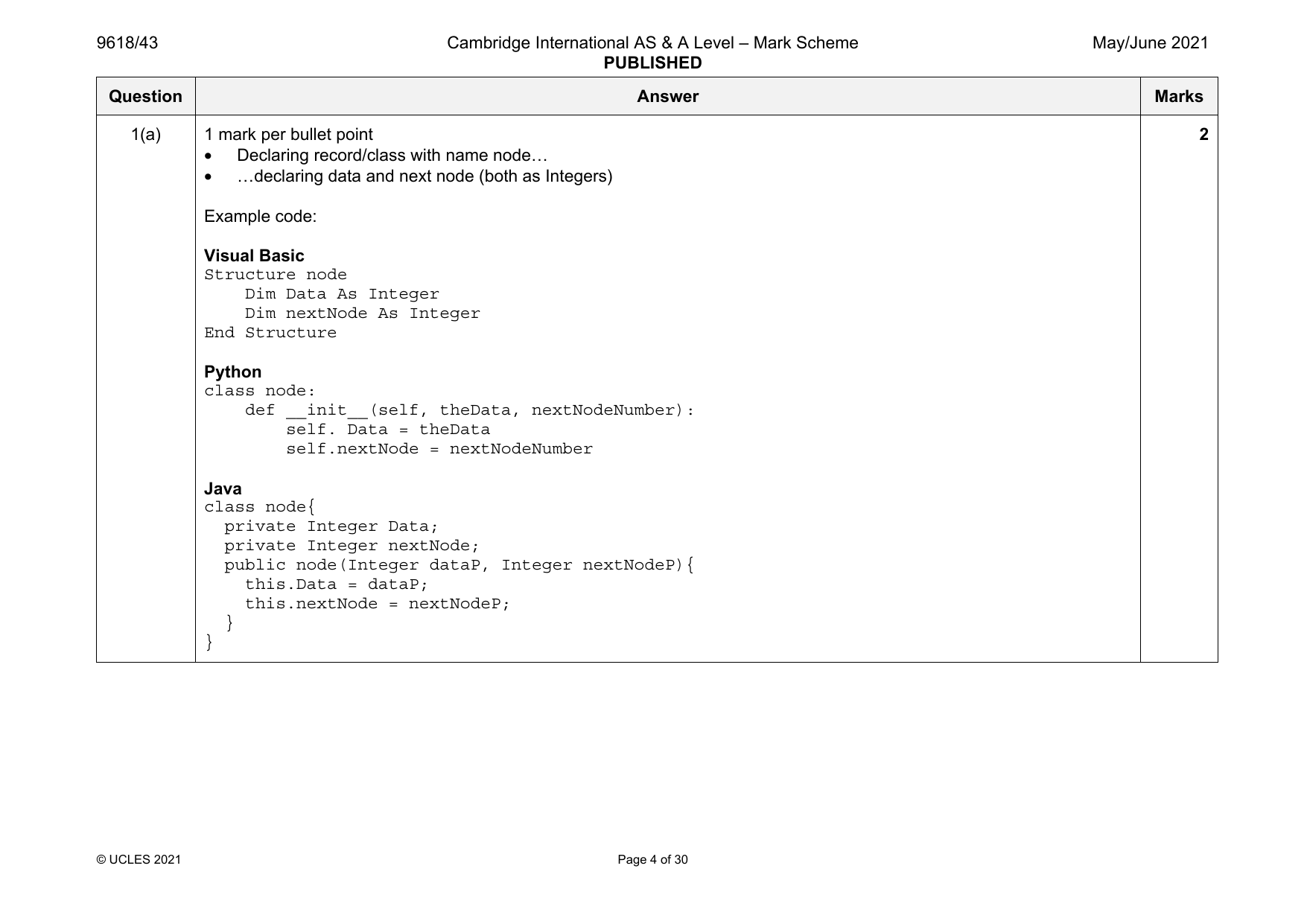
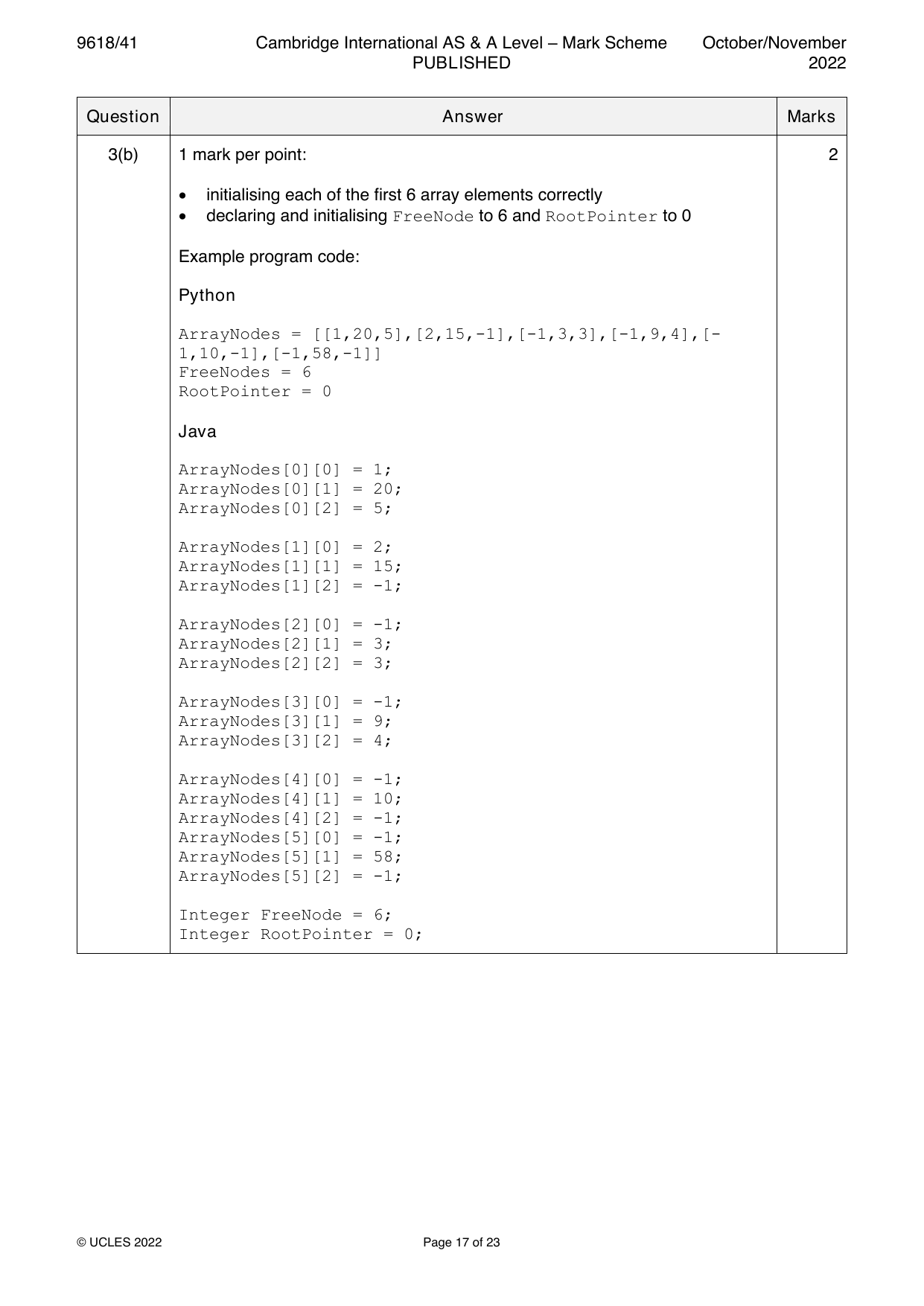
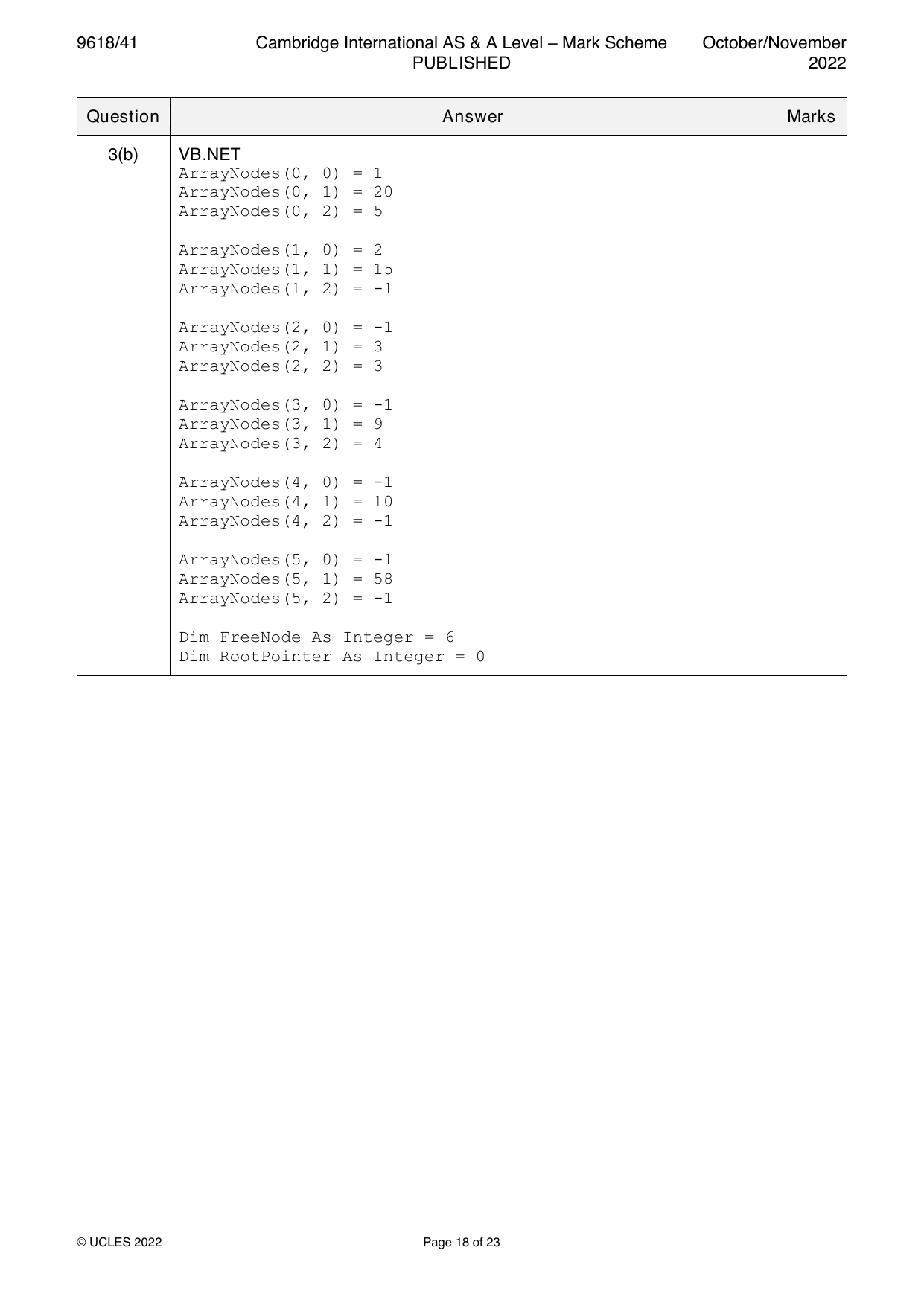
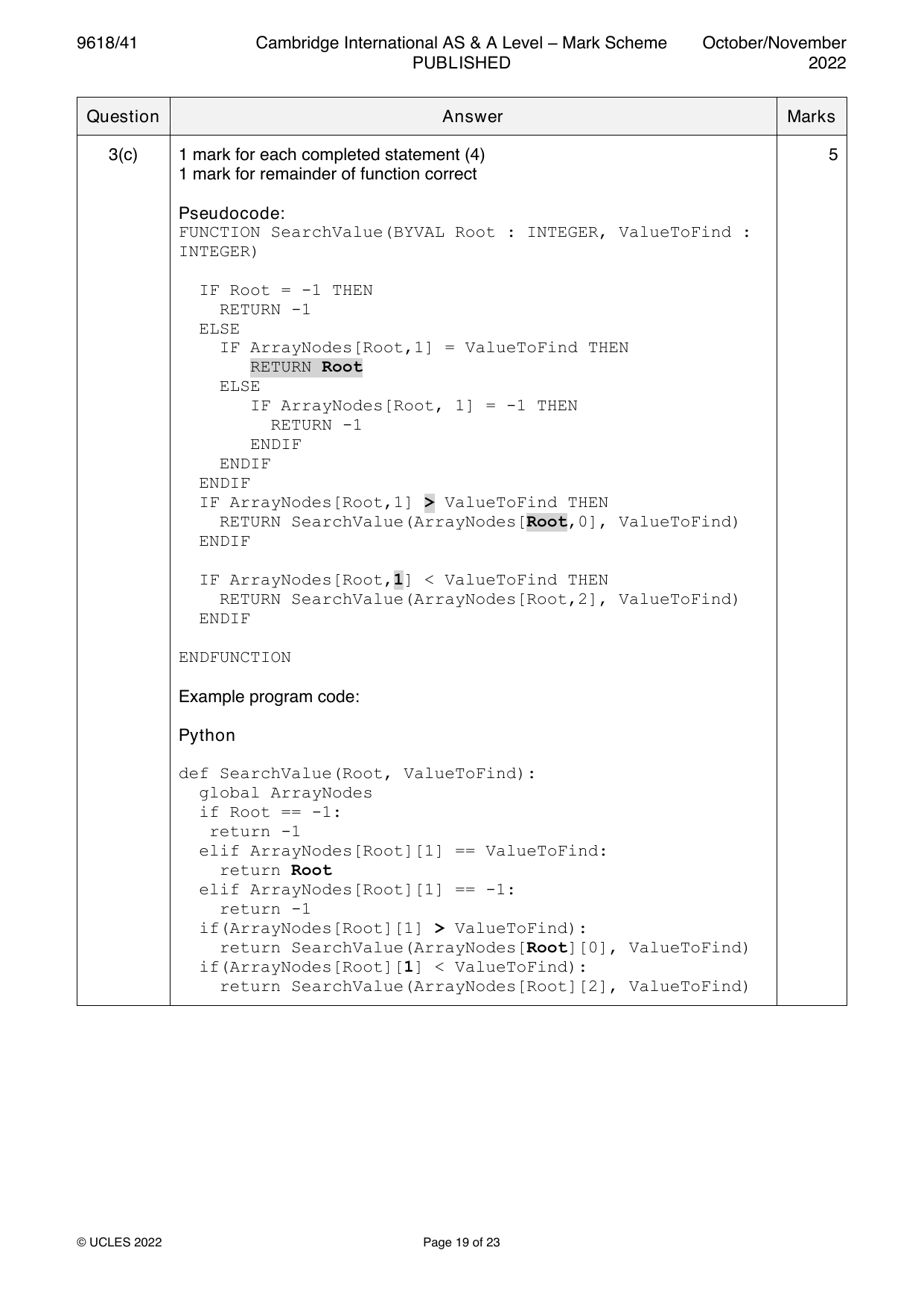
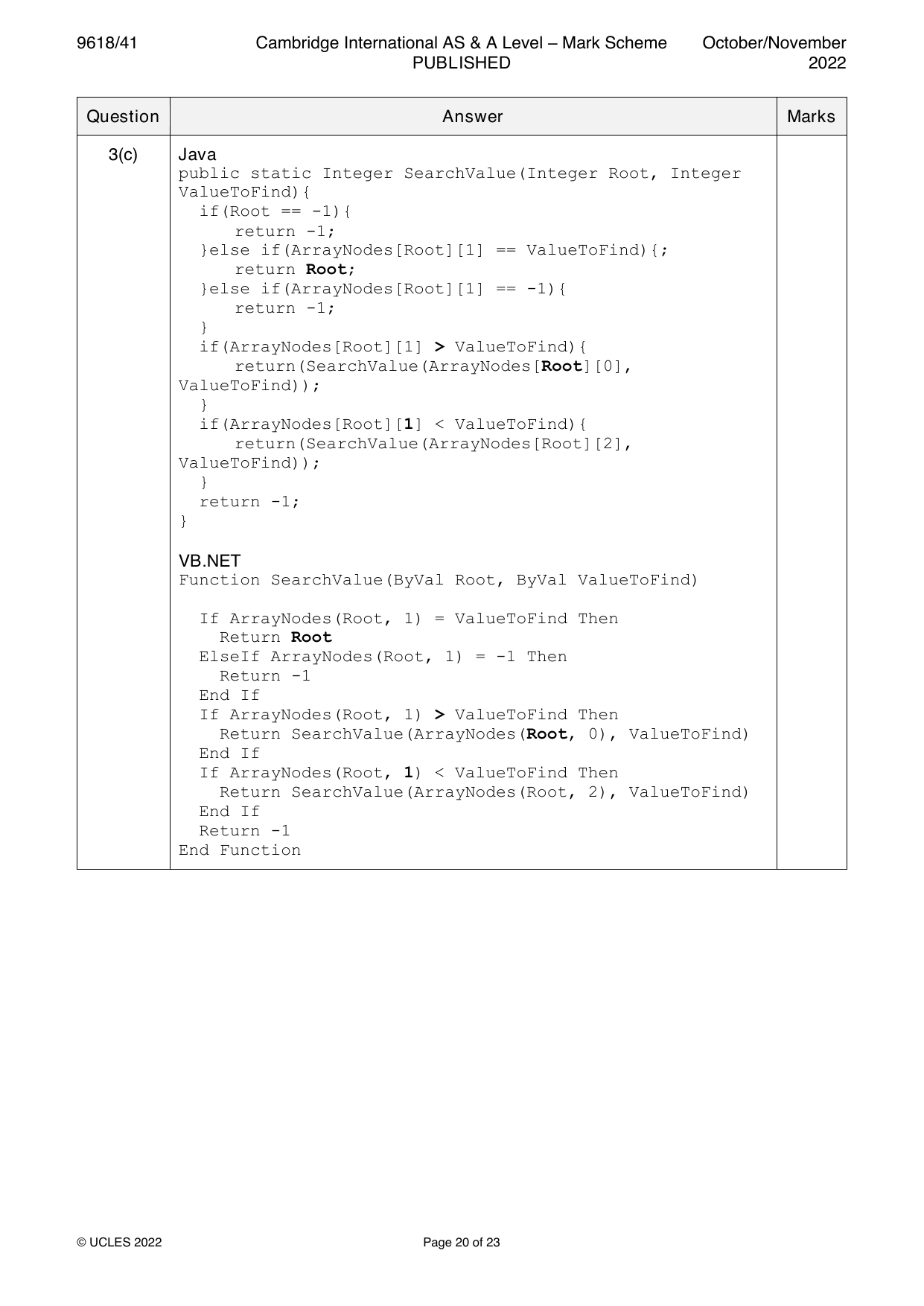
1(a) 1 mark per bullet point 2
• Declaring record/class with name node…
• …declaring data and next node (both as Integers)
Example code:
Visual Basic
Structure node
Dim Data As Integer
Dim nextNode As Integer
End Structure
Python
class node:
def __init__(self, theData, nextNodeNumber):
self. Data = theData
self.nextNode = nextNodeNumber
Java
class node{
private Integer Data;
private Integer nextNode;
public node(Integer dataP, Integer nextNodeP){
this.Data = dataP;
this.nextNode = nextNodeP;
}
}
© UCLES 2021 Page 4 of 30
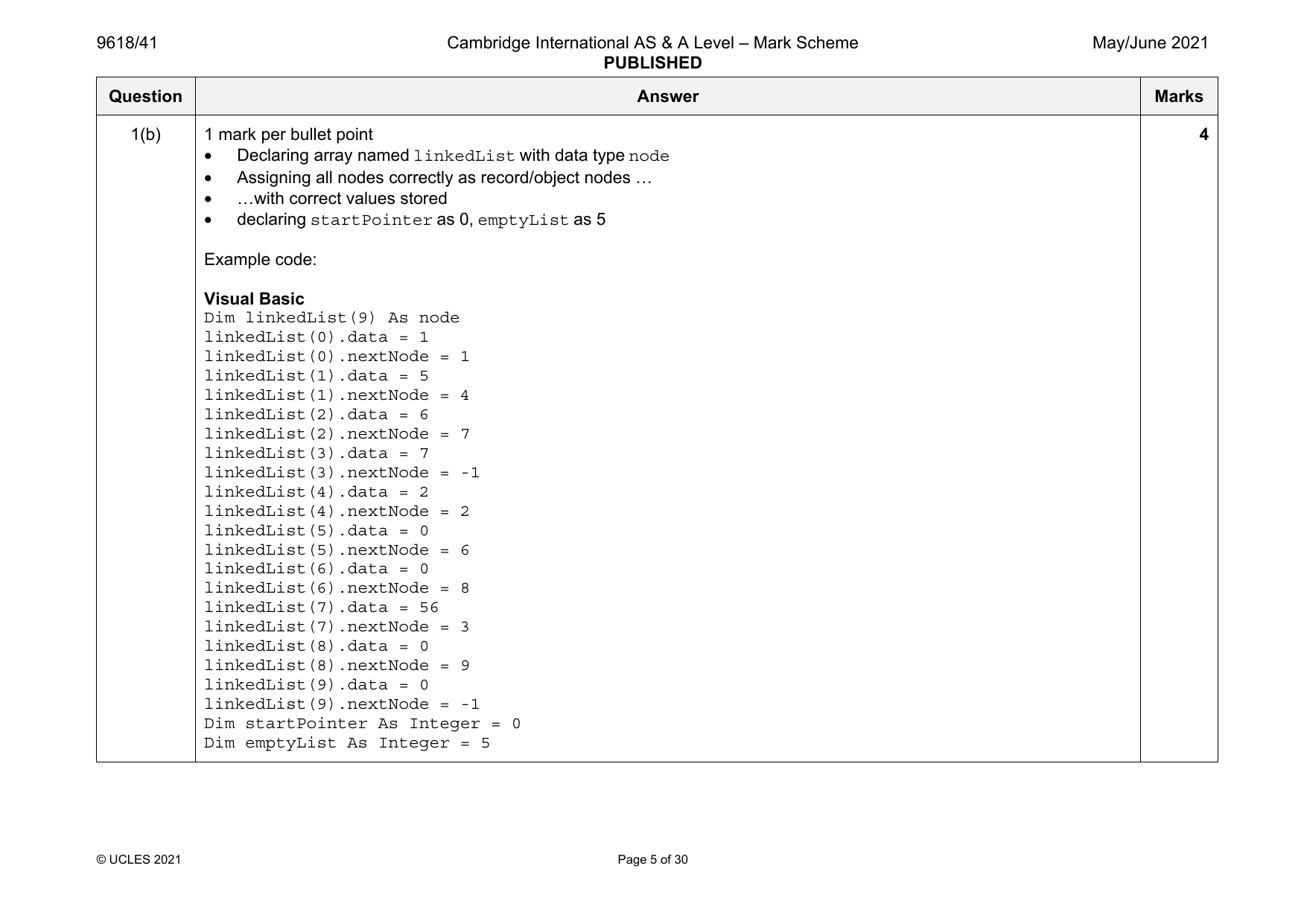
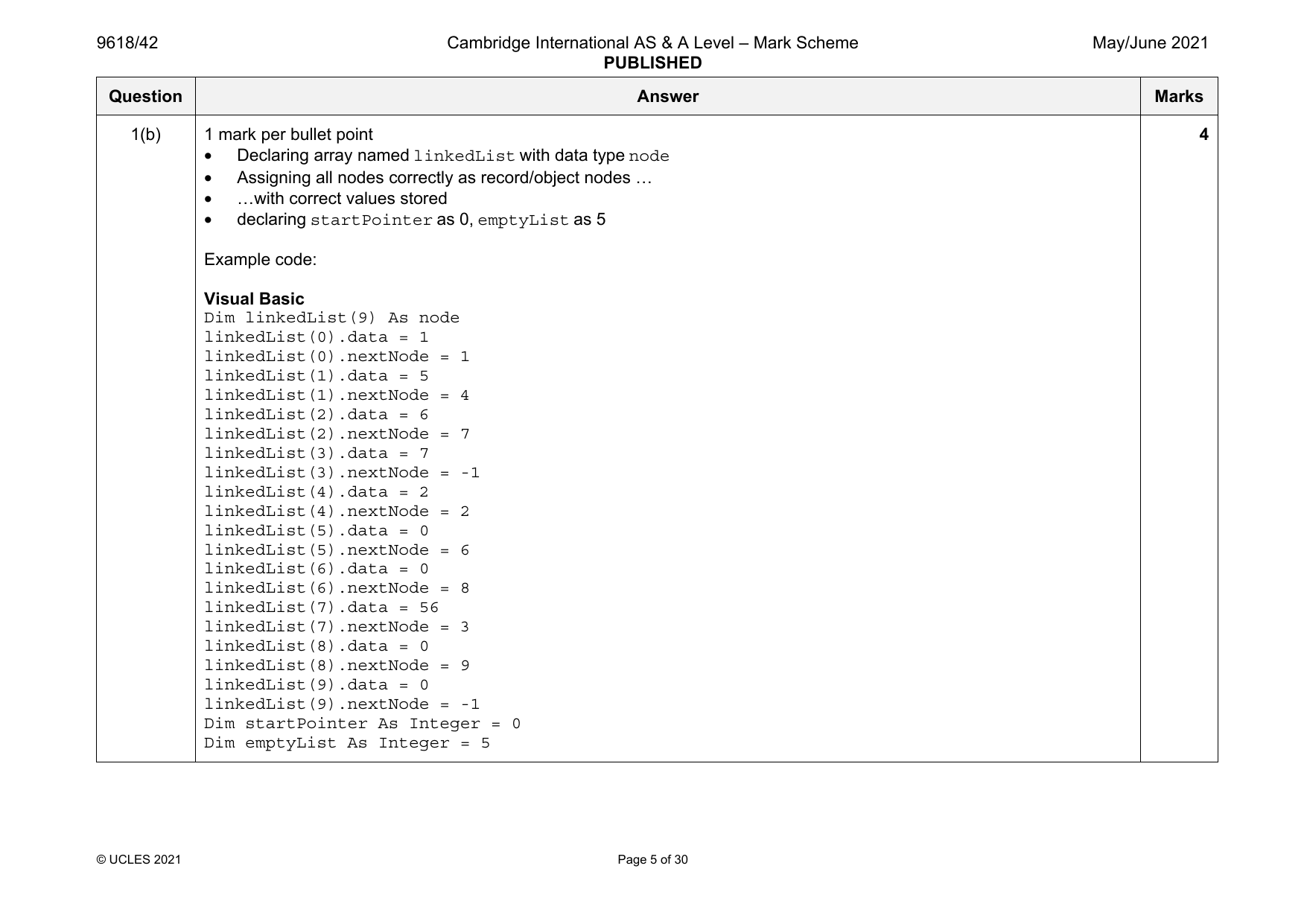
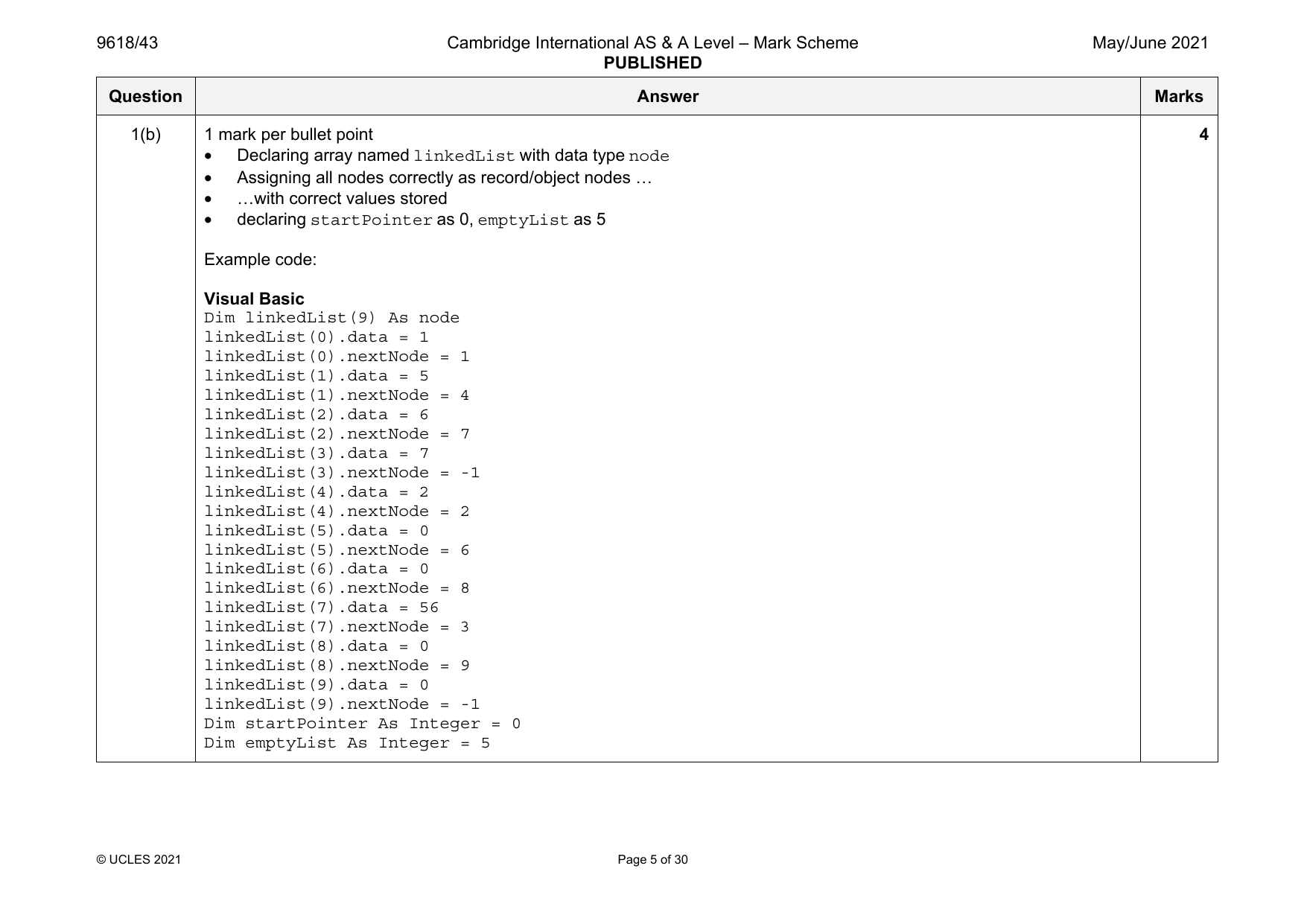
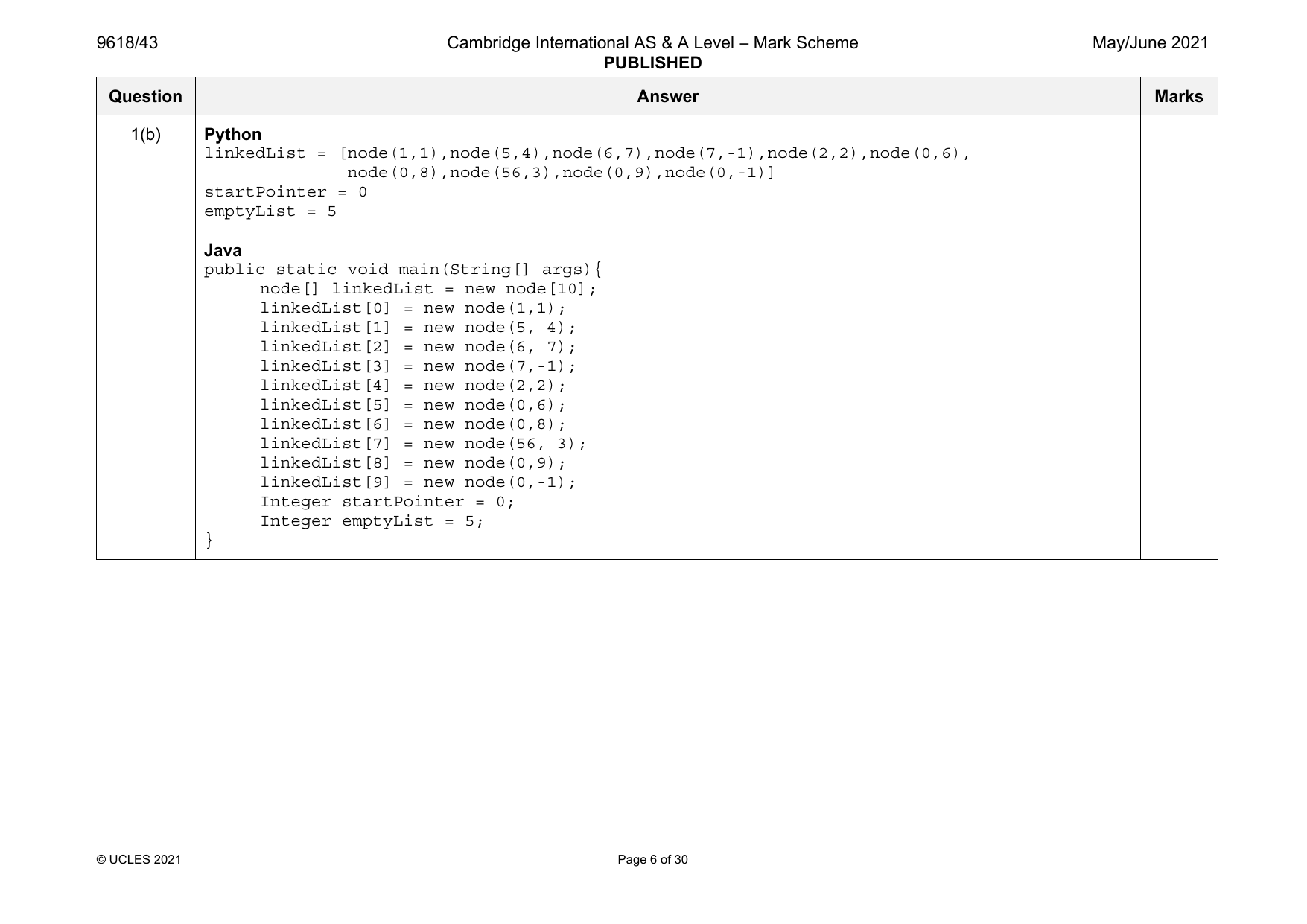
1(b) 1 mark per bullet point 4
• Declaring array named linkedList with data type node
• Assigning all nodes correctly as record/object nodes …
• …with correct values stored
• declaring startPointer as 0, emptyList as 5
Example code:
Visual Basic
Dim linkedList(9) As node
linkedList(0).data = 1
linkedList(0).nextNode = 1
linkedList(1).data = 5
linkedList(1).nextNode = 4
linkedList(2).data = 6
linkedList(2).nextNode = 7
linkedList(3).data = 7
linkedList(3).nextNode = -1
linkedList(4).data = 2
linkedList(4).nextNode = 2
linkedList(5).data = 0
linkedList(5).nextNode = 6
linkedList(6).data = 0
linkedList(6).nextNode = 8
linkedList(7).data = 56
linkedList(7).nextNode = 3
linkedList(8).data = 0
linkedList(8).nextNode = 9
linkedList(9).data = 0
linkedList(9).nextNode = -1
Dim startPointer As Integer = 0
Dim emptyList As Integer = 5
© UCLES 2021 Page 5 of 30
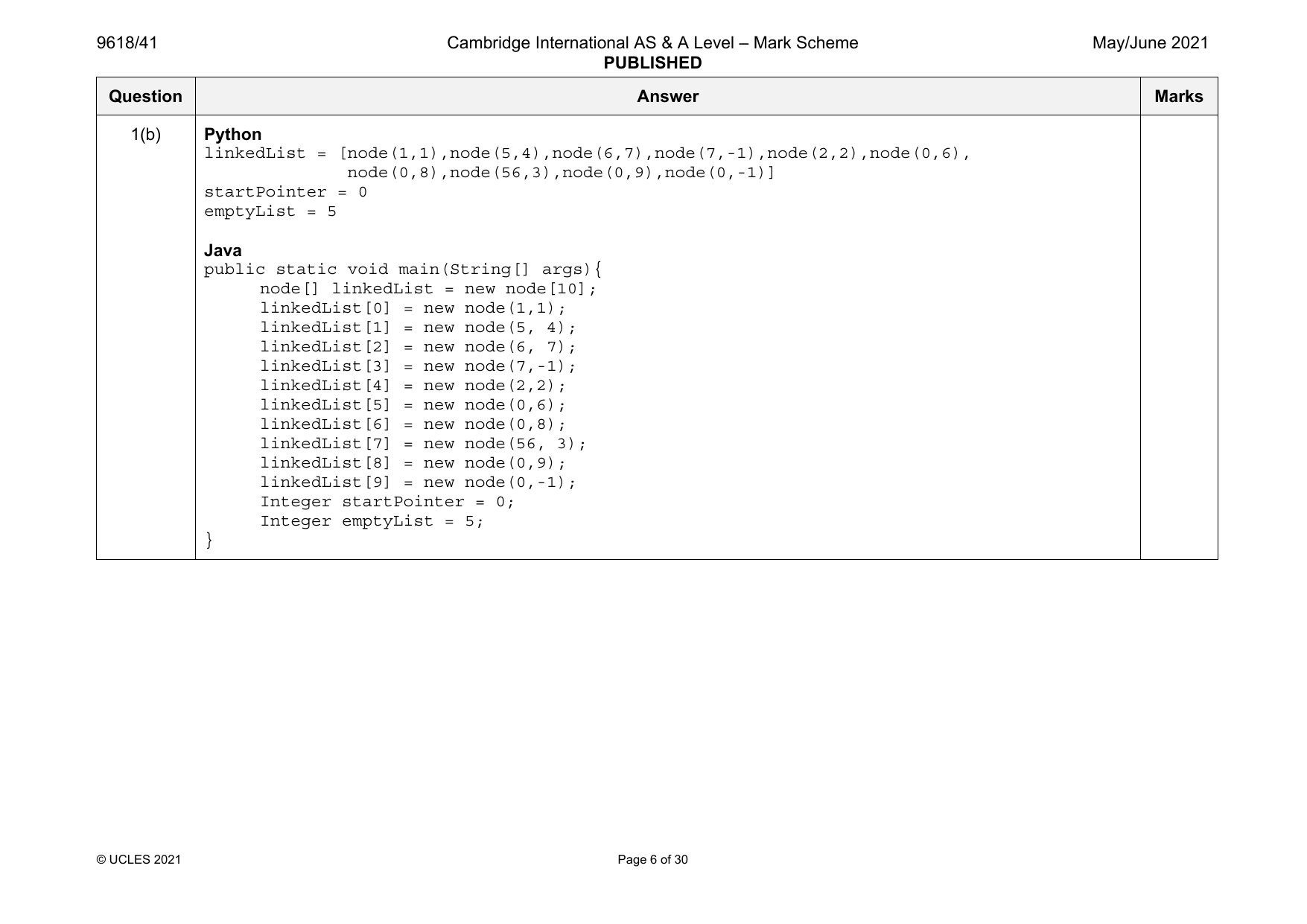
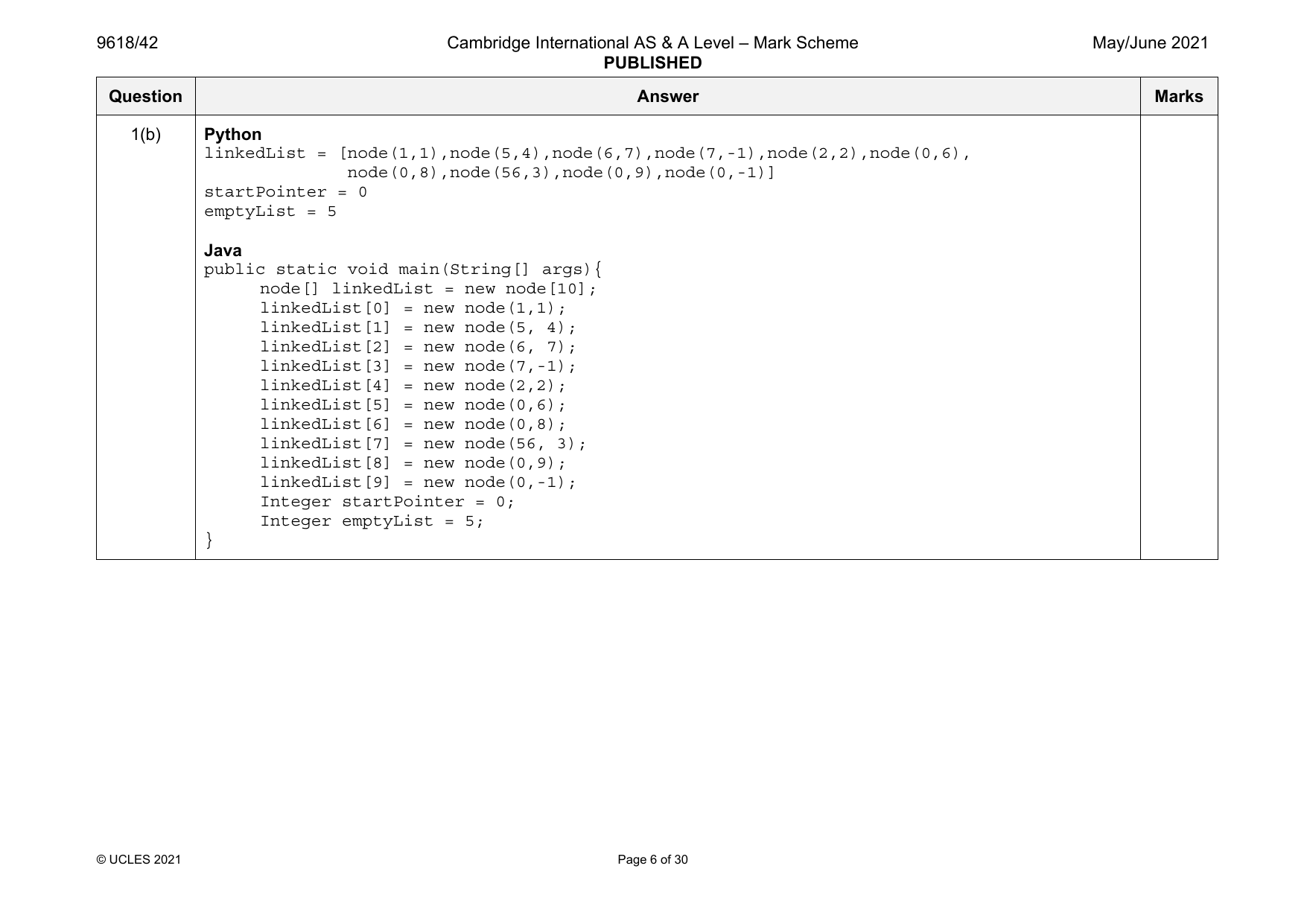
1(b) Python
linkedList = [node(1,1),node(5,4),node(6,7),node(7,-1),node(2,2),node(0,6),
node(0,8),node(56,3),node(0,9),node(0,-1)]
startPointer = 0
emptyList = 5
Java
public static void main(String[] args){
node[] linkedList = new node[10];
linkedList[0] = new node(1,1);
linkedList[1] = new node(5, 4);
linkedList[2] = new node(6, 7);
linkedList[3] = new node(7,-1);
linkedList[4] = new node(2,2);
linkedList[5] = new node(0,6);
linkedList[6] = new node(0,8);
linkedList[7] = new node(56, 3);
linkedList[8] = new node(0,9);
linkedList[9] = new node(0,-1);
Integer startPointer = 0;
Integer emptyList = 5;
}
© UCLES 2021 Page 6 of 30
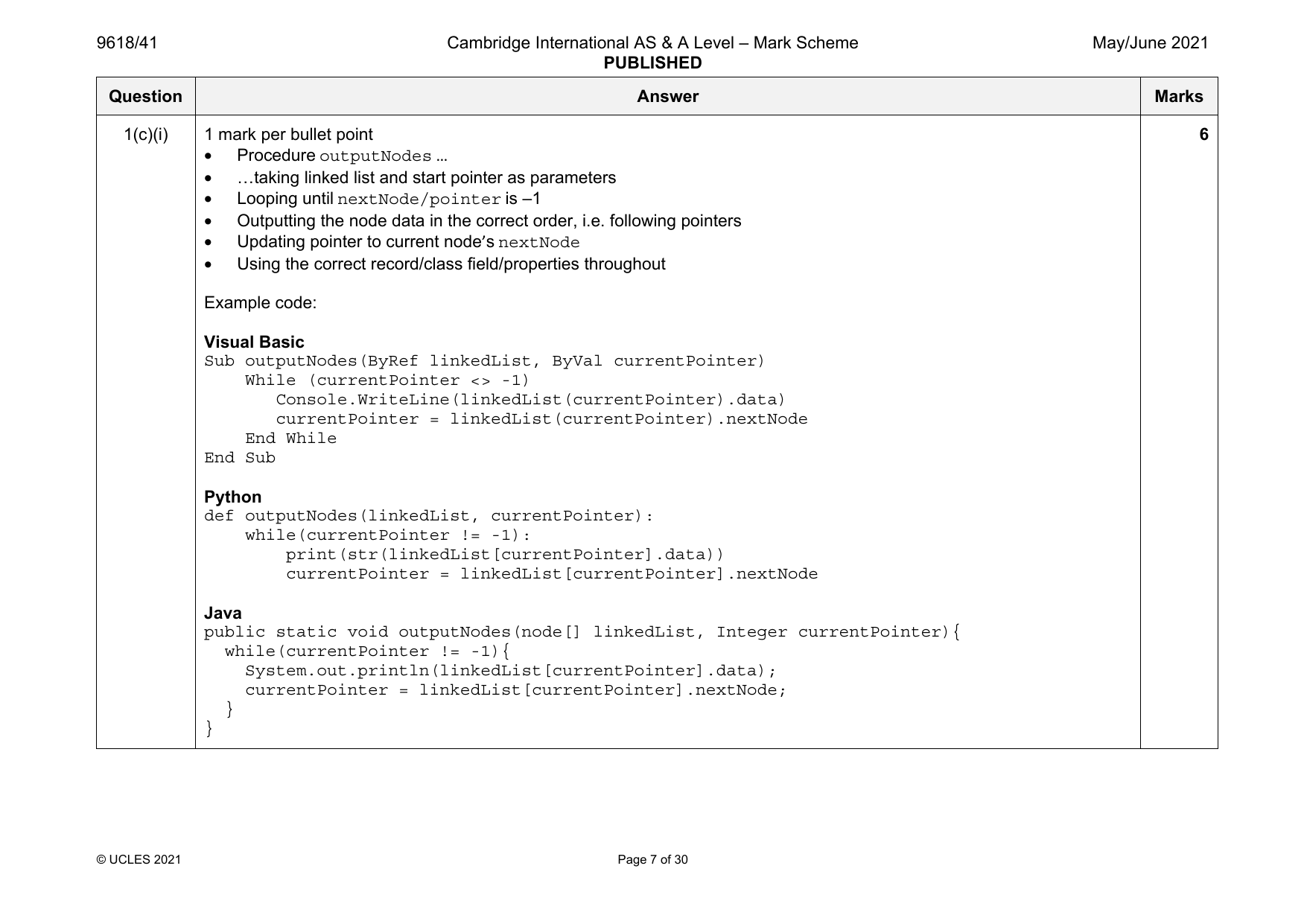
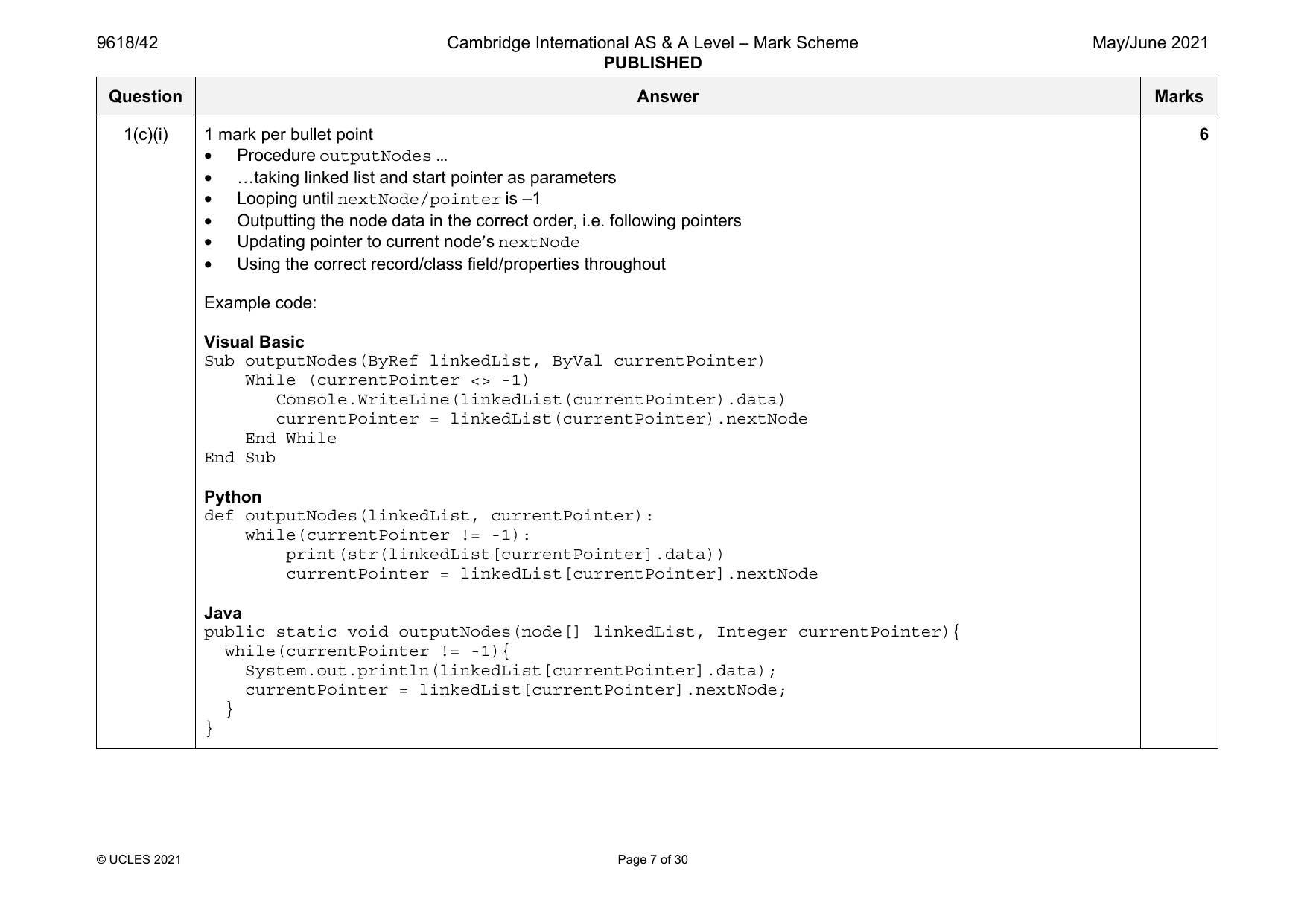
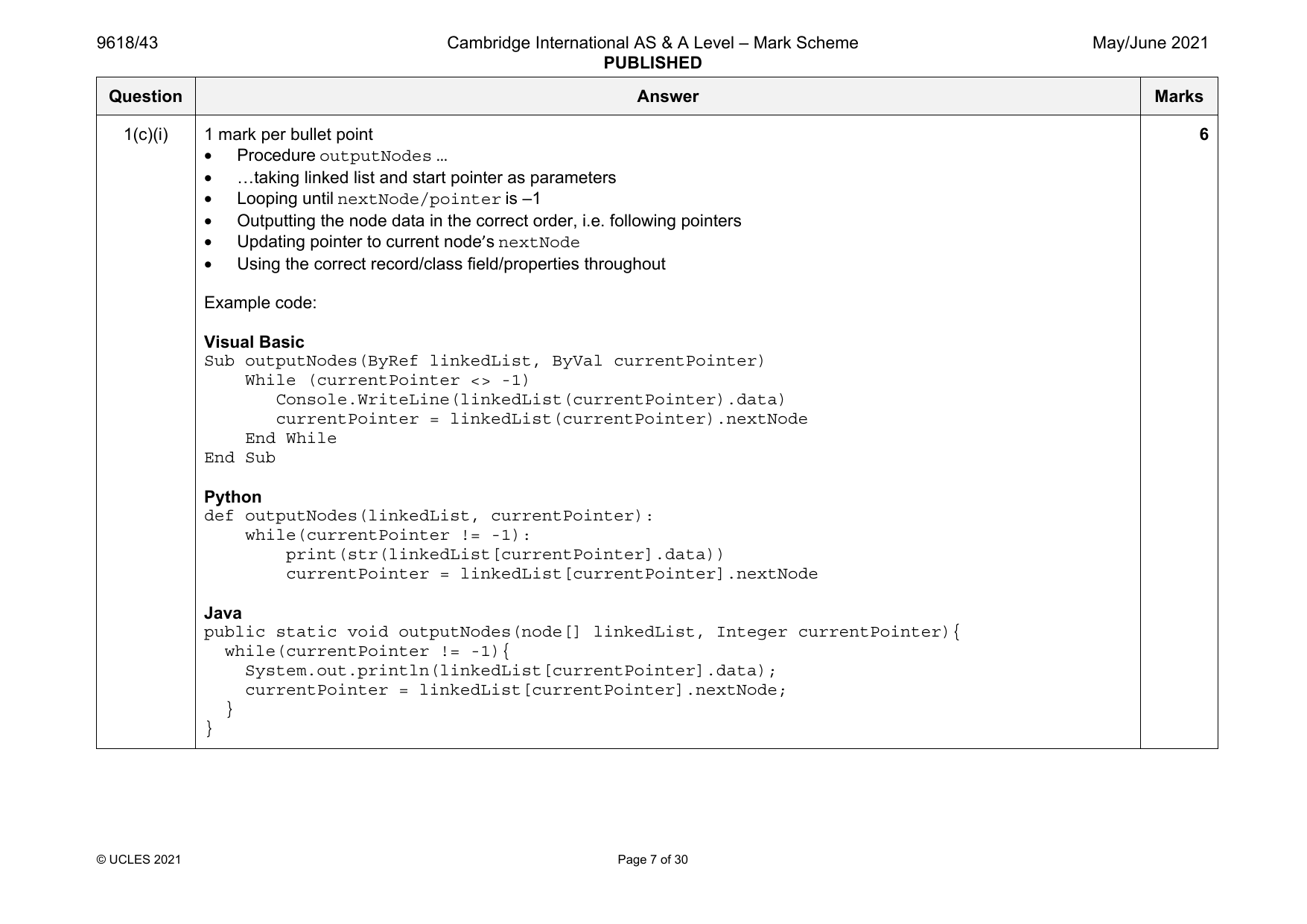
1(c)(i) 1 mark per bullet point 6
• Procedure outputNodes …
• …taking linked list and start pointer as parameters
• Looping until nextNode/pointer is –1
• Outputting the node data in the correct order, i.e. following pointers
• Updating pointer to current node’s nextNode
• Using the correct record/class field/properties throughout
Example code:
Visual Basic
Sub outputNodes(ByRef linkedList, ByVal currentPointer)
While (currentPointer <> -1)
Console.WriteLine(linkedList(currentPointer).data)
currentPointer = linkedList(currentPointer).nextNode
End While
End Sub
Python
def outputNodes(linkedList, currentPointer):
while(currentPointer != -1):
print(str(linkedList[currentPointer].data))
currentPointer = linkedList[currentPointer].nextNode
Java
public static void outputNodes(node[] linkedList, Integer currentPointer){
while(currentPointer != -1){
System.out.println(linkedList[currentPointer].data);
currentPointer = linkedList[currentPointer].nextNode;
}
}
© UCLES 2021 Page 7 of 30
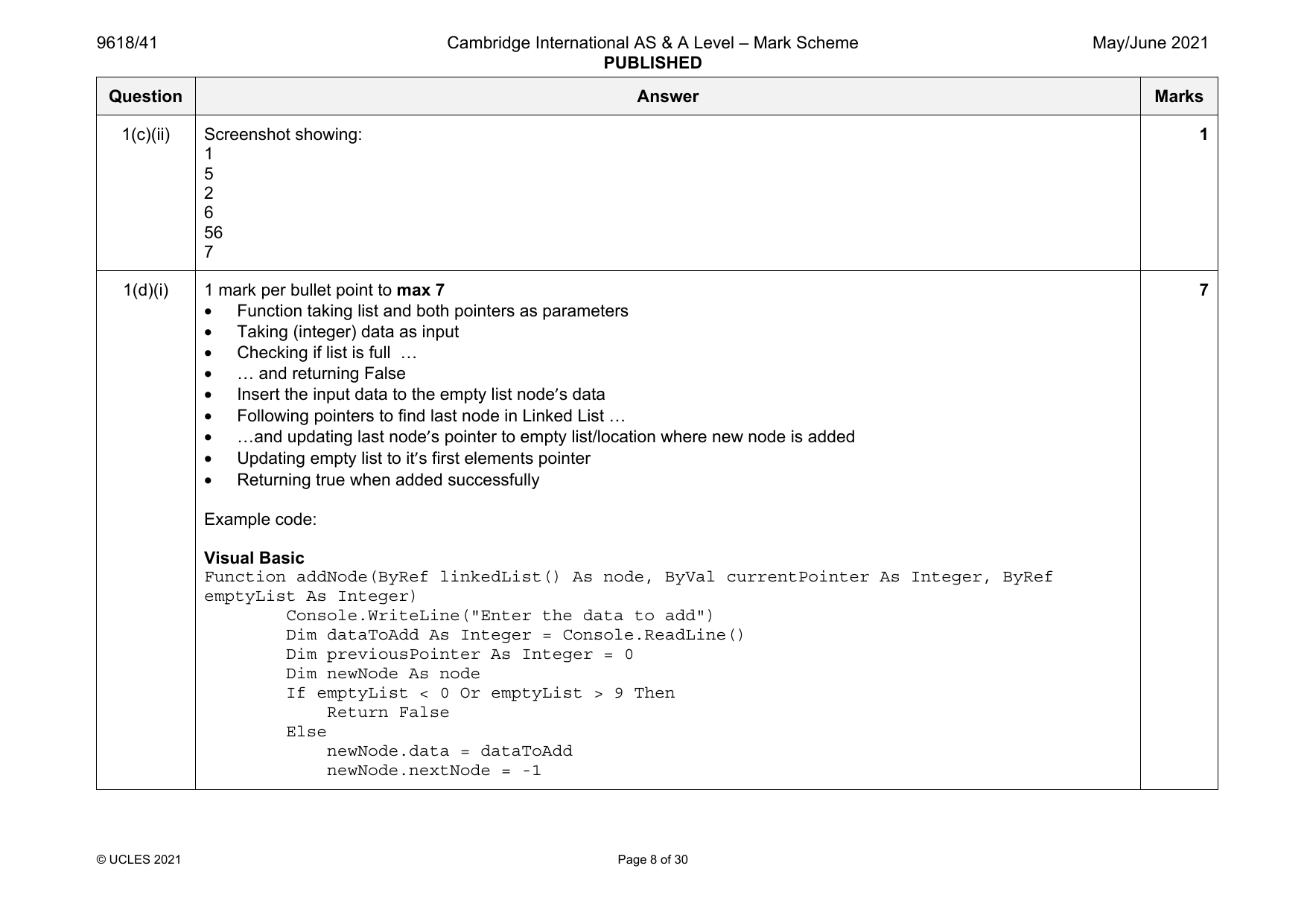
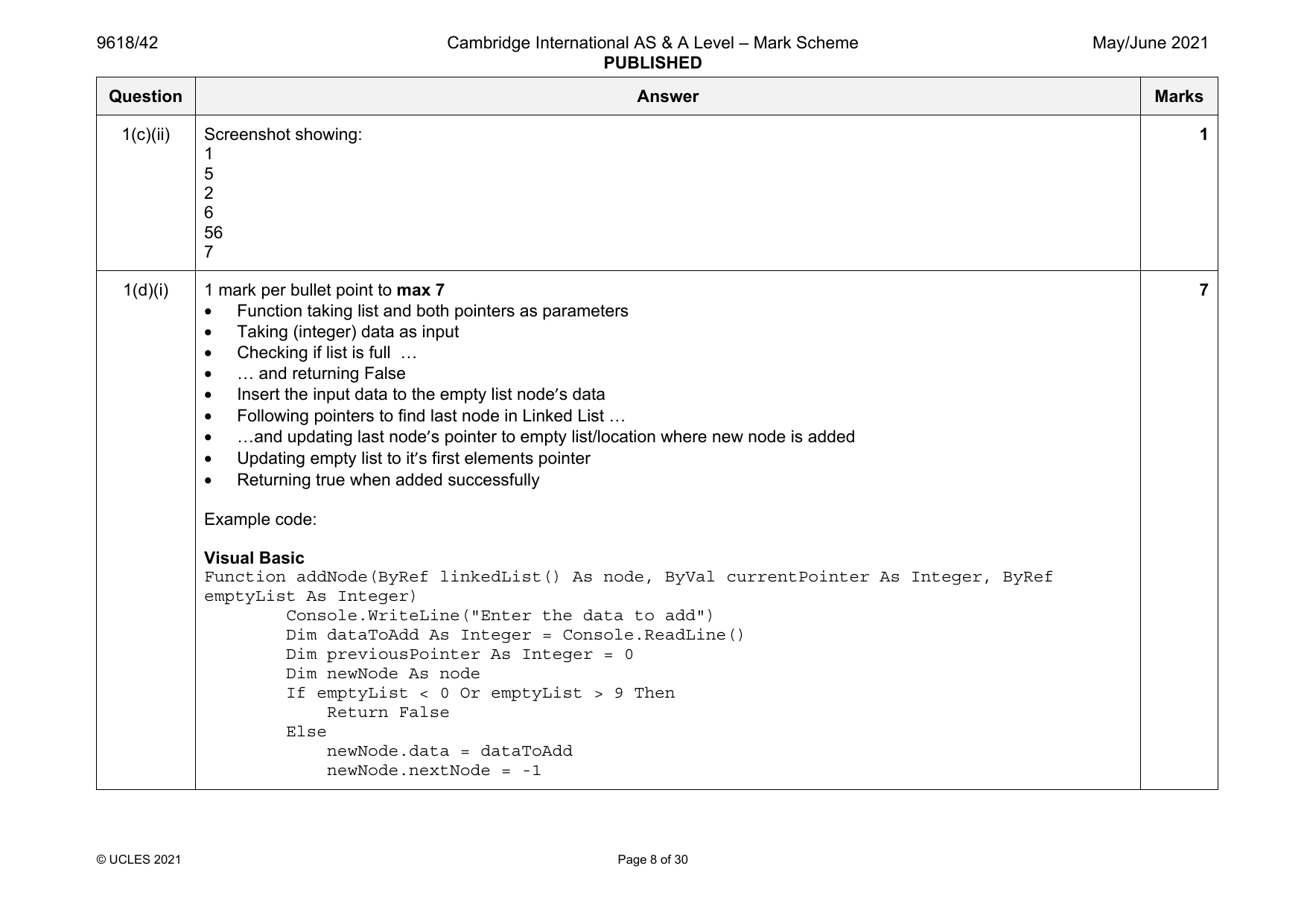
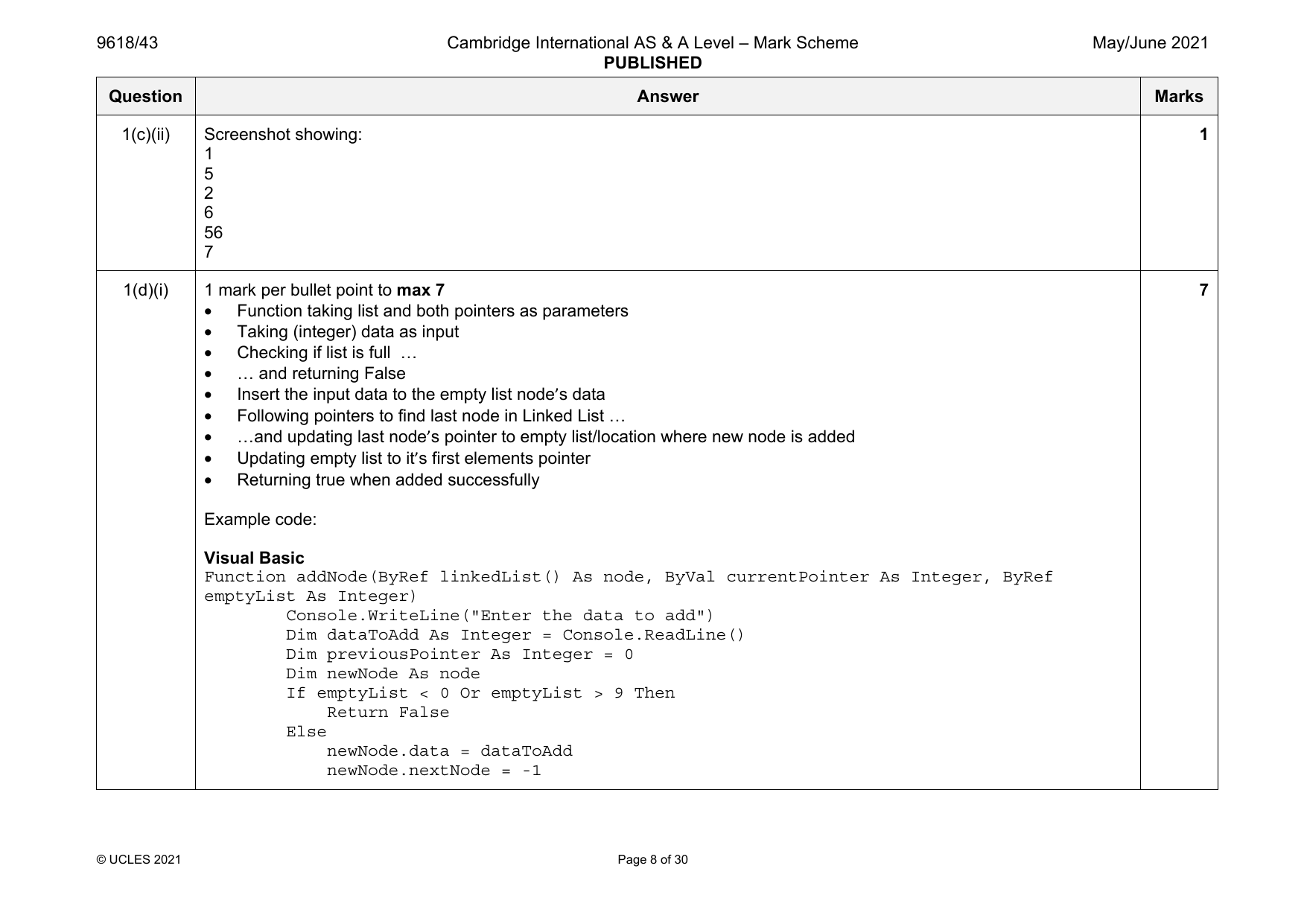
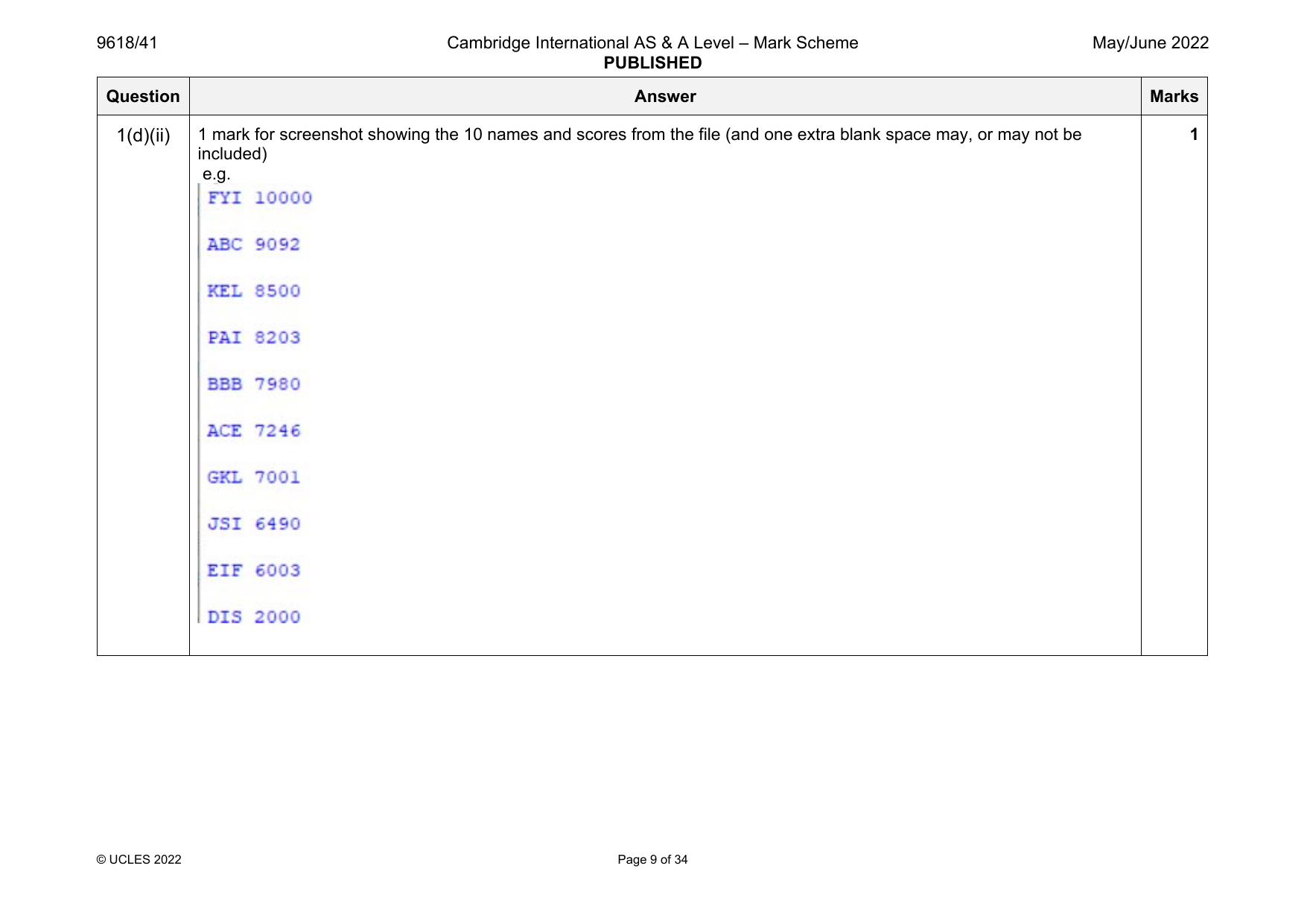
1(c)(ii) Screenshot showing: 1
1
5
Official mark scheme pages: 4, 5, 6, 7, 8 · source PDF URL
9618-2021-mj-41-q02
May/June 2021 · Paper 41 · Question 2 · 20 marks
2
6
56
7
1(d)(i) 1 mark per bullet point to max 7 7
• Function taking list and both pointers as parameters
• Taking (integer) data as input
• Checking if list is full …
• … and returning False
• Insert the input data to the empty list node’s data
• Following pointers to find last node in Linked List …
• …and updating last node’s pointer to empty list/location where new node is added
• Updating empty list to it’s first elements pointer
• Returning true when added successfully
Example code:
Visual Basic
Function addNode(ByRef linkedList() As node, ByVal currentPointer As Integer, ByRef
emptyList As Integer)
Console.WriteLine("Enter the data to add")
Dim dataToAdd As Integer = Console.ReadLine()
Dim previousPointer As Integer = 0
Dim newNode As node
If emptyList < 0 Or emptyList > 9 Then
Return False
Else
newNode.data = dataToAdd
newNode.nextNode = -1
© UCLES 2021 Page 8 of 30
9618/41 Cambridge International AS & A Level – Mark Scheme May/June 2021
PUBLISHED
Question Answer Marks
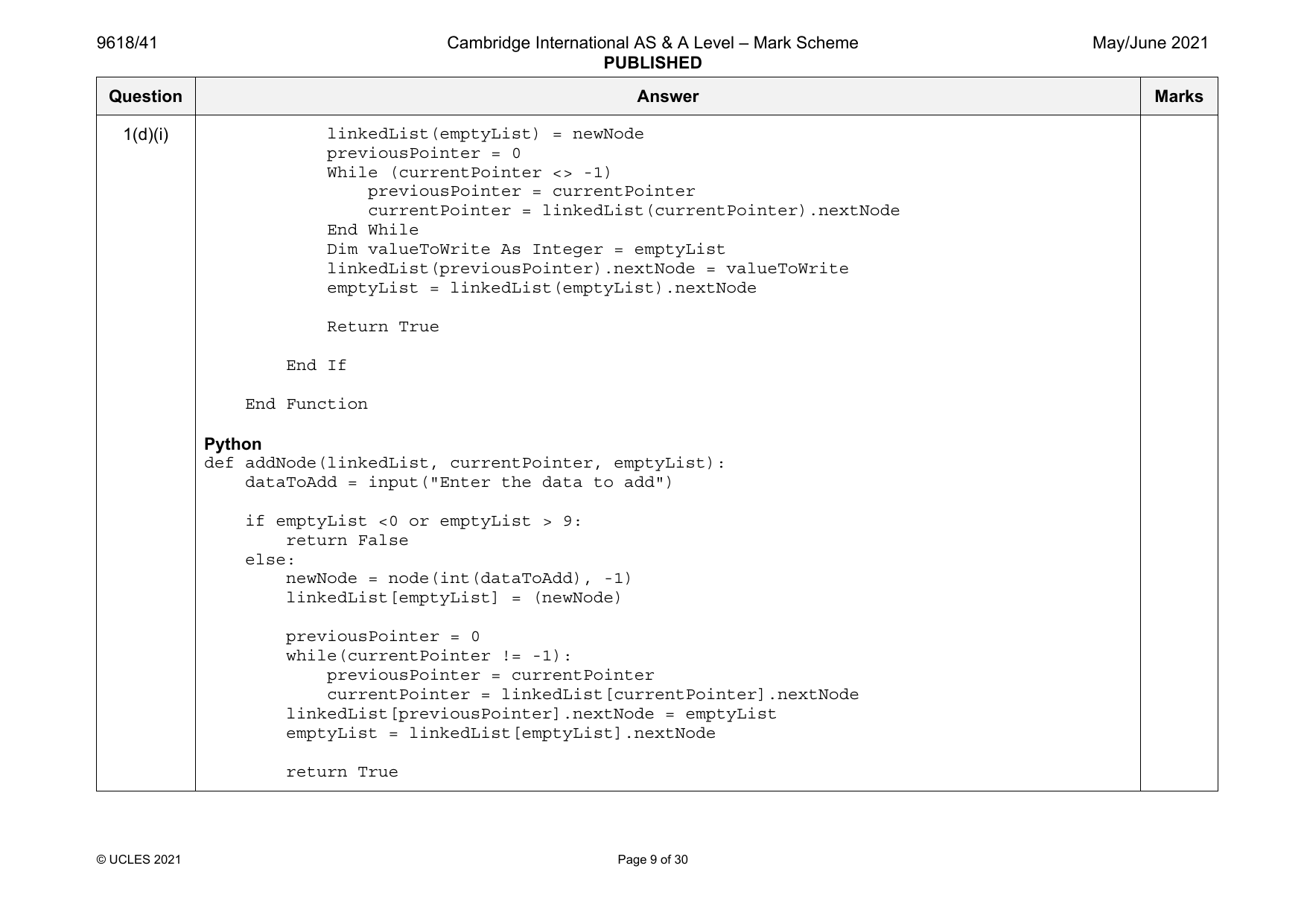
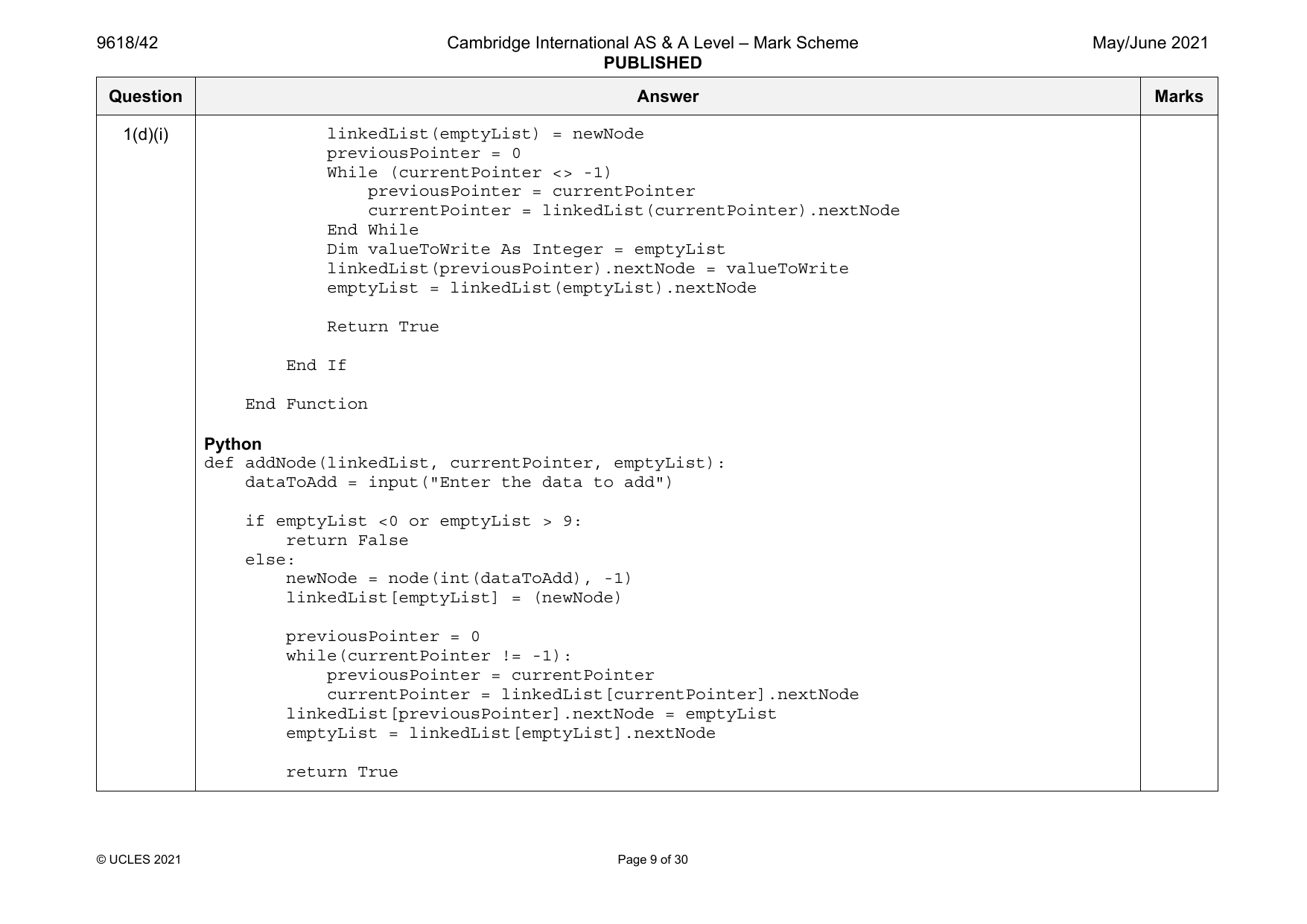
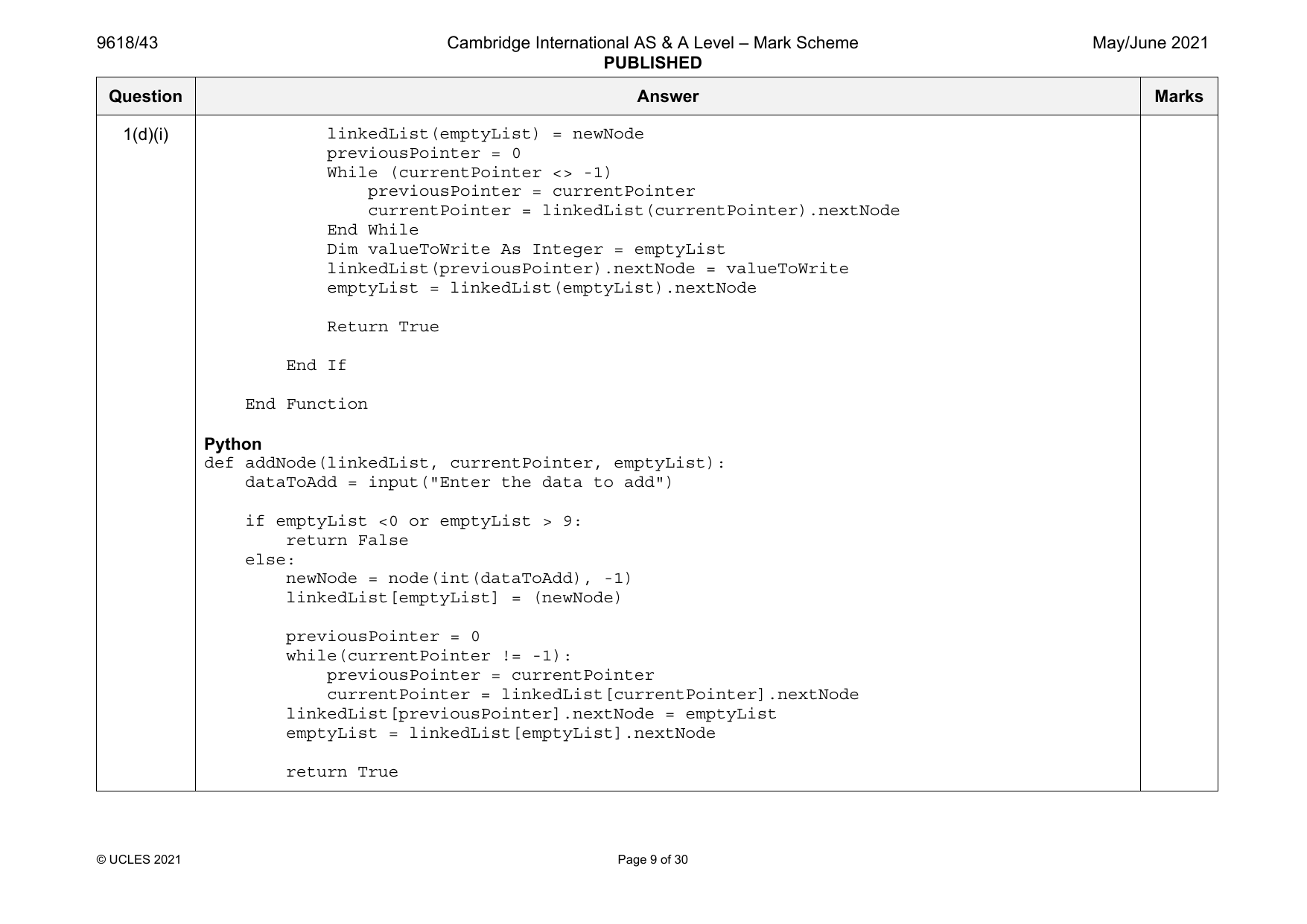
1(d)(i) linkedList(emptyList) = newNode
previousPointer = 0
While (currentPointer <> -1)
previousPointer = currentPointer
currentPointer = linkedList(currentPointer).nextNode
End While
Dim valueToWrite As Integer = emptyList
linkedList(previousPointer).nextNode = valueToWrite
emptyList = linkedList(emptyList).nextNode
Return True
End If
End Function
Python
def addNode(linkedList, currentPointer, emptyList):
dataToAdd = input("Enter the data to add")
if emptyList <0 or emptyList > 9:
return False
else:
newNode = node(int(dataToAdd), -1)
linkedList[emptyList] = (newNode)
previousPointer = 0
while(currentPointer != -1):
previousPointer = currentPointer
currentPointer = linkedList[currentPointer].nextNode
linkedList[previousPointer].nextNode = emptyList
emptyList = linkedList[emptyList].nextNode
return True
© UCLES 2021 Page 9 of 30
9618/41 Cambridge International AS & A Level – Mark Scheme May/June 2021
PUBLISHED
Question Answer Marks
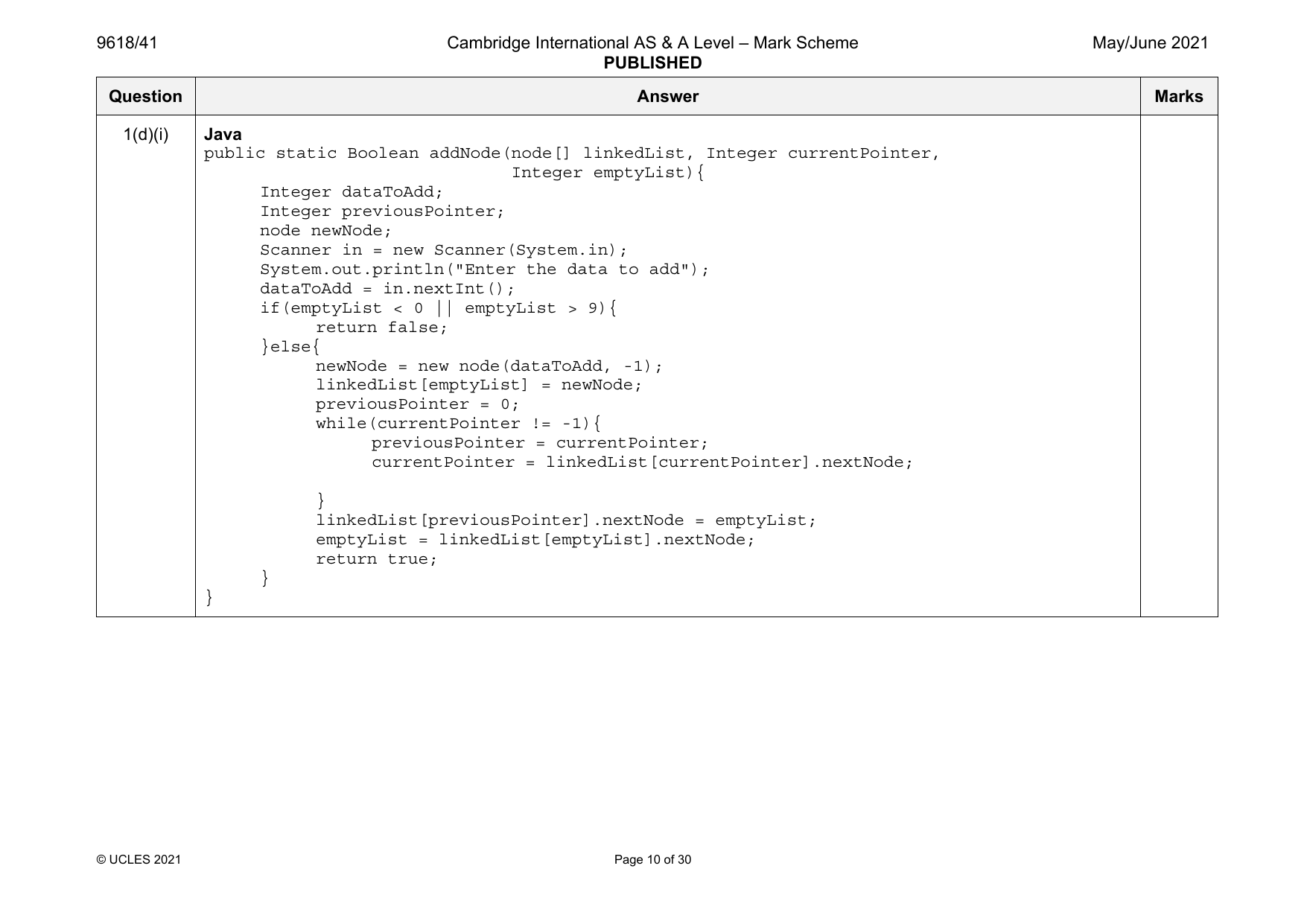
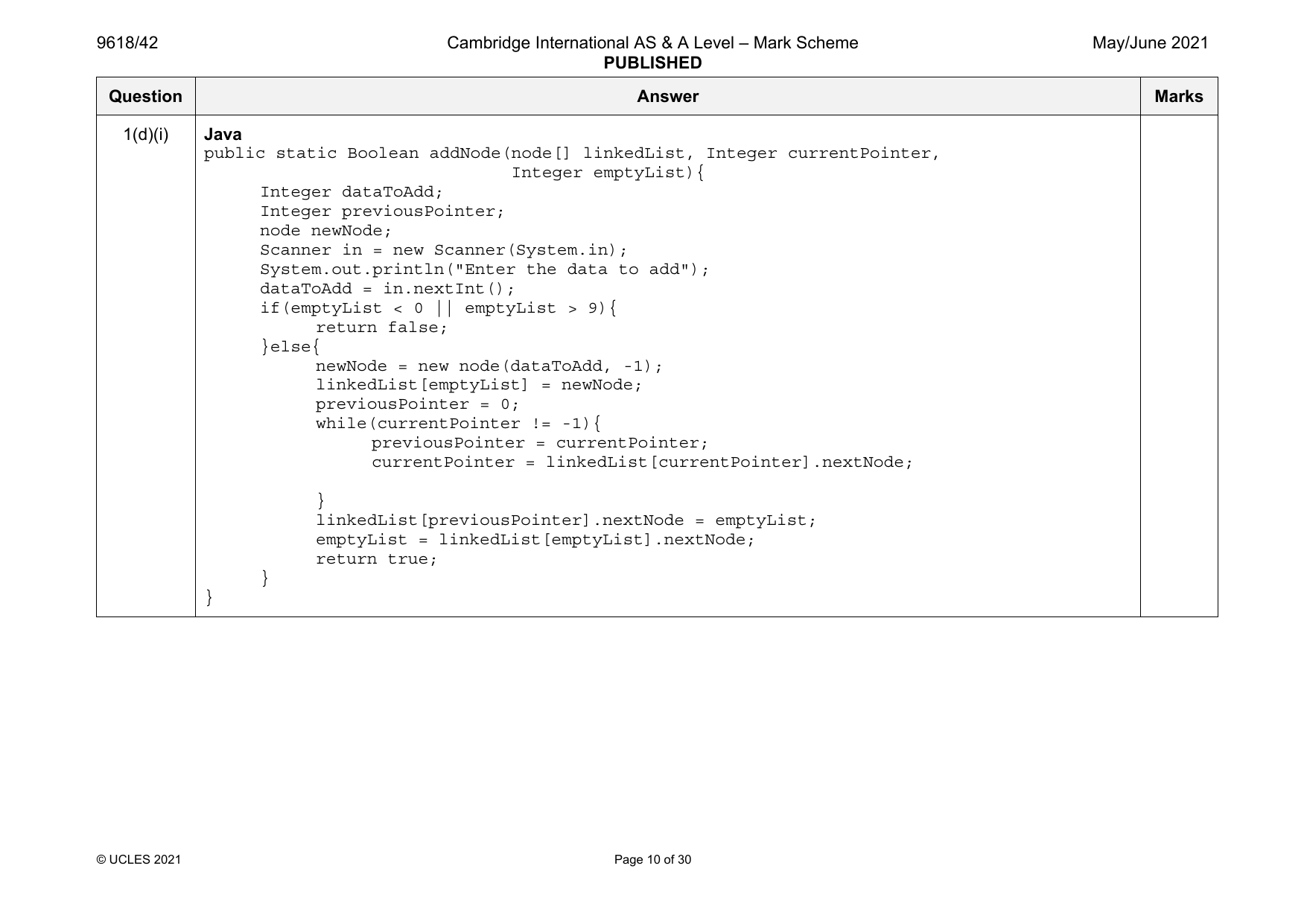
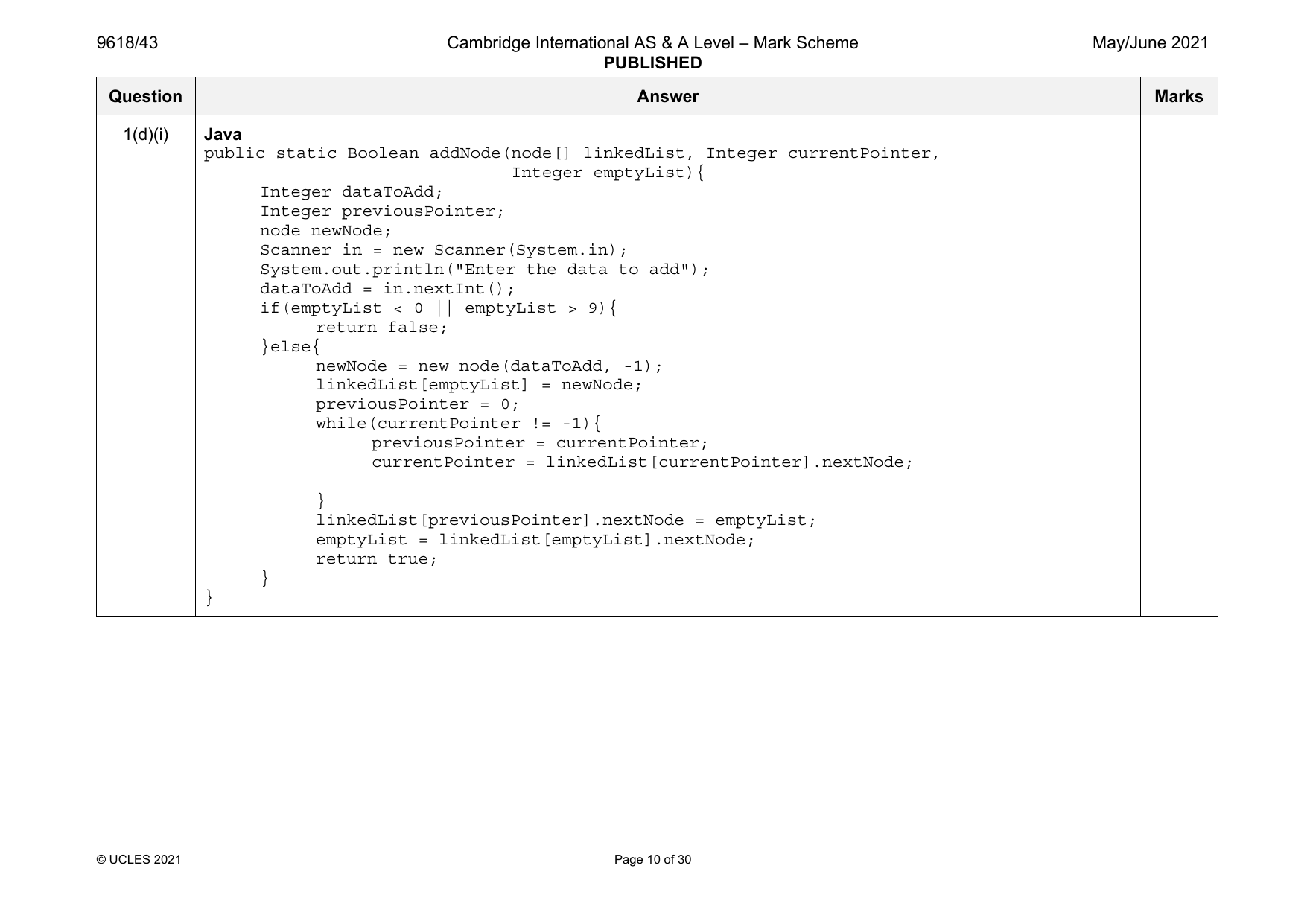
1(d)(i) Java
public static Boolean addNode(node[] linkedList, Integer currentPointer,
Integer emptyList){
Integer dataToAdd;
Integer previousPointer;
node newNode;
Scanner in = new Scanner(System.in);
System.out.println("Enter the data to add");
dataToAdd = in.nextInt();
if(emptyList < 0 || emptyList > 9){
return false;
}else{
newNode = new node(dataToAdd, -1);
linkedList[emptyList] = newNode;
previousPointer = 0;
while(currentPointer != -1){
previousPointer = currentPointer;
currentPointer = linkedList[currentPointer].nextNode;
}
linkedList[previousPointer].nextNode = emptyList;
emptyList = linkedList[emptyList].nextNode;
return true;
}
}
© UCLES 2021 Page 10 of 30
9618/41 Cambridge International AS & A Level – Mark Scheme May/June 2021
PUBLISHED
Question Answer Marks
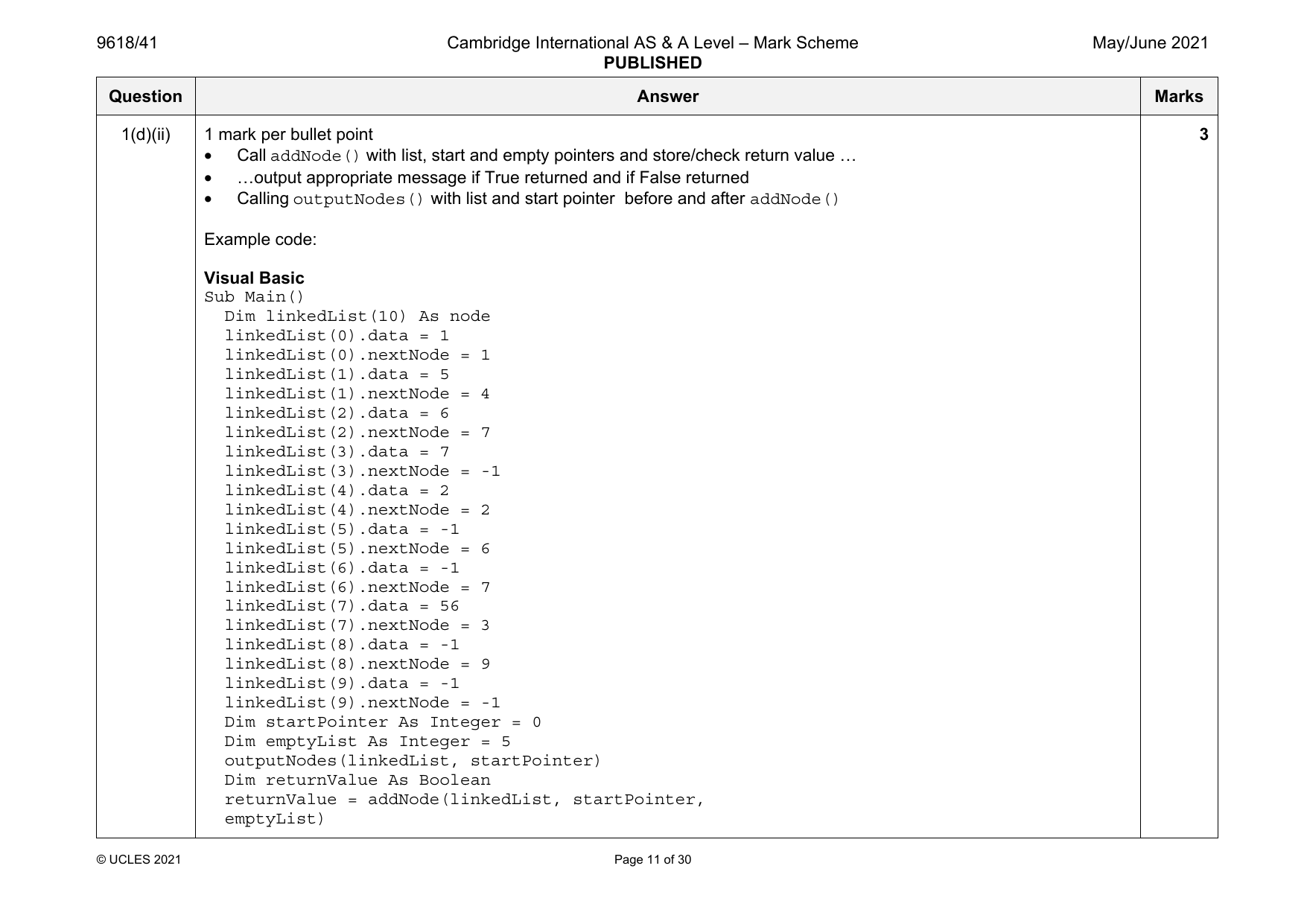
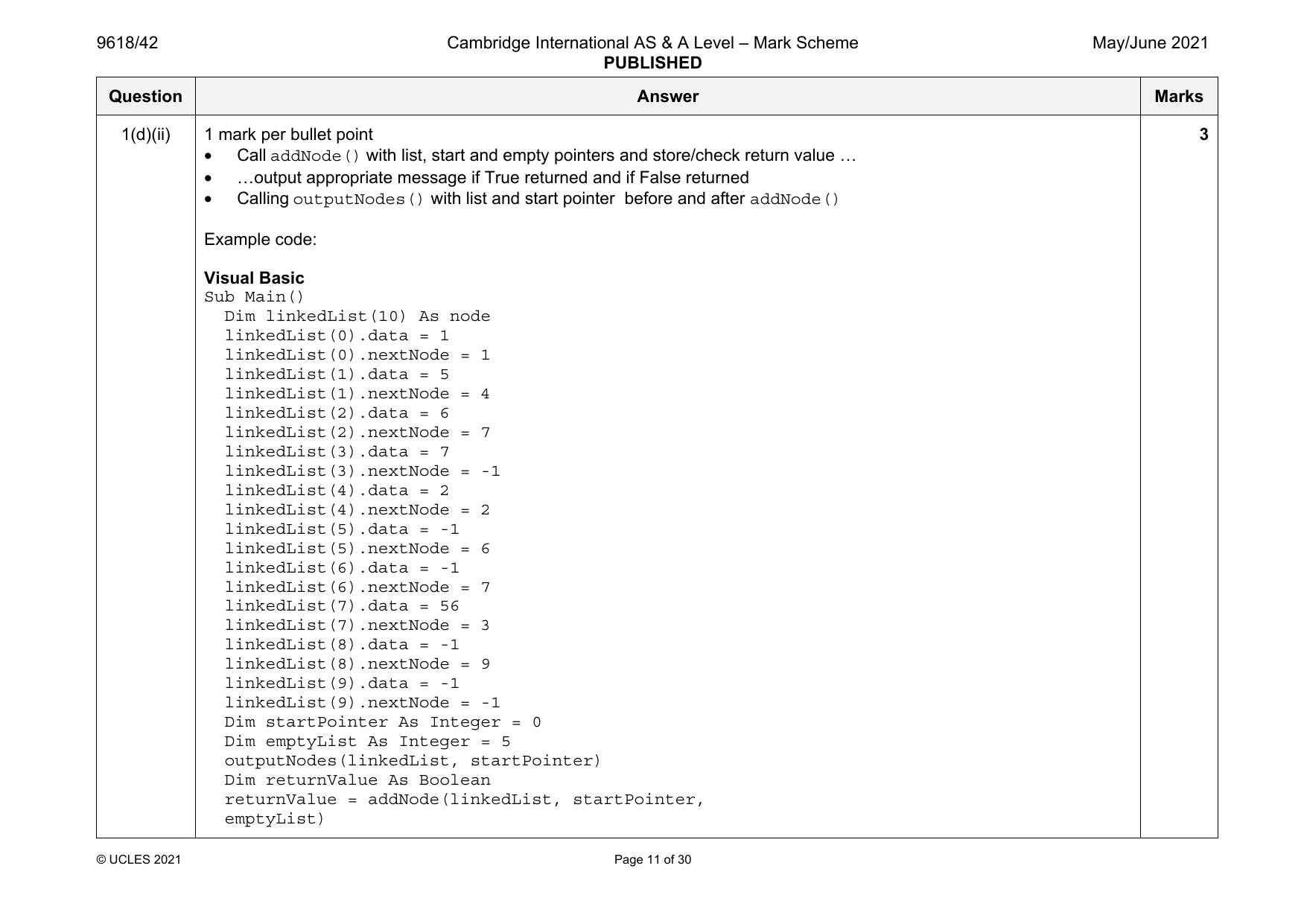
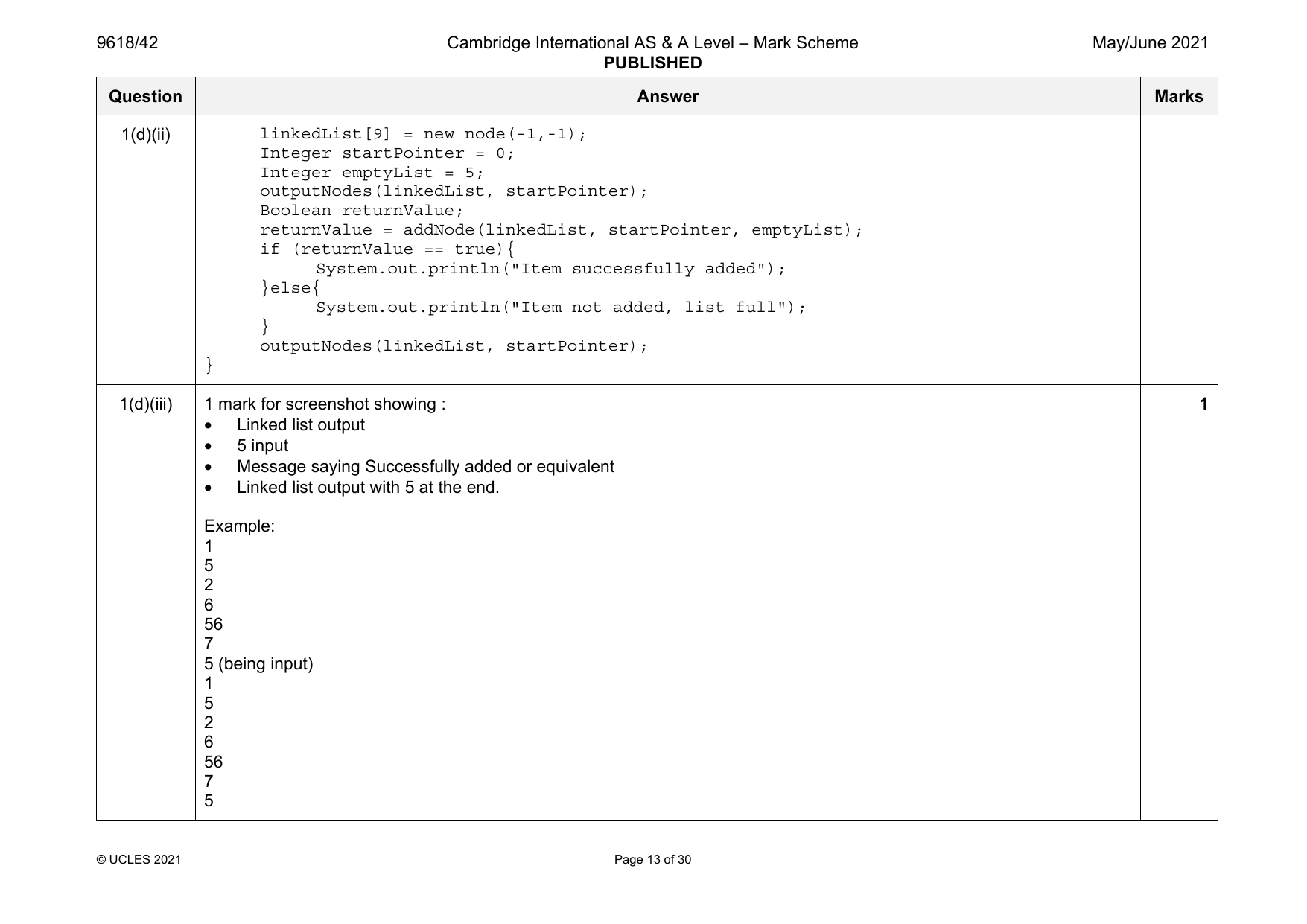
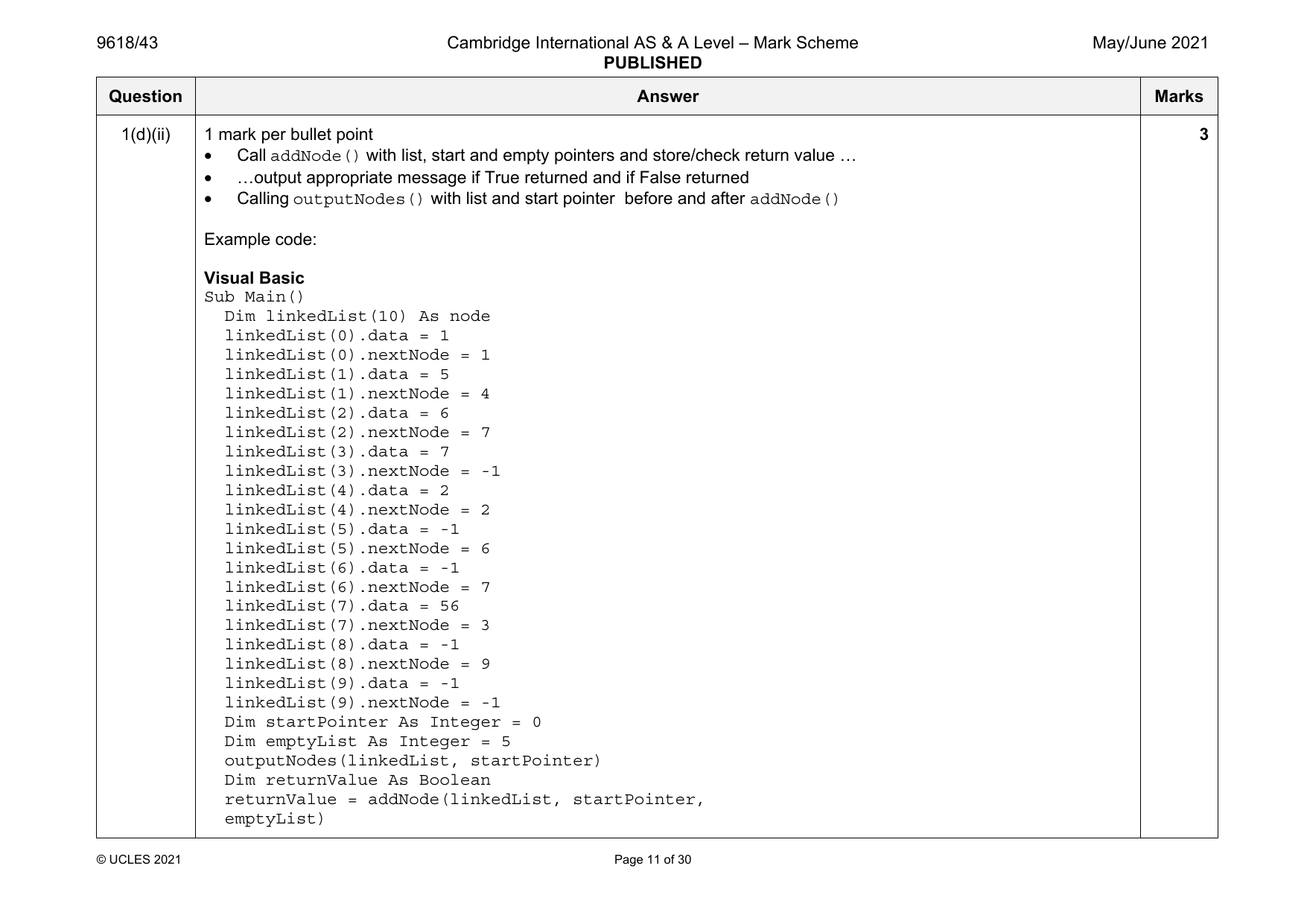
1(d)(ii) 1 mark per bullet point 3
• Call addNode() with list, start and empty pointers and store/check return value …
• …output appropriate message if True returned and if False returned
• Calling outputNodes() with list and start pointer before and after addNode()
Example code:
Visual Basic
Sub Main()
Dim linkedList(10) As node
linkedList(0).data = 1
linkedList(0).nextNode = 1
linkedList(1).data = 5
linkedList(1).nextNode = 4
linkedList(2).data = 6
linkedList(2).nextNode = 7
linkedList(3).data = 7
linkedList(3).nextNode = -1
linkedList(4).data = 2
linkedList(4).nextNode = 2
linkedList(5).data = -1
linkedList(5).nextNode = 6
linkedList(6).data = -1
linkedList(6).nextNode = 7
linkedList(7).data = 56
linkedList(7).nextNode = 3
linkedList(8).data = -1
linkedList(8).nextNode = 9
linkedList(9).data = -1
linkedList(9).nextNode = -1
Dim startPointer As Integer = 0
Dim emptyList As Integer = 5
outputNodes(linkedList, startPointer)
Dim returnValue As Boolean
returnValue = addNode(linkedList, startPointer,
emptyList)
© UCLES 2021 Page 11 of 30
9618/41 Cambridge International AS & A Level – Mark Scheme May/June 2021
PUBLISHED
Question Answer Marks
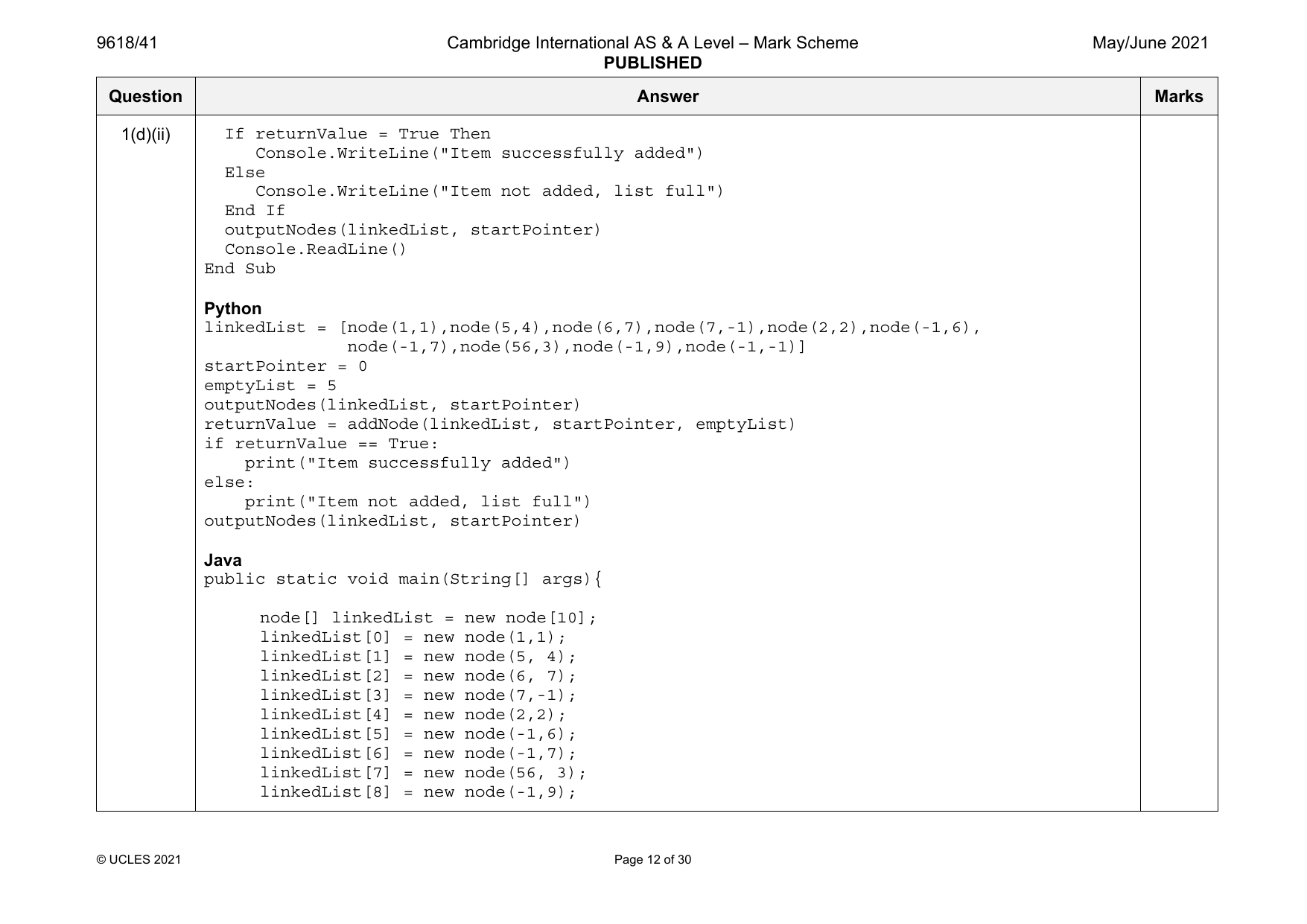
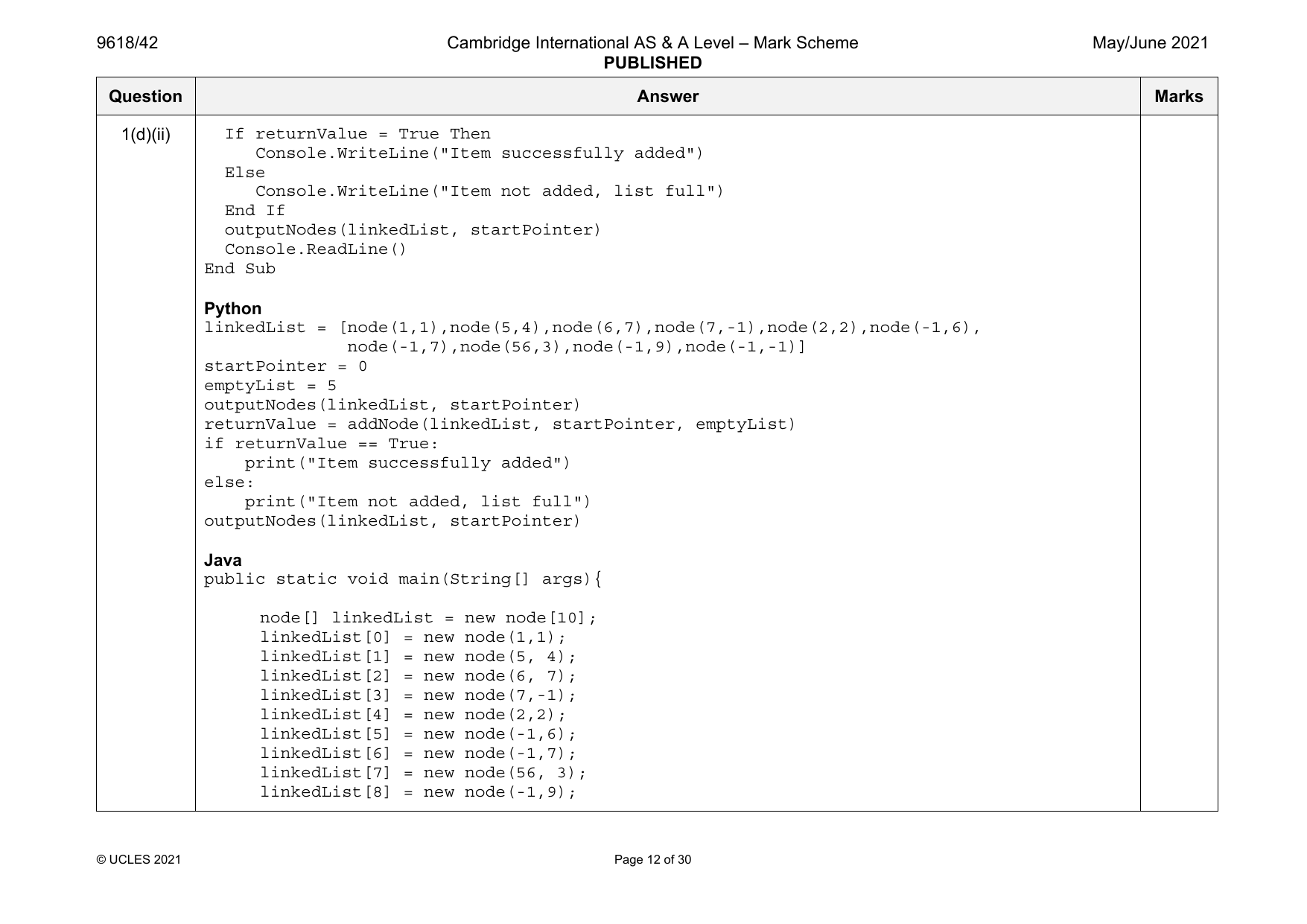
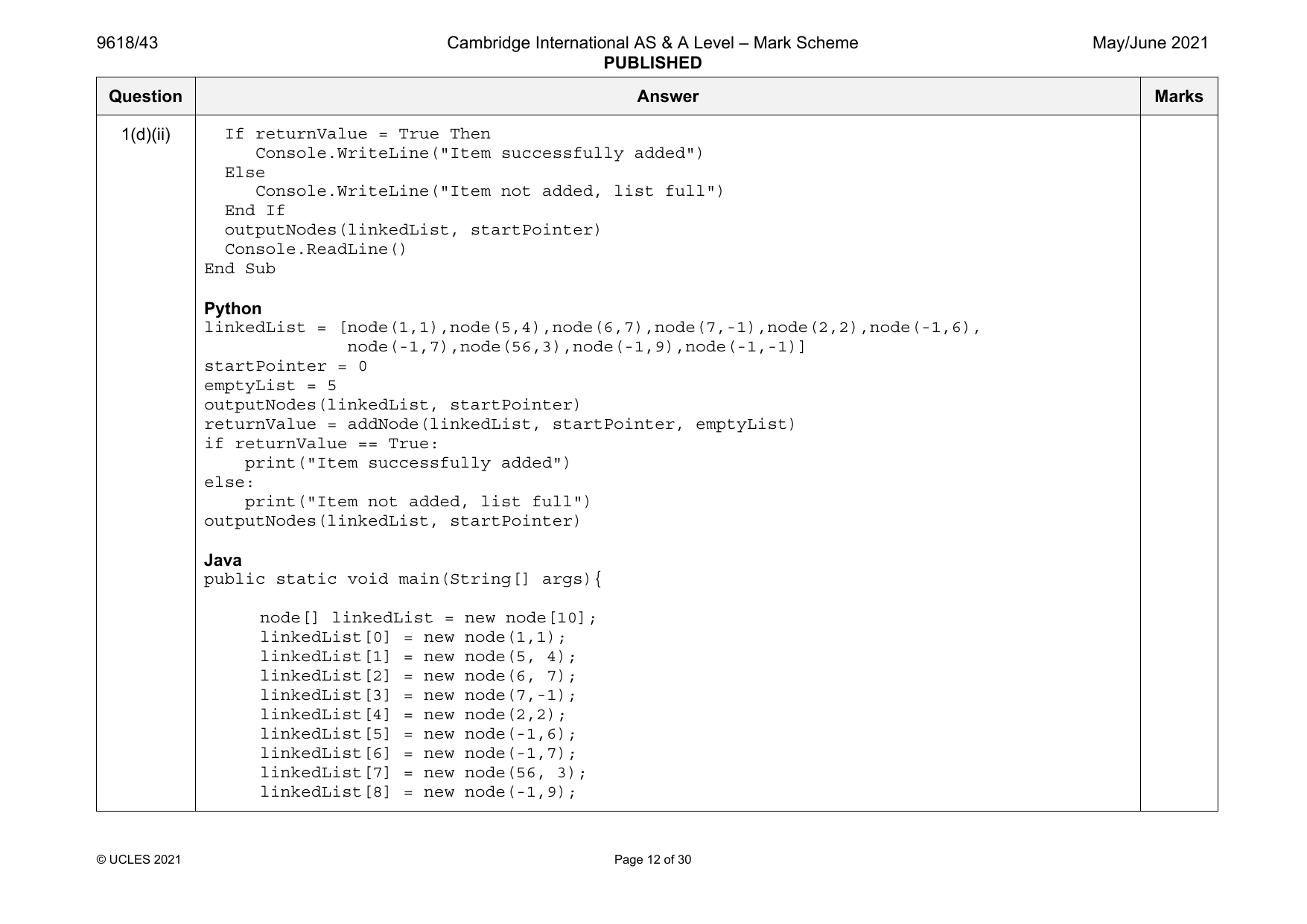
1(d)(ii) If returnValue = True Then
Console.WriteLine("Item successfully added")
Else
Console.WriteLine("Item not added, list full")
End If
outputNodes(linkedList, startPointer)
Console.ReadLine()
End Sub
Python
linkedList = [node(1,1),node(5,4),node(6,7),node(7,-1),node(2,2),node(-1,6),
node(-1,7),node(56,3),node(-1,9),node(-1,-1)]
startPointer = 0
emptyList = 5
outputNodes(linkedList, startPointer)
returnValue = addNode(linkedList, startPointer, emptyList)
if returnValue == True:
print("Item successfully added")
else:
print("Item not added, list full")
outputNodes(linkedList, startPointer)
Java
public static void main(String[] args){
node[] linkedList = new node[10];
linkedList[0] = new node(1,1);
linkedList[1] = new node(5, 4);
linkedList[2] = new node(6, 7);
linkedList[3] = new node(7,-1);
linkedList[4] = new node(2,2);
linkedList[5] = new node(-1,6);
linkedList[6] = new node(-1,7);
linkedList[7] = new node(56, 3);
linkedList[8] = new node(-1,9);
© UCLES 2021 Page 12 of 30
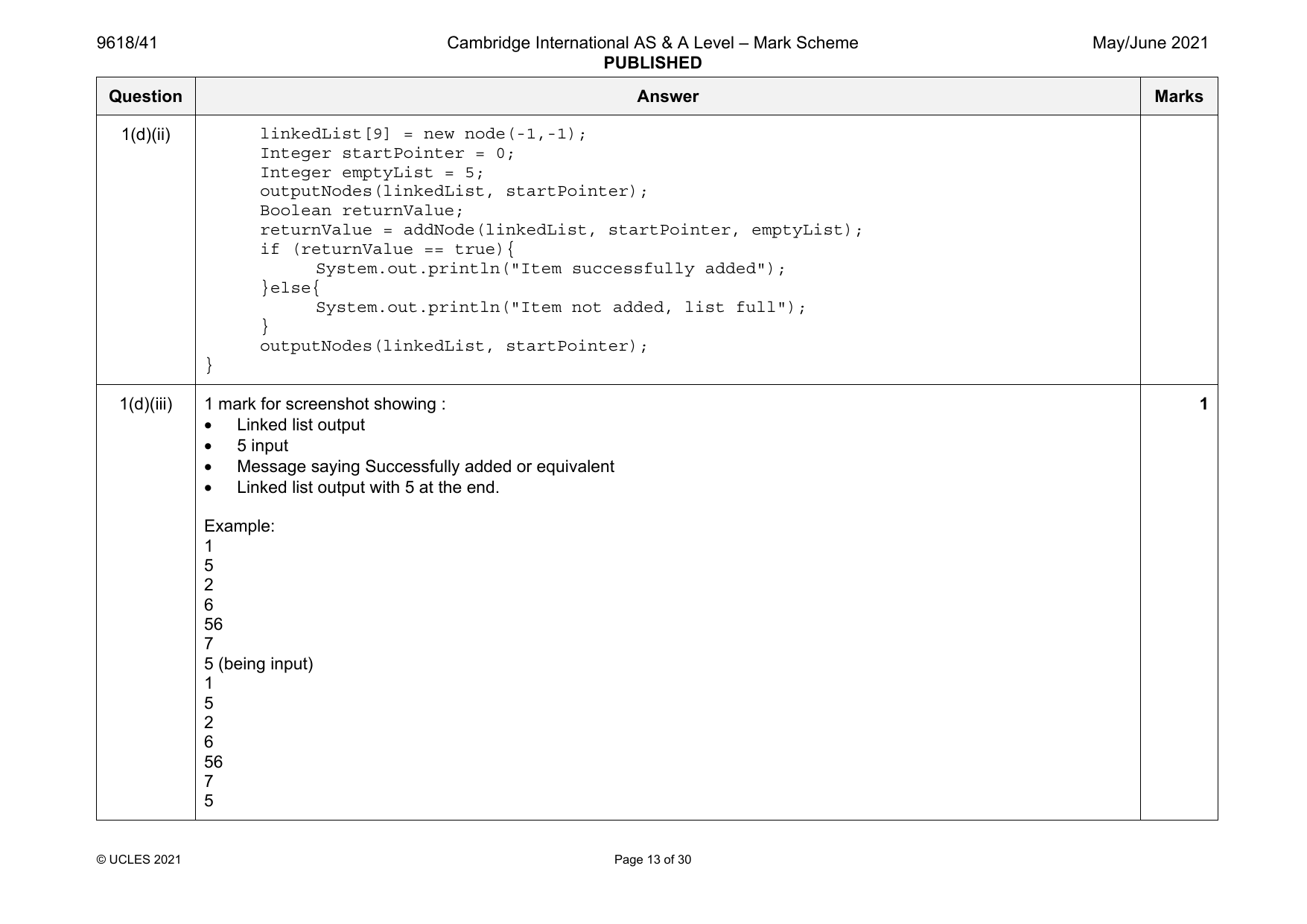
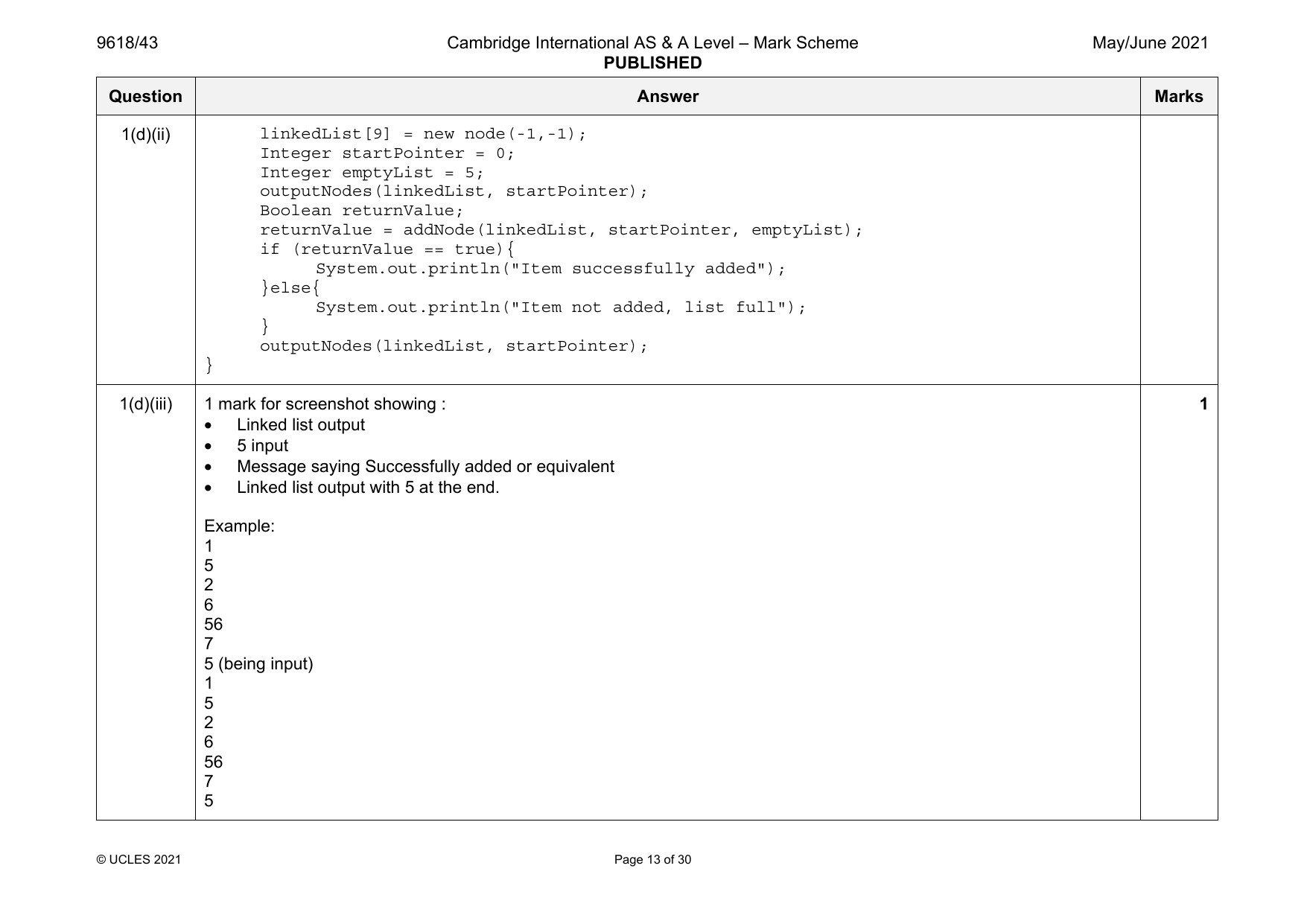
2
6
56
7
5 (being input)
1
5
2
6
56
7
5
© UCLES 2021 Page 13 of 30
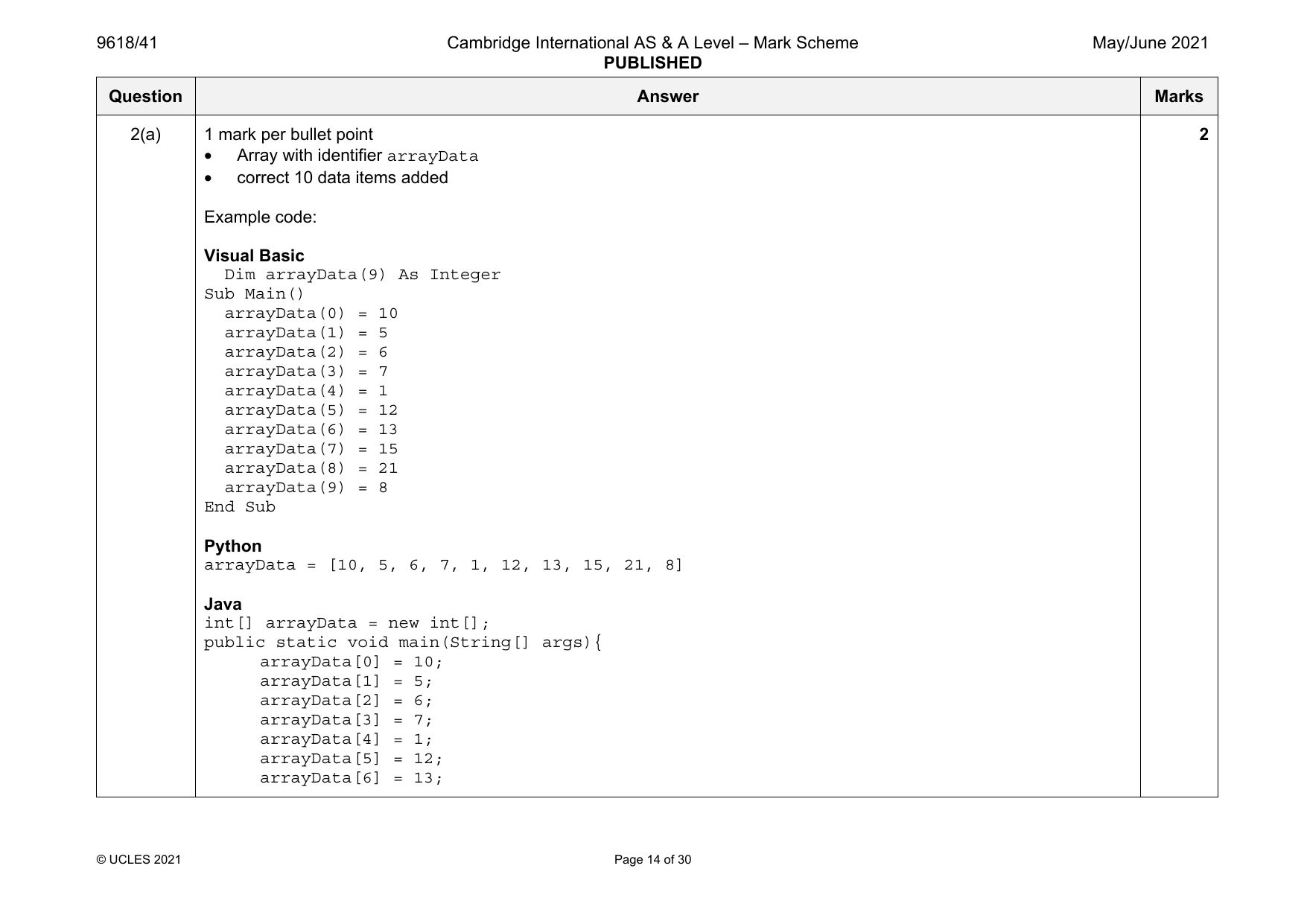
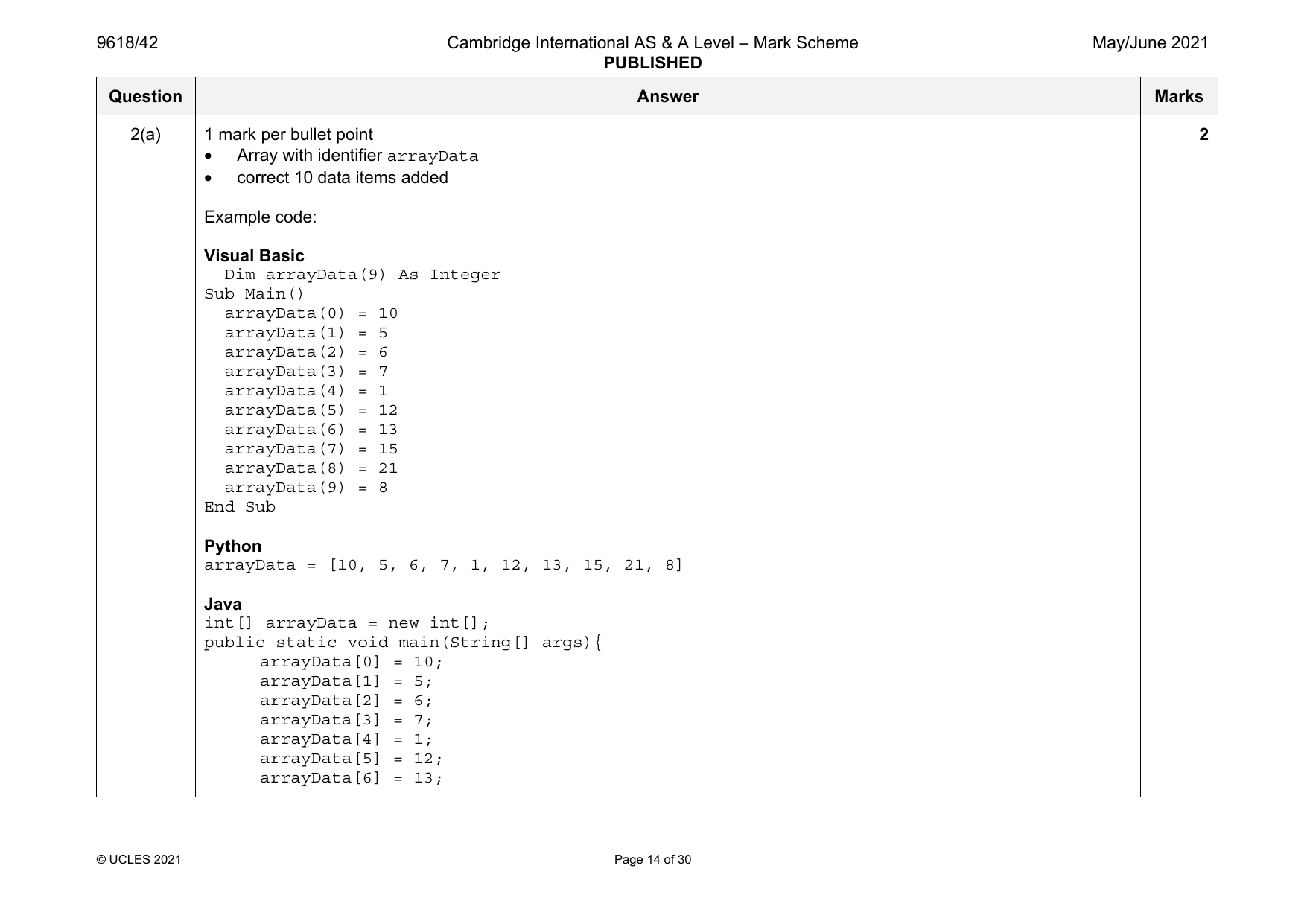
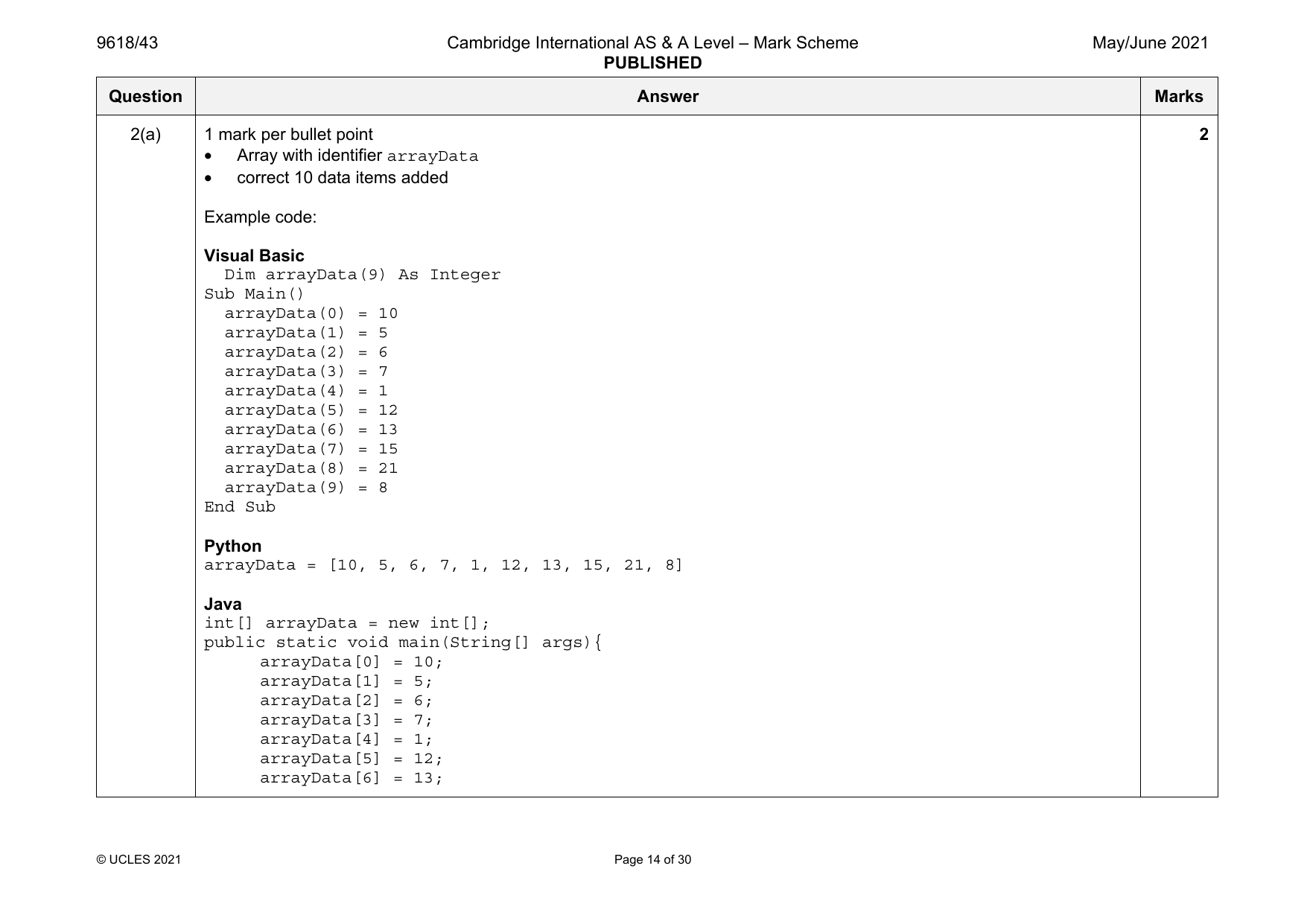
2(a) 1 mark per bullet point 2
• Array with identifier arrayData
• correct 10 data items added
Example code:
Visual Basic
Dim arrayData(9) As Integer
Sub Main()
arrayData(0) = 10
arrayData(1) = 5
arrayData(2) = 6
arrayData(3) = 7
arrayData(4) = 1
arrayData(5) = 12
arrayData(6) = 13
arrayData(7) = 15
arrayData(8) = 21
arrayData(9) = 8
End Sub
Python
arrayData = [10, 5, 6, 7, 1, 12, 13, 15, 21, 8]
Java
int[] arrayData = new int[];
public static void main(String[] args){
arrayData[0] = 10;
arrayData[1] = 5;
arrayData[2] = 6;
arrayData[3] = 7;
arrayData[4] = 1;
arrayData[5] = 12;
arrayData[6] = 13;
© UCLES 2021 Page 14 of 30
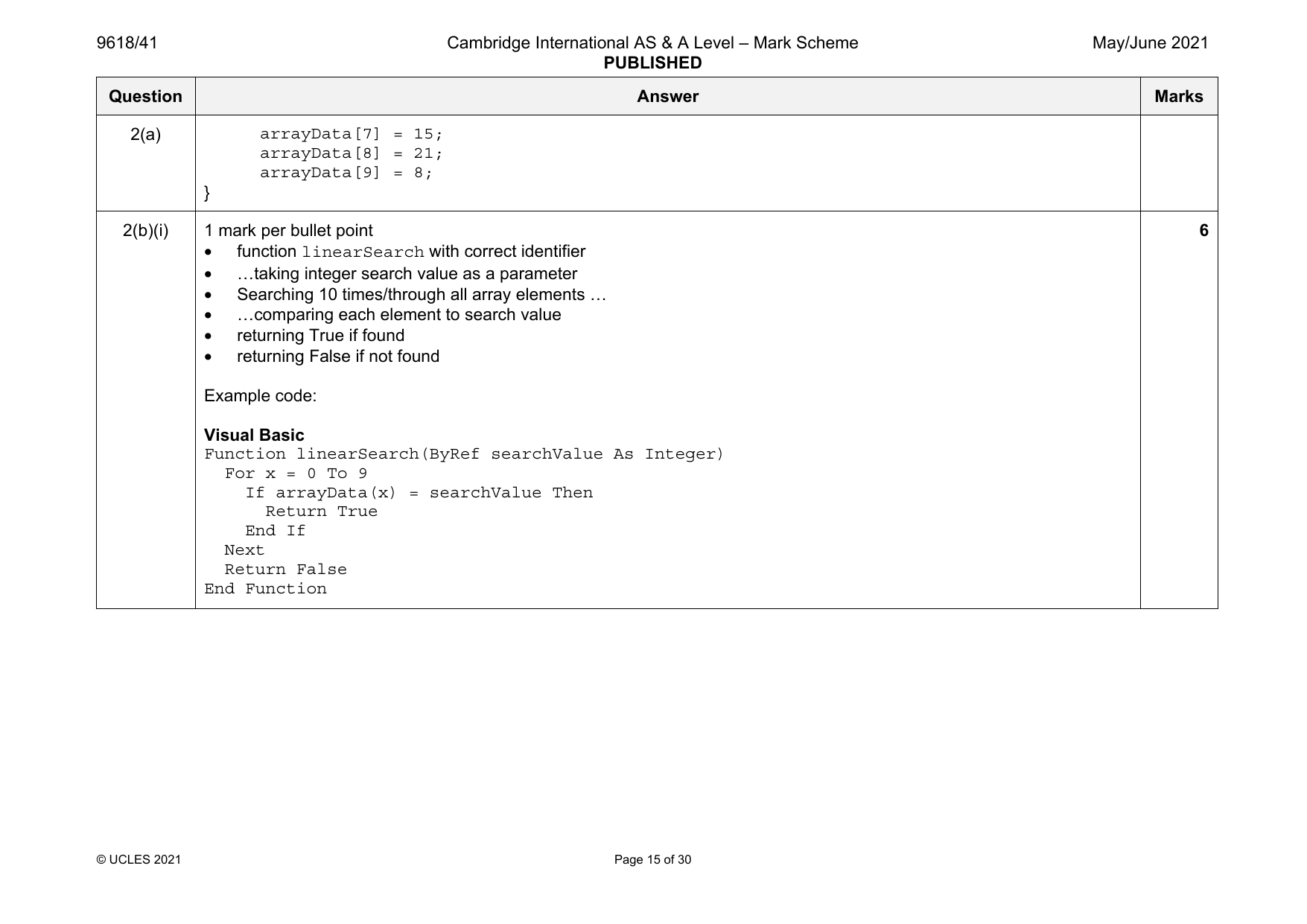
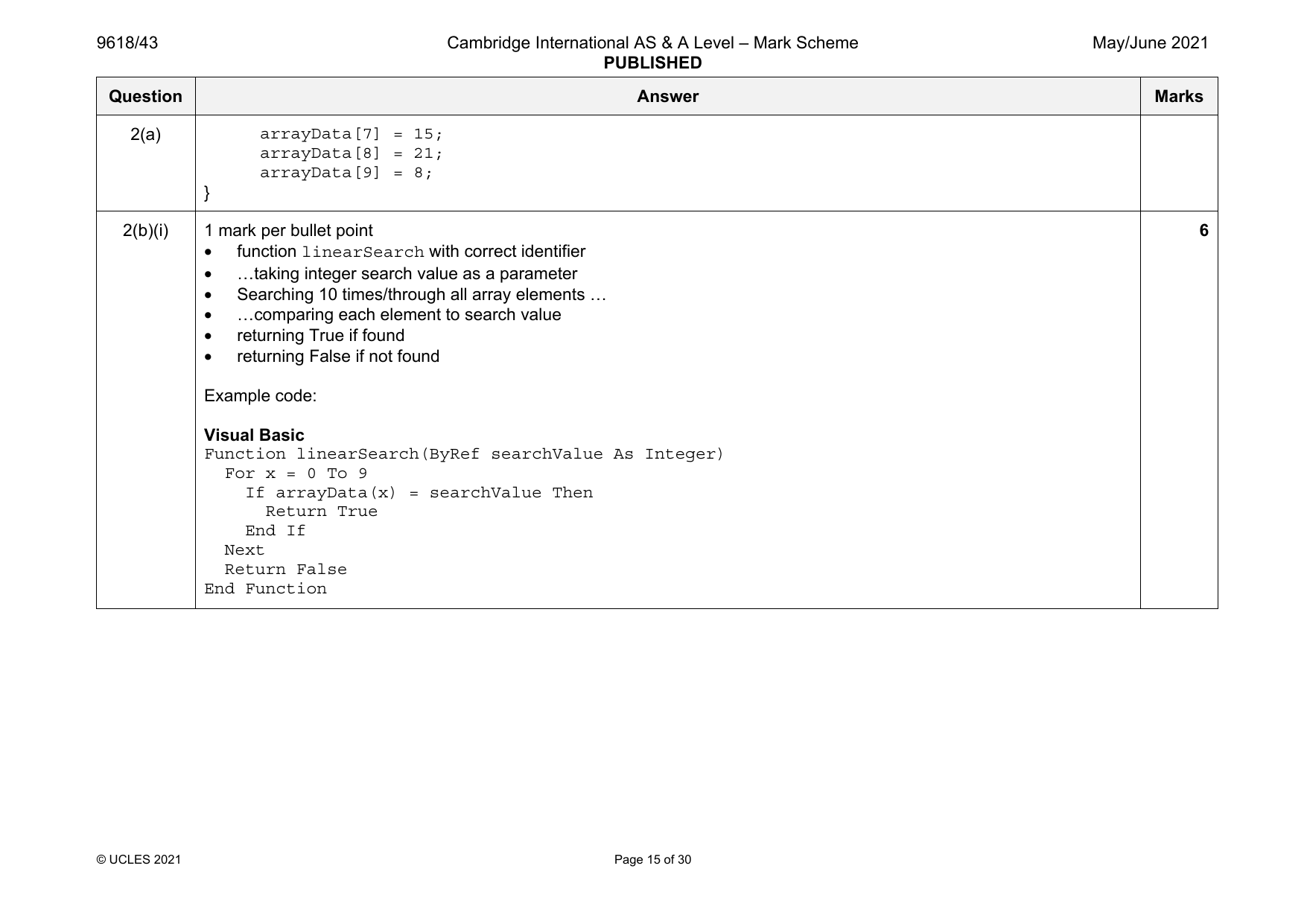
2(a) arrayData[7] = 15;
arrayData[8] = 21;
arrayData[9] = 8;
}
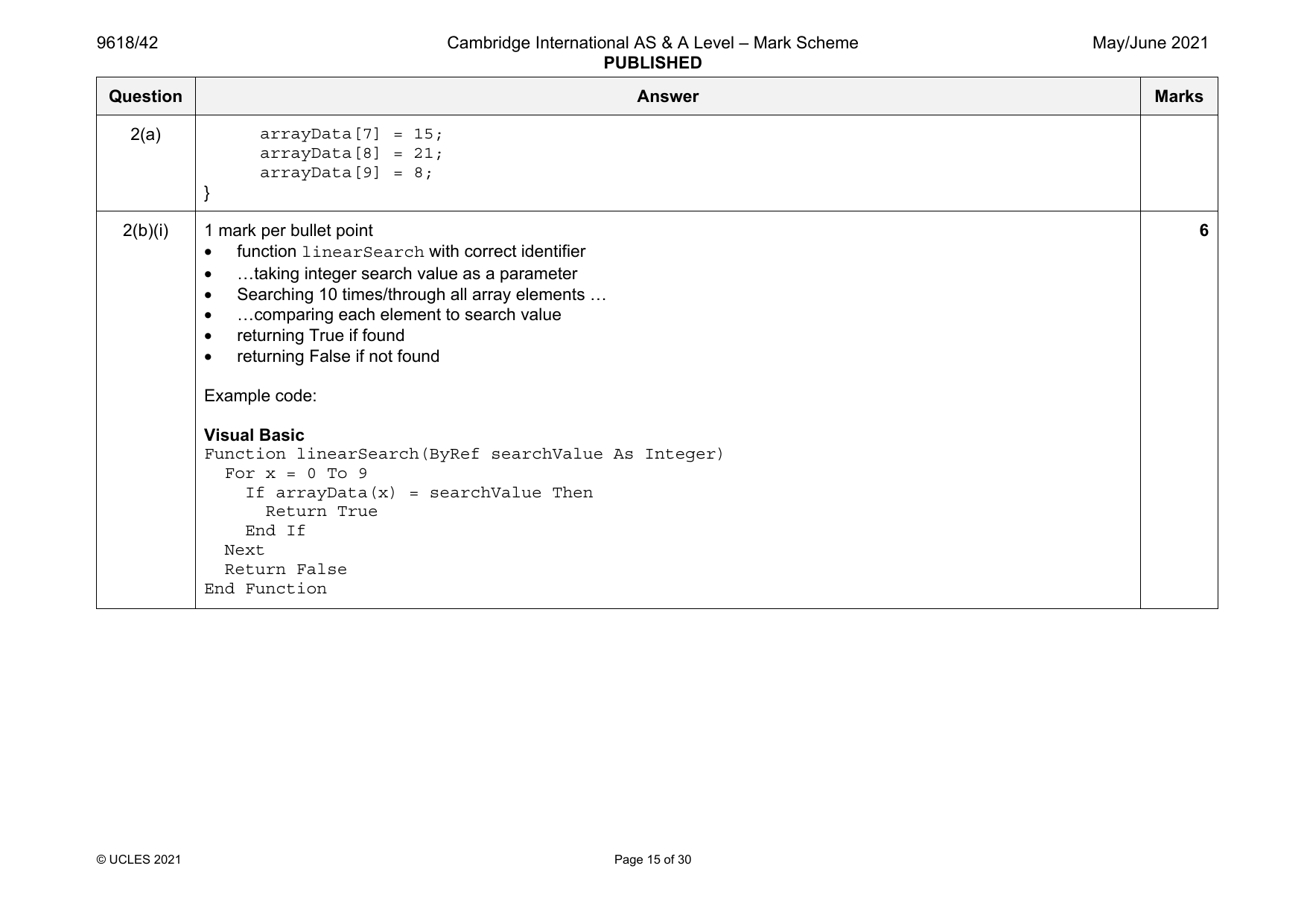
2(b)(i) 1 mark per bullet point 6
• function linearSearch with correct identifier
• …taking integer search value as a parameter
• Searching 10 times/through all array elements …
• …comparing each element to search value
• returning True if found
• returning False if not found
Example code:
Visual Basic
Function linearSearch(ByRef searchValue As Integer)
For x = 0 To 9
If arrayData(x) = searchValue Then
Return True
End If
Next
Return False
End Function
© UCLES 2021 Page 15 of 30
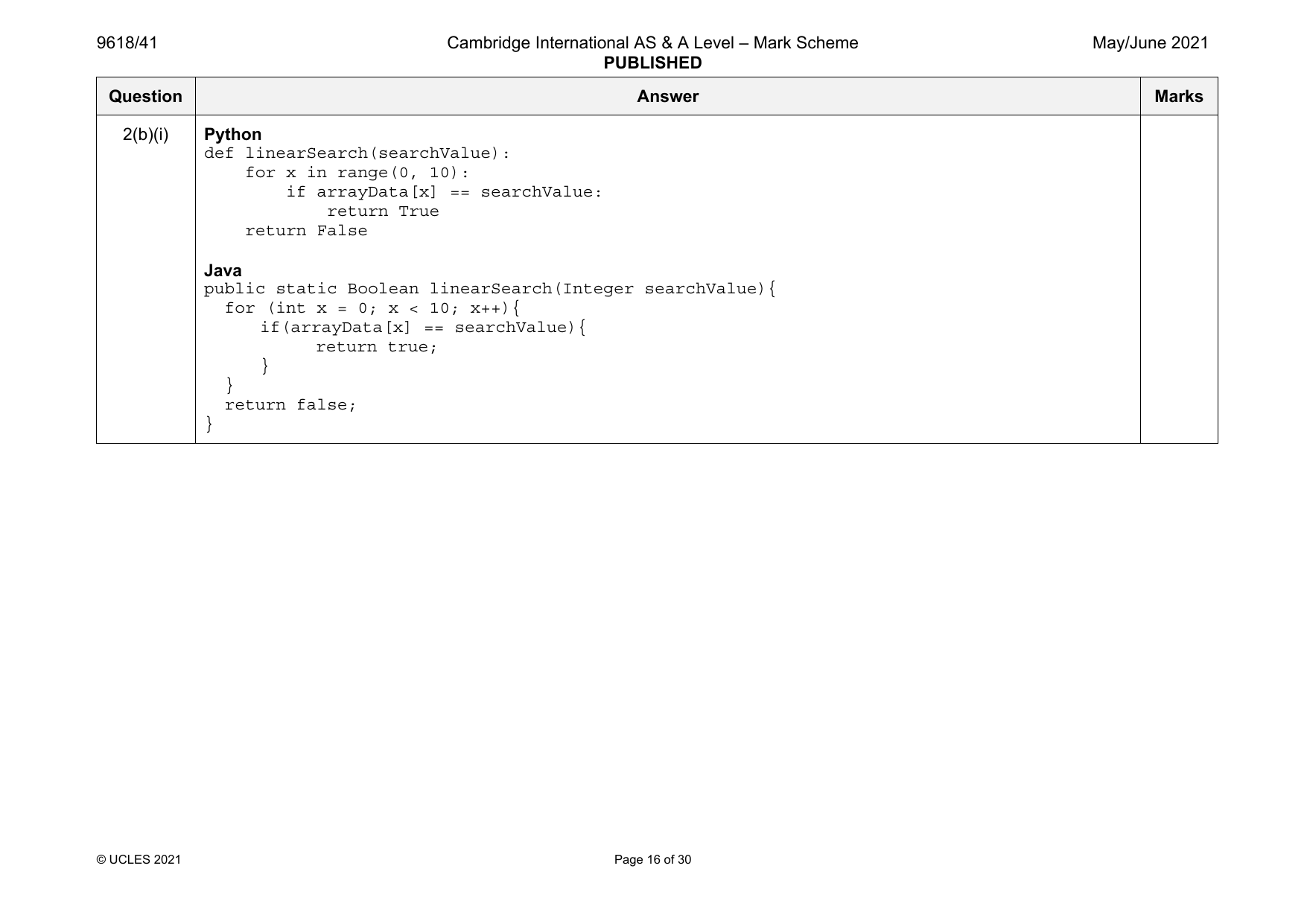
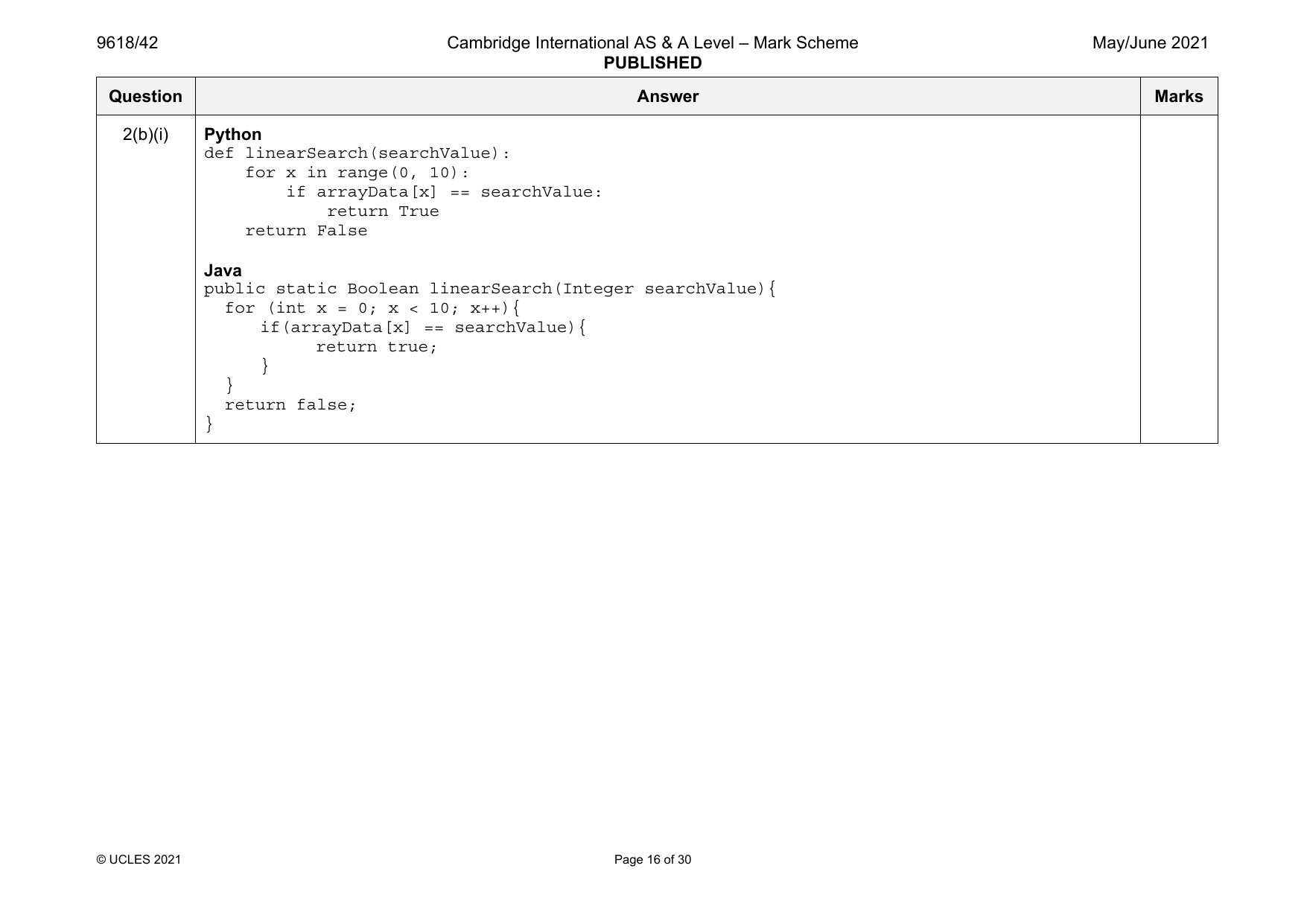
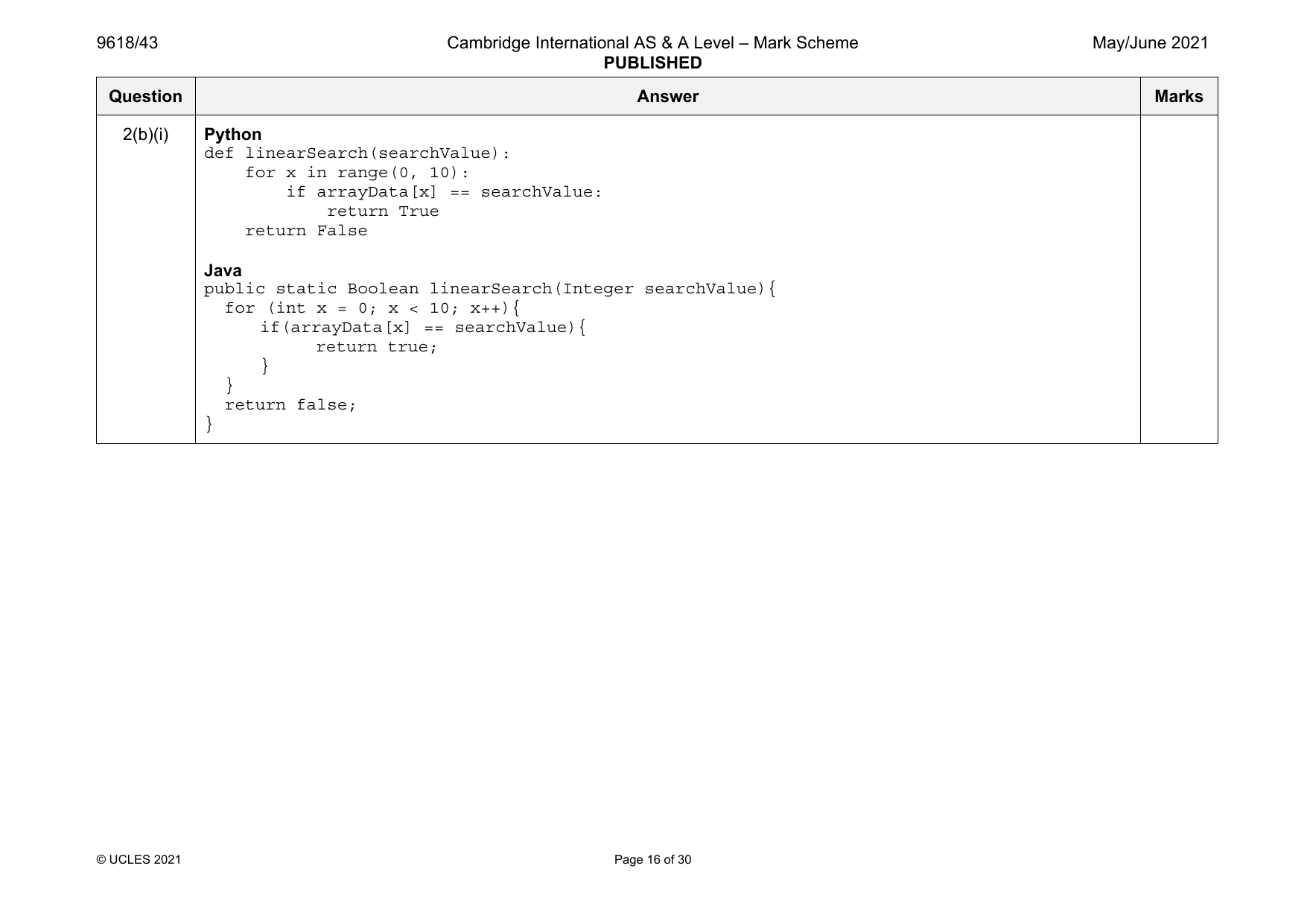
2(b)(i) Python
def linearSearch(searchValue):
for x in range(0, 10):
if arrayData[x] == searchValue:
return True
return False
Java
public static Boolean linearSearch(Integer searchValue){
for (int x = 0; x < 10; x++){
if(arrayData[x] == searchValue){
return true;
}
}
return false;
}
© UCLES 2021 Page 16 of 30
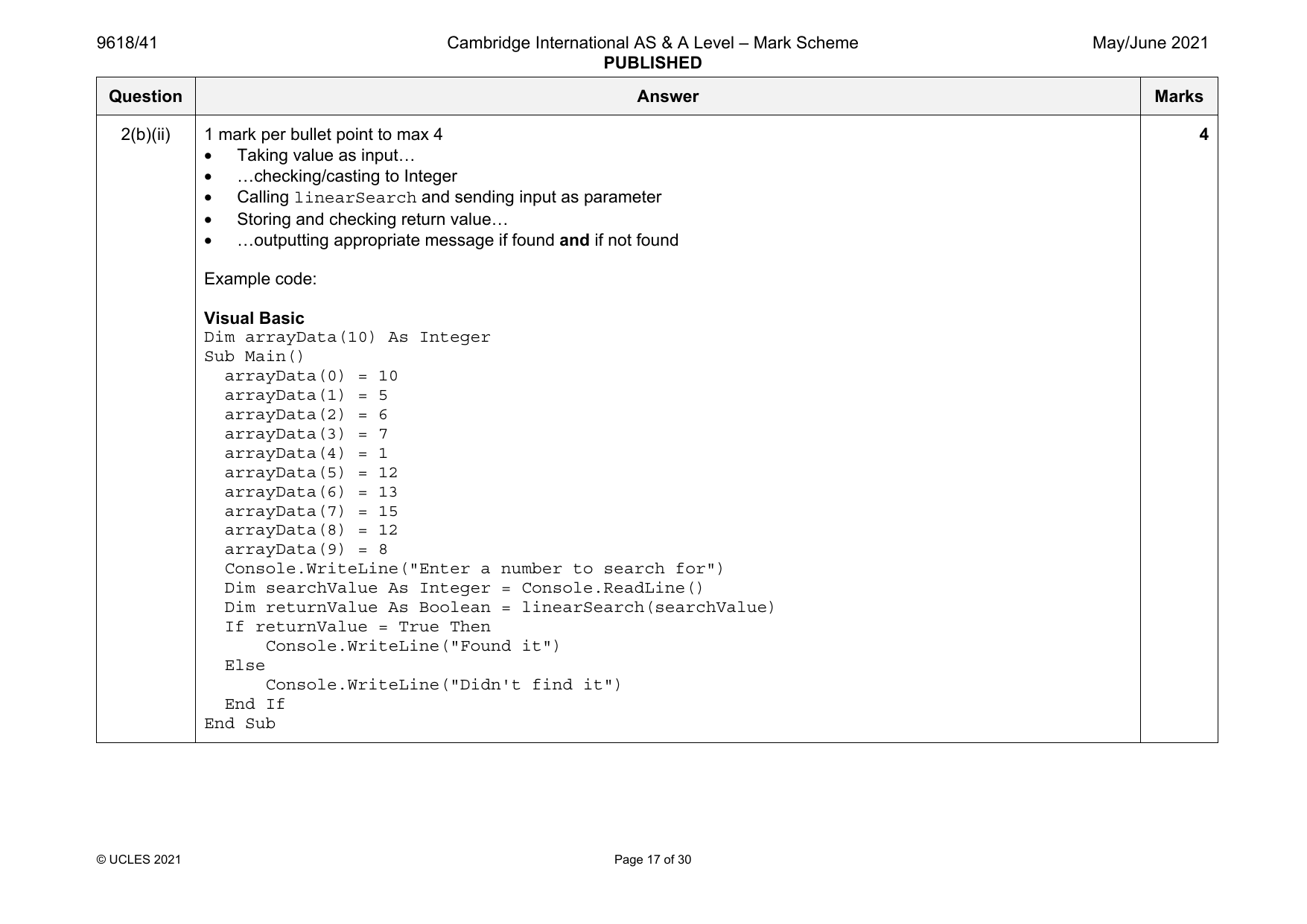
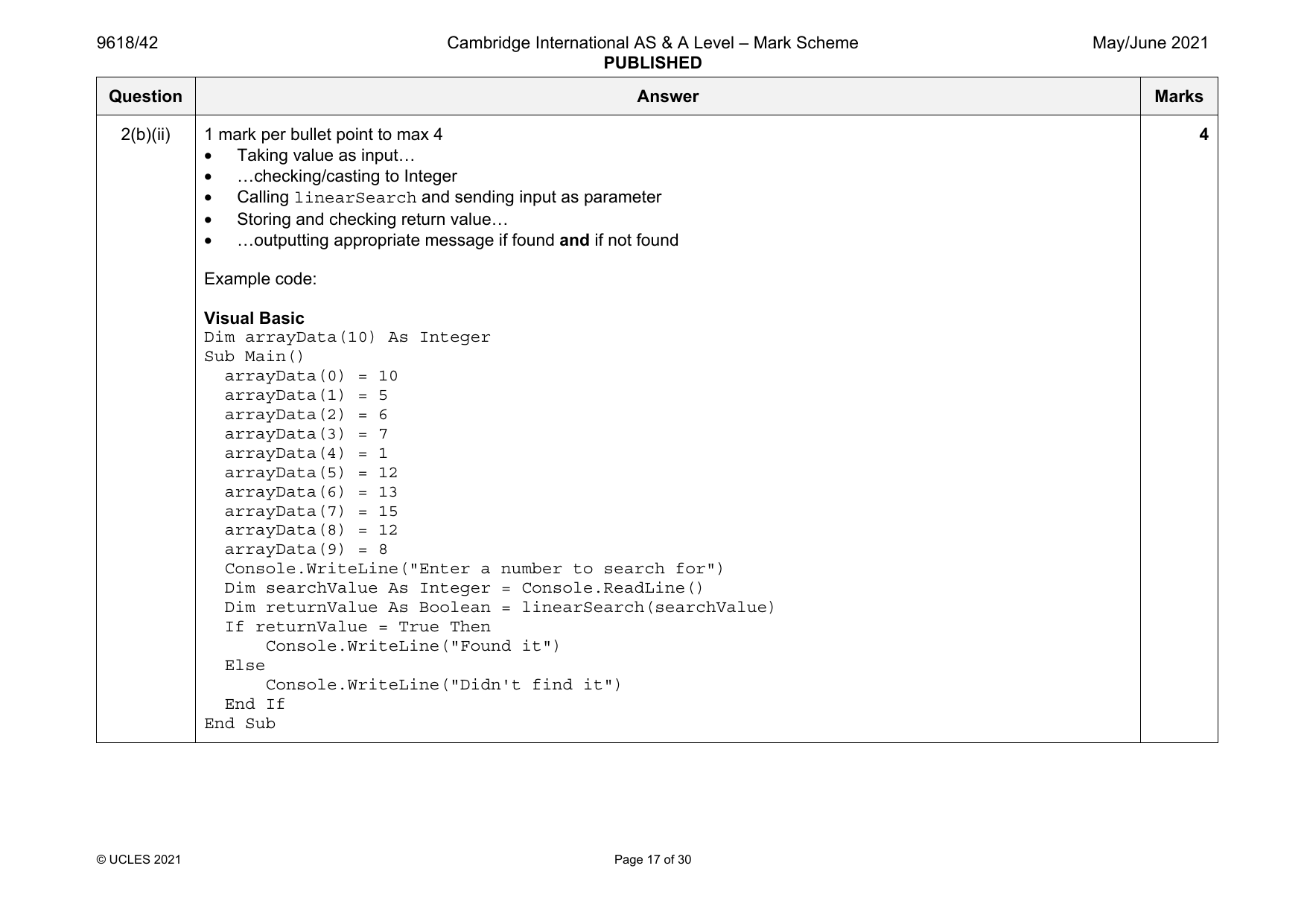
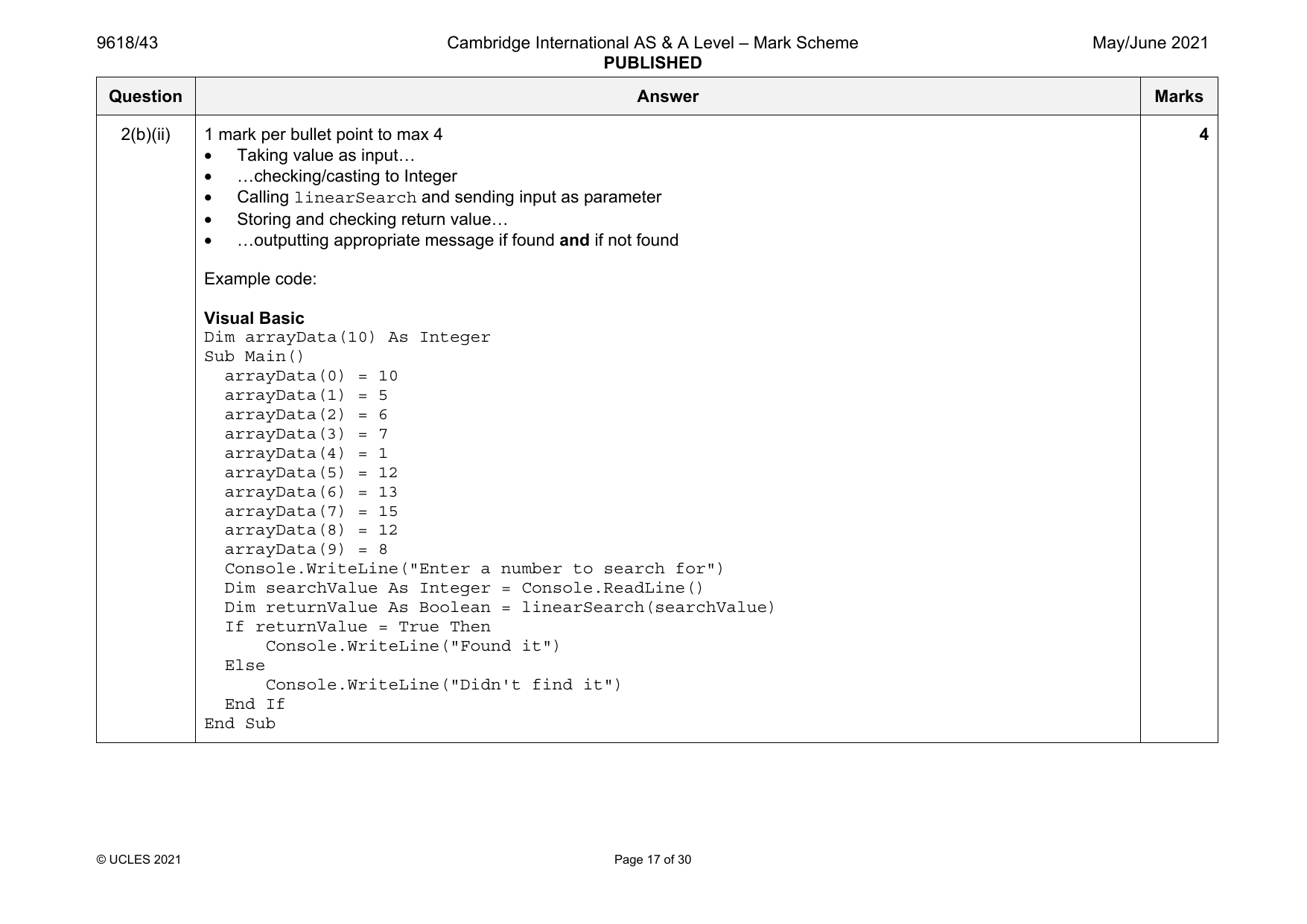
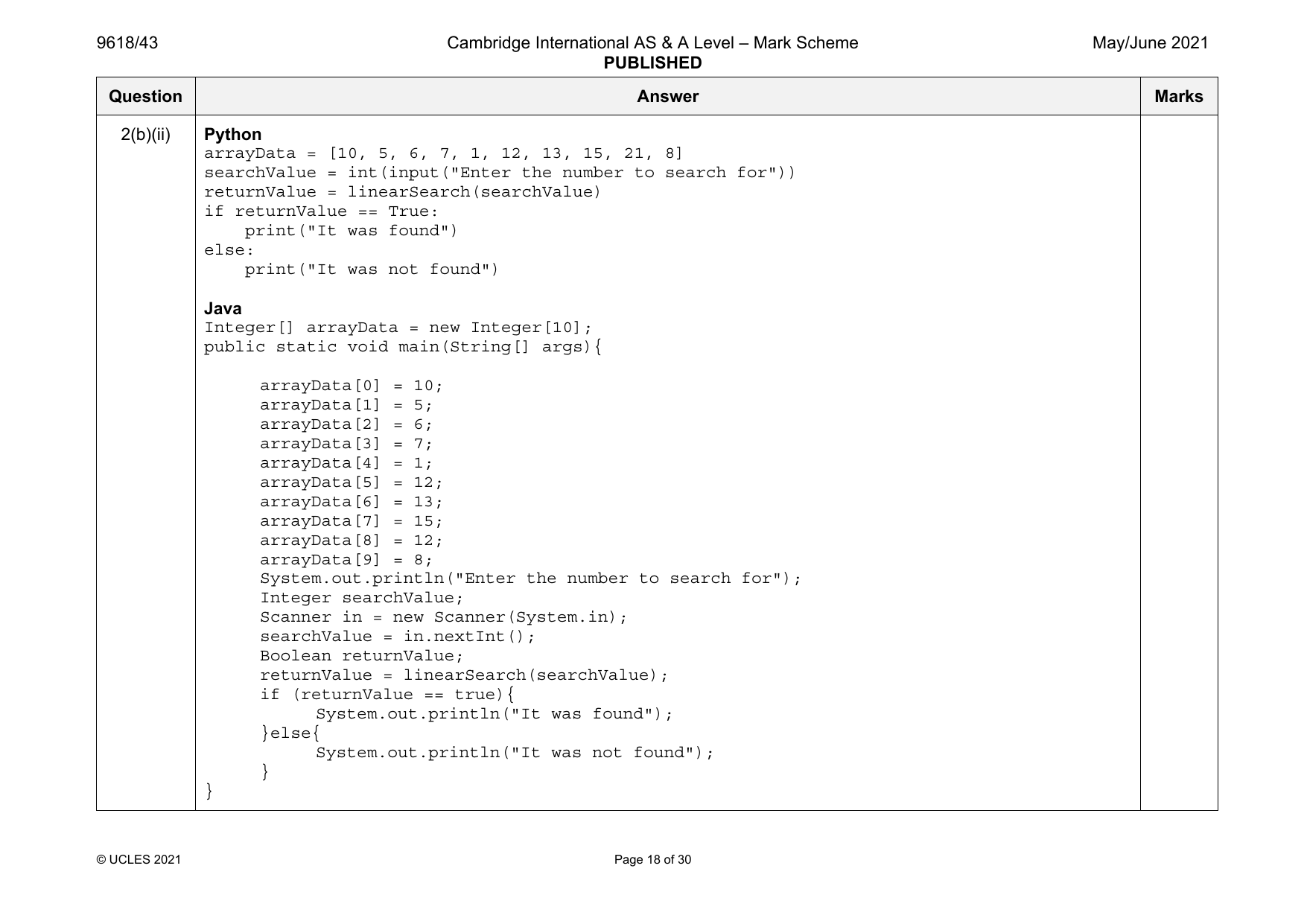
2(b)(ii) 1 mark per bullet point to max 4 4
• Taking value as input…
• …checking/casting to Integer
• Calling linearSearch and sending input as parameter
• Storing and checking return value…
• …outputting appropriate message if found and if not found
Example code:
Visual Basic
Dim arrayData(10) As Integer
Sub Main()
arrayData(0) = 10
arrayData(1) = 5
arrayData(2) = 6
arrayData(3) = 7
arrayData(4) = 1
arrayData(5) = 12
arrayData(6) = 13
arrayData(7) = 15
arrayData(8) = 12
arrayData(9) = 8
Console.WriteLine("Enter a number to search for")
Dim searchValue As Integer = Console.ReadLine()
Dim returnValue As Boolean = linearSearch(searchValue)
If returnValue = True Then
Console.WriteLine("Found it")
Else
Console.WriteLine("Didn't find it")
End If
End Sub
© UCLES 2021 Page 17 of 30
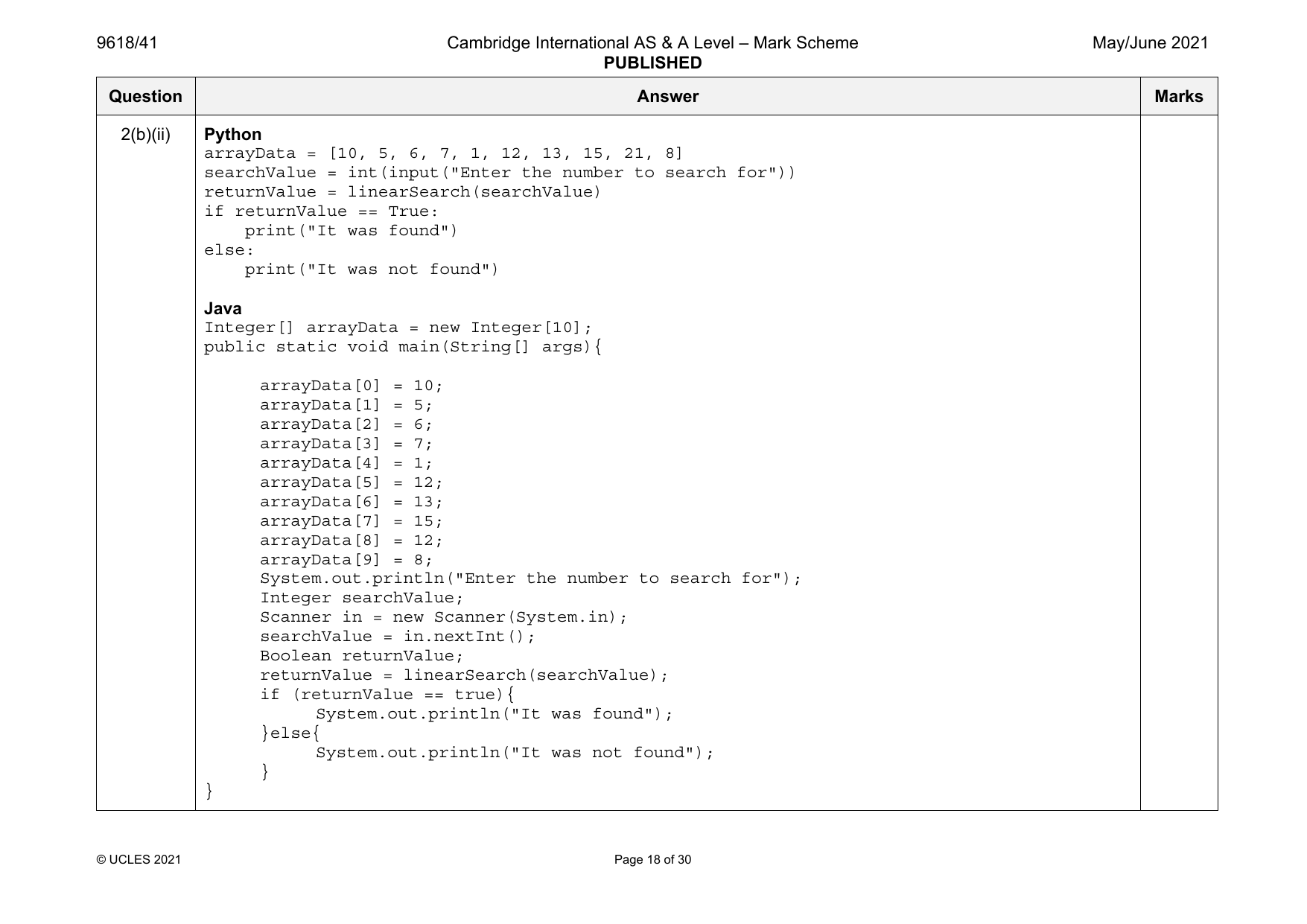
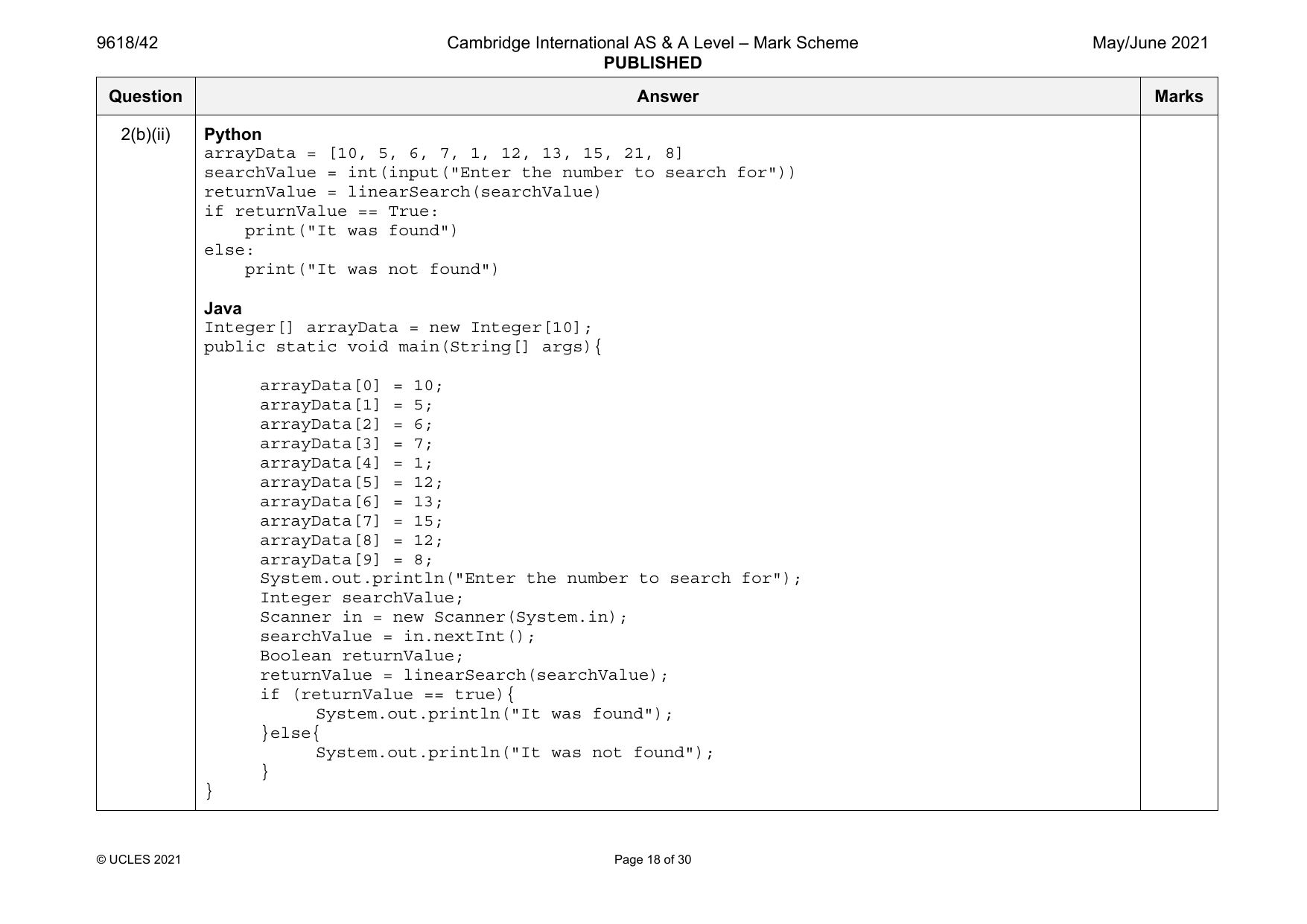
2(b)(ii) Python
arrayData = [10, 5, 6, 7, 1, 12, 13, 15, 21, 8]
searchValue = int(input("Enter the number to search for"))
returnValue = linearSearch(searchValue)
if returnValue == True:
print("It was found")
else:
print("It was not found")
Java
Integer[] arrayData = new Integer[10];
public static void main(String[] args){
arrayData[0] = 10;
arrayData[1] = 5;
arrayData[2] = 6;
arrayData[3] = 7;
arrayData[4] = 1;
arrayData[5] = 12;
arrayData[6] = 13;
arrayData[7] = 15;
arrayData[8] = 12;
arrayData[9] = 8;
System.out.println("Enter the number to search for");
Integer searchValue;
Scanner in = new Scanner(System.in);
searchValue = in.nextInt();
Boolean returnValue;
returnValue = linearSearch(searchValue);
if (returnValue == true){
System.out.println("It was found");
}else{
System.out.println("It was not found");
}
}
© UCLES 2021 Page 18 of 30
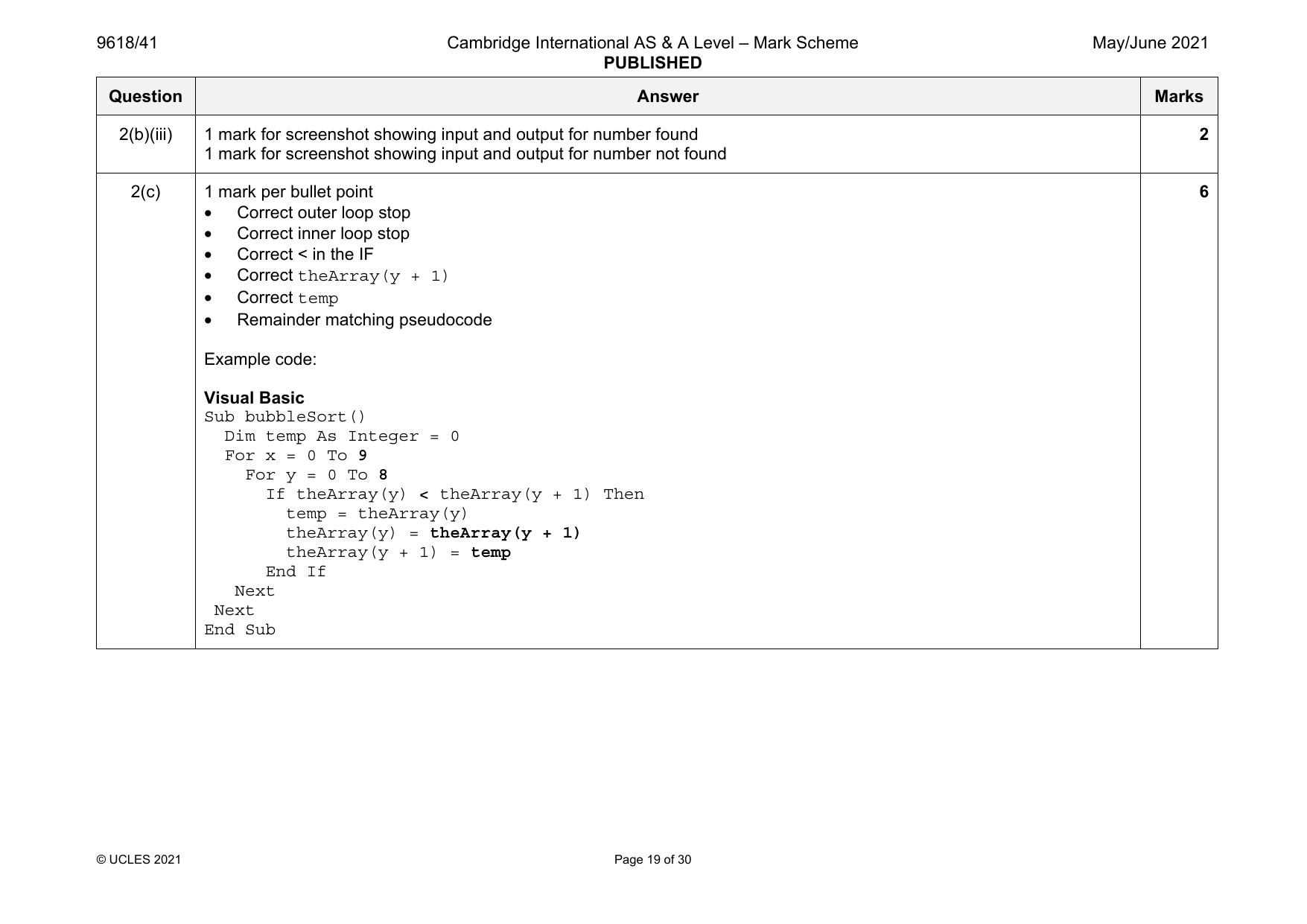
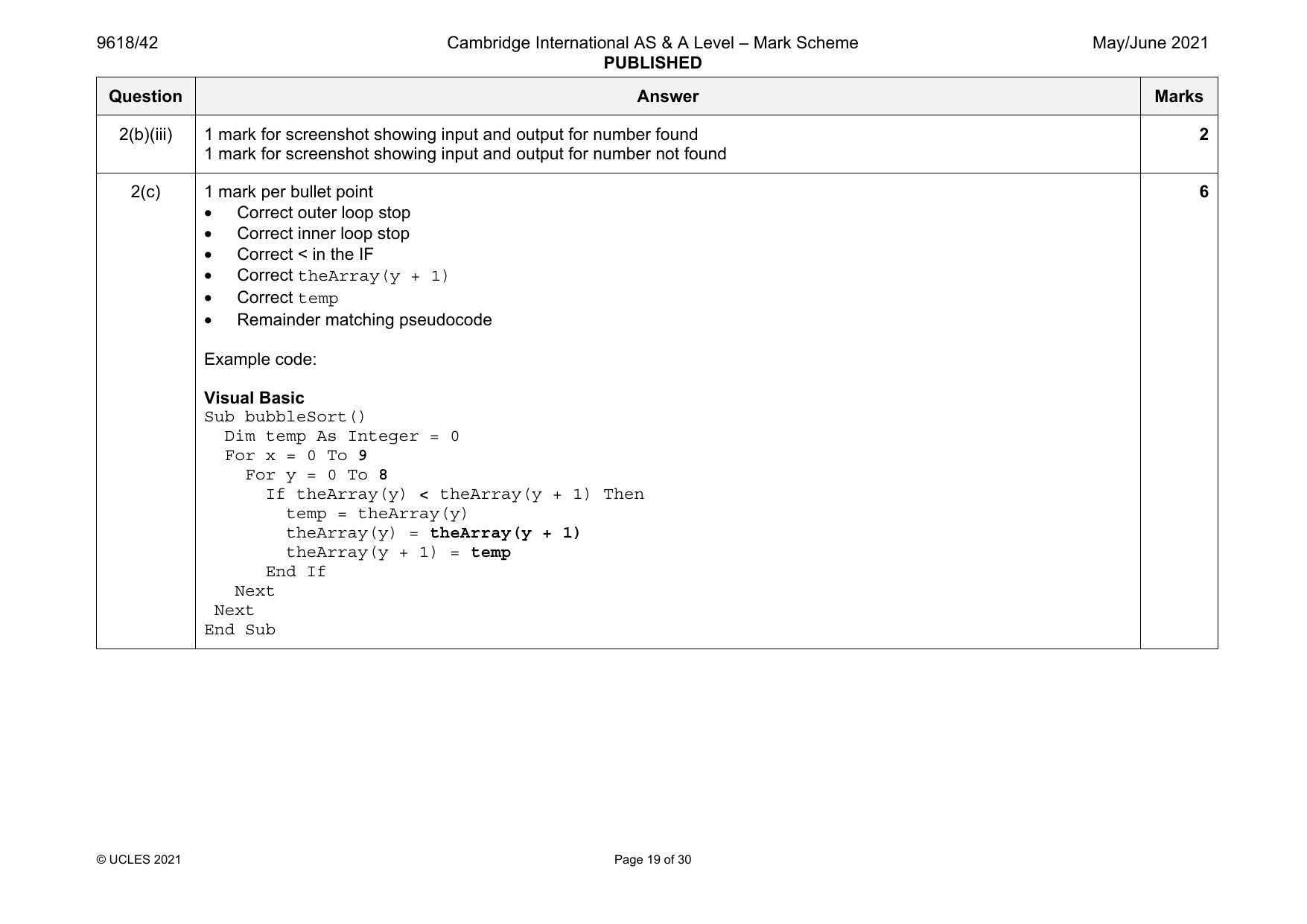
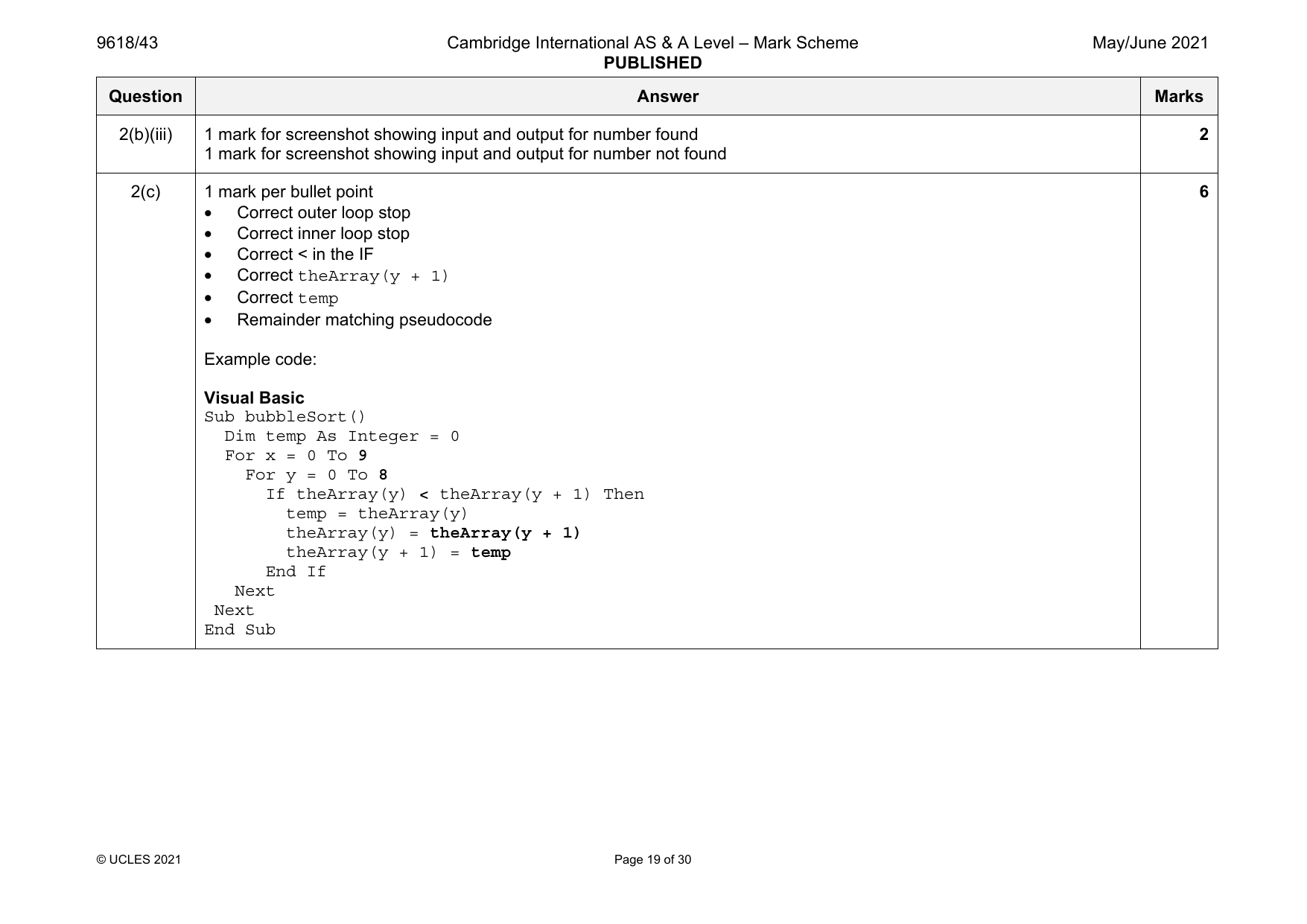
2(b)(iii) 1 mark for screenshot showing input and output for number found 2
1 mark for screenshot showing input and output for number not found
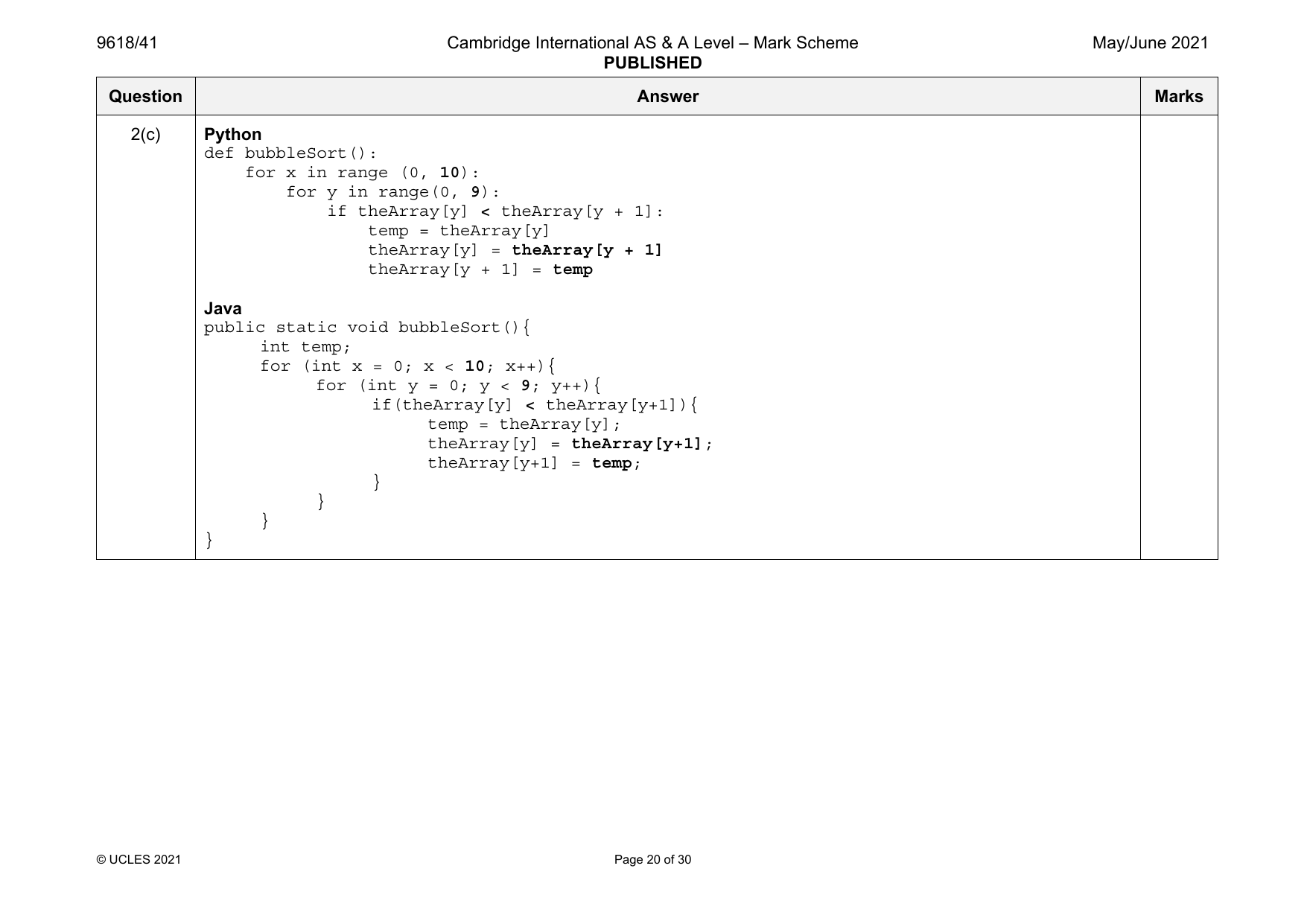
2(c) 1 mark per bullet point 6
• Correct outer loop stop
• Correct inner loop stop
• Correct < in the IF
• Correct theArray(y + 1)
• Correct temp
• Remainder matching pseudocode
Example code:
Visual Basic
Sub bubbleSort()
Dim temp As Integer = 0
For x = 0 To 9
For y = 0 To 8
If theArray(y) < theArray(y + 1) Then
temp = theArray(y)
theArray(y) = theArray(y + 1)
theArray(y + 1) = temp
End If
Next
Next
End Sub
© UCLES 2021 Page 19 of 30
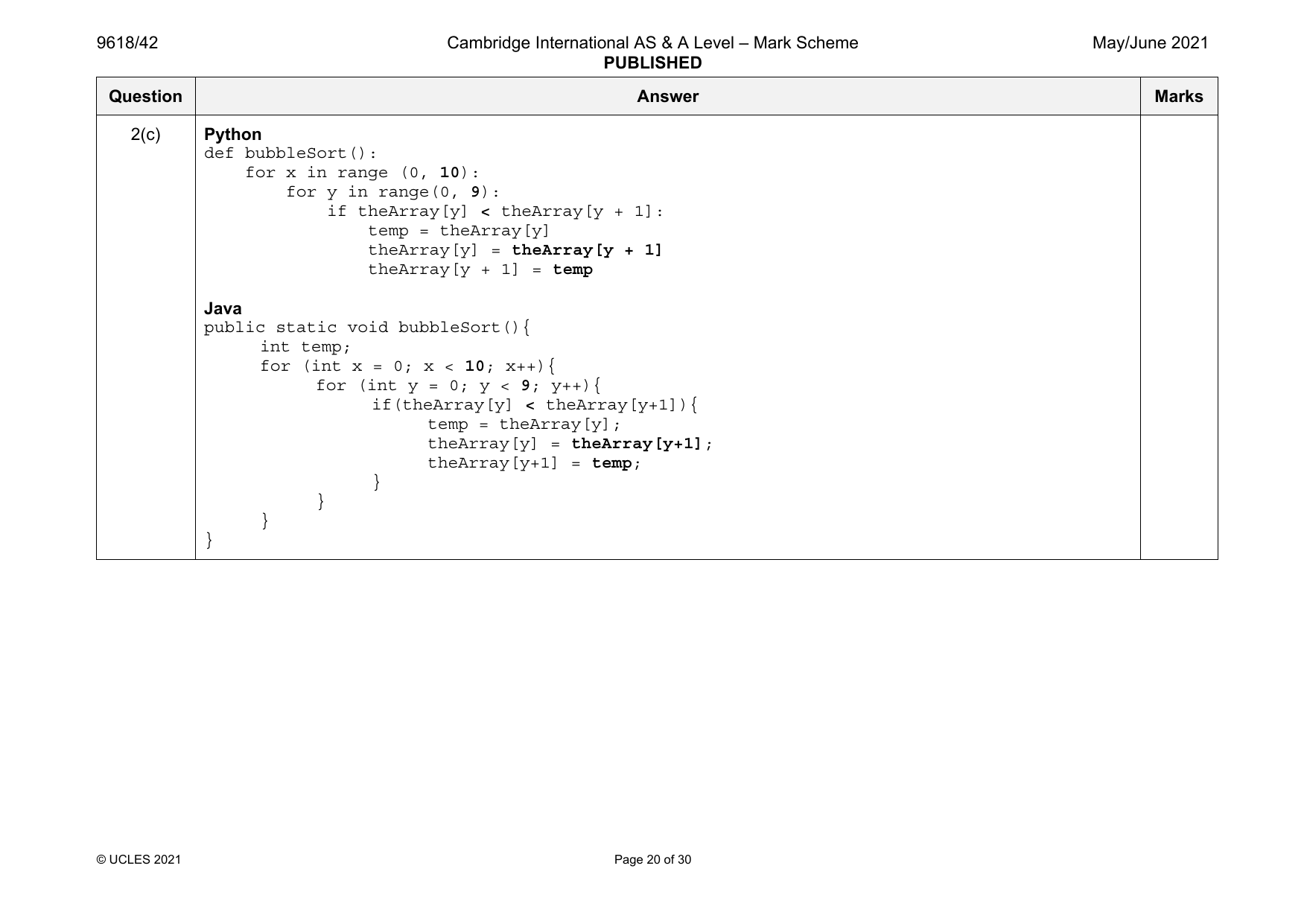
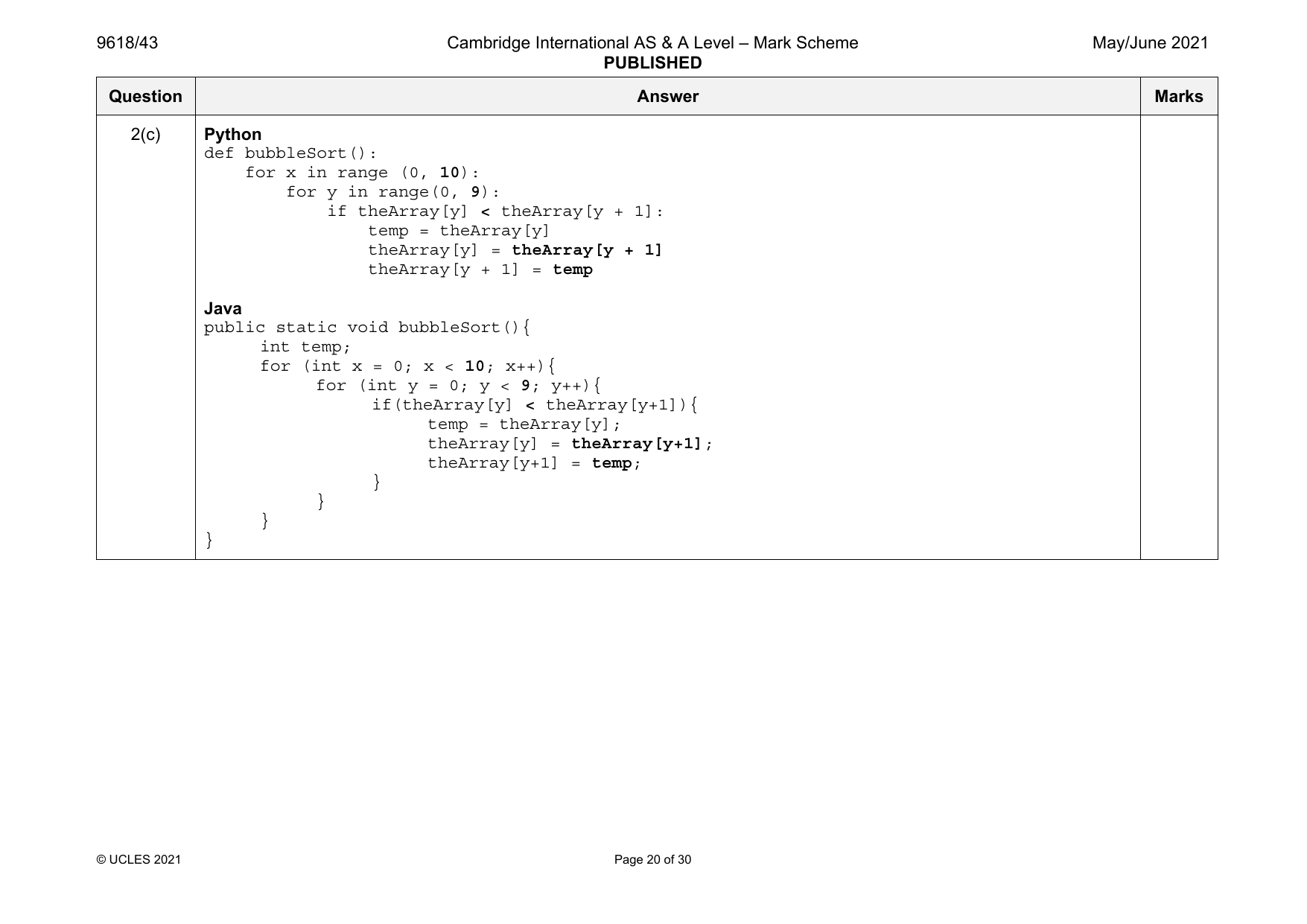
2(c) Python
def bubbleSort():
for x in range (0, 10):
for y in range(0, 9):
if theArray[y] < theArray[y + 1]:
temp = theArray[y]
theArray[y] = theArray[y + 1]
theArray[y + 1] = temp
Java
public static void bubbleSort(){
int temp;
for (int x = 0; x < 10; x++){
for (int y = 0; y < 9; y++){
if(theArray[y] < theArray[y+1]){
temp = theArray[y];
theArray[y] = theArray[y+1];
theArray[y+1] = temp;
}
}
}
}
© UCLES 2021 Page 20 of 30
Official mark scheme pages: 8, 9, 10, 11, 12, 13, 14, 15, 16, 17, 18, 19, 20 · source PDF URL
9618-2021-mj-41-q03
May/June 2021 · Paper 41 · Question 3 · 31 marks
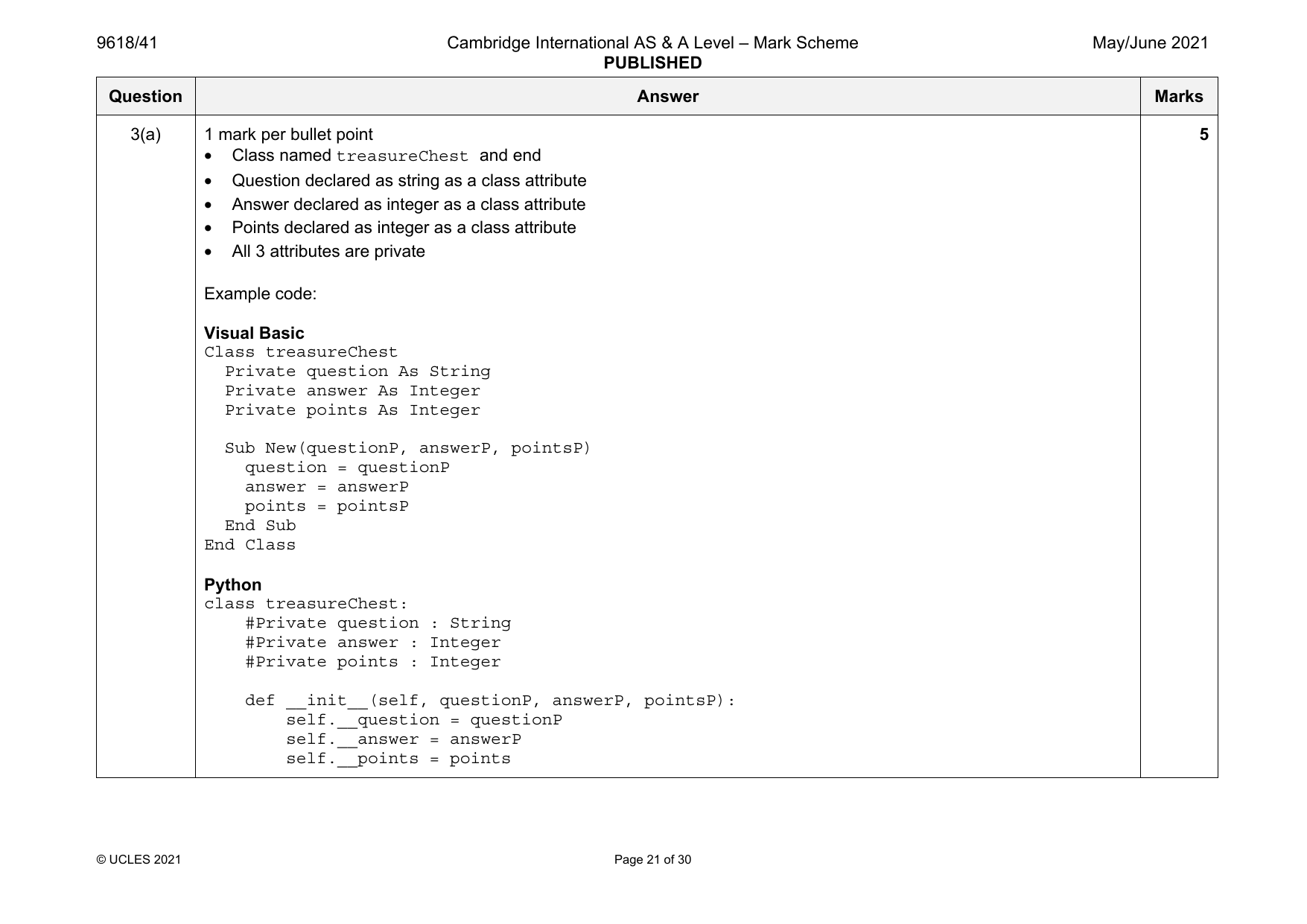
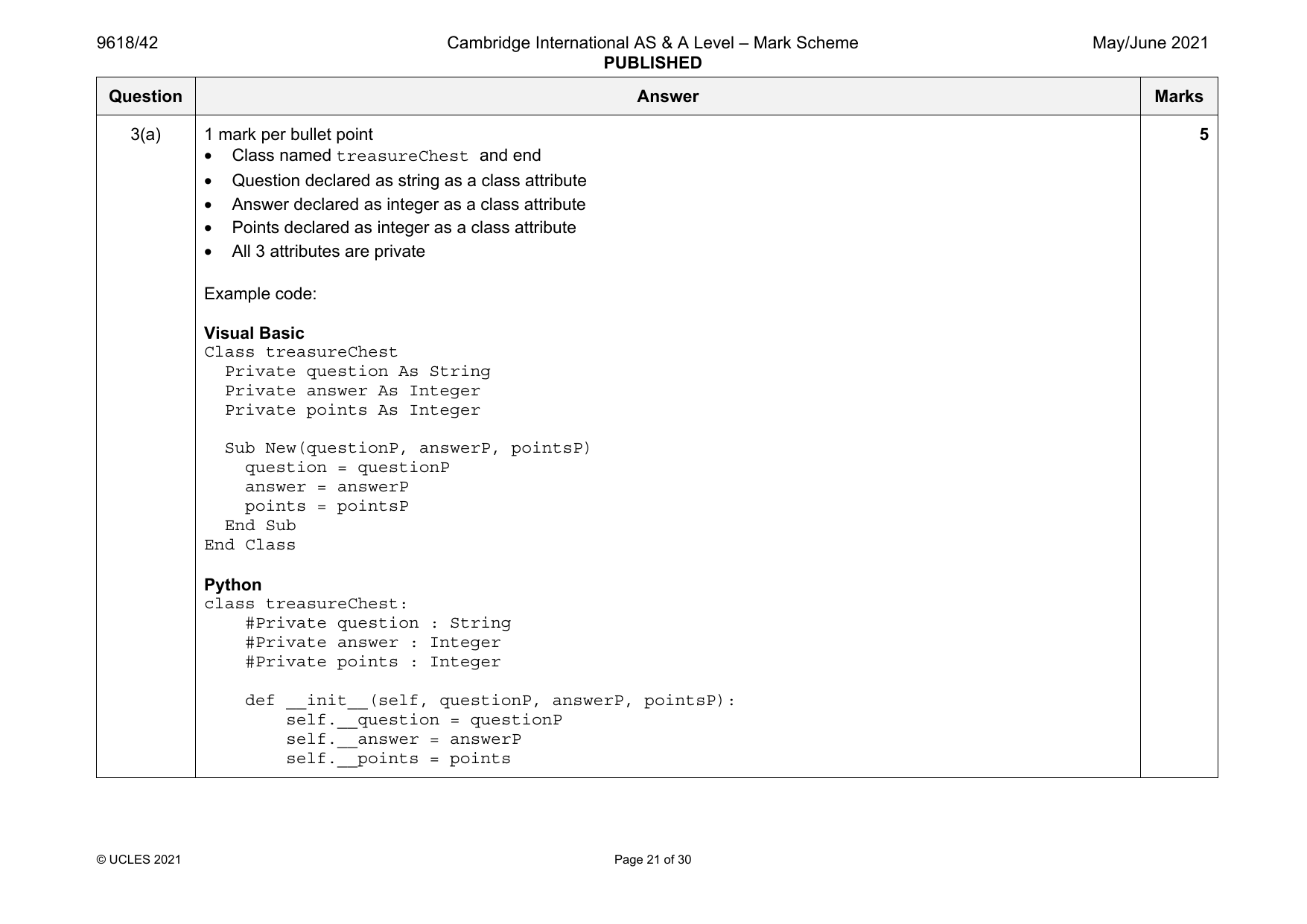
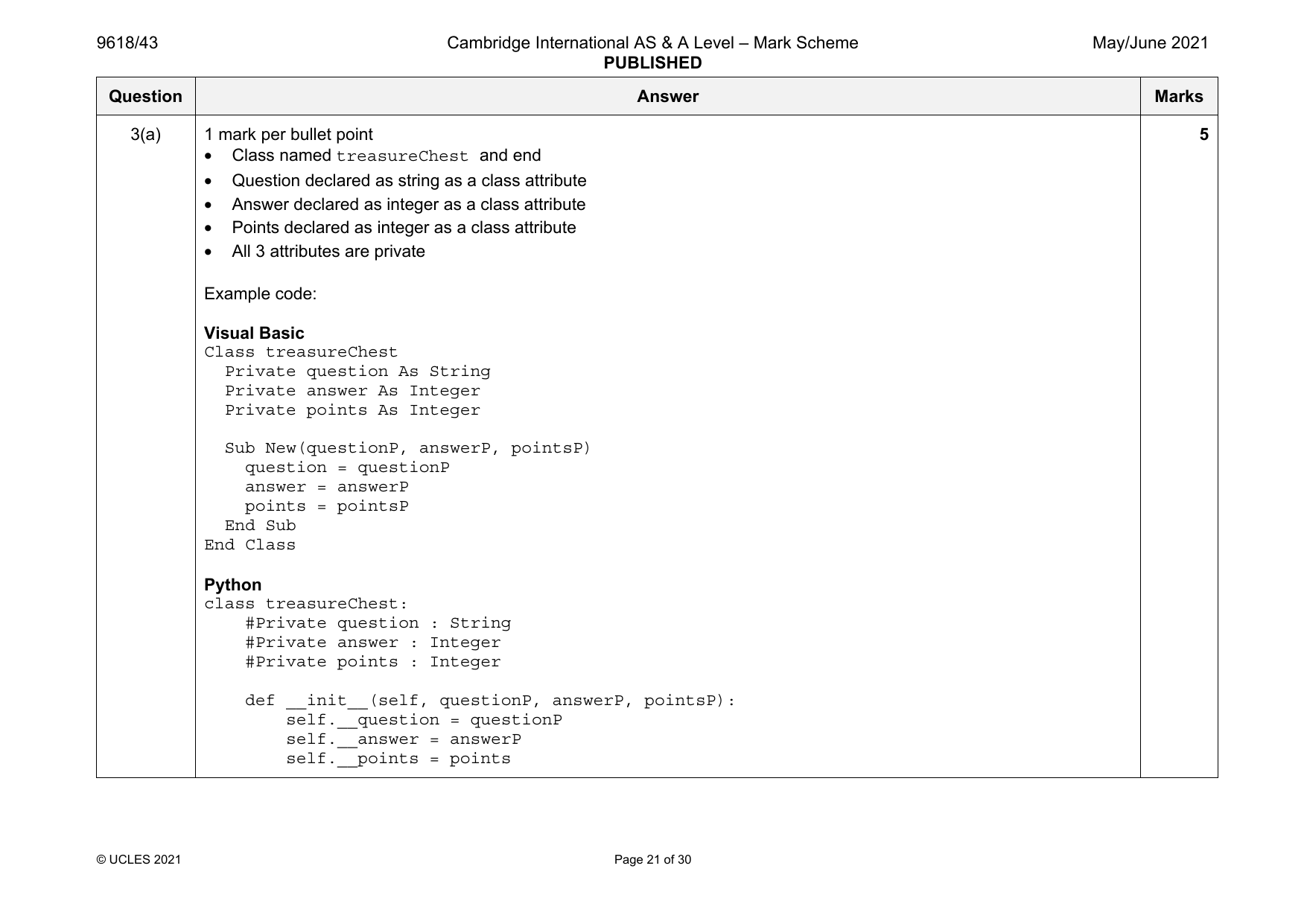
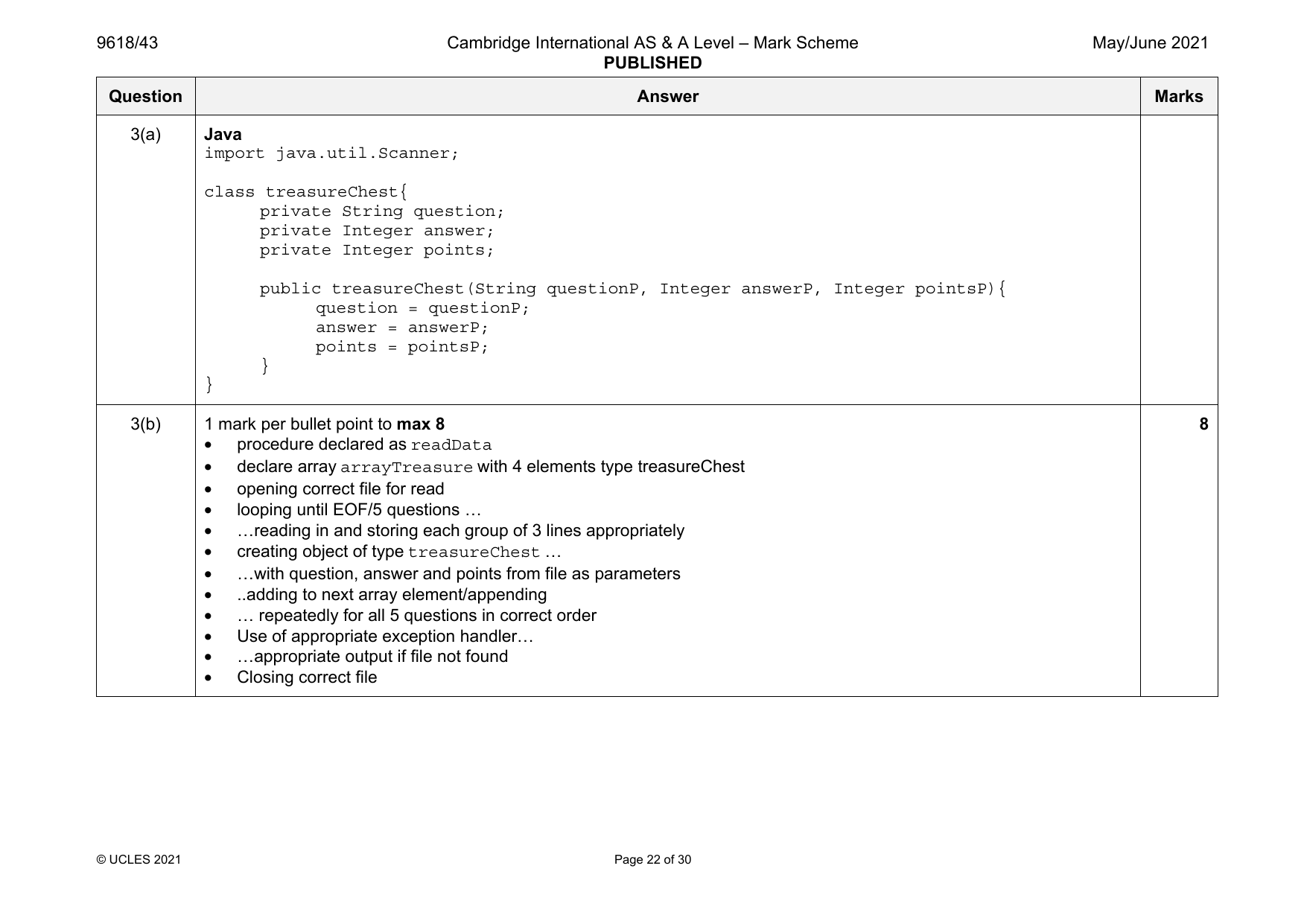
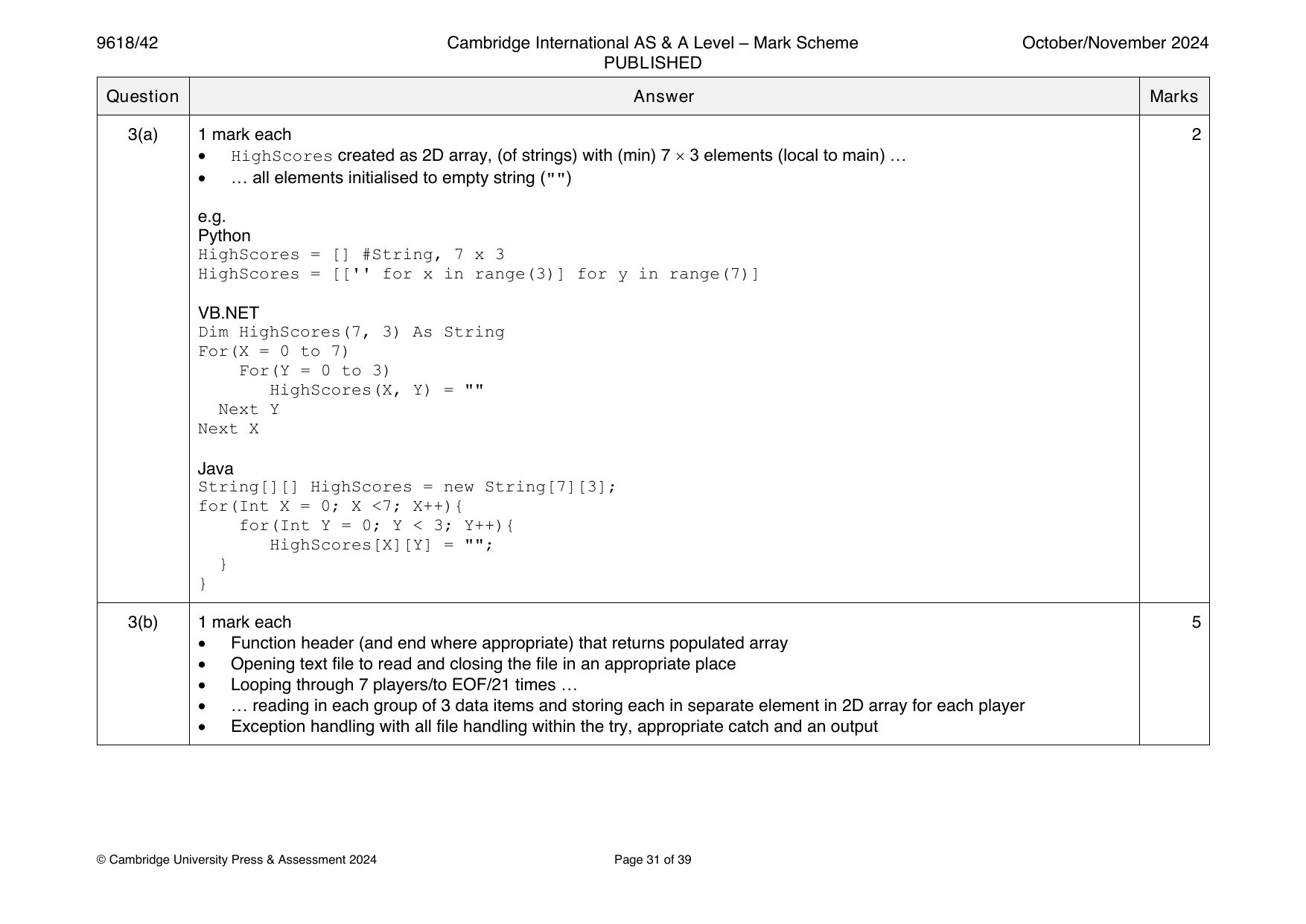
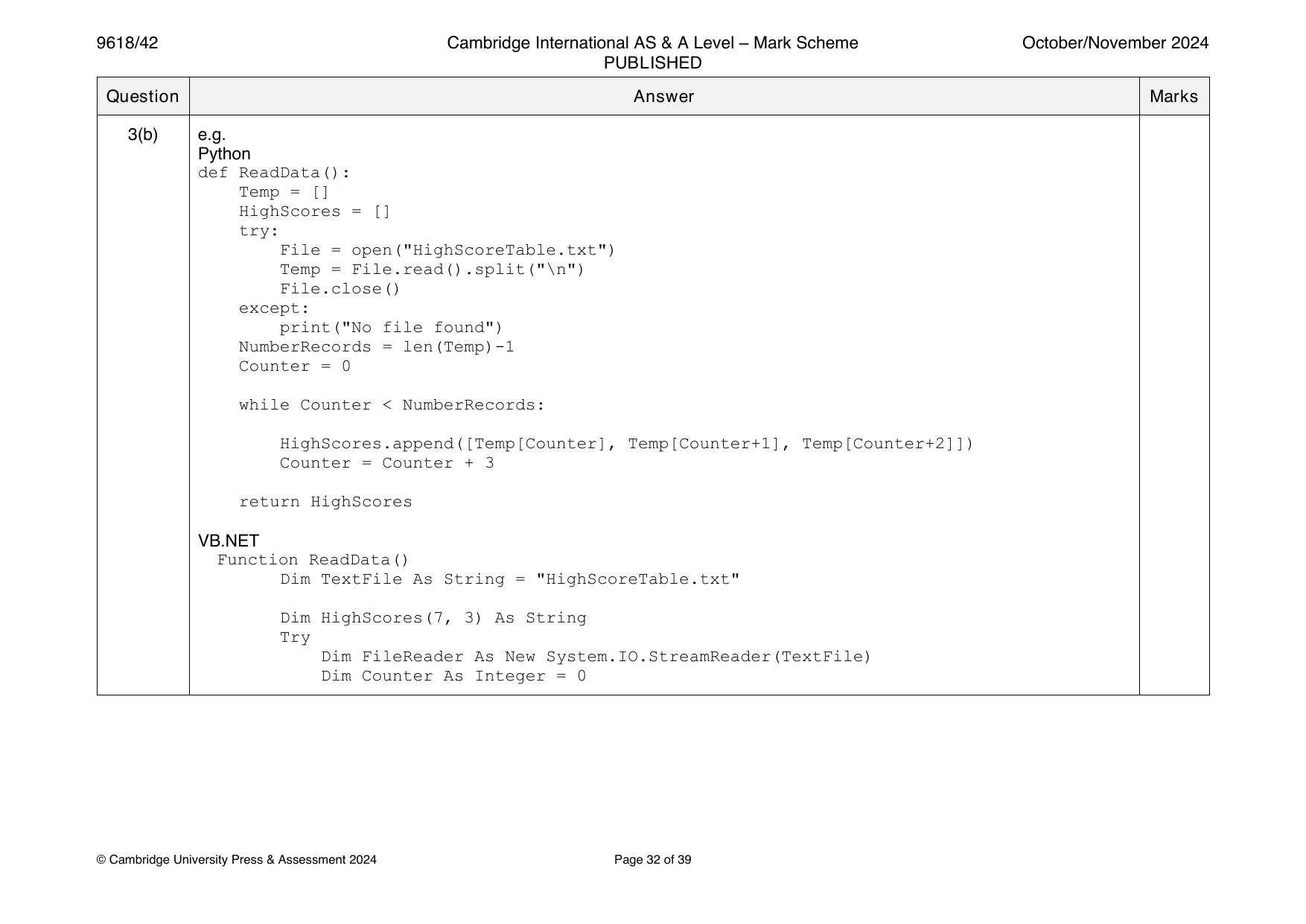
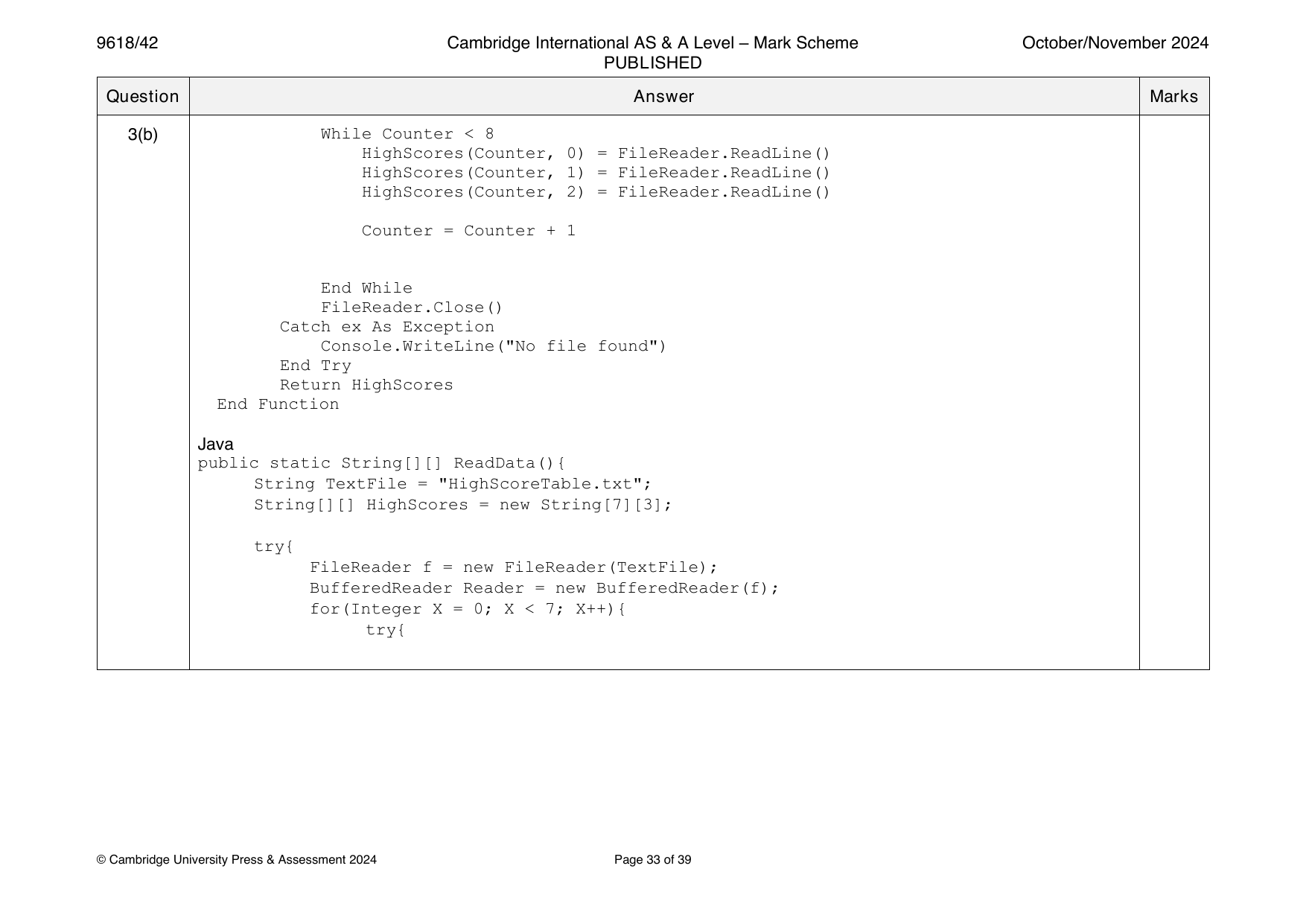
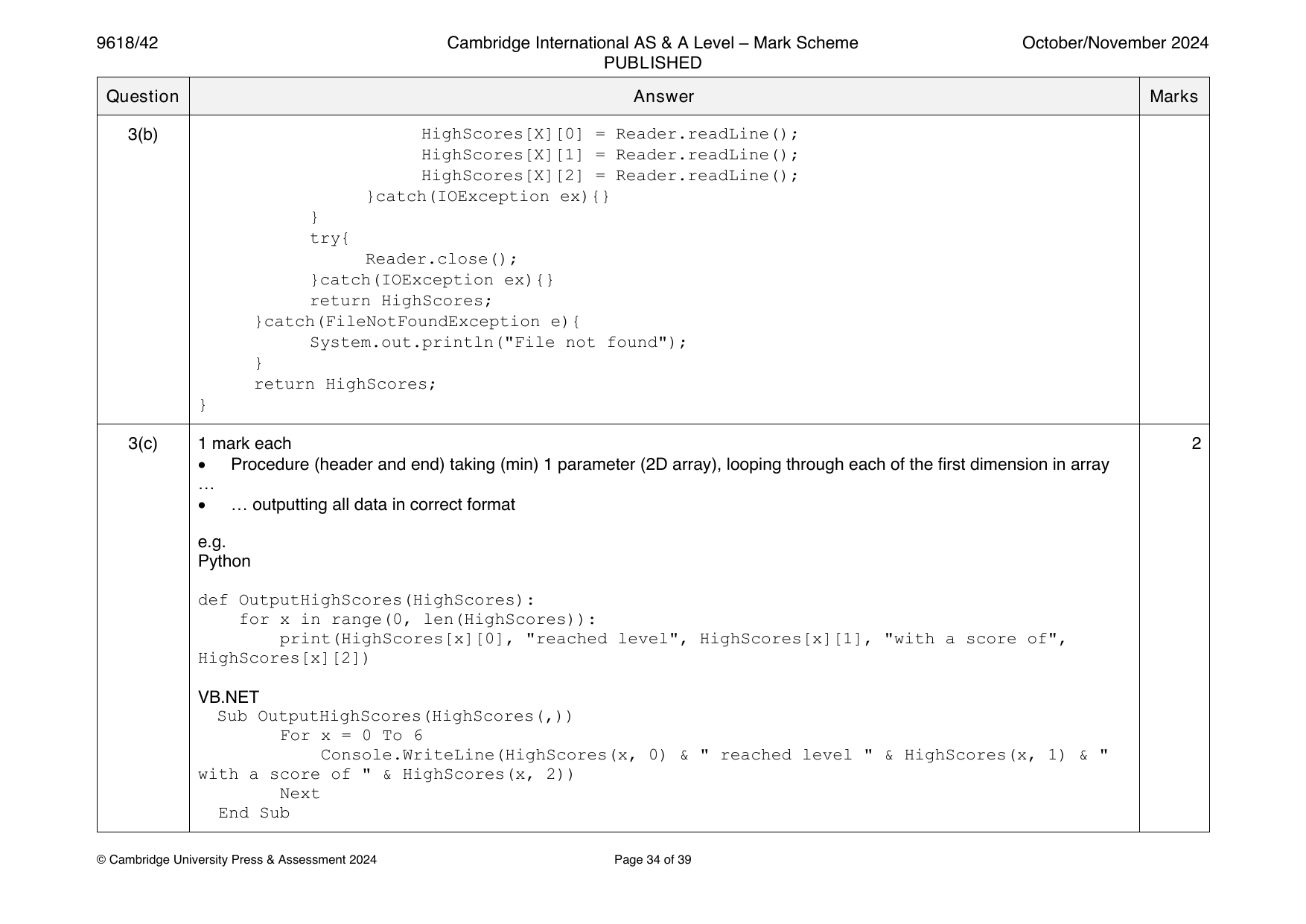
3(a) 1 mark per bullet point 5
• Class named treasureChest and end
• Question declared as string as a class attribute
• Answer declared as integer as a class attribute
• Points declared as integer as a class attribute
• All 3 attributes are private
Example code:
Visual Basic
Class treasureChest
Private question As String
Private answer As Integer
Private points As Integer
Sub New(questionP, answerP, pointsP)
question = questionP
answer = answerP
points = pointsP
End Sub
End Class
Python
class treasureChest:
#Private question : String
#Private answer : Integer
#Private points : Integer
def __init__(self, questionP, answerP, pointsP):
self.__question = questionP
self.__answer = answerP
self.__points = points
© UCLES 2021 Page 21 of 30
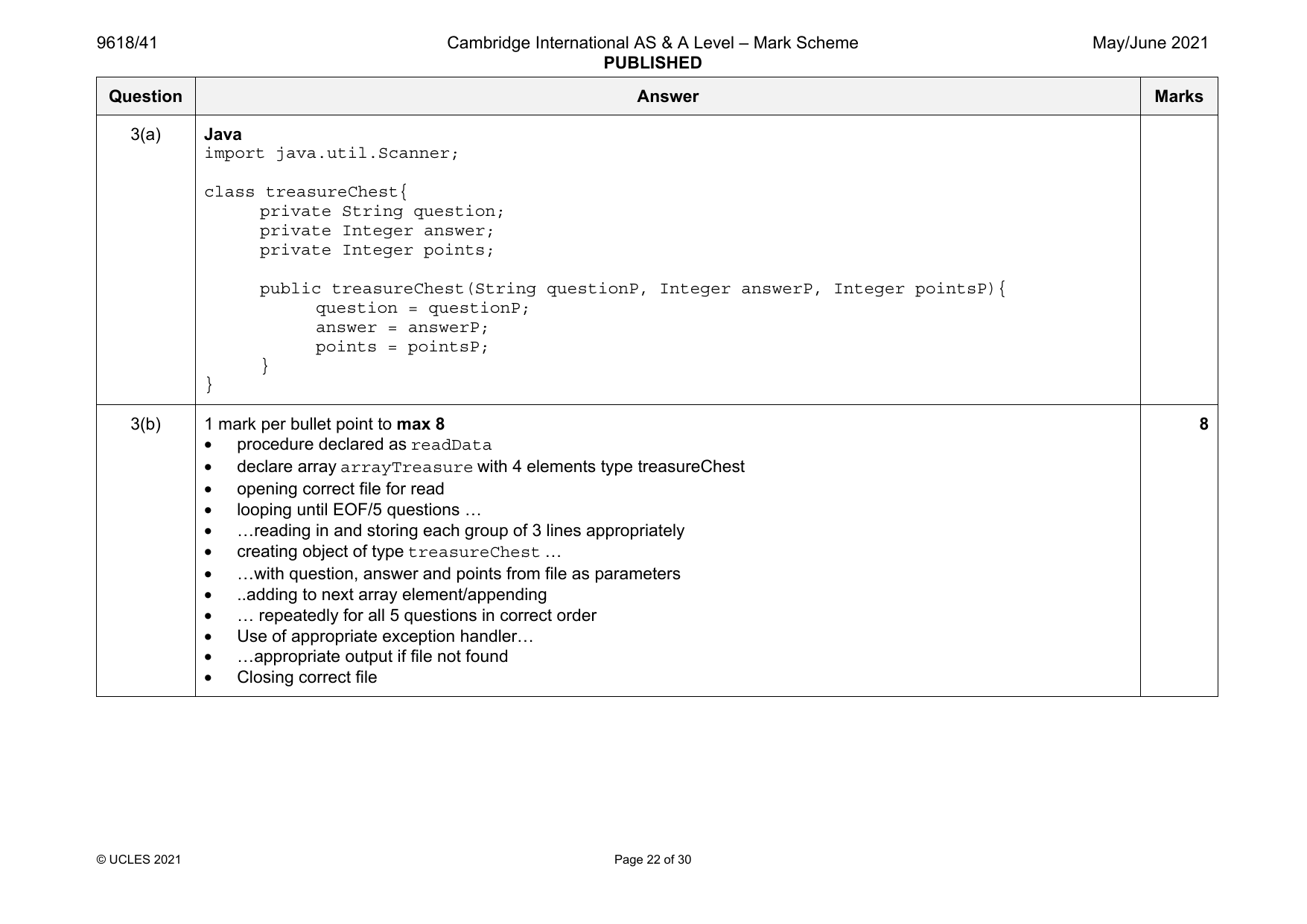
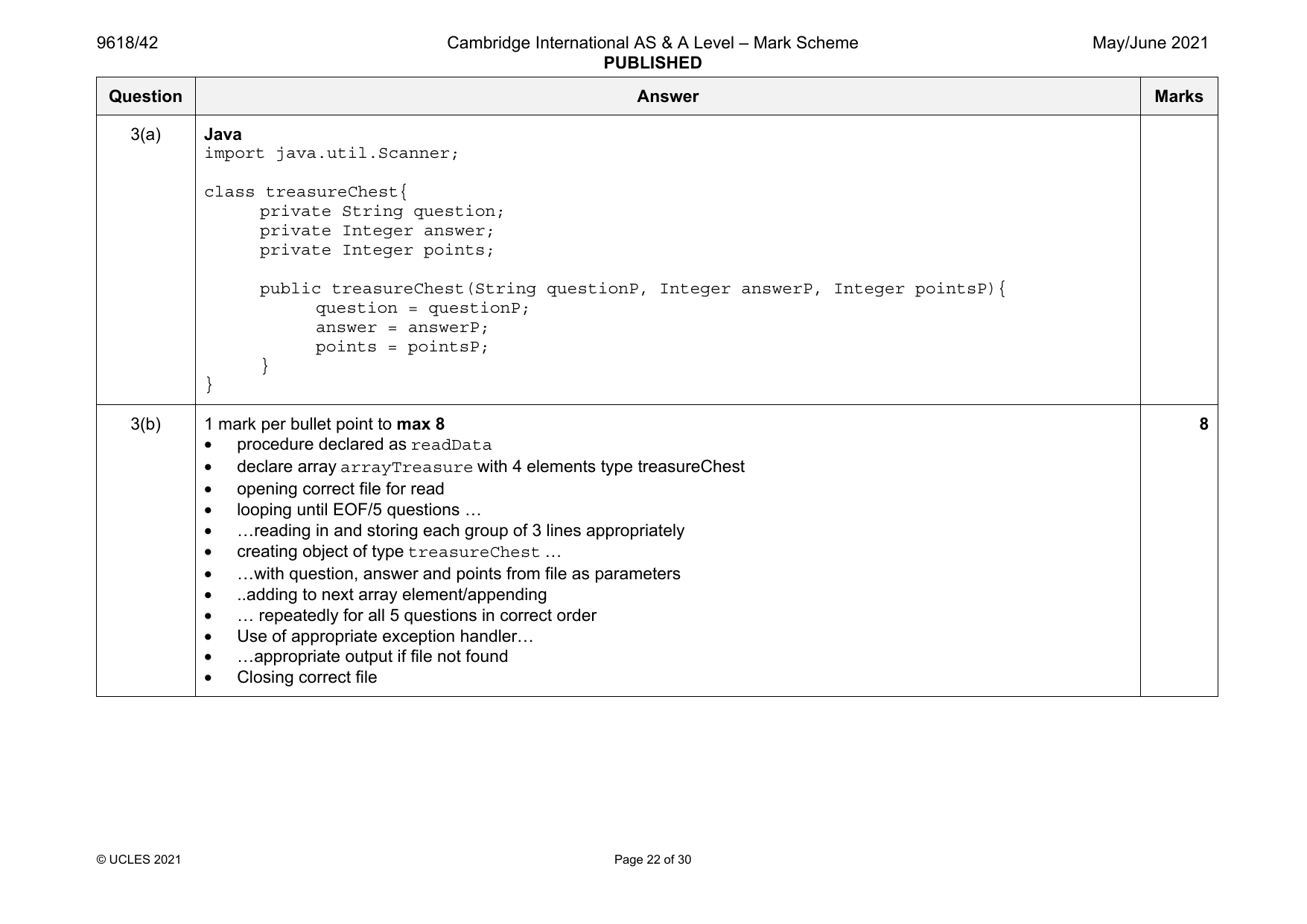
3(a) Java
import java.util.Scanner;
class treasureChest{
private String question;
private Integer answer;
private Integer points;
public treasureChest(String questionP, Integer answerP, Integer pointsP){
question = questionP;
answer = answerP;
points = pointsP;
}
}
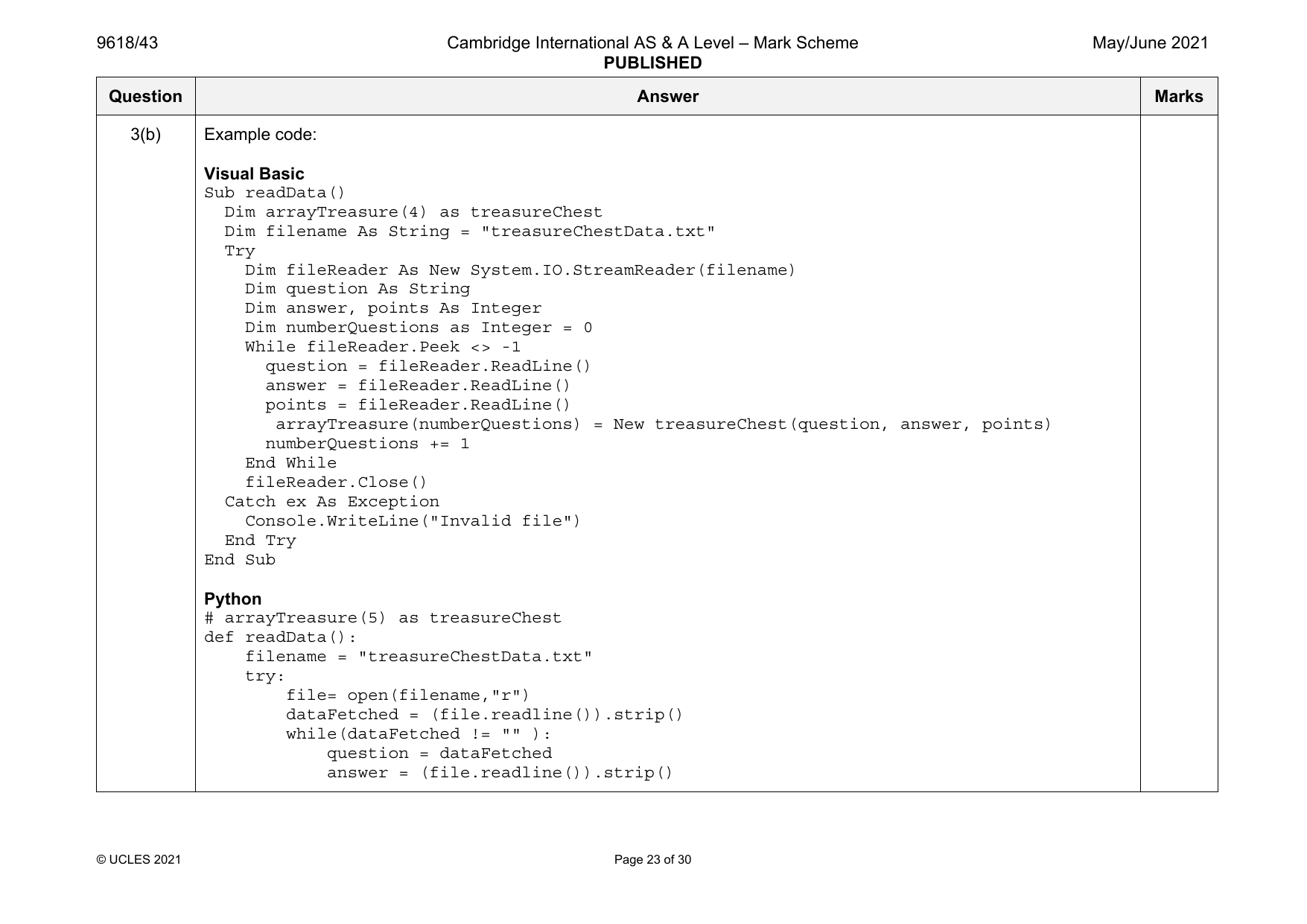
3(b) 1 mark per bullet point to max 8 8
• procedure declared as readData
• declare array arrayTreasure with 4 elements type treasureChest
• opening correct file for read
• looping until EOF/5 questions …
• …reading in and storing each group of 3 lines appropriately
• creating object of type treasureChest …
• …with question, answer and points from file as parameters
• ..adding to next array element/appending
• … repeatedly for all 5 questions in correct order
• Use of appropriate exception handler…
• …appropriate output if file not found
• Closing correct file
© UCLES 2021 Page 22 of 30
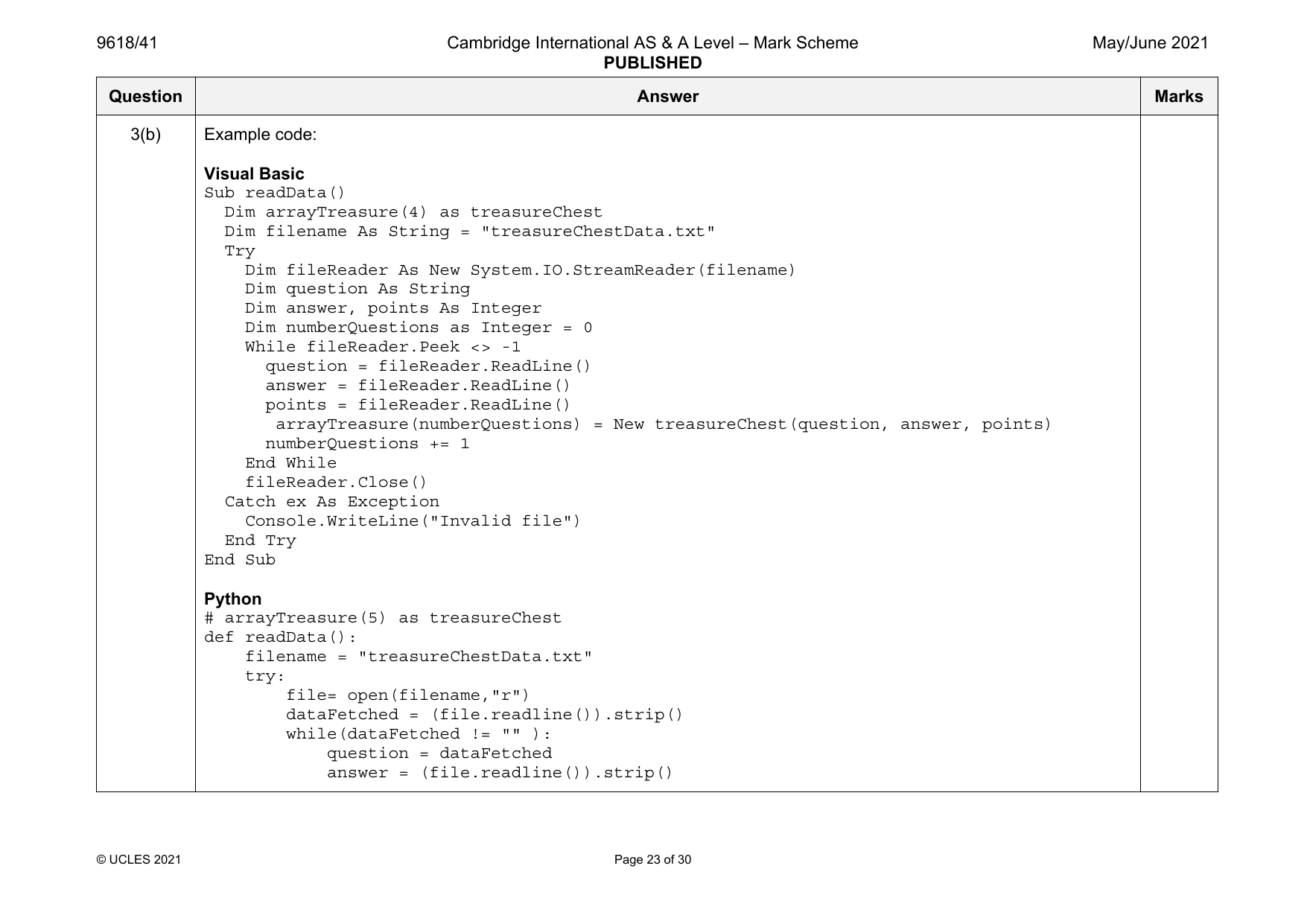
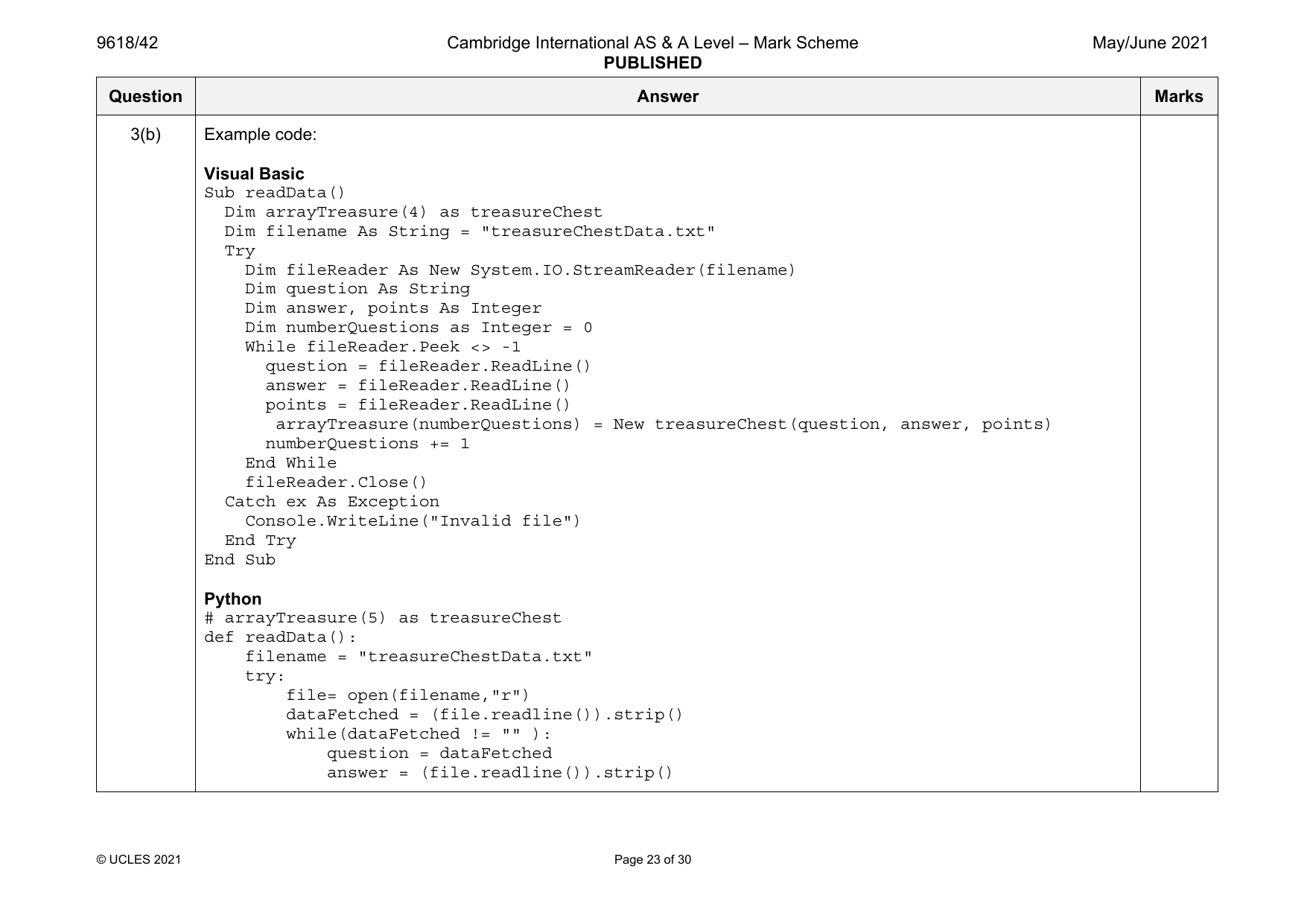
3(b) Example code:
Visual Basic
Sub readData()
Dim arrayTreasure(4) as treasureChest
Dim filename As String = "treasureChestData.txt"
Try
Dim fileReader As New System.IO.StreamReader(filename)
Dim question As String
Dim answer, points As Integer
Dim numberQuestions as Integer = 0
While fileReader.Peek <> -1
question = fileReader.ReadLine()
answer = fileReader.ReadLine()
points = fileReader.ReadLine()
arrayTreasure(numberQuestions) = New treasureChest(question, answer, points)
numberQuestions += 1
End While
fileReader.Close()
Catch ex As Exception
Console.WriteLine("Invalid file")
End Try
End Sub
Python
# arrayTreasure(5) as treasureChest
def readData():
filename = "treasureChestData.txt"
try:
file= open(filename,"r")
dataFetched = (file.readline()).strip()
while(dataFetched != "" ):
question = dataFetched
answer = (file.readline()).strip()
© UCLES 2021 Page 23 of 30
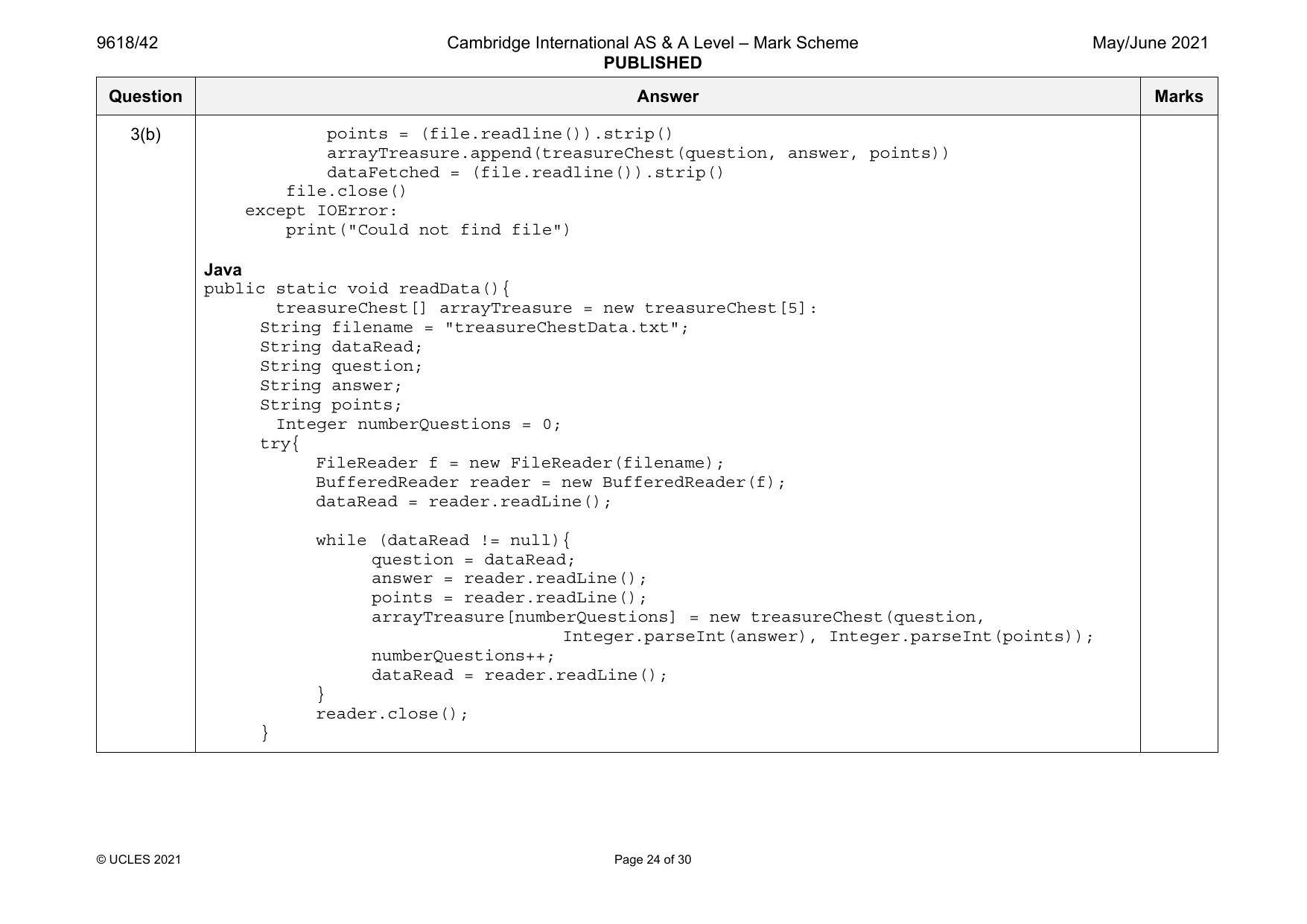
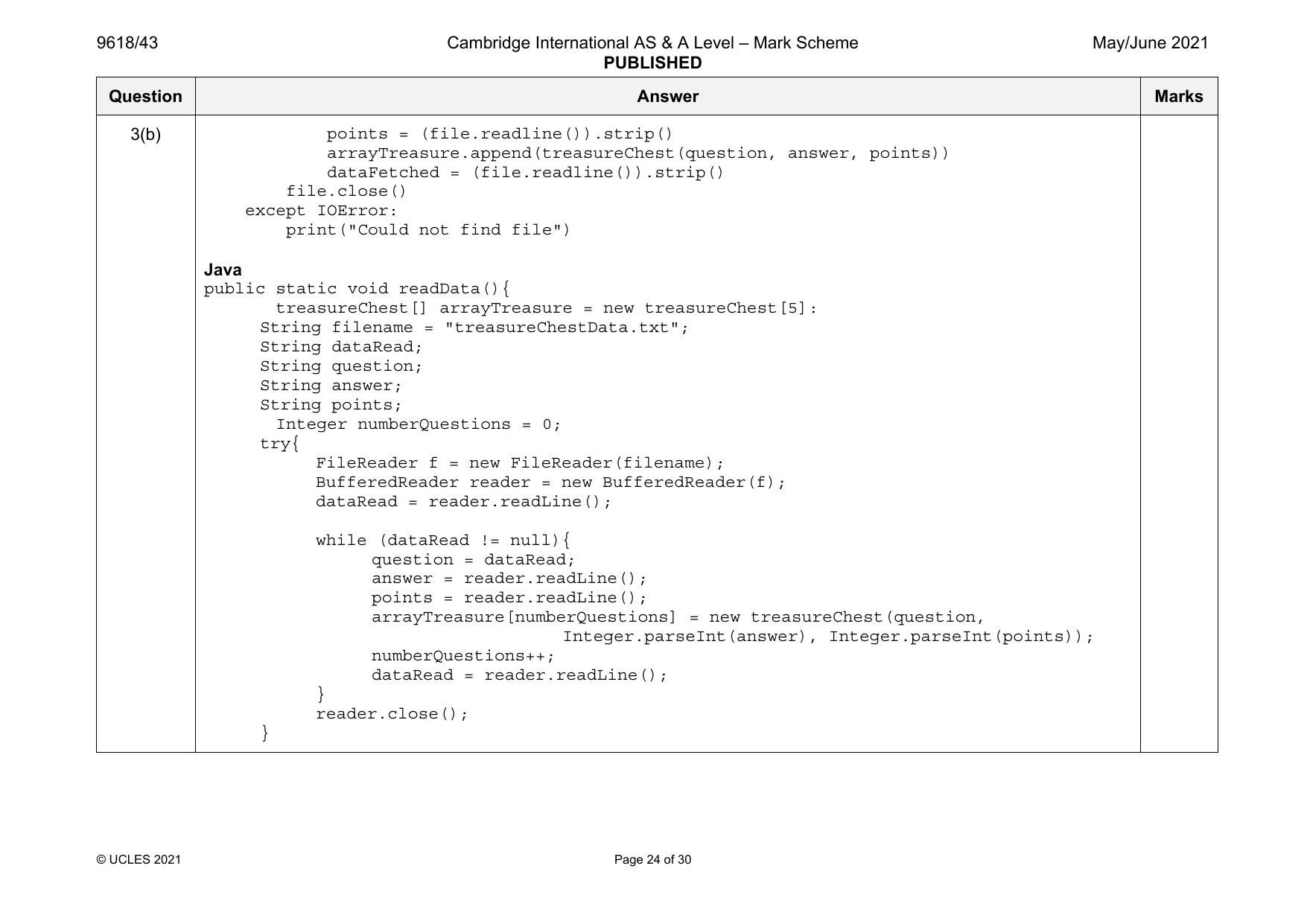
3(b) points = (file.readline()).strip()
arrayTreasure.append(treasureChest(question, answer, points))
dataFetched = (file.readline()).strip()
file.close()
except IOError:
print("Could not find file")
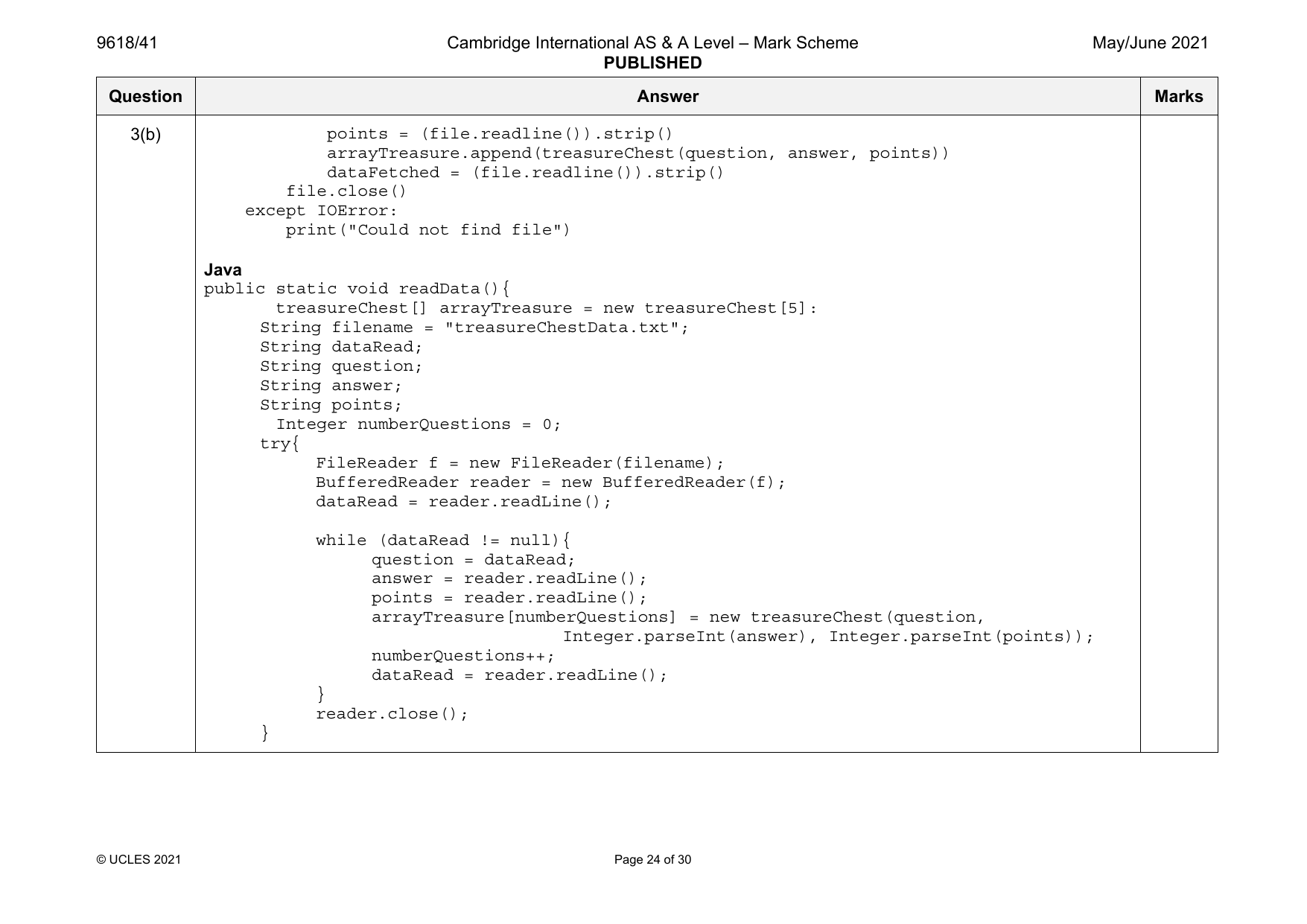
Java
public static void readData(){
treasureChest[] arrayTreasure = new treasureChest[5]:
String filename = "treasureChestData.txt";
String dataRead;
String question;
String answer;
String points;
Integer numberQuestions = 0;
try{
FileReader f = new FileReader(filename);
BufferedReader reader = new BufferedReader(f);
dataRead = reader.readLine();
while (dataRead != null){
question = dataRead;
answer = reader.readLine();
points = reader.readLine();
arrayTreasure[numberQuestions] = new treasureChest(question,
Integer.parseInt(answer), Integer.parseInt(points));
numberQuestions++;
dataRead = reader.readLine();
}
reader.close();
}
© UCLES 2021 Page 24 of 30
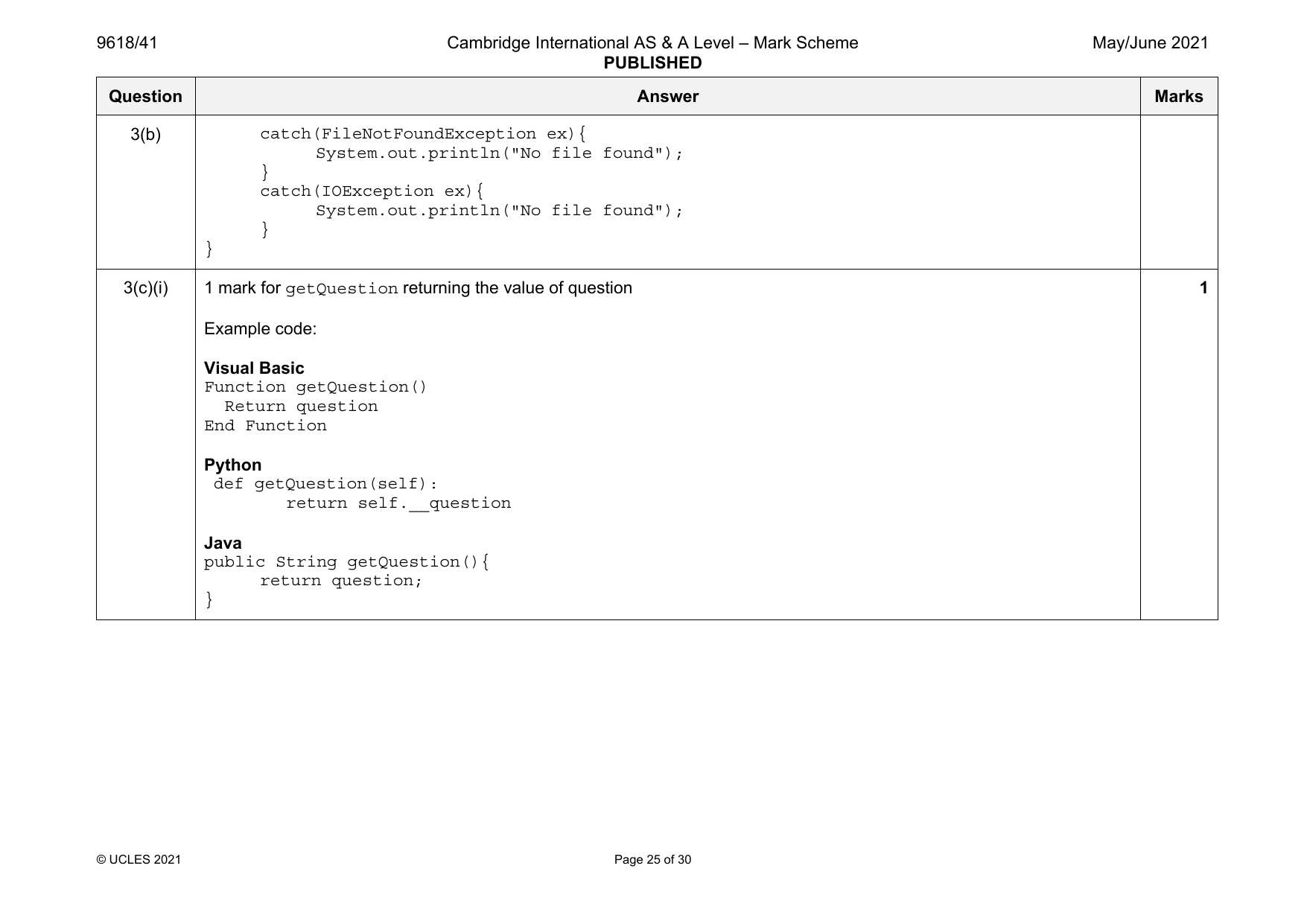
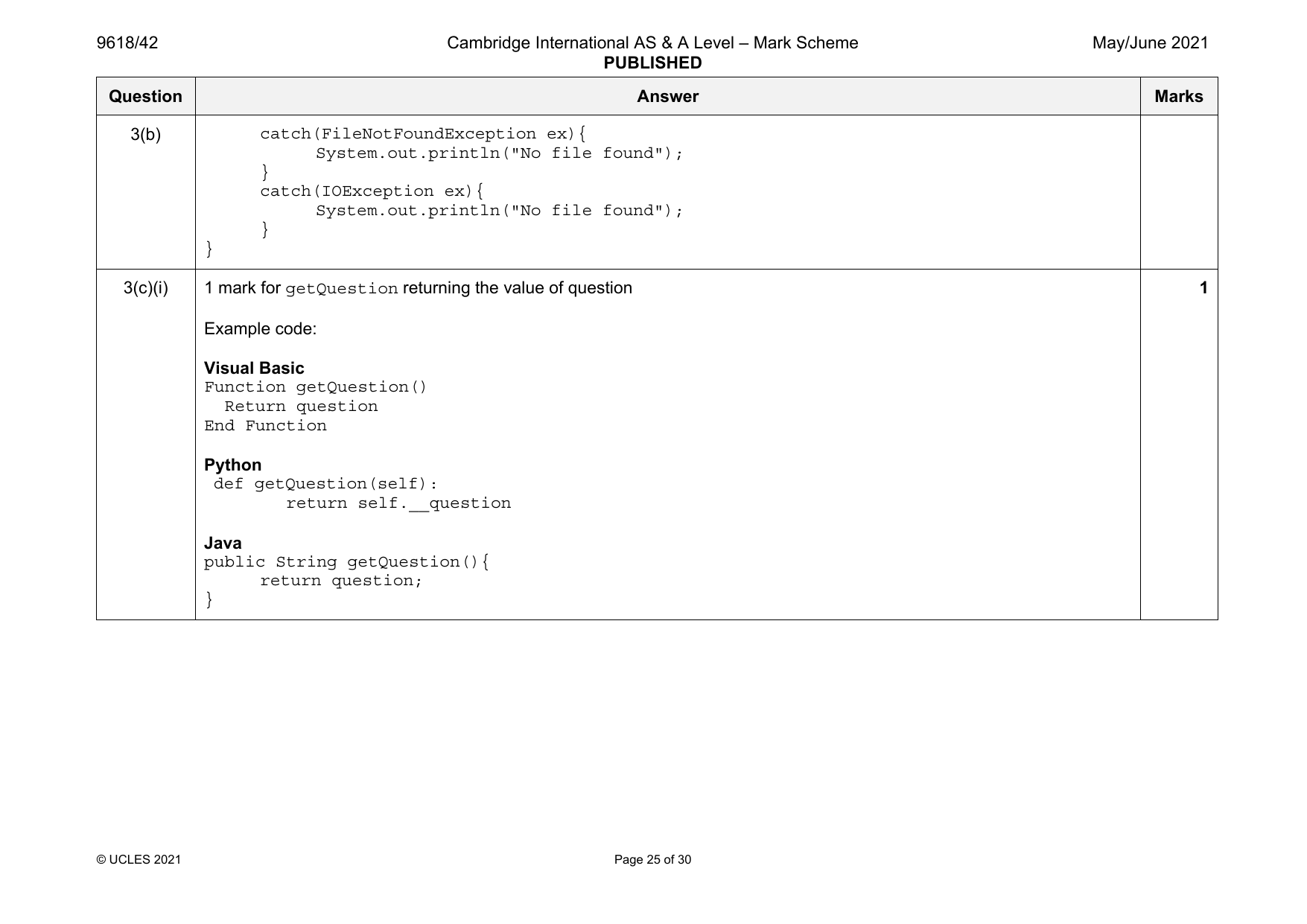
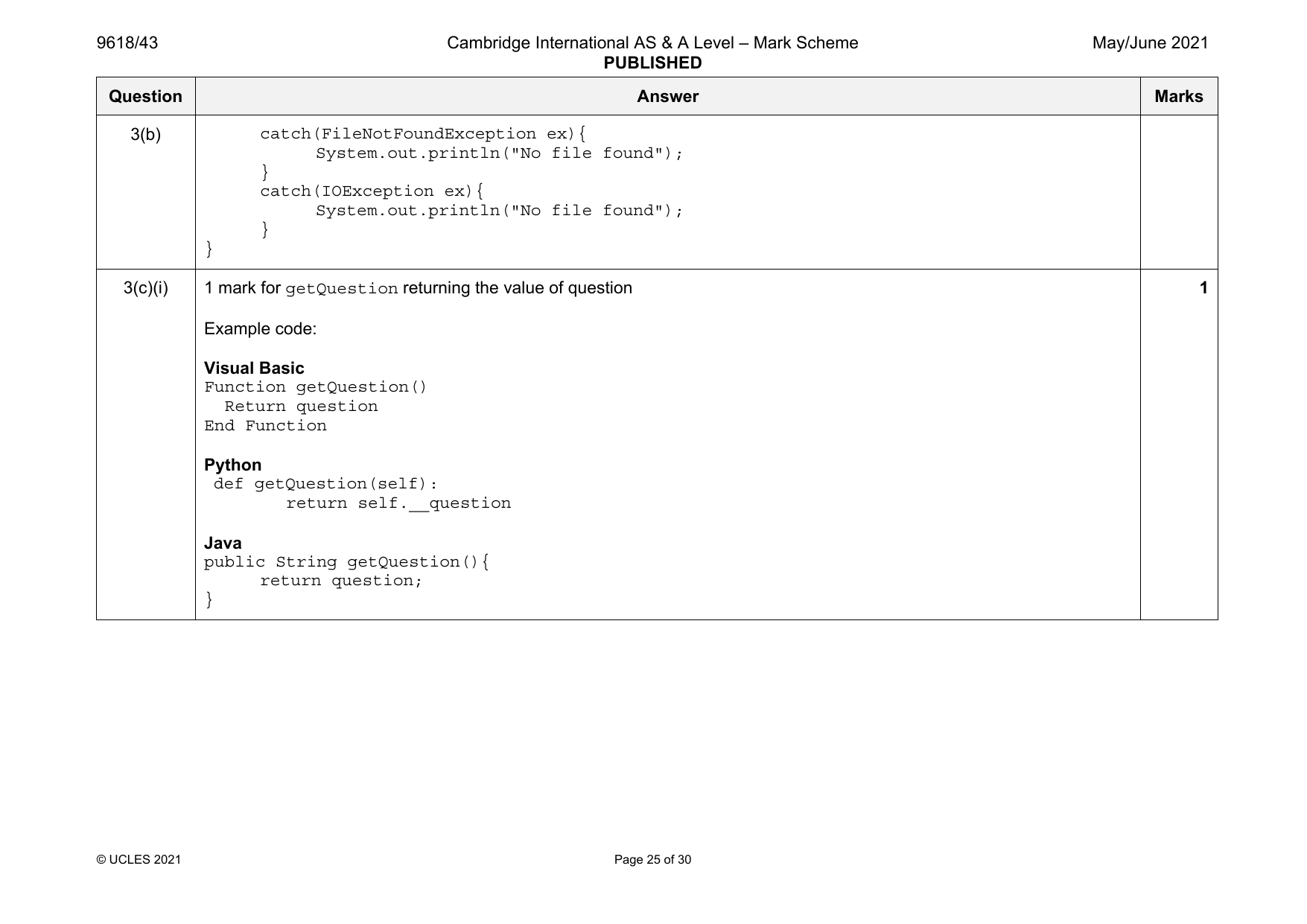
3(b) catch(FileNotFoundException ex){
System.out.println("No file found");
}
catch(IOException ex){
System.out.println("No file found");
}
}
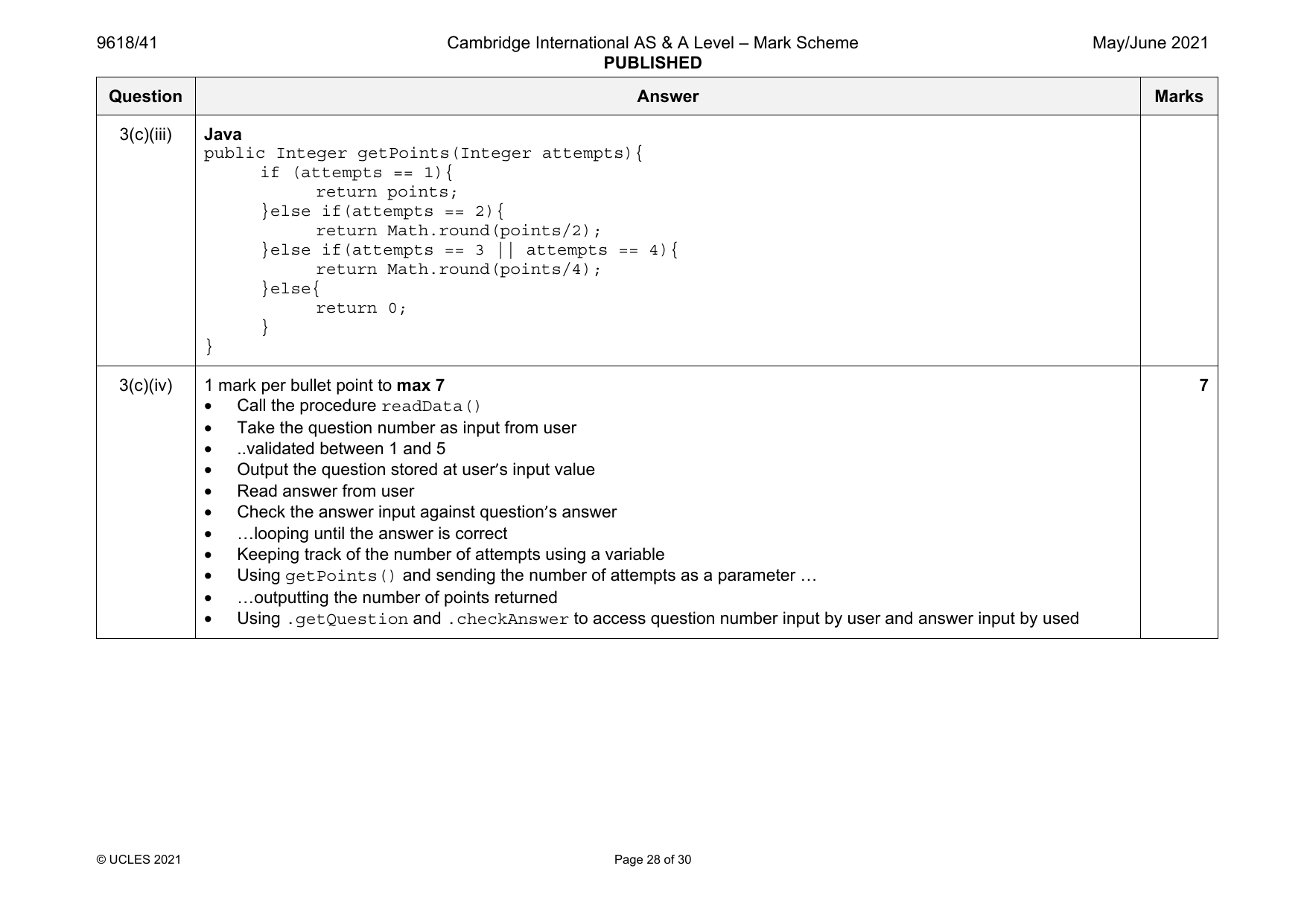
3(c)(i) 1 mark for getQuestion returning the value of question 1
Example code:
Visual Basic
Function getQuestion()
Return question
End Function
Python
def getQuestion(self):
return self.__question
Java
public String getQuestion(){
return question;
}
© UCLES 2021 Page 25 of 30
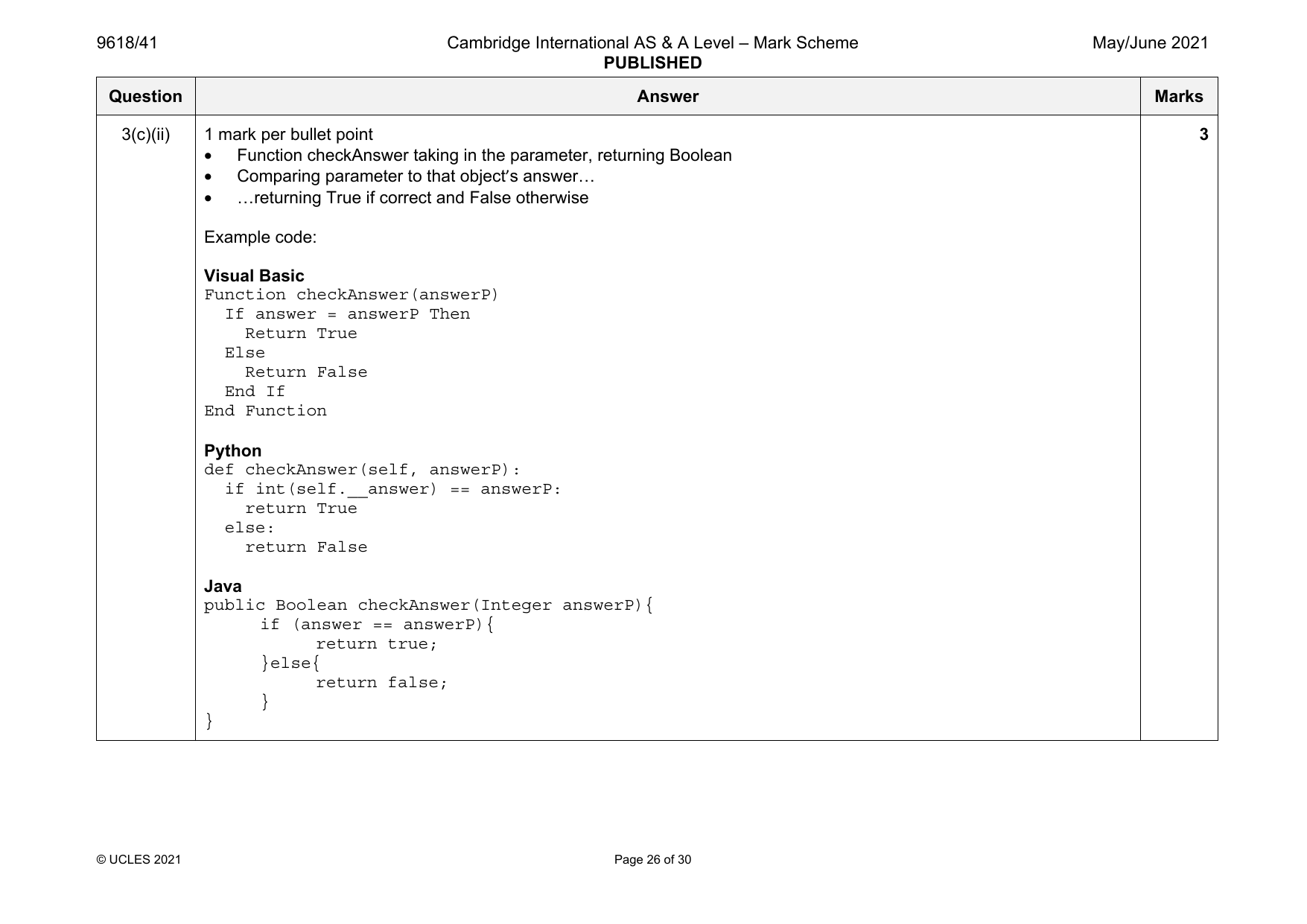
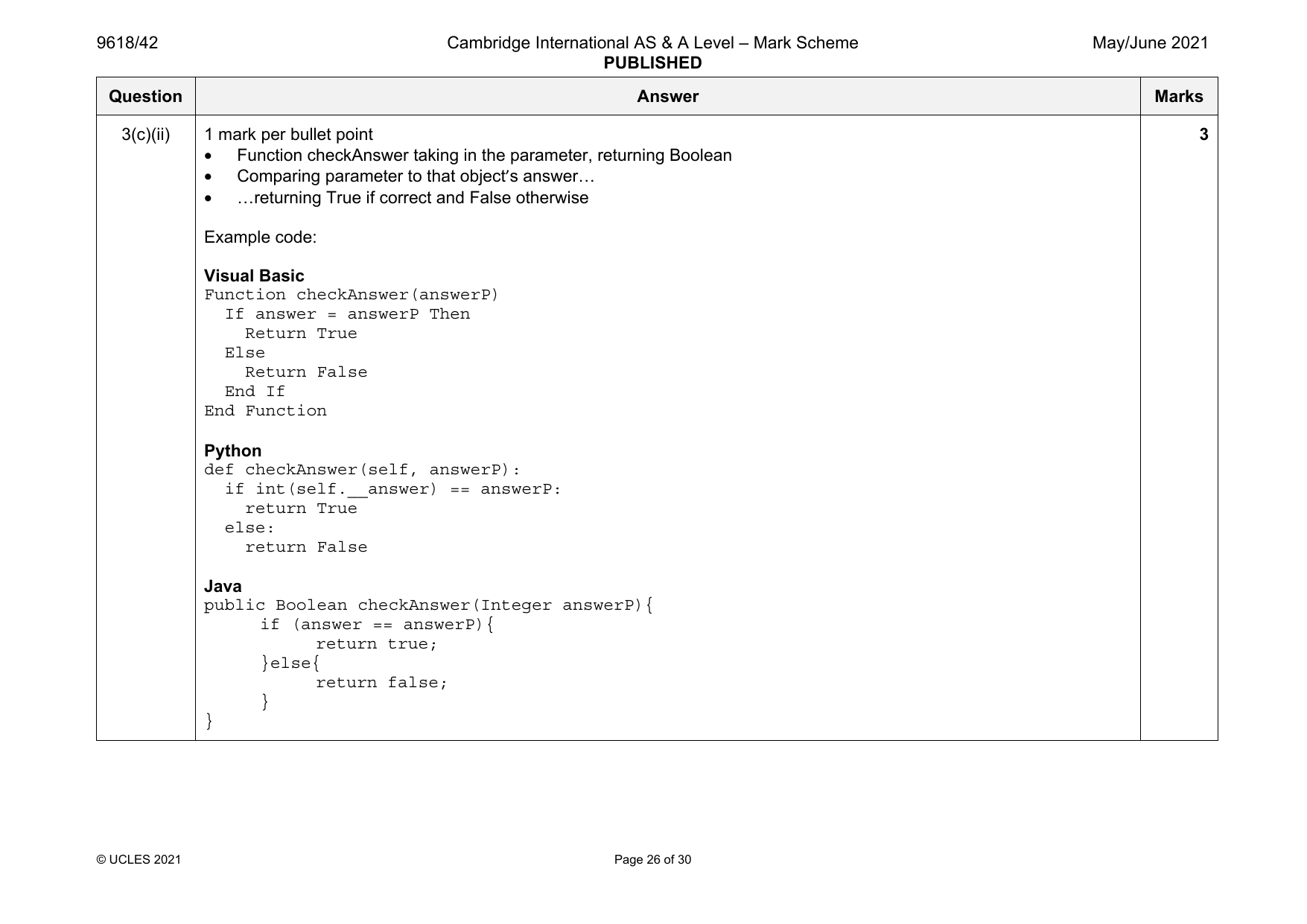
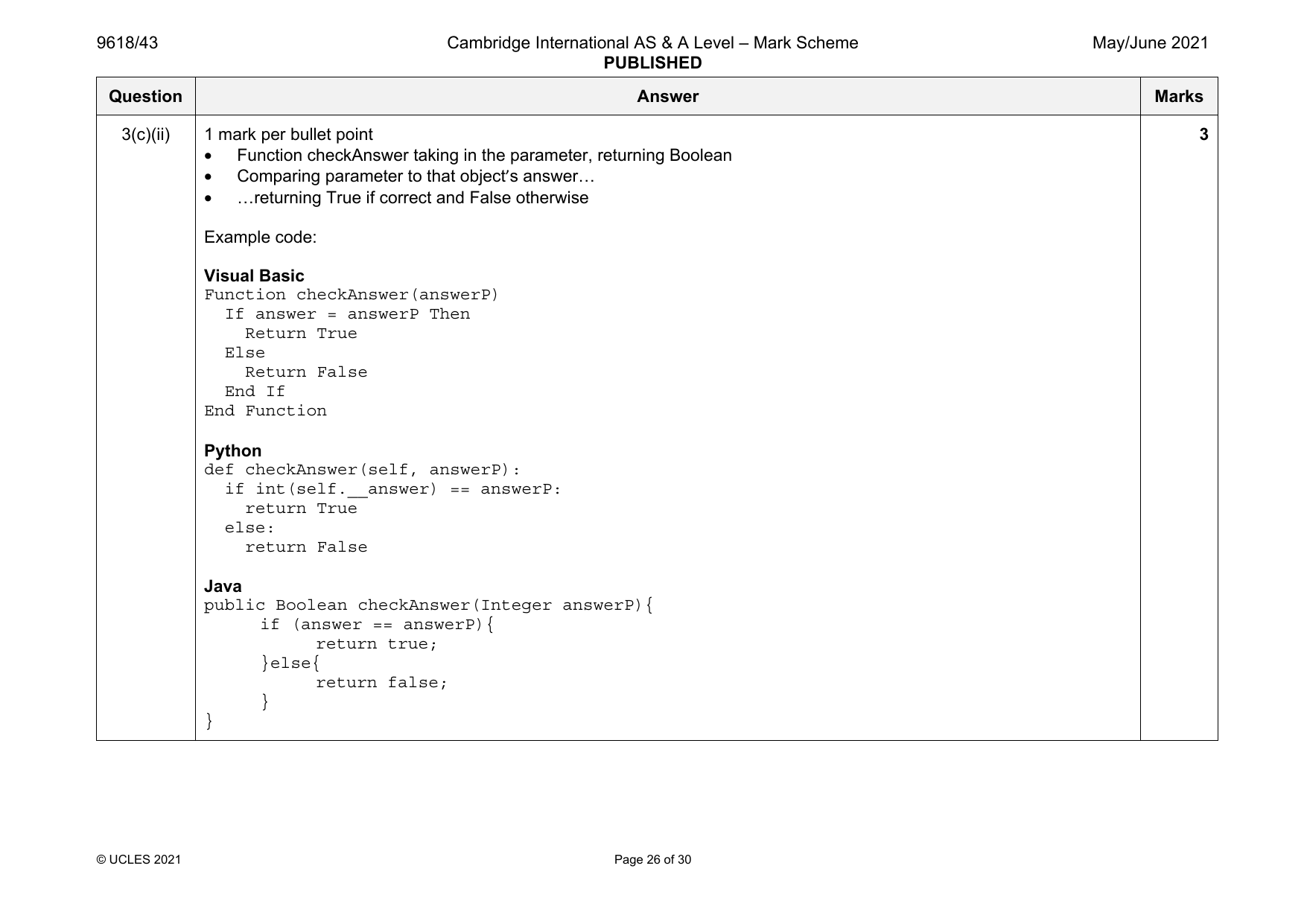
3(c)(ii) 1 mark per bullet point 3
• Function checkAnswer taking in the parameter, returning Boolean
• Comparing parameter to that object’s answer…
• …returning True if correct and False otherwise
Example code:
Visual Basic
Function checkAnswer(answerP)
If answer = answerP Then
Return True
Else
Return False
End If
End Function
Python
def checkAnswer(self, answerP):
if int(self.__answer) == answerP:
return True
else:
return False
Java
public Boolean checkAnswer(Integer answerP){
if (answer == answerP){
return true;
}else{
return false;
}
}
© UCLES 2021 Page 26 of 30
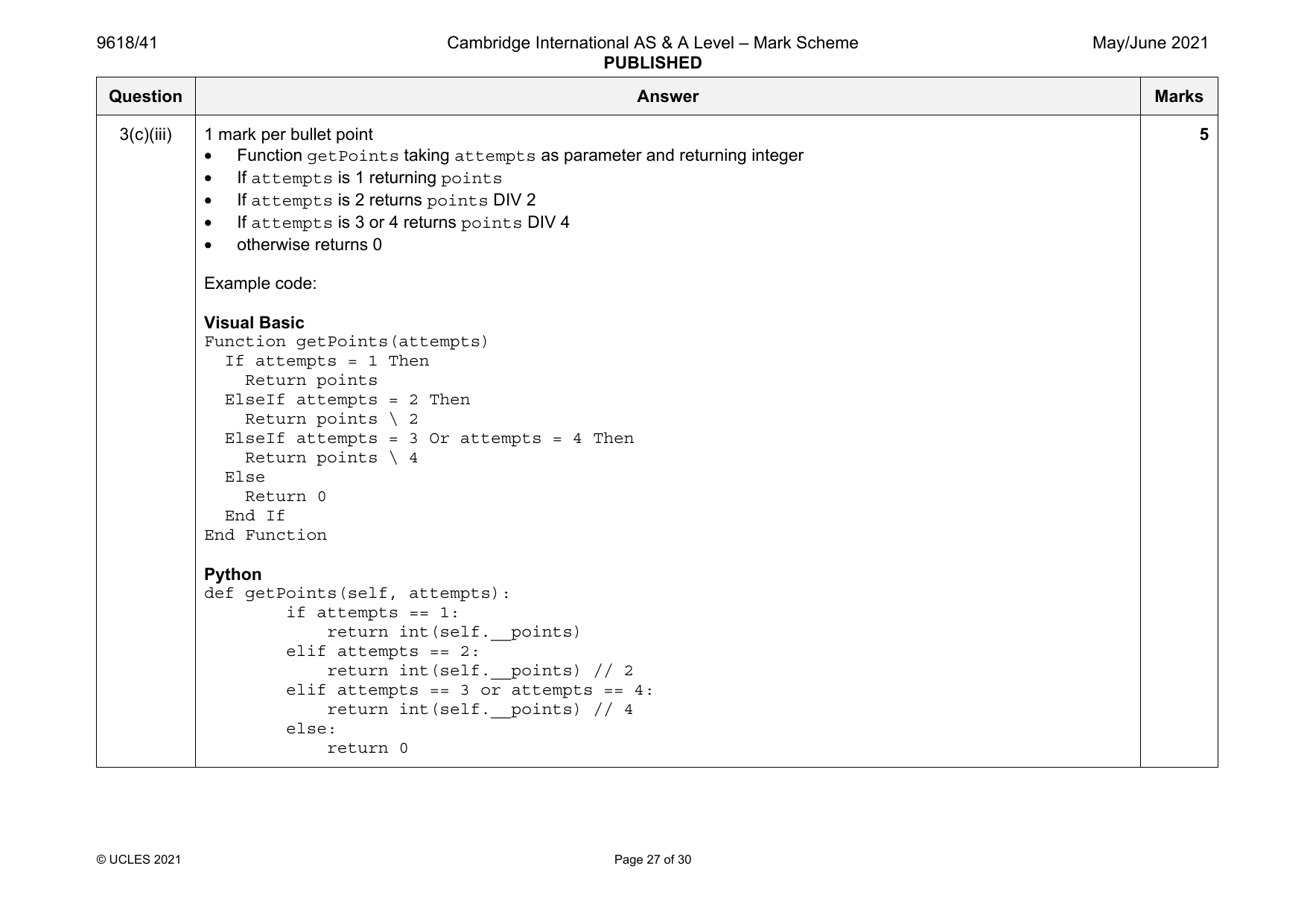
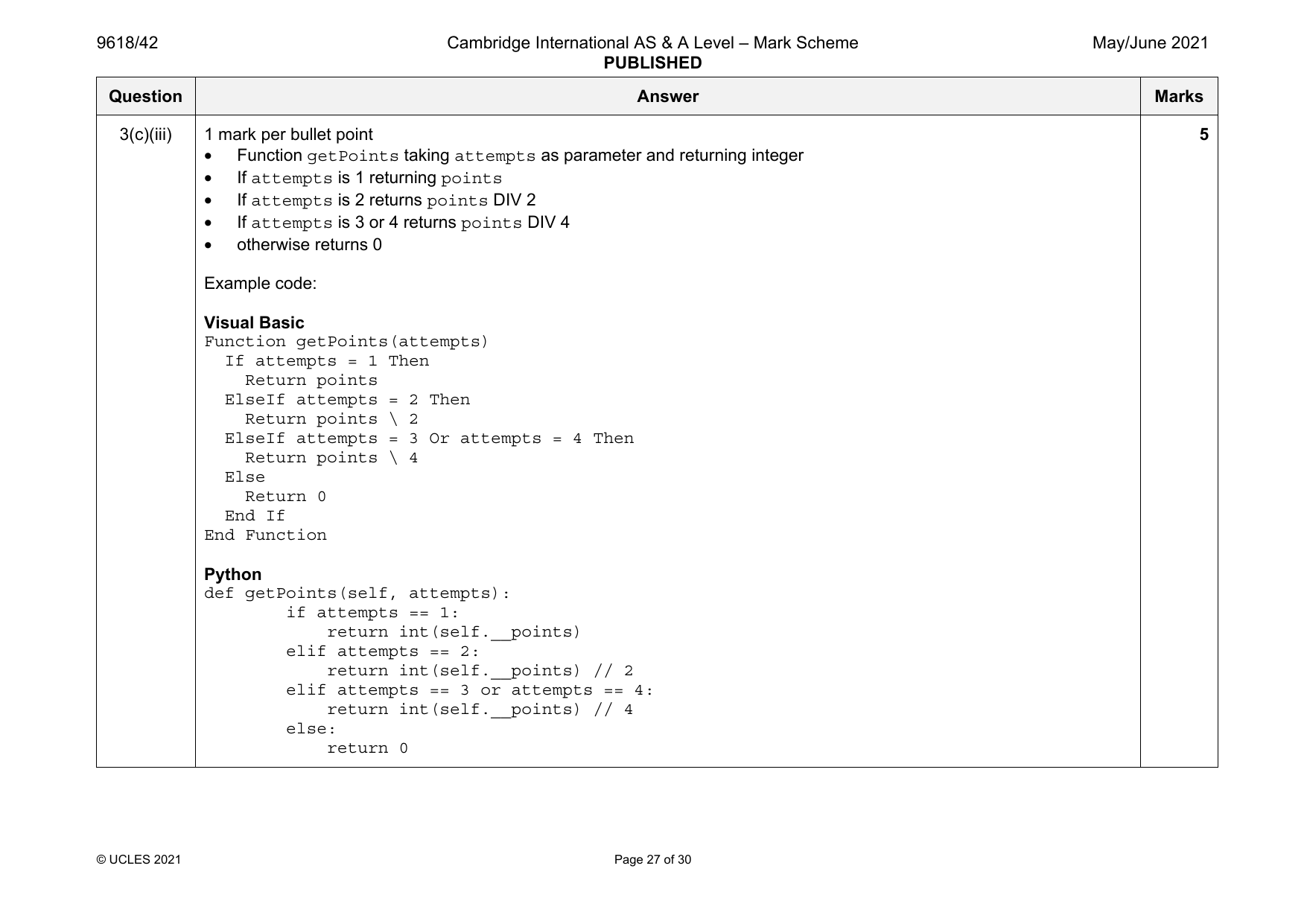
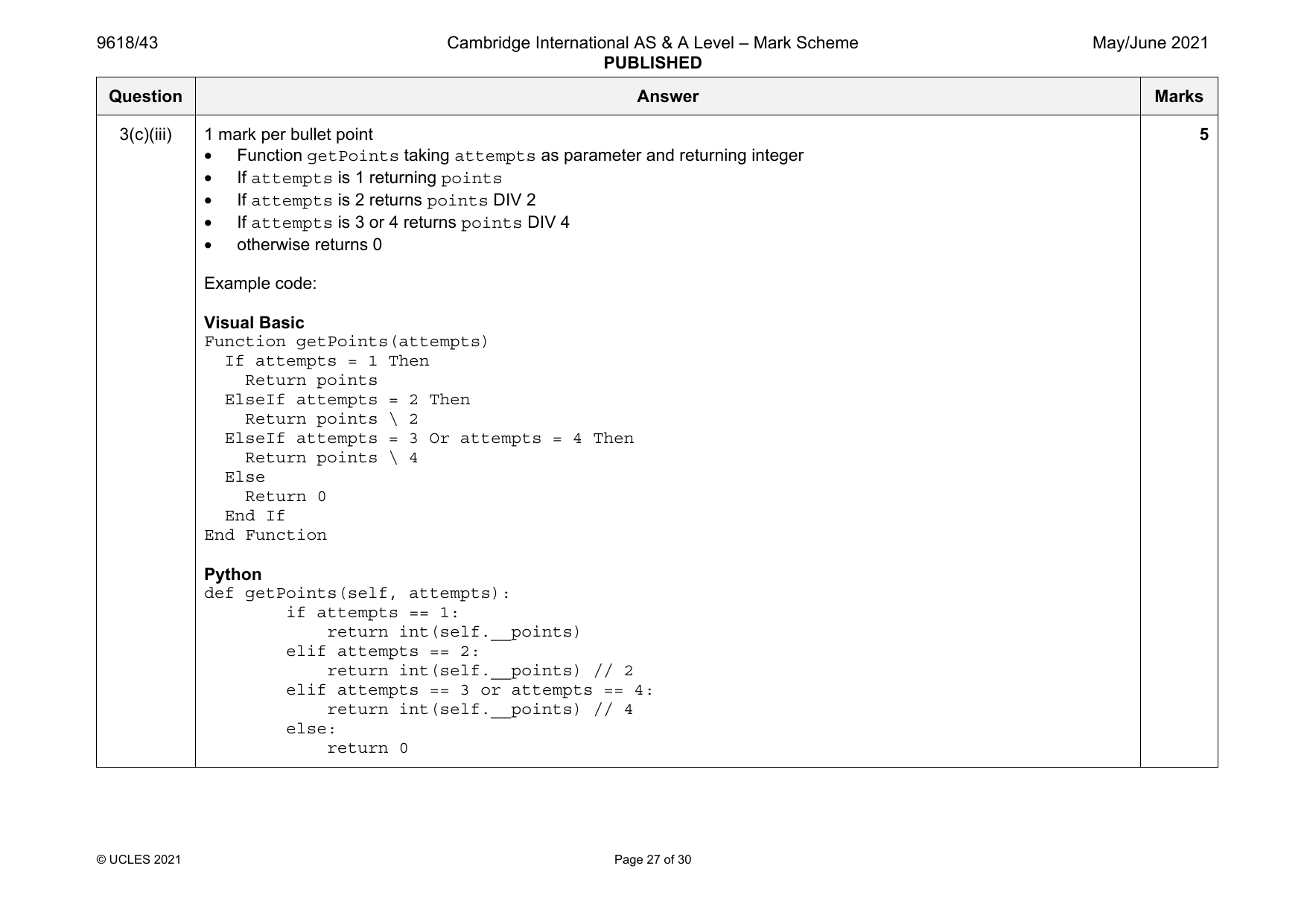
3(c)(iii) 1 mark per bullet point 5
• Function getPoints taking attempts as parameter and returning integer
• If attempts is 1 returning points
• If attempts is 2 returns points DIV 2
• If attempts is 3 or 4 returns points DIV 4
• otherwise returns 0
Example code:
Visual Basic
Function getPoints(attempts)
If attempts = 1 Then
Return points
ElseIf attempts = 2 Then
Return points \ 2
ElseIf attempts = 3 Or attempts = 4 Then
Return points \ 4
Else
Return 0
End If
End Function
Python
def getPoints(self, attempts):
if attempts == 1:
return int(self.__points)
elif attempts == 2:
return int(self.__points) // 2
elif attempts == 3 or attempts == 4:
return int(self.__points) // 4
else:
return 0
© UCLES 2021 Page 27 of 30
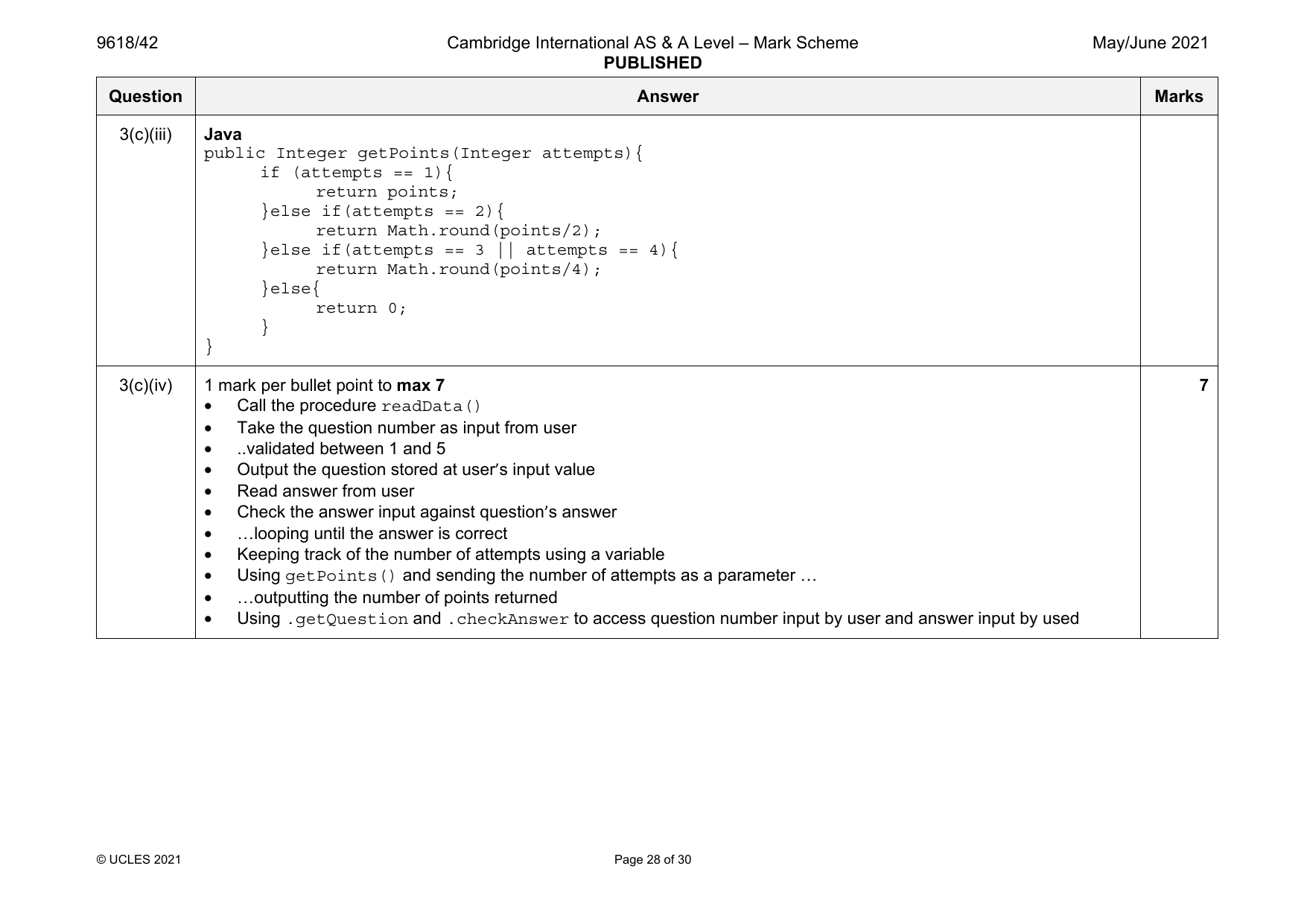
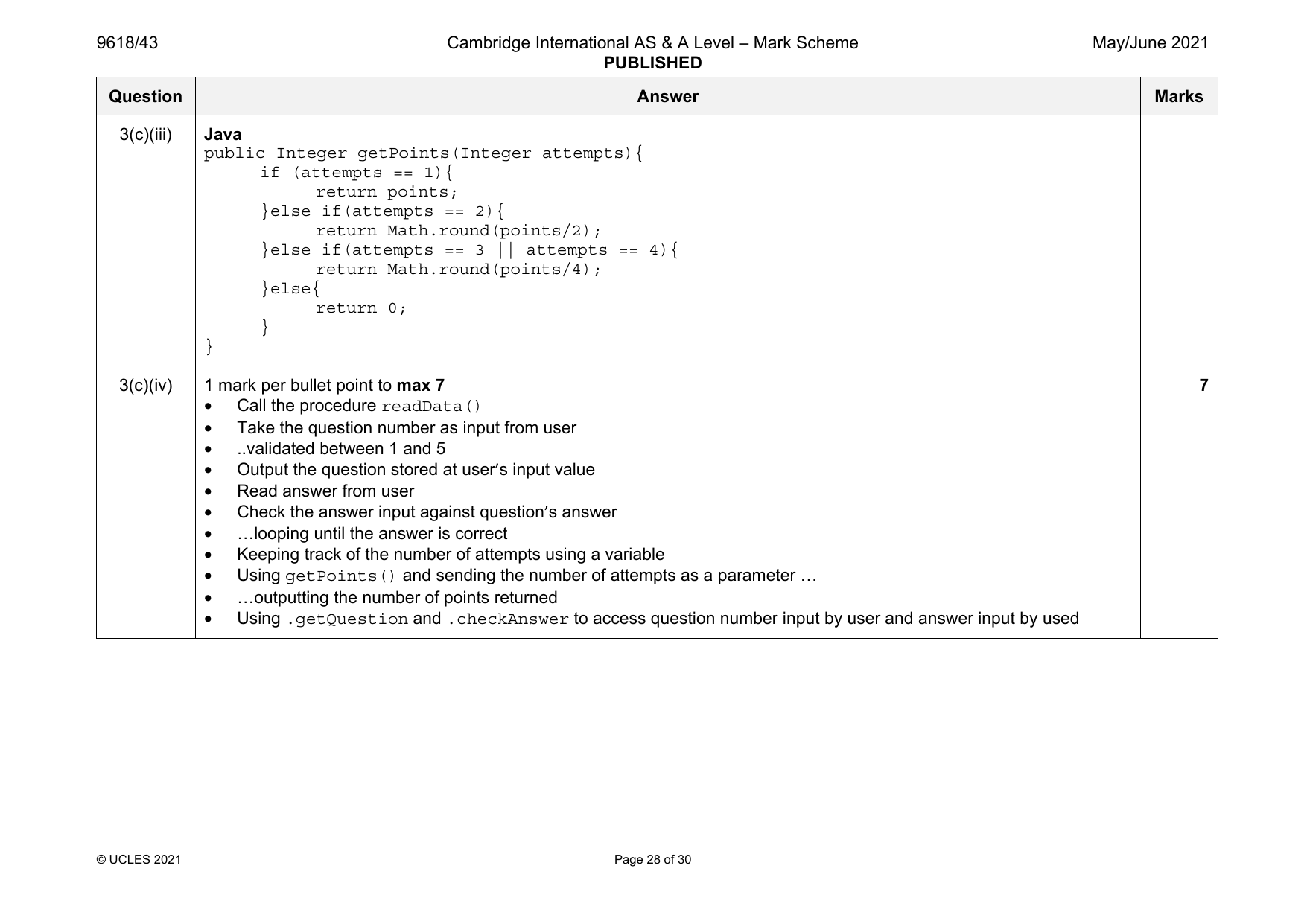
3(c)(iii) Java
public Integer getPoints(Integer attempts){
if (attempts == 1){
return points;
}else if(attempts == 2){
return Math.round(points/2);
}else if(attempts == 3 || attempts == 4){
return Math.round(points/4);
}else{
return 0;
}
}
3(c)(iv) 1 mark per bullet point to max 7 7
• Call the procedure readData()
• Take the question number as input from user
• ..validated between 1 and 5
• Output the question stored at user’s input value
• Read answer from user
• Check the answer input against question’s answer
• …looping until the answer is correct
• Keeping track of the number of attempts using a variable
• Using getPoints() and sending the number of attempts as a parameter …
• …outputting the number of points returned
• Using .getQuestion and .checkAnswer to access question number input by user and answer input by used
© UCLES 2021 Page 28 of 30
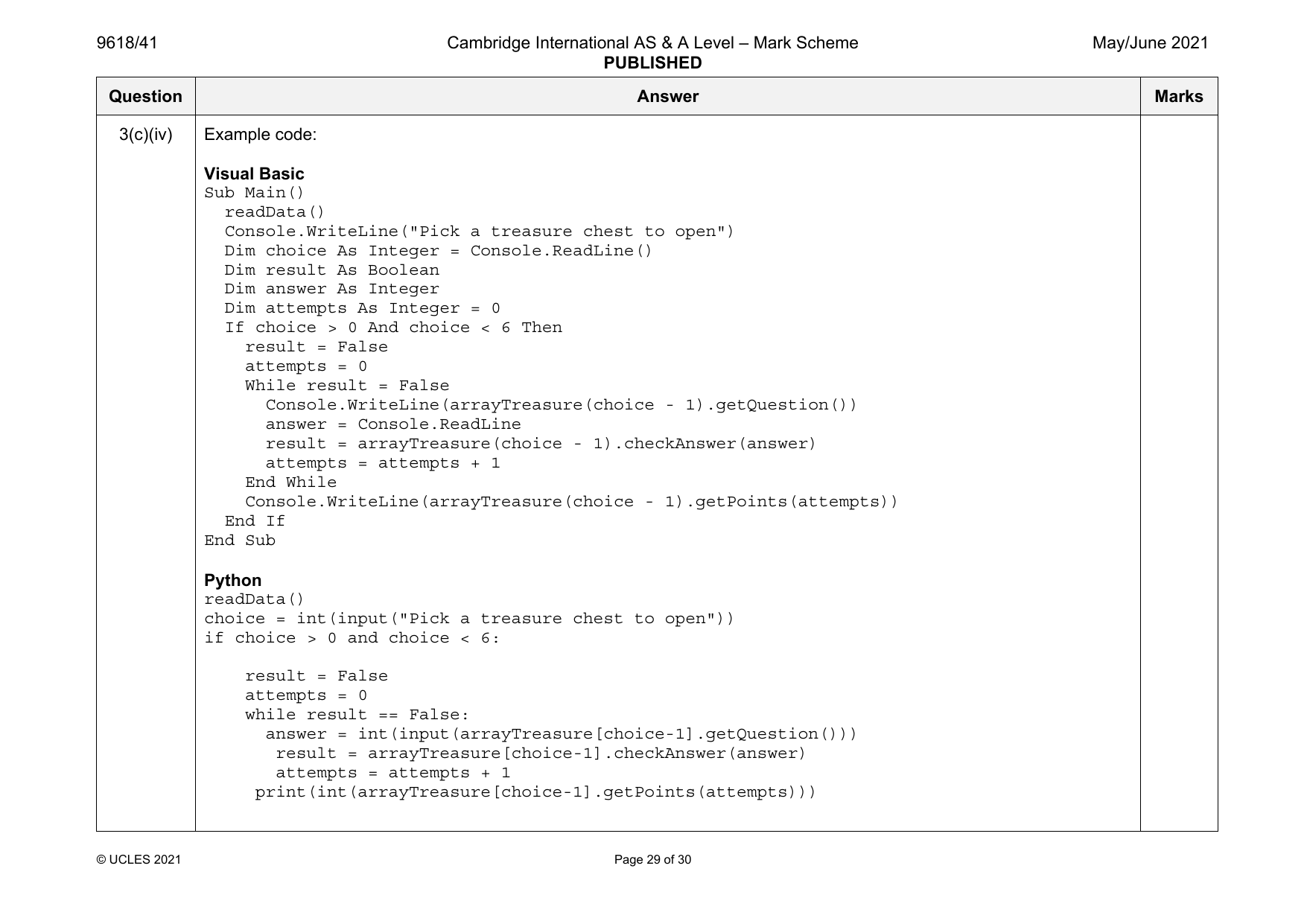
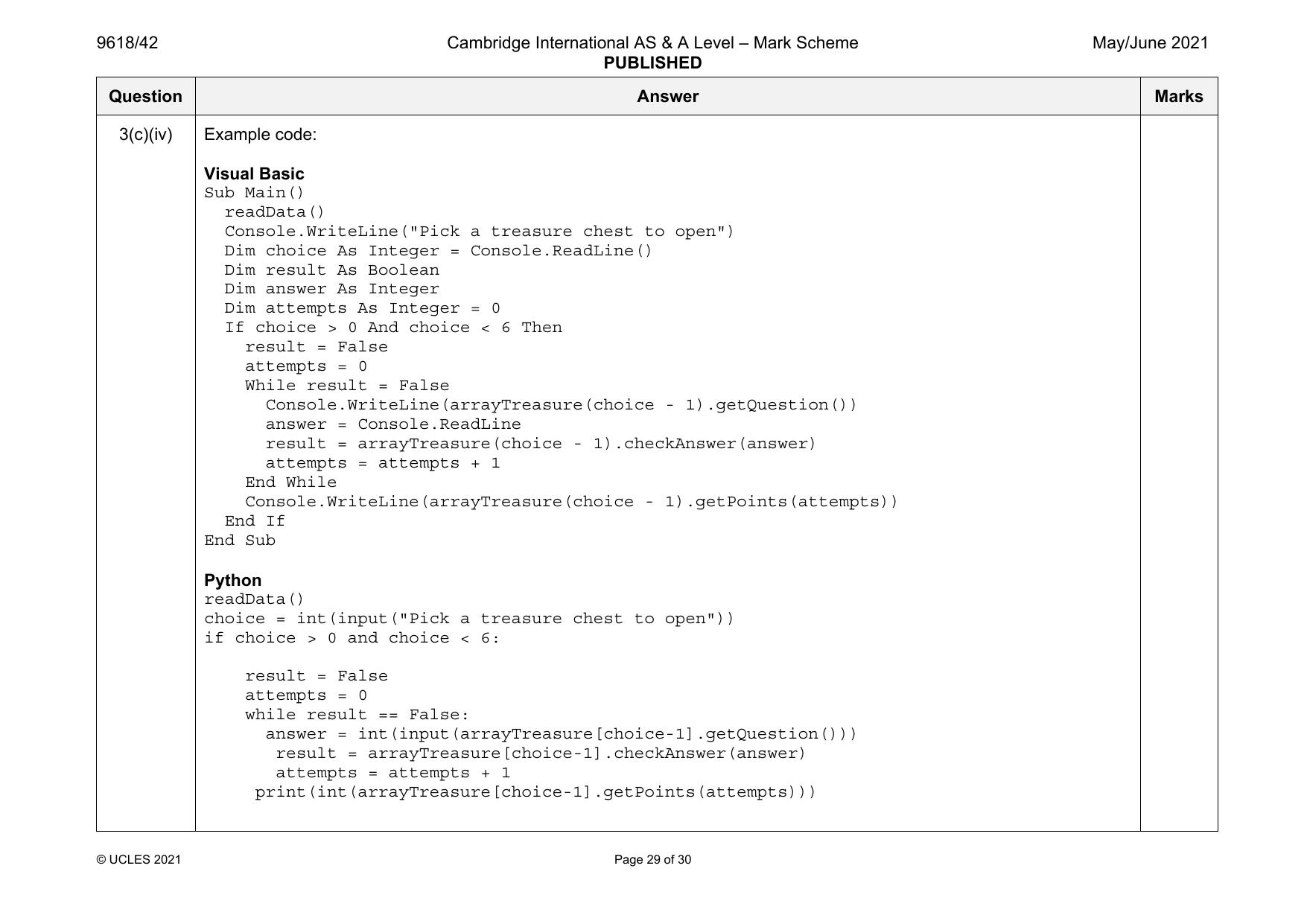
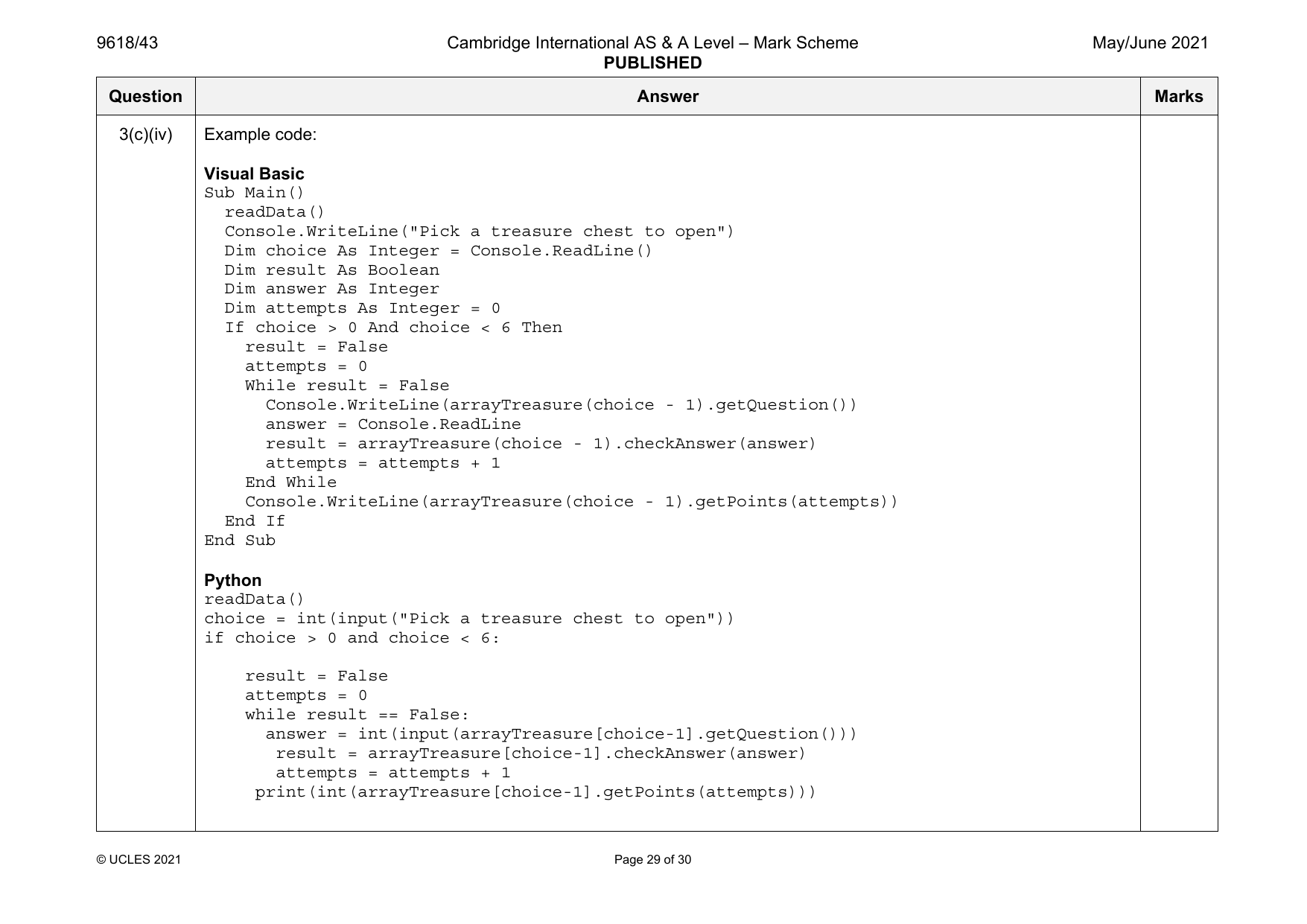
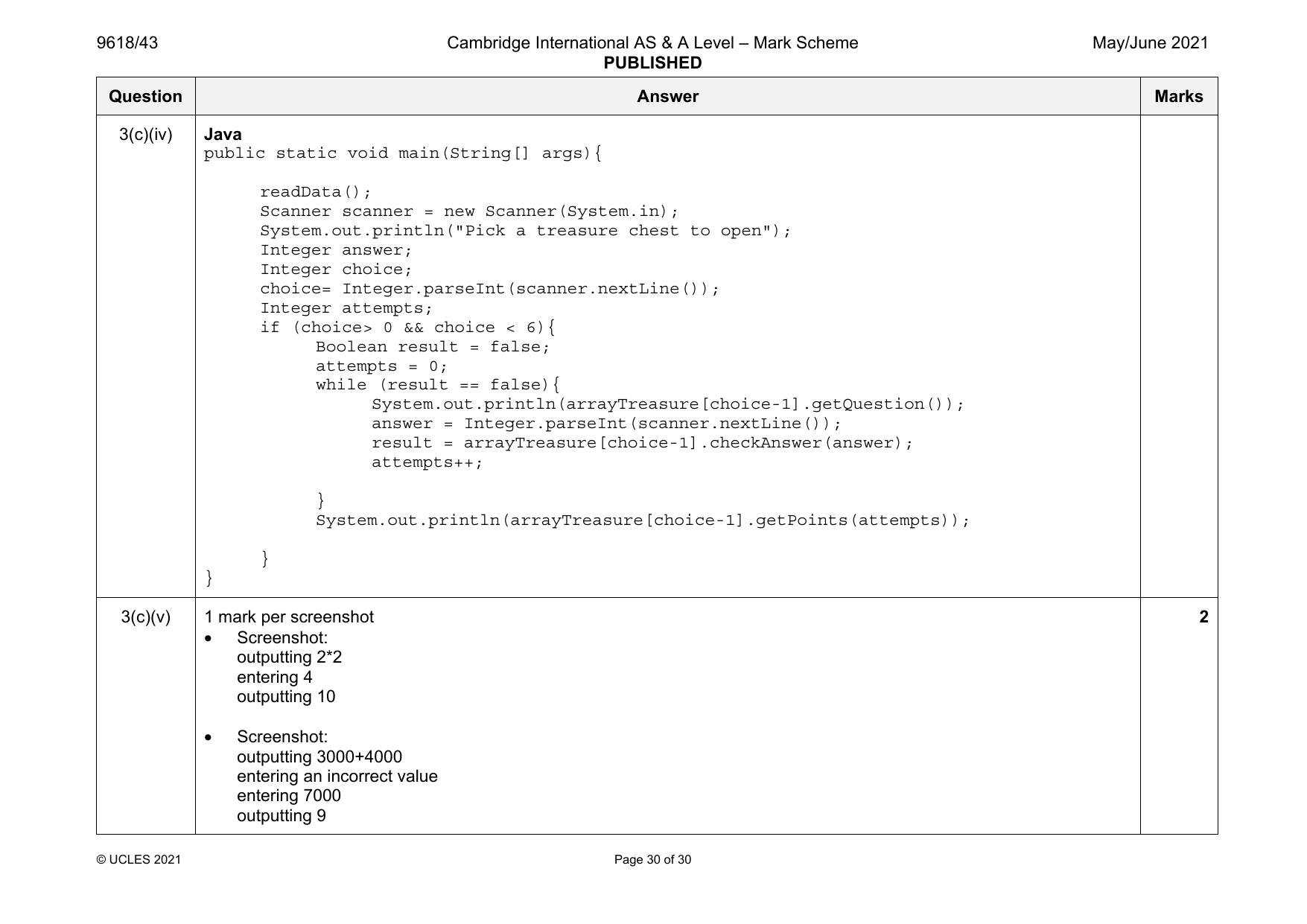
3(c)(iv) Example code:
Visual Basic
Sub Main()
readData()
Console.WriteLine("Pick a treasure chest to open")
Dim choice As Integer = Console.ReadLine()
Dim result As Boolean
Dim answer As Integer
Dim attempts As Integer = 0
If choice > 0 And choice < 6 Then
result = False
attempts = 0
While result = False
Console.WriteLine(arrayTreasure(choice - 1).getQuestion())
answer = Console.ReadLine
result = arrayTreasure(choice - 1).checkAnswer(answer)
attempts = attempts + 1
End While
Console.WriteLine(arrayTreasure(choice - 1).getPoints(attempts))
End If
End Sub
Python
readData()
choice = int(input("Pick a treasure chest to open"))
if choice > 0 and choice < 6:
result = False
attempts = 0
while result == False:
answer = int(input(arrayTreasure[choice-1].getQuestion()))
result = arrayTreasure[choice-1].checkAnswer(answer)
attempts = attempts + 1
print(int(arrayTreasure[choice-1].getPoints(attempts)))
© UCLES 2021 Page 29 of 30
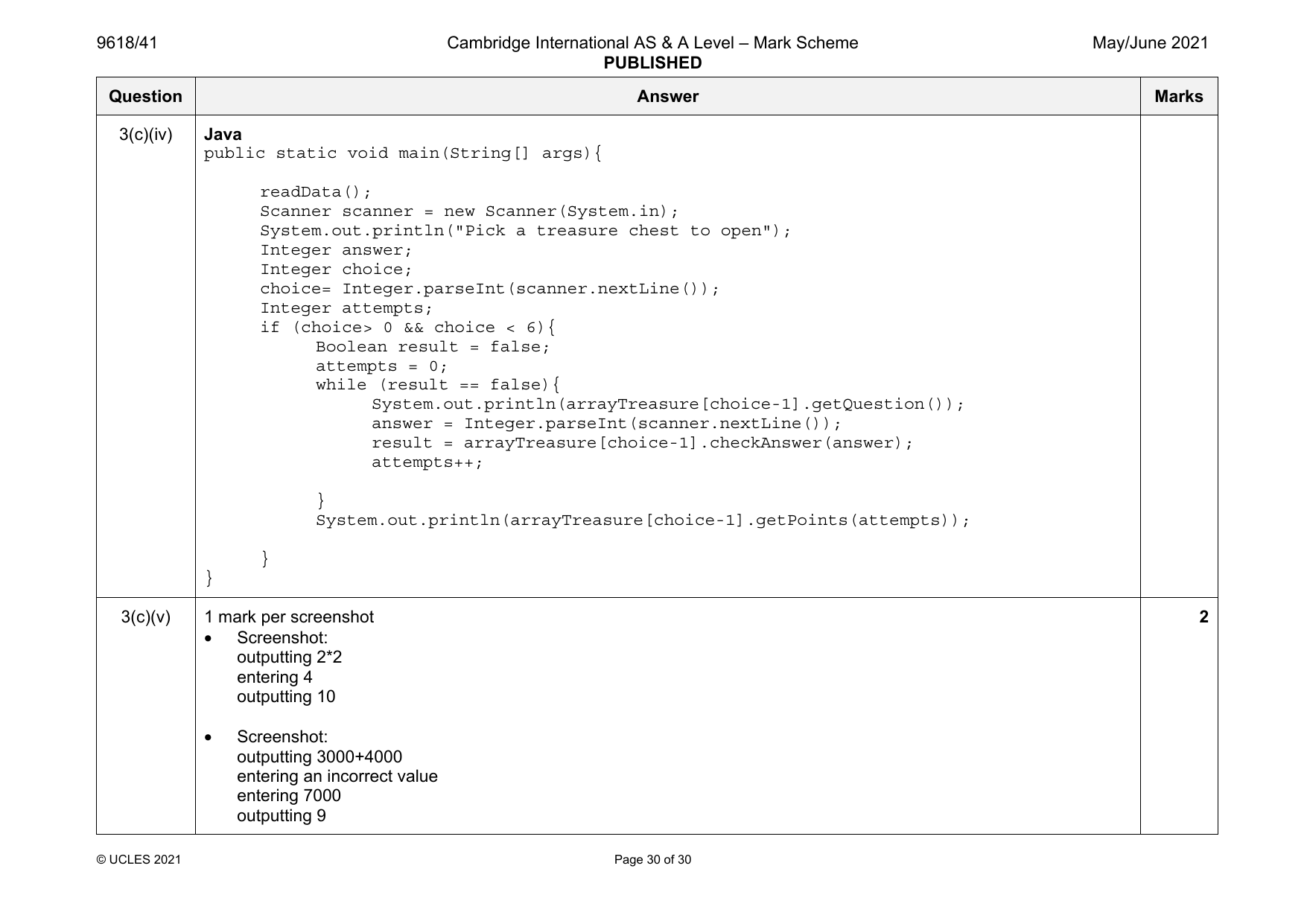
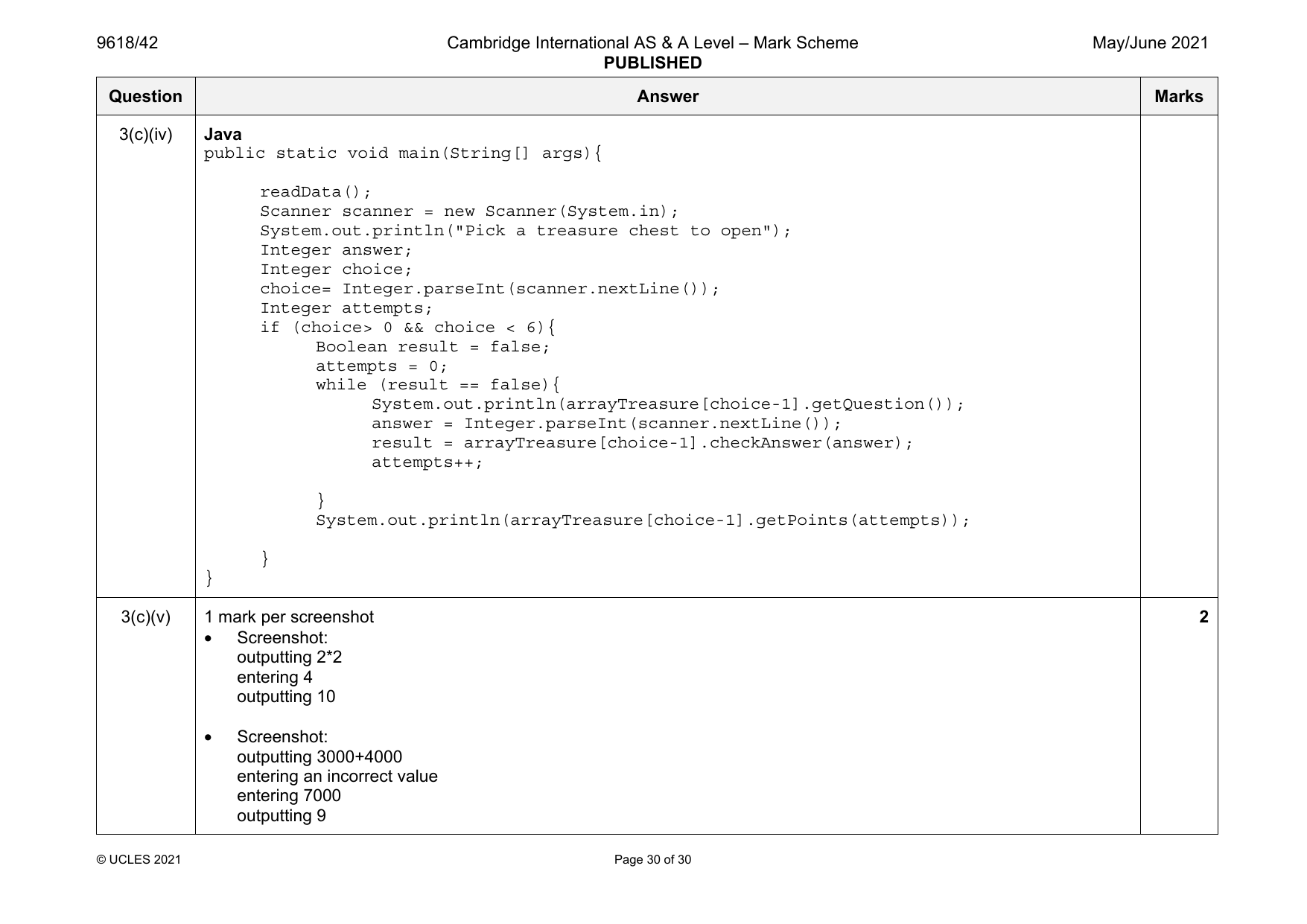
3(c)(iv) Java
public static void main(String[] args){
readData();
Scanner scanner = new Scanner(System.in);
System.out.println("Pick a treasure chest to open");
Integer answer;
Integer choice;
choice= Integer.parseInt(scanner.nextLine());
Integer attempts;
if (choice> 0 && choice < 6){
Boolean result = false;
attempts = 0;
while (result == false){
System.out.println(arrayTreasure[choice-1].getQuestion());
answer = Integer.parseInt(scanner.nextLine());
result = arrayTreasure[choice-1].checkAnswer(answer);
attempts++;
}
System.out.println(arrayTreasure[choice-1].getPoints(attempts));
}
}
3(c)(v) 1 mark per screenshot 2
• Screenshot:
outputting 2*2
entering 4
outputting 10
• Screenshot:
outputting 3000+4000
entering an incorrect value
entering 7000
outputting 9
© UCLES 2021 Page 30 of 30
Official mark scheme pages: 21, 22, 23, 24, 25, 26, 27, 28, 29, 30 · source PDF URL
9618-2021-mj-42-q01
May/June 2021 · Paper 42 · Question 1 · 24 marks
1(a) 1 mark per bullet point 2
• Declaring record/class with name node…
• …declaring data and next node (both as Integers)
Example code:
Visual Basic
Structure node
Dim Data As Integer
Dim nextNode As Integer
End Structure
Python
class node:
def __init__(self, theData, nextNodeNumber):
self. Data = theData
self.nextNode = nextNodeNumber
Java
class node{
private Integer Data;
private Integer nextNode;
public node(Integer dataP, Integer nextNodeP){
this.Data = dataP;
this.nextNode = nextNodeP;
}
}
© UCLES 2021 Page 4 of 30
1(b) 1 mark per bullet point 4
• Declaring array named linkedList with data type node
• Assigning all nodes correctly as record/object nodes …
• …with correct values stored
• declaring startPointer as 0, emptyList as 5
Example code:
Visual Basic
Dim linkedList(9) As node
linkedList(0).data = 1
linkedList(0).nextNode = 1
linkedList(1).data = 5
linkedList(1).nextNode = 4
linkedList(2).data = 6
linkedList(2).nextNode = 7
linkedList(3).data = 7
linkedList(3).nextNode = -1
linkedList(4).data = 2
linkedList(4).nextNode = 2
linkedList(5).data = 0
linkedList(5).nextNode = 6
linkedList(6).data = 0
linkedList(6).nextNode = 8
linkedList(7).data = 56
linkedList(7).nextNode = 3
linkedList(8).data = 0
linkedList(8).nextNode = 9
linkedList(9).data = 0
linkedList(9).nextNode = -1
Dim startPointer As Integer = 0
Dim emptyList As Integer = 5
© UCLES 2021 Page 5 of 30
1(b) Python
linkedList = [node(1,1),node(5,4),node(6,7),node(7,-1),node(2,2),node(0,6),
node(0,8),node(56,3),node(0,9),node(0,-1)]
startPointer = 0
emptyList = 5
Java
public static void main(String[] args){
node[] linkedList = new node[10];
linkedList[0] = new node(1,1);
linkedList[1] = new node(5, 4);
linkedList[2] = new node(6, 7);
linkedList[3] = new node(7,-1);
linkedList[4] = new node(2,2);
linkedList[5] = new node(0,6);
linkedList[6] = new node(0,8);
linkedList[7] = new node(56, 3);
linkedList[8] = new node(0,9);
linkedList[9] = new node(0,-1);
Integer startPointer = 0;
Integer emptyList = 5;
}
© UCLES 2021 Page 6 of 30
1(c)(i) 1 mark per bullet point 6
• Procedure outputNodes …
• …taking linked list and start pointer as parameters
• Looping until nextNode/pointer is –1
• Outputting the node data in the correct order, i.e. following pointers
• Updating pointer to current node’s nextNode
• Using the correct record/class field/properties throughout
Example code:
Visual Basic
Sub outputNodes(ByRef linkedList, ByVal currentPointer)
While (currentPointer <> -1)
Console.WriteLine(linkedList(currentPointer).data)
currentPointer = linkedList(currentPointer).nextNode
End While
End Sub
Python
def outputNodes(linkedList, currentPointer):
while(currentPointer != -1):
print(str(linkedList[currentPointer].data))
currentPointer = linkedList[currentPointer].nextNode
Java
public static void outputNodes(node[] linkedList, Integer currentPointer){
while(currentPointer != -1){
System.out.println(linkedList[currentPointer].data);
currentPointer = linkedList[currentPointer].nextNode;
}
}
© UCLES 2021 Page 7 of 30
1(c)(ii) Screenshot showing: 1
1
5
Official mark scheme pages: 4, 5, 6, 7, 8 · source PDF URL
9618-2021-mj-42-q02
May/June 2021 · Paper 42 · Question 2 · 20 marks
2
6
56
7
1(d)(i) 1 mark per bullet point to max 7 7
• Function taking list and both pointers as parameters
• Taking (integer) data as input
• Checking if list is full …
• … and returning False
• Insert the input data to the empty list node’s data
• Following pointers to find last node in Linked List …
• …and updating last node’s pointer to empty list/location where new node is added
• Updating empty list to it’s first elements pointer
• Returning true when added successfully
Example code:
Visual Basic
Function addNode(ByRef linkedList() As node, ByVal currentPointer As Integer, ByRef
emptyList As Integer)
Console.WriteLine("Enter the data to add")
Dim dataToAdd As Integer = Console.ReadLine()
Dim previousPointer As Integer = 0
Dim newNode As node
If emptyList < 0 Or emptyList > 9 Then
Return False
Else
newNode.data = dataToAdd
newNode.nextNode = -1
© UCLES 2021 Page 8 of 30
9618/42 Cambridge International AS & A Level – Mark Scheme May/June 2021
PUBLISHED
Question Answer Marks
1(d)(i) linkedList(emptyList) = newNode
previousPointer = 0
While (currentPointer <> -1)
previousPointer = currentPointer
currentPointer = linkedList(currentPointer).nextNode
End While
Dim valueToWrite As Integer = emptyList
linkedList(previousPointer).nextNode = valueToWrite
emptyList = linkedList(emptyList).nextNode
Return True
End If
End Function
Python
def addNode(linkedList, currentPointer, emptyList):
dataToAdd = input("Enter the data to add")
if emptyList <0 or emptyList > 9:
return False
else:
newNode = node(int(dataToAdd), -1)
linkedList[emptyList] = (newNode)
previousPointer = 0
while(currentPointer != -1):
previousPointer = currentPointer
currentPointer = linkedList[currentPointer].nextNode
linkedList[previousPointer].nextNode = emptyList
emptyList = linkedList[emptyList].nextNode
return True
© UCLES 2021 Page 9 of 30
9618/42 Cambridge International AS & A Level – Mark Scheme May/June 2021
PUBLISHED
Question Answer Marks
1(d)(i) Java
public static Boolean addNode(node[] linkedList, Integer currentPointer,
Integer emptyList){
Integer dataToAdd;
Integer previousPointer;
node newNode;
Scanner in = new Scanner(System.in);
System.out.println("Enter the data to add");
dataToAdd = in.nextInt();
if(emptyList < 0 || emptyList > 9){
return false;
}else{
newNode = new node(dataToAdd, -1);
linkedList[emptyList] = newNode;
previousPointer = 0;
while(currentPointer != -1){
previousPointer = currentPointer;
currentPointer = linkedList[currentPointer].nextNode;
}
linkedList[previousPointer].nextNode = emptyList;
emptyList = linkedList[emptyList].nextNode;
return true;
}
}
© UCLES 2021 Page 10 of 30
9618/42 Cambridge International AS & A Level – Mark Scheme May/June 2021
PUBLISHED
Question Answer Marks
1(d)(ii) 1 mark per bullet point 3
• Call addNode() with list, start and empty pointers and store/check return value …
• …output appropriate message if True returned and if False returned
• Calling outputNodes() with list and start pointer before and after addNode()
Example code:
Visual Basic
Sub Main()
Dim linkedList(10) As node
linkedList(0).data = 1
linkedList(0).nextNode = 1
linkedList(1).data = 5
linkedList(1).nextNode = 4
linkedList(2).data = 6
linkedList(2).nextNode = 7
linkedList(3).data = 7
linkedList(3).nextNode = -1
linkedList(4).data = 2
linkedList(4).nextNode = 2
linkedList(5).data = -1
linkedList(5).nextNode = 6
linkedList(6).data = -1
linkedList(6).nextNode = 7
linkedList(7).data = 56
linkedList(7).nextNode = 3
linkedList(8).data = -1
linkedList(8).nextNode = 9
linkedList(9).data = -1
linkedList(9).nextNode = -1
Dim startPointer As Integer = 0
Dim emptyList As Integer = 5
outputNodes(linkedList, startPointer)
Dim returnValue As Boolean
returnValue = addNode(linkedList, startPointer,
emptyList)
© UCLES 2021 Page 11 of 30
9618/42 Cambridge International AS & A Level – Mark Scheme May/June 2021
PUBLISHED
Question Answer Marks
1(d)(ii) If returnValue = True Then
Console.WriteLine("Item successfully added")
Else
Console.WriteLine("Item not added, list full")
End If
outputNodes(linkedList, startPointer)
Console.ReadLine()
End Sub
Python
linkedList = [node(1,1),node(5,4),node(6,7),node(7,-1),node(2,2),node(-1,6),
node(-1,7),node(56,3),node(-1,9),node(-1,-1)]
startPointer = 0
emptyList = 5
outputNodes(linkedList, startPointer)
returnValue = addNode(linkedList, startPointer, emptyList)
if returnValue == True:
print("Item successfully added")
else:
print("Item not added, list full")
outputNodes(linkedList, startPointer)
Java
public static void main(String[] args){
node[] linkedList = new node[10];
linkedList[0] = new node(1,1);
linkedList[1] = new node(5, 4);
linkedList[2] = new node(6, 7);
linkedList[3] = new node(7,-1);
linkedList[4] = new node(2,2);
linkedList[5] = new node(-1,6);
linkedList[6] = new node(-1,7);
linkedList[7] = new node(56, 3);
linkedList[8] = new node(-1,9);
© UCLES 2021 Page 12 of 30
2
6
56
7
5 (being input)
1
5
2
6
56
7
5
© UCLES 2021 Page 13 of 30
2(a) 1 mark per bullet point 2
• Array with identifier arrayData
• correct 10 data items added
Example code:
Visual Basic
Dim arrayData(9) As Integer
Sub Main()
arrayData(0) = 10
arrayData(1) = 5
arrayData(2) = 6
arrayData(3) = 7
arrayData(4) = 1
arrayData(5) = 12
arrayData(6) = 13
arrayData(7) = 15
arrayData(8) = 21
arrayData(9) = 8
End Sub
Python
arrayData = [10, 5, 6, 7, 1, 12, 13, 15, 21, 8]
Java
int[] arrayData = new int[];
public static void main(String[] args){
arrayData[0] = 10;
arrayData[1] = 5;
arrayData[2] = 6;
arrayData[3] = 7;
arrayData[4] = 1;
arrayData[5] = 12;
arrayData[6] = 13;
© UCLES 2021 Page 14 of 30
2(a) arrayData[7] = 15;
arrayData[8] = 21;
arrayData[9] = 8;
}
2(b)(i) 1 mark per bullet point 6
• function linearSearch with correct identifier
• …taking integer search value as a parameter
• Searching 10 times/through all array elements …
• …comparing each element to search value
• returning True if found
• returning False if not found
Example code:
Visual Basic
Function linearSearch(ByRef searchValue As Integer)
For x = 0 To 9
If arrayData(x) = searchValue Then
Return True
End If
Next
Return False
End Function
© UCLES 2021 Page 15 of 30
2(b)(i) Python
def linearSearch(searchValue):
for x in range(0, 10):
if arrayData[x] == searchValue:
return True
return False
Java
public static Boolean linearSearch(Integer searchValue){
for (int x = 0; x < 10; x++){
if(arrayData[x] == searchValue){
return true;
}
}
return false;
}
© UCLES 2021 Page 16 of 30
2(b)(ii) 1 mark per bullet point to max 4 4
• Taking value as input…
• …checking/casting to Integer
• Calling linearSearch and sending input as parameter
• Storing and checking return value…
• …outputting appropriate message if found and if not found
Example code:
Visual Basic
Dim arrayData(10) As Integer
Sub Main()
arrayData(0) = 10
arrayData(1) = 5
arrayData(2) = 6
arrayData(3) = 7
arrayData(4) = 1
arrayData(5) = 12
arrayData(6) = 13
arrayData(7) = 15
arrayData(8) = 12
arrayData(9) = 8
Console.WriteLine("Enter a number to search for")
Dim searchValue As Integer = Console.ReadLine()
Dim returnValue As Boolean = linearSearch(searchValue)
If returnValue = True Then
Console.WriteLine("Found it")
Else
Console.WriteLine("Didn't find it")
End If
End Sub
© UCLES 2021 Page 17 of 30
2(b)(ii) Python
arrayData = [10, 5, 6, 7, 1, 12, 13, 15, 21, 8]
searchValue = int(input("Enter the number to search for"))
returnValue = linearSearch(searchValue)
if returnValue == True:
print("It was found")
else:
print("It was not found")
Java
Integer[] arrayData = new Integer[10];
public static void main(String[] args){
arrayData[0] = 10;
arrayData[1] = 5;
arrayData[2] = 6;
arrayData[3] = 7;
arrayData[4] = 1;
arrayData[5] = 12;
arrayData[6] = 13;
arrayData[7] = 15;
arrayData[8] = 12;
arrayData[9] = 8;
System.out.println("Enter the number to search for");
Integer searchValue;
Scanner in = new Scanner(System.in);
searchValue = in.nextInt();
Boolean returnValue;
returnValue = linearSearch(searchValue);
if (returnValue == true){
System.out.println("It was found");
}else{
System.out.println("It was not found");
}
}
© UCLES 2021 Page 18 of 30
2(b)(iii) 1 mark for screenshot showing input and output for number found 2
1 mark for screenshot showing input and output for number not found
2(c) 1 mark per bullet point 6
• Correct outer loop stop
• Correct inner loop stop
• Correct < in the IF
• Correct theArray(y + 1)
• Correct temp
• Remainder matching pseudocode
Example code:
Visual Basic
Sub bubbleSort()
Dim temp As Integer = 0
For x = 0 To 9
For y = 0 To 8
If theArray(y) < theArray(y + 1) Then
temp = theArray(y)
theArray(y) = theArray(y + 1)
theArray(y + 1) = temp
End If
Next
Next
End Sub
© UCLES 2021 Page 19 of 30
2(c) Python
def bubbleSort():
for x in range (0, 10):
for y in range(0, 9):
if theArray[y] < theArray[y + 1]:
temp = theArray[y]
theArray[y] = theArray[y + 1]
theArray[y + 1] = temp
Java
public static void bubbleSort(){
int temp;
for (int x = 0; x < 10; x++){
for (int y = 0; y < 9; y++){
if(theArray[y] < theArray[y+1]){
temp = theArray[y];
theArray[y] = theArray[y+1];
theArray[y+1] = temp;
}
}
}
}
© UCLES 2021 Page 20 of 30
Official mark scheme pages: 8, 9, 10, 11, 12, 13, 14, 15, 16, 17, 18, 19, 20 · source PDF URL
9618-2021-mj-42-q03
May/June 2021 · Paper 42 · Question 3 · 31 marks
3(a) 1 mark per bullet point 5
• Class named treasureChest and end
• Question declared as string as a class attribute
• Answer declared as integer as a class attribute
• Points declared as integer as a class attribute
• All 3 attributes are private
Example code:
Visual Basic
Class treasureChest
Private question As String
Private answer As Integer
Private points As Integer
Sub New(questionP, answerP, pointsP)
question = questionP
answer = answerP
points = pointsP
End Sub
End Class
Python
class treasureChest:
#Private question : String
#Private answer : Integer
#Private points : Integer
def __init__(self, questionP, answerP, pointsP):
self.__question = questionP
self.__answer = answerP
self.__points = points
© UCLES 2021 Page 21 of 30
3(a) Java
import java.util.Scanner;
class treasureChest{
private String question;
private Integer answer;
private Integer points;
public treasureChest(String questionP, Integer answerP, Integer pointsP){
question = questionP;
answer = answerP;
points = pointsP;
}
}
3(b) 1 mark per bullet point to max 8 8
• procedure declared as readData
• declare array arrayTreasure with 4 elements type treasureChest
• opening correct file for read
• looping until EOF/5 questions …
• …reading in and storing each group of 3 lines appropriately
• creating object of type treasureChest …
• …with question, answer and points from file as parameters
• ..adding to next array element/appending
• … repeatedly for all 5 questions in correct order
• Use of appropriate exception handler…
• …appropriate output if file not found
• Closing correct file
© UCLES 2021 Page 22 of 30
3(b) Example code:
Visual Basic
Sub readData()
Dim arrayTreasure(4) as treasureChest
Dim filename As String = "treasureChestData.txt"
Try
Dim fileReader As New System.IO.StreamReader(filename)
Dim question As String
Dim answer, points As Integer
Dim numberQuestions as Integer = 0
While fileReader.Peek <> -1
question = fileReader.ReadLine()
answer = fileReader.ReadLine()
points = fileReader.ReadLine()
arrayTreasure(numberQuestions) = New treasureChest(question, answer, points)
numberQuestions += 1
End While
fileReader.Close()
Catch ex As Exception
Console.WriteLine("Invalid file")
End Try
End Sub
Python
# arrayTreasure(5) as treasureChest
def readData():
filename = "treasureChestData.txt"
try:
file= open(filename,"r")
dataFetched = (file.readline()).strip()
while(dataFetched != "" ):
question = dataFetched
answer = (file.readline()).strip()
© UCLES 2021 Page 23 of 30
3(b) points = (file.readline()).strip()
arrayTreasure.append(treasureChest(question, answer, points))
dataFetched = (file.readline()).strip()
file.close()
except IOError:
print("Could not find file")
Java
public static void readData(){
treasureChest[] arrayTreasure = new treasureChest[5]:
String filename = "treasureChestData.txt";
String dataRead;
String question;
String answer;
String points;
Integer numberQuestions = 0;
try{
FileReader f = new FileReader(filename);
BufferedReader reader = new BufferedReader(f);
dataRead = reader.readLine();
while (dataRead != null){
question = dataRead;
answer = reader.readLine();
points = reader.readLine();
arrayTreasure[numberQuestions] = new treasureChest(question,
Integer.parseInt(answer), Integer.parseInt(points));
numberQuestions++;
dataRead = reader.readLine();
}
reader.close();
}
© UCLES 2021 Page 24 of 30
3(b) catch(FileNotFoundException ex){
System.out.println("No file found");
}
catch(IOException ex){
System.out.println("No file found");
}
}
3(c)(i) 1 mark for getQuestion returning the value of question 1
Example code:
Visual Basic
Function getQuestion()
Return question
End Function
Python
def getQuestion(self):
return self.__question
Java
public String getQuestion(){
return question;
}
© UCLES 2021 Page 25 of 30
3(c)(ii) 1 mark per bullet point 3
• Function checkAnswer taking in the parameter, returning Boolean
• Comparing parameter to that object’s answer…
• …returning True if correct and False otherwise
Example code:
Visual Basic
Function checkAnswer(answerP)
If answer = answerP Then
Return True
Else
Return False
End If
End Function
Python
def checkAnswer(self, answerP):
if int(self.__answer) == answerP:
return True
else:
return False
Java
public Boolean checkAnswer(Integer answerP){
if (answer == answerP){
return true;
}else{
return false;
}
}
© UCLES 2021 Page 26 of 30
3(c)(iii) 1 mark per bullet point 5
• Function getPoints taking attempts as parameter and returning integer
• If attempts is 1 returning points
• If attempts is 2 returns points DIV 2
• If attempts is 3 or 4 returns points DIV 4
• otherwise returns 0
Example code:
Visual Basic
Function getPoints(attempts)
If attempts = 1 Then
Return points
ElseIf attempts = 2 Then
Return points \ 2
ElseIf attempts = 3 Or attempts = 4 Then
Return points \ 4
Else
Return 0
End If
End Function
Python
def getPoints(self, attempts):
if attempts == 1:
return int(self.__points)
elif attempts == 2:
return int(self.__points) // 2
elif attempts == 3 or attempts == 4:
return int(self.__points) // 4
else:
return 0
© UCLES 2021 Page 27 of 30
3(c)(iii) Java
public Integer getPoints(Integer attempts){
if (attempts == 1){
return points;
}else if(attempts == 2){
return Math.round(points/2);
}else if(attempts == 3 || attempts == 4){
return Math.round(points/4);
}else{
return 0;
}
}
3(c)(iv) 1 mark per bullet point to max 7 7
• Call the procedure readData()
• Take the question number as input from user
• ..validated between 1 and 5
• Output the question stored at user’s input value
• Read answer from user
• Check the answer input against question’s answer
• …looping until the answer is correct
• Keeping track of the number of attempts using a variable
• Using getPoints() and sending the number of attempts as a parameter …
• …outputting the number of points returned
• Using .getQuestion and .checkAnswer to access question number input by user and answer input by used
© UCLES 2021 Page 28 of 30
3(c)(iv) Example code:
Visual Basic
Sub Main()
readData()
Console.WriteLine("Pick a treasure chest to open")
Dim choice As Integer = Console.ReadLine()
Dim result As Boolean
Dim answer As Integer
Dim attempts As Integer = 0
If choice > 0 And choice < 6 Then
result = False
attempts = 0
While result = False
Console.WriteLine(arrayTreasure(choice - 1).getQuestion())
answer = Console.ReadLine
result = arrayTreasure(choice - 1).checkAnswer(answer)
attempts = attempts + 1
End While
Console.WriteLine(arrayTreasure(choice - 1).getPoints(attempts))
End If
End Sub
Python
readData()
choice = int(input("Pick a treasure chest to open"))
if choice > 0 and choice < 6:
result = False
attempts = 0
while result == False:
answer = int(input(arrayTreasure[choice-1].getQuestion()))
result = arrayTreasure[choice-1].checkAnswer(answer)
attempts = attempts + 1
print(int(arrayTreasure[choice-1].getPoints(attempts)))
© UCLES 2021 Page 29 of 30
3(c)(iv) Java
public static void main(String[] args){
readData();
Scanner scanner = new Scanner(System.in);
System.out.println("Pick a treasure chest to open");
Integer answer;
Integer choice;
choice= Integer.parseInt(scanner.nextLine());
Integer attempts;
if (choice> 0 && choice < 6){
Boolean result = false;
attempts = 0;
while (result == false){
System.out.println(arrayTreasure[choice-1].getQuestion());
answer = Integer.parseInt(scanner.nextLine());
result = arrayTreasure[choice-1].checkAnswer(answer);
attempts++;
}
System.out.println(arrayTreasure[choice-1].getPoints(attempts));
}
}
3(c)(v) 1 mark per screenshot 2
• Screenshot:
outputting 2*2
entering 4
outputting 10
• Screenshot:
outputting 3000+4000
entering an incorrect value
entering 7000
outputting 9
© UCLES 2021 Page 30 of 30
Official mark scheme pages: 21, 22, 23, 24, 25, 26, 27, 28, 29, 30 · source PDF URL
9618-2021-mj-43-q01
May/June 2021 · Paper 43 · Question 1 · 24 marks
1(a) 1 mark per bullet point 2
• Declaring record/class with name node…
• …declaring data and next node (both as Integers)
Example code:
Visual Basic
Structure node
Dim Data As Integer
Dim nextNode As Integer
End Structure
Python
class node:
def __init__(self, theData, nextNodeNumber):
self. Data = theData
self.nextNode = nextNodeNumber
Java
class node{
private Integer Data;
private Integer nextNode;
public node(Integer dataP, Integer nextNodeP){
this.Data = dataP;
this.nextNode = nextNodeP;
}
}
© UCLES 2021 Page 4 of 30
1(b) 1 mark per bullet point 4
• Declaring array named linkedList with data type node
• Assigning all nodes correctly as record/object nodes …
• …with correct values stored
• declaring startPointer as 0, emptyList as 5
Example code:
Visual Basic
Dim linkedList(9) As node
linkedList(0).data = 1
linkedList(0).nextNode = 1
linkedList(1).data = 5
linkedList(1).nextNode = 4
linkedList(2).data = 6
linkedList(2).nextNode = 7
linkedList(3).data = 7
linkedList(3).nextNode = -1
linkedList(4).data = 2
linkedList(4).nextNode = 2
linkedList(5).data = 0
linkedList(5).nextNode = 6
linkedList(6).data = 0
linkedList(6).nextNode = 8
linkedList(7).data = 56
linkedList(7).nextNode = 3
linkedList(8).data = 0
linkedList(8).nextNode = 9
linkedList(9).data = 0
linkedList(9).nextNode = -1
Dim startPointer As Integer = 0
Dim emptyList As Integer = 5
© UCLES 2021 Page 5 of 30
1(b) Python
linkedList = [node(1,1),node(5,4),node(6,7),node(7,-1),node(2,2),node(0,6),
node(0,8),node(56,3),node(0,9),node(0,-1)]
startPointer = 0
emptyList = 5
Java
public static void main(String[] args){
node[] linkedList = new node[10];
linkedList[0] = new node(1,1);
linkedList[1] = new node(5, 4);
linkedList[2] = new node(6, 7);
linkedList[3] = new node(7,-1);
linkedList[4] = new node(2,2);
linkedList[5] = new node(0,6);
linkedList[6] = new node(0,8);
linkedList[7] = new node(56, 3);
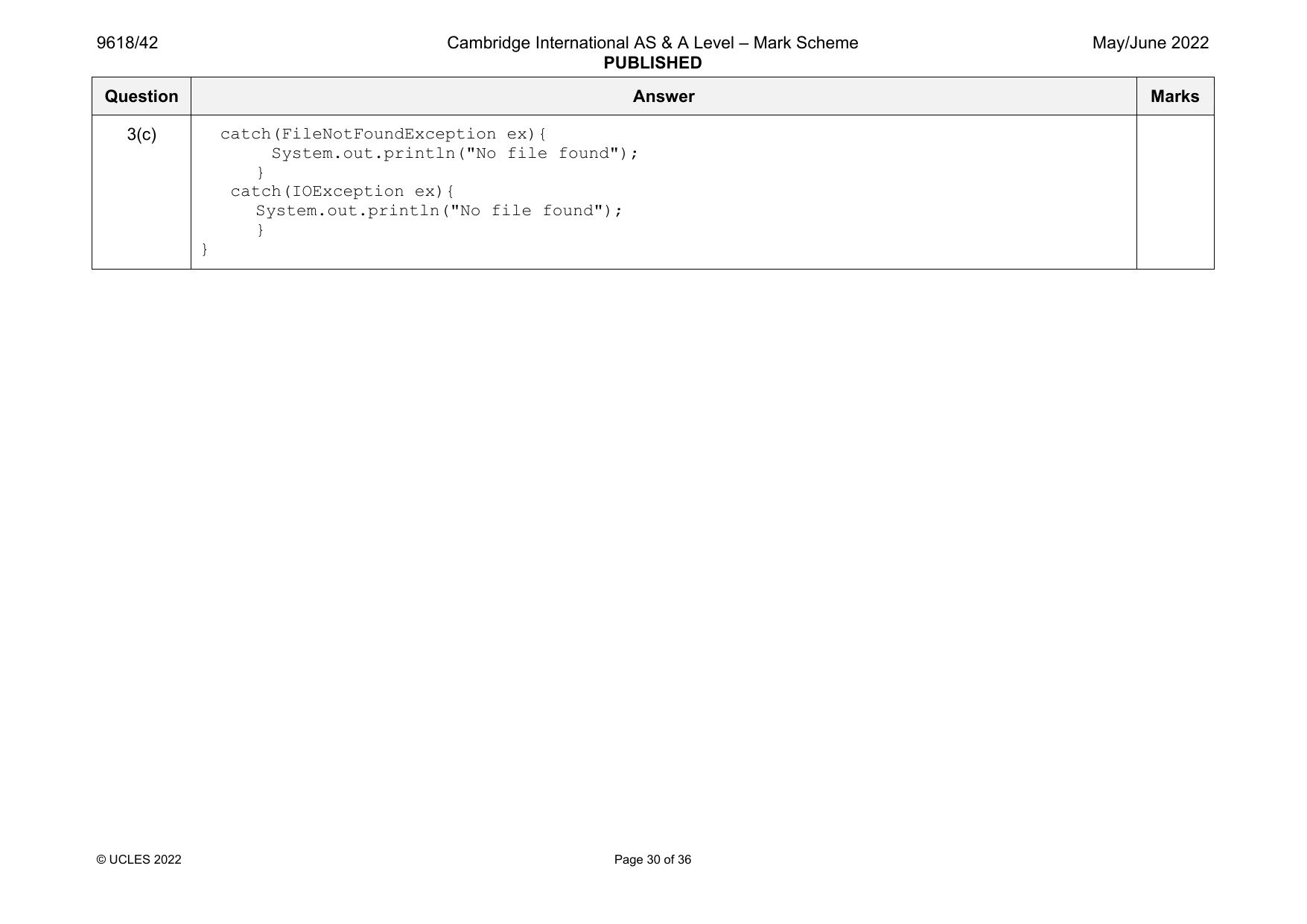
linkedList[8] = new node(0,9);
linkedList[9] = new node(0,-1);
Integer startPointer = 0;
Integer emptyList = 5;
}
© UCLES 2021 Page 6 of 30
1(c)(i) 1 mark per bullet point 6
• Procedure outputNodes …
• …taking linked list and start pointer as parameters
• Looping until nextNode/pointer is –1
• Outputting the node data in the correct order, i.e. following pointers
• Updating pointer to current node’s nextNode
• Using the correct record/class field/properties throughout
Example code:
Visual Basic
Sub outputNodes(ByRef linkedList, ByVal currentPointer)
While (currentPointer <> -1)
Console.WriteLine(linkedList(currentPointer).data)
currentPointer = linkedList(currentPointer).nextNode
End While
End Sub
Python
def outputNodes(linkedList, currentPointer):
while(currentPointer != -1):
print(str(linkedList[currentPointer].data))
currentPointer = linkedList[currentPointer].nextNode
Java
public static void outputNodes(node[] linkedList, Integer currentPointer){
while(currentPointer != -1){
System.out.println(linkedList[currentPointer].data);
currentPointer = linkedList[currentPointer].nextNode;
}
}
© UCLES 2021 Page 7 of 30
1(c)(ii) Screenshot showing: 1
1
5
Official mark scheme pages: 4, 5, 6, 7, 8 · source PDF URL
9618-2021-mj-43-q02
May/June 2021 · Paper 43 · Question 2 · 20 marks
2
6
56
7
1(d)(i) 1 mark per bullet point to max 7 7
• Function taking list and both pointers as parameters
• Taking (integer) data as input
• Checking if list is full …
• … and returning False
• Insert the input data to the empty list node’s data
• Following pointers to find last node in Linked List …
• …and updating last node’s pointer to empty list/location where new node is added
• Updating empty list to it’s first elements pointer
• Returning true when added successfully
Example code:
Visual Basic
Function addNode(ByRef linkedList() As node, ByVal currentPointer As Integer, ByRef
emptyList As Integer)
Console.WriteLine("Enter the data to add")
Dim dataToAdd As Integer = Console.ReadLine()
Dim previousPointer As Integer = 0
Dim newNode As node
If emptyList < 0 Or emptyList > 9 Then
Return False
Else
newNode.data = dataToAdd
newNode.nextNode = -1
© UCLES 2021 Page 8 of 30
9618/43 Cambridge International AS & A Level – Mark Scheme May/June 2021
PUBLISHED
Question Answer Marks
1(d)(i) linkedList(emptyList) = newNode
previousPointer = 0
While (currentPointer <> -1)
previousPointer = currentPointer
currentPointer = linkedList(currentPointer).nextNode
End While
Dim valueToWrite As Integer = emptyList
linkedList(previousPointer).nextNode = valueToWrite
emptyList = linkedList(emptyList).nextNode
Return True
End If
End Function
Python
def addNode(linkedList, currentPointer, emptyList):
dataToAdd = input("Enter the data to add")
if emptyList <0 or emptyList > 9:
return False
else:
newNode = node(int(dataToAdd), -1)
linkedList[emptyList] = (newNode)
previousPointer = 0
while(currentPointer != -1):
previousPointer = currentPointer
currentPointer = linkedList[currentPointer].nextNode
linkedList[previousPointer].nextNode = emptyList
emptyList = linkedList[emptyList].nextNode
return True
© UCLES 2021 Page 9 of 30
9618/43 Cambridge International AS & A Level – Mark Scheme May/June 2021
PUBLISHED
Question Answer Marks
1(d)(i) Java
public static Boolean addNode(node[] linkedList, Integer currentPointer,
Integer emptyList){
Integer dataToAdd;
Integer previousPointer;
node newNode;
Scanner in = new Scanner(System.in);
System.out.println("Enter the data to add");
dataToAdd = in.nextInt();
if(emptyList < 0 || emptyList > 9){
return false;
}else{
newNode = new node(dataToAdd, -1);
linkedList[emptyList] = newNode;
previousPointer = 0;
while(currentPointer != -1){
previousPointer = currentPointer;
currentPointer = linkedList[currentPointer].nextNode;
}
linkedList[previousPointer].nextNode = emptyList;
emptyList = linkedList[emptyList].nextNode;
return true;
}
}
© UCLES 2021 Page 10 of 30
9618/43 Cambridge International AS & A Level – Mark Scheme May/June 2021
PUBLISHED
Question Answer Marks
1(d)(ii) 1 mark per bullet point 3
• Call addNode() with list, start and empty pointers and store/check return value …
• …output appropriate message if True returned and if False returned
• Calling outputNodes() with list and start pointer before and after addNode()
Example code:
Visual Basic
Sub Main()
Dim linkedList(10) As node
linkedList(0).data = 1
linkedList(0).nextNode = 1
linkedList(1).data = 5
linkedList(1).nextNode = 4
linkedList(2).data = 6
linkedList(2).nextNode = 7
linkedList(3).data = 7
linkedList(3).nextNode = -1
linkedList(4).data = 2
linkedList(4).nextNode = 2
linkedList(5).data = -1
linkedList(5).nextNode = 6
linkedList(6).data = -1
linkedList(6).nextNode = 7
linkedList(7).data = 56
linkedList(7).nextNode = 3
linkedList(8).data = -1
linkedList(8).nextNode = 9
linkedList(9).data = -1
linkedList(9).nextNode = -1
Dim startPointer As Integer = 0
Dim emptyList As Integer = 5
outputNodes(linkedList, startPointer)
Dim returnValue As Boolean
returnValue = addNode(linkedList, startPointer,
emptyList)
© UCLES 2021 Page 11 of 30
9618/43 Cambridge International AS & A Level – Mark Scheme May/June 2021
PUBLISHED
Question Answer Marks
1(d)(ii) If returnValue = True Then
Console.WriteLine("Item successfully added")
Else
Console.WriteLine("Item not added, list full")
End If
outputNodes(linkedList, startPointer)
Console.ReadLine()
End Sub
Python
linkedList = [node(1,1),node(5,4),node(6,7),node(7,-1),node(2,2),node(-1,6),
node(-1,7),node(56,3),node(-1,9),node(-1,-1)]
startPointer = 0
emptyList = 5
outputNodes(linkedList, startPointer)
returnValue = addNode(linkedList, startPointer, emptyList)
if returnValue == True:
print("Item successfully added")
else:
print("Item not added, list full")
outputNodes(linkedList, startPointer)
Java
public static void main(String[] args){
node[] linkedList = new node[10];
linkedList[0] = new node(1,1);
linkedList[1] = new node(5, 4);
linkedList[2] = new node(6, 7);
linkedList[3] = new node(7,-1);
linkedList[4] = new node(2,2);
linkedList[5] = new node(-1,6);
linkedList[6] = new node(-1,7);
linkedList[7] = new node(56, 3);
linkedList[8] = new node(-1,9);
© UCLES 2021 Page 12 of 30
2
6
56
7
5 (being input)
1
5
2
6
56
7
5
© UCLES 2021 Page 13 of 30
2(a) 1 mark per bullet point 2
• Array with identifier arrayData
• correct 10 data items added
Example code:
Visual Basic
Dim arrayData(9) As Integer
Sub Main()
arrayData(0) = 10
arrayData(1) = 5
arrayData(2) = 6
arrayData(3) = 7
arrayData(4) = 1
arrayData(5) = 12
arrayData(6) = 13
arrayData(7) = 15
arrayData(8) = 21
arrayData(9) = 8
End Sub
Python
arrayData = [10, 5, 6, 7, 1, 12, 13, 15, 21, 8]
Java
int[] arrayData = new int[];
public static void main(String[] args){
arrayData[0] = 10;
arrayData[1] = 5;
arrayData[2] = 6;
arrayData[3] = 7;
arrayData[4] = 1;
arrayData[5] = 12;
arrayData[6] = 13;
© UCLES 2021 Page 14 of 30
2(a) arrayData[7] = 15;
arrayData[8] = 21;
arrayData[9] = 8;
}
2(b)(i) 1 mark per bullet point 6
• function linearSearch with correct identifier
• …taking integer search value as a parameter
• Searching 10 times/through all array elements …
• …comparing each element to search value
• returning True if found
• returning False if not found
Example code:
Visual Basic
Function linearSearch(ByRef searchValue As Integer)
For x = 0 To 9
If arrayData(x) = searchValue Then
Return True
End If
Next
Return False
End Function
© UCLES 2021 Page 15 of 30
2(b)(i) Python
def linearSearch(searchValue):
for x in range(0, 10):
if arrayData[x] == searchValue:
return True
return False
Java
public static Boolean linearSearch(Integer searchValue){
for (int x = 0; x < 10; x++){
if(arrayData[x] == searchValue){
return true;
}
}
return false;
}
© UCLES 2021 Page 16 of 30
2(b)(ii) 1 mark per bullet point to max 4 4
• Taking value as input…
• …checking/casting to Integer
• Calling linearSearch and sending input as parameter
• Storing and checking return value…
• …outputting appropriate message if found and if not found
Example code:
Visual Basic
Dim arrayData(10) As Integer
Sub Main()
arrayData(0) = 10
arrayData(1) = 5
arrayData(2) = 6
arrayData(3) = 7
arrayData(4) = 1
arrayData(5) = 12
arrayData(6) = 13
arrayData(7) = 15
arrayData(8) = 12
arrayData(9) = 8
Console.WriteLine("Enter a number to search for")
Dim searchValue As Integer = Console.ReadLine()
Dim returnValue As Boolean = linearSearch(searchValue)
If returnValue = True Then
Console.WriteLine("Found it")
Else
Console.WriteLine("Didn't find it")
End If
End Sub
© UCLES 2021 Page 17 of 30
2(b)(ii) Python
arrayData = [10, 5, 6, 7, 1, 12, 13, 15, 21, 8]
searchValue = int(input("Enter the number to search for"))
returnValue = linearSearch(searchValue)
if returnValue == True:
print("It was found")
else:
print("It was not found")
Java
Integer[] arrayData = new Integer[10];
public static void main(String[] args){
arrayData[0] = 10;
arrayData[1] = 5;
arrayData[2] = 6;
arrayData[3] = 7;
arrayData[4] = 1;
arrayData[5] = 12;
arrayData[6] = 13;
arrayData[7] = 15;
arrayData[8] = 12;
arrayData[9] = 8;
System.out.println("Enter the number to search for");
Integer searchValue;
Scanner in = new Scanner(System.in);
searchValue = in.nextInt();
Boolean returnValue;
returnValue = linearSearch(searchValue);
if (returnValue == true){
System.out.println("It was found");
}else{
System.out.println("It was not found");
}
}
© UCLES 2021 Page 18 of 30
2(b)(iii) 1 mark for screenshot showing input and output for number found 2
1 mark for screenshot showing input and output for number not found
2(c) 1 mark per bullet point 6
• Correct outer loop stop
• Correct inner loop stop
• Correct < in the IF
• Correct theArray(y + 1)
• Correct temp
• Remainder matching pseudocode
Example code:
Visual Basic
Sub bubbleSort()
Dim temp As Integer = 0
For x = 0 To 9
For y = 0 To 8
If theArray(y) < theArray(y + 1) Then
temp = theArray(y)
theArray(y) = theArray(y + 1)
theArray(y + 1) = temp
End If
Next
Next
End Sub
© UCLES 2021 Page 19 of 30
2(c) Python
def bubbleSort():
for x in range (0, 10):
for y in range(0, 9):
if theArray[y] < theArray[y + 1]:
temp = theArray[y]
theArray[y] = theArray[y + 1]
theArray[y + 1] = temp
Java
public static void bubbleSort(){
int temp;
for (int x = 0; x < 10; x++){
for (int y = 0; y < 9; y++){
if(theArray[y] < theArray[y+1]){
temp = theArray[y];
theArray[y] = theArray[y+1];
theArray[y+1] = temp;
}
}
}
}
© UCLES 2021 Page 20 of 30
Official mark scheme pages: 8, 9, 10, 11, 12, 13, 14, 15, 16, 17, 18, 19, 20 · source PDF URL
9618-2021-mj-43-q03
May/June 2021 · Paper 43 · Question 3 · 31 marks
3(a) 1 mark per bullet point 5
• Class named treasureChest and end
• Question declared as string as a class attribute
• Answer declared as integer as a class attribute
• Points declared as integer as a class attribute
• All 3 attributes are private
Example code:
Visual Basic
Class treasureChest
Private question As String
Private answer As Integer
Private points As Integer
Sub New(questionP, answerP, pointsP)
question = questionP
answer = answerP
points = pointsP
End Sub
End Class
Python
class treasureChest:
#Private question : String
#Private answer : Integer
#Private points : Integer
def __init__(self, questionP, answerP, pointsP):
self.__question = questionP
self.__answer = answerP
self.__points = points
© UCLES 2021 Page 21 of 30
3(a) Java
import java.util.Scanner;
class treasureChest{
private String question;
private Integer answer;
private Integer points;
public treasureChest(String questionP, Integer answerP, Integer pointsP){
question = questionP;
answer = answerP;
points = pointsP;
}
}
3(b) 1 mark per bullet point to max 8 8
• procedure declared as readData
• declare array arrayTreasure with 4 elements type treasureChest
• opening correct file for read
• looping until EOF/5 questions …
• …reading in and storing each group of 3 lines appropriately
• creating object of type treasureChest …
• …with question, answer and points from file as parameters
• ..adding to next array element/appending
• … repeatedly for all 5 questions in correct order
• Use of appropriate exception handler…
• …appropriate output if file not found
• Closing correct file
© UCLES 2021 Page 22 of 30
3(b) Example code:
Visual Basic
Sub readData()
Dim arrayTreasure(4) as treasureChest
Dim filename As String = "treasureChestData.txt"
Try
Dim fileReader As New System.IO.StreamReader(filename)
Dim question As String
Dim answer, points As Integer
Dim numberQuestions as Integer = 0
While fileReader.Peek <> -1
question = fileReader.ReadLine()
answer = fileReader.ReadLine()
points = fileReader.ReadLine()
arrayTreasure(numberQuestions) = New treasureChest(question, answer, points)
numberQuestions += 1
End While
fileReader.Close()
Catch ex As Exception
Console.WriteLine("Invalid file")
End Try
End Sub
Python
# arrayTreasure(5) as treasureChest
def readData():
filename = "treasureChestData.txt"
try:
file= open(filename,"r")
dataFetched = (file.readline()).strip()
while(dataFetched != "" ):
question = dataFetched
answer = (file.readline()).strip()
© UCLES 2021 Page 23 of 30
3(b) points = (file.readline()).strip()
arrayTreasure.append(treasureChest(question, answer, points))
dataFetched = (file.readline()).strip()
file.close()
except IOError:
print("Could not find file")
Java
public static void readData(){
treasureChest[] arrayTreasure = new treasureChest[5]:
String filename = "treasureChestData.txt";
String dataRead;
String question;
String answer;
String points;
Integer numberQuestions = 0;
try{
FileReader f = new FileReader(filename);
BufferedReader reader = new BufferedReader(f);
dataRead = reader.readLine();
while (dataRead != null){
question = dataRead;
answer = reader.readLine();
points = reader.readLine();
arrayTreasure[numberQuestions] = new treasureChest(question,
Integer.parseInt(answer), Integer.parseInt(points));
numberQuestions++;
dataRead = reader.readLine();
}
reader.close();
}
© UCLES 2021 Page 24 of 30
3(b) catch(FileNotFoundException ex){
System.out.println("No file found");
}
catch(IOException ex){
System.out.println("No file found");
}
}
3(c)(i) 1 mark for getQuestion returning the value of question 1
Example code:
Visual Basic
Function getQuestion()
Return question
End Function
Python
def getQuestion(self):
return self.__question
Java
public String getQuestion(){
return question;
}
© UCLES 2021 Page 25 of 30
3(c)(ii) 1 mark per bullet point 3
• Function checkAnswer taking in the parameter, returning Boolean
• Comparing parameter to that object’s answer…
• …returning True if correct and False otherwise
Example code:
Visual Basic
Function checkAnswer(answerP)
If answer = answerP Then
Return True
Else
Return False
End If
End Function
Python
def checkAnswer(self, answerP):
if int(self.__answer) == answerP:
return True
else:
return False
Java
public Boolean checkAnswer(Integer answerP){
if (answer == answerP){
return true;
}else{
return false;
}
}
© UCLES 2021 Page 26 of 30
3(c)(iii) 1 mark per bullet point 5
• Function getPoints taking attempts as parameter and returning integer
• If attempts is 1 returning points
• If attempts is 2 returns points DIV 2
• If attempts is 3 or 4 returns points DIV 4
• otherwise returns 0
Example code:
Visual Basic
Function getPoints(attempts)
If attempts = 1 Then
Return points
ElseIf attempts = 2 Then
Return points \ 2
ElseIf attempts = 3 Or attempts = 4 Then
Return points \ 4
Else
Return 0
End If
End Function
Python
def getPoints(self, attempts):
if attempts == 1:
return int(self.__points)
elif attempts == 2:
return int(self.__points) // 2
elif attempts == 3 or attempts == 4:
return int(self.__points) // 4
else:
return 0
© UCLES 2021 Page 27 of 30
3(c)(iii) Java
public Integer getPoints(Integer attempts){
if (attempts == 1){
return points;
}else if(attempts == 2){
return Math.round(points/2);
}else if(attempts == 3 || attempts == 4){
return Math.round(points/4);
}else{
return 0;
}
}
3(c)(iv) 1 mark per bullet point to max 7 7
• Call the procedure readData()
• Take the question number as input from user
• ..validated between 1 and 5
• Output the question stored at user’s input value
• Read answer from user
• Check the answer input against question’s answer
• …looping until the answer is correct
• Keeping track of the number of attempts using a variable
• Using getPoints() and sending the number of attempts as a parameter …
• …outputting the number of points returned
• Using .getQuestion and .checkAnswer to access question number input by user and answer input by used
© UCLES 2021 Page 28 of 30
3(c)(iv) Example code:
Visual Basic
Sub Main()
readData()
Console.WriteLine("Pick a treasure chest to open")
Dim choice As Integer = Console.ReadLine()
Dim result As Boolean
Dim answer As Integer
Dim attempts As Integer = 0
If choice > 0 And choice < 6 Then
result = False
attempts = 0
While result = False
Console.WriteLine(arrayTreasure(choice - 1).getQuestion())
answer = Console.ReadLine
result = arrayTreasure(choice - 1).checkAnswer(answer)
attempts = attempts + 1
End While
Console.WriteLine(arrayTreasure(choice - 1).getPoints(attempts))
End If
End Sub
Python
readData()
choice = int(input("Pick a treasure chest to open"))
if choice > 0 and choice < 6:
result = False
attempts = 0
while result == False:
answer = int(input(arrayTreasure[choice-1].getQuestion()))
result = arrayTreasure[choice-1].checkAnswer(answer)
attempts = attempts + 1
print(int(arrayTreasure[choice-1].getPoints(attempts)))
© UCLES 2021 Page 29 of 30
3(c)(iv) Java
public static void main(String[] args){
readData();
Scanner scanner = new Scanner(System.in);
System.out.println("Pick a treasure chest to open");
Integer answer;
Integer choice;
choice= Integer.parseInt(scanner.nextLine());
Integer attempts;
if (choice> 0 && choice < 6){
Boolean result = false;
attempts = 0;
while (result == false){
System.out.println(arrayTreasure[choice-1].getQuestion());
answer = Integer.parseInt(scanner.nextLine());
result = arrayTreasure[choice-1].checkAnswer(answer);
attempts++;
}
System.out.println(arrayTreasure[choice-1].getPoints(attempts));
}
}
3(c)(v) 1 mark per screenshot 2
• Screenshot:
outputting 2*2
entering 4
outputting 10
• Screenshot:
outputting 3000+4000
entering an incorrect value
entering 7000
outputting 9
© UCLES 2021 Page 30 of 30
Official mark scheme pages: 21, 22, 23, 24, 25, 26, 27, 28, 29, 30 · source PDF URL
9618-2021-on-41-q01
Oct/Nov 2021 · Paper 41 · Question 1 · 17 marks
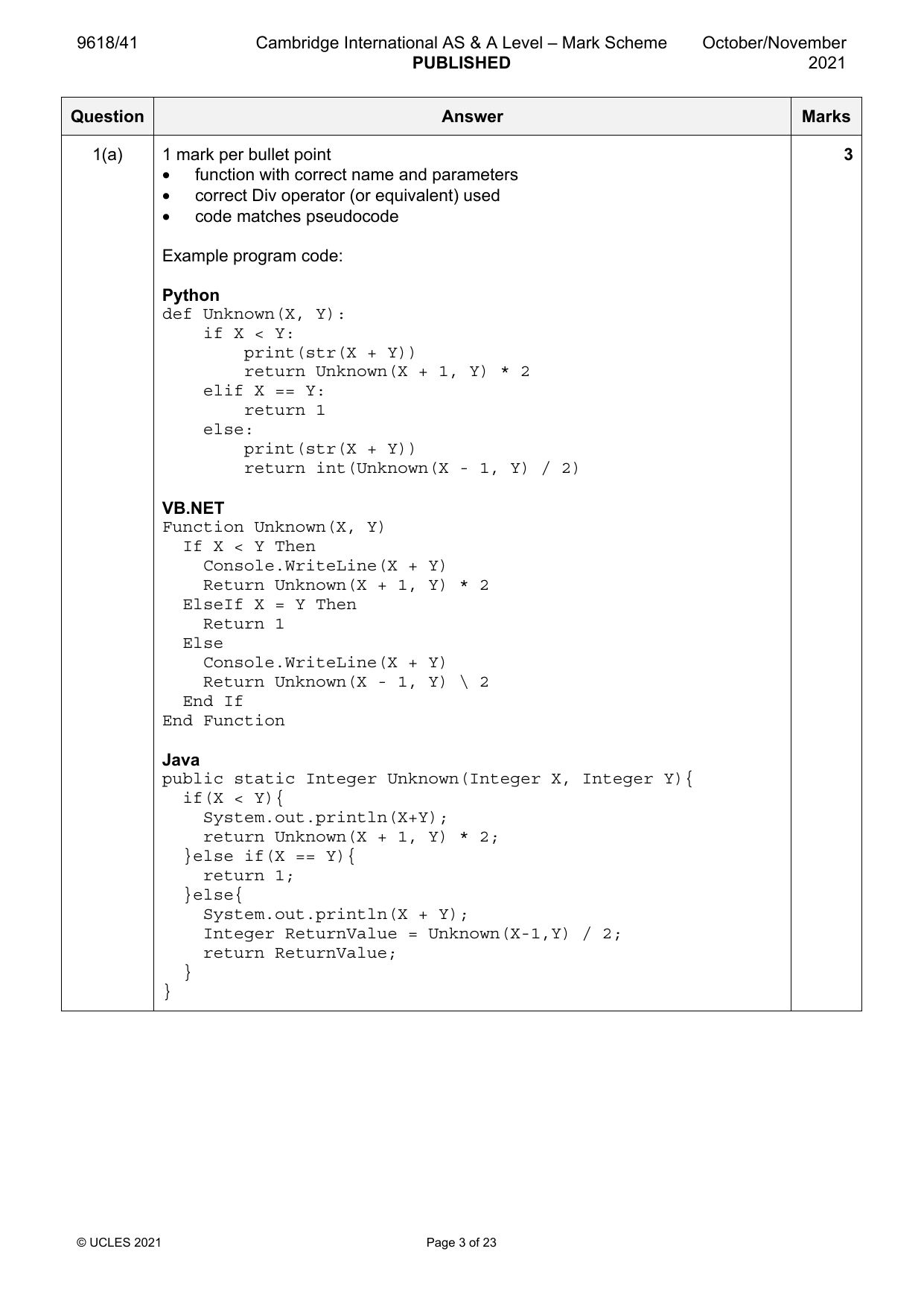
1(a) 1 mark per bullet point 3
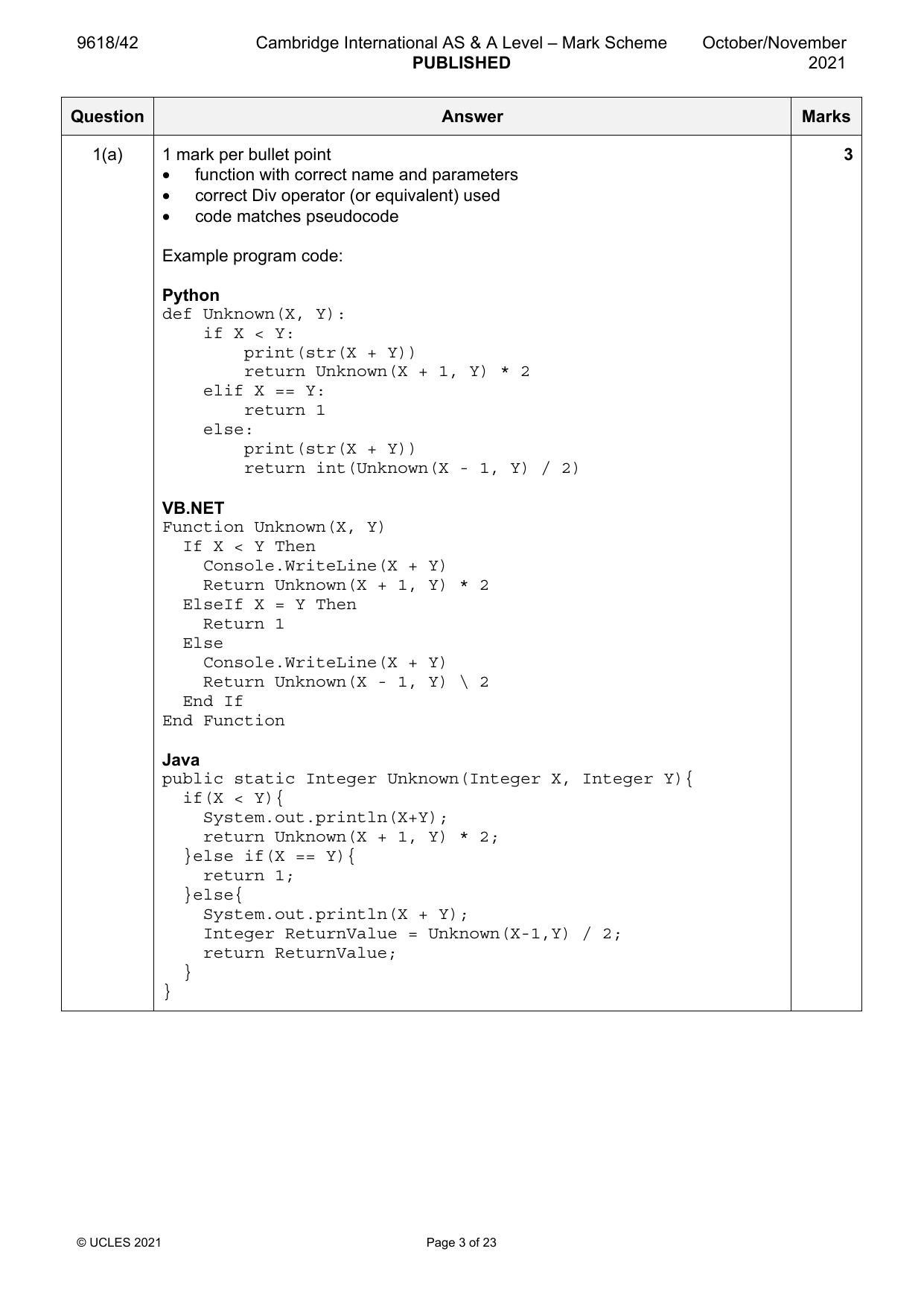
• function with correct name and parameters
• correct Div operator (or equivalent) used
• code matches pseudocode
Example program code:
Python
def Unknown(X, Y):
if X < Y:
print(str(X + Y))
return Unknown(X + 1, Y) * 2
elif X == Y:
return 1
else:
print(str(X + Y))
return int(Unknown(X - 1, Y) / 2)
VB.NET
Function Unknown(X, Y)
If X < Y Then
Console.WriteLine(X + Y)
Return Unknown(X + 1, Y) * 2
ElseIf X = Y Then
Return 1
Else
Console.WriteLine(X + Y)
Return Unknown(X - 1, Y) \ 2
End If
End Function
Java
public static Integer Unknown(Integer X, Integer Y){
if(X < Y){
System.out.println(X+Y);
return Unknown(X + 1, Y) * 2;
}else if(X == Y){
return 1;
}else{
System.out.println(X + Y);
Integer ReturnValue = Unknown(X-1,Y) / 2;
return ReturnValue;
}
}
© UCLES 2021 Page 3 of 23
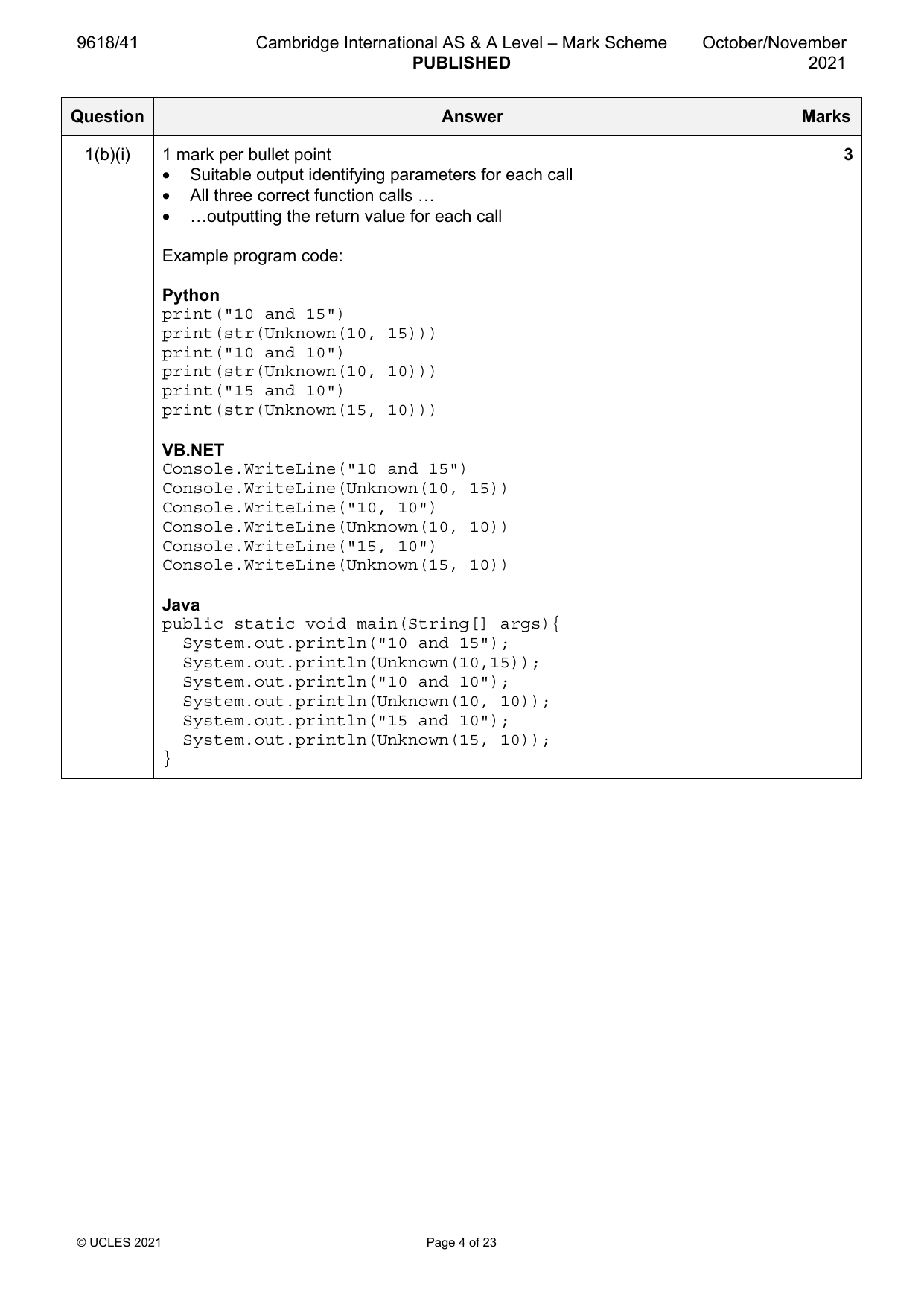
1(b)(i) 1 mark per bullet point 3
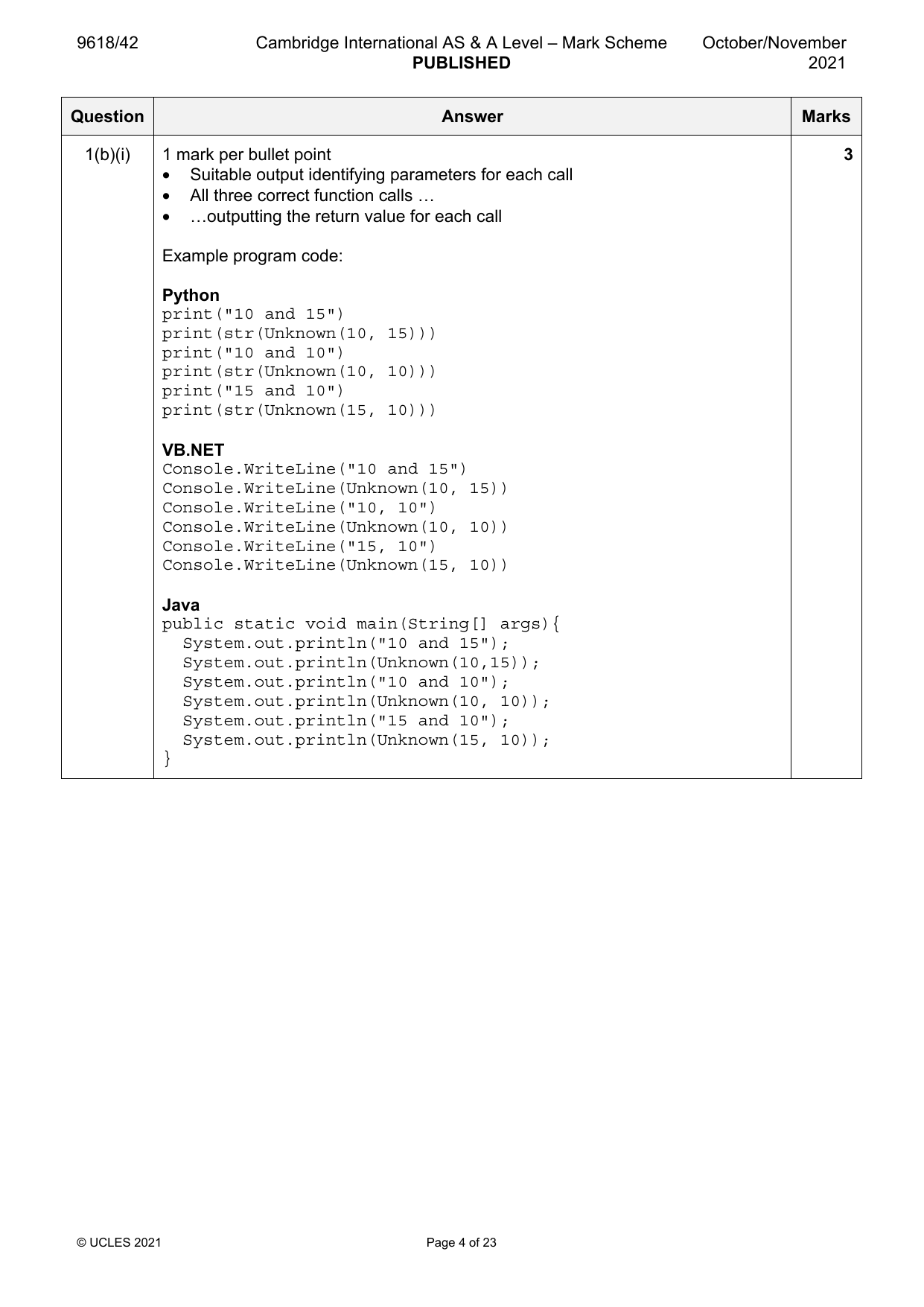
• Suitable output identifying parameters for each call
• All three correct function calls …
• …outputting the return value for each call
Example program code:
Python
print("10 and 15")
print(str(Unknown(10, 15)))
print("10 and 10")
print(str(Unknown(10, 10)))
print("15 and 10")
print(str(Unknown(15, 10)))
VB.NET
Console.WriteLine("10 and 15")
Console.WriteLine(Unknown(10, 15))
Console.WriteLine("10, 10")
Console.WriteLine(Unknown(10, 10))
Console.WriteLine("15, 10")
Console.WriteLine(Unknown(15, 10))
Java
public static void main(String[] args){
System.out.println("10 and 15");
System.out.println(Unknown(10,15));
System.out.println("10 and 10");
System.out.println(Unknown(10, 10));
System.out.println("15 and 10");
System.out.println(Unknown(15, 10));
}
© UCLES 2021 Page 4 of 23
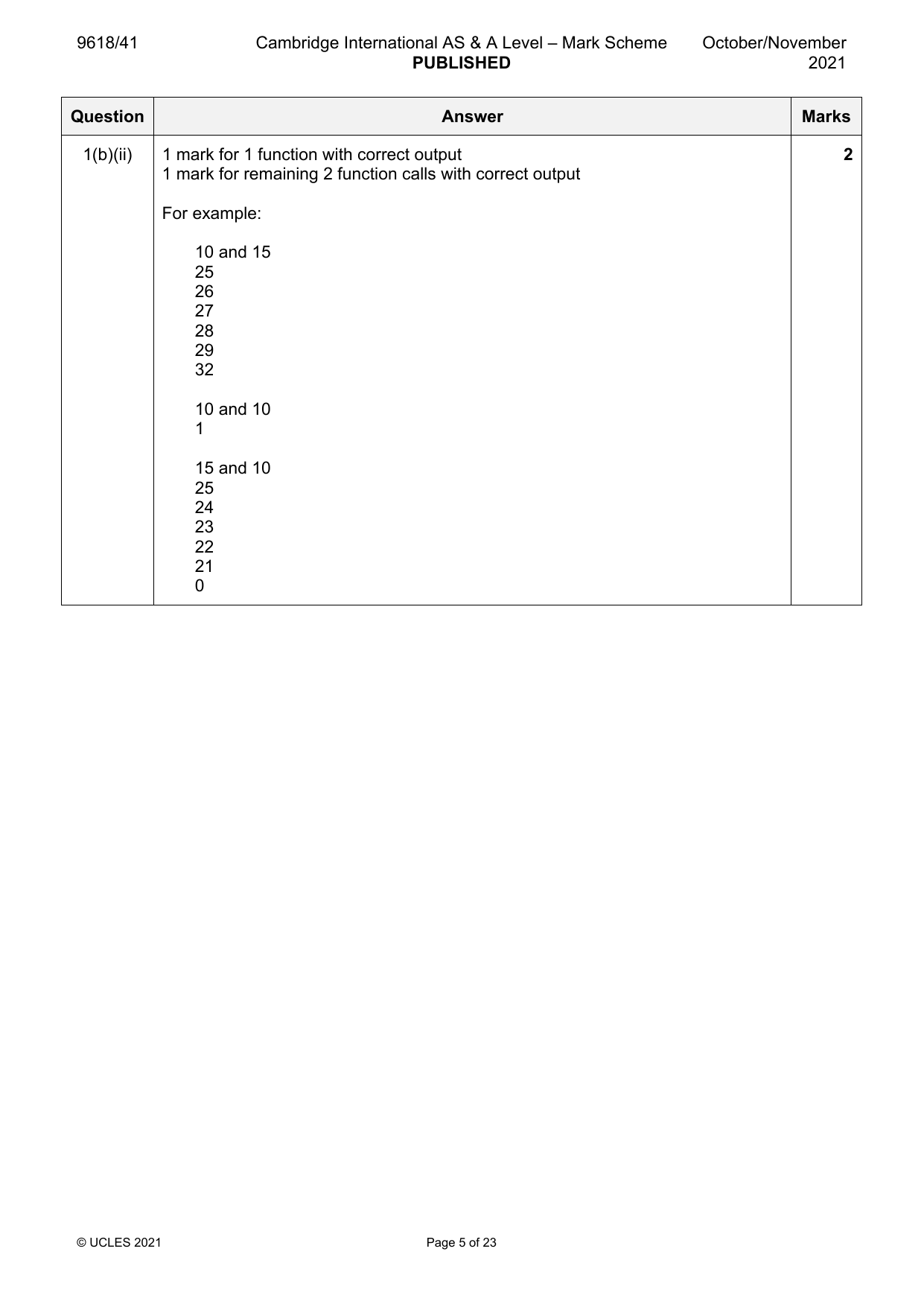
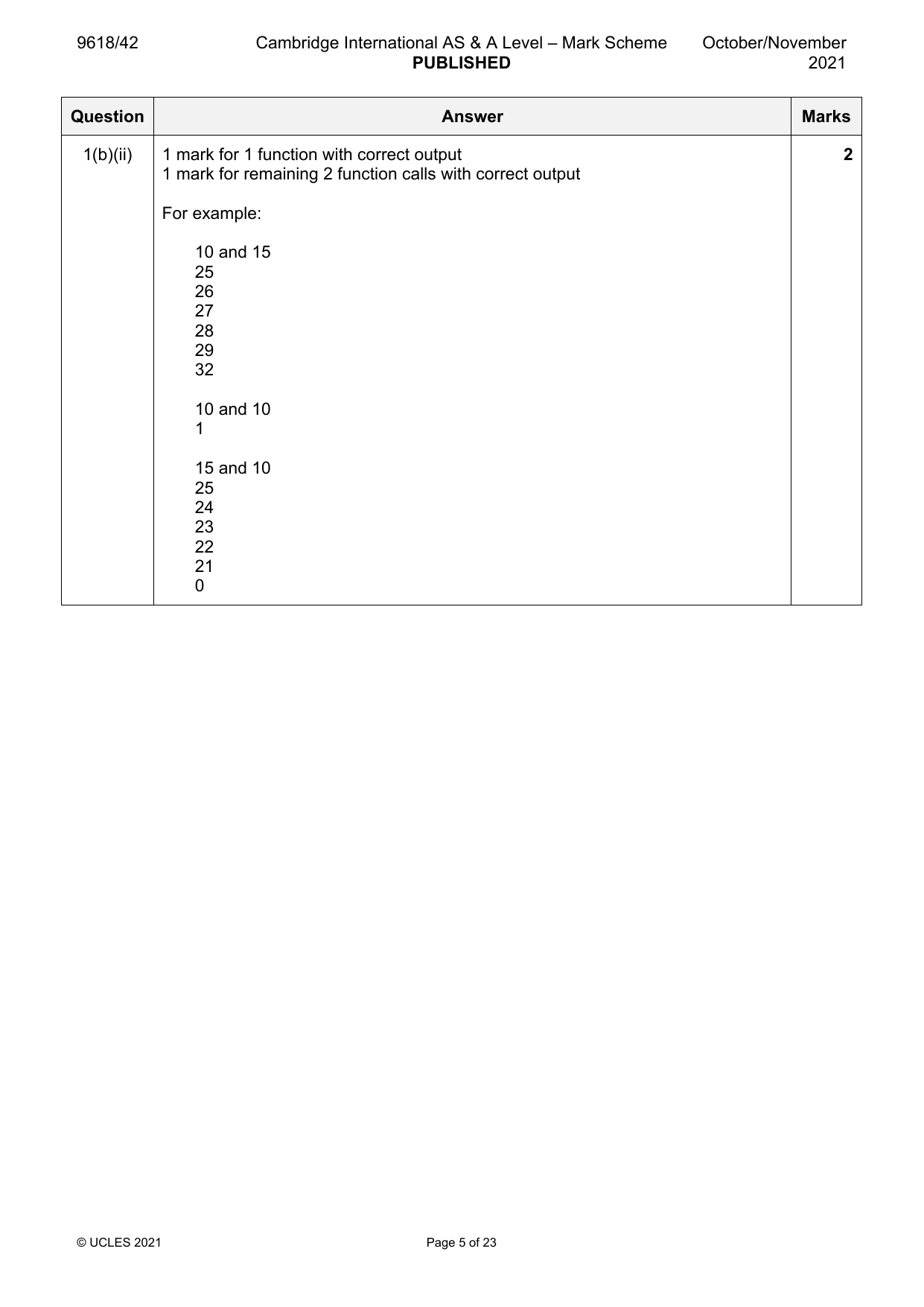
1(b)(ii) 1 mark for 1 function with correct output 2
1 mark for remaining 2 function calls with correct output
For example:
10 and 15
25
26
27
28
29
32
10 and 10
1
15 and 10
25
24
23
22
21
0
© UCLES 2021 Page 5 of 23
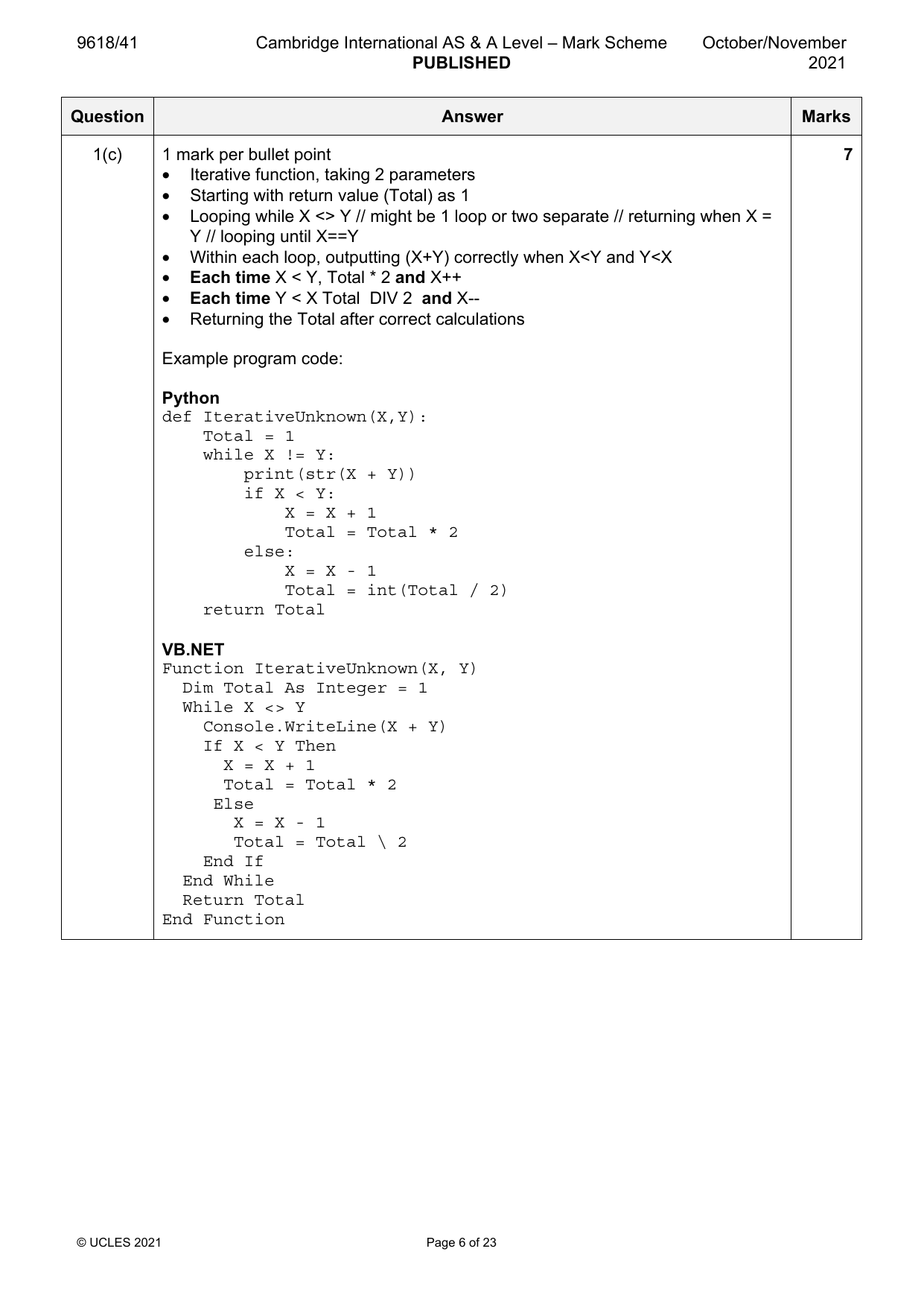
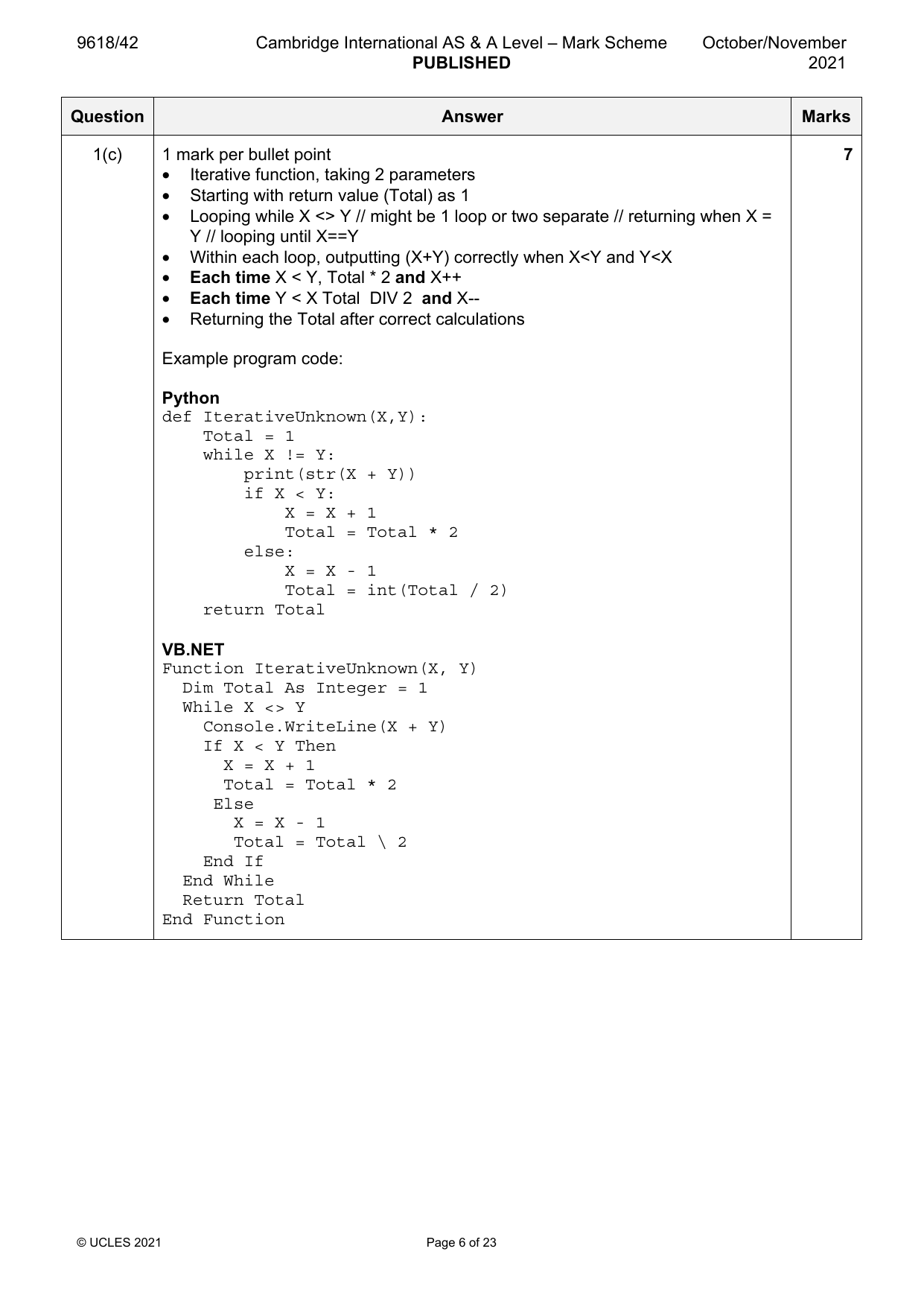
1(c) 1 mark per bullet point 7
• Iterative function, taking 2 parameters
• Starting with return value (Total) as 1
• Looping while X <> Y // might be 1 loop or two separate // returning when X =
Y // looping until X==Y
• Within each loop, outputting (X+Y) correctly when X<Y and Y<X
• Each time X < Y, Total * 2 and X++
• Each time Y < X Total DIV 2 and X--
• Returning the Total after correct calculations
Example program code:
Python
def IterativeUnknown(X,Y):
Total = 1
while X != Y:
print(str(X + Y))
if X < Y:
X = X + 1
Total = Total * 2
else:
X = X - 1
Total = int(Total / 2)
return Total
VB.NET
Function IterativeUnknown(X, Y)
Dim Total As Integer = 1
While X <> Y
Console.WriteLine(X + Y)
If X < Y Then
X = X + 1
Total = Total * 2
Else
X = X - 1
Total = Total \ 2
End If
End While
Return Total
End Function
© UCLES 2021 Page 6 of 23
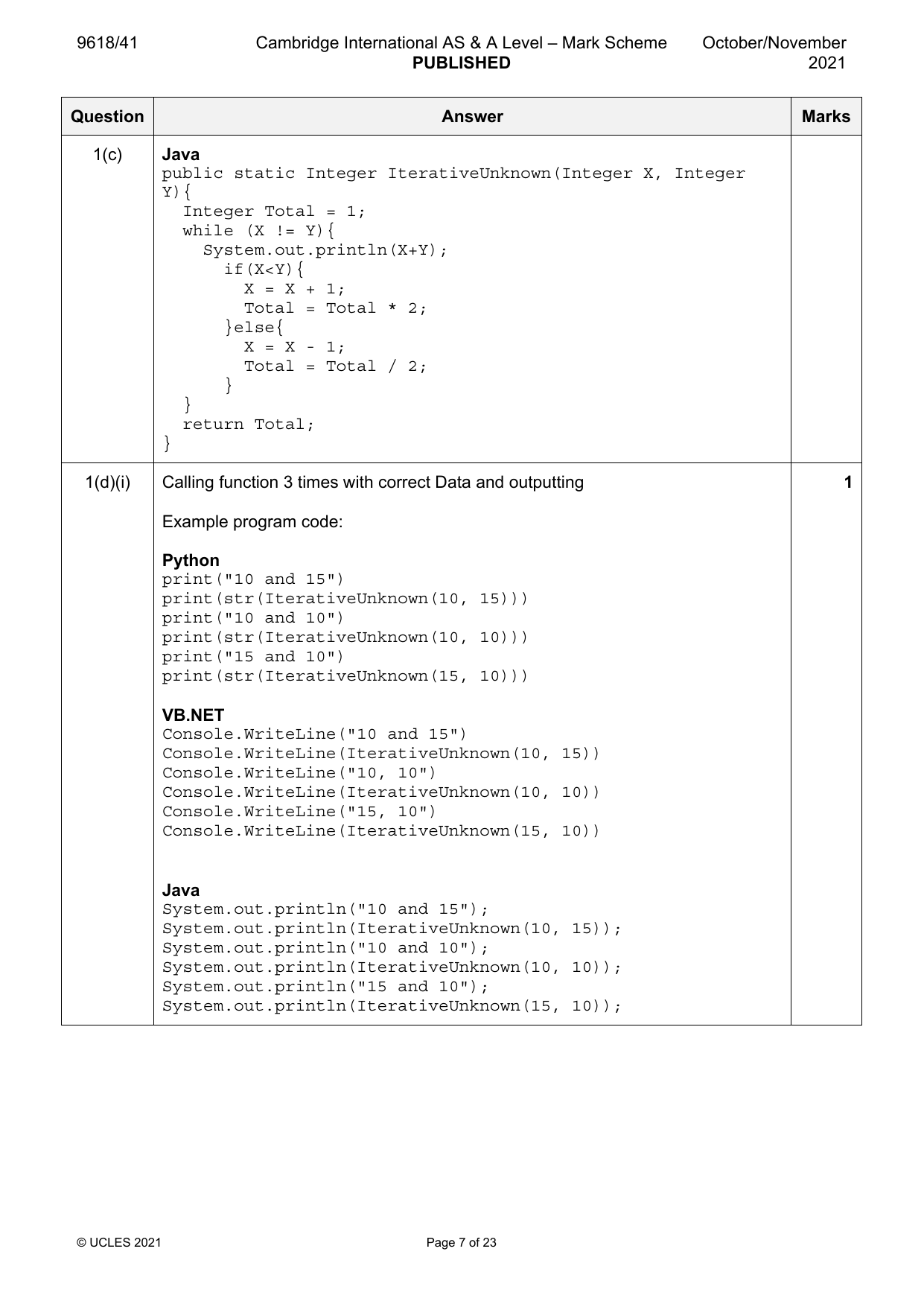
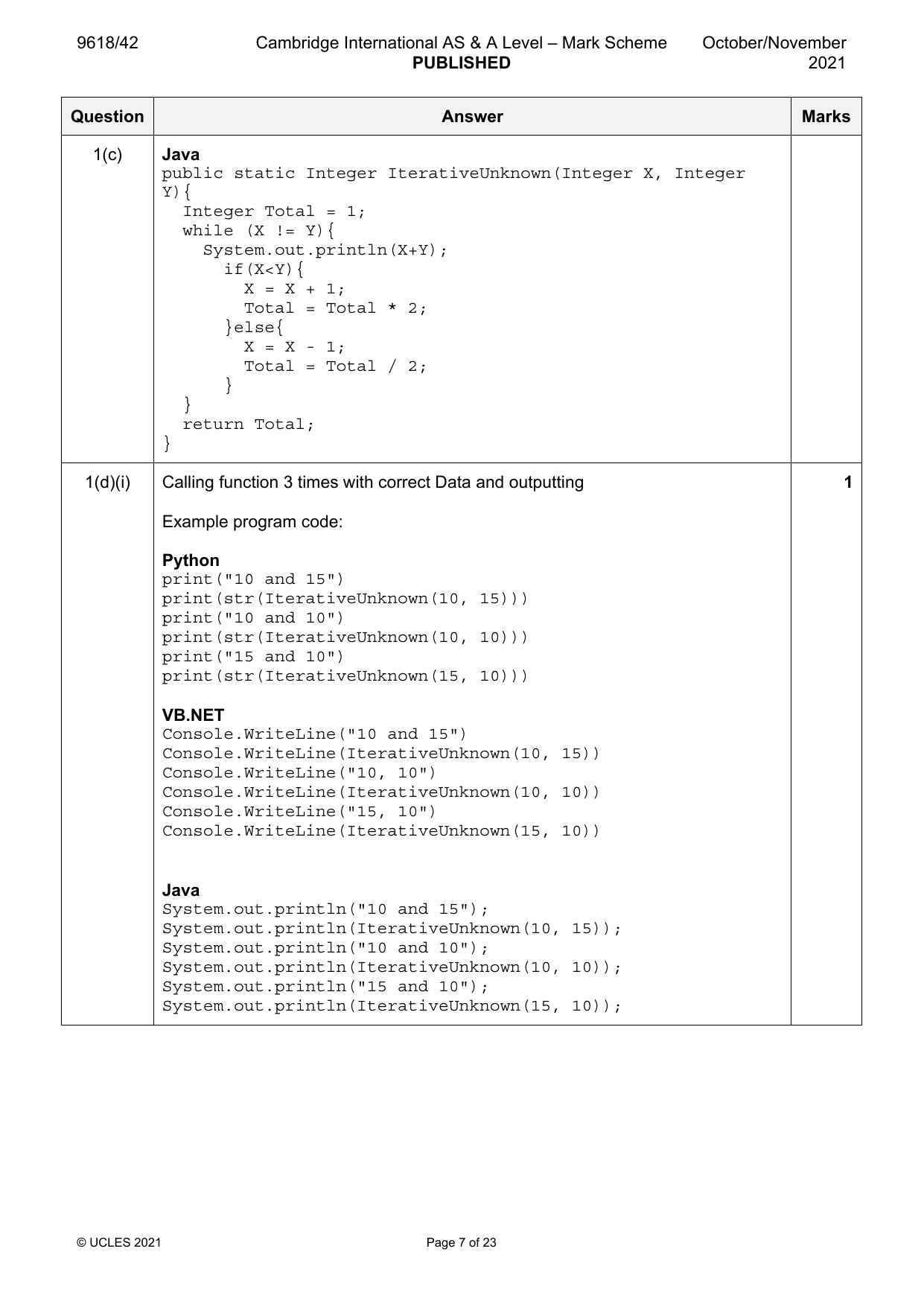
1(c) Java
public static Integer IterativeUnknown(Integer X, Integer
Y){
Integer Total = 1;
while (X != Y){
System.out.println(X+Y);
if(X<Y){
X = X + 1;
Total = Total * 2;
}else{
X = X - 1;
Total = Total / 2;
}
}
return Total;
}
1(d)(i) Calling function 3 times with correct Data and outputting 1
Example program code:
Python
print("10 and 15")
print(str(IterativeUnknown(10, 15)))
print("10 and 10")
print(str(IterativeUnknown(10, 10)))
print("15 and 10")
print(str(IterativeUnknown(15, 10)))
VB.NET
Console.WriteLine("10 and 15")
Console.WriteLine(IterativeUnknown(10, 15))
Console.WriteLine("10, 10")
Console.WriteLine(IterativeUnknown(10, 10))
Console.WriteLine("15, 10")
Console.WriteLine(IterativeUnknown(15, 10))
Java
System.out.println("10 and 15");
System.out.println(IterativeUnknown(10, 15));
System.out.println("10 and 10");
System.out.println(IterativeUnknown(10, 10));
System.out.println("15 and 10");
System.out.println(IterativeUnknown(15, 10));
© UCLES 2021 Page 7 of 23
1(d)(ii) 1 mark for screenshot showing correct output for both functions 1
Question Answer Marks
Official mark scheme pages: 3, 4, 5, 6, 7, 8 · source PDF URL
9618-2021-on-41-q02
Oct/Nov 2021 · Paper 41 · Question 2 · 30 marks
2(a) 1 mark per bullet point 5
• class declared (with appropriate close) with identifier Picture
• correct attribute declarations with Data types (Description, Frame colour =
string, Width, Height = integer.)
• …as private
• correct constructor (with appropriate close) with four parameters…
• …parameters assigned to attributes
Example program code:
Python
class Picture:
def __init__(self, DescriptionP, WidthSizeP,
HeightSizeP, FrameColourP):
self.__Description = DescriptionP # string
self.__Width = int(WidthSizeP) #integer
self.__Height = int(HeightSizeP) #integer
self.__FrameColour = FrameColourP #string
Java
class Picture{
private String Description;
private Integer Width;
private Integer Height;
private String FrameColour;
public Picture(String DescriptionP, Integer WidthP,
Integer HeightP, String FrameColourP){
Description = DescriptionP;
Width = WidthP;
Height = HeightP;
FrameColour = FrameColourP;
}
}
© UCLES 2021 Page 8 of 23
2(a) VB.NET
Class Picture
Private Description As String
Private Width As Integer
Private Height As Integer
Private FrameColour As String
Public Sub New(DescriptionP, WidthP, HeightP,FrameColourP)
Description = DescriptionP
Width = WidthP
Height = HeightP
FrameColour = FrameColourP
End Sub
End Class
© UCLES 2021 Page 9 of 23
2(b) 1 mark per bullet point 3
• 1 Get method taking no parameter…
• …returning correct attribute
• remaining 3 correct methods
Example program code:
Python
def GetDescription(self):
return self.__Description
def GetWidth(self):
return self.__Width
def GetHeight(self):
return self.__Height
def GetColour(self):
return self.__FrameColour
Java
public String GetDescription(){
return Description;
}
public Integer GetWidth(){
return Width;
}
public Integer GetHeight(){
return Height;
}
public String GetFrameColour(){
return FrameColour;
}
VB.NET
Function GetDescription()
Return Description
End Function
Function GetWidth()
Return Width
End Function
Function GetHeight()
Return Height
End Function
Function GetFrameColour()
Return FrameColour
End Function
© UCLES 2021 Page 10 of 23
2(c) 1 mark per bullet point 2
• Set method (procedure) taking parameter (no return) …
• …assigning parameter to correct attribute
Example program code:
Python
def SetDescription(self, DescriptionP):
self.__Description = DescriptionP
Java
public void SetDescription(String DescriptionP){
Description = DescriptionP;
}
VB.NET
Public Sub SetDescription(DescriptionP)
Description = DescriptionP
End Sub
2(d) 1 mark for declaring array of type Picture with 100 elements 1
Example program code:
Python
PictureArray = []
for i in range(100):
PictureArray.append(Picture("",0,0,""))
Java
public static void main(String[] args){
Picture[] PictureArray = new Picture[100];}
VB.NET
Dim PictureArray(0 to 99) As Picture
© UCLES 2021 Page 11 of 23
2(e) 1 mark per bullet point: 8
• Exception with opening the file inside...
• ..appropriate catch and output
1 mark per bullet point to Max 7
• Function/procedure declared with correct name (and close, passing array by
reference or global array declared)
• opening Pictures.txt for Read
• looping until EOF / or equivalent
• …reading each set of 4 lines from the file within loop
• creating object of type Picture
• …with Description, Width, Height, Frame colour from File as parameters
• ..adding to next array element/appending
• closing the File (in an appropriate place)
• counts and returns number of pictures in array
Example program code:
Python
def ReadData(PictureArray):
Filename = "Pictures.txt"
Counter = 0
try:
File = open(Filename,"r")
Description = (File.readline()).strip().lower()
while(Description != ""):
Width = int((File.readline()).strip())
Height = int((File.readline()).strip())
Frame = ((File.readline()).strip()).lower()
PictureArray[Counter] = Picture(Description,
Width, Height, Frame)
Description =((File.readline()).strip()).lower()
Counter = Counter + 1
File.close()
except IOError:
print("Could not find File")
return Counter, PictureArray
© UCLES 2021 Page 12 of 23
2(e) VB.NET
Function ReadData(ByRef PictureArray, ByRef NumberPictures)
As Integer
Dim Counter As Integer = 0
Try
Dim Filename As String = "Pictures.txt"
Dim FileReader As New System.IO.StreamReader(Filename)
Dim Description, FrameColour As String
Dim Height, Width As Integer
While FileReader.Peek <> -1
Description = FileReader.ReadLine()
Width = FileReader.ReadLine()
Height = FileReader.ReadLine()
FrameColour = FileReader.ReadLine()
PictureArray(NumberPictures) =
New Picture(Description, Width, Height, FrameColour)
NumberPictures = NumberPictures + 1
Counter = Counter + 1
End While
FileReader.Close()
Catch ex As Exception
Console.WriteLine("Invalid File")
End Try
Return Counter
End Function
© UCLES 2021 Page 13 of 23
2(e) Java
public static Integer ReadData(Picture[] PictureArray){
String Filename = "Pictures.txt";
String DataRead;
String Description;
String Width;
String Height;
String FrameColour;
Integer NumberPictures = 0;
try{
FileReader f = new FileReader(Filename);
BufferedReader Reader = new BufferedReader(f);
DataRead = Reader.readLine();
while(DataRead != null){
Description = DataRead;
Width = Reader.readLine();
Height = Reader.readLine();
FrameColour = Reader.readLine();
PictureArray[NumberPictures] =
new Picture(Description, Integer.parseInt(Width),
Integer.parseInt(Height), FrameColour);
NumberPictures++;
DataRead = Reader.readLine();
}
Reader.close();
}
catch(FileNotFoundException ex){
System.out.println("No File found");
}
catch(IOException ex){
System.out.println("No File found");
}
return NumberPictures;
}
2(f) 1 mark per bullet point 2
• calling function ReadData() …
• …store/use the Number of elements returned/by reference based on answer
to part 2e
Example program code:
Python
NumberPicturesInArray, PictureArray = ReadData(PictureArray)
Java
Integer NumberPicturesInArray = ReadData(PictureArray);
VB.NET
Dim NumberPicturesInArray As Integer = ReadData()
© UCLES 2021 Page 14 of 23
2(g) 1 mark per bullet point to Max 7 7
• taking as input all three values (colour, width, height)
• … converting colour to lowercase // uppercase
• looping through array …
• …using returned value from part 2(f) as max index
• …within loop, checking if Array[index].FrameColour matches input
• …and checking if Array[index].FrameWidth <= input Width
• …and checking if Array[index].FrameHeight <= input Height
• …all using Get methods
• outputting the Picture Description, Width and Height for all/any matching
Pictures
Example program code:
Python
FrameColour = input("Input the Frame colour ").lower()
MaxWidth = int(input("Input the Maximum Width "))
MaxHeight = int(input("Input the Maximum Height "))
print("Matches Frames shown")
for Z in range(0, NumberPicturesInArray):
if PictureArray[Z].GetColour() == FrameColour:
if(PictureArray[Z].GetWidth() <= MaxWidth):
if (PictureArray[Z].GetHeight() <= MaxHeight):
print(PictureArray[Z].GetDescription(), " " ,
str(PictureArray[Z].GetWidth()), " ",
str(PictureArray[Z].GetHeight()))
VB.NET
Sub Main()
Dim PictureArray(0 To 99) As Picture
Dim NumberPictures As Integer = 0
Dim FrameColour As String
Dim MaxWidth, MaxHeight As Integer
ReadData(PictureArray, NumberPictures)
Console.WriteLine("Input the Frame colour")
FrameColour = (Console.ReadLine()).ToLower()
Console.WriteLine("Input the Maximum Width")
MaxWidth = Console.ReadLine()
Console.WriteLine("Input the Maximum Height")
MaxHeight = Console.ReadLine()
Console.WriteLine("Matching Frames shown")
For X = 0 To NumberPictures - 1
If PictureArray(X).GetFrameColour() = FrameColour And
PictureArray(X).GetWidth <= MaxWidth And
PictureArray(X).GetHeight <= MaxHeight Then
© UCLES 2021 Page 15 of 23
2(g) Console.WriteLine(PictureArray(X).GetDescription() & " "
& PictureArray(X).GetWidth() & " " &
PictureArray(X).GetHeight)
End If
Next
Console.ReadLine()
End Sub
Java
public static void main(String[] args){
Picture[] PictureArray = new Picture[100];
Integer NumberPicturesInArray = ReadData(PictureArray);
Scanner scanner = new Scanner(System.in);
System.out.println("Enter the Frame colour");
String FrameColour = scanner.nextLine();
System.out.println("Enter the Maximum Width");
Integer MaxWidth = Integer.parseInt(scanner.nextLine());
System.out.println("Enter the Maximum Height");
Integer MaxHeight = Integer.parseInt(scanner.nextLine());
FrameColour = FrameColour.toLowerCase();
for(int X = 0; X < NumberPicturesInArray; X++){
if(PictureArray[X].GetFrameColour().equals(FrameColour) &&
PictureArray[X].GetWidth() <= MaxWidth &&
PictureArray[X].GetHeight() <= MaxHeight){
System.out.println(PictureArray[X].GetDescription() +
" " + PictureArray[X].GetWidth() + " " +
PictureArray[X].GetHeight());
}
}
}
2(h) 1 mark for screenshot showing output for BLACK, 100, 100 2
1 mark for showing no outputs for silver, 25, 25
Input the Frame colour BLACK
Input the Maximum Width 100
Input the Maximum Height 100
Matches Frames shown
flowers 45 50
people 20 20
landscape 30 45
landscape 25 37
people 50 40
Input the Frame colour silver
Input the Maximum Width 25
Input the Maximum Height 25
Matches Frames shown
© UCLES 2021 Page 16 of 23
Official mark scheme pages: 8, 9, 10, 11, 12, 13, 14, 15, 16 · source PDF URL
9618-2021-on-41-q03
Oct/Nov 2021 · Paper 41 · Question 3 · 34 marks
3(a) 1 mark per bullet point 4
• Declaring array named ArrayNodes of type integer
• …with 20 by 3 elements
• RootPointer declared as integer and assigned -1
• FreeNode declared as integer and assigned 0
Example program code:
Python
ArrayNodes=[[0 for X in range(3)] for Y in range(20)]
RootPointer = -1
FreeNode = 0
VB.NET
Sub Main()
Dim ArrayNodes(19, 2) As Integer
Dim RootPointer As Integer = -1
Dim FreeNode As Integer = 0
End Sub
Java
public static Integer[][] ArrayNodes = new Integer[20][3];
public static Integer RootPointer = -1;
public static Integer FreeNode = 0;
© UCLES 2021 Page 17 of 23
3(b) 1 mark for each completed statement to Max 6 8
1 mark per bullet point
• Function/procedure declaration either :
taking parameters by reference
returning the three amended values (Python)
using global instead
• remainder of function/procedure matches the pseudocode
Example program code:
Python
def AddNode(ArrayNodes, RootPointer, FreeNode):
NodeData = int(input("Enter the Data"))
if FreeNode <= 19:
ArrayNodes[FreeNode][0] = -1
ArrayNodes[FreeNode][1] = NodeData
ArrayNodes[FreeNode][2] = -1
if RootPointer == -1: # Add to start
RootPointer = 0
else:
Placed = False
CurrentNode = RootPointer
while Placed == False:
if NodeData < ArrayNodes[CurrentNode][1]:
if ArrayNodes[CurrentNode][0] == -1:
ArrayNodes[CurrentNode][0] = FreeNode
Placed = True
else:
CurrentNode = ArrayNodes[CurrentNode][0]
else:
if ArrayNodes[CurrentNode][2] == -1:
ArrayNodes[CurrentNode][2] = FreeNode
Placed = True
else:
CurrentNode = ArrayNodes[CurrentNode][2]
FreeNode = FreeNode + 1
else:
print("Tree is full")
return ArrayNodes, RootPointer, FreeNode
© UCLES 2021 Page 18 of 23
3(b) VB.NET
Sub AddNode(ByRef ArrayNodes, ByRef RootPointer,
ByRef FreeNode)
Console.WriteLine("Enter the Data")
Dim NodeData As Integer = Console.ReadLine
If FreeNode <= 19 Then
ArrayNodes(FreeNode, 0) = -1
ArrayNodes(FreeNode, 1) = NodeData
ArrayNodes(FreeNode, 2) = -1
If RootPointer = -1 Then
RootPointer = 0
Else
Dim Placed As Boolean = False
Dim CurrentNode As Integer = RootPointer
While Placed = False
If NodeData < ArrayNodes(CurrentNode, 1) Then
If ArrayNodes(CurrentNode, 0) = -1 Then
ArrayNodes(CurrentNode, 0) = FreeNode
Placed = True
Else
CurrentNode = ArrayNodes(CurrentNode, 0)
End If
Else
If ArrayNodes(CurrentNode, 2) = -1 Then
ArrayNodes(CurrentNode, 2) = FreeNode
Placed = True
Else
CurrentNode = ArrayNodes(CurrentNode, 2)
End If
End If
End While
Endif
FreeNode = FreeNode + 1
Else
Console.WriteLine("Tree is full")
End If
End Sub
© UCLES 2021 Page 19 of 23
3(b) Java
public static void AddNode(){
System.out.println("Enter the Data");
Integer NodeData;
Scanner in = new Scanner(System.in);
NodeData = in.nextInt();
if(FreeNode <= 19){
ArrayNodes[FreeNode][0] = -1;
ArrayNodes[FreeNode][1] = NodeData;
ArrayNodes[FreeNode][2] = -1;
if (RootPointer == -1){
RootPointer = 0;
}else{
Boolean Placed = false;
Integer CurrentNode = RootPointer;
while(Placed == false){
if (NodeData < ArrayNodes[CurrentNode][1]){
if (ArrayNodes[CurrentNode][0] == -1){
ArrayNodes[CurrentNode][0] = FreeNode;
Placed = true;
}else{
CurrentNode = ArrayNodes[CurrentNode][0];
}
}else{
if (ArrayNodes[CurrentNode][2] == -1){
ArrayNodes[CurrentNode][2] = FreeNode;
Placed = true;
}else{
CurrentNode = ArrayNodes[CurrentNode][2];
}
}
}
}
FreeNode = FreeNode + 1;
}else{
System.out.println("Tree is full");
}
}
© UCLES 2021 Page 20 of 23
3(c) 1 mark per bullet point 4
• procedure header (and end, take array as parameter)
• Loops through all array elements // loops 20 times
• Prints data in index 0, 1, 2 in each array element…
• … in the correct order and format (spaces between)
Example program code:
Python
def PrintAll(ArrayNodes):
for X in range(0, 20):
print(str(ArrayNodes[X][0]), " ", str(ArrayNodes[X][1]),
" ", str(ArrayNodes[X][2]))
VB.NET
Sub PrintAll(ByRef ArrayNodes)
For X = 0 To 19
Console.WriteLine(ArrayNodes(X, 0) & " " & ArrayNodes(X,
1) & " " & ArrayNodes(X, 2))
Next
End Sub
Java
public static void PrintAll(){
for(int X = 0; X < 20; X++){
System.out.println(ArrayNodes[X][0] + " " +
ArrayNodes[X][1] + " " + ArrayNodes[X][2]);
}
}
3(d)(i) 1 mark per bullet point 3
• looping 10 times
• calling AddNode 10 times (check parameters in 3b)
• calling PrintAll outside of loop (check parameters in 3c)
Example program code:
Python
for X in range(0,10):
ArrayNodes, RootPointer, FreeNode =
AddNode(ArrayNodes,RootPointer,FreeNode)
PrintAll(ArrayNodes)
VB.NET
For X = 0 To 9
AddNode(ArrayNodes, RootPointer, FreeNode)
Next
printall(ArrayNodes)
Java
for (int X = 0; X < 10; X++){
AddNode();
}
PrintAll();
© UCLES 2021 Page 21 of 23
3(d)(ii) 1 mark for screenshot showing the following output: 1
1 10 2
9 5 3
4 15 6
5 8 8
7 12 −1
−1 6 −1
−1 20 −1
−1 11 −1
−1 9 −1
−1 4 −1
3(e)(i) 1 mark per bullet point 7
• procedure name InOrder taking a parameter (for current node being
accessed)
• Checking if left Node is empty (−1)
• ….(if not) calling procedure recursively with [Current Node][0] as parameter
• outputting the [Current Node][1]
• checking if right Node is empty (−1)
• …(if not) calling procedure recursively with [Current Node][2] as a parameter
• Order is correct, left, root, right
Example program code:
Python
def InOrder(ArrayNodes, RootNode):
if ArrayNodes[RootNode][0] != -1:
InOrder(ArrayNodes, ArrayNodes[RootNode][0])
print(str(ArrayNodes[RootNode][1]))
if ArrayNodes[RootNode][2] != -1:
InOrder(ArrayNodes, ArrayNodes[RootNode][2])
VB.NET
Sub InOrder(ArrayNodes, RootNode)
If ArrayNodes(RootNode, 0) <> -1 Then
InOrder(ArrayNodes, ArrayNodes(RootNode, 0))
End If
Console.WriteLine(ArrayNodes(RootNode, 1))
If ArrayNodes(RootNode, 2) <> -1 Then
InOrder(ArrayNodes, ArrayNodes(RootNode, 2))
End If
End Sub
Java
public static void InOrder(Integer Root){
if (ArrayNodes[Root][0] != -1){
InOrder(ArrayNodes[Root][0]);
}
System.out.println(ArrayNodes[Root][1]);
if(ArrayNodes[Root][2] != -1){
InOrder(ArrayNodes[Root][2]);
}
}
© UCLES 2021 Page 22 of 23
3(e)(ii) 1 mark showing output: 1
4
5
6
8
9
10
11
12
15
20
© UCLES 2021 Page 23 of 23
Official mark scheme pages: 17, 18, 19, 20, 21, 22, 23 · source PDF URL
9618-2021-on-42-q01
Oct/Nov 2021 · Paper 42 · Question 1 · 17 marks
1(a) 1 mark per bullet point 3
• function with correct name and parameters
• correct Div operator (or equivalent) used
• code matches pseudocode
Example program code:
Python
def Unknown(X, Y):
if X < Y:
print(str(X + Y))
return Unknown(X + 1, Y) * 2
elif X == Y:
return 1
else:
print(str(X + Y))
return int(Unknown(X - 1, Y) / 2)
VB.NET
Function Unknown(X, Y)
If X < Y Then
Console.WriteLine(X + Y)
Return Unknown(X + 1, Y) * 2
ElseIf X = Y Then
Return 1
Else
Console.WriteLine(X + Y)
Return Unknown(X - 1, Y) \ 2
End If
End Function
Java
public static Integer Unknown(Integer X, Integer Y){
if(X < Y){
System.out.println(X+Y);
return Unknown(X + 1, Y) * 2;
}else if(X == Y){
return 1;
}else{
System.out.println(X + Y);
Integer ReturnValue = Unknown(X-1,Y) / 2;
return ReturnValue;
}
}
© UCLES 2021 Page 3 of 23
1(b)(i) 1 mark per bullet point 3
• Suitable output identifying parameters for each call
• All three correct function calls …
• …outputting the return value for each call
Example program code:
Python
print("10 and 15")
print(str(Unknown(10, 15)))
print("10 and 10")
print(str(Unknown(10, 10)))
print("15 and 10")
print(str(Unknown(15, 10)))
VB.NET
Console.WriteLine("10 and 15")
Console.WriteLine(Unknown(10, 15))
Console.WriteLine("10, 10")
Console.WriteLine(Unknown(10, 10))
Console.WriteLine("15, 10")
Console.WriteLine(Unknown(15, 10))
Java
public static void main(String[] args){
System.out.println("10 and 15");
System.out.println(Unknown(10,15));
System.out.println("10 and 10");
System.out.println(Unknown(10, 10));
System.out.println("15 and 10");
System.out.println(Unknown(15, 10));
}
© UCLES 2021 Page 4 of 23
1(b)(ii) 1 mark for 1 function with correct output 2
1 mark for remaining 2 function calls with correct output
For example:
10 and 15
25
26
27
28
29
32
10 and 10
1
15 and 10
25
24
23
22
21
0
© UCLES 2021 Page 5 of 23
1(c) 1 mark per bullet point 7
• Iterative function, taking 2 parameters
• Starting with return value (Total) as 1
• Looping while X <> Y // might be 1 loop or two separate // returning when X =
Y // looping until X==Y
• Within each loop, outputting (X+Y) correctly when X<Y and Y<X
• Each time X < Y, Total * 2 and X++
• Each time Y < X Total DIV 2 and X--
• Returning the Total after correct calculations
Example program code:
Python
def IterativeUnknown(X,Y):
Total = 1
while X != Y:
print(str(X + Y))
if X < Y:
X = X + 1
Total = Total * 2
else:
X = X - 1
Total = int(Total / 2)
return Total
VB.NET
Function IterativeUnknown(X, Y)
Dim Total As Integer = 1
While X <> Y
Console.WriteLine(X + Y)
If X < Y Then
X = X + 1
Total = Total * 2
Else
X = X - 1
Total = Total \ 2
End If
End While
Return Total
End Function
© UCLES 2021 Page 6 of 23
1(c) Java
public static Integer IterativeUnknown(Integer X, Integer
Y){
Integer Total = 1;
while (X != Y){
System.out.println(X+Y);
if(X<Y){
X = X + 1;
Total = Total * 2;
}else{
X = X - 1;
Total = Total / 2;
}
}
return Total;
}
1(d)(i) Calling function 3 times with correct Data and outputting 1
Example program code:
Python
print("10 and 15")
print(str(IterativeUnknown(10, 15)))
print("10 and 10")
print(str(IterativeUnknown(10, 10)))
print("15 and 10")
print(str(IterativeUnknown(15, 10)))
VB.NET
Console.WriteLine("10 and 15")
Console.WriteLine(IterativeUnknown(10, 15))
Console.WriteLine("10, 10")
Console.WriteLine(IterativeUnknown(10, 10))
Console.WriteLine("15, 10")
Console.WriteLine(IterativeUnknown(15, 10))
Java
System.out.println("10 and 15");
System.out.println(IterativeUnknown(10, 15));
System.out.println("10 and 10");
System.out.println(IterativeUnknown(10, 10));
System.out.println("15 and 10");
System.out.println(IterativeUnknown(15, 10));
© UCLES 2021 Page 7 of 23
1(d)(ii) 1 mark for screenshot showing correct output for both functions 1
Question Answer Marks
Official mark scheme pages: 3, 4, 5, 6, 7, 8 · source PDF URL
9618-2021-on-42-q02
Oct/Nov 2021 · Paper 42 · Question 2 · 30 marks
2(a) 1 mark per bullet point 5
• class declared (with appropriate close) with identifier Picture
• correct attribute declarations with Data types (Description, Frame colour =
string, Width, Height = integer.)
• …as private
• correct constructor (with appropriate close) with four parameters…
• …parameters assigned to attributes
Example program code:
Python
class Picture:
def __init__(self, DescriptionP, WidthSizeP,
HeightSizeP, FrameColourP):
self.__Description = DescriptionP # string
self.__Width = int(WidthSizeP) #integer
self.__Height = int(HeightSizeP) #integer
self.__FrameColour = FrameColourP #string
Java
class Picture{
private String Description;
private Integer Width;
private Integer Height;
private String FrameColour;
public Picture(String DescriptionP, Integer WidthP,
Integer HeightP, String FrameColourP){
Description = DescriptionP;
Width = WidthP;
Height = HeightP;
FrameColour = FrameColourP;
}
}
© UCLES 2021 Page 8 of 23
2(a) VB.NET
Class Picture
Private Description As String
Private Width As Integer
Private Height As Integer
Private FrameColour As String
Public Sub New(DescriptionP, WidthP, HeightP,FrameColourP)
Description = DescriptionP
Width = WidthP
Height = HeightP
FrameColour = FrameColourP
End Sub
End Class
© UCLES 2021 Page 9 of 23
2(b) 1 mark per bullet point 3
• 1 Get method taking no parameter…
• …returning correct attribute
• remaining 3 correct methods
Example program code:
Python
def GetDescription(self):
return self.__Description
def GetWidth(self):
return self.__Width
def GetHeight(self):
return self.__Height
def GetColour(self):
return self.__FrameColour
Java
public String GetDescription(){
return Description;
}
public Integer GetWidth(){
return Width;
}
public Integer GetHeight(){
return Height;
}
public String GetFrameColour(){
return FrameColour;
}
VB.NET
Function GetDescription()
Return Description
End Function
Function GetWidth()
Return Width
End Function
Function GetHeight()
Return Height
End Function
Function GetFrameColour()
Return FrameColour
End Function
© UCLES 2021 Page 10 of 23
2(c) 1 mark per bullet point 2
• Set method (procedure) taking parameter (no return) …
• …assigning parameter to correct attribute
Example program code:
Python
def SetDescription(self, DescriptionP):
self.__Description = DescriptionP
Java
public void SetDescription(String DescriptionP){
Description = DescriptionP;
}
VB.NET
Public Sub SetDescription(DescriptionP)
Description = DescriptionP
End Sub
2(d) 1 mark for declaring array of type Picture with 100 elements 1
Example program code:
Python
PictureArray = []
for i in range(100):
PictureArray.append(Picture("",0,0,""))
Java
public static void main(String[] args){
Picture[] PictureArray = new Picture[100];}
VB.NET
Dim PictureArray(0 to 99) As Picture
© UCLES 2021 Page 11 of 23
2(e) 1 mark per bullet point: 8
• Exception with opening the file inside...
• ..appropriate catch and output
1 mark per bullet point to Max 7
• Function/procedure declared with correct name (and close, passing array by
reference or global array declared)
• opening Pictures.txt for Read
• looping until EOF / or equivalent
• …reading each set of 4 lines from the file within loop
• creating object of type Picture
• …with Description, Width, Height, Frame colour from File as parameters
• ..adding to next array element/appending
• closing the File (in an appropriate place)
• counts and returns number of pictures in array
Example program code:
Python
def ReadData(PictureArray):
Filename = "Pictures.txt"
Counter = 0
try:
File = open(Filename,"r")
Description = (File.readline()).strip().lower()
while(Description != ""):
Width = int((File.readline()).strip())
Height = int((File.readline()).strip())
Frame = ((File.readline()).strip()).lower()
PictureArray[Counter] = Picture(Description,
Width, Height, Frame)
Description =((File.readline()).strip()).lower()
Counter = Counter + 1
File.close()
except IOError:
print("Could not find File")
return Counter, PictureArray
© UCLES 2021 Page 12 of 23
2(e) VB.NET
Function ReadData(ByRef PictureArray, ByRef NumberPictures)
As Integer
Dim Counter As Integer = 0
Try
Dim Filename As String = "Pictures.txt"
Dim FileReader As New System.IO.StreamReader(Filename)
Dim Description, FrameColour As String
Dim Height, Width As Integer
While FileReader.Peek <> -1
Description = FileReader.ReadLine()
Width = FileReader.ReadLine()
Height = FileReader.ReadLine()
FrameColour = FileReader.ReadLine()
PictureArray(NumberPictures) =
New Picture(Description, Width, Height, FrameColour)
NumberPictures = NumberPictures + 1
Counter = Counter + 1
End While
FileReader.Close()
Catch ex As Exception
Console.WriteLine("Invalid File")
End Try
Return Counter
End Function
© UCLES 2021 Page 13 of 23
2(e) Java
public static Integer ReadData(Picture[] PictureArray){
String Filename = "Pictures.txt";
String DataRead;
String Description;
String Width;
String Height;
String FrameColour;
Integer NumberPictures = 0;
try{
FileReader f = new FileReader(Filename);
BufferedReader Reader = new BufferedReader(f);
DataRead = Reader.readLine();
while(DataRead != null){
Description = DataRead;
Width = Reader.readLine();
Height = Reader.readLine();
FrameColour = Reader.readLine();
PictureArray[NumberPictures] =
new Picture(Description, Integer.parseInt(Width),
Integer.parseInt(Height), FrameColour);
NumberPictures++;
DataRead = Reader.readLine();
}
Reader.close();
}
catch(FileNotFoundException ex){
System.out.println("No File found");
}
catch(IOException ex){
System.out.println("No File found");
}
return NumberPictures;
}
2(f) 1 mark per bullet point 2
• calling function ReadData() …
• …store/use the Number of elements returned/by reference based on answer
to part 2e
Example program code:
Python
NumberPicturesInArray, PictureArray = ReadData(PictureArray)
Java
Integer NumberPicturesInArray = ReadData(PictureArray);
VB.NET
Dim NumberPicturesInArray As Integer = ReadData()
© UCLES 2021 Page 14 of 23
2(g) 1 mark per bullet point to Max 7 7
• taking as input all three values (colour, width, height)
• … converting colour to lowercase // uppercase
• looping through array …
• …using returned value from part 2(f) as max index
• …within loop, checking if Array[index].FrameColour matches input
• …and checking if Array[index].FrameWidth <= input Width
• …and checking if Array[index].FrameHeight <= input Height
• …all using Get methods
• outputting the Picture Description, Width and Height for all/any matching
Pictures
Example program code:
Python
FrameColour = input("Input the Frame colour ").lower()
MaxWidth = int(input("Input the Maximum Width "))
MaxHeight = int(input("Input the Maximum Height "))
print("Matches Frames shown")
for Z in range(0, NumberPicturesInArray):
if PictureArray[Z].GetColour() == FrameColour:
if(PictureArray[Z].GetWidth() <= MaxWidth):
if (PictureArray[Z].GetHeight() <= MaxHeight):
print(PictureArray[Z].GetDescription(), " " ,
str(PictureArray[Z].GetWidth()), " ",
str(PictureArray[Z].GetHeight()))
VB.NET
Sub Main()
Dim PictureArray(0 To 99) As Picture
Dim NumberPictures As Integer = 0
Dim FrameColour As String
Dim MaxWidth, MaxHeight As Integer
ReadData(PictureArray, NumberPictures)
Console.WriteLine("Input the Frame colour")
FrameColour = (Console.ReadLine()).ToLower()
Console.WriteLine("Input the Maximum Width")
MaxWidth = Console.ReadLine()
Console.WriteLine("Input the Maximum Height")
MaxHeight = Console.ReadLine()
Console.WriteLine("Matching Frames shown")
For X = 0 To NumberPictures - 1
If PictureArray(X).GetFrameColour() = FrameColour And
PictureArray(X).GetWidth <= MaxWidth And
PictureArray(X).GetHeight <= MaxHeight Then
© UCLES 2021 Page 15 of 23
2(g) Console.WriteLine(PictureArray(X).GetDescription() & " "
& PictureArray(X).GetWidth() & " " &
PictureArray(X).GetHeight)
End If
Next
Console.ReadLine()
End Sub
Java
public static void main(String[] args){
Picture[] PictureArray = new Picture[100];
Integer NumberPicturesInArray = ReadData(PictureArray);
Scanner scanner = new Scanner(System.in);
System.out.println("Enter the Frame colour");
String FrameColour = scanner.nextLine();
System.out.println("Enter the Maximum Width");
Integer MaxWidth = Integer.parseInt(scanner.nextLine());
System.out.println("Enter the Maximum Height");
Integer MaxHeight = Integer.parseInt(scanner.nextLine());
FrameColour = FrameColour.toLowerCase();
for(int X = 0; X < NumberPicturesInArray; X++){
if(PictureArray[X].GetFrameColour().equals(FrameColour) &&
PictureArray[X].GetWidth() <= MaxWidth &&
PictureArray[X].GetHeight() <= MaxHeight){
System.out.println(PictureArray[X].GetDescription() +
" " + PictureArray[X].GetWidth() + " " +
PictureArray[X].GetHeight());
}
}
}
2(h) 1 mark for screenshot showing output for BLACK, 100, 100 2
1 mark for showing no outputs for silver, 25, 25
Input the Frame colour BLACK
Input the Maximum Width 100
Input the Maximum Height 100
Matches Frames shown
flowers 45 50
people 20 20
landscape 30 45
landscape 25 37
people 50 40
Input the Frame colour silver
Input the Maximum Width 25
Input the Maximum Height 25
Matches Frames shown
© UCLES 2021 Page 16 of 23
Official mark scheme pages: 8, 9, 10, 11, 12, 13, 14, 15, 16 · source PDF URL
9618-2021-on-42-q03
Oct/Nov 2021 · Paper 42 · Question 3 · 34 marks
3(a) 1 mark per bullet point 4
• Declaring array named ArrayNodes of type integer
• …with 20 by 3 elements
• RootPointer declared as integer and assigned -1
• FreeNode declared as integer and assigned 0
Example program code:
Python
ArrayNodes=[[0 for X in range(3)] for Y in range(20)]
RootPointer = -1
FreeNode = 0
VB.NET
Sub Main()
Dim ArrayNodes(19, 2) As Integer
Dim RootPointer As Integer = -1
Dim FreeNode As Integer = 0
End Sub
Java
public static Integer[][] ArrayNodes = new Integer[20][3];
public static Integer RootPointer = -1;
public static Integer FreeNode = 0;
© UCLES 2021 Page 17 of 23
3(b) 1 mark for each completed statement to Max 6 8
1 mark per bullet point
• Function/procedure declaration either :
taking parameters by reference
returning the three amended values (Python)
using global instead
• remainder of function/procedure matches the pseudocode
Example program code:
Python
def AddNode(ArrayNodes, RootPointer, FreeNode):
NodeData = int(input("Enter the Data"))
if FreeNode <= 19:
ArrayNodes[FreeNode][0] = -1
ArrayNodes[FreeNode][1] = NodeData
ArrayNodes[FreeNode][2] = -1
if RootPointer == -1: # Add to start
RootPointer = 0
else:
Placed = False
CurrentNode = RootPointer
while Placed == False:
if NodeData < ArrayNodes[CurrentNode][1]:
if ArrayNodes[CurrentNode][0] == -1:
ArrayNodes[CurrentNode][0] = FreeNode
Placed = True
else:
CurrentNode = ArrayNodes[CurrentNode][0]
else:
if ArrayNodes[CurrentNode][2] == -1:
ArrayNodes[CurrentNode][2] = FreeNode
Placed = True
else:
CurrentNode = ArrayNodes[CurrentNode][2]
FreeNode = FreeNode + 1
else:
print("Tree is full")
return ArrayNodes, RootPointer, FreeNode
© UCLES 2021 Page 18 of 23
3(b) VB.NET
Sub AddNode(ByRef ArrayNodes, ByRef RootPointer,
ByRef FreeNode)
Console.WriteLine("Enter the Data")
Dim NodeData As Integer = Console.ReadLine
If FreeNode <= 19 Then
ArrayNodes(FreeNode, 0) = -1
ArrayNodes(FreeNode, 1) = NodeData
ArrayNodes(FreeNode, 2) = -1
If RootPointer = -1 Then
RootPointer = 0
Else
Dim Placed As Boolean = False
Dim CurrentNode As Integer = RootPointer
While Placed = False
If NodeData < ArrayNodes(CurrentNode, 1) Then
If ArrayNodes(CurrentNode, 0) = -1 Then
ArrayNodes(CurrentNode, 0) = FreeNode
Placed = True
Else
CurrentNode = ArrayNodes(CurrentNode, 0)
End If
Else
If ArrayNodes(CurrentNode, 2) = -1 Then
ArrayNodes(CurrentNode, 2) = FreeNode
Placed = True
Else
CurrentNode = ArrayNodes(CurrentNode, 2)
End If
End If
End While
Endif
FreeNode = FreeNode + 1
Else
Console.WriteLine("Tree is full")
End If
End Sub
© UCLES 2021 Page 19 of 23
3(b) Java
public static void AddNode(){
System.out.println("Enter the Data");
Integer NodeData;
Scanner in = new Scanner(System.in);
NodeData = in.nextInt();
if(FreeNode <= 19){
ArrayNodes[FreeNode][0] = -1;
ArrayNodes[FreeNode][1] = NodeData;
ArrayNodes[FreeNode][2] = -1;
if (RootPointer == -1){
RootPointer = 0;
}else{
Boolean Placed = false;
Integer CurrentNode = RootPointer;
while(Placed == false){
if (NodeData < ArrayNodes[CurrentNode][1]){
if (ArrayNodes[CurrentNode][0] == -1){
ArrayNodes[CurrentNode][0] = FreeNode;
Placed = true;
}else{
CurrentNode = ArrayNodes[CurrentNode][0];
}
}else{
if (ArrayNodes[CurrentNode][2] == -1){
ArrayNodes[CurrentNode][2] = FreeNode;
Placed = true;
}else{
CurrentNode = ArrayNodes[CurrentNode][2];
}
}
}
}
FreeNode = FreeNode + 1;
}else{
System.out.println("Tree is full");
}
}
© UCLES 2021 Page 20 of 23
3(c) 1 mark per bullet point 4
• procedure header (and end, take array as parameter)
• Loops through all array elements // loops 20 times
• Prints data in index 0, 1, 2 in each array element…
• … in the correct order and format (spaces between)
Example program code:
Python
def PrintAll(ArrayNodes):
for X in range(0, 20):
print(str(ArrayNodes[X][0]), " ", str(ArrayNodes[X][1]),
" ", str(ArrayNodes[X][2]))
VB.NET
Sub PrintAll(ByRef ArrayNodes)
For X = 0 To 19
Console.WriteLine(ArrayNodes(X, 0) & " " & ArrayNodes(X,
1) & " " & ArrayNodes(X, 2))
Next
End Sub
Java
public static void PrintAll(){
for(int X = 0; X < 20; X++){
System.out.println(ArrayNodes[X][0] + " " +
ArrayNodes[X][1] + " " + ArrayNodes[X][2]);
}
}
3(d)(i) 1 mark per bullet point 3
• looping 10 times
• calling AddNode 10 times (check parameters in 3b)
• calling PrintAll outside of loop (check parameters in 3c)
Example program code:
Python
for X in range(0,10):
ArrayNodes, RootPointer, FreeNode =
AddNode(ArrayNodes,RootPointer,FreeNode)
PrintAll(ArrayNodes)
VB.NET
For X = 0 To 9
AddNode(ArrayNodes, RootPointer, FreeNode)
Next
printall(ArrayNodes)
Java
for (int X = 0; X < 10; X++){
AddNode();
}
PrintAll();
© UCLES 2021 Page 21 of 23
3(d)(ii) 1 mark for screenshot showing the following output: 1
1 10 2
9 5 3
4 15 6
5 8 8
7 12 −1
−1 6 −1
−1 20 −1
−1 11 −1
−1 9 −1
−1 4 −1
3(e)(i) 1 mark per bullet point 7
• procedure name InOrder taking a parameter (for current node being
accessed)
• Checking if left Node is empty (−1)
• ….(if not) calling procedure recursively with [Current Node][0] as parameter
• outputting the [Current Node][1]
• checking if right Node is empty (−1)
• …(if not) calling procedure recursively with [Current Node][2] as a parameter
• Order is correct, left, root, right
Example program code:
Python
def InOrder(ArrayNodes, RootNode):
if ArrayNodes[RootNode][0] != -1:
InOrder(ArrayNodes, ArrayNodes[RootNode][0])
print(str(ArrayNodes[RootNode][1]))
if ArrayNodes[RootNode][2] != -1:
InOrder(ArrayNodes, ArrayNodes[RootNode][2])
VB.NET
Sub InOrder(ArrayNodes, RootNode)
If ArrayNodes(RootNode, 0) <> -1 Then
InOrder(ArrayNodes, ArrayNodes(RootNode, 0))
End If
Console.WriteLine(ArrayNodes(RootNode, 1))
If ArrayNodes(RootNode, 2) <> -1 Then
InOrder(ArrayNodes, ArrayNodes(RootNode, 2))
End If
End Sub
Java
public static void InOrder(Integer Root){
if (ArrayNodes[Root][0] != -1){
InOrder(ArrayNodes[Root][0]);
}
System.out.println(ArrayNodes[Root][1]);
if(ArrayNodes[Root][2] != -1){
InOrder(ArrayNodes[Root][2]);
}
}
© UCLES 2021 Page 22 of 23
3(e)(ii) 1 mark showing output: 1
4
5
6
8
9
10
11
12
15
20
© UCLES 2021 Page 23 of 23
Official mark scheme pages: 17, 18, 19, 20, 21, 22, 23 · source PDF URL
9618-2022-mj-41-q01
May/June 2022 · Paper 41 · Question 1 · 29 marks
1(a) 1 mark per mark point 2
declaration of at least 1 array with appropriate identifier
… 11 elements (and appropriate data type(s))
Example program code:
Java
Public static String[][] FileData = new String[10][2];
VB.NET
Dim FileData(0 To 9, 0 To 1) As String
Python
FileData = [[""] *2 for i in range(11)] #string
© UCLES 2022 Page 4 of 34
1(b) 1 mark per mark point to max 6 6
procedure declaration (and end)
Opening the text file (to read)
Looping 10 times // looping until end of file (e.g. 10 pairs of data)
Reading in each pair of lines …
… storing player name and score in data structure(s)
closing the file
Try and catch on file handling …
… with suitable output
Example program code:
Java
public static void ReadHighScores(){
String Filename = "HighScore.txt";
try{
FileReader F = new FileReader(Filename);
BufferedReader Reader = new BufferedReader(F);
for(Integer x = 0; x < 10; x++){
FileData[x][0] = Reader.readLine();
FileData[x][1] = Reader.readLine();
}
Reader.close();
}catch(FileNotFoundException ex){
System.out.println("No file found");
}
catch(IOException ex){
System.out.println("No file found");
}
}
© UCLES 2022 Page 5 of 34
1(b) Python
def ReadHighScores():
Filename = "HighScore.txt"
File = open(Filename, 'r')
for x in range(0, 10):
FileData[x][0] = File.readline()[:3]
FileData[x][1] = File.readline()
File.close
VB.NET
Sub ReadHighScores()
Dim Textfile As String = "HighScore.txt"
Dim FileReader As New System.IO.StreamReader(textfile)
Dim DataEntered As Integer = 0
While FileReader.Peek <> -1 and DataEntered < 10
FileData(DataEntered, 0) = FileReader.ReadLine()
FileData(DataEntered, 1) = FileReader.ReadLine()
DataEntered = DataEntered + 1
End While
FileReader.Close()
End Sub
© UCLES 2022 Page 6 of 34
1(c) 1 mark per mark point 3
procedure heading and end
looping through all data structure elements
outputting player name, space, score. Each player must start on a new line
Example program code:
Java
public static void OutputHighScores(){
for(Integer x = 0; x < 11; x++){
System.out.println(FileData[x][0] + " " + FileData[x][1]);
}
}
Python
def OutputHighScores ():
for x in range(0, 11):
Output = FileData[x][0] + " " + FileData[x][1]
print(Output)
VB.NET
Sub OutputHighScores ()
For x = 0 To 10
Console.WriteLine(FileData(x, 0) & " " & FileData(x,1))
Next
End Sub
© UCLES 2022 Page 7 of 34
1(d)(i) 1 mark per mark point 2
(Main program) calls ReadHighScores()
… then calls OutputHighScores()
Example program code:
Java
public static void main(String[] args){
ReadHighScores();
OutputHighScores();
}
Python
ReadHighScores()
OutputHighScore()
VB.NET
Sub Main()
ReadHighScores()
OutputHighScore()
Console.ReadLine()
End Sub
© UCLES 2022 Page 8 of 34
1(d)(ii) 1 mark for screenshot showing the 10 names and scores from the file (and one extra blank space may, or may not be 1
included)
e.g.
© UCLES 2022 Page 9 of 34
1(e)(i) 1 mark per mark point 3
Read in a username and score
Validate username input (3-characters, or just selecting the first 3 characters if there are definitely 3 characters)
Validate score input (integer (cast) between 1 and 100 000 inclusive)
Example program code:
Java
public static void main(String[] args){
Scanner scanner = new Scanner(System.in);
ReadHighScores();
OutputHighScores();
String Username = "ABCD"
do{
System.out.println("Enter your Username");
Username = scanner.nextLine();
}while(Username.length != 3)
String Score = "-1";
do{
System.out.println("Enter your score");
Score = scanner.nextLine();
}while(Integer.parseInt(Score) < 1 || Integer.parseInt(Score) > 100000);
}
Python
Username = "ABCD"
while len(Username) != 3:
Username = input("Enter your Username")
score = -1
while Score < 1 or Score > 100000:
Score = int(input("Enter score"))
© UCLES 2022 Page 10 of 34
1(e)(i) VB.NET
Console.WriteLine("Enter Username")
Username = "ABCD"
While Username.length <> 3
Username = Console.ReadLine()
End While
Score = -1
While Score < 1 Or Score > 100000
Console.WriteLine("Enter score")
Score = Console.ReadLine()
End While
© UCLES 2022 Page 11 of 34
1(e)(ii) 1 mark per mark point 5
procedure declaration (and close where appropriate) taking 1 string and 1 integer parameter
looping through each array element
… finding the position to input the score
storing the array data in the correct position
storing the name and score in the correct position
Example program code:
Java
public static void Arrange(String Username, String Score){
String Temp1; String Temp2; String Second1; String Second2;
for(Integer x = 0; x < 10; x++){
if (Integer.parseInt(Score) > Integer.parseInt(FileData[x][1])){
Temp1 = FileData[x][0];
Temp2 = FileData[x][1];
FileData[x][0] = Username;
FileData[x][1] = Score;
for(Integer Count = x+1; Count < 10; Count++){
second1 = FileData[count][0];
second2 = FileData[count][1];
FileData[Count][0] = Temp1;
FileData[Count][1] = Temp2;
Temp1 = Second1;
Temp2 = Second2;
x = 11;
}
}
}
}
© UCLES 2022 Page 12 of 34
1(e)(ii) Python
def Arrange(Username, Score):
for x in range(0, 10):
if Score > FileData[x][1]:
Temp1 = FileData[x][0]
Temp2 = FileData[x][1]
FileData[x][0] = Username
FileData[x][1] = Score
Count = x+1
while(Count < 10):
Second1 = FileData[Count][0]
Second2 = FileData[Count][1]
FileData[Count][0] = Temp1
FileData[Count][1] = Temp2
Temp1 = Second1
Temp2 = Second2
Count = Count + 1
break;
© UCLES 2022 Page 13 of 34
1(e)(ii) VB.NET
Sub Arrange(Username, Score)
Dim Temp1 As String
Dim Temp2 As String
Dim Second1 As String
Dim Second2 As String
For x = 0 To 9
If Score > Integer.Parse(FileData(x, 1)) Then
Temp1 = FileData(x, 0)
Temp2 = FileData(x, 1)
FileData(x, 0) = Username
FileData(x, 1) = Score.ToString
For Count = x + 1 To 9
Second1 = FileData(Count, 0)
Second2 = FileData(Count, 1)
FileData(Count, 0) = Temp1
FileData(Count, 1) = Temp2
Temp1 = Second1
Temp2 = Second2
x = 10
Next
End If
Next
End Sub
© UCLES 2022 Page 14 of 34
1(e)(iii) 1 mark per mark point 2
Calling sorting procedure with correct parameters
Outputting the array before and after procedure call
Example program code:
Java
public static void main(String[] args){
Scanner scanner = new Scanner(System.in);
ReadHighScores();
OutputHighScores();
System.out.println("Enter your Username");
String Username = scanner.nextLine();
String Score = "-1";
do{
System.out.println("Enter your score");
Score = scanner.nextLine();
}while(Integer.parseInt(Score) < 0 || Integer.parseInt(Score) > 100000);
arrange(Username, Score);
OutputHighScores();
}
Python
ReadHighScores()
OutputHighScore()
Username = input("Enter your Username")
Score = -1
while Score < 0 or Score > 100000:
Score = int(input("Enter score"))
Arrange(Username, Score)
OutputHighScore()
© UCLES 2022 Page 15 of 34
1(e)(iii) VB.NET
OutputHighScore()
Username = Console.ReadLine()
Score = -1
While(score < 0 or Score > 100000)
Score = Console.ReadLine()
End While
Arrange(Username, Score)
OutputHighScore()
1(e)(iv) 1 mark for screenshot. JKL, 9999 entered. After shows JKL in the second position. 1
e.g.
© UCLES 2022 Page 16 of 34
1(f) 1 mark per mark point to max 4 4
procedure header and end (where appropriate) and opening the file NewHighScore.txt to write
Closing the file
Looping through all 10 array values …
… writing the username, then the score
Exception handling and appropriate output
Example program code:
Java
public static void WriteTopTen(){
String Filename = "NewHighScore.txt";
try{
FileWriter F = new FileWriter(Filename);
BufferedWriter Out = new BufferedWriter(F);
for(Integer x = 0; x < 10; x++){
Out.write(FileData[x][0] + "\n");
Out.write(FileData[x][1] + "\n");
}
Out.close();
} catch(Exception e){
System.err.println("No file");
}
}
Python
def WriteTopTen():
Filename = " NewHighScore.txt"
Filename = open(Filename, 'w')
for x in range(0, 10):
Filename.write(str(FileData[x][0]) + '\n')
Filename.write(str(FileData[x][1]) + '\n')
Filename.close
© UCLES 2022 Page 17 of 34
1(f) VB.NET
Sub WriteTopTen()
Dim Filename As String = " NewHighScore.txt"
Dim NewFile As New System.IO.StreamWriter(Filename)
For x = 0 To 9
NewFile.WriteLine(FileData(x, 0))
NewFile.WriteLine(FileData(x, 1))
Next
NewFile.Close()
End Sub
© UCLES 2022 Page 18 of 34
Official mark scheme pages: 4, 5, 6, 7, 8, 9, 10, 11, 12, 13, 14, 15, 16, 17, 18 · source PDF URL
9618-2022-mj-41-q02
May/June 2022 · Paper 41 · Question 2 · 25 marks
2(a) 1 mark per mark point 5
Class Balloon declaration (and end where appropriate)
declaration of 3 attributes as private with suitable data types
constructor header (and end) with two parameters …
… initialising colour and defence item to parameters
… initialising health to 100
Example program code:
Java
class Balloon{
private Integer Health;
private String Colour;
private String DefenceItem;
public Balloon(String PDefenceItem, String PColour){
Colour = PColour;
DefenceItem = PDefenceItem;
Health = 100;
}
public static void main(String[] args){
}
}
Python
class Balloon:
#Health as integer
#Colour as string
#DefenceItem as string
def __init__(self, PDefenceItem, PColour):
self.__Health = 100
self.__Colour = PColour
self.__DefenceItem = PDefenceItem
© UCLES 2022 Page 19 of 34
2(a) VB.NET
Class balloon
Private Health As Integer
Private Colour As String
Private DefenceItem As String
Public Sub New(PDefenceItem, PColour)
Health = 100
Colour = PColour
DefenceItem = PDefenceItem
End Sub
End Class
2(b) 1 mark per mark point 2
get header and close with no parameter …
… returning defence item attribute
Example program code:
Java
public String GetDefenceItem(){
return DefenceItem;
}
Python
def GetDefenceItem(self):
return self.__DefenceItem
VB.NET
Public Function GetDefenceItem()
Return DefenceItem
End Function
© UCLES 2022 Page 20 of 34
2(c) 1 mark per mark point 2
procedure header and close taking 1 parameter …
… adding parameter value to health attribute
Example program code:
Java
public void ChangeHealth(Integer Change){
Health = Health + Change;
}
Python
def ChangeHealth(self, Change):
self.__Health = self.__Health + Change
VB.NET
Public Sub ChangeHealth(Change)
Health = Health + Change
End Sub
© UCLES 2022 Page 21 of 34
2(d) 1 mark per mark point 2
method header and close and checking if health attribute is <= 0
Returning TRUE if health attribute <= 0 and returning FALSE otherwise
Example program code:
Java
public Boolean CheckHealth(){
if(Health <= 0){
return true;
}else{
return false;
}
}
Python
def CheckHealth(self):
if self.__Health <= 0:
return True
else:
return False
VB.NET
Function CheckHealth()
If Health <= 0 Then
Return True
Else
Return False
End If
End Function
© UCLES 2022 Page 22 of 34
2(e) 1 mark per mark point 3
take as input defence method and colour (2 strings)
instantiating new balloon object with identifier Balloon1 …
… with both input values as parameters
Example program code:
Java
public static void main(String[] args){
Scanner scanner = new Scanner(System.in);
System.out.println("Enter balloon defence method");
String Method = scanner.nextLine();
System.out.println("Enter the balloon colour");
String Colour = scanner.nextLine();
Balloon Balloon1 = new Balloon(Method, Colour);
}
Python
Method = input("Enter balloon defence method ")
Colour = input("Enter the balloon colour ")
Balloon1 = Balloon(Method, Colour)
VB.NET
Sub Main()
Console.WriteLine("Enter balloon defence method")
Dim Method As String = Console.ReadLine
Console.WriteLine("Enter the balloons colour")
Dim Colour As String = Console.ReadLine
Dim Balloon1 As Balloon = New Balloon(Method, Colour)
End Sub
© UCLES 2022 Page 23 of 34
2(f) 1 mark per mark point to max 8 8
function header (and end where appropriate) and taking balloon object as parameter
Inputting strength
Calling ChangeHealth method for the parameter object …
… with the input as a subtraction
outputting the defence item for the parameter object …
… using GetDefenceItem()
Calling CheckHealth()for the parameter object …
… outputting appropriate message if TRUE is returned (no health remaining)
… outputting appropriate message if FALSE is returned (health remaining).
Returning the updated balloon object
Example program code:
Java
public Balloon Defend(Balloon My Balloon){
System.out.println("Enter the strength of opponent");
Scanner scanner = new Scanner(System.in);
Integer Strength = Integer.parseInt(scanner.nextLine());
MyBalloon.ChangeHealth(-Strength);
if(MyBalloon.CheckHealth() == true){
System.out.println("Defence failed");
}else {
System.out.println("Defence succeeded");
}
return MyBalloon;
}
© UCLES 2022 Page 24 of 34
2(f) Python
def Defend(MyBalloon):
Strength = int(input("Enter the strength of opponent"))
MyBalloon.VhangeHealth(-Strength)
print("You defended with ", str(MyBalloon.GetDefenceItem()))
if(MyBalloon.CheckHealth() == True):
print("Defence failed")
else:
print("Defence succeeded")
return MyBalloon
VB.NET
Function Defend(MyBalloon)
Console.WriteLine("Enter the strength of opponent")
Dim Strength As Integer = Console.ReadLine
MyBalloon.ChangeHealth(-Strength)
Console.WriteLine("You defended with " & MyBalloon.GetDefenceItem)
If (MyBalloon.CheckHealth() = True) Then
Console.WriteLine("Defence failed")
Else
Console.WriteLine("Defence succeeded")
End If
Return MyBalloon
End Function
© UCLES 2022 Page 25 of 34
2(g)(i) 1 mark each 2
calling Defend with balloon object …
… and stores return value over object
Example program code:
Java
Balloon1 = Defend(Balloon1);
Python
Balloon1 = Defend(Balloon1)
VB.NET
Balloon1 = Defend(Balloon1)
2(g)(ii) 1 mark for screenshot with: 1
Shield, Red and 50 input
Output stating their defence item was Shield
Output says health is not 0 (in some manner)
e.g.
© UCLES 2022 Page 26 of 34
Official mark scheme pages: 19, 20, 21, 22, 23, 24, 25, 26 · source PDF URL
9618-2022-mj-41-q03
May/June 2022 · Paper 41 · Question 3 · 21 marks
3(a) 1 mark per mark point 2
Declaring variables: head pointer, tail pointer and number of items all initialised as 0 (integer)
QueueArray declared as 1D array as string with 10 elements
Example program code:
Java
public static void main(String[] args){
String[] QueueArray = new String[10];
Integer QueueHeadPointer = 0;
Integer QueueTailPointer = 0;
Integer NumberOfItems = 0;
}
Python
QueueArray = ['','','','','','','','','',''] #string
QueueHeadPointer = 0 #integer
QueueTailPointer = 0 #integer
NumberOfItems = 0 #integer
VB.NET
Sub Main()
Dim QueueArray(0 To 9) As String
Dim QueueHeadPointer As Integer = 0
Dim QueueTailPointer As Integer = 0
Dim NumberOfItems As Integer = 0
End Sub
© UCLES 2022 Page 27 of 34
3(b) 1 mark per complete statement (5) 7
1 mark for function heading and end, dealing with ByRef
1 mark for remainder of function correct and following the logic
FUNCTION Enqueue(BYREF QueueArray[] : STRING, BYREF HeadPointer : Integer, BYREF
TailPointer : Integer, NumberItems : INTEGER, DataToAdd : STRING) RETURNS
BOOLEAN
IF NumberItems = 10 THEN
RETURN FALSE
ENDIF
QueueArray[TailPointer] DataToAdd
IF TailPointer >= 9 THEN
TailPointer 0
ELSE
TailPointer TailPointer + 1
ENDIF
NumberItems NumberItems + 1
RETURN TRUE
ENDFUNCTION
Example program code:
Java
public static Boolean Enqueue(String DataToAdd){
if(NumberOfItems == 10){
return false;
}
QueueArray[QueueTailPointer] = DataToAdd;
if(QueueTailPointer >= 9){
QueueTailPointer = 0;
}else{
QueueTailPointer = QueueTailPointer + 1;
}
NumberOfItems = NumberOfItems + 1;
return true;
}
© UCLES 2022 Page 28 of 34
3(b) Python
def Enqueue(Queue, Head, Tail, NumItems, InputData):
if NumItems >= 10:
return (False, Queue, Head, Tail, NumItems)
Queue[Tail] = InputData
if Tail >= 9:
Tail = 0
else:
Tail = Tail + 1
NumItems = NumItems + 1
return (True, Queue, Head, Tail, NumItems)
VB.NET
Function Enqueue(ByRef Queue() As String, ByRef Head As Integer, ByRef Tail As Integer,
ByRef NumItems As Integer, ByRef InputData As String)
If NumItems = 10 Then
Return False
End If
Queue(Tail) = InputData
If Tail >= 9 Then
Tail = 0
Else
Tail = Tail + 1
© UCLES 2022 Page 29 of 34
3(c) 1 mark per mark point to max 6 6
Function header and end
checking if queue is empty …
… returning False
If not empty accessing and returning item at head pointer
… incrementing head pointer …
… changing head pointer to 0 if it's more than 9 after incrementing
… decrement number of items
Example program code:
Java
public static String Dequeue(){
if(NumberOfItems == 0){
return "FALSE";
}else{
String ReturnValue = QueueArray[QueueHeadPointer];
QueueHeadPointer = QueueHeadPointer + 1;
if(QueueHeadPointer >= 9){
QueueHeadPointer = 0;
}
NumberOfItems = NumberOfItems – 1;
return ReturnValue;
}
}
Python
def Dequeue(Queue, Head, Tail, NumItems):
if NumItems == 0:
return (false, Queue, Head, Tail, NumItems)
else:
ReturnValue = Queue(Head)
Head = Head + 1
if Head >= 9:
Head = 0
NumItems = NumItems - 1
return(ReturnValue, Queue, Head, Tail, NumItems)
© UCLES 2022 Page 30 of 34
3(c) VB.NET
Function Dequeue(ByRef QueueArray() As String, ByRef QueueHeadPointer As Integer, ByRef
QueueTailpointer As Integer, ByRef NumberOfItems As Integer)
If NumberOfItems = 0 Then
Return "False"
Else
Dim ReturnValue = QueueArray(QueueHeadPointer)
QueueHeadPointer = QueueHeadPointer + 1
If QueueHeadPointer >= 9 Then
QueueHeadPointer = 0
End If
NumberOfItems = NumberOfItems - 1
Return ReturnValue
End If
End Function
© UCLES 2022 Page 31 of 34
3(d)(i) 1 mark per mark point 5
Taking 11 inputs…
… calling Enqueue with each of the 11 inputs …
… outputting an appropriate message if added or not added
Calling Dequeue twice …
… outputting return value each time
Example program code:
Java
public static void main(String args[]){
String InputString;
for(Integer x = 0; x < 11; x++){
System.out.println("Enter a string");
Scanner scanner = new Scanner(System.in);
InputString = scanner.nextLine();
if(Enqueue(InputString)){
System.out.println("Successful");
}else{
System.out.println("Unsuccessful");
}
}
System.out.println(Dequeue());
System.out.println(Dequeue());
}
© UCLES 2022 Page 32 of 34
3(d)(i) Python
for x in range(0, 11):
InputString = input("Enter a string")
ReturnValue, QueueArray, QueueHeadPointer, QueueTailPointer, NumberOfItems =
Enqueue(QueueArray, QueueHeadPointer, QueueTailPointer, NumberOfItems, InputString)
if ReturnValue == True:
print("Successful")
else:
print("Unsuccessful")
ReturnValue, QueueArray, QueueHeadPointer, QueueTailPointer, NumberOfItems =
Dequeue(QueueArray, QueueHeadPointer, QueueTailPointer, NumberOfItems)
print(ReturnValue)
ReturnValue, QueueArray, QueueHeadPointer, QueueTailPointer, NumberOfItems =
Dequeue(QueueArray, QueueHeadPointer, QueueTailPointer, NumberOfItems)
print(ReturnValue)
VB.NET
For x = 0 To 10
Console.WriteLine("Enter a string")
InputString = Console.ReadLine
If(Enqueue(QueueArray, QueueHeadPointer, QueueTailPointer, NumberOfItems, InputString))
Then
Console.WriteLine("Successful")
Else
Console.WriteLine("Unsuccessful")
End If
Next
Console.WriteLine(Dequeue)
Console.WriteLine(Dequeue)
© UCLES 2022 Page 33 of 34
3(d)(ii) 1 mark for showing inputs and outputs: 1
A – J input and successful.
K input and unsuccessful.
Output: A, B
e.g.
© UCLES 2022 Page 34 of 34
Official mark scheme pages: 27, 28, 29, 30, 31, 32, 33, 34 · source PDF URL
9618-2022-mj-42-q01
May/June 2022 · Paper 42 · Question 1 · 25 marks
1(a) 1 mark per mark point 3
declaring array StackData and pointer StackPointer as (global data structures)
StackData has 10 integer elements
StackPointer initialised to 0
Example program code:
VB.NET
Dim StackData(9) As Integer
Dim StackPointer As Integer
Sub Main()
StackPointer = 0
end Sub
Python
global StackData #integer
global StackPointer
StackData = [0,0,0,0,0,0,0,0,0,0] #integer
StackPointer = 0
Java
import java.util.Scanner;
class Question1{
public static Integer[] StackData;
public static Integer StackPointer;
public static void main(String args[]){
StackData = new Integer[10];
StackPointer = 0;
}
}
© UCLES 2022 Page 4 of 36
1(b) 1 mark per mark point 3
procedure header with sensible identifier (and end where appropriate)
outputting StackPointer
outputting all 10 elements in array
Example program code:
VB.NET
Sub PrintArray()
Console.WriteLine(StackPointer)
For x = 0 To 9
Console.WriteLine(StackData(x))
Next
End Sub
Python
def PrintArray():
global StackData
global StackPointer
print(StackPointer)
for x in range (0, 10):
print(StackData[x])
Java
public static void PrintArray(){
System.out.println(StackPointer);
for(int x = 0; x < 10 ;x++){
System.out.println(StackData[x]);
}
}
© UCLES 2022 Page 5 of 36
1(c) 1 mark per mark point 6
function Push() taking an integer parameter
checking if stack is full …
…and returning FALSE
(if not full) storing parameter to stack at StackPointer …
…incrementing StackPointer
…returning TRUE
Example program code:
VB.Net
Function Push(DataToPush)
If StackPointer = 10 Then
Return False
Else
StackData(StackPointer) = DataToPush
StackPointer = StackPointer + 1
Return True
End If
End Function
Python
def Push(DataToPush):
global StackData
global StackPointer
if StackPointer == 10:
return False
else:
StackData[StackPointer] = DataToPush
StackPointer = StackPointer + 1
return True
© UCLES 2022 Page 6 of 36
1(c) Java
public static Boolean Push(Integer DataToPush){
if(StackPointer == 10){
return false;
}else{
StackData[StackPointer] = DataToPush;
StackPointer = StackPointer + 1;
return true;
}
}
© UCLES 2022 Page 7 of 36
1(d)(i) 1 mark per mark point 5
Inputting 11 numbers …
…calling Push() with each number input as a parameter …
…outputting appropriate message if TRUE returned
…outputting appropriate message if FALSE returned
Calling their output procedure after all 11 additions
Example program code:
VB.NET
Sub Main()
StackPointer = 0
Dim TempNumber As Integer
For x = 0 To 10
Console.WriteLine("Enter a number")
TempNumber = Console.ReadLine()
If Push(TempNumber) Then
Console.WriteLine("Stored")
Else
Console.WriteLine("Stack full")
End If
Next
PrintArray()
Console.ReadLine()
End Sub
© UCLES 2022 Page 8 of 36
1(d)(i) Python
#main
StackPointer = 0
StackData = [0,0,0,0,0,0,0,0,0,0]
for x in range(0, 11):
TempNumber = int(input("Enter a number"))
if Push(TempNumber) == True:
print("Stored")
else:
print("Stack full")
PrintArray()
Java
public static void main(String[] args){
StackData = new Integer[10];
StackPointer = 0;
Integer TempNumber = 0;
for(int x = 0; x < 10; x++){
System.out.println("Enter a number");
Scanner scanner = new Scanner(System.in);
TempNumber = Integer.parseInt(scanner.nextLine());
if(Push(TempNumber)){
System.out.println("Stored");
}else{
System.out.println("Stack full");
}
}
PrintArray();
}
© UCLES 2022 Page 9 of 36
1(d)(ii) 1 mark for inputting all 11 numbers, message for first 10 saying added (11 to 20), message stating 11th number stating 1
stack full. Full array contents output (11 12 13 14 15 16 17 18 19 20).
e.g.
© UCLES 2022 Page 10 of 36
1(e)(i) 1 mark per mark point 5
Pop() function header (and close where appropriate) and returning a number in all possible situations
checking if stack is empty (StackPointer is 0) and returning -1
(otherwise) accessing the item at the top of the stack …
…decrementing the stack pointer
…returning the item removed
Example Program code:
VB.NET
Function Pop()
Dim ReturnData As Integer
If StackPointer = 0 Then
Return -1
Else
ReturnData = StackData(StackPointer – 1)
StackPointer = StackPointer - 1
Return ReturnData
End If
End Function
Python
def Pop():
global StackData
global StackPointer
if StackPointer == 0:
return -1
else:
ReturnData = StackData[StackPointer - 1]
StackPointer = StackPointer - 1
return ReturnData
© UCLES 2022 Page 11 of 36
1(e)(i) Java
public static Integer Pop(){
Integer ReturnData = 0;
if(StackPointer == 0){
return -1;
}else{
ReturnData = StackData[StackPointer - 1];
StackPointer = StackPointer - 1;
return ReturnData;
}
}
1(e)(ii) 1 mark per mark point 2
output of before removed with 11 inputs
output of stack (after, this could be 11–20, 11–18, or 11–18 then ‘null’ ‘null’s)
e.g.
© UCLES 2022 Page 12 of 36
Official mark scheme pages: 4, 5, 6, 7, 8, 9, 10, 11, 12 · source PDF URL
9618-2022-mj-42-q02
May/June 2022 · Paper 42 · Question 2 · 23 marks
2(a) 1 mark per mark point 4
in main local 2D array declared …
… with 10 10 integer elements
initialising all array elements to a number…
…that is random between 1 and 100 (allow inclusive or exclusive)
Example program code:
VB.NET
Sub Main()
Dim Random As New Random
Dim ArrayData(10, 10) As Integer
For x = 0 To 9
For y = 0 To 9
ArrayData(x, y) = Random.Next(1, 100)
Next
Next
Console.ReadLine()
End Sub
Python
import random
#main
ArrayData= [[0]*10 for i in range(10)] #integer
for x in range(0, 10):
for y in range(0,10):
ArrayData[x][y] = random.randint(1, 100)
© UCLES 2022 Page 13 of 36
2(a) Java
import java.util.Scanner;
import java.util.Random;
class Question2{
public static Integer[][] ArrayData;
public static void main(String args[]){
Random Rand = new Random();
ArrayData = new Integer[10][10];
for(int x=0; x < 10; x++){
for(int y = 0; y < 10; y++){
ArrayData[x][y] = Rand.nextInt(100);}
}
}
}
© UCLES 2022 Page 14 of 36
2(b)(i) 1 mark per mark point 5
1st outer loop (dimension 1)
2nd loop (dimension 2)
inner for loop for all second dimension
Selection statement …
…swapping the numbers correctly
Example program code:
VB.NET
Dim TempNumber As Integer
Dim ArrayLength As Integer = 10
For X = 0 To ArrayLength - 1
For Y = 0 To ArrayLength - 2
For Z = 0 To ArrayLength - Y - 2
if ArrayData(X, Z) > ArrayData(X, Z + 1) then
TempNumber = ArrayData(X, Z)
ArrayData(X, Z) = ArrayData(X, Z+1)
ArrayData(X, Z + 1) = TempNumber
end if
Next Z
Next Y
Next X
Python
ArrayLength = 10
for X in range(0, ArrayLength):
for Y in range(0, ArrayLength-1):
for Z in range(0, ArrayLength - Y - 1):
if(ArrayData[X][Z] > ArrayData[X][Z+1]):
TempNumber = ArrayData[X][Z]
ArrayData[X][Z] = ArrayData[X][Z+1]
ArrayData[X][Z+1] = TempNumber
Accept for MP5:
ArrayData[X][Z], ArrayData[X][Z+1] = ArrayData[X][Z+1], ArrayData[X][Z]
© UCLES 2022 Page 15 of 36
2(b)(i) Java
Integer ArrayLength = 10;
for(int X = 0; X < ArrayLength; X++){
for(int Y = 0; Y < ArrayLength; Y++){
for(int Z = 0; Z < ArrayLength - Y - 1; Z++){
if(ArrayData[X][Z] > ArrayData[X][Z + 1]){
TempNumber = ArrayData[X][Z];
ArrayData[X][Z] = ArrayData[X][Z+1];
ArrayData[X][Z + 1] = TempNumber;
}
}
}
}
© UCLES 2022 Page 16 of 36
2(b)(ii) 1 mark per mark point 3
procedure header (and end where appropriate)
Outputting all 10 10 values with each 2nd dimension on a complete line
Calling procedure before and after bubble sort
Example program code:
VB.NET
Sub Main()
Dim random As New Random
Dim ArrayData(10, 10) As Integer
For x = 0 To 9
For y = 0 To 9
ArrayData(x, y) = random.Next(1, 100)
Next
Next
Console.WriteLine("before")
printarray(ArrayData)
Dim TempNumber As Integer
Dim ArrayLength As Integer = 10
For X = 0 To ArrayLength - 1
For Y = 0 To ArrayLength - 2
For Z = 0 To ArrayLength - Y - 2
if ArrayData(X, Z) > ArrayData(X, Z + 1) then
TempNumber = ArrayData(X, Z)
ArrayData(X, Z) = ArrayData(X, Z+1)
ArrayData(X, Z + 1) = TempNumber
end if
Next Z
Next Y
Next X
Console.WriteLine("after")
printarray(ArrayData)
Console.ReadLine()
End Sub
© UCLES 2022 Page 17 of 36
2(b)(ii) Sub Printarray(ByRef ArrayData(,) As Integer)
For x = 0 To 9
For y = 0 To 9
Console.Write(ArrayData(x, y) & " ")
Next
Console.WriteLine()
Next
End Sub
Python
import random
def Printarray(ArrayData):
for x in range(0, 10):
for y in range(0, 10):
print(ArrayData[x][y], " ", end='')
print("")
#main
ArrayData= [[0]*10 for i in range(10)] #integer
for x in range(0, 10):
for y in range(0,10):
ArrayData[x][y] = random.randint(1, 100)
print("Before")
printarray(ArrayData)
ArrayLength = 10
for X in range(0, ArrayLength):
for Y in range(0, ArrayLength):
for Z in range(0, ArrayLength - Y - 1):
if(ArrayData[X][Z] > ArrayData[X][Z+1]):
TempNumber = ArrayData[X][Z]
ArrayData[X][Z] = ArrayData[X][Z+1]
ArrayData[X][Z+1] = TempNumber
print("After")
Printarray(ArrayData)
© UCLES 2022 Page 18 of 36
2(b)(ii) Java
import java.util.Scanner;
import java.util.Random;
class Question2{
public static Integer[][] ArrayData;
public static void printArray(Integer[][] theArrayData){
for(int x = 0; x < 10; x++){
for(int y = 0; y < 10; y++){
System.out.printf(theArrayData[x][y] + " ");
}
System.out.println();
}
}
public static void main(String args[]){
Random rand = new Random(){
ArrayData = new Integer[10][10];
for(int x=0; x < 10; x++){
for(int y = 0; y < 10; y++){
ArrayData[x][y] = rand.nextInt(100);
}
}
Integer TempNumber = 0;
System.out.println("Before");
printArray(ArrayData);
Integer ArrayLength = 10;
for(int X = 0; X < ArrayLength; X++){
for(int Y = 0; Y < ArrayLength; Y++){
for(int Z = 0; Z < ArrayLength - Y - 1; Z++){
if(ArrayData[X][Z] > ArrayData[X][Z + 1]){
© UCLES 2022 Page 19 of 36
2(b)(ii) TempNumber = ArrayData[X][Z];
ArrayData[X][Z] = ArrayData[X][Z+1];
ArrayData[X][Z + 1] = TempNumber;
}
}
}
}
System.out.println("After");
PrintArray(ArrayData);
}
}
© UCLES 2022 Page 20 of 36
2(b)(iii) 1 mark for output showing array unsorted and then sorted on 1 of the dimensions 1
e.g.
© UCLES 2022 Page 21 of 36
2(c)(i) 1 mark for each completed statement (6) 8
1 mark per mark point
function declaration taking appropriate parameters and recursive calls
remainder of the function is accurate including appropriate DIV operator.
Example program code:
VB.NET
Function BinarySearch(ByVal SearchArray(,) As Integer, Lower As Integer, Upper As Integer,
SearchValue As Integer)
Dim Mid As Integer
If Upper >= 0 Then
Mid = (Lower + (Upper - 1)) \ 2
If SearchArray(0, Mid) = SearchValue Then
Return Mid
ElseIf SearchArray(0, Mid) > SearchValue Then
Return BinarySearch(SearchArray, Lower, Mid - 1, SearchValue)
Else
Return BinarySearch(SearchArray, Mid + 1, Upper, SearchValue)
End If
End If
Return -1
End Function
Python
def BinarySearch(SearchArray, Lower, Upper, SearchValue):
if Upper >= 0:
Mid = int((Lower + (Upper - 1)) / 2)
If SearchArray[0][Mid] == SearchValue:
return Mid
elif SearchArray[0][Mid] > SearchValue:
return BinarySearch(SearchArray, Lower, Mid-1, SearchValue)
else:
return BinarySearch(SearchArray, Mid+1, Upper, SearchValue)
return -1
© UCLES 2022 Page 22 of 36
2(c)(i) Java
public static Integer BinarySearch(Integer[][] SearchArray, Integer Lower, Integer Upper,
Integer SearchValue){
Integer Mid = 0;
If Upper >= 0 {
Mid = (Lower + (Upper - 1)) / 2;
If SearchArray[0][Mid] == SearchValue ){
return Mid;
}else if SearchArray[0][Mid] > SearchValue {
return BinarySearch(SearchArray, Lower, Mid-1, SearchValue);
}else{
return BinarySearch(SearchArray, Mid+1, Upper, SearchValue);
}
} return -1;
}
© UCLES 2022 Page 23 of 36
2(c)(ii) 1 mark per mark point 2
screenshot outputting the index when Number is found
screenshot outputting –1 with a Number not found
e.g.
© UCLES 2022 Page 24 of 36
Official mark scheme pages: 13, 14, 15, 16, 17, 18, 19, 20, 21, 22, 23, 24 · source PDF URL
9618-2022-mj-42-q03
May/June 2022 · Paper 42 · Question 3 · 27 marks
3(a) 1 mark per mark point 5
Card class declaration (and end where appropriate)
Both attributes (Number and Colour) declared with suitable data types …
…as private
correct constructor header (and end where appropriate) with two parameters …
…both parameters assigned to the attributes
Example program code:
VB.NET
Class Card
Private Number As Integer
Private Colour As String
Sub New(Numberp, Colourp)
Number = Numberp
Colour = Colourp
End Sub
End Class
Python
class Card:
#Number as Integer
#Colour as string
def __init__(self, Numberp, Colourp):
self.__Number = Numberp
self.__Colour = Colourp
© UCLES 2022 Page 25 of 36
3(a) Java
import java.util.Scanner;
import java.io.*;
class Card{
private Integer Number;
private String Colour;
public Card(Integer pNumber, String pColour){
Number = pNumber;
Colour = pColour;
}
public static void main(String args[]){
}
}
© UCLES 2022 Page 26 of 36
3(b) 1 mark per mark point 3
1 get method header (and close where appropriate) with no parameter …
… returning attribute
2nd correct get method
Example program code:
VB.NET
Function GetNumber()
Return Number
End Function
Function GetColour()
Return Colour
End Function
Python
def GetNumber(self):
return self.__Number
def GetColour(self):
return self.__Colour
Java
public Integer GetNumber(){
return Number;
}
public String GetColour(){
return Colour;
}
© UCLES 2022 Page 27 of 36
3(c) 1 mark per mark point to max 7 7
Declaration of array with 30 elements of type Card
Opening the text file CardValues.txt for read
Looping until EOF/30 times
Reading in all sets of 2 lines (number then colour) …
…creating object of type Card…
…with number and colour read in from file …
…storing in next array element
Try and catch for file handling…s
….with appropriate outputs
Closing the file in a suitable place
Example program code:
VB.NET
Sub Main()
Dim CardArray(0 To 29) As Card
Dim NumberRead As Integer
Dim ColourRead As String
Try
Dim Filename As String = "CardValues.txt"
Dim FileReader As New System.IO.StreamReader(filename)
For x = 0 To 29
NumberRead = FileReader.ReadLine()
ColourRead = FileReader.ReadLine()
CardArray(x) = New Card(NumberRead, ColourRead)
Next
FileReader.close()
Catch ex As Exception
© UCLES 2022 Page 28 of 36
3(c) Console.WriteLine("Invalid file")
End Try
End Sub
Python
CardArray = [0,0,0,0,0,0,0,0,0,0,0,0,0,0,0,0,0,0,0,0,0,0,0,0,0,0,0,0,0,0] #integer
try:
Filename = "CardValues.txt"
File = open(Filename,'r')
for x in range(0,30):
NumberRead = int(File.readline())
ColourRead = File.readline()
CardArray[x] = Card(NumberRead, ColourRead)
File.close
except IOError:
print("Could not find file")
Java
public static void main(String args[]){
Card[] CardArray = new Card[30];
Integer NumberRead;
String ColourRead;
String FileName = "CardValues.txt";
try{
FileReader F = new FileReader(FileName);
BufferedReader Reader = new BufferedReader(f);
for(Integer x = 0; x < 30; x++){
NumberRead = Integer.parseInt(Reader.readLine());
ColourRead = Reader.readLine();
CardArray[x] = new Card(NumberRead, ColourRead);
}
Reader.close();
}
© UCLES 2022 Page 29 of 36
3(c) catch(FileNotFoundException ex){
System.out.println("No file found");
}
catch(IOException ex){
System.out.println("No file found");
}
}
© UCLES 2022 Page 30 of 36
3(d) 1 mark per mark point to max 6 6
Implementing a suitable way of storing which card have been selected
Function ChooseCard() header (and close) and returning an integer (index) in all cases
Reading in array index from the user …
…with suitable validation looping until it is between 1 and 30 (inclusive)
Converting input to array index (e.g. –1 each time)
Check if the input is already selected…
… if it is selected, loop until index input is not already selected
… returning index of available card selected
Stores the valid Card chosen as taken (using any suitable method)
Example program code:
VB.NET
Dim NumbersChosen(0 To 29) As Boolean
Sub Main()
For x = 0 To 29
NumbersChosen(x) = False
Next
….
End Sub
Function chooseCard()
Dim CardSelected As Integer
Dim flagContinue As Boolean = True
While flagContinue = True
Console.WriteLine("Select a Card from 1 to 30")
CardSelected = Console.ReadLine()
If CardSelected < 1 Or CardSelected > 30 Then
Console.WriteLine("Number must be between ")
© UCLES 2022 Page 31 of 36
3(d) ElseIf NumbersChosen(CardSelected - 1) = True Then
Console.WriteLine("Already taken")
Else
Console.WriteLine("valid")
flagContinue = False
End If
End While
NumbersChosen(CardSelected - 1) = True
Return CardSelected - 1
End Function
Python
global NumbersChosen
…
def chooseCard ():
global NumbersChosen
flagContinue = True
while flagContinue == true:
CardSelected = int(input("Select a Card from 1 to 30"))
if CardSelected < 1 or CardSelected > 30:
print("Number must be between 1 and 30")
elif NumbersChosen(CardSelected - 1) == True:
print("Already taken")
else:
print("Valid")
flagContinue = False
NumbersChosen[CardSelected-1] = True
return CardSelected-1
…
#main
…
NumbersChosen = [False for i in range(30)]
© UCLES 2022 Page 32 of 36
3(d) Java
public static Boolean[] NumbersChosen = new Boolean[30];
public Integer chooseCard (){
Boolean flagContinue = true;
Integer CardSelected = -1;
while(flagContinue){
System.out.println("Select a Card from 1 to 30");
Scanner scanner = new Scanner(System.in);
CardSelected = Integer.parseInt(scanner.nextLine());
if(CardSelected < 1 || CardSelected > 30){
System.out.println("Number must be between 1 and 30");
}else if(NumbersChosen[CardSelected - 1]){
System.out.println("Already taken");
}else{
System.out.println("Valid");
flagContinue = false;
}
}
NumbersChosen[CardSelected - 1] = true;
return CardSelected - 1;
}
© UCLES 2022 Page 33 of 36
3(e)(i) 1 mark per mark point 5
declaring array Player1 of type Card
calling the function ChooseCard() four times
storing the card, that is in the index returned, in the array Player1
outputting all four numbers and colours in Player1 …
…. using the get methodss
Example program code:
VB.NET
Dim Player1(0 To 3) As Card
For x = 0 To 3
Player1(x) = CardArray(ChooseCard(NumbersChosen))
Next
for x = 0 to 3
console.writeline(Player1(x).GetColour)
console.writeline(Player1(x).GetNumber)
next x
Python
Player1 = [] #of type Card
for x in range(0, 4):
ReturnNumber = ChooseCard ()
Player1.append(CardArray[ReturnNumber])
for x in range(0, 4):
print(Player1[x].GetColour())
print(Player1[x].GetNumber())
© UCLES 2022 Page 34 of 36
3(e)(i) Java
Card[] Player1 = new Card[5];
for(Integer x = 0; x < 5; x++){
Player1[x] = CardArray[ChooseCard()];
}
for(Integer x = 0; x < 5; x++){
System.out.println(Player1[x].GetColour());
System.out.println(Player1[x].GetNumber());
}
3(e)(ii) 1 mark for both tests 1
Test 1: inputting 1, 5, 9, 10. Outputting: 1 red 9 green 9 orange 10 red
Test 2: inputting 2 2 3 4 4 5. Outputting: 2 already taken. Then 5 black 2 while 4 red 9 green
Test 1 e.g.
© UCLES 2022 Page 35 of 36
3(e)(ii) Test 2 e.g.
© UCLES 2022 Page 36 of 36
Official mark scheme pages: 25, 26, 27, 28, 29, 30, 31, 32, 33, 34, 35, 36 · source PDF URL
9618-2022-mj-43-q01
May/June 2022 · Paper 43 · Question 1 · 29 marks
1(a) 1 mark per mark point 2
declaration of at least 1 array with appropriate identifier
… 11 elements (and appropriate data type(s))
Example program code:
Java
Public static String[][] FileData = new String[10][2];
VB.NET
Dim FileData(0 To 9, 0 To 1) As String
Python
FileData = [[""] *2 for i in range(11)] #string
© UCLES 2022 Page 4 of 34
1(b) 1 mark per mark point to max 6 6
procedure declaration (and end)
Opening the text file (to read)
Looping 10 times // looping until end of file (e.g. 10 pairs of data)
Reading in each pair of lines …
… storing player name and score in data structure(s)
closing the file
Try and catch on file handling …
… with suitable output
Example program code:
Java
public static void ReadHighScores(){
String Filename = "HighScore.txt";
try{
FileReader F = new FileReader(Filename);
BufferedReader Reader = new BufferedReader(F);
for(Integer x = 0; x < 10; x++){
FileData[x][0] = Reader.readLine();
FileData[x][1] = Reader.readLine();
}
Reader.close();
}catch(FileNotFoundException ex){
System.out.println("No file found");
}
catch(IOException ex){
System.out.println("No file found");
}
}
© UCLES 2022 Page 5 of 34
1(b) Python
def ReadHighScores():
Filename = "HighScore.txt"
File = open(Filename, 'r')
for x in range(0, 10):
FileData[x][0] = File.readline()[:3]
FileData[x][1] = File.readline()
File.close
VB.NET
Sub ReadHighScores()
Dim Textfile As String = "HighScore.txt"
Dim FileReader As New System.IO.StreamReader(textfile)
Dim DataEntered As Integer = 0
While FileReader.Peek <> -1 and DataEntered < 10
FileData(DataEntered, 0) = FileReader.ReadLine()
FileData(DataEntered, 1) = FileReader.ReadLine()
DataEntered = DataEntered + 1
End While
FileReader.Close()
End Sub
© UCLES 2022 Page 6 of 34
1(c) 1 mark per mark point 3
procedure heading and end
looping through all data structure elements
outputting player name, space, score. Each player must start on a new line
Example program code:
Java
public static void OutputHighScores(){
for(Integer x = 0; x < 11; x++){
System.out.println(FileData[x][0] + " " + FileData[x][1]);
}
}
Python
def OutputHighScores ():
for x in range(0, 11):
Output = FileData[x][0] + " " + FileData[x][1]
print(Output)
VB.NET
Sub OutputHighScores ()
For x = 0 To 10
Console.WriteLine(FileData(x, 0) & " " & FileData(x,1))
Next
End Sub
© UCLES 2022 Page 7 of 34
1(d)(i) 1 mark per mark point 2
(Main program) calls ReadHighScores()
… then calls OutputHighScores()
Example program code:
Java
public static void main(String[] args){
ReadHighScores();
OutputHighScores();
}
Python
ReadHighScores()
OutputHighScore()
VB.NET
Sub Main()
ReadHighScores()
OutputHighScore()
Console.ReadLine()
End Sub
© UCLES 2022 Page 8 of 34
1(d)(ii) 1 mark for screenshot showing the 10 names and scores from the file (and one extra blank space may, or may not be 1
included)
e.g.
© UCLES 2022 Page 9 of 34
1(e)(i) 1 mark per mark point 3
Read in a username and score
Validate username input (3-characters, or just selecting the first 3 characters if there are definitely 3 characters)
Validate score input (integer (cast) between 1 and 100 000 inclusive)
Example program code:
Java
public static void main(String[] args){
Scanner scanner = new Scanner(System.in);
ReadHighScores();
OutputHighScores();
String Username = "ABCD"
do{
System.out.println("Enter your Username");
Username = scanner.nextLine();
}while(Username.length != 3)
String Score = "-1";
do{
System.out.println("Enter your score");
Score = scanner.nextLine();
}while(Integer.parseInt(Score) < 1 || Integer.parseInt(Score) > 100000);
}
Python
Username = "ABCD"
while len(Username) != 3:
Username = input("Enter your Username")
score = -1
while Score < 1 or Score > 100000:
Score = int(input("Enter score"))
© UCLES 2022 Page 10 of 34
1(e)(i) VB.NET
Console.WriteLine("Enter Username")
Username = "ABCD"
While Username.length <> 3
Username = Console.ReadLine()
End While
Score = -1
While Score < 1 Or Score > 100000
Console.WriteLine("Enter score")
Score = Console.ReadLine()
End While
© UCLES 2022 Page 11 of 34
1(e)(ii) 1 mark per mark point 5
procedure declaration (and close where appropriate) taking 1 string and 1 integer parameter
looping through each array element
… finding the position to input the score
storing the array data in the correct position
storing the name and score in the correct position
Example program code:
Java
public static void Arrange(String Username, String Score){
String Temp1; String Temp2; String Second1; String Second2;
for(Integer x = 0; x < 10; x++){
if (Integer.parseInt(Score) > Integer.parseInt(FileData[x][1])){
Temp1 = FileData[x][0];
Temp2 = FileData[x][1];
FileData[x][0] = Username;
FileData[x][1] = Score;
for(Integer Count = x+1; Count < 10; Count++){
second1 = FileData[count][0];
second2 = FileData[count][1];
FileData[Count][0] = Temp1;
FileData[Count][1] = Temp2;
Temp1 = Second1;
Temp2 = Second2;
x = 11;
}
}
}
}
© UCLES 2022 Page 12 of 34
1(e)(ii) Python
def Arrange(Username, Score):
for x in range(0, 10):
if Score > FileData[x][1]:
Temp1 = FileData[x][0]
Temp2 = FileData[x][1]
FileData[x][0] = Username
FileData[x][1] = Score
Count = x+1
while(Count < 10):
Second1 = FileData[Count][0]
Second2 = FileData[Count][1]
FileData[Count][0] = Temp1
FileData[Count][1] = Temp2
Temp1 = Second1
Temp2 = Second2
Count = Count + 1
break;
© UCLES 2022 Page 13 of 34
1(e)(ii) VB.NET
Sub Arrange(Username, Score)
Dim Temp1 As String
Dim Temp2 As String
Dim Second1 As String
Dim Second2 As String
For x = 0 To 9
If Score > Integer.Parse(FileData(x, 1)) Then
Temp1 = FileData(x, 0)
Temp2 = FileData(x, 1)
FileData(x, 0) = Username
FileData(x, 1) = Score.ToString
For Count = x + 1 To 9
Second1 = FileData(Count, 0)
Second2 = FileData(Count, 1)
FileData(Count, 0) = Temp1
FileData(Count, 1) = Temp2
Temp1 = Second1
Temp2 = Second2
x = 10
Next
End If
Next
End Sub
© UCLES 2022 Page 14 of 34
1(e)(iii) 1 mark per mark point 2
Calling sorting procedure with correct parameters
Outputting the array before and after procedure call
Example program code:
Java
public static void main(String[] args){
Scanner scanner = new Scanner(System.in);
ReadHighScores();
OutputHighScores();
System.out.println("Enter your Username");
String Username = scanner.nextLine();
String Score = "-1";
do{
System.out.println("Enter your score");
Score = scanner.nextLine();
}while(Integer.parseInt(Score) < 0 || Integer.parseInt(Score) > 100000);
arrange(Username, Score);
OutputHighScores();
}
Python
ReadHighScores()
OutputHighScore()
Username = input("Enter your Username")
Score = -1
while Score < 0 or Score > 100000:
Score = int(input("Enter score"))
Arrange(Username, Score)
OutputHighScore()
© UCLES 2022 Page 15 of 34
1(e)(iii) VB.NET
OutputHighScore()
Username = Console.ReadLine()
Score = -1
While(score < 0 or Score > 100000)
Score = Console.ReadLine()
End While
Arrange(Username, Score)
OutputHighScore()
1(e)(iv) 1 mark for screenshot. JKL, 9999 entered. After shows JKL in the second position. 1
e.g.
© UCLES 2022 Page 16 of 34
1(f) 1 mark per mark point to max 4 4
procedure header and end (where appropriate) and opening the file NewHighScore.txt to write
Closing the file
Looping through all 10 array values …
… writing the username, then the score
Exception handling and appropriate output
Example program code:
Java
public static void WriteTopTen(){
String Filename = "NewHighScore.txt";
try{
FileWriter F = new FileWriter(Filename);
BufferedWriter Out = new BufferedWriter(F);
for(Integer x = 0; x < 10; x++){
Out.write(FileData[x][0] + "\n");
Out.write(FileData[x][1] + "\n");
}
Out.close();
} catch(Exception e){
System.err.println("No file");
}
}
Python
def WriteTopTen():
Filename = " NewHighScore.txt"
Filename = open(Filename, 'w')
for x in range(0, 10):
Filename.write(str(FileData[x][0]) + '\n')
Filename.write(str(FileData[x][1]) + '\n')
Filename.close
© UCLES 2022 Page 17 of 34
1(f) VB.NET
Sub WriteTopTen()
Dim Filename As String = " NewHighScore.txt"
Dim NewFile As New System.IO.StreamWriter(Filename)
For x = 0 To 9
NewFile.WriteLine(FileData(x, 0))
NewFile.WriteLine(FileData(x, 1))
Next
NewFile.Close()
End Sub
© UCLES 2022 Page 18 of 34
Official mark scheme pages: 4, 5, 6, 7, 8, 9, 10, 11, 12, 13, 14, 15, 16, 17, 18 · source PDF URL
9618-2022-mj-43-q02
May/June 2022 · Paper 43 · Question 2 · 25 marks
2(a) 1 mark per mark point 5
Class Balloon declaration (and end where appropriate)
declaration of 3 attributes as private with suitable data types
constructor header (and end) with two parameters …
… initialising colour and defence item to parameters
… initialising health to 100
Example program code:
Java
class Balloon{
private Integer Health;
private String Colour;
private String DefenceItem;
public Balloon(String PDefenceItem, String PColour){
Colour = PColour;
DefenceItem = PDefenceItem;
Health = 100;
}
public static void main(String[] args){
}
}
Python
class Balloon:
#Health as integer
#Colour as string
#DefenceItem as string
def __init__(self, PDefenceItem, PColour):
self.__Health = 100
self.__Colour = PColour
self.__DefenceItem = PDefenceItem
© UCLES 2022 Page 19 of 34
2(a) VB.NET
Class balloon
Private Health As Integer
Private Colour As String
Private DefenceItem As String
Public Sub New(PDefenceItem, PColour)
Health = 100
Colour = PColour
DefenceItem = PDefenceItem
End Sub
End Class
2(b) 1 mark per mark point 2
get header and close with no parameter …
… returning defence item attribute
Example program code:
Java
public String GetDefenceItem(){
return DefenceItem;
}
Python
def GetDefenceItem(self):
return self.__DefenceItem
VB.NET
Public Function GetDefenceItem()
Return DefenceItem
End Function
© UCLES 2022 Page 20 of 34
2(c) 1 mark per mark point 2
procedure header and close taking 1 parameter …
… adding parameter value to health attribute
Example program code:
Java
public void ChangeHealth(Integer Change){
Health = Health + Change;
}
Python
def ChangeHealth(self, Change):
self.__Health = self.__Health + Change
VB.NET
Public Sub ChangeHealth(Change)
Health = Health + Change
End Sub
© UCLES 2022 Page 21 of 34
2(d) 1 mark per mark point 2
method header and close and checking if health attribute is <= 0
Returning TRUE if health attribute <= 0 and returning FALSE otherwise
Example program code:
Java
public Boolean CheckHealth(){
if(Health <= 0){
return true;
}else{
return false;
}
}
Python
def CheckHealth(self):
if self.__Health <= 0:
return True
else:
return False
VB.NET
Function CheckHealth()
If Health <= 0 Then
Return True
Else
Return False
End If
End Function
© UCLES 2022 Page 22 of 34
2(e) 1 mark per mark point 3
take as input defence method and colour (2 strings)
instantiating new balloon object with identifier Balloon1 …
… with both input values as parameters
Example program code:
Java
public static void main(String[] args){
Scanner scanner = new Scanner(System.in);
System.out.println("Enter balloon defence method");
String Method = scanner.nextLine();
System.out.println("Enter the balloon colour");
String Colour = scanner.nextLine();
Balloon Balloon1 = new Balloon(Method, Colour);
}
Python
Method = input("Enter balloon defence method ")
Colour = input("Enter the balloon colour ")
Balloon1 = Balloon(Method, Colour)
VB.NET
Sub Main()
Console.WriteLine("Enter balloon defence method")
Dim Method As String = Console.ReadLine
Console.WriteLine("Enter the balloons colour")
Dim Colour As String = Console.ReadLine
Dim Balloon1 As Balloon = New Balloon(Method, Colour)
End Sub
© UCLES 2022 Page 23 of 34
2(f) 1 mark per mark point to max 8 8
function header (and end where appropriate) and taking balloon object as parameter
Inputting strength
Calling ChangeHealth method for the parameter object …
… with the input as a subtraction
outputting the defence item for the parameter object …
… using GetDefenceItem()
Calling CheckHealth()for the parameter object …
… outputting appropriate message if TRUE is returned (no health remaining)
… outputting appropriate message if FALSE is returned (health remaining).
Returning the updated balloon object
Example program code:
Java
public Balloon Defend(Balloon My Balloon){
System.out.println("Enter the strength of opponent");
Scanner scanner = new Scanner(System.in);
Integer Strength = Integer.parseInt(scanner.nextLine());
MyBalloon.ChangeHealth(-Strength);
if(MyBalloon.CheckHealth() == true){
System.out.println("Defence failed");
}else {
System.out.println("Defence succeeded");
}
return MyBalloon;
}
© UCLES 2022 Page 24 of 34
2(f) Python
def Defend(MyBalloon):
Strength = int(input("Enter the strength of opponent"))
MyBalloon.VhangeHealth(-Strength)
print("You defended with ", str(MyBalloon.GetDefenceItem()))
if(MyBalloon.CheckHealth() == True):
print("Defence failed")
else:
print("Defence succeeded")
return MyBalloon
VB.NET
Function Defend(MyBalloon)
Console.WriteLine("Enter the strength of opponent")
Dim Strength As Integer = Console.ReadLine
MyBalloon.ChangeHealth(-Strength)
Console.WriteLine("You defended with " & MyBalloon.GetDefenceItem)
If (MyBalloon.CheckHealth() = True) Then
Console.WriteLine("Defence failed")
Else
Console.WriteLine("Defence succeeded")
End If
Return MyBalloon
End Function
© UCLES 2022 Page 25 of 34
2(g)(i) 1 mark each 2
calling Defend with balloon object …
… and stores return value over object
Example program code:
Java
Balloon1 = Defend(Balloon1);
Python
Balloon1 = Defend(Balloon1)
VB.NET
Balloon1 = Defend(Balloon1)
2(g)(ii) 1 mark for screenshot with: 1
Shield, Red and 50 input
Output stating their defence item was Shield
Output says health is not 0 (in some manner)
e.g.
© UCLES 2022 Page 26 of 34
Official mark scheme pages: 19, 20, 21, 22, 23, 24, 25, 26 · source PDF URL
9618-2022-mj-43-q03
May/June 2022 · Paper 43 · Question 3 · 21 marks
3(a) 1 mark per mark point 2
Declaring variables: head pointer, tail pointer and number of items all initialised as 0 (integer)
QueueArray declared as 1D array as string with 10 elements
Example program code:
Java
public static void main(String[] args){
String[] QueueArray = new String[10];
Integer QueueHeadPointer = 0;
Integer QueueTailPointer = 0;
Integer NumberOfItems = 0;
}
Python
QueueArray = ['','','','','','','','','',''] #string
QueueHeadPointer = 0 #integer
QueueTailPointer = 0 #integer
NumberOfItems = 0 #integer
VB.NET
Sub Main()
Dim QueueArray(0 To 9) As String
Dim QueueHeadPointer As Integer = 0
Dim QueueTailPointer As Integer = 0
Dim NumberOfItems As Integer = 0
End Sub
© UCLES 2022 Page 27 of 34
3(b) 1 mark per complete statement (5) 7
1 mark for function heading and end, dealing with ByRef
1 mark for remainder of function correct and following the logic
FUNCTION Enqueue(BYREF QueueArray[] : STRING, BYREF HeadPointer : Integer, BYREF
TailPointer : Integer, NumberItems : INTEGER, DataToAdd : STRING) RETURNS
BOOLEAN
IF NumberItems = 10 THEN
RETURN FALSE
ENDIF
QueueArray[TailPointer] DataToAdd
IF TailPointer >= 9 THEN
TailPointer 0
ELSE
TailPointer TailPointer + 1
ENDIF
NumberItems NumberItems + 1
RETURN TRUE
ENDFUNCTION
Example program code:
Java
public static Boolean Enqueue(String DataToAdd){
if(NumberOfItems == 10){
return false;
}
QueueArray[QueueTailPointer] = DataToAdd;
if(QueueTailPointer >= 9){
QueueTailPointer = 0;
}else{
QueueTailPointer = QueueTailPointer + 1;
}
NumberOfItems = NumberOfItems + 1;
return true;
}
© UCLES 2022 Page 28 of 34
3(b) Python
def Enqueue(Queue, Head, Tail, NumItems, InputData):
if NumItems >= 10:
return (False, Queue, Head, Tail, NumItems)
Queue[Tail] = InputData
if Tail >= 9:
Tail = 0
else:
Tail = Tail + 1
NumItems = NumItems + 1
return (True, Queue, Head, Tail, NumItems)
VB.NET
Function Enqueue(ByRef Queue() As String, ByRef Head As Integer, ByRef Tail As Integer,
ByRef NumItems As Integer, ByRef InputData As String)
If NumItems = 10 Then
Return False
End If
Queue(Tail) = InputData
If Tail >= 9 Then
Tail = 0
Else
Tail = Tail + 1
© UCLES 2022 Page 29 of 34
3(c) 1 mark per mark point to max 6 6
Function header and end
checking if queue is empty …
… returning False
If not empty accessing and returning item at head pointer
… incrementing head pointer …
… changing head pointer to 0 if it's more than 9 after incrementing
… decrement number of items
Example program code:
Java
public static String Dequeue(){
if(NumberOfItems == 0){
return "FALSE";
}else{
String ReturnValue = QueueArray[QueueHeadPointer];
QueueHeadPointer = QueueHeadPointer + 1;
if(QueueHeadPointer >= 9){
QueueHeadPointer = 0;
}
NumberOfItems = NumberOfItems – 1;
return ReturnValue;
}
}
Python
def Dequeue(Queue, Head, Tail, NumItems):
if NumItems == 0:
return (false, Queue, Head, Tail, NumItems)
else:
ReturnValue = Queue(Head)
Head = Head + 1
if Head >= 9:
Head = 0
NumItems = NumItems - 1
return(ReturnValue, Queue, Head, Tail, NumItems)
© UCLES 2022 Page 30 of 34
3(c) VB.NET
Function Dequeue(ByRef QueueArray() As String, ByRef QueueHeadPointer As Integer, ByRef
QueueTailpointer As Integer, ByRef NumberOfItems As Integer)
If NumberOfItems = 0 Then
Return "False"
Else
Dim ReturnValue = QueueArray(QueueHeadPointer)
QueueHeadPointer = QueueHeadPointer + 1
If QueueHeadPointer >= 9 Then
QueueHeadPointer = 0
End If
NumberOfItems = NumberOfItems - 1
Return ReturnValue
End If
End Function
© UCLES 2022 Page 31 of 34
3(d)(i) 1 mark per mark point 5
Taking 11 inputs…
… calling Enqueue with each of the 11 inputs …
… outputting an appropriate message if added or not added
Calling Dequeue twice …
… outputting return value each time
Example program code:
Java
public static void main(String args[]){
String InputString;
for(Integer x = 0; x < 11; x++){
System.out.println("Enter a string");
Scanner scanner = new Scanner(System.in);
InputString = scanner.nextLine();
if(Enqueue(InputString)){
System.out.println("Successful");
}else{
System.out.println("Unsuccessful");
}
}
System.out.println(Dequeue());
System.out.println(Dequeue());
}
© UCLES 2022 Page 32 of 34
3(d)(i) Python
for x in range(0, 11):
InputString = input("Enter a string")
ReturnValue, QueueArray, QueueHeadPointer, QueueTailPointer, NumberOfItems =
Enqueue(QueueArray, QueueHeadPointer, QueueTailPointer, NumberOfItems, InputString)
if ReturnValue == True:
print("Successful")
else:
print("Unsuccessful")
ReturnValue, QueueArray, QueueHeadPointer, QueueTailPointer, NumberOfItems =
Dequeue(QueueArray, QueueHeadPointer, QueueTailPointer, NumberOfItems)
print(ReturnValue)
ReturnValue, QueueArray, QueueHeadPointer, QueueTailPointer, NumberOfItems =
Dequeue(QueueArray, QueueHeadPointer, QueueTailPointer, NumberOfItems)
print(ReturnValue)
VB.NET
For x = 0 To 10
Console.WriteLine("Enter a string")
InputString = Console.ReadLine
If(Enqueue(QueueArray, QueueHeadPointer, QueueTailPointer, NumberOfItems, InputString))
Then
Console.WriteLine("Successful")
Else
Console.WriteLine("Unsuccessful")
End If
Next
Console.WriteLine(Dequeue)
Console.WriteLine(Dequeue)
© UCLES 2022 Page 33 of 34
3(d)(ii) 1 mark for showing inputs and outputs: 1
A – J input and successful.
K input and unsuccessful.
Output: A, B
e.g.
© UCLES 2022 Page 34 of 34
Official mark scheme pages: 27, 28, 29, 30, 31, 32, 33, 34 · source PDF URL
9618-2022-on-41-q01
Oct/Nov 2022 · Paper 41 · Question 1 · 23 marks
1(a) 1 mark per point: 2
• (global) 1D (Integer) array DataArray
• 100 elements
Example program code:
Python
DataArray = [0 for I in range (100)]
Java
public static Integer[] DataArray = new Integer[100];
VB.NET
Dim DataArray(99) As Integer
1(b) 1 mark per point: 6
• Procedure ReadFile() header (and end where appropriate)
• opening file IntegerData.txt (for read)
• looping through the 100 elements // looping to end of file
• reading each (and all) value from file and storing in array
• closing file (in appropriate place)
1 mark per point:
• Exception Handling (for opening the file, or for reading values from the
file)…
• …with appropriate catch and output messages
Example program code:
Python
def ReadFile():
global DataArray
try:
TextFile = "IntegerData.txt"
File = open(TextFile, 'r')
for X in range(0, 100):
DataArray[X] = File.readline()
DataArray[X].rstrip('\n')
DataArray[X] = int(DataArray[X])
File.close()
except IOError:
print("Count not find file")
© UCLES 2022 Page 3 of 23
1(b) Java
public static void ReadFile(){
String Filename = "IntegerData.txt";
try{
FileReader F = new FileReader(Filename);
BufferedReader Reader = new BufferedReader(F);
for(Integer X = 0; X < 100; X++){
DataArray[X] =
Integer.parseInt(Reader.readLine());
}
Reader.close();
}
catch(FileNotFoundException ex){
System.out.println("No file found");
}
catch(IOException ex){
System.out.println("No file found");
}
}
VB.NET
Sub ReadFile()
try
Dim TextFile As String = "IntegerData.txt"
Dim FileReader As New
System.IO.StreamReader(TextFile)
For X = 0 To 99
DataArray(X) = FileReader.ReadLine()
Next
FileReader.Close()
Catch ex As Exception
Console.WriteLine("Invalid file")
End Try
End Sub
1(c) 1 mark per point: 7
• Function FindValues() (and end where appropriate) and input of data
to search for in the array
• …validation/casting(/storing as) of input as integer
• …validation of input between 1 and 100 (inclusive)
• looping through all 100 array elements…
• …comparing input to each array element…
• …initialising counter to 0 and then adding 1 each time it is found…
• Returning the total
© UCLES 2022 Page 4 of 23
1(c) Example program code:
Python
def FindValues():
global DataArray
DataToFind = -1
while(DataToFind < 1 or DataToFind > 100):
DataToFind = int(input("Enter a number between 1
and 100"))
Total = 0
for X in range(0, 99):
if DataArray[X] == DataToFind:
Total = Total + 1
return Total
VB.NET
Function FindValues()
Dim DataToFind As Integer
Do
Console.WriteLine("Enter a number between 1 and 100")
DataToFind = Console.ReadLine()
Loop Until (DataToFind >= 1 And DataToFind <= 100)
Dim Total As Integer = 0
For X = 0 To 99
If DataArray(X) = DataToFind Then
Total = Total + 1
End If
Next
Return Total
End Function
Java
public static Integer FindValues(){
Integer DataToFind = -1;
while(DataToFind < 1 || DataToFind > 100){
System.out.println("Enter a number between 1 and
100");
Scanner in = new Scanner(System.in);
DataToFind = in.nextInt();
}
Integer Total = 0;
for(Integer X = 0; X < 100; X++){
if(DataArray[X] == DataToFind){
Total = Total + 1;
}
}
return Total;
}
© UCLES 2022 Page 5 of 23
1(d)(i) 1 mark per point: 3
• Calling ReadFile() and then FindValues() (in the main program)
• storing/using return value from FindValues() …
• …outputting return value with appropriate message
Example program code:
Python
ReadFile()
print("The number appears " + str(FindValues()) + "
times")
Java
public static void main(String[] args){
ReadFile();
Integer ReturnValue = FindValues();
System.out.println("The number was found " +
ReturnValue + " times");
}
VB.NET
Sub Main()
ReadFile()
Dim ReturnValue As Integer = FindValues()
Console.WriteLine("The number was found " & ReturnValue
& " times")
End Sub
1(d)(ii) Screenshot showing 61 input and 2 output, e.g. 1
© UCLES 2022 Page 6 of 23
1(e) 1 mark per point: 4
• procedure declaration (and end where appropriate) and
outputting array contents at end of procedure and
calling procedure from main program
• correct outer loop …
• … correct inner loop …
• … swapping all elements if in incorrect order
Example program code:
Python
def BubbleSort():
global DataArray
N = 100
for I in range(N-1):
for J in range(0, N-I-1):
if DataArray[J] > DataArray[J+1]:
DataArray[J], DataArray[J+1] =
DataArray[J+1], DataArray[J]
#main
ReadFile()
print("The number appears " + str(FindValues()) + "
times")
BubbleSort()
print(DataArray)
Java
public static void BubbleSort(){
Integer Temp = 0;
for(Integer I = 0; I < 100-1; I++){
for(Integer J = 0; J < 100-I-1; J++){
if(DataArray[J] > DataArray[J+1]){
Temp = DataArray[J];
DataArray[J] = DataArray[J+1];
DataArray[J+1] = Temp;
}
}
}
for(Integer X = 0; X < 100; X ++){
System.out.println(DataArray[X]);
}
}
public static void main(String[] args){
ReadFile();
Integer ReturnValue = FindValues();
System.out.println("The number was found " +
ReturnValue + " times");
BubbleSort();
}
© UCLES 2022 Page 7 of 23
1(e) VB.NET
Sub Bubblesort()
Dim Outer As Integer = 100 - 1
Dim Swap As Boolean
Dim Inner As Integer
Dim Temp As Integer
Do
Inner = 0
Swap = False
Do
If DataArray(Inner) > DataArray(Inner + 1) Then
Temp = DataArray(Inner)
DataArray(Inner) = DataArray(Inner + 1)
DataArray(Inner + 1) = Temp
Swap = True
End If
Inner = Inner + 1
Loop Until Inner = Outer
Outer = Outer - 1
Loop Until Swap = False Or Outer = 0
For X = 0 To 99
Console.WriteLine(DataArray(X))
Next
End Sub
Sub Main()
ReadFile()
Dim ReturnValue As Integer = FindValues()
Console.WriteLine("The number was found " &
ReturnValue & " times")
Bubblesort()
End Sub
Question Answer Marks
Official mark scheme pages: 3, 4, 5, 6, 7, 8 · source PDF URL
9618-2022-on-41-q02
Oct/Nov 2022 · Paper 41 · Question 2 · 31 marks
2(a)(i) 1 mark per point: 5
• class Card declaration (and end where appropriate)
• Private attributes declared Number as integer and Colour as string
• constructor header (and end where appropriate)…
• …taking 2 parameters
• assigning parameters to attributes
Example program code:
Python
class Card:
#Number as integer
#Colour as string
def __init__(self, Number1, Colour1):
self.__Number = Number1;
self.__Colour = Colour1;
© UCLES 2022 Page 8 of 23
2(a)(i) Java
class Card{
private Integer Number;
private String Colour;
public Card(Integer Number1, String Colourp){
Number = Number1;
Colour = Colourp;
}}
VB.NET
Class Card
Private Number As Integer
Private Colour As String
Sub New(Number1, Colourp)
Number = Number1
Colour = Colourp
End Sub
End Class
2(a)(ii) 1 mark per point: 3
• 1 get method as function (and end where appropriate) with no
parameters…
• …returning the value
• 2nd correct get method
Example program code:
Python
def GetNumber(self):
return self.__Number
def GetColour(self):
return self.__Colour
Java
public Integer GetNumber(){
return Number;
}
public String GetColour(){
return Colour;
}
VB.NET
Function GetNumber()
Return Number
End Function
Function GetColour()
Return Colour
End Function
© UCLES 2022 Page 9 of 23
2(a)(iii) 1 mark per point: 2
• one card initialised as type Card …
• … all 15 cards initialised correctly as type Card
Example program code:
Python
OneRed = Card(1, "red")
TwoRed = Card(2, "red")
ThreeRed = Card(3, "red")
FourRed = Card(4, "red")
FiveRed = Card(5, "red")
OneBlue = Card(1, "blue")
TwoBlue = Card(2, "blue")
ThreeBlue = Card(3, "blue")
FourBlue = Card(4, "blue")
FiveBlue = Card(5, "blue")
OneYellow = Card(1, "yellow")
TwoYellow = Card(2, "yellow")
ThreeYellow = Card(3, "yellow")
FourYellow = Card(4, "yellow")
FiveYellow = Card(5, "yellow")
Java
CARD oneRed = new Card(1, "red");
CARD twoRed = new Card(2, "red");
CARD threeRed = new Card(3, "red");
CARD fourRed = new Card(4, "red");
CARD fiveRed = new Card(5, "red");
CARD oneBlue = new Card(1, "blue");
CARD twoBlue = new Card(2, "blue");
CARD threeBlue = new Card(3, "blue");
CARD fourBlue = new Card(4, "blue");
CARD fiveBlue = new Card(5, "blue");
CARD oneYellow = new Card(1, "yellow");
CARD twoYellow = new Card(2, "yellow");
CARD threeYellow = new Card(3, "yellow");
CARD fourYellow = new Card(4, "yellow");
CARD fiveYellow = new Card(5, "yellow");
© UCLES 2022 Page 10 of 23
2(a)(iii) VB.NET
Dim OneRed As New Card (1, "red")
Dim TwoRed As New Card(2, "red")
Dim ThreeRed As New Card(3, "red")
Dim FourRed As New Card(4, "red")
Dim FiveRed As New Card(5, "red")
Dim OneBlue As New Card(1, "blue")
Dim TwoBlue As New Card(2, "blue")
Dim ThreeBlue As New Card(3, "blue")
Dim FourBlue As New Card(4, "blue")
Dim FiveBlue As New Card(5, "blue")
Dim OneYellow As New Card(1, "yellow")
Dim TwoYellow As New Card(2, "yellow")
Dim ThreeYellow As New Card(3, "yellow")
Dim FourYellow As New Card(4, "yellow")
Dim FiveYellow As New Card(5, "yellow")
2(b)(i) 1 mark per point: 6
• class Hand declaration (and end where appropriate)
• private attribute declarations; FirstCard as integer, NumberCards as
integer
• private attribute array named Cards of type Card with 10 elements
• constructor with 5 Card objects as parameters
• assigning each Card parameter to the array (in constructor)
• initialising FirstCard to 0 and NumberCards to 5 (in constructor)
Example program code:
Python
class Hand:
#Cards[10] as Card
#FirstCard as integer
#NumberCards as integer
def __init__(self, Card1, Card2, Card3, Card4,
Card5):
self.__Cards = []
self.__Cards.append(Card1)
self.__Cards.append(Card2)
self.__Cards.append(Card3)
self.__Cards.append(Card4)
self.__Cards.append(Card5)
self.__FirstCard = 0
self.__NumberCards = 5
© UCLES 2022 Page 11 of 23
2(b)(i) Java
class Hand{
private Card[] Cards = new Card[10];
private Integer FirstCard;
private Integer NumberCards;
public Hand(CARD Card1, CARD Card2, CARD Card3, CARD
Card4, CARD Card5){
Cards[0] = Card1;
Cards[1] = Card2;
Cards[2] = Card3;
Cards[3] = Card4;
Cards[4] = Card5;
FirstCard = 0;
NumberCards = 5;
}
}
VB.NET
class Hand
Private Cards(9) As Card
Private FirstCard As Integer
Private NumberCards As Integer
Sub New(Card1, Card2, Card3, Card4, Card5)
Cards(0) = Card1
Cards(1) = Card2
Cards(2) = Card3
Cards(3) = Card4
Cards(4) = Card5
FirstCard = 0
NumberCards = 5
End Sub
End Class
2(b)(ii) 1 mark per point: 2
• function GetCard() header (and end where appropriate) taking (integer)
parameter
• returning the card at parameter index in array
Example program code:
Python
def GetCard(self, Position):
return self.__Cards[Position]
Java
public Card GetCard(Integer Position){
return Cards[Position];
}
VB.NET
Function GetCard(Position)
Return Cards(Position)
End Function
© UCLES 2022 Page 12 of 23
2(b)(iii) 1 mark per point: 2
• 2 variables (player 1 and player 2) of type Hand
• using constructor and sending the correct variables as parameters
Example program code:
Python
Player1 = Hand(OneRed, TwoRed, ThreeRed, FourRed,
OneYellow)
Player2 = Hand(TwoYellow, ThreeYellow, FourYellow,
FiveYellow, OneBlue)
Java
Hand Player1 = new Hand(OneRed, TwoRed, ThreeRed,
FourRed, OneYellow);
Hand Player2 = new Hand(TwoYellow, ThreeYellow,
FourYellow, FiveYellow, OneBlue);
VB.NET
Dim Player1 As New Hand(OneRed, TwoRed, ThreeRed,
FourRed, OneYellow)
Dim Player2 As New Hand(TwoYellow, ThreeYellow,
FourYellow, FiveYellow, OneBlue)
2(c)(i) 1 mark per point: 6
• function CalculateValue() header (and end where appropriate)
taking one parameter and initialising score to 0
• looping through all 5 Card objects in parameter array…
• … adding 5 to score for red, 10 to score for blue, 15 to score if yellow
• … adding each card number to score
• Using GetCard(), GetColour() and GetNumber() correctly
• Returning calculated score
Example program code:
Python
def CalculateValue(Player):
Score = 0
for Count in range(0, 4):
CardGot = Player.GetCard(Count)
Score = Score + CardGot.GetNumber()
Colour = CardGot.GetColour()
if Colour == "red":
Score = Score + 5
elif Colour == "blue":
Score = Score + 10
else:
Score = Score + 15
return Score
© UCLES 2022 Page 13 of 23
2(c)(i) Java
public static Integer CalculateValue(Hand Player){
Integer Score = 0;
String Colour;
Card CardGot;
for(Integer X = 0; X<5; X++){
CardGot = Player.GetCard(X);
Score = Score + CardGot.GetNumber();
Colour = CardGot.GetColour();
if(Colour == "red"){
Score = Score + 5;
}else if(Colour == "blue"){
Score = Score + 10;
} else {
Score = Score + 15;
}}return Score;}
VB.NET
Function CalculateValue(Player As Hand)
Dim Score As Integer = 0
Dim Colour As String
Dim CardGot As Card
For Count = 0 To 4
CardGot = Player.GetCard(Count)
Score = Score + CardGot.GetNumber()
Colour = CardGot.GetColour()
If Colour = "red" Then
Score = Score + 5
ElseIf Colour = "blue" Then
Score = Score + 10
Else
Score = Score + 15
End If
Next
Return Score
End Function
© UCLES 2022 Page 14 of 23
2(c)(ii) 1 mark per point: 4
• One function call of CalculateValue( ) for each player …
• …sending the player's hand as parameter
• Comparing return values and outputting the player with the highest
score in an appropriate message …
• … or if there was a draw in appropriate message
Example program code:
Python
Player1score = CalculateValue(Player1)
Player2score = CalculateValue(Player2)
if Player1score > Player2score:
print("Player 1 wins")
elif Player1score < Player2score:
print("Player 2 wins")
else:
print("It's a draw")
Java
Integer Player1score = CalculateValue(Player1);
Integer Player2score = CalculateValue(Player2);
if(Player1score > Player2score){
System.out.println("Player 1 wins");
}else if(Player2score > Player1score){
System.out.println("Player2 wins");
} else {
System.out.println("It's a draw");
}
VB.NET
Dim Player1score As Integer
Dim Player2score As Integer
Player1score = CalculateValue(Player1)
Player2score = CalculateValue(Player2)
If Player1score > Player2score Then
Console.WriteLine("Player 1 wins")
ElseIf Player1score < Player2score Then
Console.WriteLine("Player 2 wins")
Else
Console.WriteLine("It's a draw")
End If
2(c)(iii) Output showing player 2 wins, for example: 1
© UCLES 2022 Page 15 of 23
Official mark scheme pages: 8, 9, 10, 11, 12, 13, 14, 15 · source PDF URL
9618-2022-on-41-q03
Oct/Nov 2022 · Paper 41 · Question 3 · 21 marks
3(a) 1 mark per point: 3
• Declaring (global) 2D array ArrayNodes
• looping through all 20 3 elements of array …
• …. storing −1 in each element
Example program code:
Java
public static Integer[][] ArrayNodes = new
Integer[20][3];
for(Integer X = 0; X<20; X++){
for(Integer Y = 0; Y<3; Y++){
ArrayNodes[X][Y] = -1
}}
Python
ArrayNodes = []
for x in range(0, 20):
ArrayNodes.append([-1, -1, -1])
VB.NET
Dim ArrayNodes(19, 2) As Integer
Sub main()
For X = 0 To 19
For Y = 0 To 2
ArrayNodes(X, Y) = -1
Next
Next
End Sub
© UCLES 2022 Page 16 of 23
3(b) 1 mark per point: 2
• initialising each of the first 6 array elements correctly
• declaring and initialising FreeNode to 6 and RootPointer to 0
Example program code:
Python
ArrayNodes = [[1,20,5],[2,15,-1],[-1,3,3],[-1,9,4],[-
1,10,-1],[-1,58,-1]]
FreeNodes = 6
RootPointer = 0
Java
ArrayNodes[0][0] = 1;
ArrayNodes[0][1] = 20;
ArrayNodes[0][2] = 5;
ArrayNodes[1][0] = 2;
ArrayNodes[1][1] = 15;
ArrayNodes[1][2] = -1;
ArrayNodes[2][0] = -1;
ArrayNodes[2][1] = 3;
ArrayNodes[2][2] = 3;
ArrayNodes[3][0] = -1;
ArrayNodes[3][1] = 9;
ArrayNodes[3][2] = 4;
ArrayNodes[4][0] = -1;
ArrayNodes[4][1] = 10;
ArrayNodes[4][2] = -1;
ArrayNodes[5][0] = -1;
ArrayNodes[5][1] = 58;
ArrayNodes[5][2] = -1;
Integer FreeNode = 6;
Integer RootPointer = 0;
© UCLES 2022 Page 17 of 23
3(b) VB.NET
ArrayNodes(0, 0) = 1
ArrayNodes(0, 1) = 20
ArrayNodes(0, 2) = 5
ArrayNodes(1, 0) = 2
ArrayNodes(1, 1) = 15
ArrayNodes(1, 2) = -1
ArrayNodes(2, 0) = -1
ArrayNodes(2, 1) = 3
ArrayNodes(2, 2) = 3
ArrayNodes(3, 0) = -1
ArrayNodes(3, 1) = 9
ArrayNodes(3, 2) = 4
ArrayNodes(4, 0) = -1
ArrayNodes(4, 1) = 10
ArrayNodes(4, 2) = -1
ArrayNodes(5, 0) = -1
ArrayNodes(5, 1) = 58
ArrayNodes(5, 2) = -1
Dim FreeNode As Integer = 6
Dim RootPointer As Integer = 0
© UCLES 2022 Page 18 of 23
3(c) 1 mark for each completed statement (4) 5
1 mark for remainder of function correct
Pseudocode:
FUNCTION SearchValue(BYVAL Root : INTEGER, ValueToFind :
INTEGER)
IF Root = -1 THEN
RETURN -1
ELSE
IF ArrayNodes[Root,1] = ValueToFind THEN
RETURN Root
ELSE
IF ArrayNodes[Root, 1] = -1 THEN
RETURN -1
ENDIF
ENDIF
ENDIF
IF ArrayNodes[Root,1] > ValueToFind THEN
RETURN SearchValue(ArrayNodes[Root,0], ValueToFind)
ENDIF
IF ArrayNodes[Root,1] < ValueToFind THEN
RETURN SearchValue(ArrayNodes[Root,2], ValueToFind)
ENDIF
ENDFUNCTION
Example program code:
Python
def SearchValue(Root, ValueToFind):
global ArrayNodes
if Root == -1:
return -1
elif ArrayNodes[Root][1] == ValueToFind:
return Root
elif ArrayNodes[Root][1] == -1:
return -1
if(ArrayNodes[Root][1] > ValueToFind):
return SearchValue(ArrayNodes[Root][0], ValueToFind)
if(ArrayNodes[Root][1] < ValueToFind):
return SearchValue(ArrayNodes[Root][2], ValueToFind)
© UCLES 2022 Page 19 of 23
3(c) Java
public static Integer SearchValue(Integer Root, Integer
ValueToFind){
if(Root == -1){
return -1;
}else if(ArrayNodes[Root][1] == ValueToFind){;
return Root;
}else if(ArrayNodes[Root][1] == -1){
return -1;
}
if(ArrayNodes[Root][1] > ValueToFind){
return(SearchValue(ArrayNodes[Root][0],
ValueToFind));
}
if(ArrayNodes[Root][1] < ValueToFind){
return(SearchValue(ArrayNodes[Root][2],
ValueToFind));
}
return -1;
}
VB.NET
Function SearchValue(ByVal Root, ByVal ValueToFind)
If ArrayNodes(Root, 1) = ValueToFind Then
Return Root
ElseIf ArrayNodes(Root, 1) = -1 Then
Return -1
End If
If ArrayNodes(Root, 1) > ValueToFind Then
Return SearchValue(ArrayNodes(Root, 0), ValueToFind)
End If
If ArrayNodes(Root, 1) < ValueToFind Then
Return SearchValue(ArrayNodes(Root, 2), ValueToFind)
End If
Return -1
End Function
© UCLES 2022 Page 20 of 23
3(d) 1 mark per point (Max 7): 7
• (procedure) header (and end where appropriate) with one parameter
(root node or index of root node) and at least one recursive call
• checking if left node is −1 …
• … if not recursive call with parameter as ArrayNodes[RootNode[0]]
• checking if right node is −1 …
• …if not recursive call with parameter as ArrayNodes[RootNode[2]]
• outputting the element at the parameter RootNode[]
• all 3 in the correct order
Example program code:
Python
def PostOrder(RootNode):
if RootNode[0] != -1:
PostOrder(ArrayNodes[RootNode[0]])
if RootNode[2] != -1:
PostOrder(ArrayNodes[RootNode[2]])
print(str(RootNode[1]))
Java
public static void PostOrder(Integer[] RootNode){
if(RootNode[0] != -1){
PostOrder(ArrayNodes[RootNode[0]]);
}
if(RootNode[2] != -1){
PostOrder(ArrayNodes[RootNode[2]]);
}
System.out.println(RootNode[1]);
}
VB.NET
Sub PostOrder(RootNode() As Integer)
Dim TempArray(2) As Integer
If RootNode(0) <> -1 Then
TempArray(0) = ArrayNodes(RootNode(0), 0)
TempArray(1) = ArrayNodes(RootNode(0), 1)
TempArray(2) = ArrayNodes(RootNode(0), 2)
PostOrder(TempArray)
End If
If RootNode(2) <> -1 Then
TempArray(0) = ArrayNodes(RootNode(2), 0)
TempArray(1) = ArrayNodes(RootNode(2), 1)
TempArray(2) = ArrayNodes(RootNode(2), 2)
PostOrder(TempArray)
End If
Console.WriteLine(RootNode(1))
End Sub
© UCLES 2022 Page 21 of 23
3(e)(i) 1 mark per point: 3
• calling SearchValue() with 15 and rootPointer as a parameter …
• … if return value > -1 output returned index and
if return value = -1 output not found
Both as appropriate messages
• Calling PostOrder() with ArrayNodes[RootPointer] as a
parameter
Example program code:
Python
ReturnValue = SearchValue(RootPointer, 15)
if ReturnValue == -1:
print("Not found")
else:
print("Found at " + str(ReturnValue))
PostOrder(ArrayNodes[RootPointer])
Java
Integer ReturnValue = SearchValue(RootPointer, 15);
if(ReturnValue == -1){
System.out.println("Not found");
} else {
System.out.println("Found at " + ReturnValue);
}
PostOrder(ArrayNodes[RootPointer]);
VB.NET
Dim returnvalue As Integer = SearchValue(RootPointer, 15)
If returnvalue = -1 Then
Console.WriteLine("Not found")
Else
Console.WriteLine("Found at " & returnvalue)
End If
Console.WriteLine("Post order")
Dim TempArray(2) As Integer
TempArray(0) = ArrayNodes(RootPointer, 0)
TempArray(1) = ArrayNodes(RootPointer, 1)
TempArray(2) = ArrayNodes(RootPointer, 2)
PostOrder(TempArray)
© UCLES 2022 Page 22 of 23
3(e)(ii) Screenshot with result as shown, for example: 1
© UCLES 2022 Page 23 of 23
Official mark scheme pages: 16, 17, 18, 19, 20, 21, 22, 23 · source PDF URL
9618-2022-on-42-q01
Oct/Nov 2022 · Paper 42 · Question 1 · 23 marks
1(a) 1 mark per point: 3
• (global) 2-D array Jobs with correct identifier (and Integer data type)
• … with 100 elements by 2 elements
• (global) NumberOfJobs declared as variable (as Integer)
Example program code:
Java
public static Integer[][] Jobs = new Integer[100][2];
public static Integer NumberOfJobs;
Python
Jobs # global integer, 100 by 2 elements
NumberOfJobs # global integer
VB.NET
Dim Jobs(99, 1) As Integer
Dim NumberOfJobs As Integer
© UCLES 2022 Page 3 of 24
1(b) 1 mark per point: 3
• procedure heading (and end where appropriate) and assigns 0 to
NumberOfJobs
• looping through both array element dimensions
• … assigns −1 to all elements
Example program code:
Java
public static void Initialise(){
for(Integer x = 0; x<100;x++){
for(Integer y = 0; y<2; y++){
Jobs[x][y] = -1;
}
}
NumberOfJobs = 0;
}
Python
def Initialise():
global Jobs
global NumberOfJobs
for x in range(0, 100):
Jobs.append([-1,-1])
NumberOfJobs = 0
VB.NET
Sub Initialise()
For X = 0 To 99
For Y = 0 To 1
Jobs(X, Y) = -1
Next
Next
NumberOfJobs = 0
End Sub
© UCLES 2022 Page 4 of 24
1(c) 1 mark per point (Max 5): 5
• Function header (and end where appropriate) with two (integer)
parameters
• Checks if array is full …
• … if full outputs "Not added"
• Storing parameters job number and priority to only the next available
array position
• Incrementing NumberOfJobs
• Outputting "Added" if successful
Example program code:
Java
public static void AddJob(Integer Description, Integer
Priority){
if(NumberOfJobs == 100){
System.out.println("Not added");
}else{
Jobs[NumberOfJobs][0] = Description;
Jobs[NumberOfJobs][1] = Priority;
NumberOfJobs = NumberOfJobs + 1;
System.out.println("Added");
}
}
Python
def AddJob(JobNumber, Priority):
global NumberOfJobs
global Jobs
if NumberOfJobs == 100:
print("Not added")
else:
Jobs[NumberOfJobs] = [JobNumber, Priority]
print("Added")
NumberOfJobs = NumberOfJobs + 1
VB.NET
Sub AddJob(JobNumber, Priority)
If NumberOfJobs = 100 Then
Console.WriteLine("Not added")
Else
Jobs(NumberOfJobs, 0) = JobNumber
Jobs(NumberOfJobs, 1) = Priority
NumberOfJobs = NumberOfJobs + 1
Console.WriteLine("Added")
End If
End Sub
© UCLES 2022 Page 5 of 24
1(d) 1 mark per point: 2
• Calls Initialise() (in the main program)
• 5 AddJob calls with correct values as parameters in correct order
Example program code:
Java
public static void main(String args[]){
Initialise();
AddJob(12, 10);
AddJob(526, 9);
AddJob(33,8);
AddJob(12,9);
AddJob(78,1);
}
Python
Initialise()
AddJob(12,10)
AddJob(526,9)
AddJob(33,8)
AddJob(12,9)
AddJob(78,1)
VB.NET
Sub Main()
Initialise()
AddJob(12, 10)
AddJob(526, 9)
AddJob(33, 8)
AddJob(12, 9)
AddJob(78, 1)
End Sub
© UCLES 2022 Page 6 of 24
1(e) 1 mark per point: 5
• Procedure header (and end where appropriate)
• Outer loop through all 5 elements / number of jobs …
• … inner loop through array elements …
• …and comparing priority (second index) …
• …moving the elements up and inserting correctly
Example program code:
Python
def InsertionSort():
global Jobs
global NumberOfJobs
for I in range(1, NumberOfJobs):
Current1 = Jobs[I][0]
Current2 = Jobs[I][1]
while I > 0 and Jobs[I-1][1] > Current2:
Jobs[I][0] = Jobs[I-1][0]
Jobs[I][1] = Jobs[I-1][1]
I = I - 1
Jobs[I][0] = Current1
Jobs[I][1] = Current2
Java
public static void InsertionSort(){
Integer Current1;
Integer Current2;
Integer Counter;
Integer Placed;
for(Integer i = 1; i < NumberOfJobs; i++){
Current1 = Jobs[i][0];
Current2 = Jobs[i][1];
while(i > 0 && Jobs[i-1][1] > Current2){
Jobs[i][0] = Jobs[i-1][0];
Jobs[i][1] = Jobs[i-1][1];
i = i - 1;
}
Jobs[i][0] = Current1;
Jobs[i][1] = Current2;
}
}
© UCLES 2022 Page 7 of 24
1(e) VB.NET
Sub InsertionSort()
Dim Tempa As Integer
Dim Tempb As Integer
Dim Counter As Integer
Dim Placed As Boolean
For i = 1 To NumberOfJobs - 1
Tempa = Jobs(i, 0)
Tempb = Jobs(i, 1)
Counter = i
Placed = False
While (Counter > 0 And Not Placed)
If (Jobs(Counter - 1, 1) > Tempb) Then
Jobs(Counter, 0) = Jobs(Counter - 1, 0)
Jobs(Counter, 1) = Jobs(Counter - 1, 1)
Counter = Counter - 1
Else
Placed = True
End If
End While
Jobs(Counter, 0) = Tempa
Jobs(Counter, 1) = Tempb
Next i
End Sub
© UCLES 2022 Page 8 of 24
1(f) 1 mark per point: 3
• procedure heading (and end where appropriate) and outputting all job
numbers and priorities
• Outputting the job and priority for each element on the same line, with a
line break between each job …
• … with 'priority' between job number and priority
Example program code:
Java
public static void PrintArray(){
for(Integer x = 0; x < NumberOfJobs; x++){
System.out.println(Jobs[x][0] + " priority " +
Jobs[x][1]);
}
}
Python
def PrintArray():
global Jobs
global NumberOfJobs
for X in range(0, NumberOfJobs):
print(str(Jobs[X][0]), " priority ", str(Jobs[X][1]))
VB.NET
Sub PrintArray()
For X = 0 To NumberOfJobs - 1
Console.WriteLine(Jobs(X, 0) & " priority " & Jobs(X,
1))
Next
End Sub
1(g)(i) • calling both subroutines in the main program in the correct order 1
Example program code:
Java
InsertionSort();
PrintArray();
Python
InsertionSort()
PrintArray()
VB.NET
InsertionSort()
PrintArray()
© UCLES 2022 Page 9 of 24
1(g)(ii) 1 mark for added 5 times and jobs in order. 1
526 and 12 can be reversed
© UCLES 2022 Page 10 of 24
Official mark scheme pages: 3, 4, 5, 6, 7, 8, 9, 10 · source PDF URL
9618-2022-on-42-q02
Oct/Nov 2022 · Paper 42 · Question 2 · 31 marks
2(a) 1 mark per point: 4
• Class declaration (and end where appropriate) for Character
• Declaring the 3 private attributes with appropriate data types; Name as
string, xCoordinate as integer, yCoordinate as integer
• Constructor method (and end where appropriate) taking 3 parameters …
• …assigning parameters to all 3 attributes
Example program code:
Java
class Character{
private String Name;
private Integer XCoordinate;
private Integer YCoordinate;
public Character(String Namep, Integer XCoord,
Integer YCoord){
Name = Namep;
XCoordinate = XCoord;
YCoordinate = YCoord; }}
Python
class Character:
#private Name as string
#private XCoordinate as integer
#private YCoordinate as integer
def __init__(self, Namep, Xcoord, Ycoord):
self.__Name = Namep
self.__XCoordiante = Xcoord
self.__YCoordinate = Ycoord
VB.NET
Class Character
Private Name As String
Private XCoordinate As Integer
Private YCoordinate As Integer
Sub New(Namep, Xcoord, Ycoord)
Name = Namep
XCoordinate = Xcoord
YCoordinate = Ycoord
End Sub
End Class
© UCLES 2022 Page 11 of 24
2(b) 1 mark per point: 3
• 1 get method header (and end where appropriate) with no parameters…
• …returning correct value
• 2nd and 3rd correct get methods
Example program code:
Java
public String GetName(){
return Name;}
public Integer GetX(){
return XCoordinate;}
public Integer GetY(){
return YCoordinate;}
Python
def GetName(self):
return self.__Name
def GetX(self):
return self.__XCoordinate
def GetY(self):
return self.__YCoordinate
VB.NET
Function GetName()
Return Name
End Function
Function GetX()
Return XCoordinate
End Function
Function GetY()
Return YCoordinate
End Function
© UCLES 2022 Page 12 of 24
2(c) 1 mark per point: 2
• method header (and end where appropriate) taking 2 (integer)
parameters
• adding both parameters to existing x and y coordinate values
Example program code:
Java
public void ChangePosition(Integer XChange, Integer
YChange){
XCoordinate = XCoordinate + XChange;
YCoordinate = YCoordinate + YChange;
}
Python
def ChangePosition(self, XChange, YChange):
self.__XCoordinate = self.__XCoordinate + XChange
self.__YCoordinate = self.__YCoordinate + YChange
VB.NET
Sub changePosition(XChange, YChange)
XCoordinate = XCoordinate + XChange
YCoordinate = YCoordinate + YChange
End Sub
© UCLES 2022 Page 13 of 24
2(d) 1 mark per point (Max 7): 7
• declaration of 1D array, 10 elements of type Character
• opening text file Characters.txt to read
• looping until EOF/10 times…
• … reading in each 3-set of values from file …
• … instantiate a Character with correct parameters read in from file…
• … store in next element/append in declared array
• closing the text file (in appropriate place)
• Exception handling for opening and reading data from file…
• … with appropriate catch and output
Example program code:
Java
public static void main(String[] args){
Character[] Characters = new Character[10];
String TextFile = "Characters.txt";
String Name = "";
Integer Xcoord = 0;
Integer Ycoord = 0;
try{
FileReader f = new FileReader(TextFile);
BufferedReader Reader = new BufferedReader(f);
for(Integer X = 0; X < 10; X++){
Name = Reader.readLine();
Xcoord = Integer.parseInt(Reader.readLine());
Ycoord = Integer.parseInt(Reader.readLine());
}
Reader.close();
}catch(FileNotFoundException ex){
System.out.println("No file found");
}
catch(IOException ex){
System.out.println("No file found");
}
}
Python
Characters = []
TextFile = "Characters.txt"
try:
File = open(TextFile, 'r')
for X in range(0, 10):
Name = File.readline().strip()
XCoord = File.readline().strip()
YCoord = File.readline().strip()
TempC = Character(Name, int(XCoord), int(YCoord))
Characters.append(TempC)
File.close()
except:
print("File not found")
© UCLES 2022 Page 14 of 24
2(d) VB.NET
Sub Main()
Dim Characters(0 To 9) As Character
Dim TextFile As String = "Characters.txt"
Try
Dim FileReader As New
System.IO.StreamReader(TextFile)
For X = 0 To 10
Name = FileReader.ReadLine()
Xcoord = FileReader.ReadLine()
Ycoord = FileReader.ReadLine()
Characters(X) = New Character(Name, Xcoord, Ycoord)
Next
FileReader.Close()
Catch ex As Exception
Console.WriteLine("File not found")
End Try
end sub
© UCLES 2022 Page 15 of 24
2(e) 1 mark per point (Max 5): 5
• Taking name as input …
• …converting/checking case e.g. all to lower
• Looping through array of characters comparing each character name to
input …
• …continuously taking repeat input if not found in array
• …storing the index when found
• Accessing the name of character in the array using GetName()
Example program code:
Python
Position = -1
CharacterName = ""
while(Position == -1):
CharacterInput = input("Enter the Character to
move").rstrip('\n').lower()
for Count in range(0, 10):
Temp = str(Characters[Count].GetName().strip())
if(Temp == CharacterInput):
Position = Count
VB.NET
Dim Position As Integer = -1
Dim CharacterName As String = ""
While Position = -1
Console.WriteLine("Enter the Character to move")
CharacterName = Console.ReadLine
For Count = 0 To 9
If(Characters(Count).GetName).tolower =
CharacterName.ToLower Then
Position = Count
End If
Next
End While
© UCLES 2022 Page 16 of 24
2(e) Java
Integer Position = -1;
String CharacterName = "";
Scanner scanner = new Scanner(System.in);
String Temp = "";
while(Position == -1){
System.out.println("Enter the Character to move");
CharacterName = scanner.nextLine();
for(Integer Count = 0; Count < 10; Count++){
Temp = Characters[Count].GetName();
Temp = Temp.toLowerCase();
if(Temp.equals(CharacterName.toLowerCase())){
Position = Count;
} }}
© UCLES 2022 Page 17 of 24
2(f) 1 mark per point (Max 7): 7
• Taking move as input…
• …looping until valid
• Calling ChangePosition()with object
• If A is input parameters are −1, 0
• If D is input parameters are 1, 0
• If W is input parameters are 0, 1
• If S is input parameters are 0, −1
Example program code:
Java
Boolean IsValid = false;
String Move = "";
while(IsValid != true){
System.out.println("Enter A for left, W for up, S or
down or D for right");
Move = scanner.nextLine();
if(Move.toUpperCase().equals("A")){
Characters[Position].ChangePosition(-1,0);
IsValid = true;
} else if(Move.toUpperCase().equals("W")){
Characters[Position].ChangePosition(0,1);
IsValid = true;
} else if(Move.toUpperCase().equals("S")){
Characters[Position].ChangePosition(0,-1);
IsValid = true;
} else if(Move.toUpperCase().equals("D")){
Characters[Position].ChangePosition(1,0);
IsValid = true;
} }
Python
IsValid = False
while(IsValid != True):
Move = input("Enter A for left, W for up, S for down,
or D for right")
if(Move.upper() == "A"):
Characters[Position].ChangePosition(-1,0)
IsValid = True
elif (Move.upper() == "W"):
Characters[Position].ChangePosition(0,1)
IsValid = True
elif (Move.upper() == "S"):
Characters[Position].ChangePosition(0,-1)
IsValid = True
elif(Move.upper() == "D"):
Characters[Position].ChangePosition(1,0)
IsValid = True
© UCLES 2022 Page 18 of 24
2(f) VB.NET
Dim IsValid As Boolean = False
Dim Move As String
While IsValid <> True
Console.WriteLine("Enter A for left, W for up, S for
down or D for right")
Move = Console.ReadLine()
If Move.ToUpper = "A" Then
Characters(Position).ChangePosition(-1, 0)
IsValid = True
ElseIf Move.ToUpper = "W" Then
Characters(Position).ChangePosition(0, 1)
IsValid = True
ElseIf Move.ToUpper = "S" Then
Characters(Position).ChangePosition(0, -1)
IsValid = True
ElseIf Move.ToUpper = "D" Then
Characters(Position).ChangePosition(1, 0)
IsValid = True
End If
End While
2(g)(i) 1 mark per point: 2
• Outputting given message including name, x and y position
• …all using appropriate get methods
Example program code:
Java
System.out.println(CharacterName + " has changed
coordinates to X = " + Characters[Position].GetX() + " Y
= " + Characters[Position].GetY());
Python
print(CharacterName, " has changed coordinate to X = ",
str(Characters[Position].GetX()), " Y = ",
str(Characters[Position].GetY()))
VB.NET
Console.WriteLine(CharacterName & " has changed
coordinates to X = " & Characters(Position).GetX & " Y =
" & Characters(Position).GetY())
© UCLES 2022 Page 19 of 24
2(g)(ii) 1 mark for correct result, for example: 1
Question Answer Marks
Official mark scheme pages: 11, 12, 13, 14, 15, 16, 17, 18, 19, 20 · source PDF URL
9618-2022-on-42-q03
Oct/Nov 2022 · Paper 42 · Question 3 · 21 marks
3(a) 1 mark per point: 3
• 1D array with 100 (Integer) spaces
• head pointer declared initialised to appropriate value e.g. −1
• tail pointer declared initialised to 0
Example program code:
Java
public Integer[] queue = new Integer[100];
public Integer HeadPointer = -1;
public Integer TailPointer = 0;
Python
Queue = [-1 for I in range(100)] #Integer
HeadPointer = -1
TailPointer = 0
VB.NET
Dim Queue(0 To 99) As Integer
Dim HeadPointer As Integer = -1
Dim TailPointer As Integer = 0
© UCLES 2022 Page 20 of 24
3(b) 1 mark per point: 6
• Function header (and close where appropriate) with integer parameter
• Checking if queue full and returning false
• If not full adding parameter to queue at tail pointer …
• … incrementing tail pointer (after adding to queue)
• … and returning true
• Changing head pointer to 0 if this is the first element in array
Example program code:
Java
public Boolean Enqueue(Integer Data){
if(TailPointer < 100){
if(HeadPointer == -1){
HeadPointer = 0;
}
Queue[TailPointer] = Data;
TailPointer = TailPointer + 1;
return true;
}
return false;
}
Python
def Enqueue(Data):
global Queue
global TailPointer
if(TailPointer < 100):
if HeadPointer == -1:
HeadPointer = 0
Queue[TailPointer] = Data
TailPointer = TailPointer + 1
return True
return False
VB.NET
Function Enqueue(Data)
If TailPointer < 100 Then
If HeadPointer = -1 Then
HeadPointer = 0
End If
Queue(TailPointer) = data
TailPointer = TailPointer + 1
Return True
End If
Return False
End Function
© UCLES 2022 Page 21 of 24
3(c) 1 mark per point: 4
• Looping 20 times
• … using Enqueue() with each number 1 to 20 in ascending numerical
order…
• … and storing/using the return value
• … based on return value, outputting "Successful" and "Unsuccessful" if
all numbers are added
Example program code:
Java
public static void main(String[] args){
Boolean success = false;
for(Integer count = 1; count <= 20; count++){
success = enqueue(count);
}
if(success == false){
System.Out.Println("Unsuccessful ")
else{
System.Out.Println("Successful ")
}
}
Python
Success = False
for Count in range(1, 21):
Success = Enqueue(Count)
if(Success == False):
print("Unsuccessful")
else:
print("Successful")
VB.NET
Dim Success As Boolean
For Count = 1 To 20
Success = Enqueue(Count)
Next
If Success = False THEN
Console.WriteLine("Unsuccessful")
ELSE
Console.WriteLine("Successful")
ENDIF
© UCLES 2022 Page 22 of 24
3(d) 1 mark per point: 6
• function call (and end where appropriate) taking a parameter
• checking if at start of queue//20 …
• …returning the last value in the queue
• (otherwise) adding return value to a total // adding value in queue before
recursive call and using this in the recursive call …
• recursive call with Start/pointer −1
• returning the final total
Example program code:
Java
public static Integer RecursiveOutput(Integer Start){
if(Start == 0){
return Queue[Start];
}else{
return Queue[Start] + RecursiveOutput(Start -1);
}}
Python
def RecursiveOutput(Start):
if(Start == 0):
return Queue[Start]
else:
return Queue[Start] + RecursiveOutput(Start - 1)
VB.NET
Function RecursiveOutput(ByVal Start)
If (Start = 0) Then
Return Queue(Start)
Else
Return Queue(Start) + RecursiveOutput(Start - 1)
End If
End Function
3(e)(i) 1 mark for calling function and outputting return value. 1
Example program code:
Java
System.out.println(RecursiveOutput(TailPointer-1));
Python
print(str(RecursiveOutput(TailPointer - 1)))
VB.NET
Console.WriteLine(RecursiveOutput(TailPointer - 1))
© UCLES 2022 Page 23 of 24
3(e)(ii) 1 mark for screenshot showing 210, for example: 1
© UCLES 2022 Page 24 of 24
Official mark scheme pages: 20, 21, 22, 23, 24 · source PDF URL
9618-2022-on-43-q01
Oct/Nov 2022 · Paper 43 · Question 1 · 23 marks
1(a) 1 mark per point: 2
• (global) 1D (Integer) array DataArray
• 100 elements
Example program code:
Python
DataArray = [0 for I in range (100)]
Java
public static Integer[] DataArray = new Integer[100];
VB.NET
Dim DataArray(99) As Integer
1(b) 1 mark per point: 6
• Procedure ReadFile() header (and end where appropriate)
• opening file IntegerData.txt (for read)
• looping through the 100 elements // looping to end of file
• reading each (and all) value from file and storing in array
• closing file (in appropriate place)
1 mark per point:
• Exception Handling (for opening the file, or for reading values from the
file)…
• …with appropriate catch and output messages
Example program code:
Python
def ReadFile():
global DataArray
try:
TextFile = "IntegerData.txt"
File = open(TextFile, 'r')
for X in range(0, 100):
DataArray[X] = File.readline()
DataArray[X].rstrip('\n')
DataArray[X] = int(DataArray[X])
File.close()
except IOError:
print("Count not find file")
© UCLES 2022 Page 3 of 23
1(b) Java
public static void ReadFile(){
String Filename = "IntegerData.txt";
try{
FileReader F = new FileReader(Filename);
BufferedReader Reader = new BufferedReader(F);
for(Integer X = 0; X < 100; X++){
DataArray[X] =
Integer.parseInt(Reader.readLine());
}
Reader.close();
}
catch(FileNotFoundException ex){
System.out.println("No file found");
}
catch(IOException ex){
System.out.println("No file found");
}
}
VB.NET
Sub ReadFile()
try
Dim TextFile As String = "IntegerData.txt"
Dim FileReader As New
System.IO.StreamReader(TextFile)
For X = 0 To 99
DataArray(X) = FileReader.ReadLine()
Next
FileReader.Close()
Catch ex As Exception
Console.WriteLine("Invalid file")
End Try
End Sub
1(c) 1 mark per point: 7
• Function FindValues() (and end where appropriate) and input of data
to search for in the array
• …validation/casting(/storing as) of input as integer
• …validation of input between 1 and 100 (inclusive)
• looping through all 100 array elements…
• …comparing input to each array element…
• …initialising counter to 0 and then adding 1 each time it is found…
• Returning the total
© UCLES 2022 Page 4 of 23
1(c) Example program code:
Python
def FindValues():
global DataArray
DataToFind = -1
while(DataToFind < 1 or DataToFind > 100):
DataToFind = int(input("Enter a number between 1
and 100"))
Total = 0
for X in range(0, 99):
if DataArray[X] == DataToFind:
Total = Total + 1
return Total
VB.NET
Function FindValues()
Dim DataToFind As Integer
Do
Console.WriteLine("Enter a number between 1 and 100")
DataToFind = Console.ReadLine()
Loop Until (DataToFind >= 1 And DataToFind <= 100)
Dim Total As Integer = 0
For X = 0 To 99
If DataArray(X) = DataToFind Then
Total = Total + 1
End If
Next
Return Total
End Function
Java
public static Integer FindValues(){
Integer DataToFind = -1;
while(DataToFind < 1 || DataToFind > 100){
System.out.println("Enter a number between 1 and
100");
Scanner in = new Scanner(System.in);
DataToFind = in.nextInt();
}
Integer Total = 0;
for(Integer X = 0; X < 100; X++){
if(DataArray[X] == DataToFind){
Total = Total + 1;
}
}
return Total;
}
© UCLES 2022 Page 5 of 23
1(d)(i) 1 mark per point: 3
• Calling ReadFile() and then FindValues() (in the main program)
• storing/using return value from FindValues() …
• …outputting return value with appropriate message
Example program code:
Python
ReadFile()
print("The number appears " + str(FindValues()) + "
times")
Java
public static void main(String[] args){
ReadFile();
Integer ReturnValue = FindValues();
System.out.println("The number was found " +
ReturnValue + " times");
}
VB.NET
Sub Main()
ReadFile()
Dim ReturnValue As Integer = FindValues()
Console.WriteLine("The number was found " & ReturnValue
& " times")
End Sub
1(d)(ii) Screenshot showing 61 input and 2 output, e.g. 1
© UCLES 2022 Page 6 of 23
1(e) 1 mark per point: 4
• procedure declaration (and end where appropriate) and
outputting array contents at end of procedure and
calling procedure from main program
• correct outer loop …
• … correct inner loop …
• … swapping all elements if in incorrect order
Example program code:
Python
def BubbleSort():
global DataArray
N = 100
for I in range(N-1):
for J in range(0, N-I-1):
if DataArray[J] > DataArray[J+1]:
DataArray[J], DataArray[J+1] =
DataArray[J+1], DataArray[J]
#main
ReadFile()
print("The number appears " + str(FindValues()) + "
times")
BubbleSort()
print(DataArray)
Java
public static void BubbleSort(){
Integer Temp = 0;
for(Integer I = 0; I < 100-1; I++){
for(Integer J = 0; J < 100-I-1; J++){
if(DataArray[J] > DataArray[J+1]){
Temp = DataArray[J];
DataArray[J] = DataArray[J+1];
DataArray[J+1] = Temp;
}
}
}
for(Integer X = 0; X < 100; X ++){
System.out.println(DataArray[X]);
}
}
public static void main(String[] args){
ReadFile();
Integer ReturnValue = FindValues();
System.out.println("The number was found " +
ReturnValue + " times");
BubbleSort();
}
© UCLES 2022 Page 7 of 23
1(e) VB.NET
Sub Bubblesort()
Dim Outer As Integer = 100 - 1
Dim Swap As Boolean
Dim Inner As Integer
Dim Temp As Integer
Do
Inner = 0
Swap = False
Do
If DataArray(Inner) > DataArray(Inner + 1) Then
Temp = DataArray(Inner)
DataArray(Inner) = DataArray(Inner + 1)
DataArray(Inner + 1) = Temp
Swap = True
End If
Inner = Inner + 1
Loop Until Inner = Outer
Outer = Outer - 1
Loop Until Swap = False Or Outer = 0
For X = 0 To 99
Console.WriteLine(DataArray(X))
Next
End Sub
Sub Main()
ReadFile()
Dim ReturnValue As Integer = FindValues()
Console.WriteLine("The number was found " &
ReturnValue & " times")
Bubblesort()
End Sub
Question Answer Marks
Official mark scheme pages: 3, 4, 5, 6, 7, 8 · source PDF URL
9618-2022-on-43-q02
Oct/Nov 2022 · Paper 43 · Question 2 · 31 marks
2(a)(i) 1 mark per point: 5
• class Card declaration (and end where appropriate)
• Private attributes declared Number as integer and Colour as string
• constructor header (and end where appropriate)…
• …taking 2 parameters
• assigning parameters to attributes
Example program code:
Python
class Card:
#Number as integer
#Colour as string
def __init__(self, Number1, Colour1):
self.__Number = Number1;
self.__Colour = Colour1;
© UCLES 2022 Page 8 of 23
2(a)(i) Java
class Card{
private Integer Number;
private String Colour;
public Card(Integer Number1, String Colourp){
Number = Number1;
Colour = Colourp;
}}
VB.NET
Class Card
Private Number As Integer
Private Colour As String
Sub New(Number1, Colourp)
Number = Number1
Colour = Colourp
End Sub
End Class
2(a)(ii) 1 mark per point: 3
• 1 get method as function (and end where appropriate) with no
parameters…
• …returning the value
• 2nd correct get method
Example program code:
Python
def GetNumber(self):
return self.__Number
def GetColour(self):
return self.__Colour
Java
public Integer GetNumber(){
return Number;
}
public String GetColour(){
return Colour;
}
VB.NET
Function GetNumber()
Return Number
End Function
Function GetColour()
Return Colour
End Function
© UCLES 2022 Page 9 of 23
2(a)(iii) 1 mark per point: 2
• one card initialised as type Card …
• … all 15 cards initialised correctly as type Card
Example program code:
Python
OneRed = Card(1, "red")
TwoRed = Card(2, "red")
ThreeRed = Card(3, "red")
FourRed = Card(4, "red")
FiveRed = Card(5, "red")
OneBlue = Card(1, "blue")
TwoBlue = Card(2, "blue")
ThreeBlue = Card(3, "blue")
FourBlue = Card(4, "blue")
FiveBlue = Card(5, "blue")
OneYellow = Card(1, "yellow")
TwoYellow = Card(2, "yellow")
ThreeYellow = Card(3, "yellow")
FourYellow = Card(4, "yellow")
FiveYellow = Card(5, "yellow")
Java
CARD oneRed = new Card(1, "red");
CARD twoRed = new Card(2, "red");
CARD threeRed = new Card(3, "red");
CARD fourRed = new Card(4, "red");
CARD fiveRed = new Card(5, "red");
CARD oneBlue = new Card(1, "blue");
CARD twoBlue = new Card(2, "blue");
CARD threeBlue = new Card(3, "blue");
CARD fourBlue = new Card(4, "blue");
CARD fiveBlue = new Card(5, "blue");
CARD oneYellow = new Card(1, "yellow");
CARD twoYellow = new Card(2, "yellow");
CARD threeYellow = new Card(3, "yellow");
CARD fourYellow = new Card(4, "yellow");
CARD fiveYellow = new Card(5, "yellow");
© UCLES 2022 Page 10 of 23
2(a)(iii) VB.NET
Dim OneRed As New Card (1, "red")
Dim TwoRed As New Card(2, "red")
Dim ThreeRed As New Card(3, "red")
Dim FourRed As New Card(4, "red")
Dim FiveRed As New Card(5, "red")
Dim OneBlue As New Card(1, "blue")
Dim TwoBlue As New Card(2, "blue")
Dim ThreeBlue As New Card(3, "blue")
Dim FourBlue As New Card(4, "blue")
Dim FiveBlue As New Card(5, "blue")
Dim OneYellow As New Card(1, "yellow")
Dim TwoYellow As New Card(2, "yellow")
Dim ThreeYellow As New Card(3, "yellow")
Dim FourYellow As New Card(4, "yellow")
Dim FiveYellow As New Card(5, "yellow")
2(b)(i) 1 mark per point: 6
• class Hand declaration (and end where appropriate)
• private attribute declarations; FirstCard as integer, NumberCards as
integer
• private attribute array named Cards of type Card with 10 elements
• constructor with 5 Card objects as parameters
• assigning each Card parameter to the array (in constructor)
• initialising FirstCard to 0 and NumberCards to 5 (in constructor)
Example program code:
Python
class Hand:
#Cards[10] as Card
#FirstCard as integer
#NumberCards as integer
def __init__(self, Card1, Card2, Card3, Card4,
Card5):
self.__Cards = []
self.__Cards.append(Card1)
self.__Cards.append(Card2)
self.__Cards.append(Card3)
self.__Cards.append(Card4)
self.__Cards.append(Card5)
self.__FirstCard = 0
self.__NumberCards = 5
© UCLES 2022 Page 11 of 23
2(b)(i) Java
class Hand{
private Card[] Cards = new Card[10];
private Integer FirstCard;
private Integer NumberCards;
public Hand(CARD Card1, CARD Card2, CARD Card3, CARD
Card4, CARD Card5){
Cards[0] = Card1;
Cards[1] = Card2;
Cards[2] = Card3;
Cards[3] = Card4;
Cards[4] = Card5;
FirstCard = 0;
NumberCards = 5;
}
}
VB.NET
class Hand
Private Cards(9) As Card
Private FirstCard As Integer
Private NumberCards As Integer
Sub New(Card1, Card2, Card3, Card4, Card5)
Cards(0) = Card1
Cards(1) = Card2
Cards(2) = Card3
Cards(3) = Card4
Cards(4) = Card5
FirstCard = 0
NumberCards = 5
End Sub
End Class
2(b)(ii) 1 mark per point: 2
• function GetCard() header (and end where appropriate) taking (integer)
parameter
• returning the card at parameter index in array
Example program code:
Python
def GetCard(self, Position):
return self.__Cards[Position]
Java
public Card GetCard(Integer Position){
return Cards[Position];
}
VB.NET
Function GetCard(Position)
Return Cards(Position)
End Function
© UCLES 2022 Page 12 of 23
2(b)(iii) 1 mark per point: 2
• 2 variables (player 1 and player 2) of type Hand
• using constructor and sending the correct variables as parameters
Example program code:
Python
Player1 = Hand(OneRed, TwoRed, ThreeRed, FourRed,
OneYellow)
Player2 = Hand(TwoYellow, ThreeYellow, FourYellow,
FiveYellow, OneBlue)
Java
Hand Player1 = new Hand(OneRed, TwoRed, ThreeRed,
FourRed, OneYellow);
Hand Player2 = new Hand(TwoYellow, ThreeYellow,
FourYellow, FiveYellow, OneBlue);
VB.NET
Dim Player1 As New Hand(OneRed, TwoRed, ThreeRed,
FourRed, OneYellow)
Dim Player2 As New Hand(TwoYellow, ThreeYellow,
FourYellow, FiveYellow, OneBlue)
2(c)(i) 1 mark per point: 6
• function CalculateValue() header (and end where appropriate)
taking one parameter and initialising score to 0
• looping through all 5 Card objects in parameter array…
• … adding 5 to score for red, 10 to score for blue, 15 to score if yellow
• … adding each card number to score
• Using GetCard(), GetColour() and GetNumber() correctly
• Returning calculated score
Example program code:
Python
def CalculateValue(Player):
Score = 0
for Count in range(0, 4):
CardGot = Player.GetCard(Count)
Score = Score + CardGot.GetNumber()
Colour = CardGot.GetColour()
if Colour == "red":
Score = Score + 5
elif Colour == "blue":
Score = Score + 10
else:
Score = Score + 15
return Score
© UCLES 2022 Page 13 of 23
2(c)(i) Java
public static Integer CalculateValue(Hand Player){
Integer Score = 0;
String Colour;
Card CardGot;
for(Integer X = 0; X<5; X++){
CardGot = Player.GetCard(X);
Score = Score + CardGot.GetNumber();
Colour = CardGot.GetColour();
if(Colour == "red"){
Score = Score + 5;
}else if(Colour == "blue"){
Score = Score + 10;
} else {
Score = Score + 15;
}}return Score;}
VB.NET
Function CalculateValue(Player As Hand)
Dim Score As Integer = 0
Dim Colour As String
Dim CardGot As Card
For Count = 0 To 4
CardGot = Player.GetCard(Count)
Score = Score + CardGot.GetNumber()
Colour = CardGot.GetColour()
If Colour = "red" Then
Score = Score + 5
ElseIf Colour = "blue" Then
Score = Score + 10
Else
Score = Score + 15
End If
Next
Return Score
End Function
© UCLES 2022 Page 14 of 23
2(c)(ii) 1 mark per point: 4
• One function call of CalculateValue( ) for each player …
• …sending the player's hand as parameter
• Comparing return values and outputting the player with the highest
score in an appropriate message …
• … or if there was a draw in appropriate message
Example program code:
Python
Player1score = CalculateValue(Player1)
Player2score = CalculateValue(Player2)
if Player1score > Player2score:
print("Player 1 wins")
elif Player1score < Player2score:
print("Player 2 wins")
else:
print("It's a draw")
Java
Integer Player1score = CalculateValue(Player1);
Integer Player2score = CalculateValue(Player2);
if(Player1score > Player2score){
System.out.println("Player 1 wins");
}else if(Player2score > Player1score){
System.out.println("Player2 wins");
} else {
System.out.println("It's a draw");
}
VB.NET
Dim Player1score As Integer
Dim Player2score As Integer
Player1score = CalculateValue(Player1)
Player2score = CalculateValue(Player2)
If Player1score > Player2score Then
Console.WriteLine("Player 1 wins")
ElseIf Player1score < Player2score Then
Console.WriteLine("Player 2 wins")
Else
Console.WriteLine("It's a draw")
End If
2(c)(iii) Output showing player 2 wins, for example: 1
© UCLES 2022 Page 15 of 23
Official mark scheme pages: 8, 9, 10, 11, 12, 13, 14, 15 · source PDF URL
9618-2022-on-43-q03
Oct/Nov 2022 · Paper 43 · Question 3 · 21 marks
3(a) 1 mark per point: 3
• Declaring (global) 2D array ArrayNodes
• looping through all 20 3 elements of array …
• …. storing −1 in each element
Example program code:
Java
public static Integer[][] ArrayNodes = new
Integer[20][3];
for(Integer X = 0; X<20; X++){
for(Integer Y = 0; Y<3; Y++){
ArrayNodes[X][Y] = -1
}}
Python
ArrayNodes = []
for x in range(0, 20):
ArrayNodes.append([-1, -1, -1])
VB.NET
Dim ArrayNodes(19, 2) As Integer
Sub main()
For X = 0 To 19
For Y = 0 To 2
ArrayNodes(X, Y) = -1
Next
Next
End Sub
© UCLES 2022 Page 16 of 23
3(b) 1 mark per point: 2
• initialising each of the first 6 array elements correctly
• declaring and initialising FreeNode to 6 and RootPointer to 0
Example program code:
Python
ArrayNodes = [[1,20,5],[2,15,-1],[-1,3,3],[-1,9,4],[-
1,10,-1],[-1,58,-1]]
FreeNodes = 6
RootPointer = 0
Java
ArrayNodes[0][0] = 1;
ArrayNodes[0][1] = 20;
ArrayNodes[0][2] = 5;
ArrayNodes[1][0] = 2;
ArrayNodes[1][1] = 15;
ArrayNodes[1][2] = -1;
ArrayNodes[2][0] = -1;
ArrayNodes[2][1] = 3;
ArrayNodes[2][2] = 3;
ArrayNodes[3][0] = -1;
ArrayNodes[3][1] = 9;
ArrayNodes[3][2] = 4;
ArrayNodes[4][0] = -1;
ArrayNodes[4][1] = 10;
ArrayNodes[4][2] = -1;
ArrayNodes[5][0] = -1;
ArrayNodes[5][1] = 58;
ArrayNodes[5][2] = -1;
Integer FreeNode = 6;
Integer RootPointer = 0;
© UCLES 2022 Page 17 of 23
3(b) VB.NET
ArrayNodes(0, 0) = 1
ArrayNodes(0, 1) = 20
ArrayNodes(0, 2) = 5
ArrayNodes(1, 0) = 2
ArrayNodes(1, 1) = 15
ArrayNodes(1, 2) = -1
ArrayNodes(2, 0) = -1
ArrayNodes(2, 1) = 3
ArrayNodes(2, 2) = 3
ArrayNodes(3, 0) = -1
ArrayNodes(3, 1) = 9
ArrayNodes(3, 2) = 4
ArrayNodes(4, 0) = -1
ArrayNodes(4, 1) = 10
ArrayNodes(4, 2) = -1
ArrayNodes(5, 0) = -1
ArrayNodes(5, 1) = 58
ArrayNodes(5, 2) = -1
Dim FreeNode As Integer = 6
Dim RootPointer As Integer = 0
© UCLES 2022 Page 18 of 23
3(c) 1 mark for each completed statement (4) 5
1 mark for remainder of function correct
Pseudocode:
FUNCTION SearchValue(BYVAL Root : INTEGER, ValueToFind :
INTEGER)
IF Root = -1 THEN
RETURN -1
ELSE
IF ArrayNodes[Root,1] = ValueToFind THEN
RETURN Root
ELSE
IF ArrayNodes[Root, 1] = -1 THEN
RETURN -1
ENDIF
ENDIF
ENDIF
IF ArrayNodes[Root,1] > ValueToFind THEN
RETURN SearchValue(ArrayNodes[Root,0], ValueToFind)
ENDIF
IF ArrayNodes[Root,1] < ValueToFind THEN
RETURN SearchValue(ArrayNodes[Root,2], ValueToFind)
ENDIF
ENDFUNCTION
Example program code:
Python
def SearchValue(Root, ValueToFind):
global ArrayNodes
if Root == -1:
return -1
elif ArrayNodes[Root][1] == ValueToFind:
return Root
elif ArrayNodes[Root][1] == -1:
return -1
if(ArrayNodes[Root][1] > ValueToFind):
return SearchValue(ArrayNodes[Root][0], ValueToFind)
if(ArrayNodes[Root][1] < ValueToFind):
return SearchValue(ArrayNodes[Root][2], ValueToFind)
© UCLES 2022 Page 19 of 23
3(c) Java
public static Integer SearchValue(Integer Root, Integer
ValueToFind){
if(Root == -1){
return -1;
}else if(ArrayNodes[Root][1] == ValueToFind){;
return Root;
}else if(ArrayNodes[Root][1] == -1){
return -1;
}
if(ArrayNodes[Root][1] > ValueToFind){
return(SearchValue(ArrayNodes[Root][0],
ValueToFind));
}
if(ArrayNodes[Root][1] < ValueToFind){
return(SearchValue(ArrayNodes[Root][2],
ValueToFind));
}
return -1;
}
VB.NET
Function SearchValue(ByVal Root, ByVal ValueToFind)
If ArrayNodes(Root, 1) = ValueToFind Then
Return Root
ElseIf ArrayNodes(Root, 1) = -1 Then
Return -1
End If
If ArrayNodes(Root, 1) > ValueToFind Then
Return SearchValue(ArrayNodes(Root, 0), ValueToFind)
End If
If ArrayNodes(Root, 1) < ValueToFind Then
Return SearchValue(ArrayNodes(Root, 2), ValueToFind)
End If
Return -1
End Function
© UCLES 2022 Page 20 of 23
3(d) 1 mark per point (Max 7): 7
• (procedure) header (and end where appropriate) with one parameter
(root node or index of root node) and at least one recursive call
• checking if left node is −1 …
• … if not recursive call with parameter as ArrayNodes[RootNode[0]]
• checking if right node is −1 …
• …if not recursive call with parameter as ArrayNodes[RootNode[2]]
• outputting the element at the parameter RootNode[]
• all 3 in the correct order
Example program code:
Python
def PostOrder(RootNode):
if RootNode[0] != -1:
PostOrder(ArrayNodes[RootNode[0]])
if RootNode[2] != -1:
PostOrder(ArrayNodes[RootNode[2]])
print(str(RootNode[1]))
Java
public static void PostOrder(Integer[] RootNode){
if(RootNode[0] != -1){
PostOrder(ArrayNodes[RootNode[0]]);
}
if(RootNode[2] != -1){
PostOrder(ArrayNodes[RootNode[2]]);
}
System.out.println(RootNode[1]);
}
VB.NET
Sub PostOrder(RootNode() As Integer)
Dim TempArray(2) As Integer
If RootNode(0) <> -1 Then
TempArray(0) = ArrayNodes(RootNode(0), 0)
TempArray(1) = ArrayNodes(RootNode(0), 1)
TempArray(2) = ArrayNodes(RootNode(0), 2)
PostOrder(TempArray)
End If
If RootNode(2) <> -1 Then
TempArray(0) = ArrayNodes(RootNode(2), 0)
TempArray(1) = ArrayNodes(RootNode(2), 1)
TempArray(2) = ArrayNodes(RootNode(2), 2)
PostOrder(TempArray)
End If
Console.WriteLine(RootNode(1))
End Sub
© UCLES 2022 Page 21 of 23
3(e)(i) 1 mark per point: 3
• calling SearchValue() with 15 and rootPointer as a parameter …
• … if return value > -1 output returned index and
if return value = -1 output not found
Both as appropriate messages
• Calling PostOrder() with ArrayNodes[RootPointer] as a
parameter
Example program code:
Python
ReturnValue = SearchValue(RootPointer, 15)
if ReturnValue == -1:
print("Not found")
else:
print("Found at " + str(ReturnValue))
PostOrder(ArrayNodes[RootPointer])
Java
Integer ReturnValue = SearchValue(RootPointer, 15);
if(ReturnValue == -1){
System.out.println("Not found");
} else {
System.out.println("Found at " + ReturnValue);
}
PostOrder(ArrayNodes[RootPointer]);
VB.NET
Dim returnvalue As Integer = SearchValue(RootPointer, 15)
If returnvalue = -1 Then
Console.WriteLine("Not found")
Else
Console.WriteLine("Found at " & returnvalue)
End If
Console.WriteLine("Post order")
Dim TempArray(2) As Integer
TempArray(0) = ArrayNodes(RootPointer, 0)
TempArray(1) = ArrayNodes(RootPointer, 1)
TempArray(2) = ArrayNodes(RootPointer, 2)
PostOrder(TempArray)
© UCLES 2022 Page 22 of 23
3(e)(ii) Screenshot with result as shown, for example: 1
© UCLES 2022 Page 23 of 23
Official mark scheme pages: 16, 17, 18, 19, 20, 21, 22, 23 · source PDF URL
9618-2023-mj-41-q01
May/June 2023 · Paper 41 · Question 1 · 18 marks
1(a)(i) 1 mark for 1
1D array with name DataArray (with 25 elements of type Integer)
Example program code:
Java
public static Integer[] DataArray = new Integer[25];
VB.NET
Dim DataArray(24) As Integer
Python
DataArray = [] #25 elements Integer
© UCLES 2023 Page 4 of 38
1(a)(ii) 1 mark each to max 4 4
Opening file Data.txt to read
Looping through all the 25/EOF …
… reading each line and storing/appending into array
Exception handling with appropriate output
Closing the file (in an appropriate place)
Example program code:
Java
Integer Counter = 0;
try{
Scanner Scanner1 = new Scanner(new File("Data.txt"));
while(Scanner1.hasNextLine()){
DataArray[Counter] = Integer.parseInt(Scanner1.next());
Counter++;
}
Scanner1.close();
}catch(FileNotFoundException ex){
System.out.println("No data file found");
}
VB.NET
try
Dim DataReader As New System.IO.StreamReader("Data.txt")
Dim X As Integer = 0
Do Until DataReader.EndOfStream
DataArray(X) = DataReader.ReadLine()
X = X + 1
Loop
DataReader.Close()
Catch ex As Exception
Console.WriteLine("Invalid file")
End Try
© UCLES 2023 Page 5 of 38
1(a)(ii) Python
try:
DataFile = open("Data.txt",'r')
for Line in DataFile:
DataArray.append(int(Line))
DataFile.close()
except IOError:
print("Could not find file")
© UCLES 2023 Page 6 of 38
1(b)(i) 1 mark each 3
Procedure header (and close where appropriate) with (at least) one (integer array) parameter
Outputting all (25) array elements …
…on one line
Example program code:
Java
public static void PrintArray(Integer[] DataArray){
String OutputData;
for(Integer X = 0; X < DataArray.length - 1; X++){
OutputData = OutputData + DataArray[X] + " ";
}
System.out.print(OutputData);
}
VB.NET
Sub PrintArray(DataArray)
Dim OutputData As String = "";
For x = 0 To DataArray.length - 1
OutputData = OutputData & DataArray(x) & " "
Next
Console.WriteLine(OutputData)
End Sub
Python
def PrintArray(DataArray):
output = ""
for X in range(0, len(DataArray)):
output = output + str((DataArray[X])) + " "
print(output)
© UCLES 2023 Page 7 of 38
1(b)(ii) 1 mark for calling PrintArray with the array as a parameter 1
Example program code:
Java
PrintArray(DataArray);
VB.NET
PrintArray(DataArray)
Python
PrintArray(DataArray)
1(b)(iii) 1 mark for screenshot 1
e.g.
© UCLES 2023 Page 8 of 38
1(c) 1 mark each 3
Function header (and close where appropriate) taking array and search value as parameters
Looping through each array element and keeping count of the number of times the parameter appears
Returning the calculated count value
Example program code:
Java
public static Integer LinearSearch(Integer[] DataArray, Integer DataToFind){
Integer Count = 0;
for(Integer x = 0; x < DataArray.length - 1; x++){
if(DataArray[x] == DataToFind){
Count++;
}
}
return Count;
}
VB.NET
Function LinearSearch(DataArray, DataToFind)
Dim Count As Integer = 0
For x = 0 To DataArray.length - 1
If DataArray(x) = DataToFind Then
Count = Count + 1
End If
Next
Return Count
End Function
Python
def LinearSearch(DataArray, DataToFind):
Count = 0
for X in range(0, len(DataArray)):
if(DataArray[X] == DataToFind):
Count +=1
return Count
© UCLES 2023 Page 9 of 38
1(d)(i) 1 mark each 4
Prompt and reading input …
…with validation for whole number between 0 and 100 inclusive
Calling LinearSearch() with array and valid data input and storing/using return value
Output of the message with return value
Example program code:
Java
System.out.println("Enter a number to find");
Integer DataToFind = -1;
Scanner NewScanner = new Scanner(System.in);
while(DataToFind < 0 || DataToFind > 100){
DataToFind = Integer.parseInt(NewScanner.nextLine());
}
Integer NumberTimes = LinearSearch(DataArray, DataToFind);
System.out.println("The number " + DataToFind + " is found " + NumberTimes + " times");
VB.NET
Console.WriteLine("Enter a number to find ")
Dim DataToFind As Integer = -1
Do Until DataToFind >= 0 And DataToFind <= 100
DataToFind = Console.ReadLine()
Loop
Dim NumberTimes = LinearSearch(DataArray, DataToFind)
Console.WriteLine("The number " & DataToFind & " is found " & NumberTimes & " times.")
Python
DataToFind = int(input("Enter a number to find "))
while DataToFind < 0 or DataToFind > 100:
DataToFind = int(input("Enter a number to find "))
NumberTimes = LinearSearch(DataArray, DataToFind)
print("The number", DataToFind, "is found", NumberTimes, "times")
© UCLES 2023 Page 10 of 38
1(d)(ii) 1 mark for screenshot e.g. 1
© UCLES 2023 Page 11 of 38
Official mark scheme pages: 4, 5, 6, 7, 8, 9, 10, 11 · source PDF URL
9618-2023-mj-41-q02
May/June 2023 · Paper 41 · Question 2 · 32 marks
2(a)(i) 1 mark each 5
Class header (and close where appropriate)
5 (private) attribute declarations including data types
Constructor header (and close where appropriate) taking 3 parameters (min)
Assigning ID, MaxSpeed and IncreaseAmount to parameters
Assigning CurrentSpeed and HorizontalPosition to 0
Example program code:
VB.NET
Class Vehicle
Private ID As String
Private MaxSpeed As Integer
Private CurrentSpeed As Integer
Private IncreaseAmount As Integer
Private HorizontalPosition As Integer
Sub New(IDP, MaxSpeedP, IncreaseAmountP)
ID = IDP
MaxSpeed = MaxSpeedP
CurrentSpeed = 0
IncreaseAmount = IncreaseAmountP
HorizontalPosition = 0
End Sub
End Class
Java
class Vehicle{
private String ID;
private Integer MaxSpeed;
private Integer CurrentSpeed;
private Integer IncreaseAmount;
private Integer HorizontalPosition;
© UCLES 2023 Page 12 of 38
2(a)(i) public Vehicle(String IDP, Integer MaxSpeedP, Integer IncreaseAmountP){
ID = IDP;
MaxSpeed = MaxSpeedP;
IncreaseAmount = IncreaseAmountP;
CurrentSpeed = 0;
HorizontalPosition = 0;
}}
Python
class Vehicle:
#self.__ID string
#self.__MaxSpeed integer
#self.__CurrentSpeed integer
#self.__IncreaseAmount integer
#self.__HorizontalPosition
def __init__(self, IDP, MaxSpeedP, IncreaseAmountP):
self.__ID = IDP
self.__MaxSpeed = MaxSpeedP
self.__IncreaseAmount = IncreaseAmountP
self.__CurrentSpeed = 0
self.__HorizontalPosition = 0
© UCLES 2023 Page 13 of 38
2(a)(ii) 1 mark each 3
1 get function header (and end where appropriate) with no parameter …
…returning attribute (without overwriting)
3 further correct get methods
Example program code:
VB.NET
Function GetCurrentSpeed()
Return CurrentSpeed
End Function
Function GetIncreaseAmount()
Return IncreaseAmount
End Function
Function GetHorizontalPosition()
Return HorizontalPosition
End Function
Function GetMaxSpeed()
Return MaxSpeed
End Function
Java
public Integer GetCurrentSpeed(){
return CurrentSpeed;
}
public Integer GetIncreaseAmount(){
return IncreaseAmount;
}
public Integer GetHorizontalPosition(){
return HorizontalPosition;
}
public Integer GetMaxSpeed(){
return MaxSpeed;
}
© UCLES 2023 Page 14 of 38
2(a)(ii) Python
def GetCurrentSpeed(self):
return self.__CurrentSpeed
def GetIncreaseAmount(self):
return self.__IncreaseAmount
def GetHorizontalPosition(self):
return self.__HorizontalPosition
def GetMaxSpeed(self):
return self.__MaxSpeed
© UCLES 2023 Page 15 of 38
2(a)(iii) 1 mark each 3
1 set procedure (and end where appropriate) taking parameter …
… assigns parameter to the attribute (without overriding)
Second correct set method
Example program code:
VB.NET
Sub SetCurrentSpeed(CSp)
CurrentSpeed = CSp
End Sub
Sub SetHorizontalPosition(HPP)
HorizontalPosition = HPP
End Sub
Java
public void SetCurrentSpeed(Integer CSP){
CurrentSpeed = CSP;
}
public void SetHorizontalPosition(Integer HPP){
HorizontalPosition = HPP;
}
Python
def SetCurrentSpeed(self, CSP):
self.__CurrentSpeed = CSP
def SetHorizontalPosition(self, HPP):
self.__HorizontalPosition = HPP
© UCLES 2023 Page 16 of 38
2(a)(iv) 1 mark each 3
Method header (and close where appropriate) with no parameter and adding IncreaseAmount to CurrentSpeed
Checking if MaxSpeed is exceeded and limiting to max speed (remove increase or assign maximum)
Adding updated CurrentSpeed to HorizontalPosition in all cases (whether MaxSpeed is exceeded or not)
Example program code:
VB.NET
Sub IncreaseSpeed()
CurrentSpeed = CurrentSpeed + IncreaseAmount
If CurrentSpeed > MaxSpeed Then
CurrentSpeed = MaxSpeed
End If
HorizontalPosition = HorizontalPosition + CurrentSpeed
End Sub
Java
public void IncreaseSpeed(){
CurrentSpeed = CurrentSpeed + IncreaseAmount;
if(CurrentSpeed > MaxSpeed){
CurrentSpeed = MaxSpeed;
}
HorizontalPosition = HorizontalPosition + CurrentSpeed;
}
Python
def IncreaseSpeed(self):
self.__CurrentSpeed = self.__CurrentSpeed + self.__IncreaseAmount
if(self.__CurrentSpeed > self.__MaxSpeed):
self.__CurrentSpeed = self.__MaxSpeed
self.__HorizontalPosition = self.__HorizontalPosition + self.__CurrentSpeed
© UCLES 2023 Page 17 of 38
2(b)(i) 1 mark each 5
Class header (and end where appropriate) inheriting from Vehicle
3 (private) attribute declarations with data types
Constructor (and end where appropriate) with (min) 5 parameters
Calling parent constructor with appropriate parameters
Initialising VerticalPosition to 0 and VerticalChange and MaxHeight to attributes
Example program code:
VB.NET
Class Helicopter
Inherits Vehicle
Private VerticalPosition As Integer
Private VerticalChange As Integer
Private MaxHeight As Integer
Sub New(IDP, MaxSpeedP, IncreaseAmountP, VertChangeP, MaxHeightP)
MyBase.New(IDP, MaxSpeedP, IncreaseAmountP)
VerticalPosition = 0
VerticalChange = VertChangeP
MaxHeight = MaxHeightP
End Sub
End Class
Java
class Helicopter extends Vehicle{
private Integer VerticalPosition;
private Integer VerticalChange;
private Integer MaxHeight;
public Helicopter(String IDP, Integer MaxSpeedP, Integer IncreaseAmountP, Integer
VertChangeP, Integer MaxHeightP){
© UCLES 2023 Page 18 of 38
2(b)(i) super(IDP, MaxSpeedP, IncreaseAmountP);
VerticalPosition = 0;
VerticalChange = VertChangeP;
MaxHeight = MaxHeightP;
}}
Python
class Helicopter(Vehicle):
#VerticalPosition Integer
#VerticalChange Integer
#MaxHeight Integer
def __init__(self, IDP, MaxSpeedP, IncreaseAmountP, VertChangeP, MaxHeightP):
Vehicle.__init__(self,IDP, MaxSpeedP, IncreaseAmountP)
self.__VerticalPosition = 0
self.__VerticalChange = VertChangeP
self.__MaxHeight = MaxHeightP
© UCLES 2023 Page 19 of 38
2(b)(ii) 1 mark each to max 4 4
Method header (overriding where required) with no parameter
Adding vertical change to vertical position …
…limiting to maximum height
Repeating/calling/using the code from original for horizontal increase (in every case)
Example program code:
VB.NET
Overrides Sub IncreaseSpeed()
VerticalPosition = VerticalPosition + VerticalChange
If VerticalPosition > MaxHeight Then
VerticalPosition = MaxHeight
End If
Me.SetCurrentSpeed(GetCurrentSpeed() + GetIncreaseAmount())
If Me.GetCurrentSpeed() > Me.GetMaxSpeed() Then
Me.SetCurrentSpeed(Me.GetMaxSpeed())
End If
Me.SetHorizontalPosition(Me.GetHorizontalPosition() + Me.GetCurrentSpeed())
End Sub
Java
public void IncreaseSpeed(){
VerticalPosition = VerticalPosition + VerticalChange;
if(VerticalPosition > MaxHeight){
VerticalPosition = MaxHeight;
}
super.SetCurrentSpeed(super.GetCurrentSpeed() + super.GetIncreaseAmount());
if(super.GetCurrentSpeed() > super.GetMaxSpeed()){
super.SetCurrentSpeed(super.GetMaxSpeed());
}
super.SetHorizontalPosition(super.GetHorizontalPosition() + super.GetCurrentSpeed());
}
© UCLES 2023 Page 20 of 38
2(b)(ii) Python
def IncreaseSpeed(self):
self.__VerticalPosition = self.__VerticalPosition + self.__VerticalChange
if(self.__VerticalPosition > self.__MaxHeight):
self.__VerticalPosition = MaxHeight
Vehicle.SetCurrentSpeed(self, Vehicle.GetCurrentSpeed(self) +
Vehicle.GetIncreaseAmount(self))
if(Vehicle.GetCurrentSpeed(self) > Vehicle.GetMaxSpeed(self)):
Vehicle.SetCurrentSpeed(self, Vehicle.GetMaxSpeed(self));
Vehicle.SetHorizontalPosition(self, Vehicle.GetHorizontalPosition(self) +
Vehicle.GetCurrentSpeed(self))
© UCLES 2023 Page 21 of 38
2(c) 1 mark each to max 3 3
Suitable method/procedure heading (and end where appropriate) and outputting horizontal position and current speed
in an appropriate message
Checking if object is a Vehicle or Helicopter // overriding methods in each class for output // one method in each class
// try except …
…outputting vertical position only if helicopter with appropriate message
Example program code:
VB.NET
Sub OutputCurrentPosition(ObjectToOutput)
Console.WriteLine("Current position = " & ObjectToOutput.GetHorizontalPosition())
Console.WriteLine("Current speed = " & ObjectToOutput.GetCurrentSpeed())
If TypeOf ObjectToOutput Is Helicopter Then
Console.WriteLine("Current vertical position = " &
ObjectToOutput.GetVerticalPosition())
End If
End Sub
Java
public void OutputCurrentPosition(){
System.out.println("Current position = " + HorizontalPosition);
System.out.println("Current speed = " + CurrentSpeed);
}
public void OutputCurrentPosition(){
System.out.println("Current position = " +super.GetHorizontalPosition());
System.out.println("Current speed = " + super.GetCurrentSpeed());
System.out.println("Current vertical position = " + VerticalPosition);
}
Python
def OutputCurrentPosition(self):
print("Current position = ", self.__HorizontalPosition)
print("Current speed = ", self.__CurrentSpeed)
© UCLES 2023 Page 22 of 38
2(c) def OutputCurrentPosition(self):
print("Current position = ", Vehicle.GetHorizontalPosition(self))
print("Current speed = ", Vehicle.GetCurrentSpeed(self))
print("Current verticalposition = ", self.__VerticalPosition)
© UCLES 2023 Page 23 of 38
2(d)(i) 1 mark each 5
Instantiating an object of type Vehicle with correct parameters ("Tiger", 100, 20)
Instantiating an object of type Helicopter with correct parameters ("Lion", 350, 40, 3, 100)
Calling IncreaseSpeed() twice for the car
Calling IncreaseSpeed() twice for the helicopter
Calling the output for both objects
Example program code:
VB.NET
Sub Main()
Dim Car As Vehicle
Car = New Vehicle("Tiger", 100, 20)
Dim Heli1 As Helicopter
Heli1 = New Helicopter("Lion", 350, 40, 3, 100)
Car.IncreaseSpeed()
Car.IncreaseSpeed()
OutputCurrentPosition(Car)
Console.WriteLine("")
Heli1.IncreaseSpeed()
Heli1.IncreaseSpeed()
OutputCurrentPosition(Heli1)
End Sub
Java
public static void main(String args[]){
Vehicle Car = new Vehicle("Tiger", 100, 20);
Helicopter Heli1 = new Helicopter("Lion", 350, 40, 3, 100);
Car.IncreaseSpeed();
Car.IncreaseSpeed();
Car.OutputCurrentPosition();
System.out.println("");
Heli1.IncreaseSpeed();
Heli1.IncreaseSpeed();
Heli1.OutputCurrentPosition();
}
© UCLES 2023 Page 24 of 38
2(d)(i) Python
#main
Car = Vehicle("Tiger", 100, 20)
Heli1 = Helicopter("Lion", 350, 40, 3, 100)
Car.IncreaseSpeed()
Car.IncreaseSpeed()
Car.OutputCurrentPosition()
print("")
Heli1.IncreaseSpeed()
Heli1.IncreaseSpeed()
Heli1.OutputCurrentPosition()
2(d)(ii) Screenshot of results e.g. 1
© UCLES 2023 Page 25 of 38
Official mark scheme pages: 12, 13, 14, 15, 16, 17, 18, 19, 20, 21, 22, 23, 24, 25 · source PDF URL
9618-2023-mj-41-q03
May/June 2023 · Paper 41 · Question 3 · 25 marks
3(a) 1 mark each 3
(Global) Animal array (with 20 string elements)
(Global) Colour array (with 10 string elements)
(Global) AnimalTopPointer and ColourTopPointer initialised to 0
Example program code:
Java
public static String[] Animal = new String[20];
public static String[] Colour = new String[10];
public static Integer AnimalTopPointer = 0;
public static Integer ColourTopPointer = 0;
VB.NET
Dim Animal(0 to 19) As String
Dim Colour(0 to 9) As String
Dim AnimalTopPointer As Integer = 0
Dim ColourTopPointer As Integer = 0
Python
Animal = [] #20 elements
Colour = [] #10 elements
global AnimalTopPointer
global ColourTopPointer
AnimalTopPointer = 0
ColourTopPointer = 0
© UCLES 2023 Page 26 of 38
3(b)(i) 1 mark each 3
Function header (and close where appropriate) with parameter, checking if full (AnimalTopPointer = 20) and returning
false
If not full, inserting parameter value into AnimalTopPointer
…incrementing pointer and returning true
Example program code:
Java
public static Boolean PushAnimal(String DataToPush){
if(AnimalTopPointer == 20){
return false;
}else{
Animal[AnimalTopPointer] = DataToPush;
AnimalTopPointer++;
return true;
}
}
VB.NET
Function PushAnimal(DataToPush)
If AnimalTopPointer = 20 Then
Return False
Else
Animal(AnimalTopPointer) = DataToPush
AnimalTopPointer = AnimalTopPointer + 1
Return True
End If
End Function
Python
def PushAnimal(DataToPush):
global AnimalTopPointer
global ColourTopPointer
if AnimalTopPointer == 20:
return False
© UCLES 2023 Page 27 of 38
3(b)(i) else:
Animal.append(DataToPush)
AnimalTopPointer +=1
return True
3(b)(ii) 1 mark each 3
Procedure header (and end where appropriate) with no parameter, checking if empty (AnimalTopPointer = 0) and
returning empty string
If not empty returning the top data item (AnimalTopPointer-1)
… and decrementing AnimalTopPointer
Example program code:
Java
public static String PopAnimal(){
String ReturnData;
if(AnimalTopPointer == 0){
return "";
}else{
ReturnData = Animal[AnimalTopPointer - 1];
AnimalTopPointer--;
return ReturnData;
}
}
VB.NET
Function PopAnimal()
Dim ReturnData As String
If AnimalTopPointer = 0 Then
Return ""
Else
ReturnData = Animal(AnimalTopPointer - 1)
AnimalTopPointer = AnimalTopPointer - 1
Return ReturnData
End If
End Function
© UCLES 2023 Page 28 of 38
3(b)(ii) Python
def PopAnimal():
global AnimalTopPointer
global ColourTopPointer
if AnimalTopPointer == 0:
return ""
else:
ReturnData = Animal[AnimalTopPointer - 1]
AnimalTopPointer -=1
return ReturnData
© UCLES 2023 Page 29 of 38
3(b)(iii) 1 mark 5
Procedure header (and close where appropriate) and opening correct file for read
Looping until end of file // looping until all animal names read in // looping 8 times
Calling PushAnimal() with each line read from file (for all lines)
Closing the file
Exception handling with appropriate error message
Example program code:
Java
private static void ReadData(){
try{
Scanner Scanner1 = new Scanner(new File("AnimalData.txt"));
while(Scanner1.hasNextLine()){
PushAnimal(Scanner1.next());
}
Scanner1.close();
}catch(FileNotFoundException ex){
System.out.println("No Animal file found");
}
}
VB.NET
Sub ReadData()
try
Dim AnimalFile As String = "AnimalData.txt"
Dim AnimalFileReader As New System.IO.StreamReader(AnimalFile)
Do Until AnimalFileReader.EndOfStream
PushAnimal(AnimalFileReader.ReadLine())
Loop
AnimalFileReader.Close()
Catch ex As Exception
Console.WriteLine("Invalid file")
End Try
End Sub
© UCLES 2023 Page 30 of 38
3(b)(iii) Python
def ReadData():
try:
global AnimalTopPointer
global ColourTopPointer
AnimalFile = open("AnimalData.txt", 'r')
for Line in AnimalFile:
PushAnimal(Line)
AnimalFile.close()
except IOError:
print("Could not find file")
© UCLES 2023 Page 31 of 38
3(b)(iv) 1 mark each 2
PushColour function
PopColour function
Example program code:
Java
public static Boolean PushColour(String DataToPush){
if(ColourTopPointer == 10){
return false;
}else{
Colour[ColourTopPointer] = DataToPush;
ColourTopPointer++;
return true;
}
}
public static String PopColour(){
String ReturnData;
if(ColourTopPointer == 0){
return "";
}else{
ReturnData = Colour[ColourTopPointer - 1];
ColourTopPointer--;
return ReturnData;
}
}
VB.NET
Function PushColour(DataToPush)
If ColourTopPointer = 10 Then
Return False
Else
Colour(ColourTopPointer) = DataToPush
ColourTopPointer = ColourTopPointer + 1
Return True
End If
© UCLES 2023 Page 32 of 38
3(b)(iv) End Function
Function PopColour()
Dim ReturnData As String
If ColourTopPointer = 0 Then
Return ""
Else
ReturnData = Colour(ColourTopPointer - 1)
ColourTopPointer = ColourTopPointer - 1
Return ReturnData
End If
End Function
Python
def PushColour(DataToPush):
global AnimalTopPointer
global ColourTopPointer
if ColourTopPointer == 10:
return False
else:
Colour.append(DataToPush)
ColourTopPointer +=1
return True
def PopColour():
global AnimalTopPointer
global ColourTopPointer
if ColourTopPointer == 0:
return ""
else:
ReturnData = Colour[ColourTopPointer - 1]
ColourTopPointer -=1
return ReturnData
© UCLES 2023 Page 33 of 38
3(b)(v) 1 mark each 2
Opening ColourData.txt to read, reading until EOF, closing file and exception handling
Using PushColour() to store each item read from the file for all lines
Example program code:
Java
private static void ReadData(){
try{
Scanner Scanner1 = new Scanner(new File("AnimalData.txt"));
while(Scanner1.hasNextLine()){
PushAnimal(Scanner1.next());
}
Scanner1.close();
}catch(FileNotFoundException ex){
System.out.println("No Animal file found");
}
try{
Scanner Scanner2 = new Scanner(new File("ColourData.txt"));
while(Scanner2.hasNextLine()){
PushColour(Scanner2.next());
}
Scanner2.close();
}catch(FileNotFoundException ex){
System.out.println("No Colour file found");
}
}
VB.NET
Sub ReadData()
try
Dim AnimalFile As String = "AnimalData.txt"
Dim AnimalFileReader As New System.IO.StreamReader(AnimalFile)
Do Until AnimalFileReader.EndOfStream
PushAnimal(AnimalFileReader.ReadLine())
© UCLES 2023 Page 34 of 38
3(b)(v) Loop
AnimalFileReader.Close()
Dim ColourFile As String = "ColourData.txt"
Dim ColourFileReader As New System.IO.StreamReader(ColourFile)
Do Until ColourFileReader.EndOfStream
PushColour(ColourFileReader.ReadLine())
Loop
ColourFileReader.Close()
Catch ex As Exception
Console.WriteLine("Invalid file")
End Try
End Sub
Python
def ReadData():
try:
global AnimalTopPointer
global ColourTopPointer
AnimalFile = open("AnimalData.txt", 'r')
for Line in AnimalFile:
PushAnimal(Line)
AnimalFile.close()
ColourFile = open("ColourData.txt", 'r')
for Line in ColourFile:
PushColour(Line)
ColourFile.close()
except IOError:
print("Could not find file")
© UCLES 2023 Page 35 of 38
3(c) 1 mark each to max 5 5
Procedure heading (and close where appropriate) and outputting the colour and animal using PopColour() and
PopAnimal() (only if both are successfully popped)
Checking if no colour and outputting "No colour" …
….pushing the removed animal back onto the stack
Checking if no animal and outputting "No animal" …
…pushing the removed colour back onto the stack
Example program code:
Java
public static void OutputItem(){
String ColourReturned = PopColour();
String AnimalReturned = PopAnimal();
if(ColourReturned.equals("")){
System.out.println("No colour");
PushAnimal(AnimalReturned);
}else{
if(AnimalReturned.equals("")){
System.out.println("No animal");
PushColour(ColourReturned);
}else{
System.out.println("A " + ColourReturned + " " + AnimalReturned);
}
}
}
VB.NET
Sub OutputItem()
Dim ColourReturned As String = PopColour()
Dim Animalreturned As String = PopAnimal()
If ColourReturned = "" Then
Console.WriteLine("No colour")
PushAnimal(AnimalReturned)
© UCLES 2023 Page 36 of 38
3(c) Else
If Animalreturned = "" Then
Console.WriteLine("No animal")
PushColour(ColourReturned)
Else
Console.WriteLine("A " & ColourReturned & " " & Animalreturned)
End If
End If
End Sub
Python
def OutputItem():
global AnimalTopPointer
global ColourTopPointer
ColourReturned = PopColour()
AnimalReturned = PopAnimal()
if ColourReturned == "":
print("No colour")
PushAnimal(AnimalReturned)
else:
if AnimalReturned == "":
print("No animal")
PushColour(ColourReturned)
else:
print(ColourReturned, AnimalReturned)
© UCLES 2023 Page 37 of 38
3(d)(i) 1 mark for 1
Calling ReadData() and calling OutputItem() 4 times
Example program code:
Java
public static void main(String args[]){
ReadData();
OutputItem();
OutputItem();
OutputItem();
OutputItem();
}
VB.NET
Sub Main()
ReadData()
OutputItem()
OutputItem()
OutputItem()
OutputItem()
End Sub
Python
ReadData()
OutputItem()
OutputItem()
OutputItem()
OutputItem()
3(d)(ii) 1 mark for output 1
e.g.
© UCLES 2023 Page 38 of 38
Official mark scheme pages: 26, 27, 28, 29, 30, 31, 32, 33, 34, 35, 36, 37, 38 · source PDF URL
9618-2023-mj-42-q01
May/June 2023 · Paper 42 · Question 1 · 14 marks
1(a) 1 mark each 2
Global array named Animals
10 string elements
Example Program code:
Java
public static String[] Animals = new String[10];
VB.NET
Dim Animals(9) As String
Python
global Animals #array 10 elements string
© UCLES 2023 Page 4 of 37
1(b) 1 mark each 2
Storing all 10 items in the array …
… in the correct order and all in lower case
Example Program code:
Java
Animals[0] = "horse";
Animals[1] = "lion";
Animals[2] = "rabbit";
Animals[3] = "mouse";
Animals[4] = "bird";
Animals[5] = "deer";
Animals[6] = "whale";
Animals[7] = "elephant";
Animals[8] = "kangaroo";
Animals[9] = "tiger";
VB.NET
Sub Main()
Animals(0) = "horse"
Animals(1) = "lion"
Animals(2) = "rabbit"
Animals(3) = "mouse"
Animals(4) = "bird"
Animals(5) = "deer"
Animals(6) = "whale"
Animals(7) = "elephant"
Animals(8) = "kangaroo"
Animals(9) = "tiger"
End Sub
© UCLES 2023 Page 5 of 37
1(b) Python
#main
Animals = []
Animals.append("horse")
Animals.append("lion")
Animals.append("rabbit")
Animals.append("mouse")
Animals.append("bird")
Animals.append("deer")
Animals.append("whale")
Animals.append("elephant")
Animals.append("kangaroo")
Animals.append("tiger")
© UCLES 2023 Page 6 of 37
1(c) 1 mark for each completed statement to MAX 4 6
1 mark each:
Use of appropriate string functions to access e.g. MID and length
Remainder of procedure correct and following example
Pseudocode:
PROCEDURE SortDescending()
DECLARE ArrayLength : INTEGER
DECLARE Temp : STRING
ArrayLength LENGTH(Animals)
FOR X 0 TO ArrayLength - 1
FOR Y 0 TO (ArrayLength - X - 1)
IF MID(Animals[Y], 0, 1) < MID(Animals[Y+1], 0, 1)
THEN
Temp Animals[Y]
Animals[Y] Animals[Y + 1]
Animals[Y + 1] Temp
ENDIF
NEXT Y
NEXT X
ENDPROCEDURE
Example Program code:
Java
public static void SortDescending(){
Integer ArrayLength = 10;
String Temp = "";
for(Integer X = 0; X < ArrayLength - 1; X++){
for(Integer Y = 0; Y < ArrayLength-X-1; Y++){
© UCLES 2023 Page 7 of 37
1(c) if(Animals[Y].charAt(0) < Animals[Y+1].charAt(0)){
Temp = Animals[Y];
Animals[Y] = Animals[Y+1];
Animals[Y+1] = Temp;
}
}
}
}
VB.NET
Sub SortDescending()
Dim ArrayLength As Integer = 10
Dim Temp As String = ""
For X = 0 To ArrayLength - 1
For Y = 0 To ArrayLength - X - 2
If Left(Animals(Y), 1) < Left(Animals(Y + 1), 1) Then
Temp = Animals(Y)
Animals(Y) = Animals(Y + 1)
Animals(Y + 1) = Temp
End If
Next
Next
End Sub
Python
def SortDescending():
ArrayLength = 10
for X in range(0, ArrayLength-1):
for Y in range(0, ArrayLength-X-1):
if(Animals[Y][0] < Animals[Y+1][0]):
Temp = Animals[Y]
Animals[Y] = Animals[Y + 1]
Animals[Y + 1] = Temp
© UCLES 2023 Page 8 of 37
1(d)(i) 1 mark each 3
calling the procedure SortDescending()
looping through all array elements
outputting each array element on a new line
Example Program code:
Java
SortDescending();
for(Integer X = 0; X < 10; X++){
System.out.println(Animals[X]);
}
VB.NET
SortDescending()
For X = 0 to 9
Console.WriteLine(Animals(X))
Next X
Python
SortDescending()
for X in range(0, 10):
print(Animals[X])
© UCLES 2023 Page 9 of 37
1(d)(ii) 1 mark for screenshot e.g. 1
© UCLES 2023 Page 10 of 37
Official mark scheme pages: 4, 5, 6, 7, 8, 9, 10 · source PDF URL
9618-2023-mj-42-q02
May/June 2023 · Paper 42 · Question 2 · 28 marks
2(a) 1 mark each 2
Record declaration named SaleData // class declaration (and end) named SaleData…
…SaleID declared as string, Quantity as integer in record
// if a class then a constructor assigning attributes SaleID and Quantity
Example Program code:
Java
class SaleData{
private String SaleId;
private Integer Quantity;
public SaleData(String SaleIDP, Integer Quantityp){
SaleId = SaleIDP;
Quantity = Quantityp;
}
}
VB.NET
Structure SaleData
Public SaleID As String
Public Quantity As Integer
End Structure
Python
class SaleData:
def __init__(self, SaleIDp, Quantityp):
self.SaleID = SaleIDp #string
self.Quantity = Quantityp #integer
© UCLES 2023 Page 11 of 37
2(b) 1 mark each 4
Global array CircularQueue of 5 items of type SaleData
Global variables Head, Tail and NumberOfItems all initialised to 0
One record declared setting ID to "" and Quantity to -1 …
...stored in all 5 array elements
Example Program code:
Java
public static SaleData[] CircularQueue = new SaleData[5];
public static Integer NumberOfItems = 0;
public static Integer Head = 0;
public static Integer Tail = 0;
public static void main(String args[]){
for(Integer X = 0; X < 5; X++){
CircularQueue[X] = new SaleData("",-1);
}}
VB.NET
Dim CircularQueue(0 To 4) As SaleData
Dim NumberOfItems As Integer
Dim Head As Integer
Dim Tail As Integer
Sub Main()
NumberOfItems = 0
Head = 0
Tail = 0
For x = 0 To 4
CircularQueue(x).SaleID = ""
CircularQueue(x).Quantity = -1
Next
End Sub
© UCLES 2023 Page 12 of 37
2(b) Python
CircularQueue = [] #SaleData, 5 items
global NumberOfItems #int
global Head #int
global Tail #int
#main
NumberOfItems = 0
Head = 0
Tail = 0
for x in range(0, 5):
CircularQueue.append((SaleData("",-1)))
© UCLES 2023 Page 13 of 37
2(c) 1 mark each 6
Function Enqueue() header (and end) taking one parameter (type SaleData)
Checks if queue is full …
… and returns -1
(otherwise) Inserts parameter to CircularQueue[Tail] …
… increments Tail and resets to 0 if 5
Increments number of items and returns 1
Example Program code:
Java
public static Integer Enqueue(SaleData RecordToAdd){
if(NumberOfItems == 5){
return -1;
}else{
CircularQueue[Tail].SetSaleID(RecordToAdd.GetSaleID());
CircularQueue[Tail].SetQuantity(RecordToAdd.GetQuantity());
if(Tail == 4){
Tail = 0;
}else{
Tail++;
}
NumberOfItems++;
return 1;
}
}
VB.NET
Function Enqueue(RecordToAdd)
If (NumberOfItems = 5) Then
Return -1
Else
CircularQueue(Tail) = RecordToAdd
If (Tail = 4) Then
Tail = 0
© UCLES 2023 Page 14 of 37
2(c) Else
Tail += 1
End If
NumberOfItems += 1
Return 1
End If
End Function
Python
def Enqueue(RecordToAdd):
global NumberOfItems #int
global Head #int
global Tail #int
if(NumberOfItems == 5):
return -1
else:
CircularQueue[Tail] = RecordToAdd
if(Tail == 4):
Tail = 0
else:
Tail +=1
NumberOfItems +=1
return 1
© UCLES 2023 Page 15 of 37
2(d) 1 mark each 6
Function header Dequeue() (and end where appropriate)
Checking if queue is empty…
….and returning appropriate empty/null record/object/list element
(Otherwise) returning the item at Head
Incrementing Head and changing value 0 if it is 4/5
Decrement number of items
Example Program code:
Java
public static SaleData Dequeue(){
SaleData RecordRemoved;
RecordRemoved = new SaleData("", -1);
if(!(NumberOfItems == 0)){
RecordRemoved.SetSaleID(CircularQueue[Head].GetSaleID());
RecordRemoved.SetQuantity(CircularQueue[Head].GetQuantity());
NumberOfItems--;
if(Head == 4){
Head = 0;
}else{Head++;}
}
return RecordRemoved;
}
VB.NET
Function Dequeue()
Dim RecordRemoved As SaleData
RecordRemoved.SaleID = ""
RecordRemoved.Quantity = -1
If Not (NumberOfItems = 0) Then
RecordRemoved = CircularQueue(Head)
NumberOfItems -= 1
If Head = 4 Then
Head = 0
© UCLES 2023 Page 16 of 37
2(d) Else
Head += 1
End If
End If
Return RecordRemoved
End Function
Python
def Dequeue():
global NumberOfItems #int
global Head #int
global Tail #int
RecordRemoved = SaleData("", -1)
if not(NumberOfItems == 0):
RecordRemoved = CircularQueue[Head]
NumberOfItems -=1
if Head == 4:
Head = 0
else:
Head +=1
return RecordRemoved
© UCLES 2023 Page 17 of 37
2(e) 1 mark each 5
Procedure header EnterRecord (and end where appropriate) (ignore parameters)
Takes as input an ID (string) and quantity (integer)
Creates a record/object using inputs
Calls Enqueue() with record as parameter and stores/uses return value
Outputs "Full" and "Stored" in correct places
Example Program code:
Java
public static void EnterRecord(){
System.out.println("Enter ID");
Scanner NewScanner = new Scanner(System.in);
String ID = NewScanner.nextLine();
System.out.println("Enter quantity");
Quan = Integer.parseInt(NewScanner.nextLine());
SaleData Record;
Record = new SaleData(ID, Quan);
if(Enqueue(Record) == -1){ System.out.println("Full");}
else{System.out.println("Stored");}
}
VB.NET
Sub EnterRecord()
Dim Record As SaleData
Console.WriteLine("Enter ID")
Record.SaleID = Console.ReadLine()
Console.WriteLine("Enter quantity")
Record.Quantity = Console.ReadLine()
If Enqueue(Record) = -1 Then
Console.WriteLine("Full")
Else
Console.WriteLine("Stored")
End If
End Sub
© UCLES 2023 Page 18 of 37
2(e) Python
def EnterRecord():
ID = input("Enter ID")
QuantityP = input("Enter quantity")
Record = SaleData(ID, QuantityP)
if Enqueue(Record) == -1:
print("Full")
else:
print("Stored")
© UCLES 2023 Page 19 of 37
2(f)(i) 1 mark each to max 4 4
Calling EnterRecord() 6 times before dequeue
Calling Dequeue() and storing/using return value …
… checking if an empty record is returned and outputting either the ID and quantity of returned record or outputting
the error message if empty record
Calling EnterRecord() again after dequeue
Output the ID and quantity for all the records currently stored in CircularQueue
Example Program code:
Java
EnterRecord();
EnterRecord();
EnterRecord();
EnterRecord();
EnterRecord();
EnterRecord();
SaleData ReturnValue = new SaleData;
ReturnValue = Dequeue();
if(ReturnValue.GetSaleID() == ""){
System.out.println("No items");
}else{
System.out.println(ReturnValue.GetSaleID() + " " + ReturnValue. GetQuantity());
}
EnterRecord();
for(Integer X = 0; X < 5; X++){
System.out.println(CircularQueue[X].GetSaleID() + " " +
CircularQueue[X].GetQuantity());
}
VB.NET
EnterRecord()
EnterRecord()
EnterRecord()
EnterRecord()
© UCLES 2023 Page 20 of 37
2(f)(i) EnterRecord()
EnterRecord()
Dim ReturnValue As SaleData = new SaleData
ReturnValue = Dequeue()
If (ReturnValue.SaleID = "") Then
Console.WriteLine("No items")
Else
Console.WriteLine(ReturnValue.SaleID & " " & ReturnValue.Quantity)
End If
EnterRecord()
For x = 0 To 4
Console.WriteLine(CircularQueue(x).SaleID & " " & CircularQueue(x).Quantity)
Next
Python
EnterRecord()
EnterRecord()
EnterRecord()
EnterRecord()
EnterRecord()
EnterRecord()
ReturnValue = Dequeue()
if ReturnValue.SaleID == "":
print("No items")
else:
print(ReturnValue.SaleID, " ", ReturnValue.Quantity)
EnterRecord()
for x in range(0, 5):
print(CircularQueue[x].SaleID, " ", CircularQueue[x].Quantity)
© UCLES 2023 Page 21 of 37
2(f)(ii) 1 mark for screenshot showing: 1
Data for 6 records input
5 messages stating (e.g.) stored and 1 message stating (e.g.) full
1 output of ADF 10 (dequeued)
Repeat successful input of LLP 3
Output of the 5 records
e.g.
© UCLES 2023 Page 22 of 37
Official mark scheme pages: 11, 12, 13, 14, 15, 16, 17, 18, 19, 20, 21, 22 · source PDF URL
9618-2023-mj-42-q03
May/June 2023 · Paper 42 · Question 3 · 33 marks
3(a)(i) For X = 0 To 51
PayYear2022(X) = 0.00
Next
End Sub
End Class
Python
class Employee:
#self.__HourlyPay single
#self.__EmployeeNumber string
#self.__JobTitle string
def __init__(self, EmpNumP, PayP, JobP):
self.__HourlyPay = PayP
self.__EmployeeNumber = EmpNumP
self.__JobTitle = JobP
self.__PayYear2022 = []#array 52 elements single
for x in range(0, 52):
self.__PayYear2022.append(0.00)
© UCLES 2023 Page 24 of 37
3(a)(ii) 1 mark each 2
Get method header (and end) with no parameters …
… returning employee number (without overriding)
Example program code:
Java
public String GetEmployeeNumber(){
return EmployeeNumber;
}
VB.NET
Public Function GetEmployeeNumber()
Return EmployeeNumber
End Function
Python
def GetEmployeeNumber(self):
return self.__EmployeeNumber
© UCLES 2023 Page 25 of 37
3(a)(iii) 1 mark each 3
Method header (and close) with two parameters (week number and number of hours)
Calculates pay as number of hours (parameter) * HourlyPay (attribute)
… stores result in correct index in PayYear2022
Example program code:
Java
public void SetPay(Integer WeekNumber, Double Hours){
PayYear2022[WeekNumber - 1] = Hours * HourlyPay;
}
VB.NET
Overridable Sub SetPay(WeekNumber, Hours)
PayYear2022(WeekNumber - 1) = Hours * HourlyPay
End Sub
Python
def SetPay(self, WeekNumber, Hours):
self.__PayYear2022[WeekNumber-1] = Hours * self.__HourlyPay
© UCLES 2023 Page 26 of 37
3(a)(iv) 1 mark each 2
Method header (and close) and returning calculated total (ignore parameters, allow return of any reasonable attempt
at calculation)
Totalling all elements in PayYear2022
Example program code:
Java
public Double GetTotalPay(){
Double TotalPay = 0.0;
for(Integer X = 0; X < 52; X++){
TotalPay = TotalPay + PayYear2022[X];
}
return TotalPay;
}
VB.NET
Public Function GetTotalPay()
Dim TotalPay As Single = 0
For X = 0 To 51
TotalPay = TotalPay + PayYear2022(X)
Next
Return TotalPay
End Function
Python
def GetTotalPay(self):
TotalPay = 0
for X in range (0, 52):
TotalPay = TotalPay + self.__PayYear2022[X]
return TotalPay
© UCLES 2023 Page 27 of 37
3(b)(i) 1 mark each 4
Class Manager header (and end) inheriting from Employee
Constructor within class (and end) taking 4 parameters…
…calling parent class constructor with 3 values from parameters
Declaring BonusValue (real) and assigning parameter to it within constructor
Example program code:
Java
class Manager extends Employee{
private Double BonusValue;
public Manager(String EmpNumP, Double PayP, String JobP, Double BonusP){
super(EmpNumP, PayP, JobP);
BonusValue = BonusP;
}
}
VB.NET
Class Manager
Inherits Employee
Private BonusValue As Single
Sub New(EmpNumP As String, PayP As Single, JobP As String, BonusP As Single)
MyBase.New(EmpNumP, PayP, JobP)
BonusValue = BonusP
End Sub
End Class
© UCLES 2023 Page 28 of 37
3(b)(i) Python
class Manager(Employee):
#BonusValue single
def __init__(self, EmpNumP, PayP, JobP, BonusP):
super().__init__(EmpNumP, PayP, JobP)
self.__BonusValue = BonusP
3(b)(ii) 1 mark each 3
Method SetPay header (and end) taking 2 parameters
Calculating hours (from parameter) * bonus as a percentage
Overriding / calling parent SetPay with week number from parameter and updated hours as parameters
Example program code:
Java
public void SetPay(Integer WeekNumber, Double Hours){
super.SetPay(WeekNumber, Hours * ((BonusValue / 100) + 1));
}
VB.NET
Overrides Sub SetPay(WeekNumber, Hours)
MyBase.SetPay(WeekNumber, Hours * ((BonusValue / 100) + 1))
End Sub
Alternative VB.NET:
Overloads Sub SetPay(WeekNumber, Hours)
SetPay(WeekNumber, Hours * ((BonusValue / 100) + 1))
End Sub
Python
def SetPay(self, WeekNumber, Hours):
Hours = Hours * (1 + self.__BonusValue / 100)
super().SetPay(WeekNumber, Hours)
© UCLES 2023 Page 29 of 37
3(c) 1 mark each to max 7 7
Opening file Employees.txt to read and closing file in an appropriate place
Exception handling with appropriate output for opening the file
Looping to EOF / 8 times
(Attempting to) Read in all lines from the file for each employee
For each employee:
Instantiating and storing an object of type Manager (not Employee) when bonus is included...
…with correct read in values
(otherwise) instantiating and storing an object of type Employee …
.. with correct read in values
Example program code:
Java
public static void main(String args[]){
Double Pay = 0.0;
String ID = "";
Double Bonus = 0.00;
String Title = "";
Integer NumberEmployees = 0;
String Temp = "";
String TextFile = "Employees.txt";
try{
FileReader f = new FileReader(TextFile);
BufferedReader Reader = new BufferedReader(f);
for(Integer X = 0; X < 8; X++){
Bonus = 0.00;
try{
Pay = Double.parseDouble(Reader.readLine());
ID = Reader.readLine();
Temp = Reader.readLine();
© UCLES 2023 Page 30 of 37
3(c) try{
Bonus = Double.parseDouble(Temp);
Title = Reader.readLine();
EmployeeArray[NumberEmployees] = new Manager(ID, Pay, Title, Bonus);
}catch(NumberFormatException e){
Title = Temp;
EmployeeArray[NumberEmployees] = new Employee(ID, Pay, Title);
} NumberEmployees++;
} catch(IOException ex){
}
} try{
Reader.close();
}catch(IOException ex){}
}catch(FileNotFoundException ex){
System.out.println("No file found");
}}
VB.NET
Dim Pay As Single
Dim ID As String
Dim Bonus As Single
Dim Title As String
Dim NumberEmployees As Integer = 0
Dim Temp As String
try
Dim TextFile As String = "Employees.txt"
Dim FileReader As New System.IO.StreamReader(TextFile)
For x = 0 To 7
Pay = CSng(FileReader.ReadLine())
ID = FileReader.ReadLine
Temp = FileReader.ReadLine
If Single.TryParse(Temp, Bonus) Then
Bonus = Temp
Title = FileReader.ReadLine()
EmployeeArray(NumberEmployees) = New Manager(ID, Pay, Title, Bonus)
© UCLES 2023 Page 31 of 37
3(c) Else
Title = Temp
EmployeeArray(NumberEmployees) = New Employee(ID, Pay, Title)
End If
NumberEmployees += 1
Next
FileReader.Close()
Catch ex As Exception
Console.WriteLine("Invalid file")
End Try
Python
#main
Pay = 0.00
ID = ""
Bonus = 0.00
Title = ""
Temp = ""
try:
TextFile = "Employees.txt"
File = open(TextFile, 'r')
for x in range(0, 8):
Pay = float(File.readline())
ID = File.readline()
Temp = File.readline()
try:
Bonus = float(Temp)
Title = File.readline()
EmployeeArray.append(Manager(ID, Pay, Title, Bonus))
except:
Title = Temp
EmployeeArray.append(Employee(ID, Pay, Title))
© UCLES 2023 Page 32 of 37
3(c) File.close()
except IOError:
print("Could not find file")
© UCLES 2023 Page 33 of 37
3(d) 1 mark each to max 4 4
Procedure header EnterHours() (ignore parameters) and opening file to read and closing file in appropriate place
Exception handling with appropriate output for opening file
Looping to EOF/8 times and reading in each line
Searching array for employee number …
… using GetEmployeeNumber()
…calling SetPay() with the number of hours and week number 1 as parameters, for that employee in the array
Example program code:
Java
public static void EnterHours(){
String TextFile = "HoursWeek1.txt";
String EmpID = "";
try{
FileReader f = new FileReader(TextFile);
BufferedReader Reader = new BufferedReader(f);
for(Integer X = 0; X < 8; X++){
try{
EmpID = Reader.readLine();
for(Integer Y = 0; Y < 8; Y++){
if(Employees[Y].GetEmployeeNumber().equals(EmpID)){
Employees[Y].SetPay(1, Double.parseDouble(Reader.readLine()));
}
}
} catch(IOException ex){
}
}
try{
Reader.close();
}catch(IOException ex){}
}catch(FileNotFoundException e){
System.out.println("File not found");
}
}
© UCLES 2023 Page 34 of 37
3(d) VB.NET
Sub EnterHours()
try
Dim TextFile As String = "HoursWeek1.txt"
Dim FileReader As New System.IO.StreamReader(TextFile)
Dim EmpId As String
For X = 0 To 7
EmpId = FileReader.ReadLine()
For Y = 0 To 7
If Employees(Y).GetEmployeeNumber = EmpId Then
Employees(Y).SetPay(1, CSng(FileReader.ReadLine()))
End If
Next
Next
FileReader.Close()
Catch ex As Exception
Console.WriteLine("Invalid file")
End Try
End Sub
Python
def EnterHours():
try:
TextFile = "HoursWeek1.txt"
File = open(TextFile, 'r')
EmpID = ""
for X in range(0, 8):
EmpID = File.readline()
for Y in range(0, 8):
if Employees[Y].GetEmployeeNumber() == EmpID:
Employees[Y].SetPay(1, float(File.readline()))
except IOError:
print("Could not find file")
© UCLES 2023 Page 35 of 37
3(e)(i) 1 mark each 2
Calling EnterHours() and looping through each employee …
… outputting the employee number and their total pay using GetTotalPay() and GetEmployeeNumber()
Example program code:
Java
EnterHours();
for(Integer X = 0; X < 8; X++){
System.out.println(Employees[Y].GetEmployeeNumber() + " " + Employees[Y].GetTotalPay());
}
VB.NET
EnterHours()
For Y = 0 To 7
Console.WriteLine(Employees(Y).GetEmployeeNumber & " " & Employees(Y).GetTotalPay())
Next
Python
EnterHours()
for(Y in range(0, 8):
print(Employees[Y].GetEmployeeNumber(), " ", Employees[Y].GetTotalPay())
© UCLES 2023 Page 36 of 37
3(e)(ii) 1 mark for screenshot e.g. 1
© UCLES 2023 Page 37 of 37
Official mark scheme pages: 24, 25, 26, 27, 28, 29, 30, 31, 32, 33, 34, 35, 36, 37 · source PDF URL
9618-2023-mj-43-q01
May/June 2023 · Paper 43 · Question 1 · 18 marks
1(a)(i) 1 mark for 1
1D array with name DataArray (with 25 elements of type Integer)
Example program code:
Java
public static Integer[] DataArray = new Integer[25];
VB.NET
Dim DataArray(24) As Integer
Python
DataArray = [] #25 elements Integer
© UCLES 2023 Page 4 of 38
1(a)(ii) 1 mark each to max 4 4
Opening file Data.txt to read
Looping through all the 25/EOF …
… reading each line and storing/appending into array
Exception handling with appropriate output
Closing the file (in an appropriate place)
Example program code:
Java
Integer Counter = 0;
try{
Scanner Scanner1 = new Scanner(new File("Data.txt"));
while(Scanner1.hasNextLine()){
DataArray[Counter] = Integer.parseInt(Scanner1.next());
Counter++;
}
Scanner1.close();
}catch(FileNotFoundException ex){
System.out.println("No data file found");
}
VB.NET
try
Dim DataReader As New System.IO.StreamReader("Data.txt")
Dim X As Integer = 0
Do Until DataReader.EndOfStream
DataArray(X) = DataReader.ReadLine()
X = X + 1
Loop
DataReader.Close()
Catch ex As Exception
Console.WriteLine("Invalid file")
End Try
© UCLES 2023 Page 5 of 38
1(a)(ii) Python
try:
DataFile = open("Data.txt",'r')
for Line in DataFile:
DataArray.append(int(Line))
DataFile.close()
except IOError:
print("Could not find file")
© UCLES 2023 Page 6 of 38
1(b)(i) 1 mark each 3
Procedure header (and close where appropriate) with (at least) one (integer array) parameter
Outputting all (25) array elements …
…on one line
Example program code:
Java
public static void PrintArray(Integer[] DataArray){
String OutputData;
for(Integer X = 0; X < DataArray.length - 1; X++){
OutputData = OutputData + DataArray[X] + " ";
}
System.out.print(OutputData);
}
VB.NET
Sub PrintArray(DataArray)
Dim OutputData As String = "";
For x = 0 To DataArray.length - 1
OutputData = OutputData & DataArray(x) & " "
Next
Console.WriteLine(OutputData)
End Sub
Python
def PrintArray(DataArray):
output = ""
for X in range(0, len(DataArray)):
output = output + str((DataArray[X])) + " "
print(output)
© UCLES 2023 Page 7 of 38
1(b)(ii) 1 mark for calling PrintArray with the array as a parameter 1
Example program code:
Java
PrintArray(DataArray);
VB.NET
PrintArray(DataArray)
Python
PrintArray(DataArray)
1(b)(iii) 1 mark for screenshot 1
e.g.
© UCLES 2023 Page 8 of 38
1(c) 1 mark each 3
Function header (and close where appropriate) taking array and search value as parameters
Looping through each array element and keeping count of the number of times the parameter appears
Returning the calculated count value
Example program code:
Java
public static Integer LinearSearch(Integer[] DataArray, Integer DataToFind){
Integer Count = 0;
for(Integer x = 0; x < DataArray.length - 1; x++){
if(DataArray[x] == DataToFind){
Count++;
}
}
return Count;
}
VB.NET
Function LinearSearch(DataArray, DataToFind)
Dim Count As Integer = 0
For x = 0 To DataArray.length - 1
If DataArray(x) = DataToFind Then
Count = Count + 1
End If
Next
Return Count
End Function
Python
def LinearSearch(DataArray, DataToFind):
Count = 0
for X in range(0, len(DataArray)):
if(DataArray[X] == DataToFind):
Count +=1
return Count
© UCLES 2023 Page 9 of 38
1(d)(i) 1 mark each 4
Prompt and reading input …
…with validation for whole number between 0 and 100 inclusive
Calling LinearSearch() with array and valid data input and storing/using return value
Output of the message with return value
Example program code:
Java
System.out.println("Enter a number to find");
Integer DataToFind = -1;
Scanner NewScanner = new Scanner(System.in);
while(DataToFind < 0 || DataToFind > 100){
DataToFind = Integer.parseInt(NewScanner.nextLine());
}
Integer NumberTimes = LinearSearch(DataArray, DataToFind);
System.out.println("The number " + DataToFind + " is found " + NumberTimes + " times");
VB.NET
Console.WriteLine("Enter a number to find ")
Dim DataToFind As Integer = -1
Do Until DataToFind >= 0 And DataToFind <= 100
DataToFind = Console.ReadLine()
Loop
Dim NumberTimes = LinearSearch(DataArray, DataToFind)
Console.WriteLine("The number " & DataToFind & " is found " & NumberTimes & " times.")
Python
DataToFind = int(input("Enter a number to find "))
while DataToFind < 0 or DataToFind > 100:
DataToFind = int(input("Enter a number to find "))
NumberTimes = LinearSearch(DataArray, DataToFind)
print("The number", DataToFind, "is found", NumberTimes, "times")
© UCLES 2023 Page 10 of 38
1(d)(ii) 1 mark for screenshot e.g. 1
© UCLES 2023 Page 11 of 38
Official mark scheme pages: 4, 5, 6, 7, 8, 9, 10, 11 · source PDF URL
9618-2023-mj-43-q02
May/June 2023 · Paper 43 · Question 2 · 32 marks
2(a)(i) 1 mark each 5
Class header (and close where appropriate)
5 (private) attribute declarations including data types
Constructor header (and close where appropriate) taking 3 parameters (min)
Assigning ID, MaxSpeed and IncreaseAmount to parameters
Assigning CurrentSpeed and HorizontalPosition to 0
Example program code:
VB.NET
Class Vehicle
Private ID As String
Private MaxSpeed As Integer
Private CurrentSpeed As Integer
Private IncreaseAmount As Integer
Private HorizontalPosition As Integer
Sub New(IDP, MaxSpeedP, IncreaseAmountP)
ID = IDP
MaxSpeed = MaxSpeedP
CurrentSpeed = 0
IncreaseAmount = IncreaseAmountP
HorizontalPosition = 0
End Sub
End Class
Java
class Vehicle{
private String ID;
private Integer MaxSpeed;
private Integer CurrentSpeed;
private Integer IncreaseAmount;
private Integer HorizontalPosition;
© UCLES 2023 Page 12 of 38
2(a)(i) public Vehicle(String IDP, Integer MaxSpeedP, Integer IncreaseAmountP){
ID = IDP;
MaxSpeed = MaxSpeedP;
IncreaseAmount = IncreaseAmountP;
CurrentSpeed = 0;
HorizontalPosition = 0;
}}
Python
class Vehicle:
#self.__ID string
#self.__MaxSpeed integer
#self.__CurrentSpeed integer
#self.__IncreaseAmount integer
#self.__HorizontalPosition
def __init__(self, IDP, MaxSpeedP, IncreaseAmountP):
self.__ID = IDP
self.__MaxSpeed = MaxSpeedP
self.__IncreaseAmount = IncreaseAmountP
self.__CurrentSpeed = 0
self.__HorizontalPosition = 0
© UCLES 2023 Page 13 of 38
2(a)(ii) 1 mark each 3
1 get function header (and end where appropriate) with no parameter …
…returning attribute (without overwriting)
3 further correct get methods
Example program code:
VB.NET
Function GetCurrentSpeed()
Return CurrentSpeed
End Function
Function GetIncreaseAmount()
Return IncreaseAmount
End Function
Function GetHorizontalPosition()
Return HorizontalPosition
End Function
Function GetMaxSpeed()
Return MaxSpeed
End Function
Java
public Integer GetCurrentSpeed(){
return CurrentSpeed;
}
public Integer GetIncreaseAmount(){
return IncreaseAmount;
}
public Integer GetHorizontalPosition(){
return HorizontalPosition;
}
public Integer GetMaxSpeed(){
return MaxSpeed;
}
© UCLES 2023 Page 14 of 38
2(a)(ii) Python
def GetCurrentSpeed(self):
return self.__CurrentSpeed
def GetIncreaseAmount(self):
return self.__IncreaseAmount
def GetHorizontalPosition(self):
return self.__HorizontalPosition
def GetMaxSpeed(self):
return self.__MaxSpeed
© UCLES 2023 Page 15 of 38
2(a)(iii) 1 mark each 3
1 set procedure (and end where appropriate) taking parameter …
… assigns parameter to the attribute (without overriding)
Second correct set method
Example program code:
VB.NET
Sub SetCurrentSpeed(CSp)
CurrentSpeed = CSp
End Sub
Sub SetHorizontalPosition(HPP)
HorizontalPosition = HPP
End Sub
Java
public void SetCurrentSpeed(Integer CSP){
CurrentSpeed = CSP;
}
public void SetHorizontalPosition(Integer HPP){
HorizontalPosition = HPP;
}
Python
def SetCurrentSpeed(self, CSP):
self.__CurrentSpeed = CSP
def SetHorizontalPosition(self, HPP):
self.__HorizontalPosition = HPP
© UCLES 2023 Page 16 of 38
2(a)(iv) 1 mark each 3
Method header (and close where appropriate) with no parameter and adding IncreaseAmount to CurrentSpeed
Checking if MaxSpeed is exceeded and limiting to max speed (remove increase or assign maximum)
Adding updated CurrentSpeed to HorizontalPosition in all cases (whether MaxSpeed is exceeded or not)
Example program code:
VB.NET
Sub IncreaseSpeed()
CurrentSpeed = CurrentSpeed + IncreaseAmount
If CurrentSpeed > MaxSpeed Then
CurrentSpeed = MaxSpeed
End If
HorizontalPosition = HorizontalPosition + CurrentSpeed
End Sub
Java
public void IncreaseSpeed(){
CurrentSpeed = CurrentSpeed + IncreaseAmount;
if(CurrentSpeed > MaxSpeed){
CurrentSpeed = MaxSpeed;
}
HorizontalPosition = HorizontalPosition + CurrentSpeed;
}
Python
def IncreaseSpeed(self):
self.__CurrentSpeed = self.__CurrentSpeed + self.__IncreaseAmount
if(self.__CurrentSpeed > self.__MaxSpeed):
self.__CurrentSpeed = self.__MaxSpeed
self.__HorizontalPosition = self.__HorizontalPosition + self.__CurrentSpeed
© UCLES 2023 Page 17 of 38
2(b)(i) 1 mark each 5
Class header (and end where appropriate) inheriting from Vehicle
3 (private) attribute declarations with data types
Constructor (and end where appropriate) with (min) 5 parameters
Calling parent constructor with appropriate parameters
Initialising VerticalPosition to 0 and VerticalChange and MaxHeight to attributes
Example program code:
VB.NET
Class Helicopter
Inherits Vehicle
Private VerticalPosition As Integer
Private VerticalChange As Integer
Private MaxHeight As Integer
Sub New(IDP, MaxSpeedP, IncreaseAmountP, VertChangeP, MaxHeightP)
MyBase.New(IDP, MaxSpeedP, IncreaseAmountP)
VerticalPosition = 0
VerticalChange = VertChangeP
MaxHeight = MaxHeightP
End Sub
End Class
Java
class Helicopter extends Vehicle{
private Integer VerticalPosition;
private Integer VerticalChange;
private Integer MaxHeight;
public Helicopter(String IDP, Integer MaxSpeedP, Integer IncreaseAmountP, Integer
VertChangeP, Integer MaxHeightP){
© UCLES 2023 Page 18 of 38
2(b)(i) super(IDP, MaxSpeedP, IncreaseAmountP);
VerticalPosition = 0;
VerticalChange = VertChangeP;
MaxHeight = MaxHeightP;
}}
Python
class Helicopter(Vehicle):
#VerticalPosition Integer
#VerticalChange Integer
#MaxHeight Integer
def __init__(self, IDP, MaxSpeedP, IncreaseAmountP, VertChangeP, MaxHeightP):
Vehicle.__init__(self,IDP, MaxSpeedP, IncreaseAmountP)
self.__VerticalPosition = 0
self.__VerticalChange = VertChangeP
self.__MaxHeight = MaxHeightP
© UCLES 2023 Page 19 of 38
2(b)(ii) 1 mark each to max 4 4
Method header (overriding where required) with no parameter
Adding vertical change to vertical position …
…limiting to maximum height
Repeating/calling/using the code from original for horizontal increase (in every case)
Example program code:
VB.NET
Overrides Sub IncreaseSpeed()
VerticalPosition = VerticalPosition + VerticalChange
If VerticalPosition > MaxHeight Then
VerticalPosition = MaxHeight
End If
Me.SetCurrentSpeed(GetCurrentSpeed() + GetIncreaseAmount())
If Me.GetCurrentSpeed() > Me.GetMaxSpeed() Then
Me.SetCurrentSpeed(Me.GetMaxSpeed())
End If
Me.SetHorizontalPosition(Me.GetHorizontalPosition() + Me.GetCurrentSpeed())
End Sub
Java
public void IncreaseSpeed(){
VerticalPosition = VerticalPosition + VerticalChange;
if(VerticalPosition > MaxHeight){
VerticalPosition = MaxHeight;
}
super.SetCurrentSpeed(super.GetCurrentSpeed() + super.GetIncreaseAmount());
if(super.GetCurrentSpeed() > super.GetMaxSpeed()){
super.SetCurrentSpeed(super.GetMaxSpeed());
}
super.SetHorizontalPosition(super.GetHorizontalPosition() + super.GetCurrentSpeed());
}
© UCLES 2023 Page 20 of 38
2(b)(ii) Python
def IncreaseSpeed(self):
self.__VerticalPosition = self.__VerticalPosition + self.__VerticalChange
if(self.__VerticalPosition > self.__MaxHeight):
self.__VerticalPosition = MaxHeight
Vehicle.SetCurrentSpeed(self, Vehicle.GetCurrentSpeed(self) +
Vehicle.GetIncreaseAmount(self))
if(Vehicle.GetCurrentSpeed(self) > Vehicle.GetMaxSpeed(self)):
Vehicle.SetCurrentSpeed(self, Vehicle.GetMaxSpeed(self));
Vehicle.SetHorizontalPosition(self, Vehicle.GetHorizontalPosition(self) +
Vehicle.GetCurrentSpeed(self))
© UCLES 2023 Page 21 of 38
2(c) 1 mark each to max 3 3
Suitable method/procedure heading (and end where appropriate) and outputting horizontal position and current speed
in an appropriate message
Checking if object is a Vehicle or Helicopter // overriding methods in each class for output // one method in each class
// try except …
…outputting vertical position only if helicopter with appropriate message
Example program code:
VB.NET
Sub OutputCurrentPosition(ObjectToOutput)
Console.WriteLine("Current position = " & ObjectToOutput.GetHorizontalPosition())
Console.WriteLine("Current speed = " & ObjectToOutput.GetCurrentSpeed())
If TypeOf ObjectToOutput Is Helicopter Then
Console.WriteLine("Current vertical position = " &
ObjectToOutput.GetVerticalPosition())
End If
End Sub
Java
public void OutputCurrentPosition(){
System.out.println("Current position = " + HorizontalPosition);
System.out.println("Current speed = " + CurrentSpeed);
}
public void OutputCurrentPosition(){
System.out.println("Current position = " +super.GetHorizontalPosition());
System.out.println("Current speed = " + super.GetCurrentSpeed());
System.out.println("Current vertical position = " + VerticalPosition);
}
Python
def OutputCurrentPosition(self):
print("Current position = ", self.__HorizontalPosition)
print("Current speed = ", self.__CurrentSpeed)
© UCLES 2023 Page 22 of 38
2(c) def OutputCurrentPosition(self):
print("Current position = ", Vehicle.GetHorizontalPosition(self))
print("Current speed = ", Vehicle.GetCurrentSpeed(self))
print("Current verticalposition = ", self.__VerticalPosition)
© UCLES 2023 Page 23 of 38
2(d)(i) 1 mark each 5
Instantiating an object of type Vehicle with correct parameters ("Tiger", 100, 20)
Instantiating an object of type Helicopter with correct parameters ("Lion", 350, 40, 3, 100)
Calling IncreaseSpeed() twice for the car
Calling IncreaseSpeed() twice for the helicopter
Calling the output for both objects
Example program code:
VB.NET
Sub Main()
Dim Car As Vehicle
Car = New Vehicle("Tiger", 100, 20)
Dim Heli1 As Helicopter
Heli1 = New Helicopter("Lion", 350, 40, 3, 100)
Car.IncreaseSpeed()
Car.IncreaseSpeed()
OutputCurrentPosition(Car)
Console.WriteLine("")
Heli1.IncreaseSpeed()
Heli1.IncreaseSpeed()
OutputCurrentPosition(Heli1)
End Sub
Java
public static void main(String args[]){
Vehicle Car = new Vehicle("Tiger", 100, 20);
Helicopter Heli1 = new Helicopter("Lion", 350, 40, 3, 100);
Car.IncreaseSpeed();
Car.IncreaseSpeed();
Car.OutputCurrentPosition();
System.out.println("");
Heli1.IncreaseSpeed();
Heli1.IncreaseSpeed();
Heli1.OutputCurrentPosition();
}
© UCLES 2023 Page 24 of 38
2(d)(i) Python
#main
Car = Vehicle("Tiger", 100, 20)
Heli1 = Helicopter("Lion", 350, 40, 3, 100)
Car.IncreaseSpeed()
Car.IncreaseSpeed()
Car.OutputCurrentPosition()
print("")
Heli1.IncreaseSpeed()
Heli1.IncreaseSpeed()
Heli1.OutputCurrentPosition()
2(d)(ii) Screenshot of results e.g. 1
© UCLES 2023 Page 25 of 38
Official mark scheme pages: 12, 13, 14, 15, 16, 17, 18, 19, 20, 21, 22, 23, 24, 25 · source PDF URL
9618-2023-mj-43-q03
May/June 2023 · Paper 43 · Question 3 · 25 marks
3(a) 1 mark each 3
(Global) Animal array (with 20 string elements)
(Global) Colour array (with 10 string elements)
(Global) AnimalTopPointer and ColourTopPointer initialised to 0
Example program code:
Java
public static String[] Animal = new String[20];
public static String[] Colour = new String[10];
public static Integer AnimalTopPointer = 0;
public static Integer ColourTopPointer = 0;
VB.NET
Dim Animal(0 to 19) As String
Dim Colour(0 to 9) As String
Dim AnimalTopPointer As Integer = 0
Dim ColourTopPointer As Integer = 0
Python
Animal = [] #20 elements
Colour = [] #10 elements
global AnimalTopPointer
global ColourTopPointer
AnimalTopPointer = 0
ColourTopPointer = 0
© UCLES 2023 Page 26 of 38
3(b)(i) 1 mark each 3
Function header (and close where appropriate) with parameter, checking if full (AnimalTopPointer = 20) and returning
false
If not full, inserting parameter value into AnimalTopPointer
…incrementing pointer and returning true
Example program code:
Java
public static Boolean PushAnimal(String DataToPush){
if(AnimalTopPointer == 20){
return false;
}else{
Animal[AnimalTopPointer] = DataToPush;
AnimalTopPointer++;
return true;
}
}
VB.NET
Function PushAnimal(DataToPush)
If AnimalTopPointer = 20 Then
Return False
Else
Animal(AnimalTopPointer) = DataToPush
AnimalTopPointer = AnimalTopPointer + 1
Return True
End If
End Function
Python
def PushAnimal(DataToPush):
global AnimalTopPointer
global ColourTopPointer
if AnimalTopPointer == 20:
return False
© UCLES 2023 Page 27 of 38
3(b)(i) else:
Animal.append(DataToPush)
AnimalTopPointer +=1
return True
3(b)(ii) 1 mark each 3
Procedure header (and end where appropriate) with no parameter, checking if empty (AnimalTopPointer = 0) and
returning empty string
If not empty returning the top data item (AnimalTopPointer-1)
… and decrementing AnimalTopPointer
Example program code:
Java
public static String PopAnimal(){
String ReturnData;
if(AnimalTopPointer == 0){
return "";
}else{
ReturnData = Animal[AnimalTopPointer - 1];
AnimalTopPointer--;
return ReturnData;
}
}
VB.NET
Function PopAnimal()
Dim ReturnData As String
If AnimalTopPointer = 0 Then
Return ""
Else
ReturnData = Animal(AnimalTopPointer - 1)
AnimalTopPointer = AnimalTopPointer - 1
Return ReturnData
End If
End Function
© UCLES 2023 Page 28 of 38
3(b)(ii) Python
def PopAnimal():
global AnimalTopPointer
global ColourTopPointer
if AnimalTopPointer == 0:
return ""
else:
ReturnData = Animal[AnimalTopPointer - 1]
AnimalTopPointer -=1
return ReturnData
© UCLES 2023 Page 29 of 38
3(b)(iii) 1 mark 5
Procedure header (and close where appropriate) and opening correct file for read
Looping until end of file // looping until all animal names read in // looping 8 times
Calling PushAnimal() with each line read from file (for all lines)
Closing the file
Exception handling with appropriate error message
Example program code:
Java
private static void ReadData(){
try{
Scanner Scanner1 = new Scanner(new File("AnimalData.txt"));
while(Scanner1.hasNextLine()){
PushAnimal(Scanner1.next());
}
Scanner1.close();
}catch(FileNotFoundException ex){
System.out.println("No Animal file found");
}
}
VB.NET
Sub ReadData()
try
Dim AnimalFile As String = "AnimalData.txt"
Dim AnimalFileReader As New System.IO.StreamReader(AnimalFile)
Do Until AnimalFileReader.EndOfStream
PushAnimal(AnimalFileReader.ReadLine())
Loop
AnimalFileReader.Close()
Catch ex As Exception
Console.WriteLine("Invalid file")
End Try
End Sub
© UCLES 2023 Page 30 of 38
3(b)(iii) Python
def ReadData():
try:
global AnimalTopPointer
global ColourTopPointer
AnimalFile = open("AnimalData.txt", 'r')
for Line in AnimalFile:
PushAnimal(Line)
AnimalFile.close()
except IOError:
print("Could not find file")
© UCLES 2023 Page 31 of 38
3(b)(iv) 1 mark each 2
PushColour function
PopColour function
Example program code:
Java
public static Boolean PushColour(String DataToPush){
if(ColourTopPointer == 10){
return false;
}else{
Colour[ColourTopPointer] = DataToPush;
ColourTopPointer++;
return true;
}
}
public static String PopColour(){
String ReturnData;
if(ColourTopPointer == 0){
return "";
}else{
ReturnData = Colour[ColourTopPointer - 1];
ColourTopPointer--;
return ReturnData;
}
}
VB.NET
Function PushColour(DataToPush)
If ColourTopPointer = 10 Then
Return False
Else
Colour(ColourTopPointer) = DataToPush
ColourTopPointer = ColourTopPointer + 1
Return True
End If
© UCLES 2023 Page 32 of 38
3(b)(iv) End Function
Function PopColour()
Dim ReturnData As String
If ColourTopPointer = 0 Then
Return ""
Else
ReturnData = Colour(ColourTopPointer - 1)
ColourTopPointer = ColourTopPointer - 1
Return ReturnData
End If
End Function
Python
def PushColour(DataToPush):
global AnimalTopPointer
global ColourTopPointer
if ColourTopPointer == 10:
return False
else:
Colour.append(DataToPush)
ColourTopPointer +=1
return True
def PopColour():
global AnimalTopPointer
global ColourTopPointer
if ColourTopPointer == 0:
return ""
else:
ReturnData = Colour[ColourTopPointer - 1]
ColourTopPointer -=1
return ReturnData
© UCLES 2023 Page 33 of 38
3(b)(v) 1 mark each 2
Opening ColourData.txt to read, reading until EOF, closing file and exception handling
Using PushColour() to store each item read from the file for all lines
Example program code:
Java
private static void ReadData(){
try{
Scanner Scanner1 = new Scanner(new File("AnimalData.txt"));
while(Scanner1.hasNextLine()){
PushAnimal(Scanner1.next());
}
Scanner1.close();
}catch(FileNotFoundException ex){
System.out.println("No Animal file found");
}
try{
Scanner Scanner2 = new Scanner(new File("ColourData.txt"));
while(Scanner2.hasNextLine()){
PushColour(Scanner2.next());
}
Scanner2.close();
}catch(FileNotFoundException ex){
System.out.println("No Colour file found");
}
}
VB.NET
Sub ReadData()
try
Dim AnimalFile As String = "AnimalData.txt"
Dim AnimalFileReader As New System.IO.StreamReader(AnimalFile)
Do Until AnimalFileReader.EndOfStream
PushAnimal(AnimalFileReader.ReadLine())
© UCLES 2023 Page 34 of 38
3(b)(v) Loop
AnimalFileReader.Close()
Dim ColourFile As String = "ColourData.txt"
Dim ColourFileReader As New System.IO.StreamReader(ColourFile)
Do Until ColourFileReader.EndOfStream
PushColour(ColourFileReader.ReadLine())
Loop
ColourFileReader.Close()
Catch ex As Exception
Console.WriteLine("Invalid file")
End Try
End Sub
Python
def ReadData():
try:
global AnimalTopPointer
global ColourTopPointer
AnimalFile = open("AnimalData.txt", 'r')
for Line in AnimalFile:
PushAnimal(Line)
AnimalFile.close()
ColourFile = open("ColourData.txt", 'r')
for Line in ColourFile:
PushColour(Line)
ColourFile.close()
except IOError:
print("Could not find file")
© UCLES 2023 Page 35 of 38
3(c) 1 mark each to max 5 5
Procedure heading (and close where appropriate) and outputting the colour and animal using PopColour() and
PopAnimal() (only if both are successfully popped)
Checking if no colour and outputting "No colour" …
….pushing the removed animal back onto the stack
Checking if no animal and outputting "No animal" …
…pushing the removed colour back onto the stack
Example program code:
Java
public static void OutputItem(){
String ColourReturned = PopColour();
String AnimalReturned = PopAnimal();
if(ColourReturned.equals("")){
System.out.println("No colour");
PushAnimal(AnimalReturned);
}else{
if(AnimalReturned.equals("")){
System.out.println("No animal");
PushColour(ColourReturned);
}else{
System.out.println("A " + ColourReturned + " " + AnimalReturned);
}
}
}
VB.NET
Sub OutputItem()
Dim ColourReturned As String = PopColour()
Dim Animalreturned As String = PopAnimal()
If ColourReturned = "" Then
Console.WriteLine("No colour")
PushAnimal(AnimalReturned)
© UCLES 2023 Page 36 of 38
3(c) Else
If Animalreturned = "" Then
Console.WriteLine("No animal")
PushColour(ColourReturned)
Else
Console.WriteLine("A " & ColourReturned & " " & Animalreturned)
End If
End If
End Sub
Python
def OutputItem():
global AnimalTopPointer
global ColourTopPointer
ColourReturned = PopColour()
AnimalReturned = PopAnimal()
if ColourReturned == "":
print("No colour")
PushAnimal(AnimalReturned)
else:
if AnimalReturned == "":
print("No animal")
PushColour(ColourReturned)
else:
print(ColourReturned, AnimalReturned)
© UCLES 2023 Page 37 of 38
3(d)(i) 1 mark for 1
Calling ReadData() and calling OutputItem() 4 times
Example program code:
Java
public static void main(String args[]){
ReadData();
OutputItem();
OutputItem();
OutputItem();
OutputItem();
}
VB.NET
Sub Main()
ReadData()
OutputItem()
OutputItem()
OutputItem()
OutputItem()
End Sub
Python
ReadData()
OutputItem()
OutputItem()
OutputItem()
OutputItem()
3(d)(ii) 1 mark for output 1
e.g.
© UCLES 2023 Page 38 of 38
Official mark scheme pages: 26, 27, 28, 29, 30, 31, 32, 33, 34, 35, 36, 37, 38 · source PDF URL
9618-2023-on-41-q01
Oct/Nov 2023 · Paper 41 · Question 1 · 16 marks
1(a)(i) One mark each to max 5 5
• Function header (and end where appropriate) taking one string parameter
• Calculating length of parameter string
• Looping correct number of times
• Checking the first character against all vowels
• Accessing the remainder of the string
• Remainder of function correct with nothing extra i.e. totalling, must match structure of given algorithm
© UCLES 2023 Page 4 of 37
9618/41 Cambridge International AS & A Level – Mark Scheme October/November 2023
PUBLISHED
Question Answer Marks
Example program code:
Java
public static Integer IterativeVowels(String Value){
Integer Total = 0;
Integer LengthString = Value.length();
char FirstCharacter;
for(Integer X = 0; X < LengthString; X++){
FirstCharacter = Value.charAt(0);
if(FirstCharacter == 'a' || FirstCharacter == 'e' || FirstCharacter =='i' || FirstCharacter == 'o'
|| FirstCharacter == 'u'){
Total++;
}
Value = Value.substring(1, Value.length());
}
return Total;
}
VB.NET
Function IterativeVowels(Value)
Dim Total As Integer = 0
Dim FirstCharacter As Char
For x = 0 To Len(Value) - 1
FirstCharacter = Left(Value, 1)
If FirstCharacter = "a" Or FirstCharacter = "e" Or FirstCharacter = "i" Or FirstCharacter = "o" Or
FirstCharacter = "u" Then
Total = Total + 1
End If
Value = Right(Value, Len(Value) - 1)
Next
Return Total
End Function
© UCLES 2023 Page 5 of 37
1(a)(ii) One mark each 2
• Calling the function with "house"
• Outputting the return value
Example program code:
Java
System.out.println(IterativeVowels("house"));
VB.NET
Console.WriteLine(IterativeVowels("house"))
Python
print(IterativeVowels("house"))
1(a)(iii) One mark for screenshot outputting 3 1
1(b)(i) One mark each 6
• Recursive call
• Function header (and end where appropriate) taking string parameter (returning integer where given)
• Base case checking (length is 0) and returning 0
• Extracting first character and checking if a vowel …
• … if it is a vowel, returning 1 + recursive call with 1 less character
• … if not a vowel, return recursive call with 1 less character
© UCLES 2023 Page 6 of 37
9618/41 Cambridge International AS & A Level – Mark Scheme October/November 2023
PUBLISHED
Question Answer Marks
Example program code:
Java
public static Integer RecursiveVowels(String Value){
char FirstCharacter;
if(Value.length() == 0){
return 0;
}else{
FirstCharacter = Value.charAt(0);
if(FirstCharacter == 'a' || FirstCharacter == 'e' || FirstCharacter =='i' || FirstCharacter == 'o'
|| FirstCharacter == 'u'){
return 1 + RecursiveVowels(Value.substring(1, Value.length()));
}else{
return RecursiveVowels(Value.substring(1, Value.length()));
}
}
}
VB.NET
Function RecursiveVowels(Value)
Dim firstCharacter As Char
If Len(Value) = 0 Then
Return 0
Else
firstCharacter = Left(Value, 1)
If firstCharacter = "a" Or firstCharacter = "e" Or firstCharacter = "i" Or firstCharacter = "o" Or
firstCharacter = "u" Then
Return 1 + RecursiveVowels(Right(Value, Len(Value) - 1))
Else
Return RecursiveVowels(Right(Value, Len(Value) - 1))
© UCLES 2023 Page 7 of 37
1(b)(ii) One mark for calling recursive function with "imagine" and outputting return value 1
Example program code:
Java
System.out.println(RecursiveVowels("imagine"));
VB.NET
Console.WriteLine(RecursiveVowels("imagine"))
Python
print(RecursiveVowels("imagine"))
1(b)(iii) One mark for screenshot showing 4 1
© UCLES 2023 Page 8 of 37
Official mark scheme pages: 4, 5, 6, 7, 8 · source PDF URL
9618-2023-on-41-q02
Oct/Nov 2023 · Paper 41 · Question 2 · 29 marks
2(a)(i) One mark each 2
• (Global) array with identifier Queue with (minimum) 50 elements (of type string)
• TailPointer (integer) initialised to 0, HeadPointer (integer) initialised to -1
Example program code:
Java
public static String[] Queue = new String[50];
public static Integer HeadPointer = -1;
public static Integer TailPointer = 0;
VB.NET
Dim Queue(50) As String
Dim HeadPointer As Integer
Dim TailPointer As Integer
Sub Main(args As String())
HeadPointer = -1
TailPointer = 0
End Sub
Python
global Queue #string 50 elements
global HeadPointer
global TailPointer
#main
Queue = []
HeadPointer = -1
TailPointer = 0
© UCLES 2023 Page 9 of 37
2(a)(ii) One mark each 4
• Procedure Enqueue() header (and close where appropriate) with one (string) parameter
• Checking if queue is full and outputting suitable message
• … otherwise inserting parameter to next space
• … increment TailPointer and set HeadPointer to 0 if first item (HeadPointer = -1)
Example program code:
Java
public static void Enqueue(String Value){
if(TailPointer == 50){
System.out.println("Queue full");
}else{
Queue[TailPointer] = Value;
TailPointer++;
if(HeadPointer == -1){ HeadPointer = 0;}
}
}
VB.NET
Sub Enqueue(Data)
If TailPointer = 50 Then
Console.WriteLine("Queue full")
Else
Queue(TailPointer) = Data
TailPointer = TailPointer + 1
If (HeadPointer = -1) Then
HeadPointer = 0
End If
End If
End Sub
© UCLES 2023 Page 10 of 37
2(a)(ii) Python
def Enqueue(Data):
global TailPointer
global HeadPointer
global Queue
if TailPointer == 50:
print("Queue full")
else:
Queue.append(Data)
TailPointer +=1
if HeadPointer == -1:
HeadPointer = 0
© UCLES 2023 Page 11 of 37
2(a)(iii) One mark each to max 4 4
• Function header Dequeue() (and end where appropriate) with no parameter
• Checking if empty …
• … outputting suitable message and returning "Empty"
• (otherwise) incrementing head pointer
• returning next value (at head pointer before incrementing)
Example program code:
Java
public static String Dequeue(){
if(HeadPointer == -1 || HeadPointer == TailPointer){
System.out.println("Queue empty");
return "Empty";
}else{
HeadPointer ++;
return Queue[HeadPointer - 1];}}
VB.NET
Function Dequeue()
If HeadPointer = -1 Or HeadPointer = TailPointer Then
Console.WriteLine("Queue empty")
Return "Empty"
Else
HeadPointer = HeadPointer + 1
Return Queue(HeadPointer - 1)
End If
End Function
© UCLES 2023 Page 12 of 37
2(a)(iii) Python
def Dequeue():
global Queue
global HeadPointer
if HeadPointer == -1 or HeadPointer == TailPointer:
print("Queue empty")
return "Empty"
else:
HeadPointer +=1
return Queue[HeadPointer - 1]
© UCLES 2023 Page 13 of 37
2(b) One mark each to max 6 6
• Procedure header ReadData() with no parameters
• Opening file …
• … and closing file
• Looping until EOF/set amount
• Reading in each value
• … calling Enqueue() with each value
• Use of exception handling with appropriate output
Example program code:
Java
public static void ReadData(){
try{
Scanner Scanner1 = new Scanner(new File("QueueData.txt"));
while(Scanner1.hasNextLine()){
Enqueue(Scanner1.next());
}
Scanner1.close();
}catch(FileNotFoundException ex){
System.out.println("No file found");
}
}
VB.NET
Sub ReadData()
Try
Dim DataReader As New System.IO.StreamReader("QueueData.txt")
Do Until DataReader.EndOfStream
Enqueue(DataReader.ReadLine())
© UCLES 2023 Page 14 of 37
2(b) Loop
DataReader.Close()
Catch ex As Exception
Console.WriteLine("No file")
End Try
End Sub
Python
def ReadData():
try:
DataFile = open("QueueData.txt")
for Line in DataFile:
Enqueue(Line.strip())
DataFile.close()
except IOError:
print("No file")
© UCLES 2023 Page 15 of 37
2(c)(i) One mark each 2
• Declaration of record type/class RecordData
• ID as a string and total as an Integer
Example program code:
Java
class RecordData{
public String ID;
public Integer Total;
public RecordData(String IDP, Integer TotalP){
ID = IDP;
Total = TotalP;
} }
VB.NET
Structure RecordData
Dim ID As String
Dim Total As Integer
End Structure
Python
class RecordData:
#self. ID string
#self. Total integer
def init (self, IDP, TotalP):
self. ID = IDP
self. Total = TotalP
© UCLES 2023 Page 16 of 37
2(c)(i) def SetID(self, Value):
self. ID = Value
def GetID(self):
return self. ID
def SetTotal(self, Value):
self. Total = Value
def GetTotal(self): return self. Total
2(c)(ii) One mark each 2
• (global) 1D Array named Records of type RecordData
• (global) NumberRecords declared as integer and initialised to 0
Example program code:
Java
public static RecordData[] Records = new RecordData[50]; public static Integer
NumberRecords = 0;
VB.NET
Dim Records(49) As RecordData Dim NumberRecords As Integer
Sub Main(args As String())
NumberRecords = 0
End Sub
Python
#main
Records = [] #50 elements of type RecordData NumberRecords = 0
© UCLES 2023 Page 17 of 37
2(c)(iii) One mark each to max 5 5
• Incrementing NumberRecords each time (twice) a new record is added
• Procedure header (and end) and using Dequeue() and storing/using return value
DataAccessed Dequeue()
• Checking if NumberRecords is 0 and creating a new record with ID and total as 1:
IF NumberRecords = 0 THEN
Records[NumberRecords].ID DataAccessed
Records[NumberRecords].Total 1
Flag TRUE
• Looping through all array elements to find matching ID and incrementing total if found
FOR X 0 TO NumberRecords – 1 Check Python loop end
IF Records[X].ID = DataAccessed THEN
Records[X].Total Records[X].Total + 1
Flag TRUE
ENDIF
NEXT X
• Adding new record if record is not found, storing ID and total as 1
IF Flag = FALSE THEN
Records[NumberRecords].ID DataAccessed
Records[NumberRecords].Total 1
NumberRecords NumberRecords + 1
ENDIF
© UCLES 2023 Page 18 of 37
2(c)(iii) • Example program code:
Java
public static void TotalData(){
String DataAccessed = Dequeue();
Boolean Flag = false;
if(NumberRecords == 0){
Records[NumberRecords] = new RecordData(DataAccessed, 1);
NumberRecords ++;
Flag = true;
}else{
for(Integer X = 0; X < NumberRecords; X++){
if(Records[X].ID.equals(DataAccessed)){
Records[X].Total++;
Flag = true;
}
}
}
if(Flag == false){
Records[NumberRecords] = new RecordData(DataAccessed, 1);
NumberRecords ++;
}
}
VB.NET
Sub TotalData()
Dim DataAccessed As String
Dim Flag As Boolean = False
DataAccessed = Dequeue()
© UCLES 2023 Page 19 of 37
2(c)(iii) If NumberRecords = 0 Then
Records(NumberRecords).ID = DataAccessed
Records(NumberRecords).Total = Records(NumberRecords).Total + 1
NumberRecords = NumberRecords + 1
Flag = True
Else
For X = 0 To NumberRecords – 1
If Records(X).ID = DataAccessed Then
Records(X).Total = Records(X).Total + 1
Flag = True
End If
Next
End If
If Flag = False Then
Records(NumberRecords).ID = DataAccessed
Records(NumberRecords).Total = Records(NumberRecords).Total + 1
NumberRecords = NumberRecords + 1
End If
End Sub
Python
def TotalData():
global NumberRecords
global Records
Flag = False
DataAccessed = Dequeue()
if NumberRecords == 0:
Records.append(RecordData(DataAccessed, 1))
© UCLES 2023 Page 20 of 37
2(c)(iii) NumberRecords += 1
Flag = True
else:
for X in range(0, NumberRecords):
if(Records[X].GetID() == DataAccessed):
Records[X].SetTotal(Records[X].GetTotal() + 1)
Flag = True
if Flag == False:
Records.append(RecordData(DataAccessed, 1))
NumberRecords += 1
2(d) One mark each 1
• Looping through all array elements and outputting ID and total in correct format
© UCLES 2023 Page 21 of 37
9618/41 Cambridge International AS & A Level – Mark Scheme October/November 2023
PUBLISHED
Question Answer Marks
Example program code:
Java
public static void OutputRecords(){
for(Integer X = 0; X < NumberRecords; X++){
System.out.println("ID ", Records[X].ID + " Total " + Records[X].Total);
}
}
VB.NET
Sub OutputRecords()
For X = 0 To NumberRecords - 1
Console.WriteLine("ID " & Records(X).ID & " Total " & Records(X).Total)
Next
End Sub
Python
def OutputRecords():
for X in range(0, NumberRecords):
print("ID", Records[X].GetID(), " Total ", Records[X].GetTotal())
© UCLES 2023 Page 22 of 37
2(e)(i) One mark each 2
• Calling ReadData() first and OutputRecords() last
• Looping through all queue elements and calling TotalData() for each queue element
Example program code:
Java
public static void main(String args[]){
ReadData();
while(HeadPointer != TailPointer){
TotalData();
}
OutputRecords();
}
VB.NET
Sub Main(args As String())
HeadPointer = 0
TailPointer = 0
ReadData()
NumberRecords = 0
While HeadPointer <> TailPointer
TotalData()
End While
OutputRecords()
End Sub
© UCLES 2023 Page 23 of 37
2(e)(i) Python
#main Queue = []
Records = []
HeadPointer = 0
TailPointer = 0
ReadData()
NumberRecords = 0
while HeadPointer != TailPointer:
TotalData()
OutputRecords()
2(e)(ii) One mark for screenshot e.g. 1
© UCLES 2023 Page 24 of 37
Official mark scheme pages: 9, 10, 11, 12, 13, 14, 15, 16, 17, 18, 19, 20, 21, 22, 23, 24 · source PDF URL
9618-2023-on-41-q03
Oct/Nov 2023 · Paper 41 · Question 3 · 30 marks
3(a)(i) One mark each to max 4 4
• Class header (and end where appropriate)
• Three attributes with correct names and data types
• Constructor header (and end where appropriate) with 3 parameters
• Within constructor, assigns attributes to parameters
Example program code:
Java
class Character{
private Integer XPosition;
private Integer YPosition;
private String Name;
public Character(Integer XPositionP, Integer YPositionP, String NameP){
XPosition = XPositionP;
YPosition = YPositionP;
Name = NameP;
}
}
VB.NET
Class Character
Private XPosition As Integer
Private YPosition As Integer
Private Name As String
Sub New(XPositionP, YPositionP, NameP)
XPosition = XPositionP
YPosition = YPositionP
Name = NameP
End Sub
End Class
© UCLES 2023 Page 25 of 37
3(a)(i) Python
class Character:
#self.XPosition integer
#self.YPosition integer
#self.Name string
def init (self, XPositionP, YPositionP, NameP):
self.XPosition = XPositionP
self.YPosition = YPositionP
self.Name = NameP
© UCLES 2023 Page 26 of 37
3(a)(ii) One mark each 3
• 1 get header with no parameter …
• … returning correct value
• 2nd get method
Example program code:
Java
public Integer GetXPosition(){
return XPosition;
}
public Integer GetYPosition(){
return YPosition;
}
VB.NET
Function GetXPosition()
Return XPosition
End Function
Function GetYPosition()
Return YPosition
End Function
Python
def GetXPosition(self):
return self. XPosition
def GetYPosition(self):
return self. YPosition
© UCLES 2023 Page 27 of 37
3(a)(iii) One mark each to max 4 4
• 1 set method header (and end where appropriate) with parameter …
• … adding parameter to X/Y Position attribute and storing in the X/Y attribute
• If (resulting value is) more than 10 000 limiting to 10 000 and if less than 0 limiting to 0
• Second correct set method
Example program code:
Java
public void SetXPosition(Integer Value){
XPosition = XPosition + Value;
if(XPosition > 10000){
XPosition = 10000;
}else if(XPosition < 0){
XPosition = 0;
}
}
public void SetYPosition(Integer Value){
YPosition = YPosition + Value;
if(YPosition > 10000){
YPosition = 10000;
}else if(YPosition < 0){
YPosition = 0;
}
}
VB.NET
Function SetXPosition(Value)
XPosition = XPosition + Value
If XPosition > 10000 Then
XPosition = 10000
© UCLES 2023 Page 28 of 37
3(a)(iii) ElseIf XPosition < 0 Then
XPosition = 0
End If
End Function
Function SetYPosition(Value)
YPosition = YPosition + Value
If YPosition > 10000 Then
YPosition = 10000
ElseIf YPosition < 0 Then
YPosition = 0
End If
End Function
Python
def SetXPosition(self, Value):
self. XPosition = self. XPosition + Value
if(self.XPosition > 10000):
self.XPosition = 10000
elif self.XPosition < 0:
self.XPosition = 0
def SetYPosition(self, Value):
self.YPosition = self.YPosition + Value
if(self.YPosition > 10000):
self.YPosition = 10000
elif self.YPosition < 0:
self.YPosition = 0
© UCLES 2023 Page 29 of 37
3(a)(iv) One mark each 4
• Method header with (string) parameter
• Checking parameter for direction …
• … using SetYPosition() and SetXPosition() correctly …
• … with correct parameters
Example program code:
Java
public void Move(String Direction){
if(Direction.equals("up")){
SetYPosition(10);
}else if(Direction.equals("down")){
SetYPosition(-10);
}else if(Direction.equals("right")){
SetXPosition(10);
}else{
SetXPosition(-10);
}
}
VB.NET
Overridable Sub Move(Direction)
If Direction = "up" Then
SetYPosition(10)
ElseIf Direction = "down" Then
SetYPosition(-10)
ElseIf Direction = "right" Then
SetXPosition(10)
ElseIf Direction = "left" Then
SetXPosition(-10)
End If
End Sub
© UCLES 2023 Page 30 of 37
3(a)(iv) Python
def Move(self, Direction):
if(Direction == "up"):
self.SetYPosition(10)
elif(Direction == "down"):
self.SetYPosition(-10)
elif(Direction == "right"):
self.SetXPosition(10)
else:
self.SetXPosition(-10)
3(b) One mark each 2
• New instance of Character created with identifier Jack …
• … correct constructor called and values passed
Example program code:
Java
Character Jack = new Character(50, 50, "Jack");
VB.NET
Dim Jack As Character = New Character(50, 50, "Jack")
Python
Jack = Character(50, 50, "Jack")
© UCLES 2023 Page 31 of 37
3(c)(i) One mark each 3
• Class header inheriting from Character
• Constructor taking all 3 parameters …
• … calling parent/super constructor with the 3 parameters
Example program code:
Java
class BikeCharacter extends Character{
public BikeCharacter(Integer XPositionP, Integer YPositionP, String NameP){
super(XPositionP, YPositionP, NameP);
}
}
VB.NET
Class BikeCharacter
Inherits Character
Sub New(XPositionP, YPositionP, NameP)
MyBase.New(XPositionP, YPositionP, NameP)
End Sub
End Class
Python
class BikeCharacter(Character):
def init (self, XPositionP, YPositionP, NameP):
super(). init (XPositionP, YPositionP, NameP)
© UCLES 2023 Page 32 of 37
3(c)(ii) One mark each 2
• Method header taking parameter and overriding parent/super Move()
• Correct changes to method to update values by 20
Example program code:
Java
public void Move(String Direction){
if(Direction.equals("up")){
super.SetYPosition(20);
}else if(Direction.equals("down")){
super.SetYPosition(-20);
}else if(Direction.equals("right")){
super.SetXPosition(20);
}else{
super.SetXPosition(-20);
}
}
VB.NET
Overrides Sub
Move(Direction) If
Direction = "up" Then
SetYPosition(20)
ElseIf Direction = "down" Then
SetYPosition(-20)
ElseIf Direction = "right" Then
SetXPosition(20)
ElseIf Direction = "left" Then
SetXPosition(-20)
End If
End Sub
© UCLES 2023 Page 33 of 37
3(c)(ii) Python
def Move(self, Direction):
if(Direction == "up"):
super().SetYPosition(20)
elif(Direction == "down"):
super().SetYPosition(-20)
elif(Direction == "right"):
super().SetXPosition(2)
else:
super().SetXPosition(-20)
3(d) One mark each 1
• Declaring new BikeCharacter with correct values e.g.
Java
BikeCharacter Karla = new BikeCharacter(100, 50, "Karla");
VB.NET
Dim Karla As BikeCharacter = New BikeCharacter(100, 50, "Karla")
Python
Karla = BikeCharacter(100, 50, "Karla")
© UCLES 2023 Page 34 of 37
3(e)(i) One mark each to max 5 5
• Reading in both values (character and direction) with appropriate prompts
• Character name is validated as e.g. Jack/Karla, and direction is validated as e.g. up/down/left/right
• Calling Move() for the character input, with direction input as a parameter
• Outputting character's new X and Y position in a suitable format …
• … using get methods
Example program code:
Java
System.out.println("Would you like to move Jack or Karla?");
CharacterToMove = (scanner.nextLine()).toLowerCase();
while(CharacterToMove.equals("jack") == false &&
CharacterToMove.equals("karla") == false){
System.out.println("Invalid, try again");
CharacterToMove = (scanner.nextLine()).toLowerCase();
}
System.out.println("Which direction? Up, down, left or right?");
Direction = (scanner.nextLine()).toLowerCase();
while(Direction.equals("up") == false && Direction.equals("down") == false
&& Direction.equals("left") == false && Direction.equals("right")== false){
System.out.println("Invalid, try again");
Direction = (scanner.nextLine()).toLowerCase();
}
if(CharacterToMove.equals("jack")){
Jack.Move(Direction);
System.out.println("Jack's new position is X = "
+ Jack.GetXPosition() + " Y = " + Jack.GetYPosition());
}else{
Karla.Move(Direction);
System.out.println("Karla's new position is " +
Karla.GetXPosition()
+ " " + Karla.GetYPosition());
}
© UCLES 2023 Page 35 of 37
3(e)(i) VB.NET
Console.WriteLine("Would you like to move Jack or Karla?")
CharacterToMove = Console.ReadLine.ToLower()
While CharacterToMove <> "jack" And CharacterToMove <> "karla"
Console.WriteLine("Invalid try again")
CharacterToMove = Console.ReadLine
End While
Console.WriteLine("Which direction? Up, down, left or right")
Direction = Console.ReadLine.ToLower()
While Direction <> "up" And Direction <> "down" And Direction <> "left" And Direction <>
"right"
Console.WriteLine("Invalid try again")
Direction = Console.ReadLine
End While
If CharacterToMove = "jack"
Then Jack.Move(Direction)
Console.WriteLine("Jack's new position is X = " & Jack.GetXPosition & " Y = " &
Jack.GetYPosition)
Else
Karla.Move(Direction)
Console.WriteLine("Karla's new position is X = " & Karla.GetXPosition & " Y = " &
Karla.GetYPosition)
End If
Console.WriteLine("Would you like to Continue? Enter True to continue, or anything else to
quit")
© UCLES 2023 Page 36 of 37
3(e)(i) Python
CharacterToMove = input("Would you like to move Jack or Karla?").lower()
while CharacterToMove != "jack" and CharacterToMove != "karla":
CharacterToMove = input("Invalid try again")
Direction = input("Which direction? Up, down, left or right?")
while Direction != "up" and Direction != "down" and Direction != "left" and Direction !=
"right":
Direction = input("Invalid try again")
if CharacterToMove == "jack":
Jack.Move(Direction)
print("Jack's new position is X =", Jack.GetXPosition(), "Y =", Jack.GetYPosition())
else:
Karla.Move(Direction)
print("Karla's new position is X =", Karla.GetXPosition(), "Y =", Karla.GetYPosition())
3(e)(ii) One mark for each test 2
© UCLES 2023 Page 37 of 37
Official mark scheme pages: 25, 26, 27, 28, 29, 30, 31, 32, 33, 34, 35, 36, 37 · source PDF URL
9618-2023-on-42-q01
Oct/Nov 2023 · Paper 42 · Question 1 · 27 marks
1(a)(i) One mark each 2
• Two arrays with correct identifiers of type string/character
• Each has 100 elements
Example program code:
Java
public static String[] StackVowel = new String[100];
public static String[] StackConsonant = new String[100];
VB.NET
Dim StackVowel(0 To 99) As Char
Dim StackConsonant(0 To 99) As Char
Python
StackVowel = [] #string 100
StackConsonant = [] #string 100
© UCLES 2023 Page 4 of 34
1(a)(ii) One mark for 1
• Declaring both variables as type integer global and initialised to 0
Example program code:
Java
public static Integer VowelTop = 0;
public static Integer ConsonantTop = 0;
VB.NET
Dim VowelTop As Integer = 0
Dim ConsonantTop As Integer = 0
Python
global VowelTop #integer
global ConsonantTop #integer
#main
VowelTop = 0
ConsonantTop = 0
© UCLES 2023 Page 5 of 34
1(b)(i) One mark each 6
• Procedure PushData() heading (and end where appropriate) taking one parameter
• Checking if parameter is a (lowercase) vowel …
• … checking if StackVowel is full and outputting suitable message
• … otherwise inserting parameter in next position
• … incrementing VowelTop
• Repeated for Consonant
Example program code:
Java
public static void PushData(String Letter){
if(Letter.equals("a") || Letter.equals("e") || Letter.equals("i") || Letter.equals("o")
|| Letter.equals("u")){
if(VowelTop == 100){
System.out.println("Vowel stack full");
}else{
StackVowel[VowelTop] = Letter;
VowelTop++;
}
}else{
if(ConsonantTop == 100){
System.out.println("Consonant stack full");
}else{
StackConsonant[ConsonantTop] = Letter;
ConsonantTop++;
}
}
}
© UCLES 2023 Page 6 of 34
1(b)(i) VB.NET
Sub PushData(Letter As Char)
If Letter = "a" Or Letter = "e" Or Letter = "i" Or Letter = "o" Or Letter = "u" Then
If VowelTop = 100 Then
Console.WriteLine("Vowel stack full")
Else
StackVowel(VowelTop) = Letter
VowelTop += 1
End If
Else
If ConsonantTop = 100 Then
Console.WriteLine("Consonant stack full")
Else
StackConsonant(ConsonantTop) = Letter
ConsonantTop += 1
End If
End If
End Sub
Python
def PushData(Letter):
global VowelTop
global ConsonantTop
if Letter == "a" or Letter == "e" or Letter == "i" or Letter == "o" or Letter == "u":
if VowelTop == 100:
print("Vowel stack full")
else:
StackVowel.append(Letter)
VowelTop = VowelTop + 1
else:
if ConsonantTop == 100:
print("Consonant stack full")
else:
StackConsonant.append(Letter)
ConsonantTop = ConsonantTop + 1
© UCLES 2023 Page 7 of 34
1(b)(ii) One mark each 6
• Procedure header ReadData() with no parameter
• Opening StackData.txt to read and closing file
• Looping until EOF // Looping 100 times
• Read each item from the file
• Calling PushData() with each value as parameter
• Appropriate exception handling with suitable output
Example program code:
Java
private static void ReadData(){
try{
Scanner Scanner1 = new Scanner(new File("StackData.txt"));
while(Scanner1.hasNextLine()){
PushData(Scanner1.next());
}
Scanner1.close();
}catch(FileNotFoundException ex){
System.out.println("No file found");
}
}
VB.NET
Sub ReadData()
Try
Dim DataReader As New System.IO.StreamReader("StackData.txt")
Do Until DataReader.EndOfStream
PushData(DataReader.ReadLine())
Loop
DataReader.Close()
© UCLES 2023 Page 8 of 34
1(b)(ii) Catch ex As Exception
Console.WriteLine("File not found")
End Try
End Sub
Python
def ReadData():
try:
DataFile = open("StackData.txt")
for Line in DataFile:
PushData(Line.strip())
DataFile.close()
except:
print("File not found")
© UCLES 2023 Page 9 of 34
1(c) One mark each 5
• One function header with no parameter
• Checking if stack is empty and returning "No data"
• …otherwise, decrementing correct pointer
• Returning value at top of stack
• 2nd function fully correct
Example program code:
Java
public static String PopVowel(){
String DataToReturn = "";
if(VowelTop - 1 >= 0){
VowelTop --;
DataToReturn = StackVowel[VowelTop];
return DataToReturn;
}else{
return "No data";
}
}
public static String PopConsonant(){
String DataToReturn = "";
if(ConsonantTop - 1 >= 0){
ConsonantTop--;
DataToReturn = StackConsonant[ConsonantTop];
return DataToReturn;
}else{
return "No data";
}
}
© UCLES 2023 Page 10 of 34
1(c) VB.NET
Function PopVowel()
If VowelTop - 1 >= 0 Then
VowelTop -= 1
Dim DataToReturn As Char = StackVowel(VowelTop)
Return DataToReturn
Else
Return "No data"
End If
End Function
Function PopConsonant()
If ConsonantTop - 1 >= 0 Then
ConsonantTop -= 1
Dim DataToReturn As Char = StackConsonant(ConsonantTop)
Return DataToReturn
Else
Return "No data"
End If
End Function
Python
def PopVowel():
global VowelTop
global ConsonantTop
if VowelTop - 1 >= 0:
VowelTop = VowelTop - 1
DataToReturn = StackVowel[VowelTop]
del StackVowel[-1]
return DataToReturn
else:
return "No data"
© UCLES 2023 Page 11 of 34
1(c) def PopConsonant():
global VowelTop
global ConsonantTop
if ConsonantTop - 1 >= 0:
ConsonantTop = ConsonantTop - 1
DataToReturn = StackConsonant[ConsonantTop]
del StackConsonant[-1]
return DataToReturn
else:
return "No data"
© UCLES 2023 Page 12 of 34
1(d)(i) One mark each to max 6 6
• Calling ReadData()
• Looping until 5 letters successfully accessed
• Prompt and read in input of choice …
• … if vowel is input calling PopVowel() and if consonant calling PopConsonant() …
• … storing return values
• Outputting appropriate message if no vowels and if no consonants (stacks full) within loop
• Outputting the five returned letters on one line
Example program code:
Java
public static void main(String args[]){
VowelTop = 0;
ConsonantTop = 0;
ReadData();
String Letters = "";
Boolean Flag = false;
String Choice = "";
String DataAccessed = "";
for(Integer X = 0; X < 5; X++){
Flag = false;
while(Flag == false){
System.out.println("Vowel or Consonant");
Scanner scanner = new Scanner(System.in);
Choice = (scanner.nextLine()).toLowerCase();
if(Choice.equals("vowel")){
DataAccessed = PopVowel();
if(DataAccessed.equals("No data") == false){
Letters = Letters + DataAccessed;
Flag = true;
}else{
System.out.println("No vowels left");
}
© UCLES 2023 Page 13 of 34
1(d)(i) }else if(Choice.equals("consonant")){
DataAccessed = PopConsonant();
if(DataAccessed.equals("No data") == false){
Letters = Letters + DataAccessed;
Flag = true;
}else{
System.out.println("No consonants left");
}
}
}
}
System.out.println(Letters);
}
VB.NET
Sub Main(args As String())
VowelTop = 0
ConsonantTop = 0
ReadData()
Dim Letters As String = ""
Dim Flag As Boolean = False
Dim Choice As String
Dim DataAccessed As String
For x = 0 To 4
Flag = False
While Flag = False
Console.WriteLine("Vowel or Consonant?")
Choice = Console.ReadLine().ToLower()
If Choice = "vowel" Then
DataAccessed = PopVowel()
If DataAccessed <> "No data" Then
Letters = Letters & DataAccessed
Flag = True
Else
Console.WriteLine("No vowels left")
© UCLES 2023 Page 14 of 34
1(d)(i) End If
ElseIf Choice = "consonant" Then
DataAccessed = PopConsonant()
If DataAccessed <> "No data" Then
Letters = Letters & DataAccessed
Flag = True
Else
Console.WriteLine("No consonants left")
End If
End If
End While
Next
Console.WriteLine(Letters)
End Sub
Python
#main
VowelTop = 0
ConsonantTop = 0
ReadData()
Letters = ""
Flag = False
for x in range(0, 5):
Flag = False
while Flag == False:
Choice = input("Vowel or Consonant").lower()
if Choice == "vowel":
DataAccessed = PopVowel()
if DataAccessed != "No data":
Letters = Letters + DataAccessed
Flag = True
else:
print("No vowels left")
© UCLES 2023 Page 15 of 34
1(d)(i) elif Choice == "consonant":
DataAccessed = PopConsonant()
if DataAccessed != "No data":
Letters = Letters + DataAccessed
Flag = True
else:
print("No consonants left")
print(Letters)
1(d)(ii) One mark showing input in order vowel, cons, cons, vowel, vowel. Output is then utxoe 1
e.g.
© UCLES 2023 Page 16 of 34
Official mark scheme pages: 4, 5, 6, 7, 8, 9, 10, 11, 12, 13, 14, 15, 16 · source PDF URL
9618-2023-on-42-q02
Oct/Nov 2023 · Paper 42 · Question 2 · 17 marks
2(a)(i) One mark each 5
• Function header with parameter
• Correct loop
• Modulus calculation
• Return of correct value at correct place
• Remainder of function correct
Example program code:
Java
public static Integer IterativeCalculate(Integer Number){
Integer ToFind = Number;
Integer Total = 0;
while(Number != 0){
if(ToFind % Number == 0){
Total += Number;
}
Number--;
}
return Total;
}
VB.NET
Function IterativeCalculate(Number As Integer)
Dim total As Integer = 0
Dim ToFind As Integer = Number
While Number <> 0
If ToFind Mod Number = 0 Then
total = total + Number
End If
Number = Number - 1
End While
Return total
End Function
© UCLES 2023 Page 17 of 34
2(a)(i) Python
def IterativeCalculate(Number):
Total = 0
ToFind = Number
while Number != 0:
if ToFind % Number == 0:
Total = Total + Number
Number = Number - 1
return Total
2(a)(ii) One mark each 2
• Calling IterativeCalculate(10)
• Outputting return value
Example program code:
Java
System.out.println(IterativeCalculate(10));
VB.NET
Sub Main(args As String())
Console.WriteLine(IterativeCalculate(10))
End Sub
Python
print(IterativeCalculate(10))
2(a)(iii) One mark for screenshot showing 18 1
© UCLES 2023 Page 18 of 34
2(b)(i) One mark for each gap (5) 7
One mark for recursive calls both accurate and in correct places
One mark for remainder of function with nothing superfluous
FUNCTION RecursiveValue(Number : Integer, ToFind : Integer) RETURNS INTEGER
IF Number = 0 THEN
RETURN 0
ELSE
IF ToFind MODULUS Number = 0 THEN
RETURN Number + RecursiveValue(Number - 1, ToFind)
ELSE
RETURN RecursiveValue(Number - 1, ToFind)
ENDIF
ENDIF
ENDFUNCTION
Example program code:
Java
public static Integer RecursiveValue(Integer Number, Integer ToFind){
if(Number == 0){
return 0;
}else{
if(ToFind % Number == 0){
return Number + RecursiveValue(Number - 1, ToFind);
}else{
return RecursiveValue(Number - 1, ToFind);
}
}
}
© UCLES 2023 Page 19 of 34
2(b)(i) VB.NET
Function RecursiveValue(Number As Integer, ToFind As Integer)
If Number = 0 Then
Return 0
Else
If ToFind Mod Number = 0 Then
Return Number + RecursiveValue(Number - 1, ToFind)
Else
Return RecursiveValue(Number - 1, ToFind)
End If
End If
End Function
Python
def RecursiveValue(Number, ToFind):
if Number == 0:
return 0
else:
if ToFind % Number == 0:
return Number + RecursiveValue(Number - 1, ToFind)
else:
return RecursiveValue(Number - 1, ToFind)
© UCLES 2023 Page 20 of 34
2(b)(ii) One mark for calling RecursiveValue(50,50)and outputting return value 1
Example program code:
Java
System.out.println(RecursiveValue(50,50));
VB.NET
Console.WriteLine(RecursiveValue(50,50))
Python
print(RecursiveValue(50,50))
2(b)(iii) One mark for screenshot showing 93 1
© UCLES 2023 Page 21 of 34
Official mark scheme pages: 17, 18, 19, 20, 21 · source PDF URL
9618-2023-on-42-q03
Oct/Nov 2023 · Paper 42 · Question 3 · 31 marks
3(a)(i) One mark each: 5
• Class declaration
• Four attributes with correct data types
• Constructor header
• … taking 4 parameters
• Setting attributes to parameter values
Example program code:
Java
class Character{
private String CharacterName;
private Date DateOfBirth;
private Double Intelligence;
private Integer Speed;
public Character(String CName, Date DBirth, Double Intell, Integer SpeedP){
CharacterName = CName;
DateOfBirth = DBirth;
Intelligence = Intell;
Speed = SpeedP;
}
}
VB.NET
Class Character
Private CharacterName As String
Private DateOfBirth As Date
Private Intelligence As Single
Private Speed As Integer
Sub New(CName, DBirth, Intell, SpeedP)
CharacterName = CName
DateOfBirth = DBirth
© UCLES 2023 Page 22 of 34
3(a)(i) Intelligence = Intell
Speed = SpeedP
End Sub
End Class
Python
class Character:
#self.__CharacterName string
#self.__DateOfBirth date
#self.__Intelligence real
#self.__Speed integer
def __init__(self, CName, DBirth, Intell, SpeedP):
self.__CharacterName = CName
self.__DateOfBirth = DBirth
self.__Intelligence = Intell
self.__Speed = SpeedP
© UCLES 2023 Page 23 of 34
3(a)(ii) One mark each: 3
• 1 get header with no parameter …
• … returning attribute
• Second correct get method
Example program code:
Java
public Double GetIntelligence(){
return Intelligence;
}
public String GetName(){
return CharacterName;
}
VB.NET
Function GetIntelligence()
Return Intelligence
End Function
Function GetName()
Return CharacterName
End Function
Python
def GetIntelligence(self):
return self.__Intelligence
def GetName(self):
return self.__CharacterName
© UCLES 2023 Page 24 of 34
3(a)(iii) One mark each 2
• Set header with 1 parameter …
• … assigns parameter to attribute
Example program code:
Java
public void SetIntelligence(Double NewValue){
Intelligence = NewValue;
}
VB.NET
Sub SetIntelligence(NewValue)
Intelligence = NewValue
End Sub+
Python
def SetIntelligence(self, NewValue):
self.__Intelligence = NewValue
© UCLES 2023 Page 25 of 34
3(a)(iv) One mark for method multiplying attribute intelligence by 1.1 (or equivalent) and storing in attribute. 1
Example program code:
Java
public void Learn(){
Intelligence = Intelligence * 1.1;
}
VB.NET
Overridable Sub Learn()
Intelligence = Intelligence * 1.1
End Sub
Python
def Learn(self):
self.__Intelligence = self.__Intelligence * 1.1
© UCLES 2023 Page 26 of 34
3(a)(v) One mark each 2
• Method (function) header (and end where appropriate) no parameter, returning a calculated age
• Extracting attribute year of birth from date and subtracting from 2023
Example program code:
Java
public Integer ReturnAge(){
return 2023 - DateOfBirth.getYear();
}
VB.NET
Function ReturnAge()
Return DateDiff(DateInterval.Year, DateOfBirth, #01/01/2023#)
End Function
Python
def ReturnAge(self):
return 2023 - self.__DateOfBirth.year
© UCLES 2023 Page 27 of 34
3(b)(i) One mark each: 2
• Creating new instance of Character with identifier FirstCharacter …
• … sending correct values as parameters
Example program code:
Java
Character FirstCharacter = new Character("Royal", new Date(2019,01,01), 70.0, 30);
VB.NET
Sub Main(args As String())
Dim FirstCharacter As Character
FirstCharacter = New Character("Royal", #1/1/2019#, 70, 30)
End Sub
Python
FirstCharacter = Character("Royal", datetime.datetime(2019, 1, 1), 70, 30)
© UCLES 2023 Page 28 of 34
3(b)(ii) One mark each 3
• Calling Learn() for FirstCharacter
• Calling ReturnAge() and outputting return value
• Outputting name and intelligence using gets with suitable message
Example program code:
Java
FirstCharacter.Learn();
System.out.println(FirstCharacter.GetName() + " is " + FirstCharacter.ReturnAge() + " years
old and has intelligence " + FirstCharacter.GetIntelligence());
VB.NET
FirstCharacter.Learn()
Console.WriteLine(FirstCharacter.GetName() & " is " & FirstCharacter.ReturnAge() &
" years old and has intelligence " & FirstCharacter.GetIntelligence())
Python
FirstCharacter.Learn()
print(FirstCharacter.GetName(), "is", FirstCharacter.ReturnAge(), "years old and has
intelligence" , FirstCharacter.GetIntelligence())
3(b(iii) One mark for screenshot with Royal, 4 years, 77 intelligence e.g. 1
© UCLES 2023 Page 29 of 34
3(c)(i) One mark each: 5
• Class header inheriting from Character
• Declaring Element as string
• Constructor header taking 5 parameters …
• … calling parent constructor with the 4 parameters
• … assigning parameter to Element
Example program code:
Java
class MagicCharacter extends Character{
private String Element;
public MagicCharacter(String ElementP, String CName, Date DBirth, Double Intell,
Integer SpeedP){
super(CName, DBirth, Intell, SpeedP);
Element = ElementP;
}
}
VB.NET
Class MagicCharacter
Inherits Character
Private Element As String
Sub New(ElementP, CName, DBirth, Intell, SpeedP)
MyBase.New(CName, DBirth, Intell, SpeedP)
Element = ElementP
End Sub
End Class
© UCLES 2023 Page 30 of 34
3(c)(i) Python
class MagicCharacter(Character):
#self.__Element String
def __init__(self, ElementP, CName, DBirth, Intell, SpeedP):
super().__init__(CName, DBirth, Intell, SpeedP)
self.__Element = ElementP
© UCLES 2023 Page 31 of 34
3(c)(ii) One mark each: 3
• Method header overriding parent method but no parameters
• Checking element value …
• … correct calculations with attribute intelligence and storing
Example program code:
Java
public void Learn(){
if(Element.equals("fire") || Element.equals("water")){
super.SetIntelligence(super.GetIntelligence() * 1.2);
}else if(Element.equals("earth")){
super.SetIntelligence(super.GetIntelligence() * 1.3);
}else{
super.SetIntelligence(super.GetIntelligence() * 1.1);
}
}
VB.NET
Overrides Sub Learn()
If Element = "fire" Or Element = "water" Then
SetIntelligence(GetIntelligence() * 1.2)
ElseIf Element = "earth" Then
SetIntelligence(GetIntelligence() * 1.3)
Else
SetIntelligence(GetIntelligence() * 1.1)
End If
End Sub
© UCLES 2023 Page 32 of 34
3(c)(ii) Python
def Learn(self):
if(self.__Element == "fire" or self.__Element == "water"):
super().SetIntelligence(super().GetIntelligence() * 1.2)
elif self.__Element == "earth":
super().SetIntelligence(super().GetIntelligence() * 1.3)
else:
super().SetIntelligence(super().GetIntelligence() * 1.1)
3(d)(i) One mark each: 2
• Declaring MagicCharacter with identifier FirstMagic …
• … with correct parameters
Example program code:
Java
MagicCharacter FirstMagic = new MagicCharacter("fire", "Light", new Date(2018,03,03), 75.0,
22);
VB.NET
Dim FirstMagic As MagicCharacter
FirstMagic = New MagicCharacter("fire", "Light", #3/3/2018#, 75, 22)
Python
FirstMagic = MagicCharacter("fire", "Light", datetime.datetime(2018, 3, 3), 75, 22)
© UCLES 2023 Page 33 of 34
3(d)(ii) One mark for calling Learn() for FirstMagic and outputting all required data in appropriate message using gets. 1
Example program code:
Java
FirstMagic.Learn();
System.out.println(FirstMagic.GetName() + " is " + FirstMagic.ReturnAge() + " years old and
has intelligence " + FirstMagic.GetIntelligence());
VB.NET
FirstMagic.Learn()
Console.WriteLine(FirstMagic.GetName() & " is " & FirstMagic.ReturnAge() & " years old and
has intelligence " & FirstMagic.GetIntelligence())
Python
FirstMagic.Learn()
print(FirstMagic.GetName(), "is", FirstMagic.ReturnAge(), "years old and has intelligence",
FirstMagic.GetIntelligence())
3(d)(iii) One mark for screenshot e.g. 1
© UCLES 2023 Page 34 of 34
Official mark scheme pages: 22, 23, 24, 25, 26, 27, 28, 29, 30, 31, 32, 33, 34 · source PDF URL
9618-2023-on-43-q01
Oct/Nov 2023 · Paper 43 · Question 1 · 16 marks
1(a)(i) One mark each to max 5 5
• Function header (and end where appropriate) taking one string parameter
• Calculating length of parameter string
• Looping correct number of times
• Checking the first character against all vowels
• Accessing the remainder of the string
• Remainder of function correct with nothing extra i.e. totalling, must match structure of given algorithm
© UCLES 2023 Page 4 of 37
9618/43 Cambridge International AS & A Level – Mark Scheme October/November 2023
PUBLISHED
Question Answer Marks
Example program code:
Java
public static Integer IterativeVowels(String Value){
Integer Total = 0;
Integer LengthString = Value.length();
char FirstCharacter;
for(Integer X = 0; X < LengthString; X++){
FirstCharacter = Value.charAt(0);
if(FirstCharacter == 'a' || FirstCharacter == 'e' || FirstCharacter =='i' || FirstCharacter == 'o'
|| FirstCharacter == 'u'){
Total++;
}
Value = Value.substring(1, Value.length());
}
return Total;
}
VB.NET
Function IterativeVowels(Value)
Dim Total As Integer = 0
Dim FirstCharacter As Char
For x = 0 To Len(Value) - 1
FirstCharacter = Left(Value, 1)
If FirstCharacter = "a" Or FirstCharacter = "e" Or FirstCharacter = "i" Or FirstCharacter = "o" Or
FirstCharacter = "u" Then
Total = Total + 1
End If
Value = Right(Value, Len(Value) - 1)
Next
Return Total
End Function
© UCLES 2023 Page 5 of 37
1(a)(ii) One mark each 2
• Calling the function with "house"
• Outputting the return value
Example program code:
Java
System.out.println(IterativeVowels("house"));
VB.NET
Console.WriteLine(IterativeVowels("house"))
Python
print(IterativeVowels("house"))
1(a)(iii) One mark for screenshot outputting 3 1
1(b)(i) One mark each 6
• Recursive call
• Function header (and end where appropriate) taking string parameter (returning integer where given)
• Base case checking (length is 0) and returning 0
• Extracting first character and checking if a vowel …
• … if it is a vowel, returning 1 + recursive call with 1 less character
• … if not a vowel, return recursive call with 1 less character
© UCLES 2023 Page 6 of 37
9618/43 Cambridge International AS & A Level – Mark Scheme October/November 2023
PUBLISHED
Question Answer Marks
Example program code:
Java
public static Integer RecursiveVowels(String Value){
char FirstCharacter;
if(Value.length() == 0){
return 0;
}else{
FirstCharacter = Value.charAt(0);
if(FirstCharacter == 'a' || FirstCharacter == 'e' || FirstCharacter =='i' || FirstCharacter == 'o'
|| FirstCharacter == 'u'){
return 1 + RecursiveVowels(Value.substring(1, Value.length()));
}else{
return RecursiveVowels(Value.substring(1, Value.length()));
}
}
}
VB.NET
Function RecursiveVowels(Value)
Dim firstCharacter As Char
If Len(Value) = 0 Then
Return 0
Else
firstCharacter = Left(Value, 1)
If firstCharacter = "a" Or firstCharacter = "e" Or firstCharacter = "i" Or firstCharacter = "o" Or
firstCharacter = "u" Then
Return 1 + RecursiveVowels(Right(Value, Len(Value) - 1))
Else
Return RecursiveVowels(Right(Value, Len(Value) - 1))
© UCLES 2023 Page 7 of 37
1(b)(ii) One mark for calling recursive function with "imagine" and outputting return value 1
Example program code:
Java
System.out.println(RecursiveVowels("imagine"));
VB.NET
Console.WriteLine(RecursiveVowels("imagine"))
Python
print(RecursiveVowels("imagine"))
1(b)(iii) One mark for screenshot showing 4 1
© UCLES 2023 Page 8 of 37
Official mark scheme pages: 4, 5, 6, 7, 8 · source PDF URL
9618-2023-on-43-q02
Oct/Nov 2023 · Paper 43 · Question 2 · 29 marks
2(a)(i) One mark each 2
• (Global) array with identifier Queue with (minimum) 50 elements (of type string)
• TailPointer (integer) initialised to 0, HeadPointer (integer) initialised to -1
Example program code:
Java
public static String[] Queue = new String[50];
public static Integer HeadPointer = -1;
public static Integer TailPointer = 0;
VB.NET
Dim Queue(50) As String
Dim HeadPointer As Integer
Dim TailPointer As Integer
Sub Main(args As String())
HeadPointer = -1
TailPointer = 0
End Sub
Python
global Queue #string 50 elements
global HeadPointer
global TailPointer
#main
Queue = []
HeadPointer = -1
TailPointer = 0
© UCLES 2023 Page 9 of 37
2(a)(ii) One mark each 4
• Procedure Enqueue() header (and close where appropriate) with one (string) parameter
• Checking if queue is full and outputting suitable message
• … otherwise inserting parameter to next space
• … increment TailPointer and set HeadPointer to 0 if first item (HeadPointer = -1)
Example program code:
Java
public static void Enqueue(String Value){
if(TailPointer == 50){
System.out.println("Queue full");
}else{
Queue[TailPointer] = Value;
TailPointer++;
if(HeadPointer == -1){ HeadPointer = 0;}
}
}
VB.NET
Sub Enqueue(Data)
If TailPointer = 50 Then
Console.WriteLine("Queue full")
Else
Queue(TailPointer) = Data
TailPointer = TailPointer + 1
If (HeadPointer = -1) Then
HeadPointer = 0
End If
End If
End Sub
© UCLES 2023 Page 10 of 37
2(a)(ii) Python
def Enqueue(Data):
global TailPointer
global HeadPointer
global Queue
if TailPointer == 50:
print("Queue full")
else:
Queue.append(Data)
TailPointer +=1
if HeadPointer == -1:
HeadPointer = 0
© UCLES 2023 Page 11 of 37
2(a)(iii) One mark each to max 4 4
• Function header Dequeue() (and end where appropriate) with no parameter
• Checking if empty …
• … outputting suitable message and returning "Empty"
• (otherwise) incrementing head pointer
• returning next value (at head pointer before incrementing)
Example program code:
Java
public static String Dequeue(){
if(HeadPointer == -1 || HeadPointer == TailPointer){
System.out.println("Queue empty");
return "Empty";
}else{
HeadPointer ++;
return Queue[HeadPointer - 1];}}
VB.NET
Function Dequeue()
If HeadPointer = -1 Or HeadPointer = TailPointer Then
Console.WriteLine("Queue empty")
Return "Empty"
Else
HeadPointer = HeadPointer + 1
Return Queue(HeadPointer - 1)
End If
End Function
© UCLES 2023 Page 12 of 37
2(a)(iii) Python
def Dequeue():
global Queue
global HeadPointer
if HeadPointer == -1 or HeadPointer == TailPointer:
print("Queue empty")
return "Empty"
else:
HeadPointer +=1
return Queue[HeadPointer - 1]
© UCLES 2023 Page 13 of 37
2(b) One mark each to max 6 6
• Procedure header ReadData() with no parameters
• Opening file …
• … and closing file
• Looping until EOF/set amount
• Reading in each value
• … calling Enqueue() with each value
• Use of exception handling with appropriate output
Example program code:
Java
public static void ReadData(){
try{
Scanner Scanner1 = new Scanner(new File("QueueData.txt"));
while(Scanner1.hasNextLine()){
Enqueue(Scanner1.next());
}
Scanner1.close();
}catch(FileNotFoundException ex){
System.out.println("No file found");
}
}
VB.NET
Sub ReadData()
Try
Dim DataReader As New System.IO.StreamReader("QueueData.txt")
Do Until DataReader.EndOfStream
Enqueue(DataReader.ReadLine())
© UCLES 2023 Page 14 of 37
2(b) Loop
DataReader.Close()
Catch ex As Exception
Console.WriteLine("No file")
End Try
End Sub
Python
def ReadData():
try:
DataFile = open("QueueData.txt")
for Line in DataFile:
Enqueue(Line.strip())
DataFile.close()
except IOError:
print("No file")
© UCLES 2023 Page 15 of 37
2(c)(i) One mark each 2
• Declaration of record type/class RecordData
• ID as a string and total as an Integer
Example program code:
Java
class RecordData{
public String ID;
public Integer Total;
public RecordData(String IDP, Integer TotalP){
ID = IDP;
Total = TotalP;
} }
VB.NET
Structure RecordData
Dim ID As String
Dim Total As Integer
End Structure
Python
class RecordData:
#self. ID string
#self. Total integer
def init (self, IDP, TotalP):
self. ID = IDP
self. Total = TotalP
© UCLES 2023 Page 16 of 37
2(c)(i) def SetID(self, Value):
self. ID = Value
def GetID(self):
return self. ID
def SetTotal(self, Value):
self. Total = Value
def GetTotal(self): return self. Total
2(c)(ii) One mark each 2
• (global) 1D Array named Records of type RecordData
• (global) NumberRecords declared as integer and initialised to 0
Example program code:
Java
public static RecordData[] Records = new RecordData[50]; public static Integer
NumberRecords = 0;
VB.NET
Dim Records(49) As RecordData Dim NumberRecords As Integer
Sub Main(args As String())
NumberRecords = 0
End Sub
Python
#main
Records = [] #50 elements of type RecordData NumberRecords = 0
© UCLES 2023 Page 17 of 37
2(c)(iii) One mark each to max 5 5
• Incrementing NumberRecords each time (twice) a new record is added
• Procedure header (and end) and using Dequeue() and storing/using return value
DataAccessed Dequeue()
• Checking if NumberRecords is 0 and creating a new record with ID and total as 1:
IF NumberRecords = 0 THEN
Records[NumberRecords].ID DataAccessed
Records[NumberRecords].Total 1
Flag TRUE
• Looping through all array elements to find matching ID and incrementing total if found
FOR X 0 TO NumberRecords – 1 Check Python loop end
IF Records[X].ID = DataAccessed THEN
Records[X].Total Records[X].Total + 1
Flag TRUE
ENDIF
NEXT X
• Adding new record if record is not found, storing ID and total as 1
IF Flag = FALSE THEN
Records[NumberRecords].ID DataAccessed
Records[NumberRecords].Total 1
NumberRecords NumberRecords + 1
ENDIF
© UCLES 2023 Page 18 of 37
2(c)(iii) • Example program code:
Java
public static void TotalData(){
String DataAccessed = Dequeue();
Boolean Flag = false;
if(NumberRecords == 0){
Records[NumberRecords] = new RecordData(DataAccessed, 1);
NumberRecords ++;
Flag = true;
}else{
for(Integer X = 0; X < NumberRecords; X++){
if(Records[X].ID.equals(DataAccessed)){
Records[X].Total++;
Flag = true;
}
}
}
if(Flag == false){
Records[NumberRecords] = new RecordData(DataAccessed, 1);
NumberRecords ++;
}
}
VB.NET
Sub TotalData()
Dim DataAccessed As String
Dim Flag As Boolean = False
DataAccessed = Dequeue()
© UCLES 2023 Page 19 of 37
2(c)(iii) If NumberRecords = 0 Then
Records(NumberRecords).ID = DataAccessed
Records(NumberRecords).Total = Records(NumberRecords).Total + 1
NumberRecords = NumberRecords + 1
Flag = True
Else
For X = 0 To NumberRecords – 1
If Records(X).ID = DataAccessed Then
Records(X).Total = Records(X).Total + 1
Flag = True
End If
Next
End If
If Flag = False Then
Records(NumberRecords).ID = DataAccessed
Records(NumberRecords).Total = Records(NumberRecords).Total + 1
NumberRecords = NumberRecords + 1
End If
End Sub
Python
def TotalData():
global NumberRecords
global Records
Flag = False
DataAccessed = Dequeue()
if NumberRecords == 0:
Records.append(RecordData(DataAccessed, 1))
© UCLES 2023 Page 20 of 37
2(c)(iii) NumberRecords += 1
Flag = True
else:
for X in range(0, NumberRecords):
if(Records[X].GetID() == DataAccessed):
Records[X].SetTotal(Records[X].GetTotal() + 1)
Flag = True
if Flag == False:
Records.append(RecordData(DataAccessed, 1))
NumberRecords += 1
2(d) One mark each 1
• Looping through all array elements and outputting ID and total in correct format
© UCLES 2023 Page 21 of 37
9618/43 Cambridge International AS & A Level – Mark Scheme October/November 2023
PUBLISHED
Question Answer Marks
Example program code:
Java
public static void OutputRecords(){
for(Integer X = 0; X < NumberRecords; X++){
System.out.println("ID ", Records[X].ID + " Total " + Records[X].Total);
}
}
VB.NET
Sub OutputRecords()
For X = 0 To NumberRecords - 1
Console.WriteLine("ID " & Records(X).ID & " Total " & Records(X).Total)
Next
End Sub
Python
def OutputRecords():
for X in range(0, NumberRecords):
print("ID", Records[X].GetID(), " Total ", Records[X].GetTotal())
© UCLES 2023 Page 22 of 37
2(e)(i) One mark each 2
• Calling ReadData() first and OutputRecords() last
• Looping through all queue elements and calling TotalData() for each queue element
Example program code:
Java
public static void main(String args[]){
ReadData();
while(HeadPointer != TailPointer){
TotalData();
}
OutputRecords();
}
VB.NET
Sub Main(args As String())
HeadPointer = 0
TailPointer = 0
ReadData()
NumberRecords = 0
While HeadPointer <> TailPointer
TotalData()
End While
OutputRecords()
End Sub
© UCLES 2023 Page 23 of 37
2(e)(i) Python
#main Queue = []
Records = []
HeadPointer = 0
TailPointer = 0
ReadData()
NumberRecords = 0
while HeadPointer != TailPointer:
TotalData()
OutputRecords()
2(e)(ii) One mark for screenshot e.g. 1
© UCLES 2023 Page 24 of 37
Official mark scheme pages: 9, 10, 11, 12, 13, 14, 15, 16, 17, 18, 19, 20, 21, 22, 23, 24 · source PDF URL
9618-2023-on-43-q03
Oct/Nov 2023 · Paper 43 · Question 3 · 30 marks
3(a)(i) One mark each to max 4 4
• Class header (and end where appropriate)
• Three attributes with correct names and data types
• Constructor header (and end where appropriate) with 3 parameters
• Within constructor, assigns attributes to parameters
Example program code:
Java
class Character{
private Integer XPosition;
private Integer YPosition;
private String Name;
public Character(Integer XPositionP, Integer YPositionP, String NameP){
XPosition = XPositionP;
YPosition = YPositionP;
Name = NameP;
}
}
VB.NET
Class Character
Private XPosition As Integer
Private YPosition As Integer
Private Name As String
Sub New(XPositionP, YPositionP, NameP)
XPosition = XPositionP
YPosition = YPositionP
Name = NameP
End Sub
End Class
© UCLES 2023 Page 25 of 37
3(a)(i) Python
class Character:
#self.XPosition integer
#self.YPosition integer
#self.Name string
def init (self, XPositionP, YPositionP, NameP):
self.XPosition = XPositionP
self.YPosition = YPositionP
self.Name = NameP
© UCLES 2023 Page 26 of 37
3(a)(ii) One mark each 3
• 1 get header with no parameter …
• … returning correct value
• 2nd get method
Example program code:
Java
public Integer GetXPosition(){
return XPosition;
}
public Integer GetYPosition(){
return YPosition;
}
VB.NET
Function GetXPosition()
Return XPosition
End Function
Function GetYPosition()
Return YPosition
End Function
Python
def GetXPosition(self):
return self. XPosition
def GetYPosition(self):
return self. YPosition
© UCLES 2023 Page 27 of 37
3(a)(iii) One mark each to max 4 4
• 1 set method header (and end where appropriate) with parameter …
• … adding parameter to X/Y Position attribute and storing in the X/Y attribute
• If (resulting value is) more than 10 000 limiting to 10 000 and if less than 0 limiting to 0
• Second correct set method
Example program code:
Java
public void SetXPosition(Integer Value){
XPosition = XPosition + Value;
if(XPosition > 10000){
XPosition = 10000;
}else if(XPosition < 0){
XPosition = 0;
}
}
public void SetYPosition(Integer Value){
YPosition = YPosition + Value;
if(YPosition > 10000){
YPosition = 10000;
}else if(YPosition < 0){
YPosition = 0;
}
}
VB.NET
Function SetXPosition(Value)
XPosition = XPosition + Value
If XPosition > 10000 Then
XPosition = 10000
© UCLES 2023 Page 28 of 37
3(a)(iii) ElseIf XPosition < 0 Then
XPosition = 0
End If
End Function
Function SetYPosition(Value)
YPosition = YPosition + Value
If YPosition > 10000 Then
YPosition = 10000
ElseIf YPosition < 0 Then
YPosition = 0
End If
End Function
Python
def SetXPosition(self, Value):
self. XPosition = self. XPosition + Value
if(self.XPosition > 10000):
self.XPosition = 10000
elif self.XPosition < 0:
self.XPosition = 0
def SetYPosition(self, Value):
self.YPosition = self.YPosition + Value
if(self.YPosition > 10000):
self.YPosition = 10000
elif self.YPosition < 0:
self.YPosition = 0
© UCLES 2023 Page 29 of 37
3(a)(iv) One mark each 4
• Method header with (string) parameter
• Checking parameter for direction …
• … using SetYPosition() and SetXPosition() correctly …
• … with correct parameters
Example program code:
Java
public void Move(String Direction){
if(Direction.equals("up")){
SetYPosition(10);
}else if(Direction.equals("down")){
SetYPosition(-10);
}else if(Direction.equals("right")){
SetXPosition(10);
}else{
SetXPosition(-10);
}
}
VB.NET
Overridable Sub Move(Direction)
If Direction = "up" Then
SetYPosition(10)
ElseIf Direction = "down" Then
SetYPosition(-10)
ElseIf Direction = "right" Then
SetXPosition(10)
ElseIf Direction = "left" Then
SetXPosition(-10)
End If
End Sub
© UCLES 2023 Page 30 of 37
3(a)(iv) Python
def Move(self, Direction):
if(Direction == "up"):
self.SetYPosition(10)
elif(Direction == "down"):
self.SetYPosition(-10)
elif(Direction == "right"):
self.SetXPosition(10)
else:
self.SetXPosition(-10)
3(b) One mark each 2
• New instance of Character created with identifier Jack …
• … correct constructor called and values passed
Example program code:
Java
Character Jack = new Character(50, 50, "Jack");
VB.NET
Dim Jack As Character = New Character(50, 50, "Jack")
Python
Jack = Character(50, 50, "Jack")
© UCLES 2023 Page 31 of 37
3(c)(i) One mark each 3
• Class header inheriting from Character
• Constructor taking all 3 parameters …
• … calling parent/super constructor with the 3 parameters
Example program code:
Java
class BikeCharacter extends Character{
public BikeCharacter(Integer XPositionP, Integer YPositionP, String NameP){
super(XPositionP, YPositionP, NameP);
}
}
VB.NET
Class BikeCharacter
Inherits Character
Sub New(XPositionP, YPositionP, NameP)
MyBase.New(XPositionP, YPositionP, NameP)
End Sub
End Class
Python
class BikeCharacter(Character):
def init (self, XPositionP, YPositionP, NameP):
super(). init (XPositionP, YPositionP, NameP)
© UCLES 2023 Page 32 of 37
3(c)(ii) One mark each 2
• Method header taking parameter and overriding parent/super Move()
• Correct changes to method to update values by 20
Example program code:
Java
public void Move(String Direction){
if(Direction.equals("up")){
super.SetYPosition(20);
}else if(Direction.equals("down")){
super.SetYPosition(-20);
}else if(Direction.equals("right")){
super.SetXPosition(20);
}else{
super.SetXPosition(-20);
}
}
VB.NET
Overrides Sub
Move(Direction) If
Direction = "up" Then
SetYPosition(20)
ElseIf Direction = "down" Then
SetYPosition(-20)
ElseIf Direction = "right" Then
SetXPosition(20)
ElseIf Direction = "left" Then
SetXPosition(-20)
End If
End Sub
© UCLES 2023 Page 33 of 37
3(c)(ii) Python
def Move(self, Direction):
if(Direction == "up"):
super().SetYPosition(20)
elif(Direction == "down"):
super().SetYPosition(-20)
elif(Direction == "right"):
super().SetXPosition(2)
else:
super().SetXPosition(-20)
3(d) One mark each 1
• Declaring new BikeCharacter with correct values e.g.
Java
BikeCharacter Karla = new BikeCharacter(100, 50, "Karla");
VB.NET
Dim Karla As BikeCharacter = New BikeCharacter(100, 50, "Karla")
Python
Karla = BikeCharacter(100, 50, "Karla")
© UCLES 2023 Page 34 of 37
3(e)(i) One mark each to max 5 5
• Reading in both values (character and direction) with appropriate prompts
• Character name is validated as e.g. Jack/Karla, and direction is validated as e.g. up/down/left/right
• Calling Move() for the character input, with direction input as a parameter
• Outputting character's new X and Y position in a suitable format …
• … using get methods
Example program code:
Java
System.out.println("Would you like to move Jack or Karla?");
CharacterToMove = (scanner.nextLine()).toLowerCase();
while(CharacterToMove.equals("jack") == false &&
CharacterToMove.equals("karla") == false){
System.out.println("Invalid, try again");
CharacterToMove = (scanner.nextLine()).toLowerCase();
}
System.out.println("Which direction? Up, down, left or right?");
Direction = (scanner.nextLine()).toLowerCase();
while(Direction.equals("up") == false && Direction.equals("down") == false
&& Direction.equals("left") == false && Direction.equals("right")== false){
System.out.println("Invalid, try again");
Direction = (scanner.nextLine()).toLowerCase();
}
if(CharacterToMove.equals("jack")){
Jack.Move(Direction);
System.out.println("Jack's new position is X = "
+ Jack.GetXPosition() + " Y = " + Jack.GetYPosition());
}else{
Karla.Move(Direction);
System.out.println("Karla's new position is " +
Karla.GetXPosition()
+ " " + Karla.GetYPosition());
}
© UCLES 2023 Page 35 of 37
3(e)(i) VB.NET
Console.WriteLine("Would you like to move Jack or Karla?")
CharacterToMove = Console.ReadLine.ToLower()
While CharacterToMove <> "jack" And CharacterToMove <> "karla"
Console.WriteLine("Invalid try again")
CharacterToMove = Console.ReadLine
End While
Console.WriteLine("Which direction? Up, down, left or right")
Direction = Console.ReadLine.ToLower()
While Direction <> "up" And Direction <> "down" And Direction <> "left" And Direction <>
"right"
Console.WriteLine("Invalid try again")
Direction = Console.ReadLine
End While
If CharacterToMove = "jack"
Then Jack.Move(Direction)
Console.WriteLine("Jack's new position is X = " & Jack.GetXPosition & " Y = " &
Jack.GetYPosition)
Else
Karla.Move(Direction)
Console.WriteLine("Karla's new position is X = " & Karla.GetXPosition & " Y = " &
Karla.GetYPosition)
End If
Console.WriteLine("Would you like to Continue? Enter True to continue, or anything else to
quit")
© UCLES 2023 Page 36 of 37
3(e)(i) Python
CharacterToMove = input("Would you like to move Jack or Karla?").lower()
while CharacterToMove != "jack" and CharacterToMove != "karla":
CharacterToMove = input("Invalid try again")
Direction = input("Which direction? Up, down, left or right?")
while Direction != "up" and Direction != "down" and Direction != "left" and Direction !=
"right":
Direction = input("Invalid try again")
if CharacterToMove == "jack":
Jack.Move(Direction)
print("Jack's new position is X =", Jack.GetXPosition(), "Y =", Jack.GetYPosition())
else:
Karla.Move(Direction)
print("Karla's new position is X =", Karla.GetXPosition(), "Y =", Karla.GetYPosition())
3(e)(ii) One mark for each test 2
© UCLES 2023 Page 37 of 37
Official mark scheme pages: 25, 26, 27, 28, 29, 30, 31, 32, 33, 34, 35, 36, 37 · source PDF URL
9618-2024-mj-41-q01
May/June 2024 · Paper 41 · Question 1 · 27 marks
1(a) 1 mark for: 1
Declaration of (global) array with identifier DataStored (Integer and 20 spaces)
and NumberItems (Integer)
e.g.
Java
public static Integer[] DataStored = new Integer[20];
public static Integer NumberItems= 0;
VB.NET
Dim DataStored(19) As Integer
Dim NumberStored As Integer = 0
Python
global DataStored #integer
global NumberItems #Integer 20 items
© Cambridge University Press & Assessment 2024 Page 4 of 38
1(b) 1 mark each 5
Procedure heading (and close where appropriate) with no parameter.
Prompt/output of suitable message to request the input of the quantity of numbers
and reading in quantity of numbers and storing/using …
… each input in next space in DataStored
e.g.
Java
public static void Initialise(){
Scanner scanner = new Scanner(System.in);
Integer Quantity = 0;
do{
System.out.println("How many numbers will you enter up to 20?");
Quantity = Integer.parseInt(scanner.nextLine());
}while(Quantity <= 0 || Quantity > 20);
for(Integer X = 0; X < Quantity; X++){
System.out.println("Enter number");
DataStored[NumberItems] = Integer.parseInt(scanner.nextLine());
NumberItems++;
VB.NET
Sub Initialise()
Console.WriteLine("How many numbers will you enter?")
Dim Quantity As Integer
Do
Quantity = Console.ReadLine()
Loop Until (Quantity > 0 And Quantity < 21)
For Count = 0 To Quantity - 1
Console.WriteLine("Enter number")
DataStored(NumberStored) = Console.ReadLine()
NumberStored += 1
Next
End Sub
© Cambridge University Press & Assessment 2024 Page 5 of 38
1(b) Python
def Initialise():
global DataStored
global NumberItems
Valid = False
while(Valid == False):
NumberItems = int(input("How many numbers will you enter?")) #loop until < 20
if NumberItems > 0 and NumberItems< 21:
Valid = True
for Count in range(0, NumberItems):
DataStored.append(int(input("Enter number")))
1(c)(i) 1 mark each: 2
Storing 0 in NumberItems and then calling Initialise()
Outputting all contents of array DataStored
e.g.
Java
public static Integer NumberItems= 0;
Initialise();
for(Integer X = 0; X < NumberItems; X++){
System.out.println(DataStored[X]);
VB.NET
NumberItems = 0
Initialise()
For X = 0 To NumberItems - 1
Console.WriteLine(DataStored(X))
Next
Python
NumberItems = 0
Initialise()
print(DataStored)
© Cambridge University Press & Assessment 2024 Page 6 of 38
1(c)(ii) 1 mark each 2
Output showing quantity entered twice (30 and 5) with first being invalid
Array output 3 9 4 1 2
e.g.
© Cambridge University Press & Assessment 2024 Page 7 of 38
1(d)(i) 1 mark each 4
Procedure header (and end where appropriate)
and looping through each array element
Working inner loop …
…comparison of elements…
…swapping of elements
e.g.
Java
public static void BubbleSort(){
Integer Temp = 0;
for(Integer Count = 0; Count < NumberItems; Count++){
for(Integer Count2 = 0; Count2 < NumberItems - 1; Count2++){
if(DataStored[Count2] > DataStored[Count]){
Temp = DataStored[Count2];
DataStored[Count2] = DataStored[Count];
DataStored[Count] = Temp;
}
}
}
}
VB.NET
Sub BubbleSort()
Dim Temp As Integer
For Count = 0 To NumberStored - 1
For Count2 = 0 To NumberStored - 2
If (DataStored(Count2) > DataStored(Count)) Then
Temp = DataStored(Count) DataStored(Count) = DataStored(Count2)
DataStored(Count2) = Temp
End If
Next
Next
End Sub
© Cambridge University Press & Assessment 2024 Page 8 of 38
1(d)(i) Python
def BubbleSort():
global DataStored
global NumberItems
for Count in range(0, NumberItems):
for Count2 in range(0, NumberItems-1):
if DataStored[Count2] > DataStored[Count]:
DataStored[Count2], DataStored[Count] = DataStored[Count],
DataStored[Count2]
1(d)(ii) 1 mark for calling BubbleSort() and outputting array contents after 1
e.g.
VB.NET
BubbleSort()
For X = 0 To NumberStored - 1
Console.WriteLine(DataStored(X))
Next
e.g. Java
BubbleSort();
for(Integer X = 0; X < NumberItems; X++){
System.out.println(DataStored[X]);
}
e.g. Python
BubbleSort()
print(DataStored)
1(d)(iii) 1 mark for screenshot showing the inputs and the values in the correct order 1
e.g.
© Cambridge University Press & Assessment 2024 Page 9 of 38
1(e)(i) 1 mark each 6
Function header BinarySearch taking DataToFind as a parameter
Calculating the mid value (First + Last) \ 2 or equivalent inside loop
Checking if the data at mid is the parameter and returning mid inside loop
If DataToFind < mid, updating Last/Upper with mid – 1 inside loop
If DataToFind > mid, updating First/Lower with mid + 1 inside loop
Returning -1 when not found and a suitable loop with end criteria
e.g.
Java
public static Integer BinarySearch(Integer DataToFind){
Integer MidValue = 0;
Integer First = 0;
Integer Last = NumberItems;
while (First <= Last){
MidValue = (First + Last) / 2;
if(DataToFind == DataStored[MidValue]){
return MidValue;
}
if(DataToFind < DataStored[MidValue]){
Last = MidValue - 1;
}else{
First = MidValue + 1;
}
}
return -1;
}
© Cambridge University Press & Assessment 2024 Page 10 of 38
1(e)(i) VB.NET
Function BinarySearch(DataToFind)
Dim First As Integer = 0
Dim Last As Integer = NumberItems
Dim MidValue As Integer
While (First <= Last)
MidValue = (First + Last) / 2
If DataToFind = DataStored(MidValue) Then
Return MidValue
End If
If DataToFind < DataStored(MidValue) Then
Last = MidValue - 1
Else
First = MidValue + 1
End If
End While
Return -1
End Function
Python
def BinarySearch(DataToFind):
global DataStored
global NumberItems
First = 0
Last= NumberItems
while(First <= Last):
MidValue = int((First + Last) / 2)
if DataToFind == DataStored[MidValue]:
return MidValue
if DataToFind < DataStored[MidValue]:
Last = MidValue - 1
else:
First = MidValue + 1
return -1
© Cambridge University Press & Assessment 2024 Page 11 of 38
1(e)(ii) 1 mark each: 3
Taking number as input
… calling BinarySearch with input
Outputting value returned
e.g.
Java
Scanner scanner = new Scanner(System.in);
System.out.println("Enter a number to find");
Integer Search = Integer.parseInt(scanner.nextLine());
System.out.println(BinarySearch(Search));
VB.NET
Console.WriteLine("Enter a number to find")
Dim Search As Integer = Console.ReadLine()
Console.WriteLine(BinarySearch(Search))
Python
Search = int(input("Enter a number to find"))
print(BinarySearch(Search))
© Cambridge University Press & Assessment 2024 Page 12 of 38
1(e)(iii) 1 mark for each test 2
e.g.
Test 1 – Accept found in index 16
Test 2
© Cambridge University Press & Assessment 2024 Page 13 of 38
Official mark scheme pages: 4, 5, 6, 7, 8, 9, 10, 11, 12, 13 · source PDF URL
9618-2024-mj-41-q02
May/June 2024 · Paper 41 · Question 2 · 31 marks
2(a)(i) 1 mark each to max 4 4
Class Tree declaration (and end where appropriate)
All 5 attributes declared as private with correct identifiers and data types
Constructor header (and end) taking 5 parameters
Constructor assigns parameters to attributes
e.g.
Java
class Tree{
private String TreeName;
private Integer HeightGrowth;
private Integer MaxWidth;
private Integer MaxHeight;
private String Evergreen;
public Tree(String Name, Integer HGrowth, Integer MaxH, Integer MaxW, String
PEvergreen){
TreeName = Name;
HeightGrowth = HGrowth;
MaxWidth = MaxW;
MaxHeight = MaxH;
Evergreen = PEvergreen;
}}
© Cambridge University Press & Assessment 2024 Page 14 of 38
2(a)(i) VB.NET
Class Tree
Private TreeName As String
Private HeightGrowth As Integer
Private MaxHeight As Integer
Private MaxWidth As Integer
Private Evergreen As String
Sub New(Name, HGrowth, MaxH, MaxW, PEvergreen)
TreeName = Name
HeightGrowth = HGrowth
MaxHeight = MaxH
MaxWidth = MaxW
Evergreen = PEvergreen
End Sub
End Class
Python
class Tree:
def __init__(self, Name, HGrowth, MaxH, MaxW, PEvergreen):
self.__TreeName = Name
self.__HeightGrowth = HGrowth
self.__MaxHeight = MaxH
self.__MaxWidth = MaxW
self.__Evergreen = PEvergreen
© Cambridge University Press & Assessment 2024 Page 15 of 38
2(a)(ii) 1 mark each 3
1 get method with no parameter …
… returning correct attribute
Remaining 4 correct
e.g.
Java
public String GetTreeName(){
return TreeName;
}
public Integer GetGrowth(){
return HeightGrowth;
}
public Integer GetMaxWidth(){
return MaxWidth;
}
public Integer GetMaxHeight(){
return MaxHeight;
}
public String GetEvergreen(){
return Evergreen;
}
© Cambridge University Press & Assessment 2024 Page 16 of 38
2(a)(ii) VB.NET
Function GetTreeName()
Return TreeName
End Function
Function GetMaxHeight()
Return MaxHeight
End Function
Function GetMaxWIdth()
Return MaxWidth
End Function
Function GetGrowth()
Return HeightGrowth
End Function
Function GetEvergreen()
Return Evergreen
End Function
Python
def GetTreeName(self):
return self.__TreeName
def GetMaxHeight(self):
return self.__MaxHeight
def GetMaxWidth(self):
return self.__MaxWidth
def GetGrowth(self):
return self.__HeightGrowth
def GetEvergreen(self):
return self.__Evergreen
© Cambridge University Press & Assessment 2024 Page 17 of 38
2(b) VB.NET
Function ReadData()
Dim TreeObjects(10) As Tree
Dim TextFile As String = "Trees.txt"
try
Dim FileReader As New System.IO.StreamReader(TextFile)
Dim TreeData(10) As String
Dim TreeSplit() As String
For Count = 0 To 8
TreeData(Count) = FileReader.ReadLine()
Next Count
FileReader.Close()
For X = 0 To 8
TreeSplit = TreeData(X).Split(",")
TreeObjects(X) = New Tree(TreeSplit(0), Integer.Parse(TreeSplit(1)),
Integer.Parse(TreeSplit(2)), Integer.Parse(TreeSplit(3)), TreeSplit(4))
Next X
Catch ex As Exception
Console.WriteLine ("invalid file")
End Try
Return TreeObjects
End Function
© Cambridge University Press & Assessment 2024 Page 19 of 38
2(b) Python
def ReadData():
TreeObjects=[]
try:
File = open("Trees.txt")
TreeData = []
TreeData = File.read().split("\n")
SplitTrees = []
for Item in TreeData:
SplitTrees.append(Item.split(","))
File.close()
for Item in SplitTrees:
TreeObjects.append(Tree(Item[0],int(Item[1]),int(Item[2]),int(Item[3]),Item[4]))
except IOError:
print ("invalid file")
return TreeObjects
© Cambridge University Press & Assessment 2024 Page 20 of 38
2(c) 1 mark each 4
Procedure heading (and end) taking one parameter (of type Tree)
and using get methods to access tree name, height, width, growth
Outputs all 4 attributes (TreeName, MaxHeight, MaxWidth, GetGrowth)
Checks if it is evergreen…
… correct messages are output if evergreen and otherwise
e.g.
Java
public static void PrintTrees(Tree TreeItem){
String Final = "does not lose its leaves";
if((TreeItem.GetEvergreen()).compareTo("No") == 0){
Final = "loses its leaves each year";
}
System.out.println(TreeItem.GetTreeName() + " has a maximum height " +
TreeItem.GetMaxHeight() + " a maximum width " + TreeItem.GetMaxWidth() + " and grows " +
TreeItem.GetGrowth() + " cm a year. It " + Final);
}
VB.NET
Sub PrintTrees(Item)
Dim Final As String = "does not lose its leaves"
If (Item.GetEvergreen() = "No") Then
Final = "loses its leaves each year"
End If
Console.WriteLine(Item.GetTreeName() & " has a maximum height " &
Item.GetMaxHeight() & " a maximum width " & Item.GetMaxWidth() & " and grows " &
Item.GetGrowth() & "cm a year. It" & Final)
End Sub
© Cambridge University Press & Assessment 2024 Page 21 of 38
2(c) Python
def PrintTrees(Item):
Final = "does not lose its leaves"
if Item.GetEvergreen() == "No":
Final = "loses its leaves each year"
print(Item.GetTreeName(), "has a maximum height", Item.GetMaxHeight(),"a maximum
width",Item.GetMaxWidth(),"and grows", Item.GetGrowth(),"cm a year. It",Final)
2(d)(i) 1 mark each 2
Calling ReadData() and storing/using return value (as array of type Tree)…
…calling PrintTrees() with first object in returned array as parameter
e.g.
Java
Tree[] TreeData = new Tree[20];
TreeData = ReadData();
PrintTrees(TreeData[0]);
VB.NET
Sub Main(args As String())
Dim TreeObjects(10) As Tree
TreeObjects = ReadData()
PrintTrees(Treeobjects(0))
End Sub
Python
TreeObjects = ReadData()
PrintTrees(TreeObjects[0])
2(d)(ii) Screenshot showing output 1
© Cambridge University Press & Assessment 2024 Page 22 of 38
2(e)(i) 1 mark each to max 6 6
Procedure header (and close) taking array of Tree objects as a parameter
and reading evergreen, max height and max width once as input from the user
Looping through each array object …
… comparing each width input >= MaxWidth, height input >= MaxHeight
… comparing each evergreen input with Evergreen
… when all true (all requirements met) - appending object in new array
Calling PrintTrees() with each valid object
Outputting suitable message if no trees appropriate
e.g.
Java
public static void ChooseTree(Tree[] Trees){
Scanner scanner = new Scanner(System.in);
System.out.println("Do you want a tree that loses its leaves (enter lose), or keeps
its leaves (enter keep)") ;
String Evergreen = (scanner.nextLine());
System.out.println("What is the maximum tree height in cm");
Integer MaxHeight = Integer.parseInt(scanner.nextLine());
System.out.println("What is the maximum tree width in cm");
Integer MaxWidth = Integer.parseInt(scanner.nextLine());
Tree[] Options = new Tree[20];
String keep;
Tree Selected;
Boolean Valid = false;
if(((Evergreen.toLowerCase()).compareTo("keep") == 0) ||
((Evergreen.toLowerCase()).compareTo("keep leaves") == 0) ||
((Evergreen.toLowerCase()).compareTo("keeps its leaves") == 0)){
keep = "Yes";
}else{
keep = "No";
}
Integer Counter = 0;
for(Integer X = 0; X < 9; X++){
© Cambridge University Press & Assessment 2024 Page 23 of 38
2(e)(i) if((Trees[X].GetMaxHeight() <= MaxHeight) && (Trees[X].GetMaxWidth() <=
MaxWidth) && (keep.compareTo(Trees[X].GetEvergreen())==0)){
Options[Counter] = Trees[X];
PrintTrees(Trees[X]);
Counter = Counter + 1;
}
}
if(Counter == 0){
System.out.println("No suitable trees");
}
}
VB.NET
Sub ChooseTree(Trees)
Console.WriteLine("Do you want a tree that loses its leaves (enter lose), or keeps
its leaves (enter keep)")
Dim Evergreen As String = Console.ReadLine()
Console.WriteLine("What is the maximum tree height in cm")
Dim MaxHeight As Integer = Console.ReadLine()
Console.WriteLine("What is the maximum tree width in cm")
Dim MaxWidth As Integer = Console.ReadLine()
Dim Options(0 To 9) As Tree
Dim keep As String
Dim Valid As Boolean
Dim Selected As Tree
If Evergreen.ToLower() = "keep" Or Evergreen.ToLower() = "keep leaves" Or
Evergreen.ToLower() = "keeps its leaves" Then
keep = "Yes"
Else
keep = "No"
© Cambridge University Press & Assessment 2024 Page 24 of 38
2(e)(i) End If
Dim count As Integer = 0
For x = 0 To 8
If Trees(x).GetMaxHeight() <= MaxHeight And Trees(x).GetMaxWidth() <= MaxWidth
And keep = Trees(x).GetEvergreen() Then
Options(count) = Trees(x)
PrintTrees(Trees(x))
count = count + 1
End If
Next x
If count = 0 Then
Console.WriteLine("No suitable trees")
End If
End Sub
Python
def ChooseTree(Trees):
Evergreen = input("Do you want a tree that loses its leaves (enter lose), or keeps its
leaves (enter keep)")
MaxHeight = int(input("What is the maximum tree height in cm"))
MaxWidth = int(input("What is the maximum tree width in cm"))
Options = []
if Evergreen.lower() == "keep" or Evergreen.lower() == "keep leaves" or
Evergreen.lower() == "keeps its leaves":
keep = "Yes"
else:
keep = "No"
for Item in Trees:
if Item.GetMaxHeight() <= MaxHeight and Item.GetMaxWidth() <= MaxWidth and keep ==
Item.GetEvergreen():
Options.append(Item)
PrintTrees(Item)
if len(Options) == 0:
print("No suitable trees")
© Cambridge University Press & Assessment 2024 Page 25 of 38
2(e)(ii) 1 mark each to max 2
Taking tree name and initial height as input
Finding the tree, calculating and outputting the number of years to get to maximum height
VB.NET
Valid = False
Dim Start As Integer
Dim Years As Single
Dim Choice As String
While Valid = False
Console.WriteLine("Enter the name of the tree you want")
Choice = Console.ReadLine()
For X = 0 To count - 1
If Options(X).GetTreeName() = Choice Then
Valid = True
Selected = Options(X)
Console.WriteLine("Enter the height of the tree you would like to start with in
cm")
Start = Console.ReadLine()
Years = (Selected.GetMaxHeight() - Start) / Selected.GetGrowth()
Console.WriteLine("Your tree should be full height in approximately " & Years &
" years")
End If
Next X
End While
© Cambridge University Press & Assessment 2024 Page 26 of 38
2(e)(ii) Java
Integer Start;
Float Height;
Float Growth;
Float Years;
while(Valid == false){
System.out.println("Enter the name of the tree you want");
String Choice = scanner.nextLine();
for(Integer X = 0; X < Counter; X++){
if((Options[X].GetTreeName()).compareTo(Choice)==0){
Valid = true;
Selected = Options[X];
System.out.println("Enter the height of the tree you would like to start
with in cm");
Start = Integer.parseInt(scanner.nextLine());
Height = (Selected.GetMaxHeight()).floatValue();
Growth = (Selected.GetGrowth()).floatValue();
Years = (Height - Start) / Growth;
System.out.println("Your tree should be full height in approximately "+
Years + " years");
}
}
}
Python:
Valid = False
while Valid == False:
Choice = input("Enter the name of the tree you want")
for Item in Options:
if Item.GetTreeName() == Choice:
Valid = True
Selected = Item
Start = int(input("Enter the height of the tree you would like to start with in
cm"))
Years = (Selected.GetMaxHeight() - Start)/Selected.GetGrowth()
print("Your tree should be full height in approximately", Years,"years")
© Cambridge University Press & Assessment 2024 Page 27 of 38
2(e)(iii) 1 mark each 2
Screenshot shows the user requirements input (height 400, width 200, evergreen) and outputs the correct trees (Blue
conifer and green conifer)
Screenshot shows the tree selection input (Blue Conifer with height 100) and outputs the correct result (3 years / 3.75
/ 4 years)
© Cambridge University Press & Assessment 2024 Page 28 of 38
Official mark scheme pages: 14, 15, 16, 17, 19, 20, 21, 22, 23, 24, 25, 26, 27, 28 · source PDF URL
9618-2024-mj-41-q03
May/June 2024 · Paper 41 · Question 3 · 17 marks
3(a) 1 mark each 1
QueueData as 1D (string) array initialised to 20 null values
and QueueHead initialised to -1, QueueTail initialised to -1
e.g.
Java
class Queue{
public static String[] QueueData = new String[20];
public static Integer QueueHead;
public static Integer QueueTail;
public static void main(String args[]){
for(Integer x = 0; x < 20; x++){
QueueData[x] = "";
}
QueueHead = -1;
QueueTail = -1;
}
}
VB.NET
Dim QueueData(0 To 20) As String
Dim QueueHead As Integer = -1
Dim QueueTail As Integer = -1
Sub Main(args As String())
For x = 0 To 19
QueueData(x) = ""
Next
End Sub
Python
global QueueData
global QueueHead
global QueueTail
QueueData = []
for x in range(0, 20):
QueueData.append("")
QueueHead = -1
QueueTail = -1
© Cambridge University Press & Assessment 2024 Page 29 of 38
3(b) 1 mark each 4
Function header (and end) taking one parameter and returns a Boolean value in all instances
Checks if queue is full and returns FALSE
(If not full) Inserts data item to QueueTail + 1
and increments QueueTail
and returns TRUE
Assigns QueueHead to 0 when first element is entered (this can come from incrementing)
e.g.
Java
public static Boolean Enqueue(String DataToInsert){
if(QueueTail == 19){
return false;
}else if(QueueHead == -1){
QueueHead = 0;
}
QueueTail = QueueTail + 1;
QueueData[QueueTail] = DataToInsert.substring(0,6);
return true;
}
VB.NET
Function Enqueue(ByVal DataToInsert)
If QueueTail = 19 Then
Return False
ElseIf QueueHead = -1 Then
QueueHead = 0
End If
QueueTail = QueueTail + 1
QueueData(QueueTail) = DataToInsert
Return True
End Function
© Cambridge University Press & Assessment 2024 Page 30 of 38
3(b) Python
def Enqueue(DataToInsert):
global QueueData
global QueueHead
global QueueTail
if QueueTail == 19:
return False
elif QueueHead == -1:
QueueHead = 0
QueueTail = QueueTail + 1
QueueData.append(DataToInsert)
return True
© Cambridge University Press & Assessment 2024 Page 31 of 38
3(c) 1 mark each 3
Dequeue function header (and end) returning a string in all cases
Check if queue is empty
and return "false"
(otherwise) remove value at QueueHead
and increment QueueHead
and return value from array
e.g.
Java
public static String Dequeue(){
if(QueueHead < 0 || QueueHead > 20 || QueueHead > QueueTail){
return "false";
}
QueueHead++;
return QueueData[QueueHead-1];
}
VB.NET
Function Dequeue()
If QueueHead < 0 Or QueueHead > 20 Or QueueHead > QueueTail Then
Return "false"
Else
QueueHead = QueueHead + 1
Return QueueData(QueueHead - 1)
End If
End Function
© Cambridge University Press & Assessment 2024 Page 32 of 38
3(c) Python
def Dequeue():
global QueueData
global QueueHead
global QueueTail
if QueueHead < 0 or QueueHead > 20 or QueueHead > QueueTail:
return False
else:
QueueHead = QueueHead + 1
return QueueData[QueueHead-1]
3(d)(i) 1 mark each to max 6 6
StoreItems header (function/procedure and end where appropriate)
and takes 10 inputsi
Input is split and first 6 characters used in calculation (as integers) …
… multiplication by 1 and 3 alternately, adding to total, dividing by 10, rounding down/cast int …
… comparing check digit to character in position 6
… including comparison of X for 10
Calling Enqueue with first 6 characters when valid
… outputting appropriate message on return (for both inserted and queue full)
Counts and outputs number of invalid inputs
e.g.
Java
public static void StoreItems(){
Integer Count = 0;
Integer Total = 0;
String Data;
Boolean Result;
Scanner scanner = new Scanner(System.in);
for(Integer X = 0; X < 10; X++){
System.out.println("Enter data");
Data = scanner.nextLine();
Total = Integer.parseInt(Data.substring(0,1)) +
© Cambridge University Press & Assessment 2024 Page 33 of 38
3(d)(i) Integer.parseInt(Data.substring(1,2)) * 3 + Integer.parseInt(Data.substring(2,3)) +
Integer.parseInt(Data.substring(3,4)) * 3 + Integer.parseInt(Data.substring(4,5)) +
Integer.parseInt(Data.substring(5,6)) * 3;
Total = Total / 10;
if((Total == 10 && Data.substring(6).compareTo("X")==0)){
Result = Enqueue(Data);
if(Result == true){
System.out.println("Inserted item");
}else{
System.out.println("Queue full");
}
}else if(Total == Integer.parseInt(Data.substring(6,7))){
Result = Enqueue(Data);
if(Result == true){
System.out.println("Inserted item");
}else{
System.out.println("Queue full");
}
}else{
Count = Count + 1;
}
}
System.out.println("There were " + Count + " invalid items");
}
VB.NET
Sub StoreItems()
Dim Count As Integer = 0
Dim Total As Integer = 0
Dim Data As String
Dim Result As Boolean
For X = 0 To 9
Console.WriteLine("Enter data")
Data = Console.ReadLine()
© Cambridge University Press & Assessment 2024 Page 34 of 38
3(d)(i) Total = Integer.Parse(Data.Substring(0, 1)) + Integer.Parse(Data.Substring(1, 1)) *
3 + Integer.Parse(Data.Substring(2, 1)) + Integer.Parse(Data.Substring(3, 1)) * 3 +
Integer.Parse(Data.Substring(4, 1)) + Integer.Parse(Data.Substring(5, 1)) * 3
Total = Total \ 10
If (Total = 10 And Data.Substring(6, 1) = "X") Then
Result = Enqueue(Data.Substring(0, 6))
If Result = True Then
Console.WriteLine("Inserted item")
Else
Console.WriteLine("Queue full")
End If
ElseIf Total = Integer.Parse(Data.Substring(6, 1)) Then
Result = Enqueue(Data)
If Result = True Then
Console.WriteLine("Inserted item")
Else
Console.WriteLine("Queue full")
End If
Else
Count = Count + 1
End If
Next
Console.WriteLine("There were " & Count & " invalid items")
End Sub
© Cambridge University Press & Assessment 2024 Page 35 of 38
3(d)(i) Python
def StoreItems():
global QueueData
global QueueHead
global QueueTail
Count = 0
for X in range(0, 10):
Data = input("Enter data")
Total= int(Data[0]) + int(Data[1]) * 3 + int(Data[2]) + int(Data[3]) * 3 +
int(Data[4]) + int(Data[5]) * 3
Total = int(Total / 10)
if((Total == 10 and Data[6] == "X") or (Total == int(Data[6]))):
Result = Enqueue(Data[0:6])
if(Result == True):
print("Inserted item")
else:
print("Queue full")
else:
Count = Count + 1
print("There were", Count,"Invalid items")
© Cambridge University Press & Assessment 2024 Page 36 of 38
3(d)(ii) Calling StoreItems() 1
and Dequeue() once
and outputting a suitable message if the queue was empty
and outputting the returned value if the queue was not empty
e.g.
Java
public static void main(String args[]){
for(Integer x = 0; x < 20; x++){
QueueData[x] = "";
}
QueueHead = -1;
QueueTail = -1;
StoreItems();
String Value = Dequeue();
if(Value.compareTo("false") == 0){
System.out.println("No data items");
}else{
System.out.println("Item code " + Value);
}
}
VB.NET
Sub Main(args As String())
For x = 0 To 19
QueueData(x) = ""
Next
StoreItems()
Dim ReturnValue As String = Dequeue()
If (ReturnValue = "false") Then
Console.WriteLine("No data items")
Else
Console.WriteLine("Item code " & ReturnValue)
End If
End Sub
© Cambridge University Press & Assessment 2024 Page 37 of 38
3(d)(ii) Python
QueueData = []
for x in range(0, 20):
QueueData.append("")
QueueHead = -1
QueueTail = -1
StoreItems()
Value = Dequeue()
if Value == False:
print("No data items")
else:
print("Item code", Value)
3(d)(iii) 1 mark each 2
Data input of 10 values and output a message saying there are 4 invalid items
999999 output
e.g.
© Cambridge University Press & Assessment 2024 Page 38 of 38
Official mark scheme pages: 29, 30, 31, 32, 33, 34, 35, 36, 37, 38 · source PDF URL
9618-2024-mj-42-q01
May/June 2024 · Paper 42 · Question 1 · 22 marks
1(a) 1 mark each to max 6 6
Procedure declaration (and end where appropriate) taking (string) parameter
Declaration of array to store the data read (type string, suitable number of elements e.g. 150)
Opening file to read…
... using exception handling with try and catch and output
Reading in the data for each line in that file and storing in array…
… removing carriage return (Java, Python)
Counting the number of words
Closing the file (might be within the Python opening file statement)
e.g.
Java
public static void ReadWords(String FileName){
try{
FileReader f = new FileReader(FileName);
try{
BufferedReader Reader = new BufferedReader(f);
String Line= Reader.readLine();
while (Line != null){
WordArray[NumberWords] = Line.replace("\n","");
NumberWords++;
Line = Reader.readLine();
}
Reader.close();
}catch(IOException ex){}
© Cambridge University Press & Assessment 2024 Page 4 of 50
1(a) }catch(FileNotFoundException e){
System.out.println("File not found");
}
}
VB.NET
Sub ReadWords(FileName As String)
Try
Dim DataReader As StreamReader = New StreamReader(FileName)
NumberWords = 0
Do Until DataReader.EndOfStream
WordArray(NumberWords) = DataReader.ReadLine()
NumberWords = NumberWords + 1
Loop
DataReader.Close()
Catch ex As Exception
Console.WriteLine("Invalid file")
End Try
End Sub
Python
def ReadWords(FileName):
global WordArray
global NumberWords
File = open(FileName, 'r')
DataRead = File.read().strip()
File.close()
WordArray = DataRead.split()
NumberWords = len(WordArray)
© Cambridge University Press & Assessment 2024 Page 5 of 50
1(b) 1 mark each 4
Outputting message to ask user to enter easy, medium, hard
Taking input from user
Conversion of input to filename…
… calling ReadWords() with correct filename in each case
e.g.
Java
public static void main(String args[]){
NumberWords = 0;
Scanner scanner = new Scanner(System.in);
System.out.println("Easy, medium or hard?");
String Choice = scanner.nextLine();
if(Choice.equals("Easy")){
ReadWords("Easy.txt");
}else if(Choice.equals("medium")){
ReadWords("Medium.txt");
}else{
ReadWords("Hard.txt");
}
}
VB.NET
Sub Main(args As String())
Console.WriteLine("Easy, medium or hard?")
Dim FileName As String
Dim Choice As String = Console.ReadLine().ToLower()
If Choice = "easy" Then
FileName = "Easy.txt"
ElseIf Choice = "medium" Then
FileName = "Medium.txt"
Else
© Cambridge University Press & Assessment 2024 Page 6 of 50
1(b) FileName = "Hard.txt"
End If
ReadWords(FileName)
End Sub
Python
WordArray = []
NumberWords = 0
Choice = input("Easy, medium or hard? ").lower()
if Choice == "easy":
File = "Easy.txt"
elif Choice == "medium":
File = "Medium.txt"
else:
File = "Hard.txt"
ReadWords(File)
© Cambridge University Press & Assessment 2024 Page 7 of 50
1(c)(i) 1 mark each 6
Procedure (and end) taking array and number of answers as parameters and outputting the main word and the number
of answers
Loops until user requests to stop (enters "no") ….
… takes word as input and compares input to each answer in array but not the main word
… method of recording answers found e.g. replaces with "" (or appropriate null)
… outputs if found and not found
Counts the number of answers found (in loop, second array, any method)
e.g.
Java
public static void Play(){
System.out.println(NumberWords);
Scanner scanner = new Scanner(System.in);
String WordChosen = WordArray[0];
System.out.println("The word is " + WordChosen);
System.out.println("There are " + NumberWords + " words that can be made with 3 or more
letters");
WordArray[0] = "";
Boolean Contin = true;
Integer QuantityFound = 0;
String WordInput;
Boolean Found = false; String Answer = "yes";
while(!(Answer.equals("no"))){
System.out.println("Enter your word or no to stop");
Answer = scanner.nextLine();
Found = false;
if(!(Answer.equals("no"))){
for(Integer x = 0; x <= NumberWords; x++){
if(Answer.equals(WordArray[x])){
WordArray[x] = "";
© Cambridge University Press & Assessment 2024 Page 8 of 50
1(c)(i) QuantityFound++;
System.out.println("Correct, you have found " + QuantityFound + " words");
Found = true;
}
}
if(Found == false){
System.out.println("Sorry that was incorrect");
}
}
}
}
VB.NET
Sub Play()
Dim Word As String = WordArray(0)
Console.WriteLine("The word is: " & Word)
Console.WriteLine("There are " & NumberWords & " words that can be made with 3 or more
letters")
WordArray(0) = ""
Dim Contin As Boolean = True
Dim QuantityFound As Integer = 0
Dim Found As Boolean
Dim Answer As String = "yes"
While Answer <> "no"
Console.WriteLine("Enter your word or no to stop")
Answer = Console.ReadLine().ToLower()
Found = False
If Answer <> "Not" Then
For x = 0 To NumberWords
If Answer = WordArray(x) Then
© Cambridge University Press & Assessment 2024 Page 9 of 50
1(c)(i) WordArray(x) = ""
QuantityFound = QuantityFound + 1
Console.WriteLine("Correct, you have found " & QuantityFound & " words")
Found = True
x = NumberWords + 1
End If
Next x
If Found = False Then
Console.WriteLine("Sorry that was incorrect")
End If
End If
End While
End Sub
Python
def Play():
global WordArray
global NumberWords
Word = WordArray[0]
print("The word is: ", Word)
print("There are", NumberWords-1,"words that can be made with 3 or more letters")
WordArray[0] = ""
Answer = "yes"
QuantityFound = 0
while Answer != "no":
Answer = input("Enter your word or no to stop ").lower()
Found = False
© Cambridge University Press & Assessment 2024 Page 10 of 50
1(c)(i) if Answer != "no":
for x in range(0, NumberWords):
if Answer == WordArray[x]:
WordArray[x] = ""
QuantityFound = QuantityFound + 1
print("Correct, you have found", QuantityFound, "words")
Found = True
if Found == False:
print("Sorry that was incorrect")
© Cambridge University Press & Assessment 2024 Page 11 of 50
1(c)(ii) 1 mark each 3
Calculates and outputs percentage of answers found (when ‘no’ is entered)
Method of identifying answers not found (e.g. looping array and skipping null values)…
… and outputting those answers
e.g.
Java
public static void Play(){
System.out.println(NumberWords);
Scanner scanner = new Scanner(System.in);
String WordChosen = WordArray[0];
System.out.println("The word is " + WordChosen);
System.out.println("There are " + NumberWords + " words that can be made with 3 or
more letters");
WordArray[0] = "";
Boolean Contin = true;
Integer QuantityFound = 0;
String WordInput;
Boolean Found = false;
String Answer = "yes";
while(!(Answer.equals("no"))){
System.out.println("Enter your word or no to stop");
Answer = scanner.nextLine();
Found = false;
if(!(Answer.equals("no"))){
for(Integer x = 0; x <= NumberWords; x++){
if(Answer.equals(WordArray[x])){
WordArray[x] = "";
QuantityFound++;
System.out.println("Correct, you have found " + QuantityFound + "
words");
© Cambridge University Press & Assessment 2024 Page 12 of 50
1(c)(ii) Found = true;
}
}
if(Found == false){
System.out.println("Sorry that was incorrect");
}
}
}
double Correct = ((Double.valueOf(QuantityFound) / Double.valueOf(NumberWords)) *
100.0);
System.out.println("You found " + Correct + "%");
if(Correct < 100){
System.out.println("The words you missed are");
for(Integer x = 0; x <= NumberWords; x++){
if(WordArray[x] != ""){
System.out.println(WordArray[x]);
}
}
}
}
VB.NET
Sub Play()
Dim Word As String = WordArray(0)
Console.WriteLine("The word is: " & Word)
Console.WriteLine("There are " & NumberWords & " words that can be made with 3 or more
letters")
© Cambridge University Press & Assessment 2024 Page 13 of 50
1(c)(ii) WordArray(0) = ""
Dim Contin As Boolean = True
Dim QuantityFound As Integer = 0
Dim Found As Boolean
Dim Answer As String = "yes"
While Answer <> "no"
Console.WriteLine("Enter your word or no to stop")
Answer = Console.ReadLine().ToLower()
Found = False
If Answer <> "Not" Then
For x = 0 To NumberWords
If Answer = WordArray(x) Then
WordArray(x) = ""
QuantityFound = QuantityFound + 1
Console.WriteLine("Correct, you have found " & QuantityFound & " words")
Found = True
x = NumberWords + 1
End If
Next x
If Found = False Then
Console.WriteLine("Sorry that was incorrect") End If
End If
End While
Dim Correct As Double
Correct = (QuantityFound / NumberWords) * 100
Console.WriteLine("You found " & Correct & "%")
If Correct < 100 Then
Console.WriteLine("The words you missed are ")
For x = 0 To NumberWords
If WordArray(x) <> "" Then
© Cambridge University Press & Assessment 2024 Page 14 of 50
1(c)(ii) Console.WriteLine(WordArray(x))
End If
Next x
End If
End Sub
Python
def Play():
global WordArray
global NumberWords
Word = WordArray[0]
print("The word is: ", Word)
print("There are", NumberWords-1,"words that can be made with 3 or more letters")
WordArray[0] = ""
Answer = "yes"
QuantityFound = 0
while Answer != "no":
Answer = input("Enter your word or no to stop ").lower()
Found = False
if Answer != "no":
for x in range(0, NumberWords):
if Answer == WordArray[x]:
WordArray[x] = ""
QuantityFound = QuantityFound + 1
print("Correct, you have found", QuantityFound, "words")
Found = True
if Found == False:
print("Sorry that was incorrect")
Correct = (QuantityFound / (NumberWords-1)) * 100
print("You found", Correct,"%")
© Cambridge University Press & Assessment 2024 Page 15 of 50
1(c)(ii) if Correct < 100:
print("The words you missed are")
for x in range(0, NumberWords-1):
if WordArray[x] != "":
print(WordArray[x])
© Cambridge University Press & Assessment 2024 Page 16 of 50
1(d)(i) 1 mark for: 1
Calling Play() with array and number of answers after all read in from file
e.g.
Java
public static void ReadWords(String FileName){
try{
FileReader f = new FileReader(FileName);
try{
BufferedReader Reader = new BufferedReader(f);
String Line= Reader.readLine();
while (Line != null){
WordArray[NumberWords] = Line.replace("\n","");
NumberWords++;
Line = Reader.readLine();
}
Reader.close();
Play();
}catch(IOException ex){}
}catch(FileNotFoundException e){
System.out.println("File not found");
}
}
© Cambridge University Press & Assessment 2024 Page 17 of 50
1(d)(i) VB.NET
Sub ReadWords(FileName As String)
Try
Dim DataReader As StreamReader = New StreamReader(FileName)
NumberWords = 0
Do Until DataReader.EndOfStream
WordArray(NumberWords) = DataReader.ReadLine()
NumberWords = NumberWords + 1
Loop
DataReader.Close()
Play()
Catch ex As Exception
Console.WriteLine("Invalid file")
End Try
End Sub
Python
def ReadWords(FileName):
global WordArray
global NumberWords
File = open(FileName, 'r')
DataRead = File.read().strip()
File.close()
WordArray = DataRead.split()
NumberWords = len(WordArray)
Play()
© Cambridge University Press & Assessment 2024 Page 18 of 50
1(d)(ii) 1 mark for screenshot showing the inputs "easy", "she", "out", "no" e.g. 1
© Cambridge University Press & Assessment 2024 Page 19 of 50
1(d)(iii) 1 mark for screenshot showing the inputs ‘hard’, ‘fine’, ‘fined’, ‘idea’, ‘no’ e.g. 1
© Cambridge University Press & Assessment 2024 Page 20 of 50
Official mark scheme pages: 4, 5, 6, 7, 8, 9, 10, 11, 12, 13, 14, 15, 16, 17, 18, 19, 20 · source PDF URL
9618-2024-mj-42-q02
May/June 2024 · Paper 42 · Question 2 · 30 marks
2(a)(i) 1 mark each to max 4 4
Class declaration (and end where appropriate) with identifier Node
LeftPointer, Data and RightPointer, integer
Constructor taking 1 parameter (within class) …
… assigning parameter to Data initialising LeftPointer and RightPointer to –1
e.g.
Java
public class Node{
private Integer LeftPointer;
private Integer Data;
private Integer RightPointer;
public Node(Integer PData){
LeftPointer = -1;
Data = PData;
RightPointer = -1;
}
}
VB.NET
Class Node
Private LeftPointer As Integer
Private Data As Integer
Private RightPointer As Integer
Sub New(PData)
LeftPointer = -1
Data = PData
RightPointer = -1
End Sub
End Class
© Cambridge University Press & Assessment 2024 Page 21 of 50
2(a)(i) Python
class Node():
def init (self, PData):
self. LeftPointer = -1 #int
self. Data = PData #int
self. RightPointer = -1 #int
© Cambridge University Press & Assessment 2024 Page 22 of 50
2(a)(ii) 1 mark each 3
1 get method with no parameter…
…returning correct attribute
Remaining 2 correct (FT minor errors)
e.g.
Java
public Integer GetLeft(){
return LeftPointer;
}
public Integer GetRight(){
return RightPointer;
}
public Integer GetData(){
return Data;
}
VB.NET
Function GetLeft()
Return LeftPointer
End Function
Function GetRight()
Return RightPointer
End Function
Function GetData()
Return Data
End Function
Python
def GetLeft(self):
return self. LeftPointer
© Cambridge University Press & Assessment 2024 Page 23 of 50
2(a)(ii) def GetRight(self):
return self. RightPointer
def GetData(self):
return self. Data
© Cambridge University Press & Assessment 2024 Page 24 of 50
2(a)(iii) 1 mark each 3
1 set method with parameter …
… assigning to attribute
Remaining 2 correct (FT minor errors)
e.g.
Java
public void SetLeft(Integer NewLeft){
LeftPointer = NewLeft;
}
public void SetRight(Integer NewRight){
RightPointer = NewRight;
}
public void SetData(Integer NewData){
Data = NewData;
}
VB.NET
Sub SetLeft(NewLeft)
LeftPointer = NewLeft
End Sub
Sub SetRight(NewRight)
RightPointer = NewRight
End Sub
Sub SetData(NewData)
Data = NewData
End Sub
Python
def SetLeft(self, NewLeft):
self. LeftPointer = NewLeft
def SetRight(self, NewRight):
© Cambridge University Press & Assessment 2024 Page 25 of 50
2(a)(iii) self. RightPointer = NewRight
def SetData(self, NewData):
self. Data = NewData
© Cambridge University Press & Assessment 2024 Page 26 of 50
2(b)(i) 1 mark each 4
Class header (and end)
Private array Tree of type Node with 20 elements, private FirstNode and private NumberNodes
Constructor assigns –1 to FirstNode and 0 to NumberNodes
… initialises all Tree (20) elements to Node object with data value –1
e.g.
Java
class TreeClass{
private static Node[] Tree = new Node[20];
private static Integer FirstNode;
private static Integer NumberNodes;
public TreeClass(){
FirstNode = -1;
NumberNodes = 0;
Integer MinusOne = -1;
for(Integer x = 0; x < 20; x++){
Tree[x] = new Node(MinusOne);
}
}
}
VB.NET
Class TreeClass
Private Tree(20) As Node
Private FirstNode As Integer
Private NumberNodes As Integer
Sub New()
FirstNode = -1
NumberNodes = 0
© Cambridge University Press & Assessment 2024 Page 27 of 50
2(b)(i) For x = 0 To 19
Tree(x) = New Node(-1)
Next
End Sub
End Class
Python
class TreeClass():
def init (self):
self. Tree = [] #type node 20 spaces
self. FirstNode = -1 #int
self. NumberNodes = 0 #int
for x in range(20):
self. Tree.append(Node(-1))
© Cambridge University Press & Assessment 2024 Page 28 of 50
2(b)(ii) 1 mark each: 6
Method header and end, taking node as parameter and checking if empty and inserting in first position, updating
FirstNode
… otherwise inserting node in tree
Accessing first node and comparing data …
… checking whether to go left or right …
… repeatedly until data found
Updating left and right pointer for parent node
e.g.
Java
public void InsertNode(Node NewNode){
Integer NodeAccess;
Integer Previous = -1;
String Direction;
if(NumberNodes == 0){
Tree[0] = NewNode;
FirstNode = 0;
NumberNodes++;
}else{
Tree[NumberNodes] = NewNode;
NodeAccess = FirstNode;
Direction = "";
System.out.println(Tree[0].GetData());
while(NodeAccess != -1){
Previous = NodeAccess;
if(NewNode.GetData() < Tree[NodeAccess].GetData()){
NodeAccess = Tree[NodeAccess].GetLeft();
Direction = "left";
© Cambridge University Press & Assessment 2024 Page 29 of 50
2(b)(ii) }else if(NewNode.GetData() > Tree[NodeAccess].GetData()){
NodeAccess = Tree[NodeAccess].GetRight();
Direction = "right";
}
}
if(Direction.equals("left")){
Tree[Previous].SetLeft(NumberNodes);
}else{
Tree[Previous].SetRight(NumberNodes);
}
NumberNodes++;
}
}
VB.NET
Sub InsertNode(NewNode)
Dim NodeAccess As Integer
Dim Direction As String
Dim Previous As Integer
If NumberNodes = 0 Then
Tree(0) = NewNode
FirstNode = 0
NumberNodes += 1
Else
Tree(NumberNodes) = NewNode
NodeAccess = FirstNode
Direction = ""
While NodeAccess <> -1
Previous = NodeAccess
© Cambridge University Press & Assessment 2024 Page 30 of 50
2(b)(ii) If NewNode.GetData() < Tree(NodeAccess).GetData() Then
NodeAccess = Tree(NodeAccess).GetLeft()
Direction = "left"
ElseIf NewNode.GetData() > Tree(NodeAccess).GetData() Then
NodeAccess = Tree(NodeAccess).GetRight()
Direction = "right"
End If
End While
If Direction = "left" Then
Tree(Previous).SetLeft(NumberNodes)
Else
Tree(Previous).SetRight(NumberNodes)
End If
NumberNodes += 1
End If
End Sub
Python
def InsertNode(self, NewNode):
if(self. NumberNodes == 0):
self. Tree[0] = NewNode self. FirstNode = 0
self. NumberNodes = self. NumberNodes + 1
else:
self. Tree[self. NumberNodes] = NewNode
NodeAccess = self. FirstNode
Direction = ""
while(NodeAccess != -1):
Previous = NodeAccess
if NewNode.GetData() < self. Tree[NodeAccess].GetData():
© Cambridge University Press & Assessment 2024 Page 31 of 50
2(b)(ii) NodeAccess = self. Tree[NodeAccess].GetLeft()
Direction = "left"
elif NewNode.GetData() > self. Tree[NodeAccess].GetData():
NodeAccess = self. Tree[NodeAccess].GetRight()
Direction = "right"
if(Direction == "left"):
self. Tree[Previous].SetLeft(self. NumberNodes)
else:
self. Tree[Previous].SetRight(self. NumberNodes)
self. NumberNodes = self. NumberNodes + 1
© Cambridge University Press & Assessment 2024 Page 32 of 50
2(b)(iii) 1 mark each 4
Procedure header (and end) with no parameter and if no nodes output ‘No nodes’
(otherwise) Loop from index 0 to NumberNodes (or equivalent) …
… Outputting LeftPointer, Data then RightPointer
… using get methods
e.g.
Java
public void OutputTree(){
if(NumberNodes == 0){
System.out.println("No nodes");
}else{
for(Integer x = 0; x < NumberNodes; x++){
System.out.println(Tree[x].GetLeft() + " " + Tree[x].GetData() + " " +
Tree[x].GetRight());
}
}
}
VB.NET
Sub OutputTree()
If NumberNodes = 0 Then
Console.WriteLine("No nodes")
Else
For x = 0 To NumberNodes - 1
Console.WriteLine(Tree(x).GetLeft() & " " & Tree(x).GetData() & " " &
Tree(x).GetRight())
Next
End If
End Sub
© Cambridge University Press & Assessment 2024 Page 33 of 50
2(b)(iii) Python
def OutputTree(self):
if self. NumberNodes == 0:
print("No nodes")
else:
for x in range(0, self. NumberNodes):
print(self. Tree[x].GetLeft(), " ", self. Tree[x].GetData(), " ",self.
Tree[x].GetRight())
2(c)(i) 1 mark for 1
Instance of TreeClass created with identifier TheTree
e.g.
Java
public static void main(String args[]){
TreeClass TheTree = new TreeClass();
}
VB.NET
Sub Main(args As String())
Dim TheTree As TreeClass = New TreeClass()
End Sub
Python
TheTree = TreeClass()
© Cambridge University Press & Assessment 2024 Page 34 of 50
2(c)(ii) 1 mark each 4
Creating one node with one correct value (e.g. 10)
Calling InsertNode for TheTree with each new Node
All nodes correctly assigned in order
Calling OutputTree
e.g.
Java
public static void main(String args[]){
TreeClass TheTree = new TreeClass();
TheTree.InsertNode(new Node(10));
TheTree.InsertNode(new Node(11));
TheTree.InsertNode(new Node(5));
TheTree.InsertNode(new Node(1));
TheTree.InsertNode(new Node(20));
TheTree.InsertNode(new Node(7));
TheTree.InsertNode(new Node(15));
TheTree.OutputTree();
}
VB.NET
Sub Main(args As String())
Dim TheTree As TreeClass = New TreeClass()
TheTree.InsertNode(New Node(10))
TheTree.InsertNode(New Node(11))
TheTree.InsertNode(New Node(5))
TheTree.InsertNode(New Node(1))
TheTree.InsertNode(New Node(20))
TheTree.InsertNode(New Node(7))
TheTree.InsertNode(New Node(15))
TheTree.OutputTree()
End Sub
© Cambridge University Press & Assessment 2024 Page 35 of 50
2(c)(ii) Python
TheTree = TreeClass()
TheTree.InsertNode(Node(10))
TheTree.InsertNode(Node(11))
TheTree.InsertNode(Node(5))
TheTree.InsertNode(Node(1))
TheTree.InsertNode(Node(20))
TheTree.InsertNode(Node(7))
TheTree.InsertNode(Node(15))
TheTree.OutputTree()
2(c)(iii) 1 mark for correct output e.g. 1
© Cambridge University Press & Assessment 2024 Page 36 of 50
Official mark scheme pages: 21, 22, 23, 24, 25, 26, 27, 28, 29, 30, 31, 32, 33, 34, 35, 36 · source PDF URL
9618-2024-mj-42-q03
May/June 2024 · Paper 42 · Question 3 · 23 marks
3(a) 1 mark each 1
NumberArray declared (in main) with the 7 correct values in order (integer) 100 85 644 22 15 8 1
e.g.
Java
public static void main(String args[]){
Integer[] NumberArray = new Integer[7];
NumberArray[0] = 100;
NumberArray[1] = 85;
NumberArray[2] = 644;
NumberArray[3] = 22;
NumberArray[4] = 15;
NumberArray[5] = 8;
NumberArray[6] = 1;
}
VB.NET
Sub Main(args As String())
Dim NumberArray(7) As Integer
NumberArray(0) = 100
NumberArray(1) = 85
NumberArray(2) = 644
NumberArray(3) = 22
NumberArray(4) = 15
NumberArray(5) = 8
NumberArray(6) = 1
EndSub
Python
NumberArray = [100, 85, 644, 22, 15, 8, 1]
© Cambridge University Press & Assessment 2024 Page 37 of 50
3(b)(i) 1 mark each 4
Recursive function written with recursive call
Correct base case and return
Correct while loop control and internal
All correct and structure followed
e.g.
Java
public static Integer[] RecursiveInsertion(Integer[] IntegerArray, Integer NumberElements){
Integer LastItem;
Integer CheckItem;
if(NumberElements <= 1){
return IntegerArray;
}else{
RecursiveInsertion(IntegerArray, NumberElements - 1);
LastItem = IntegerArray[NumberElements - 1];
CheckItem = NumberElements - 2;
}
Boolean LoopAgain = true;
if(CheckItem < 0){
LoopAgain = false;
}else if(IntegerArray[CheckItem] < LastItem){
LoopAgain = false;
}
while(LoopAgain){
IntegerArray[CheckItem + 1] = IntegerArray[CheckItem];
CheckItem = CheckItem - 1;
if(CheckItem < 0){
LoopAgain = false;
© Cambridge University Press & Assessment 2024 Page 38 of 50
3(b)(i) }else if(IntegerArray[CheckItem] <= LastItem){
LoopAgain = false;
}
}
IntegerArray[CheckItem + 1] = LastItem;
return IntegerArray;
}
VB.NET
Function RecursiveInsertion(IntegerArray, NumberElements)
Dim LastItem, CheckItem As Integer
If NumberElements <= 1 Then
Return IntegerArray
Else
RecursiveInsertion(IntegerArray, NumberElements - 1)
LastItem = IntegerArray(NumberElements - 1)
CheckItem = NumberElements - 2
End If
Dim LoopAgain As Boolean = True
If CheckItem < 0 Then
LoopAgain = False
ElseIf IntegerArray(CheckItem) <= LastItem Then
LoopAgain = False
End If
While LoopAgain
IntegerArray(CheckItem + 1) = IntegerArray(CheckItem)
CheckItem = CheckItem - 1
If CheckItem < 0 Then
LoopAgain = False
ElseIf IntegerArray(CheckItem) <= LastItem Then
© Cambridge University Press & Assessment 2024 Page 39 of 50
3(b)(i) LoopAgain = False
End If
End While
IntegerArray(CheckItem + 1) = LastItem
Return IntegerArray
End Function
Python
def RecursiveInsertion(IntegerArray, NumberElements):
if NumberElements <= 1:
return IntegerArray
RecursiveInsertion(IntegerArray,NumberElements - 1)
LastItem = IntegerArray[NumberElements - 1]
CheckItem = NumberElements - 2
LoopAgain = True
if CheckItem < 0:
LoopAgain = False
elif IntegerArray[CheckItem] <= LastItem:
LoopAgain = False
while (LoopAgain):
IntegerArray[CheckItem + 1] = IntegerArray[CheckItem]
CheckItem = CheckItem - 1
if CheckItem < 0:
LoopAgain = False
elif IntegerArray[CheckItem] <= LastItem:
LoopAgain = False
IntegerArray[CheckItem + 1] = LastItem return IntegerArray
© Cambridge University Press & Assessment 2024 Page 40 of 50
3(b)(ii) 1 mark each 2
Calling RecursiveInsertion() with array and number of elements (7 or length)
Outputting ‘recursive’ and then each element in returned array
e.g.
Java
Integer[] SortedArray = new Integer[7];
SortedArray = RecursiveInsertion(NumberArray, 7);
System.out.println("Recursive");
for(Integer x = 0; x < 7; x++){
System.out.println(SortedArray[x]);
}
VB.NET
SortedArray = RecursiveInsertion(NumberArray, 7)
Console.WriteLine("Recursive")
For x = 0 To 6
Console.WriteLine(SortedArray(x))
Next x
Python
SortedArray = RecursiveInsertion(NumberArray, len(NumberArray))
print("Recursive", SortedArray)
© Cambridge University Press & Assessment 2024 Page 41 of 50
3(b)(iii) 1 mark for screenshot with: 1
Recursive
1
8
15
22
85
100
644
© Cambridge University Press & Assessment 2024 Page 42 of 50
3(c)(i) 1 mark each 4
Insertion algorithm written with correct identifier – no recursion
External loop while there are still elements left (e.g. NumberElements > 0)
Internal loop and selection accurate
Nothing additional added / logic changed
e.g.
Java
public static Integer[] IterativeInsertion(Integer[] IntegerArray, Integer NumberElements){
Integer LastItem;
Integer CheckItem;
while(NumberElements > 0){
LastItem = IntegerArray[NumberElements - 1];
CheckItem = NumberElements - 2;
Boolean LoopAgain = true;
if(CheckItem < 0){
LoopAgain = false;
}else if(IntegerArray[CheckItem] < LastItem){
LoopAgain = false;
}
while(LoopAgain){
IntegerArray[CheckItem + 1] = IntegerArray[CheckItem];
CheckItem = CheckItem - 1;
if(CheckItem < 0){
LoopAgain = false;
}else if(IntegerArray[CheckItem] <= LastItem){
LoopAgain = false;
}
}
© Cambridge University Press & Assessment 2024 Page 43 of 50
3(c)(i) IntegerArray[CheckItem + 1] = LastItem;
NumberElements = NumberElements - 1;
}
return IntegerArray;
}
VB.NET
Function IterativeInsertion(IntegerArray, NumberElements)
Dim LastItem, CheckItem As Integer
While NumberElements > 0
LastItem = IntegerArray(NumberElements - 1)
CheckItem = NumberElements - 2
Dim LoopAgain As Boolean = True
If CheckItem < 0 Then
LoopAgain = False
ElseIf IntegerArray(CheckItem) <= LastItem Then
LoopAgain = False
End If
While LoopAgain
IntegerArray(CheckItem + 1) = IntegerArray(CheckItem)
CheckItem = CheckItem - 1
If CheckItem < 0 Then
LoopAgain = False
ElseIf IntegerArray(CheckItem) <= LastItem Then
LoopAgain = False
End If
End While
IntegerArray(CheckItem + 1) = LastItem
NumberElements = NumberElements - 1
End While
Return IntegerArray
End Function
© Cambridge University Press & Assessment 2024 Page 44 of 50
3(c)(i) Python
def IterativeInsertion(IntegerArray, NumberElements):
while NumberElements > 0:
LastItem = IntegerArray[NumberElements - 1]
CheckItem = NumberElements - 2
LoopAgain = True
if CheckItem < 0:
LoopAgain = False
elif IntegerArray[CheckItem] <= LastItem:
LoopAgain = False
while(LoopAgain):
IntegerArray[CheckItem + 1] = IntegerArray[CheckItem]
CheckItem = CheckItem - 1
if CheckItem < 0:
LoopAgain = False
elif IntegerArray[CheckItem] <= LastItem:
LoopAgain = False
IntegerArray[CheckItem + 1] = LastItem
NumberElements = NumberElements - 1
return IntegerArray
© Cambridge University Press & Assessment 2024 Page 45 of 50
3(c)(ii) 1 mark each 1
Calling IterativeInsertion() with original unsorted array and outputting ‘iterative’ and the content of the returned
array
e.g.
Java
Integer[] Sorted2Array = new Integer[7];
Sorted2Array = IterativeInsertion(NumberArray, 7);
System.out.println("iterative");
for(Integer x = 0; x < 7; x++){
System.out.println(Sorted2Array[x]);
}
VB.NET
Sorted2Array = IterativeInsertion(NumberArray, 7)
Console.WriteLine("iterative")
For x = 0 To 6
Console.WriteLine(Sorted2Array(x))
Next x
Python
Sorted2Array = IterativeInsertion(NumberArray, len(NumberArray))
print("iterative", Sorted2Array)
3(c)(iii) 1 mark for Recursive 1
1 8 15 22 85 100 644
Iterative
1 8 15 22 85 100 644
© Cambridge University Press & Assessment 2024 Page 46 of 50
3(d)(i) 1 mark each to max 6 6
Recursive function BinarySearch taking the 4 indicated parameters
Suitable base case (e.g. First > Last) …
… returning –1
Calculating middle element
Comparing ToFind with middle and returning Middle if found
If ToFind less than middle, recursive call with Last as Middle – 1
If ToFind more than middle, recursive call with First as Middle + 1
e.g.
Java
public static Integer BinarySearch(Integer[] IntegerArray, Integer First, Integer Last,
Integer ToFind){
Integer Middle;
if(First > Last){;
return -1;
}else{
Middle = (Last + First) / 2;
if(IntegerArray[Middle].equals(ToFind)){
return Middle;
}else if(IntegerArray[Middle] > ToFind){
return BinarySearch(IntegerArray, First, Middle - 1, ToFind);
}else{
return BinarySearch(IntegerArray, Middle + 1, Last, ToFind);
}
}
}
VB.NET
Function BinarySearch(IntegerArray, First, Last, ToFind)
Dim Middle As Integer
If First > Last Then
© Cambridge University Press & Assessment 2024 Page 47 of 50
3(d)(i) Return -1
Else
Middle = (Last + First) \ 2
If IntegerArray(Middle) = ToFind Then
Return Middle
ElseIf IntegerArray(Middle) > ToFind Then
Return BinarySearch(IntegerArray, First, Middle - 1, ToFind)
Else
Return BinarySearch(IntegerArray, Middle + 1, Last, ToFind)
End If
End If
End Function
Python
def BinarySearch(IntegerArray, First, Last, ToFind):
if First > Last:
return -1
else:
Middle = int((Last + First) / 2)
if IntegerArray[Middle] == ToFind:
return Middle
elif IntegerArray[Middle] > ToFind:
return BinarySearch(IntegerArray, First, Middle - 1, ToFind)
else:
return BinarySearch(IntegerArray, Middle + 1, Last, ToFind)
© Cambridge University Press & Assessment 2024 Page 48 of 50
3(d)(ii) 1 mark each 2
Calling BinarySearch function with sorted array, 0, 6/len(array)–1, 644 as parameters
Checking return value and outputting ‘Not found’ if –1 and index otherwise
e.g.
Java
Position = BinarySearch(Sorted2Array, 0, 6, 644);
if(Position == -1){
System.out.println("Not found");
}else{
System.out.println(Position);
}
VB.NET
Position = BinarySearch(Sorted2Array, 0, 6, 644)
If Position = -1 Then
Console.WriteLine("Not found")
Else
Console.WriteLine(Position)
End If
Python
Position = BinarySearch(Sorted2Array, 0, len(NumberArray)-1, 644)
if Position == -1:
print("Not found")
else:
print(Position)
© Cambridge University Press & Assessment 2024 Page 49 of 50
3(d)(iii) 1 mark for screenshot showing found in index 6 e.g. 1
© Cambridge University Press & Assessment 2024 Page 50 of 50
Official mark scheme pages: 37, 38, 39, 40, 41, 42, 43, 44, 45, 46, 47, 48, 49, 50 · source PDF URL
9618-2024-mj-43-q01
May/June 2024 · Paper 43 · Question 1 · 27 marks
1(a) 1 mark for: 1
Declaration of (global) array with identifier DataStored (Integer and 20 spaces)
and NumberItems (Integer)
e.g.
Java
public static Integer[] DataStored = new Integer[20];
public static Integer NumberItems= 0;
VB.NET
Dim DataStored(19) As Integer
Dim NumberStored As Integer = 0
Python
global DataStored #integer
global NumberItems #Integer 20 items
© Cambridge University Press & Assessment 2024 Page 4 of 38
1(b) 1 mark each 5
Procedure heading (and close where appropriate) with no parameter.
Prompt/output of suitable message to request the input of the quantity of numbers
and reading in quantity of numbers and storing/using …
… each input in next space in DataStored
e.g.
Java
public static void Initialise(){
Scanner scanner = new Scanner(System.in);
Integer Quantity = 0;
do{
System.out.println("How many numbers will you enter up to 20?");
Quantity = Integer.parseInt(scanner.nextLine());
}while(Quantity <= 0 || Quantity > 20);
for(Integer X = 0; X < Quantity; X++){
System.out.println("Enter number");
DataStored[NumberItems] = Integer.parseInt(scanner.nextLine());
NumberItems++;
VB.NET
Sub Initialise()
Console.WriteLine("How many numbers will you enter?")
Dim Quantity As Integer
Do
Quantity = Console.ReadLine()
Loop Until (Quantity > 0 And Quantity < 21)
For Count = 0 To Quantity - 1
Console.WriteLine("Enter number")
DataStored(NumberStored) = Console.ReadLine()
NumberStored += 1
Next
End Sub
© Cambridge University Press & Assessment 2024 Page 5 of 38
1(b) Python
def Initialise():
global DataStored
global NumberItems
Valid = False
while(Valid == False):
NumberItems = int(input("How many numbers will you enter?")) #loop until < 20
if NumberItems > 0 and NumberItems< 21:
Valid = True
for Count in range(0, NumberItems):
DataStored.append(int(input("Enter number")))
1(c)(i) 1 mark each: 2
Storing 0 in NumberItems and then calling Initialise()
Outputting all contents of array DataStored
e.g.
Java
public static Integer NumberItems= 0;
Initialise();
for(Integer X = 0; X < NumberItems; X++){
System.out.println(DataStored[X]);
VB.NET
NumberItems = 0
Initialise()
For X = 0 To NumberItems - 1
Console.WriteLine(DataStored(X))
Next
Python
NumberItems = 0
Initialise()
print(DataStored)
© Cambridge University Press & Assessment 2024 Page 6 of 38
1(c)(ii) 1 mark each 2
Output showing quantity entered twice (30 and 5) with first being invalid
Array output 3 9 4 1 2
e.g.
© Cambridge University Press & Assessment 2024 Page 7 of 38
1(d)(i) 1 mark each 4
Procedure header (and end where appropriate)
and looping through each array element
Working inner loop …
…comparison of elements…
…swapping of elements
e.g.
Java
public static void BubbleSort(){
Integer Temp = 0;
for(Integer Count = 0; Count < NumberItems; Count++){
for(Integer Count2 = 0; Count2 < NumberItems - 1; Count2++){
if(DataStored[Count2] > DataStored[Count]){
Temp = DataStored[Count2];
DataStored[Count2] = DataStored[Count];
DataStored[Count] = Temp;
}
}
}
}
VB.NET
Sub BubbleSort()
Dim Temp As Integer
For Count = 0 To NumberStored - 1
For Count2 = 0 To NumberStored - 2
If (DataStored(Count2) > DataStored(Count)) Then
Temp = DataStored(Count) DataStored(Count) = DataStored(Count2)
DataStored(Count2) = Temp
End If
Next
Next
End Sub
© Cambridge University Press & Assessment 2024 Page 8 of 38
1(d)(i) Python
def BubbleSort():
global DataStored
global NumberItems
for Count in range(0, NumberItems):
for Count2 in range(0, NumberItems-1):
if DataStored[Count2] > DataStored[Count]:
DataStored[Count2], DataStored[Count] = DataStored[Count],
DataStored[Count2]
1(d)(ii) 1 mark for calling BubbleSort() and outputting array contents after 1
e.g.
VB.NET
BubbleSort()
For X = 0 To NumberStored - 1
Console.WriteLine(DataStored(X))
Next
e.g. Java
BubbleSort();
for(Integer X = 0; X < NumberItems; X++){
System.out.println(DataStored[X]);
}
e.g. Python
BubbleSort()
print(DataStored)
1(d)(iii) 1 mark for screenshot showing the inputs and the values in the correct order 1
e.g.
© Cambridge University Press & Assessment 2024 Page 9 of 38
1(e)(i) 1 mark each 6
Function header BinarySearch taking DataToFind as a parameter
Calculating the mid value (First + Last) \ 2 or equivalent inside loop
Checking if the data at mid is the parameter and returning mid inside loop
If DataToFind < mid, updating Last/Upper with mid – 1 inside loop
If DataToFind > mid, updating First/Lower with mid + 1 inside loop
Returning -1 when not found and a suitable loop with end criteria
e.g.
Java
public static Integer BinarySearch(Integer DataToFind){
Integer MidValue = 0;
Integer First = 0;
Integer Last = NumberItems;
while (First <= Last){
MidValue = (First + Last) / 2;
if(DataToFind == DataStored[MidValue]){
return MidValue;
}
if(DataToFind < DataStored[MidValue]){
Last = MidValue - 1;
}else{
First = MidValue + 1;
}
}
return -1;
}
© Cambridge University Press & Assessment 2024 Page 10 of 38
1(e)(i) VB.NET
Function BinarySearch(DataToFind)
Dim First As Integer = 0
Dim Last As Integer = NumberItems
Dim MidValue As Integer
While (First <= Last)
MidValue = (First + Last) / 2
If DataToFind = DataStored(MidValue) Then
Return MidValue
End If
If DataToFind < DataStored(MidValue) Then
Last = MidValue - 1
Else
First = MidValue + 1
End If
End While
Return -1
End Function
Python
def BinarySearch(DataToFind):
global DataStored
global NumberItems
First = 0
Last= NumberItems
while(First <= Last):
MidValue = int((First + Last) / 2)
if DataToFind == DataStored[MidValue]:
return MidValue
if DataToFind < DataStored[MidValue]:
Last = MidValue - 1
else:
First = MidValue + 1
return -1
© Cambridge University Press & Assessment 2024 Page 11 of 38
1(e)(ii) 1 mark each: 3
Taking number as input
… calling BinarySearch with input
Outputting value returned
e.g.
Java
Scanner scanner = new Scanner(System.in);
System.out.println("Enter a number to find");
Integer Search = Integer.parseInt(scanner.nextLine());
System.out.println(BinarySearch(Search));
VB.NET
Console.WriteLine("Enter a number to find")
Dim Search As Integer = Console.ReadLine()
Console.WriteLine(BinarySearch(Search))
Python
Search = int(input("Enter a number to find"))
print(BinarySearch(Search))
© Cambridge University Press & Assessment 2024 Page 12 of 38
1(e)(iii) 1 mark for each test 2
e.g.
Test 1 – Accept found in index 16
Test 2
© Cambridge University Press & Assessment 2024 Page 13 of 38
Official mark scheme pages: 4, 5, 6, 7, 8, 9, 10, 11, 12, 13 · source PDF URL
9618-2024-mj-43-q02
May/June 2024 · Paper 43 · Question 2 · 31 marks
2(a)(i) 1 mark each to max 4 4
Class Tree declaration (and end where appropriate)
All 5 attributes declared as private with correct identifiers and data types
Constructor header (and end) taking 5 parameters
Constructor assigns parameters to attributes
e.g.
Java
class Tree{
private String TreeName;
private Integer HeightGrowth;
private Integer MaxWidth;
private Integer MaxHeight;
private String Evergreen;
public Tree(String Name, Integer HGrowth, Integer MaxH, Integer MaxW, String
PEvergreen){
TreeName = Name;
HeightGrowth = HGrowth;
MaxWidth = MaxW;
MaxHeight = MaxH;
Evergreen = PEvergreen;
}}
© Cambridge University Press & Assessment 2024 Page 14 of 38
2(a)(i) VB.NET
Class Tree
Private TreeName As String
Private HeightGrowth As Integer
Private MaxHeight As Integer
Private MaxWidth As Integer
Private Evergreen As String
Sub New(Name, HGrowth, MaxH, MaxW, PEvergreen)
TreeName = Name
HeightGrowth = HGrowth
MaxHeight = MaxH
MaxWidth = MaxW
Evergreen = PEvergreen
End Sub
End Class
Python
class Tree:
def __init__(self, Name, HGrowth, MaxH, MaxW, PEvergreen):
self.__TreeName = Name
self.__HeightGrowth = HGrowth
self.__MaxHeight = MaxH
self.__MaxWidth = MaxW
self.__Evergreen = PEvergreen
© Cambridge University Press & Assessment 2024 Page 15 of 38
2(a)(ii) 1 mark each 3
1 get method with no parameter …
… returning correct attribute
Remaining 4 correct
e.g.
Java
public String GetTreeName(){
return TreeName;
}
public Integer GetGrowth(){
return HeightGrowth;
}
public Integer GetMaxWidth(){
return MaxWidth;
}
public Integer GetMaxHeight(){
return MaxHeight;
}
public String GetEvergreen(){
return Evergreen;
}
© Cambridge University Press & Assessment 2024 Page 16 of 38
2(a)(ii) VB.NET
Function GetTreeName()
Return TreeName
End Function
Function GetMaxHeight()
Return MaxHeight
End Function
Function GetMaxWIdth()
Return MaxWidth
End Function
Function GetGrowth()
Return HeightGrowth
End Function
Function GetEvergreen()
Return Evergreen
End Function
Python
def GetTreeName(self):
return self.__TreeName
def GetMaxHeight(self):
return self.__MaxHeight
def GetMaxWidth(self):
return self.__MaxWidth
def GetGrowth(self):
return self.__HeightGrowth
def GetEvergreen(self):
return self.__Evergreen
© Cambridge University Press & Assessment 2024 Page 17 of 38
2(b) VB.NET
Function ReadData()
Dim TreeObjects(10) As Tree
Dim TextFile As String = "Trees.txt"
try
Dim FileReader As New System.IO.StreamReader(TextFile)
Dim TreeData(10) As String
Dim TreeSplit() As String
For Count = 0 To 8
TreeData(Count) = FileReader.ReadLine()
Next Count
FileReader.Close()
For X = 0 To 8
TreeSplit = TreeData(X).Split(",")
TreeObjects(X) = New Tree(TreeSplit(0), Integer.Parse(TreeSplit(1)),
Integer.Parse(TreeSplit(2)), Integer.Parse(TreeSplit(3)), TreeSplit(4))
Next X
Catch ex As Exception
Console.WriteLine ("invalid file")
End Try
Return TreeObjects
End Function
© Cambridge University Press & Assessment 2024 Page 19 of 38
2(b) Python
def ReadData():
TreeObjects=[]
try:
File = open("Trees.txt")
TreeData = []
TreeData = File.read().split("\n")
SplitTrees = []
for Item in TreeData:
SplitTrees.append(Item.split(","))
File.close()
for Item in SplitTrees:
TreeObjects.append(Tree(Item[0],int(Item[1]),int(Item[2]),int(Item[3]),Item[4]))
except IOError:
print ("invalid file")
return TreeObjects
© Cambridge University Press & Assessment 2024 Page 20 of 38
2(c) 1 mark each 4
Procedure heading (and end) taking one parameter (of type Tree)
and using get methods to access tree name, height, width, growth
Outputs all 4 attributes (TreeName, MaxHeight, MaxWidth, GetGrowth)
Checks if it is evergreen…
… correct messages are output if evergreen and otherwise
e.g.
Java
public static void PrintTrees(Tree TreeItem){
String Final = "does not lose its leaves";
if((TreeItem.GetEvergreen()).compareTo("No") == 0){
Final = "loses its leaves each year";
}
System.out.println(TreeItem.GetTreeName() + " has a maximum height " +
TreeItem.GetMaxHeight() + " a maximum width " + TreeItem.GetMaxWidth() + " and grows " +
TreeItem.GetGrowth() + " cm a year. It " + Final);
}
VB.NET
Sub PrintTrees(Item)
Dim Final As String = "does not lose its leaves"
If (Item.GetEvergreen() = "No") Then
Final = "loses its leaves each year"
End If
Console.WriteLine(Item.GetTreeName() & " has a maximum height " &
Item.GetMaxHeight() & " a maximum width " & Item.GetMaxWidth() & " and grows " &
Item.GetGrowth() & "cm a year. It" & Final)
End Sub
© Cambridge University Press & Assessment 2024 Page 21 of 38
2(c) Python
def PrintTrees(Item):
Final = "does not lose its leaves"
if Item.GetEvergreen() == "No":
Final = "loses its leaves each year"
print(Item.GetTreeName(), "has a maximum height", Item.GetMaxHeight(),"a maximum
width",Item.GetMaxWidth(),"and grows", Item.GetGrowth(),"cm a year. It",Final)
2(d)(i) 1 mark each 2
Calling ReadData() and storing/using return value (as array of type Tree)…
…calling PrintTrees() with first object in returned array as parameter
e.g.
Java
Tree[] TreeData = new Tree[20];
TreeData = ReadData();
PrintTrees(TreeData[0]);
VB.NET
Sub Main(args As String())
Dim TreeObjects(10) As Tree
TreeObjects = ReadData()
PrintTrees(Treeobjects(0))
End Sub
Python
TreeObjects = ReadData()
PrintTrees(TreeObjects[0])
2(d)(ii) Screenshot showing output 1
© Cambridge University Press & Assessment 2024 Page 22 of 38
2(e)(i) 1 mark each to max 6 6
Procedure header (and close) taking array of Tree objects as a parameter
and reading evergreen, max height and max width once as input from the user
Looping through each array object …
… comparing each width input >= MaxWidth, height input >= MaxHeight
… comparing each evergreen input with Evergreen
… when all true (all requirements met) - appending object in new array
Calling PrintTrees() with each valid object
Outputting suitable message if no trees appropriate
e.g.
Java
public static void ChooseTree(Tree[] Trees){
Scanner scanner = new Scanner(System.in);
System.out.println("Do you want a tree that loses its leaves (enter lose), or keeps
its leaves (enter keep)") ;
String Evergreen = (scanner.nextLine());
System.out.println("What is the maximum tree height in cm");
Integer MaxHeight = Integer.parseInt(scanner.nextLine());
System.out.println("What is the maximum tree width in cm");
Integer MaxWidth = Integer.parseInt(scanner.nextLine());
Tree[] Options = new Tree[20];
String keep;
Tree Selected;
Boolean Valid = false;
if(((Evergreen.toLowerCase()).compareTo("keep") == 0) ||
((Evergreen.toLowerCase()).compareTo("keep leaves") == 0) ||
((Evergreen.toLowerCase()).compareTo("keeps its leaves") == 0)){
keep = "Yes";
}else{
keep = "No";
}
Integer Counter = 0;
for(Integer X = 0; X < 9; X++){
© Cambridge University Press & Assessment 2024 Page 23 of 38
2(e)(i) if((Trees[X].GetMaxHeight() <= MaxHeight) && (Trees[X].GetMaxWidth() <=
MaxWidth) && (keep.compareTo(Trees[X].GetEvergreen())==0)){
Options[Counter] = Trees[X];
PrintTrees(Trees[X]);
Counter = Counter + 1;
}
}
if(Counter == 0){
System.out.println("No suitable trees");
}
}
VB.NET
Sub ChooseTree(Trees)
Console.WriteLine("Do you want a tree that loses its leaves (enter lose), or keeps
its leaves (enter keep)")
Dim Evergreen As String = Console.ReadLine()
Console.WriteLine("What is the maximum tree height in cm")
Dim MaxHeight As Integer = Console.ReadLine()
Console.WriteLine("What is the maximum tree width in cm")
Dim MaxWidth As Integer = Console.ReadLine()
Dim Options(0 To 9) As Tree
Dim keep As String
Dim Valid As Boolean
Dim Selected As Tree
If Evergreen.ToLower() = "keep" Or Evergreen.ToLower() = "keep leaves" Or
Evergreen.ToLower() = "keeps its leaves" Then
keep = "Yes"
Else
keep = "No"
© Cambridge University Press & Assessment 2024 Page 24 of 38
2(e)(i) End If
Dim count As Integer = 0
For x = 0 To 8
If Trees(x).GetMaxHeight() <= MaxHeight And Trees(x).GetMaxWidth() <= MaxWidth
And keep = Trees(x).GetEvergreen() Then
Options(count) = Trees(x)
PrintTrees(Trees(x))
count = count + 1
End If
Next x
If count = 0 Then
Console.WriteLine("No suitable trees")
End If
End Sub
Python
def ChooseTree(Trees):
Evergreen = input("Do you want a tree that loses its leaves (enter lose), or keeps its
leaves (enter keep)")
MaxHeight = int(input("What is the maximum tree height in cm"))
MaxWidth = int(input("What is the maximum tree width in cm"))
Options = []
if Evergreen.lower() == "keep" or Evergreen.lower() == "keep leaves" or
Evergreen.lower() == "keeps its leaves":
keep = "Yes"
else:
keep = "No"
for Item in Trees:
if Item.GetMaxHeight() <= MaxHeight and Item.GetMaxWidth() <= MaxWidth and keep ==
Item.GetEvergreen():
Options.append(Item)
PrintTrees(Item)
if len(Options) == 0:
print("No suitable trees")
© Cambridge University Press & Assessment 2024 Page 25 of 38
2(e)(ii) 1 mark each to max 2
Taking tree name and initial height as input
Finding the tree, calculating and outputting the number of years to get to maximum height
VB.NET
Valid = False
Dim Start As Integer
Dim Years As Single
Dim Choice As String
While Valid = False
Console.WriteLine("Enter the name of the tree you want")
Choice = Console.ReadLine()
For X = 0 To count - 1
If Options(X).GetTreeName() = Choice Then
Valid = True
Selected = Options(X)
Console.WriteLine("Enter the height of the tree you would like to start with in
cm")
Start = Console.ReadLine()
Years = (Selected.GetMaxHeight() - Start) / Selected.GetGrowth()
Console.WriteLine("Your tree should be full height in approximately " & Years &
" years")
End If
Next X
End While
© Cambridge University Press & Assessment 2024 Page 26 of 38
2(e)(ii) Java
Integer Start;
Float Height;
Float Growth;
Float Years;
while(Valid == false){
System.out.println("Enter the name of the tree you want");
String Choice = scanner.nextLine();
for(Integer X = 0; X < Counter; X++){
if((Options[X].GetTreeName()).compareTo(Choice)==0){
Valid = true;
Selected = Options[X];
System.out.println("Enter the height of the tree you would like to start
with in cm");
Start = Integer.parseInt(scanner.nextLine());
Height = (Selected.GetMaxHeight()).floatValue();
Growth = (Selected.GetGrowth()).floatValue();
Years = (Height - Start) / Growth;
System.out.println("Your tree should be full height in approximately "+
Years + " years");
}
}
}
Python:
Valid = False
while Valid == False:
Choice = input("Enter the name of the tree you want")
for Item in Options:
if Item.GetTreeName() == Choice:
Valid = True
Selected = Item
Start = int(input("Enter the height of the tree you would like to start with in
cm"))
Years = (Selected.GetMaxHeight() - Start)/Selected.GetGrowth()
print("Your tree should be full height in approximately", Years,"years")
© Cambridge University Press & Assessment 2024 Page 27 of 38
2(e)(iii) 1 mark each 2
Screenshot shows the user requirements input (height 400, width 200, evergreen) and outputs the correct trees (Blue
conifer and green conifer)
Screenshot shows the tree selection input (Blue Conifer with height 100) and outputs the correct result (3 years / 3.75
/ 4 years)
© Cambridge University Press & Assessment 2024 Page 28 of 38
Official mark scheme pages: 14, 15, 16, 17, 19, 20, 21, 22, 23, 24, 25, 26, 27, 28 · source PDF URL
9618-2024-mj-43-q03
May/June 2024 · Paper 43 · Question 3 · 17 marks
3(a) 1 mark each 1
QueueData as 1D (string) array initialised to 20 null values
and QueueHead initialised to -1, QueueTail initialised to -1
e.g.
Java
class Queue{
public static String[] QueueData = new String[20];
public static Integer QueueHead;
public static Integer QueueTail;
public static void main(String args[]){
for(Integer x = 0; x < 20; x++){
QueueData[x] = "";
}
QueueHead = -1;
QueueTail = -1;
}
}
VB.NET
Dim QueueData(0 To 20) As String
Dim QueueHead As Integer = -1
Dim QueueTail As Integer = -1
Sub Main(args As String())
For x = 0 To 19
QueueData(x) = ""
Next
End Sub
Python
global QueueData
global QueueHead
global QueueTail
QueueData = []
for x in range(0, 20):
QueueData.append("")
QueueHead = -1
QueueTail = -1
© Cambridge University Press & Assessment 2024 Page 29 of 38
3(b) 1 mark each 4
Function header (and end) taking one parameter and returns a Boolean value in all instances
Checks if queue is full and returns FALSE
(If not full) Inserts data item to QueueTail + 1
and increments QueueTail
and returns TRUE
Assigns QueueHead to 0 when first element is entered (this can come from incrementing)
e.g.
Java
public static Boolean Enqueue(String DataToInsert){
if(QueueTail == 19){
return false;
}else if(QueueHead == -1){
QueueHead = 0;
}
QueueTail = QueueTail + 1;
QueueData[QueueTail] = DataToInsert.substring(0,6);
return true;
}
VB.NET
Function Enqueue(ByVal DataToInsert)
If QueueTail = 19 Then
Return False
ElseIf QueueHead = -1 Then
QueueHead = 0
End If
QueueTail = QueueTail + 1
QueueData(QueueTail) = DataToInsert
Return True
End Function
© Cambridge University Press & Assessment 2024 Page 30 of 38
3(b) Python
def Enqueue(DataToInsert):
global QueueData
global QueueHead
global QueueTail
if QueueTail == 19:
return False
elif QueueHead == -1:
QueueHead = 0
QueueTail = QueueTail + 1
QueueData.append(DataToInsert)
return True
© Cambridge University Press & Assessment 2024 Page 31 of 38
3(c) 1 mark each 3
Dequeue function header (and end) returning a string in all cases
Check if queue is empty
and return "false"
(otherwise) remove value at QueueHead
and increment QueueHead
and return value from array
e.g.
Java
public static String Dequeue(){
if(QueueHead < 0 || QueueHead > 20 || QueueHead > QueueTail){
return "false";
}
QueueHead++;
return QueueData[QueueHead-1];
}
VB.NET
Function Dequeue()
If QueueHead < 0 Or QueueHead > 20 Or QueueHead > QueueTail Then
Return "false"
Else
QueueHead = QueueHead + 1
Return QueueData(QueueHead - 1)
End If
End Function
© Cambridge University Press & Assessment 2024 Page 32 of 38
3(c) Python
def Dequeue():
global QueueData
global QueueHead
global QueueTail
if QueueHead < 0 or QueueHead > 20 or QueueHead > QueueTail:
return False
else:
QueueHead = QueueHead + 1
return QueueData[QueueHead-1]
3(d)(i) 1 mark each to max 6 6
StoreItems header (function/procedure and end where appropriate)
and takes 10 inputsi
Input is split and first 6 characters used in calculation (as integers) …
… multiplication by 1 and 3 alternately, adding to total, dividing by 10, rounding down/cast int …
… comparing check digit to character in position 6
… including comparison of X for 10
Calling Enqueue with first 6 characters when valid
… outputting appropriate message on return (for both inserted and queue full)
Counts and outputs number of invalid inputs
e.g.
Java
public static void StoreItems(){
Integer Count = 0;
Integer Total = 0;
String Data;
Boolean Result;
Scanner scanner = new Scanner(System.in);
for(Integer X = 0; X < 10; X++){
System.out.println("Enter data");
Data = scanner.nextLine();
Total = Integer.parseInt(Data.substring(0,1)) +
© Cambridge University Press & Assessment 2024 Page 33 of 38
3(d)(i) Integer.parseInt(Data.substring(1,2)) * 3 + Integer.parseInt(Data.substring(2,3)) +
Integer.parseInt(Data.substring(3,4)) * 3 + Integer.parseInt(Data.substring(4,5)) +
Integer.parseInt(Data.substring(5,6)) * 3;
Total = Total / 10;
if((Total == 10 && Data.substring(6).compareTo("X")==0)){
Result = Enqueue(Data);
if(Result == true){
System.out.println("Inserted item");
}else{
System.out.println("Queue full");
}
}else if(Total == Integer.parseInt(Data.substring(6,7))){
Result = Enqueue(Data);
if(Result == true){
System.out.println("Inserted item");
}else{
System.out.println("Queue full");
}
}else{
Count = Count + 1;
}
}
System.out.println("There were " + Count + " invalid items");
}
VB.NET
Sub StoreItems()
Dim Count As Integer = 0
Dim Total As Integer = 0
Dim Data As String
Dim Result As Boolean
For X = 0 To 9
Console.WriteLine("Enter data")
Data = Console.ReadLine()
© Cambridge University Press & Assessment 2024 Page 34 of 38
3(d)(i) Total = Integer.Parse(Data.Substring(0, 1)) + Integer.Parse(Data.Substring(1, 1)) *
3 + Integer.Parse(Data.Substring(2, 1)) + Integer.Parse(Data.Substring(3, 1)) * 3 +
Integer.Parse(Data.Substring(4, 1)) + Integer.Parse(Data.Substring(5, 1)) * 3
Total = Total \ 10
If (Total = 10 And Data.Substring(6, 1) = "X") Then
Result = Enqueue(Data.Substring(0, 6))
If Result = True Then
Console.WriteLine("Inserted item")
Else
Console.WriteLine("Queue full")
End If
ElseIf Total = Integer.Parse(Data.Substring(6, 1)) Then
Result = Enqueue(Data)
If Result = True Then
Console.WriteLine("Inserted item")
Else
Console.WriteLine("Queue full")
End If
Else
Count = Count + 1
End If
Next
Console.WriteLine("There were " & Count & " invalid items")
End Sub
© Cambridge University Press & Assessment 2024 Page 35 of 38
3(d)(i) Python
def StoreItems():
global QueueData
global QueueHead
global QueueTail
Count = 0
for X in range(0, 10):
Data = input("Enter data")
Total= int(Data[0]) + int(Data[1]) * 3 + int(Data[2]) + int(Data[3]) * 3 +
int(Data[4]) + int(Data[5]) * 3
Total = int(Total / 10)
if((Total == 10 and Data[6] == "X") or (Total == int(Data[6]))):
Result = Enqueue(Data[0:6])
if(Result == True):
print("Inserted item")
else:
print("Queue full")
else:
Count = Count + 1
print("There were", Count,"Invalid items")
© Cambridge University Press & Assessment 2024 Page 36 of 38
3(d)(ii) Calling StoreItems() 1
and Dequeue() once
and outputting a suitable message if the queue was empty
and outputting the returned value if the queue was not empty
e.g.
Java
public static void main(String args[]){
for(Integer x = 0; x < 20; x++){
QueueData[x] = "";
}
QueueHead = -1;
QueueTail = -1;
StoreItems();
String Value = Dequeue();
if(Value.compareTo("false") == 0){
System.out.println("No data items");
}else{
System.out.println("Item code " + Value);
}
}
VB.NET
Sub Main(args As String())
For x = 0 To 19
QueueData(x) = ""
Next
StoreItems()
Dim ReturnValue As String = Dequeue()
If (ReturnValue = "false") Then
Console.WriteLine("No data items")
Else
Console.WriteLine("Item code " & ReturnValue)
End If
End Sub
© Cambridge University Press & Assessment 2024 Page 37 of 38
3(d)(ii) Python
QueueData = []
for x in range(0, 20):
QueueData.append("")
QueueHead = -1
QueueTail = -1
StoreItems()
Value = Dequeue()
if Value == False:
print("No data items")
else:
print("Item code", Value)
3(d)(iii) 1 mark each 2
Data input of 10 values and output a message saying there are 4 invalid items
999999 output
e.g.
© Cambridge University Press & Assessment 2024 Page 38 of 38
Official mark scheme pages: 29, 30, 31, 32, 33, 34, 35, 36, 37, 38 · source PDF URL
9618-2024-on-41-q01
Oct/Nov 2024 · Paper 41 · Question 1 · 22 marks
1(a) 1 mark each to max 6: 6
• Function declaration (and close where appropriate)
• Declaration/use of an array (with space/initialised with 45 spaces/strings)
• Opening the file Data.txt for read and closing in an appropriate place
• Looping through all file contents/Looping 45 times and reading each line …
• … storing all items from file into array
• Returning the populated array
• Exception handling with suitable try, catch and output
e.g.
Python
def ReadData():
Colours = []
try:
File = open("Data.txt")
Colours = File.read().split("\n")
File.close()
return Colours
except:
print("No file found")
VB.NET
Function ReadData()
Dim TextFile As String = "Data.txt"
Dim Colours(45) As String
Try
Dim FileReader As New System.IO.StreamReader(TextFile)
For x = 0 To 45
Colours(x) = FileReader.ReadLine()
© Cambridge University Press & Assessment 2024 Page 4 of 37
1(a) Next
FileReader.Close()
Catch ex As Exception
Console.WriteLine("No file found")
End Try
Return Colours
End Function
Java
public static String[] ReadData(){
String TextFile = "Data.txt";
String Colours[] = new String[45];
try{
FileReader f = new FileReader(TextFile);
BufferedReader Reader = new BufferedReader(f);
for(Integer X = 0; X < 45; X++){
try{
Colours[X] = Reader.readLine();
}catch(IOException ex){}
}
try{
Reader.close();
}catch(IOException ex){}
return Colours;
}catch(FileNotFoundException e){
System.out.println("File not found");
}
return Colours;
}
© Cambridge University Press & Assessment 2024 Page 5 of 37
1(b)(i) 1 mark each 2
• Function header (and end where appropriate) taking (min) one parameter
• Looping through each parameter array element, concatenating with space and returning
Python
def FormatArray(DataArray):
OutputText = ""
for x in range(0, 45):
OutputText = OutputText + DataArray[x] + " "
return OutputText
VB.NET
Function FormatArray(DataArray)
Dim OutputText As String = ""
For X = 0 To 44
OutputText = OutputText & DataArray(X) & " "
Next
Return OutputText
End Function
Java
public static String FormatArray(String[] DataArray){
String OutputText = "";
for(Integer X = 0; X < 45; X++){
OutputText = OutputText + DataArray[X] + " ";
}
return OutputText;
}
© Cambridge University Press & Assessment 2024 Page 6 of 37
1(b)(ii) 1 mark each: 3
• Calling ReadData() and storing returned array …
• … calling FormatArray() with returned array
• Outputting return value from FormatArray()
Python
Colours = ReadData() #string array
print(FormatArray(Colours))
VB.NET
Dim Colours(45) As String
Colours = ReadData()
Console.WriteLine(FormatArray(Colours))
Java
String[] Colours = new String[45];
Colours = ReadData();
System.out.println(FormatArray(Colours));
1(b)(iii) 1 mark for output showing all colours in one string 1
e.g.
© Cambridge University Press & Assessment 2024 Page 7 of 37
1(c) 1 mark each 4
• Function header (and close where appropriate) taking (min) two parameters and returns a value in all cases
• Looping through each character in each string parameter …
• … return 1 when first parameter second
• … return 2 when first parameter second
e.g.
Python
def CompareStrings(First, Second):
Count = 0
while True:
if First[Count] < Second[Count]:
return 1
elif First[Count] > Second[Count]:
return 2
else:
Count = Count + 1
VB.NET
Function CompareStrings(FirstS, SecondS)
Dim Count As Integer = 1
While (True)
If Mid(FirstS, Count, 1) < Mid(SecondS, Count, 1) Then
Return 1
ElseIf Mid(FirstS, Count, 1) > Mid(SecondS, Count, 1) Then
Return 2
Else
Count = Count + 1
End If
End While
End Function
© Cambridge University Press & Assessment 2024 Page 8 of 37
1(c) Java
public static Integer CompareStrings(String First, String Second){
Integer Count = 0;
while(true){
if(First.substring(Count, Count + 1).compareTo(Second.substring(Count, Count +
1)) < 0){
return 1;
}else if(First.substring(Count, Count + 1).compareTo(Second.substring(Count,
Count + 1))>0){
return 2;
}else{
Count++;
}
}
}
1(d)(i) 1 mark each 3
• Bubble sort function header taking array parameter and returns sorted array in all cases
• Comparing strings using CompareStrings() and correctly swapping values when needed
• Correct bubble sort that sorts the data correctly
Python
def Bubble(DataArray):
ArrayLength = len(DataArray)
for x in range(ArrayLength - 1):
for y in range(0, ArrayLength - x - 1):
Result = CompareStrings(DataArray[y], DataArray[y + 1])
if Result == 2:
DataArray[y], DataArray[y+1] = DataArray[y+1], DataArray[y]
return DataArray
© Cambridge University Press & Assessment 2024 Page 9 of 37
1(d)(i) VB.NET
Function Bubble(DataArray)
Dim ArrayLength As Integer = 45
Dim Result As Integer
Dim Temp As String
For X = 0 To ArrayLength - 1
For Y = 0 To ArrayLength - X - 2
Result = CompareStrings(DataArray(Y), DataArray(Y + 1))
If Result = 2 Then
Temp = DataArray(Y)
DataArray(Y) = DataArray(Y + 1)
DataArray(Y + 1) = Temp
End If
Next
Next
Return DataArray
End Function
Java
public static String[] Bubble(String[] DataArray){
Integer ArrayLength = 45;
Integer Result;
String Temp;
for(Integer X = 0; X < ArrayLength ; X++){
for(Integer Y = 0; Y < ArrayLength - X - 1; Y++){
Result = CompareStrings(DataArray[Y], DataArray[Y+1]);
© Cambridge University Press & Assessment 2024 Page 10 of 37
1(d)(i) if (Result == 2){
Temp = DataArray[Y];
DataArray[Y] = DataArray[Y+1];
DataArray[Y+1] = Temp;
}
}
}
return DataArray;
}
1(d)(ii) 1 mark each 2
• Calling Bubble() with array as parameter and using/storing return value
• Calling FormatArray() with return value from Bubble() and outputting return value
Python
BubbleSorted = Bubble(Colours)
print(FormatArray(BubbleSorted))
VB.NET
Dim BubbleSorted(45) As String
BubbleSorted = Bubble(Colours)
Console.WriteLine(FormatArray(BubbleSorted))
Java
String[] BubbleSorted = new String[45];
BubbleSorted = Bubble(Colours);
System.out.println(FormatArray(BubbleSorted));
1(d)(iii) 1 mark for sorted data 1
e.g.
© Cambridge University Press & Assessment 2024 Page 11 of 37
Official mark scheme pages: 4, 5, 6, 7, 8, 9, 10, 11 · source PDF URL
9618-2024-on-41-q02
Oct/Nov 2024 · Paper 41 · Question 2 · 34 marks
2(a)(i) 1 mark each 4
• Class Horse declaration (and end where appropriate)
• All 3 attributes declared as private with appropriate data types (declaration or comment)
• Constructor header (and end) taking 3 parameters (constructor must be within class) …
• … constructor assigns parameters to attributes
e.g.
Python
class Horse:
def __init__(self, PName, PMaxFenceHeight, PPercentageSuccess):
self.__Name = PName #String
self.__MaxFenceHeight = PMaxFenceHeight #Integer
self.__PercentageSuccess = PPercentageSuccess #Integer
VB.NET
Class Horse
Private Name As String
Private MaxFenceHeight As Integer
Private PercentageSuccess As Integer
Sub New(PName, PMaxFenceHeight, PPercentageSuccess)
Name = PName
MaxFenceHeight = PMaxFenceHeight
PercentageSuccess = PPercentageSuccess
End Sub
End Class
© Cambridge University Press & Assessment 2024 Page 12 of 37
2(a)(i) Java
class Horse{
private static String Name;
private static Integer MaxFenceHeight;
private static Integer PercentageSuccess;
public Horse(String PName, Integer PMaxFenceHeight, Integer PPercentageSuccess){
Name = PName;
MaxFenceHeight = PMaxFenceHeight;
PercentageSuccess = PPercentageSuccess;
}
}
2(a)(ii) 1 mark each 3
• 1 get method header with no parameter …
• … returning correct attribute (without change)
• 2nd get method correct
e.g.
Python
def GetName(self):
return self.__Name
def GetMaxFenceHeight(self):
return self.__MaxFenceHeight
VB.NET
Function GetName()
Return Name
End Function
© Cambridge University Press & Assessment 2024 Page 13 of 37
2(a)(ii) Function GetMaxFenceHeight()
Return MaxFenceHeight
End Function
Java
public String GetName(){
return Name;
}
public Integer GetMaxFenceHeight(){
return MaxFenceHeight;
}
2(b)(i) 1 mark each 5
• Instantiating one object of type Horse with correct data …
• … and storing in first element of a 1D array Horses
• Instantiating second object of type Horse with correct data and storing in second index of the array
• Outputting name of both horse objects from array …
• … using GetName()
e.g.
Python
Horses = []
Horses.append(Horse("Beauty", 150, 72))
Horses.append(Horse("Jet", 160, 65))
print(Horses[0].GetName())
print(Horses[1].GetName())
VB.NET
Dim Horses(2) As Horse
Horses(0) = New Horse("Beauty", 150, 72)
Horses(1) = New Horse("Jet", 160, 65)
Console.WriteLine(Horses(0).GetName())
Console.WriteLine(Horses(1).GetName())
© Cambridge University Press & Assessment 2024 Page 14 of 37
2(b)(i) Java
Horse[] Horses = new Horse[2];
Horses[0] = new Horse("Beauty", 150, 72);
Horses[1] = new Horse("Jet", 160, 65);
System.out.println(Horses[0].GetName());
System.out.println(Horses[1].GetName());
2(b)(ii) 1 mark for both names output: 1
2(c)(i) 1 mark each 4
• Class Fence header (and end where appropriate) with no inheritance
• Height and Risk private with integer data type
• Constructor taking 2 parameters and storing in attributes (constructor must be within class)
• 2 get methods (no parameter) returning correct attributes (within class)
e.g.
Python
class Fence:
def __init__(self, PHeight, PRisk):
self.__Height = PHeight #integer
self.__Risk = PRisk #integer
def GetHeight(self):
return self.__Height
def GetRisk(self):
return self.__Risk
© Cambridge University Press & Assessment 2024 Page 15 of 37
2(c)(i) VB.NET
Class Fence
Dim Height As Integer
Dim Risk As Integer
Sub New(PHeight, PRisk)
Height = PHeight
Risk = PRisk
End Sub
Function GetHeight()
Return Height
End Function
Function GetRisk()
Return Risk
End Function
End Class
Java
class Fence{
private Integer Height;
private Integer Risk;
public Fence (Integer PHeight, Integer PRisk){
Height = PHeight;
Risk = PRisk;
}
© Cambridge University Press & Assessment 2024 Page 16 of 37
2(c)(i) public Integer GetHeight(){
return Height;
}
public Integer GetRisk(){
return Risk;
}
}
2(c)(ii) 1 mark each to max 5 5
• Declaration/use of array Course of type Fence (with at least 4 elements)
• Taking Height and Risk as input four times and store/use
• Instantiating a Fence object for each set of valid input values and storing in array
• Taking each height as input until it is between 70 and 180 (inclusive)
• Taking each risk as input until it is between 1 and 5 (inclusive)
e.g.
Python
Course = []
for x in range(0, 4):
Valid = False
while Valid == False:
Height = int(input("Enter the height in cm"))
if(Height >= 70 and Height <= 180):
Valid = True
Valid = False
while Valid == False:
Risk = int(input("Enter the risk between 1 (easy) and 5 (hard)"))
if(Risk >= 1 and Risk <= 5):
Valid = True
Course.append(Fence(Height, Risk))
© Cambridge University Press & Assessment 2024 Page 17 of 37
2(c)(ii) VB.NET
Dim Course(5) As Fence
Dim Height As Integer
Dim Risk As Integer
For x = 0 To 3
Do
Console.WriteLine("Enter the height in cm")
Height = Console.ReadLine()
Loop Until Height >= 70 And Height <= 180
Do
Console.WriteLine("Enter the risk between 1 (easy) and 5 (hard)")
Risk = Console.ReadLine()
Loop Until Risk >= 1 And Risk <= 5
Course(x) = New Fence(Height, Risk)
Next
Java
Fence [] Course = new Fence [4];
for(Integer x = 0; x < 4; x++){
do {
System.out.println("Enter the height in cm");
Height = Integer.parseInt(scanner.nextLine());
} while(Height <70 || Height > 180);
do{
System.out.println("Enter the risk between 1 (easy) and 5 (hard)");
Risk = Integer.parseInt(scanner.nextLine());
}while(Risk <1 || Risk > 5);
Course[x] = new Fence(Height, Risk);
}
© Cambridge University Press & Assessment 2024 Page 18 of 37
2(d) 1 mark each 5
• Method header taking 2 parameters (and end where appropriate, returning real)
• Checking if fence height parameter is more than max attribute for that horse, if true multiplying percentage success by
0.2
• (Otherwise) selection checking risk value parameter between 1 and 5, multiplying modifier by percentage success
• Returning correct value as a real number in all instances
• Correct use of attributes and parameters throughout
e.g.
Python
def Success(self, Height, Risk):
if Height > self.__MaxFenceHeight:
return self.__PercentageSuccess * 0.2
else:
if Risk == 1:
return self.__PercentageSuccess
elif Risk == 2:
return self.__PercentageSuccess * 0.9
elif Risk == 3:
return self.__PercentageSuccess * 0.8
elif Risk == 4:
return self.__PercentageSuccess * 0.7
else:
return self.__PercentageSuccess * 0.6
VB.NET
Function Success(Height, Risk)
If Height > MaxFenceHeight Then
Return PercentageSuccess * 0.2
Else
© Cambridge University Press & Assessment 2024 Page 19 of 37
2(d) If Risk = 1 Then
Return PercentageSuccess
ElseIf Risk = 2 Then
Return PercentageSuccess * 0.9
ElseIf Risk = 3 Then
Return PercentageSuccess * 0.8
ElseIf Risk = 4 Then
Return PercentageSuccess * 0.7
Else
Return PercentageSuccess * 0.6
End If
End If
End Function
Java
public static Double Success(Integer Height, Integer Risk){
if(Height > MaxFenceHeight){
return Double.valueOf(PercentageSuccess) * 0.2;
}else{
if(Risk == 1){
return Double.valueOf(PercentageSuccess);
}else if (Risk == 2){
return Double.valueOf(PercentageSuccess) * 0.9;
}else if (Risk == 3){
return Double.valueOf(PercentageSuccess) * 0.8;
}else if (Risk == 4){
return Double.valueOf(PercentageSuccess) * 0.7;
}else{
return Double.valueOf(PercentageSuccess) * 0.6;
}
}
}
© Cambridge University Press & Assessment 2024 Page 20 of 37
2(e)(i) 1 mark each 3
• Calling Success() for each horse with the height and risk of all 4 fences …
• … using get methods for height and risk of each fence
• … outputting the horse name, fence number and calculated success at fence in appropriate message
e.g.
Python
for y in range(0, 2):
for x in range(0, 4):
Chance = Horses[y].Success(Course[x].GetHeight(), Course[x].GetRisk())
print(Horses[y].GetName(), "Fence", x + 1, "chance of success is", Chance, "%")
VB.NET
Dim Chance As Single
For y = 0 To 1
For x = 0 To 3
Chance = Horses(y).Success(Course(x).GetHeight(), Course(x).GetRisk())
Console.WriteLine(Horses(y).GetName() & " Fence " & x + 1 & " chance of
success is " & Chance & "%")
Next
Next
Java
Double Chance = 0.0;
for(Integer y = 0; y < 2; y ++){
for(Integer x = 0; x < 4; x++){
Chance = Horses[y].Success(Course[x].GetHeight(), Course[x].GetRisk());
System.out.println(Horses[y].GetName() + " Fence " + (x + 1) + " chance of
success is " + Chance + "%");
}
}
© Cambridge University Press & Assessment 2024 Page 21 of 37
2(e)(ii) 1 mark each 2
• Calculating average of all 4 fences for each horse and outputting in suitable message
• Identifying the highest percentage of success and outputting the horse's name in an appropriate message
e.g.
Python
AverageSuccess = []
for y in range(0, 2):
Total = 0
for x in range(0, 4):
Chance = Horses[y].Success(Course[x].GetHeight(), Course[x].GetRisk())
print(Horses[y].GetName(), "Fence", x + 1, "chance of success is", Chance, "%")
Total = Total + Chance
Average = Total / 4
AverageSuccess.append(Average)
print(Horses[y].GetName(), "average success rate is", Average, "%")
Highest = AverageSuccess[0]
Winner = -1
for x in range(1,2):
if Highest < AverageSuccess[x]:
Winner = x
Highest = AverageSuccess[x]
print(Horses[Winner].GetName(), " has the highest average chance of success ")
© Cambridge University Press & Assessment 2024 Page 22 of 37
2(e)(ii) VB.NET
Dim Total As Integer
Dim Chance As Single
Dim Average As Single
For y = 0 To 1
Total = 0
For x = 0 To 3
Chance = Horses(y).Success(Course(x).GetHeight(), Course(x).GetRisk())
Console.WriteLine(Horses(y).GetName() & " Fence " & x + 1 & " chance of success is
" & Chance & "%")
Total = Total + Chance
Average = Total / 4
AverageSuccess(y) = Average
Console.WriteLine(Horses(y).GetName() & " average success rate is " & Average &
"%")
Next
Next
Dim Highest As Single
Dim Winner As Integer
Highest = AverageSuccess(0)
Winner = -1
For x = 1 To 1
If Highest < AverageSuccess(x) Then
Winner = x
Highest = AverageSuccess(x)
End If
Next x
Console.WriteLine(Horses(Winner).GetName() & " has the highest average chance of success ")
© Cambridge University Press & Assessment 2024 Page 23 of 37
2(e)(ii) Java
Double Total = 0.0;
Double Chance = 0.0;
Double Average = 0.0;
for(Integer y = 0; y < 2; y ++){
Total = 0.0;
for(Integer x = 0; x < 4; x++){
Chance = Horses[y].Success(Course[x].GetHeight(), Course[y].GetRisk());
System.out.println(Horses[y].GetName() + " Fence " + (x + 1) + " chance of
success is " + Chance + "%");
Total = Total + Chance;
}
Average = Total / 4;
AverageSuccess[y] = Average;
System.out.println(Horses[y].GetName() + " average success rate is " + Average +
"%");
}
Double Highest = AverageSuccess[0];
Integer Winner = 0;
for(Integer x = 1; x < 2; x++){
if(Highest < AverageSuccess[x]){
Winner = x;
Highest = AverageSuccess[x];
}
}
System.out.println(Horses[Winner].GetName() + " has the highest average chance of
success");
© Cambridge University Press & Assessment 2024 Page 24 of 37
2(e)(iii) 1 mark each 2
• Outputting showing correct input values for all fences, and correct chance for each horse on each jump
• Outputs of average chance of each horse and horse name with highest average
e.g.
© Cambridge University Press & Assessment 2024 Page 25 of 37
Official mark scheme pages: 12, 13, 14, 15, 16, 17, 18, 19, 20, 21, 22, 23, 24, 25 · source PDF URL
9618-2024-on-41-q03
Oct/Nov 2024 · Paper 41 · Question 3 · 19 marks
3(a) 1 mark each 2
• LinkedList declared as 2D array with (min) 20 2 elements (Integer) with all data initialised to -1, all nodes linked
correctly
• (Global) FirstNode (Int) initialised as -1 and (global) FirstEmpty (Int) initialised as 0
VB.NET
Dim LinkedList(20, 2) As Integer
Dim FirstNode As Integer
Dim FirstEmpty As Integer
Sub Main(args As String())
FirstNode = -1
FirstEmpty = 0
For x = 0 To 18
LinkedList(x, 0) = -1
LinkedList(x, 1) = x + 1
Next
LinkedList(19, 0) = -1
LinkedList(19, 1) = -1
End Sub
© Cambridge University Press & Assessment 2024 Page 26 of 37
3(a) Python
LinkedList = [] #global
FirstNode = -1
FirstEmpty = 0
for x in range(0, 19):
LinkedList.append([-1, x + 1])
LinkedList[19][0] = -1
LinkedList[19][1] = -1
Java
private static Integer[][] LinkedList = new Integer[20][2];
private static Integer FirstNode;
private static Integer FirstEmpty;
public static void main(String args[]){
FirstNode = -1;
FirstEmpty = 0;
for(Integer X = 0; X < 19; X++){
LinkedList[X][0] = -1;
LinkedList[X][1] = X + 1;
}
LinkedList[19][0] = -1;
LinkedList[19][1] = -1;
}
© Cambridge University Press & Assessment 2024 Page 27 of 37
3(b) 1 mark each to max 6 6
• Procedure header (and end) taking (min) 5 data items as input from the user
• Checking if linked list is full (FirstEmpty = -1) …
• …ending procedure/loop/not doing anything further
• (otherwise) LinkedList[FirstEmpty, 0] = data input
• LinkedList[FirstEmpty, 1] = FirstNode
• FirstNode = FirstEmpty
• FirstEmpty = LinkedList[FirstEmpty, 1] before any update to FirstEmpty ‘s pointer
e.g.
Python
def InsertData():
global LinkedList
global FirstNode
global FirstEmpty
for _ in range(5):
if FirstEmpty != -1:
nextEmpty = LinkedList[FirstEmpty][1]
LinkedList[FirstEmpty][0] = int(input("Value: "))
LinkedList[FirstEmpty][1] = FirstNode
FirstNode = FirstEmpty
FirstEmpty = nextEmpty
© Cambridge University Press & Assessment 2024 Page 28 of 37
3(b) VB.NET
Sub InsertData()
Dim NewItem As Integer
Dim NextEmpty As Integer
For x = 0 To 4
Console.WriteLine("Enter the next number")
NewItem = Console.ReadLine()
If FirstEmpty = -1 Then
x = 5
Else
NextEmpty = LinkedList(FirstEmpty, 1)
LinkedList(FirstEmpty, 0) = NewItem
LinkedList(FirstEmpty, 1) = FirstNode
FirstNode = FirstEmpty
FirstEmpty = NextEmpty
End If
Next x
End Sub
© Cambridge University Press & Assessment 2024 Page 29 of 37
3(b) Java
public static void InsertData(){
Integer NewItem;
Integer CurrentPointer = 0;
Integer PreviousPointer = 0;
Scanner scanner = new Scanner(System.in);
Integer NextEmpty;
for(Integer X = 0; X < 5; X++){
System.out.println("Enter the next number");
NewItem = Integer.parseInt(scanner.nextLine());
if(FirstEmpty == -1){
X = 5;
}else{
NextEmpty = LinkedList[FirstEmpty][1];
LinkedList[FirstEmpty][0] = NewItem;
LinkedList[FirstEmpty][1] = FirstNode;
FirstNode = FirstEmpty;
FirstEmpty = NextEmpty;
}
}
}
© Cambridge University Press & Assessment 2024 Page 30 of 37
3(c)(i) 1 mark each 2
• Procedure header (and end) starting with node at index FirstNode and outputting data
LinkedList[FirstNode,0]
• Following pointers until end reached and outputting data for each node
Python
def OutputLinkedList():
global LinkedList
global FirstNode
global FirstEmpty
CurrentPointer = FirstNode
Flag = True
while Flag:
print(LinkedList[CurrentPointer][0])
CurrentPointer = LinkedList[CurrentPointer][1]
if CurrentPointer == -1:
Flag = False
VB.NET
Sub OutputLinkedList()
Dim CurrentPointer As Integer = FirstNode
Dim Flag As Boolean = True
While Flag
Console.WriteLine(LinkedList(CurrentPointer, 0))
CurrentPointer = LinkedList(CurrentPointer, 1)
If CurrentPointer = -1 Then
Flag = False
End If
End While
© Cambridge University Press & Assessment 2024 Page 31 of 37
3(c)(i) End Sub
Java
public static void OutputLinkedList(){
Integer CurrentPointer = FirstNode;
Boolean Flag = true;
while(Flag){
System.out.println(LinkedList[CurrentPointer][0]);
CurrentPointer = LinkedList[CurrentPointer][1];
if(CurrentPointer == -1){Flag = false;}
}
}
3(c)(ii) 1 mark for calling InsertData() then OutputLinkedList() 1
Python
InsertData()
OutputLinkedList()
VB.NET
InsertData()
OutputLinkedList()
Java
InsertData();
OutputLinkedList();
3(c)(iii) 1 mark for inputs of 5 1 2 3 8 and output of 8 3 2 1 5 1
© Cambridge University Press & Assessment 2024 Page 32 of 37
3(d)(i) 1 mark each to max 5 5
• Procedure header (and end) with parameter
• Checking data in FirstNode against parameter …
• … (if found) updating FirstNode to LinkedList[FirstNode, 1]
• (Otherwise) following pointers in loop/recursive call …
• …comparing to data to remove each time
• … storing previous pointer through each loop…
• … when found, updating previous pointer to found node’s pointer
• Adding deleted node to end of/start of empty list (and updating FirstEmpty if needed)
Python
def RemoveData(ItemToRemove):
global LinkedList
global FirstNode
global FirstEmpty
if LinkedList[FirstNode][0] == ItemToRemove:
NewFirst = LinkedList[FirstNode][1]
LinkedList[FirstNode][1] = FirstEmpty
FirstEmpty = FirstNode
FirstNode = NewFirst
else:
if FirstNode != -1:
CurrentPointer = FirstNode
PreviousNode = -1
while(ItemToRemove != LinkedList[CurrentPointer][0] and CurrentPointer != -1):
PreviousNode = CurrentPointer
CurrentPointer = LinkedList[CurrentPointer][1]
if ItemToRemove == LinkedList[CurrentPointer][0]:
LinkedList[PreviousNode][1] = LinkedList[CurrentPointer][1]
LinkedList[CurrentPointer][0] = -1
LinkedList[CurrentPointer][1] = FirstEmpty
FirstEmpty = CurrentPointer
© Cambridge University Press & Assessment 2024 Page 33 of 37
3(d)(i) VB.NET
Sub RemoveData(ItemToRemove)
If LinkedList(FirstNode, 0) = ItemToRemove Then
Dim NewFirst As Integer = LinkedList(FirstNode, 1)
LinkedList(FirstNode, 1) = FirstEmpty
FirstEmpty = FirstNode
FirstNode = NewFirst
Else
If FirstNode <> -1 Then
Dim CurrentPointer As Integer = FirstNode
Dim PreviousNode As Integer = -1
Dim Flag As Boolean = True
Dim Found As Boolean = False
While Flag And Not (Found)
If (CurrentPointer <> -1) Then
If (ItemToRemove <> LinkedList(CurrentPointer, 0)) Then
PreviousNode = CurrentPointer
CurrentPointer = LinkedList(CurrentPointer, 1)
Else
Found = True
End If
Else
Flag = False
End If
End While
If Found Then
LinkedList(PreviousNode, 1) = LinkedList(CurrentPointer, 1)
LinkedList(CurrentPointer, 0) = -1
LinkedList(CurrentPointer, 1) = FirstEmpty
FirstEmpty = CurrentPointer
End If
End If
End If
End Sub
© Cambridge University Press & Assessment 2024 Page 34 of 37
3(d)(i) Java
public static void RemoveData(Integer ItemToRemove){
Integer CurrentPointer = 0;
Integer PreviousNode = 0;
Integer NewFirst = 0;
if(LinkedList[FirstNode][0] == ItemToRemove){
NewFirst = LinkedList[FirstNode][1];
LinkedList[FirstNode][1] = FirstEmpty;
FirstEmpty = FirstNode;
FirstNode = NewFirst;
}else{
if (FirstNode != -1){
CurrentPointer = FirstNode;
PreviousNode = -1;
while(ItemToRemove != LinkedList[CurrentPointer][0] && CurrentPointer
!= -1){
PreviousNode = CurrentPointer;
CurrentPointer = LinkedList[CurrentPointer][1];
}
if(ItemToRemove == LinkedList[CurrentPointer][0]){
LinkedList[PreviousNode][1] = LinkedList[CurrentPointer][1];
LinkedList[CurrentPointer][0] = -1;
LinkedList[CurrentPointer][1] = FirstEmpty;
FirstEmpty = CurrentPointer;
}
}
}
}
© Cambridge University Press & Assessment 2024 Page 35 of 37
3(d)(ii) 1 mark for calling RemoveData(5), outputting "After", calling OutputLinkedList() 1
Python
LinkedList = []
FirstNode = -1
FirstEmpty = 0
for x in range(0, 19):
LinkedList.append([-1, x + 1])
InsertData()
OutputLinkedList()
RemoveData(5)
print("After")
OutputLinkedList()
VB.NET
Sub Main(args As String())
FirstNode = -1
FirstEmpty = 0
For x = 0 To 19
LinkedList(x, 0) = -1
LinkedList(x, 1) = x + 1
Next
InsertData()
OutputLinkedList()
RemoveData(5)
Console.WriteLine("After")
OutputLinkedList()
End Sub
© Cambridge University Press & Assessment 2024 Page 36 of 37
3(d)(ii) Java
public static void main(String args[]){
FirstNode = -1;
FirstEmpty = 0;
for(Integer X = 0; X < 20; X++){
LinkedList[X][0] = -1;
LinkedList[X][1] = X + 1;
}
InsertData();
OutputLinkedList();
RemoveData(5);
System.out.println("After");
OutputLinkedList();
}
3(d)(iii) 1 mark for input and output. 1
Test data 1:
Input 5 6 8 9 5
‘After’
Output: 9 8 6 5
Test data 2:
Input 10 7 8 5 6
“After”
Output: 6 8 7 10
© Cambridge University Press & Assessment 2024 Page 37 of 37
Official mark scheme pages: 26, 27, 28, 29, 30, 31, 32, 33, 34, 35, 36, 37 · source PDF URL
9618-2024-on-42-q01
Oct/Nov 2024 · Paper 42 · Question 1 · 29 marks
1(a)(i) 1 mark each 4
• Class EventItem header (and end where appropriate)
• 3 private attributes with suitable data types
• Constructor header (and end where appropriate) with 3 (min) parameters within class declaration …
• … assigning parameters to attributes within constructor
e.g.
Python
class EventItem():
def __init__(self, pName, pType, pDifficulty):
self.__EventName = pName #String
self.__EventType = pType #String
self.__Difficulty = pDifficulty #Integer
VB.NET
Class EventItem
Private EventName As String
Private EventType As String
Private Difficulty As Integer
Sub New(pName, pType, pDifficulty)
EventName = pName
EventType = pType
Difficulty = pDifficulty
End Sub
End Class
© Cambridge University Press & Assessment 2024 Page 4 of 39
1(a)(i) Java
class EventItem{
private String EventName;
private String EventType;
private Integer Difficulty;
public EventItem(String pName, String pType, Integer pDifficulty){
EventName= pName;
EventType = pType;
Difficulty = pDifficulty;
}
}
1(a)(ii) 1 mark each 3
• 1 get method with no parameter …
• … return correct attribute (without changing)
• Remaining 2 correct get methods returning the attributes
e.g.
Python
def GetName(self):
return self.__EventName
def GetEventType(self):
return self.__EventType
def GetDifficulty(self):
return self.__Difficulty
© Cambridge University Press & Assessment 2024 Page 5 of 39
1(a)(ii) VB.NET
Function GetName()
Return EventName
End Function
Function GetEventType()
Return EventType
End Function
Function GetDifficulty()
Return Difficulty
End Function
Java
public String GetName(){
return EventName;
}
public String GetEventType(){
return EventType;
}
public Integer GetDifficulty(){
return Difficulty;
}
1(b)(i) 1 mark each: 1
• 1D array name Group with (min 5 elements and of type EventItem)
e.g.
Python
Group = [] #type Event, 5 spaces
VB.NET
Dim Group(4) As EventItem
Java
EventItem[] Group = new EventItem[5];
© Cambridge University Press & Assessment 2024 Page 6 of 39
1(b)(ii) 1 mark each 3
• Any 1 instance of EventItem declared with values passed in correct order …
• … stored in the array Group …
• … remaining 4 correctly instantiated and stored in Group
e.g.
Python
Group.append(EventItem("Bridge", "jump", 3))
Group.append(EventItem("Water wade", "swim", 4))
Group.append(EventItem("100 mile run", "run", 5))
Group.append(EventItem("Gridlock", "drive", 2))
Group.append(EventItem("Wall on wall", "jump", 4))
VB.NET
Group(0) = New EventItem("Bridge", "jump", 3)
Group(1) = New EventItem("Water wade", "swim", 4)
Group(2) = New EventItem("100 mile run", "run", 5)
Group(3) = New EventItem("Gridlock", "drive", 2)
Group(4) = New EventItem("Wall on wall", "jump", 4)
Java
Group[0] = new EventItem("Bridge", "jump", 3);
Group[1] = new EventItem("Water wade", "swim", 4);
Group[2] = new EventItem("100 mile run", "run", 5);
Group[3] = new EventItem("Gridlock", "drive", 2);
Group[4] = new EventItem("Wall on wall", "jump", 4);
1(c) 1 mark each 4
• Class Character declared (and end where appropriate)
• 5 private attributes with correct data types
• Constructor header (and end) taking (min) 5 parameters and parameters assigned to attributes
• Get method (with no parameter) returning name attribute
© Cambridge University Press & Assessment 2024 Page 7 of 39
1(c) e.g.
Python
class Character():
def __init__(self, pName, pJump, pSwim, pRun, pDrive):
self.__CName = pName #string
self.__Jump = pJump #integer chance of success
self.__Swim = pSwim #integer chance of success
self.__Run = pRun #integer chance of success
self.__Drive = pDrive #integer chance of success
def GetName(self):
return self.__CName #STRING
VB.NET
Class Character
Private CName As String
Private Jump As Integer
Private Swim As Integer
Private Run As Integer
Private Drive As Integer
Sub New(pName, pJump, pSwim, pRun, pDrive)
CName = pName
Jump = pJump
Swim = pSwim
Run = pRun
Drive = pDrive
End Sub
Function GetName()
Return CName
End Function
End Class
© Cambridge University Press & Assessment 2024 Page 8 of 39
1(c) Java
class Character{
private String CName;
private Integer Jump;
private Integer Swim;
private Integer Run;
private Integer Drive;
public Character(String pName, Integer pJump, Integer pSwim, Integer pRun, Integer
pDrive){
CName= pName;
Jump = pJump;
Swim = pSwim;
Run = pRun;
Drive = pDrive;
}
public String GetName(){
return CName
}
}
1(d) 1 mark each to max 4: 4
• Method header CalculateScore (and end where appropriate) taking (min) 2 parameters
• Selection on the type of event using the parameter
• … if skill value is = difficulty return 100
• …otherwise subtracting skill value from the difficulty and return correct value 80 (diff 1), 60 (diff 2), 40 (diff 3) and 20
(diff 4)
• Using the correct attributes and parameters throughout
© Cambridge University Press & Assessment 2024 Page 9 of 39
1(d) e.g.
Python
def CalculateScore(self, Type, Difficulty):
if Type == "jump":
Chance = self.__Jump
elif Type == "swim":
Chance = self.__Swim
elif Type == "run":
Chance = self.__Run
else:
Chance = self.__Drive
if Chance >= Difficulty:
return 100
else:
Difference = Difficulty - Chance
if Difference == 1:
return 80
elif Difference == 2:
return 60
elif Difference == 3:
return 40
elif Difference == 4:
return 20
else:
return 0
© Cambridge University Press & Assessment 2024 Page 10 of 39
1(d) VB.NET
Function CalculateScore(Type, Difficulty)
Dim Chance As Integer
Dim Difference As Integer
If Type = "jump" Then
Chance = Jump
ElseIf Type = "swim" Then
Chance = Swim
ElseIf Type = "run" Then
Chance = Run
Else
Chance = Drive
End If
If Chance >= Difficulty Then
Return 100
Else
Difference = Difficulty - Chance
If Difference = 1 Then
Return 80
ElseIf Difference = 2 Then
Return 60
ElseIf Difference = 3 Then
Return 40
ElseIf Difference = 4 Then
Return 20
Else
Return 0
End If
End If
End Function
© Cambridge University Press & Assessment 2024 Page 11 of 39
1(d) Java
public Integer CalculateScore(String Type, Integer Difficulty){
Integer Chance = 0;
Integer Difference = 0;
if(Type.equals("jump")){
Chance = Jump;
}else if(Type.equals("swim")){
Chance = Swim;
}else if(Type.equals("run")){
Chance = Run;
}else{
Chance = Drive;
}
if(Chance >= Difficulty){
return 100;
}else{
Difference = Difficulty - Chance;
if(Difference == 1){
return 80;
}else if(Difference == 2){
return 60;
}else if(Difference == 3){
return 40;
}else if(Difference == 4){
return 20;
}
}
}
© Cambridge University Press & Assessment 2024 Page 12 of 39
1(e)(i) 1 mark each 2
• Creating one new instance of Character with correct name and values for 1 character and storing
• 2nd correct instance of Character and storing
e.g.
Python
P1 = Character("Tarz", 5, 3, 5, 1)
P2 = Character("Geni", 2, 2, 3, 4)
VB.NET
Dim P1 As Character = New Character("Tarz", 5, 3, 5, 1)
Dim P2 As Character = New Character("Geni", 2, 2, 3, 4)
Java
Character P1 = new Character("Tarz", 5, 3, 5, 1);
Character P2 = new Character("Geni", 2, 2, 3, 4);
1(e)(ii) 1 mark each 7
• Looping through each event in Group (or checking each of the 5 events manually)
• Using CalculateScore() for each Character object with parameters of type and difficulty
• …comparing the return values from the two function calls …
• …incrementing points for winning player and outputting their name and message stating they have won for each
event.
• …outputting message if it's a draw.
• Comparing the total points for each character after all events checked and outputting name of player with most points
(and their points) and outputting message if it's a draw
• Using get methods correctly throughout
© Cambridge University Press & Assessment 2024 Page 13 of 39
1(e)(ii) e.g.
Python
P1Points = 0
P2Points = 0
for x in range(0, 5):
P1EventScore = P1.CalculateScore(Group[x].GetEventType(), Group[x].GetDifficulty())
P2EventScore = P2.CalculateScore(Group[x].GetEventType(), Group[x].GetDifficulty())
if P1EventScore > P2EventScore:
P1Points = P1Points + 1
print(P1.GetName(), "you win this event")
elif P2EventScore > P1EventScore:
P2Points = P2Points + 1
print(P2.GetName(), "you win this event")
else:
print("This event is a draw")
if P1Points > P2Points:
print(P1.GetName(), "you have won with", P1Points)
elif P2Points> P1Points:
print(P2.GetName(), "you have won with", P2Points)
else:
print("It's a draw")
© Cambridge University Press & Assessment 2024 Page 14 of 39
1(e)(ii) VB.NET
Dim P1 As Character = New Character("Tarz", 5, 3, 5, 1)
Dim P2 As Character = New Character("Geni", 2, 2, 3, 4)
Dim P1Points As Integer = 0
Dim P2Points As Integer = 0
Dim P1EventScore As Integer = 0
Dim P2EventScore As Integer = 0
For x = 0 To 4
P1EventScore = P1.CalculateScore(Group(x).GetEventType(), Group(x).GetDifficulty())
P2EventScore = P2.CalculateScore(Group(x).GetEventType(), Group(x).GetDifficulty())
If P1EventScore > P2EventScore Then
P1Points = P1Points + 1
Console.WriteLine(P1.GetName() & " you win this event")
ElseIf P2EventScore > P1EventScore Then
P2Points = P2Points + 1
Console.WriteLine(P2.GetName() & " you win this event")
Else
Console.WriteLine("This event is a draw")
End If
Next x
If P1Points > P2Points Then
Console.WriteLine(P1.GetName() & " you have won with " & P1Points)
ElseIf P2Points > P1Points Then
Console.WriteLine(P2.GetName() & " you have won with " & P2Points)
Else
Console.WriteLine("It's a draw")
End If
© Cambridge University Press & Assessment 2024 Page 15 of 39
1(e)(ii) Java
Integer P1Points = 0;
Integer P2Points = 0;
Integer P1EventScore = 0;
Integer P2EventScore = 0;
for(Integer x = 0; x < 5; x++){
P1EventScore = P1.CalculateScore(Group[x].GetEventType(), Group[x].GetDifficulty());
P2EventScore = P2.CalculateScore(Group[x].GetEventType(), Group[x].GetDifficulty());
System.out.println("P1 " + P1EventScore + " P2 " + P2EventScore);
if(P1EventScore > P2EventScore){
P1Points++;
System.out.println(P1.GetName() + " you win this event");
}else if(P2EventScore > P1EventScore){
P2Points++;
System.out.println(P2.GetName() + " you win this event");
}else{
System.out.println("This event is a draw");
}
}
if(P1Points > P2Points){
System.out.println(P1.GetName() + " you have won with " + P1Points);
}else if(P2Points > P1Points){
System.out.println(P2.GetName() + " you have won with " + P2Points);
}else{
System.out.println("It's a draw");
}
© Cambridge University Press & Assessment 2024 Page 16 of 39
1(e)(iii) 1 mark for output showing the correct winner for each event, the final winner’s name (and their points) 1
e.g.
© Cambridge University Press & Assessment 2024 Page 17 of 39
Official mark scheme pages: 4, 5, 6, 7, 8, 9, 10, 11, 12, 13, 14, 15, 16, 17 · source PDF URL
9618-2024-on-42-q02
Oct/Nov 2024 · Paper 42 · Question 2 · 29 marks
2(a) 1 mark each to max 3
• Record structure or class with constructor Queue (and end where appropriate) …
• … containing a 1D array of (100) integers QueueArray
• … containing HeadPointer and TailPointer as integers
e.g.
Python
class Queue:
def __init__(self):
self.QueueArray = []
HeadPointer = 0 #integer
TailPointer = 0 #integer
for x in range(0, 100):
self.QueueArray.append(-1)
VB.NET
Structure Queue
Dim QueueArray() As Integer
Dim HeadPointer As Integer
Dim TailPointer As Integer
End Structure
Java
class queue{
private static Integer[] QueueArray = new Integer[100];
private static Integer HeadPointer;
private static Integer TailPointer;
public queue(){
}
}
© Cambridge University Press & Assessment 2024 Page 18 of 39
2(b) 1 mark each 3
• New Queue record/object created/instance of class
• Queue field/attribute head pointer initialised to –1, tail pointer to 0
• All 100 array field/attribute elements initialised with –1
e.g.
Python
class Queue:
def __init__(self):
self.QueueArray = []
for x in range(0, 100):
self.QueueArray.append(-1)
self.HeadPointer = -1
self.TailPointer = 0
TheQueue= Queue()
VB.NET
Dim TheQueue As New Queue
TheQueue.HeadPointer = -1
TheQueue.TailPointer = 0
ReDim TheQueue.QueueArray(100)
For x = 0 To 99
TheQueue.QueueArray(x) = -1
Next
Java
class queue{
private static Integer[] QueueArray = new Integer[100];
private static Integer HeadPointer;
private static Integer TailPointer;
© Cambridge University Press & Assessment 2024 Page 19 of 39
2(b) public queue(){
HeadPointer = -1;
TailPointer = 0;
for(Integer x = 0; x < 100; x++){
QueueArray[x] = -1;
}
}
}
public static void main(String args[]){
queue TheQueue = new queue();
}
2(c) 1 mark for each completed statement to max 3 5
1 mark for correct values returned in correct places
1 mark for function header taking (at least) one parameter and the rest of function correct and using the record/class data
structure accurately.
Pseudocode
FUNCTION Enqueue(BYREF AQueue : Queue, BYVAL TheData : INTEGER)
RETURNS INTEGER
IF AQueue.HeadPointer = -1 THEN
AQueue.QueueArray[AQueue.TailPointer] TheData
AQueue.HeadPointer 0
AQueue.TailPointer AQueue.TailPointer + 1
RETURN 1
ELSE
IF AQueue.TailPointer > 99 THEN
RETURN -1
ELSE
AQueue.QueueArray[AQueue.TailPointer] TheData
AQueue.TailPointer AQueue.TailPointer + 1
RETURN 1
ENDIF
ENDIF
ENDFUNCTION
© Cambridge University Press & Assessment 2024 Page 20 of 39
2(c) e.g.
Python
def Enqueue(AQueue, TheData):
if AQueue.HeadPointer == -1:
AQueue.HeadPointer = 0
AQueue.QueueArray[AQueue.HeadPointer] = TheData
AQueue.TailPointer +=1
return AQueue, 1
elif AQueue.TailPointer > 99:
return AQueue, -1
else:
AQueue.QueueArray[AQueue.TailPointer] = TheData
AQueue.TailPointer = AQueue.TailPointer + 1
return AQueue, 1
VB.NET
Function Enqueue(ByRef AQueue As Queue, ByVal TheData As Integer)
If AQueue.HeadPointer = -1 Then
AQueue.QueueArray(AQueue.TailPointer) = TheData
AQueue.HeadPointer = 0
AQueue.TailPointer += 1
Return 1
ElseIf AQueue.TailPointer > 99 Then
Return -1
Else
AQueue.QueueArray(AQueue.TailPointer) = TheData
AQueue.TailPointer += 1
Return 1
End If
End Function
© Cambridge University Press & Assessment 2024 Page 21 of 39
2(c) Java
public static Integer Enqueue(Integer TheData){
if(GetHeadPointer() == -1){
SetData(TheData);
SetHeadPointer(0);
SetTailPointer(GetTailPointer() + 1);
return 1;
}else if(GetTailPointer() > 99){
return -1;
}else{
SetData(TheData);
SetTailPointer(GetTailPointer() + 1);
return 1;
}
}
2(d) 1 mark each to max 3 3
• Function header (and end) iterating through each element in the queue
• Starting at HeadPointer and incrementing until TailPointer – 1 …
• … concatenating and returning all integer values with a space between
e.g.
Python
def ReturnAllData(TheQueue):
Temp = ""
for X in range(TheQueue.HeadPointer, TheQueue.TailPointer):
Temp = Temp + str(TheQueue.QueueArray[X]) + " "
return Temp
© Cambridge University Press & Assessment 2024 Page 22 of 39
2(d) VB.NET
Function ReturnAllData(AQueue As Queue)
Dim Temp As String = ""
For X = AQueue.HeadPointer To AQueue.TailPointer - 1
Temp = Temp & AQueue.QueueArray(X).ToString() & " "
Next X
Return Temp
End Function
Java
public static String ReturnAllData(){
String Temp = "";
Integer Counter = 0;
for(int X = HeadPointer; X < TailPointer; X++){
Temp = Temp + Integer.toString(QueueArray[X]) + " ";
}
return Temp;
}
2(e)(i) 1 mark each 5
• Taking only 10 inputs in loop/one at a time
• Calling Enqueue() with each input (min) and storing/using return value …
• … only calling Enqueue() once when each input is an integer = 0. Do not award if this validation stops 10 valid
inputs being enqueued.
• Outputting message if each item is inserted and outputting a message if queue is full
• Calling ReturnAllData() and outputting return value at the end
© Cambridge University Press & Assessment 2024 Page 23 of 39
2(e)(i) e.g.
Python
for x in range(0, 10):
Continue = True
while(Continue == True):
DataInput = int(input("Enter an integer that is 0 or more"))
if DataInput > -1:
Continue = False
TheQueue, ReturnValue = Enqueue(TheQueue, DataInput)
if(ReturnValue == -1):
print("Queue full")
else:
print("Item inserted")
print(ReturnAllData(TheQueue))
VB.NET
Dim ContinueLoop As Boolean
Dim DataInput As Integer
Dim ReturnValue As Integer
For x = 0 To 9
ContinueLoop = True
While ContinueLoop = True
Console.WriteLine("Enter an integer that is 0 or more")
DataInput = Console.ReadLine
If DataInput > -1 Then
ContinueLoop = False
© Cambridge University Press & Assessment 2024 Page 24 of 39
2(e)(i) End If
End While
ReturnValue = Enqueue(TheQueue, DataInput)
If ReturnValue = 2 Then
Console.WriteLine("Queue full")
Else
Console.WriteLine("Item inserted")
End If
Next
Console.WriteLine(ReturnAllData(TheQueue))
Java
Boolean Continue = true;
Integer DataInput = -1;
Scanner scanner = new Scanner(System.in);
Integer ReturnValue;
for(Integer x = 0; x < 10; x++){
Continue = true;
while(Continue == true){
System.out.println("Enter an integer that is 0 or more");
DataInput = Integer.parseInt(scanner.nextLine());
if(DataInput > -1){
Continue = false;
}
}
ReturnValue = Enqueue(DataInput);
if(ReturnValue == -1){
System.out.println("Queue full");
}else{
System.out.println("Item inserted");
}
}
System.out.println(ReturnAllData());
© Cambridge University Press & Assessment 2024 Page 25 of 39
2(e)(ii) 1 mark for each 2
• All values input and 10 messages ‘Inserted’ (i.e. –1 is not inserted)
• Screenshot show 10 9 8 7 6 5 4 3 2 1 on one line with a space between each number
e.g.
2(f) 1 mark each 4
• Function Dequeue() (head and close), returning a value in all cases
• Checking if empty and returning –1
• Returning item at HeadPointer without deleting/changing it
• Incrementing HeadPointer
Example program code:
Python
def Dequeue(AQueue):
if AQueue.HeadPointer = 100 or AQueue.HeadPointer == -1 or AQueue.HeadPointer ==
AQueue.TailPointer:
return AQueue, -1
else:
Temp = AQueue.QueueArray[AQueue.HeadPointer]
AQueue.HeadPointer = AQueue.HeadPointer + 1
return AQueue, Temp
© Cambridge University Press & Assessment 2024 Page 26 of 39
2(f) VB.NET
Function Dequeue(ByRef AQueue As Queue)
If AQueue.HeadPointer = 100 or AQueue.HeadPointer = -1 or AQueue.HeadPointer =
AQueue.TailPointer Then
Return -1
Else
Dim Temp As Integer = AQueue.QueueArray(AQueue.HeadPointer)
AQueue.HeadPointer += 1
Return Temp
End If
End Function
Java
public static Integer Dequeue(){
if(GetHeadPointer() = 100 || GetTailpointer() == -1 || GetHeadPointer() ==
GetTailpointer()){
return -1;
}else{
Integer Temp = GetData(GetHeadPointer());
SetHeadPointer(GetHeadPointer() + 1);
return Temp;
}
}
© Cambridge University Press & Assessment 2024 Page 27 of 39
2(g)(i) 1 mark each 3
• Calls Dequeue() twice and stores/uses return value
• Outputs "Queue empty" when each return values is –1 and outputs return value otherwise
• Calls ReturnAllData() at the end
e.g.
Python
TheQueue, ReturnValue = Dequeue(TheQueue)
if ReturnValue == -1:
print("Queue empty")
else:
print(ReturnValue, " is returned")
TheQueue, ReturnValue = Dequeue(TheQueue)
if ReturnValue == -1:
print("Queue empty")
else:
print(ReturnValue, " is returned")
print(ReturnAllData(TheQueue))
VB.NET
ReturnValue = Dequeue(TheQueue)
If ReturnValue = -1 Then
Console.WriteLine("Queue empty")
Else
Console.WriteLine(ReturnValue, " is returned")
End If
© Cambridge University Press & Assessment 2024 Page 28 of 39
2(g)(i) ReturnValue = Dequeue(TheQueue)
If ReturnValue = -1 Then
Console.WriteLine("Queue empty")
Else
Console.WriteLine(ReturnValue, " is returned")
End If
Console.WriteLine(ReturnAllData(TheQueue))
Java
ReturnValue = Dequeue();
if(ReturnValue == -1){
System.out.println("Queue empty");
}else{
System.out.println(ReturnValue + " is returned");
}
ReturnValue = Dequeue();
if(ReturnValue == -1){
System.out.println("Queue empty");
}else{
System.out.println(ReturnValue + " is returned");
}
ReturnAllData(TheQueue);
© Cambridge University Press & Assessment 2024 Page 29 of 39
2(g)(ii) 1 mark each 1
• Screenshot shows the input of 10 9 8 7 6 5 4 3 2 1
Output for 10 returned
Output for 9 is returned
e.g.
© Cambridge University Press & Assessment 2024 Page 30 of 39
Official mark scheme pages: 18, 19, 20, 21, 22, 23, 24, 25, 26, 27, 28, 29, 30 · source PDF URL
9618-2024-on-42-q03
Oct/Nov 2024 · Paper 42 · Question 3 · 17 marks
3(a) 1 mark each 2
• HighScores created as 2D array, (of strings) with (min) 7 3 elements (local to main) …
• … all elements initialised to empty string ("")
e.g.
Python
HighScores = [] #String, 7 x 3
HighScores = [['' for x in range(3)] for y in range(7)]
VB.NET
Dim HighScores(7, 3) As String
For(X = 0 to 7)
For(Y = 0 to 3)
HighScores(X, Y) = ""
Next Y
Next X
Java
String[][] HighScores = new String[7][3];
for(Int X = 0; X <7; X++){
for(Int Y = 0; Y < 3; Y++){
HighScores[X][Y] = "";
}
}
3(b) 1 mark each 5
• Function header (and end where appropriate) that returns populated array
• Opening text file to read and closing the file in an appropriate place
• Looping through 7 players/to EOF/21 times …
• … reading in each group of 3 data items and storing each in separate element in 2D array for each player
• Exception handling with all file handling within the try, appropriate catch and an output
© Cambridge University Press & Assessment 2024 Page 31 of 39
3(b) e.g.
Python
def ReadData():
Temp = []
HighScores = []
try:
File = open("HighScoreTable.txt")
Temp = File.read().split("\n")
File.close()
except:
print("No file found")
NumberRecords = len(Temp)-1
Counter = 0
while Counter < NumberRecords:
HighScores.append([Temp[Counter], Temp[Counter+1], Temp[Counter+2]])
Counter = Counter + 3
return HighScores
VB.NET
Function ReadData()
Dim TextFile As String = "HighScoreTable.txt"
Dim HighScores(7, 3) As String
Try
Dim FileReader As New System.IO.StreamReader(TextFile)
Dim Counter As Integer = 0
© Cambridge University Press & Assessment 2024 Page 32 of 39
3(b) While Counter < 8
HighScores(Counter, 0) = FileReader.ReadLine()
HighScores(Counter, 1) = FileReader.ReadLine()
HighScores(Counter, 2) = FileReader.ReadLine()
Counter = Counter + 1
End While
FileReader.Close()
Catch ex As Exception
Console.WriteLine("No file found")
End Try
Return HighScores
End Function
Java
public static String[][] ReadData(){
String TextFile = "HighScoreTable.txt";
String[][] HighScores = new String[7][3];
try{
FileReader f = new FileReader(TextFile);
BufferedReader Reader = new BufferedReader(f);
for(Integer X = 0; X < 7; X++){
try{
© Cambridge University Press & Assessment 2024 Page 33 of 39
3(b) HighScores[X][0] = Reader.readLine();
HighScores[X][1] = Reader.readLine();
HighScores[X][2] = Reader.readLine();
}catch(IOException ex){}
}
try{
Reader.close();
}catch(IOException ex){}
return HighScores;
}catch(FileNotFoundException e){
System.out.println("File not found");
}
return HighScores;
}
3(c) 1 mark each 2
• Procedure (header and end) taking (min) 1 parameter (2D array), looping through each of the first dimension in array
…
• … outputting all data in correct format
e.g.
Python
def OutputHighScores(HighScores):
for x in range(0, len(HighScores)):
print(HighScores[x][0], "reached level", HighScores[x][1], "with a score of",
HighScores[x][2])
VB.NET
Sub OutputHighScores(HighScores(,))
For x = 0 To 6
Console.WriteLine(HighScores(x, 0) & " reached level " & HighScores(x, 1) & "
with a score of " & HighScores(x, 2))
Next
End Sub
© Cambridge University Press & Assessment 2024 Page 34 of 39
3(c) Java
public static void OutputHighScores(String[][] HighScores){
for(Integer x = 0; x < 7; x++){
System.out.println(HighScores[x][0] + " reached level " + HighScores[x][1] + "
with a score of " + HighScores[x][2]);
}
}
3(d) 1 mark each 4
• Function header (and end taking array as parameter) returning sorted array.
• Comparing the levels and swapping all dimensions when in incorrect order
• Comparing scores when levels are the same and swapping all dimensions when in incorrect order
• Correct loops and comparisons to put data in correct order
e.g.
Python
def SortScores(HighScores):
Counter = 0
ArrayLength = len(HighScores)
for x in range(ArrayLength-1):
for y in range(0, ArrayLength-x-1):
if int(HighScores[y][1]) < int(HighScores[y + 1][1]):
HighScores[y], HighScores[y + 1] = HighScores[y + 1], HighScores[y]
elif int(HighScores[y][1]) == int(HighScores[y+1][1]):
if int(HighScores[y][2]) < int(HighScores[y+1][2]):
HighScores[y], HighScores[y + 1] = HighScores[y + 1], HighScores[y]
return HighScores
VB.NET
Function SortScores(HighScores)
Dim ArrayLength As Integer = 6
Dim Temp1 As String
© Cambridge University Press & Assessment 2024 Page 35 of 39
3(d) Dim Temp2 As String
Dim Temp3 As String
For x = 0 To ArrayLength - 1
For y = 0 To ArrayLength - x - 1
If Integer.Parse(HighScores(y, 1)) < Integer.Parse(HighScores(y + 1, 1))
Then
Temp1 = HighScores(y, 0)
Temp2 = HighScores(y, 1)
Temp3 = HighScores(y, 2)
HighScores(y, 0) = HighScores(y + 1, 0)
HighScores(y, 1) = HighScores(y + 1, 1)
HighScores(y, 2) = HighScores(y + 1, 2)
HighScores(y + 1, 0) = Temp1
HighScores(y + 1, 1) = Temp2
HighScores(y + 1, 2) = Temp3
ElseIf Integer.Parse(HighScores(y, 1)) = Integer.Parse(HighScores(y + 1,
1)) Then
If Int(HighScores(y, 2)) < Int(HighScores(y + 1, 2)) Then
Temp1 = HighScores(y, 0)
Temp2 = HighScores(y, 1)
Temp3 = HighScores(y, 2)
HighScores(y, 0) = HighScores(y + 1, 0)
HighScores(y, 1) = HighScores(y + 1, 1)
HighScores(y, 2) = HighScores(y + 1, 2)
HighScores(y + 1, 0) = Temp1
HighScores(y + 1, 1) = Temp2
HighScores(y + 1, 2) = Temp3
End If
End If
Next y
Next x
Return HighScores
End Function
Java
public static String[][] SortScores(String[][] HighScores){
© Cambridge University Press & Assessment 2024 Page 36 of 39
3(d) Integer ArrayLength = 6;
String Temp1;
String Temp2;
String Temp3;
for(Integer x = 0; x < ArrayLength; x++){
for(Integer y = 0; y < ArrayLength - x; y++){
if(Integer.parseInt(HighScores[y][1]) <
Integer.parseInt(HighScores[y+1][1])){
Temp1 = HighScores[y][0];
Temp2 = HighScores[y][1];
Temp3 = HighScores[y][2];
HighScores[y][0] = HighScores[y+1][0];
HighScores[y][1] = HighScores[y+1][1];
HighScores[y][2] = HighScores[y+1][2];
HighScores[y+1][0] = Temp1;
HighScores[y+1][1] = Temp2;
HighScores[y+1][2] = Temp3;
}else if(Integer.parseInt(HighScores[y][1]) ==
Integer.parseInt(HighScores[y+1][1])){
if(Integer.parseInt(HighScores[y][2]) <
Integer.parseInt(HighScores[y+1][2])){
Temp1 = HighScores[y][0];
Temp2 = HighScores[y][1];
Temp3 = HighScores[y][2];
HighScores[y][0] = HighScores[y+1][0];
HighScores[y][1] = HighScores[y+1][1];
HighScores[y][2] = HighScores[y+1][2];
HighScores[y+1][0] = Temp1;
HighScores[y+1][1] = Temp2;
HighScores[y+1][2] = Temp3;
}
}
© Cambridge University Press & Assessment 2024 Page 37 of 39
3(d) }
}
return HighScores;
}
3(e)(i) 1 mark each 2
• Code statements in order:
HighScores = ReadData()
HighScores = SortScores(HighScores) // HighScores = SortScores()
• Code statements in order:
OUTPUT "Before"
OutputHighScores(HighScores) unsorted
OUTPUT "After"
OutputHighScores(HighScores) sorted
e.g.
Python
HighScores = []
HighScores = ReadData()
print("Before")
OutputHighScores(HighScores)
HighScores = SortScores(HighScores)
print("After")
OutputHighScores(HighScores)
VB.NET
Sub Main(args As String())
Dim HighScores(7, 3) As String
HighScores = ReadData()
Console.WriteLine("Before")
OutputHighScores(HighScores)
HighScores = SortScores(HighScores)
Console.WriteLine("After")
OutputHighScores(HighScores)
End Sub
© Cambridge University Press & Assessment 2024 Page 38 of 39
3(e)(i) Java
public static void main(String args[]){
String[][] HighScores = new String[7][3];
HighScores = ReadData();
System.out.println("Before");
OutputHighScores(HighScores);
HighScores = SortScores(HighScores);
System.out.println("After");
OutputHighScores(HighScores);
}
3(e)(ii) Output showing ‘Before’ and players and scores in correct format before sorting 2
Output showing ‘After’ players and scores in correct order and format after sorting
e.g.
© Cambridge University Press & Assessment 2024 Page 39 of 39
Official mark scheme pages: 31, 32, 33, 34, 35, 36, 37, 38, 39 · source PDF URL
9618-2024-on-43-q01
Oct/Nov 2024 · Paper 43 · Question 1 · 22 marks
1(a) 1 mark each to max 6: 6
• Function declaration (and close where appropriate)
• Declaration/use of an array (with space/initialised with 45 spaces/strings)
• Opening the file Data.txt for read and closing in an appropriate place
• Looping through all file contents/Looping 45 times and reading each line …
• … storing all items from file into array
• Returning the populated array
• Exception handling with suitable try, catch and output
e.g.
Python
def ReadData():
Colours = []
try:
File = open("Data.txt")
Colours = File.read().split("\n")
File.close()
return Colours
except:
print("No file found")
VB.NET
Function ReadData()
Dim TextFile As String = "Data.txt"
Dim Colours(45) As String
Try
Dim FileReader As New System.IO.StreamReader(TextFile)
For x = 0 To 45
Colours(x) = FileReader.ReadLine()
© Cambridge University Press & Assessment 2024 Page 4 of 37
1(a) Next
FileReader.Close()
Catch ex As Exception
Console.WriteLine("No file found")
End Try
Return Colours
End Function
Java
public static String[] ReadData(){
String TextFile = "Data.txt";
String Colours[] = new String[45];
try{
FileReader f = new FileReader(TextFile);
BufferedReader Reader = new BufferedReader(f);
for(Integer X = 0; X < 45; X++){
try{
Colours[X] = Reader.readLine();
}catch(IOException ex){}
}
try{
Reader.close();
}catch(IOException ex){}
return Colours;
}catch(FileNotFoundException e){
System.out.println("File not found");
}
return Colours;
}
© Cambridge University Press & Assessment 2024 Page 5 of 37
1(b)(i) 1 mark each 2
• Function header (and end where appropriate) taking (min) one parameter
• Looping through each parameter array element, concatenating with space and returning
Python
def FormatArray(DataArray):
OutputText = ""
for x in range(0, 45):
OutputText = OutputText + DataArray[x] + " "
return OutputText
VB.NET
Function FormatArray(DataArray)
Dim OutputText As String = ""
For X = 0 To 44
OutputText = OutputText & DataArray(X) & " "
Next
Return OutputText
End Function
Java
public static String FormatArray(String[] DataArray){
String OutputText = "";
for(Integer X = 0; X < 45; X++){
OutputText = OutputText + DataArray[X] + " ";
}
return OutputText;
}
© Cambridge University Press & Assessment 2024 Page 6 of 37
1(b)(ii) 1 mark each: 3
• Calling ReadData() and storing returned array …
• … calling FormatArray() with returned array
• Outputting return value from FormatArray()
Python
Colours = ReadData() #string array
print(FormatArray(Colours))
VB.NET
Dim Colours(45) As String
Colours = ReadData()
Console.WriteLine(FormatArray(Colours))
Java
String[] Colours = new String[45];
Colours = ReadData();
System.out.println(FormatArray(Colours));
1(b)(iii) 1 mark for output showing all colours in one string 1
e.g.
© Cambridge University Press & Assessment 2024 Page 7 of 37
1(c) 1 mark each 4
• Function header (and close where appropriate) taking (min) two parameters and returns a value in all cases
• Looping through each character in each string parameter …
• … return 1 when first parameter second
• … return 2 when first parameter second
e.g.
Python
def CompareStrings(First, Second):
Count = 0
while True:
if First[Count] < Second[Count]:
return 1
elif First[Count] > Second[Count]:
return 2
else:
Count = Count + 1
VB.NET
Function CompareStrings(FirstS, SecondS)
Dim Count As Integer = 1
While (True)
If Mid(FirstS, Count, 1) < Mid(SecondS, Count, 1) Then
Return 1
ElseIf Mid(FirstS, Count, 1) > Mid(SecondS, Count, 1) Then
Return 2
Else
Count = Count + 1
End If
End While
End Function
© Cambridge University Press & Assessment 2024 Page 8 of 37
1(c) Java
public static Integer CompareStrings(String First, String Second){
Integer Count = 0;
while(true){
if(First.substring(Count, Count + 1).compareTo(Second.substring(Count, Count +
1)) < 0){
return 1;
}else if(First.substring(Count, Count + 1).compareTo(Second.substring(Count,
Count + 1))>0){
return 2;
}else{
Count++;
}
}
}
1(d)(i) 1 mark each 3
• Bubble sort function header taking array parameter and returns sorted array in all cases
• Comparing strings using CompareStrings() and correctly swapping values when needed
• Correct bubble sort that sorts the data correctly
Python
def Bubble(DataArray):
ArrayLength = len(DataArray)
for x in range(ArrayLength - 1):
for y in range(0, ArrayLength - x - 1):
Result = CompareStrings(DataArray[y], DataArray[y + 1])
if Result == 2:
DataArray[y], DataArray[y+1] = DataArray[y+1], DataArray[y]
return DataArray
© Cambridge University Press & Assessment 2024 Page 9 of 37
1(d)(i) VB.NET
Function Bubble(DataArray)
Dim ArrayLength As Integer = 45
Dim Result As Integer
Dim Temp As String
For X = 0 To ArrayLength - 1
For Y = 0 To ArrayLength - X - 2
Result = CompareStrings(DataArray(Y), DataArray(Y + 1))
If Result = 2 Then
Temp = DataArray(Y)
DataArray(Y) = DataArray(Y + 1)
DataArray(Y + 1) = Temp
End If
Next
Next
Return DataArray
End Function
Java
public static String[] Bubble(String[] DataArray){
Integer ArrayLength = 45;
Integer Result;
String Temp;
for(Integer X = 0; X < ArrayLength ; X++){
for(Integer Y = 0; Y < ArrayLength - X - 1; Y++){
Result = CompareStrings(DataArray[Y], DataArray[Y+1]);
© Cambridge University Press & Assessment 2024 Page 10 of 37
1(d)(i) if (Result == 2){
Temp = DataArray[Y];
DataArray[Y] = DataArray[Y+1];
DataArray[Y+1] = Temp;
}
}
}
return DataArray;
}
1(d)(ii) 1 mark each 2
• Calling Bubble() with array as parameter and using/storing return value
• Calling FormatArray() with return value from Bubble() and outputting return value
Python
BubbleSorted = Bubble(Colours)
print(FormatArray(BubbleSorted))
VB.NET
Dim BubbleSorted(45) As String
BubbleSorted = Bubble(Colours)
Console.WriteLine(FormatArray(BubbleSorted))
Java
String[] BubbleSorted = new String[45];
BubbleSorted = Bubble(Colours);
System.out.println(FormatArray(BubbleSorted));
1(d)(iii) 1 mark for sorted data 1
e.g.
© Cambridge University Press & Assessment 2024 Page 11 of 37
Official mark scheme pages: 4, 5, 6, 7, 8, 9, 10, 11 · source PDF URL
9618-2024-on-43-q02
Oct/Nov 2024 · Paper 43 · Question 2 · 34 marks
2(a)(i) 1 mark each 4
• Class Horse declaration (and end where appropriate)
• All 3 attributes declared as private with appropriate data types (declaration or comment)
• Constructor header (and end) taking 3 parameters (constructor must be within class) …
• … constructor assigns parameters to attributes
e.g.
Python
class Horse:
def __init__(self, PName, PMaxFenceHeight, PPercentageSuccess):
self.__Name = PName #String
self.__MaxFenceHeight = PMaxFenceHeight #Integer
self.__PercentageSuccess = PPercentageSuccess #Integer
VB.NET
Class Horse
Private Name As String
Private MaxFenceHeight As Integer
Private PercentageSuccess As Integer
Sub New(PName, PMaxFenceHeight, PPercentageSuccess)
Name = PName
MaxFenceHeight = PMaxFenceHeight
PercentageSuccess = PPercentageSuccess
End Sub
End Class
© Cambridge University Press & Assessment 2024 Page 12 of 37
2(a)(i) Java
class Horse{
private static String Name;
private static Integer MaxFenceHeight;
private static Integer PercentageSuccess;
public Horse(String PName, Integer PMaxFenceHeight, Integer PPercentageSuccess){
Name = PName;
MaxFenceHeight = PMaxFenceHeight;
PercentageSuccess = PPercentageSuccess;
}
}
2(a)(ii) 1 mark each 3
• 1 get method header with no parameter …
• … returning correct attribute (without change)
• 2nd get method correct
e.g.
Python
def GetName(self):
return self.__Name
def GetMaxFenceHeight(self):
return self.__MaxFenceHeight
VB.NET
Function GetName()
Return Name
End Function
© Cambridge University Press & Assessment 2024 Page 13 of 37
2(a)(ii) Function GetMaxFenceHeight()
Return MaxFenceHeight
End Function
Java
public String GetName(){
return Name;
}
public Integer GetMaxFenceHeight(){
return MaxFenceHeight;
}
2(b)(i) 1 mark each 5
• Instantiating one object of type Horse with correct data …
• … and storing in first element of a 1D array Horses
• Instantiating second object of type Horse with correct data and storing in second index of the array
• Outputting name of both horse objects from array …
• … using GetName()
e.g.
Python
Horses = []
Horses.append(Horse("Beauty", 150, 72))
Horses.append(Horse("Jet", 160, 65))
print(Horses[0].GetName())
print(Horses[1].GetName())
VB.NET
Dim Horses(2) As Horse
Horses(0) = New Horse("Beauty", 150, 72)
Horses(1) = New Horse("Jet", 160, 65)
Console.WriteLine(Horses(0).GetName())
Console.WriteLine(Horses(1).GetName())
© Cambridge University Press & Assessment 2024 Page 14 of 37
2(b)(i) Java
Horse[] Horses = new Horse[2];
Horses[0] = new Horse("Beauty", 150, 72);
Horses[1] = new Horse("Jet", 160, 65);
System.out.println(Horses[0].GetName());
System.out.println(Horses[1].GetName());
2(b)(ii) 1 mark for both names output: 1
2(c)(i) 1 mark each 4
• Class Fence header (and end where appropriate) with no inheritance
• Height and Risk private with integer data type
• Constructor taking 2 parameters and storing in attributes (constructor must be within class)
• 2 get methods (no parameter) returning correct attributes (within class)
e.g.
Python
class Fence:
def __init__(self, PHeight, PRisk):
self.__Height = PHeight #integer
self.__Risk = PRisk #integer
def GetHeight(self):
return self.__Height
def GetRisk(self):
return self.__Risk
© Cambridge University Press & Assessment 2024 Page 15 of 37
2(c)(i) VB.NET
Class Fence
Dim Height As Integer
Dim Risk As Integer
Sub New(PHeight, PRisk)
Height = PHeight
Risk = PRisk
End Sub
Function GetHeight()
Return Height
End Function
Function GetRisk()
Return Risk
End Function
End Class
Java
class Fence{
private Integer Height;
private Integer Risk;
public Fence (Integer PHeight, Integer PRisk){
Height = PHeight;
Risk = PRisk;
}
© Cambridge University Press & Assessment 2024 Page 16 of 37
2(c)(i) public Integer GetHeight(){
return Height;
}
public Integer GetRisk(){
return Risk;
}
}
2(c)(ii) 1 mark each to max 5 5
• Declaration/use of array Course of type Fence (with at least 4 elements)
• Taking Height and Risk as input four times and store/use
• Instantiating a Fence object for each set of valid input values and storing in array
• Taking each height as input until it is between 70 and 180 (inclusive)
• Taking each risk as input until it is between 1 and 5 (inclusive)
e.g.
Python
Course = []
for x in range(0, 4):
Valid = False
while Valid == False:
Height = int(input("Enter the height in cm"))
if(Height >= 70 and Height <= 180):
Valid = True
Valid = False
while Valid == False:
Risk = int(input("Enter the risk between 1 (easy) and 5 (hard)"))
if(Risk >= 1 and Risk <= 5):
Valid = True
Course.append(Fence(Height, Risk))
© Cambridge University Press & Assessment 2024 Page 17 of 37
2(c)(ii) VB.NET
Dim Course(5) As Fence
Dim Height As Integer
Dim Risk As Integer
For x = 0 To 3
Do
Console.WriteLine("Enter the height in cm")
Height = Console.ReadLine()
Loop Until Height >= 70 And Height <= 180
Do
Console.WriteLine("Enter the risk between 1 (easy) and 5 (hard)")
Risk = Console.ReadLine()
Loop Until Risk >= 1 And Risk <= 5
Course(x) = New Fence(Height, Risk)
Next
Java
Fence [] Course = new Fence [4];
for(Integer x = 0; x < 4; x++){
do {
System.out.println("Enter the height in cm");
Height = Integer.parseInt(scanner.nextLine());
} while(Height <70 || Height > 180);
do{
System.out.println("Enter the risk between 1 (easy) and 5 (hard)");
Risk = Integer.parseInt(scanner.nextLine());
}while(Risk <1 || Risk > 5);
Course[x] = new Fence(Height, Risk);
}
© Cambridge University Press & Assessment 2024 Page 18 of 37
2(d) 1 mark each 5
• Method header taking 2 parameters (and end where appropriate, returning real)
• Checking if fence height parameter is more than max attribute for that horse, if true multiplying percentage success by
0.2
• (Otherwise) selection checking risk value parameter between 1 and 5, multiplying modifier by percentage success
• Returning correct value as a real number in all instances
• Correct use of attributes and parameters throughout
e.g.
Python
def Success(self, Height, Risk):
if Height > self.__MaxFenceHeight:
return self.__PercentageSuccess * 0.2
else:
if Risk == 1:
return self.__PercentageSuccess
elif Risk == 2:
return self.__PercentageSuccess * 0.9
elif Risk == 3:
return self.__PercentageSuccess * 0.8
elif Risk == 4:
return self.__PercentageSuccess * 0.7
else:
return self.__PercentageSuccess * 0.6
VB.NET
Function Success(Height, Risk)
If Height > MaxFenceHeight Then
Return PercentageSuccess * 0.2
Else
© Cambridge University Press & Assessment 2024 Page 19 of 37
2(d) If Risk = 1 Then
Return PercentageSuccess
ElseIf Risk = 2 Then
Return PercentageSuccess * 0.9
ElseIf Risk = 3 Then
Return PercentageSuccess * 0.8
ElseIf Risk = 4 Then
Return PercentageSuccess * 0.7
Else
Return PercentageSuccess * 0.6
End If
End If
End Function
Java
public static Double Success(Integer Height, Integer Risk){
if(Height > MaxFenceHeight){
return Double.valueOf(PercentageSuccess) * 0.2;
}else{
if(Risk == 1){
return Double.valueOf(PercentageSuccess);
}else if (Risk == 2){
return Double.valueOf(PercentageSuccess) * 0.9;
}else if (Risk == 3){
return Double.valueOf(PercentageSuccess) * 0.8;
}else if (Risk == 4){
return Double.valueOf(PercentageSuccess) * 0.7;
}else{
return Double.valueOf(PercentageSuccess) * 0.6;
}
}
}
© Cambridge University Press & Assessment 2024 Page 20 of 37
2(e)(i) 1 mark each 3
• Calling Success() for each horse with the height and risk of all 4 fences …
• … using get methods for height and risk of each fence
• … outputting the horse name, fence number and calculated success at fence in appropriate message
e.g.
Python
for y in range(0, 2):
for x in range(0, 4):
Chance = Horses[y].Success(Course[x].GetHeight(), Course[x].GetRisk())
print(Horses[y].GetName(), "Fence", x + 1, "chance of success is", Chance, "%")
VB.NET
Dim Chance As Single
For y = 0 To 1
For x = 0 To 3
Chance = Horses(y).Success(Course(x).GetHeight(), Course(x).GetRisk())
Console.WriteLine(Horses(y).GetName() & " Fence " & x + 1 & " chance of
success is " & Chance & "%")
Next
Next
Java
Double Chance = 0.0;
for(Integer y = 0; y < 2; y ++){
for(Integer x = 0; x < 4; x++){
Chance = Horses[y].Success(Course[x].GetHeight(), Course[x].GetRisk());
System.out.println(Horses[y].GetName() + " Fence " + (x + 1) + " chance of
success is " + Chance + "%");
}
}
© Cambridge University Press & Assessment 2024 Page 21 of 37
2(e)(ii) 1 mark each 2
• Calculating average of all 4 fences for each horse and outputting in suitable message
• Identifying the highest percentage of success and outputting the horse's name in an appropriate message
e.g.
Python
AverageSuccess = []
for y in range(0, 2):
Total = 0
for x in range(0, 4):
Chance = Horses[y].Success(Course[x].GetHeight(), Course[x].GetRisk())
print(Horses[y].GetName(), "Fence", x + 1, "chance of success is", Chance, "%")
Total = Total + Chance
Average = Total / 4
AverageSuccess.append(Average)
print(Horses[y].GetName(), "average success rate is", Average, "%")
Highest = AverageSuccess[0]
Winner = -1
for x in range(1,2):
if Highest < AverageSuccess[x]:
Winner = x
Highest = AverageSuccess[x]
print(Horses[Winner].GetName(), " has the highest average chance of success ")
© Cambridge University Press & Assessment 2024 Page 22 of 37
2(e)(ii) VB.NET
Dim Total As Integer
Dim Chance As Single
Dim Average As Single
For y = 0 To 1
Total = 0
For x = 0 To 3
Chance = Horses(y).Success(Course(x).GetHeight(), Course(x).GetRisk())
Console.WriteLine(Horses(y).GetName() & " Fence " & x + 1 & " chance of success is
" & Chance & "%")
Total = Total + Chance
Average = Total / 4
AverageSuccess(y) = Average
Console.WriteLine(Horses(y).GetName() & " average success rate is " & Average &
"%")
Next
Next
Dim Highest As Single
Dim Winner As Integer
Highest = AverageSuccess(0)
Winner = -1
For x = 1 To 1
If Highest < AverageSuccess(x) Then
Winner = x
Highest = AverageSuccess(x)
End If
Next x
Console.WriteLine(Horses(Winner).GetName() & " has the highest average chance of success ")
© Cambridge University Press & Assessment 2024 Page 23 of 37
2(e)(ii) Java
Double Total = 0.0;
Double Chance = 0.0;
Double Average = 0.0;
for(Integer y = 0; y < 2; y ++){
Total = 0.0;
for(Integer x = 0; x < 4; x++){
Chance = Horses[y].Success(Course[x].GetHeight(), Course[y].GetRisk());
System.out.println(Horses[y].GetName() + " Fence " + (x + 1) + " chance of
success is " + Chance + "%");
Total = Total + Chance;
}
Average = Total / 4;
AverageSuccess[y] = Average;
System.out.println(Horses[y].GetName() + " average success rate is " + Average +
"%");
}
Double Highest = AverageSuccess[0];
Integer Winner = 0;
for(Integer x = 1; x < 2; x++){
if(Highest < AverageSuccess[x]){
Winner = x;
Highest = AverageSuccess[x];
}
}
System.out.println(Horses[Winner].GetName() + " has the highest average chance of
success");
© Cambridge University Press & Assessment 2024 Page 24 of 37
2(e)(iii) 1 mark each 2
• Outputting showing correct input values for all fences, and correct chance for each horse on each jump
• Outputs of average chance of each horse and horse name with highest average
e.g.
© Cambridge University Press & Assessment 2024 Page 25 of 37
Official mark scheme pages: 12, 13, 14, 15, 16, 17, 18, 19, 20, 21, 22, 23, 24, 25 · source PDF URL
9618-2024-on-43-q03
Oct/Nov 2024 · Paper 43 · Question 3 · 19 marks
3(a) 1 mark each 2
• LinkedList declared as 2D array with (min) 20 2 elements (Integer) with all data initialised to -1, all nodes linked
correctly
• (Global) FirstNode (Int) initialised as -1 and (global) FirstEmpty (Int) initialised as 0
VB.NET
Dim LinkedList(20, 2) As Integer
Dim FirstNode As Integer
Dim FirstEmpty As Integer
Sub Main(args As String())
FirstNode = -1
FirstEmpty = 0
For x = 0 To 18
LinkedList(x, 0) = -1
LinkedList(x, 1) = x + 1
Next
LinkedList(19, 0) = -1
LinkedList(19, 1) = -1
End Sub
© Cambridge University Press & Assessment 2024 Page 26 of 37
3(a) Python
LinkedList = [] #global
FirstNode = -1
FirstEmpty = 0
for x in range(0, 19):
LinkedList.append([-1, x + 1])
LinkedList[19][0] = -1
LinkedList[19][1] = -1
Java
private static Integer[][] LinkedList = new Integer[20][2];
private static Integer FirstNode;
private static Integer FirstEmpty;
public static void main(String args[]){
FirstNode = -1;
FirstEmpty = 0;
for(Integer X = 0; X < 19; X++){
LinkedList[X][0] = -1;
LinkedList[X][1] = X + 1;
}
LinkedList[19][0] = -1;
LinkedList[19][1] = -1;
}
© Cambridge University Press & Assessment 2024 Page 27 of 37
3(b) 1 mark each to max 6 6
• Procedure header (and end) taking (min) 5 data items as input from the user
• Checking if linked list is full (FirstEmpty = -1) …
• …ending procedure/loop/not doing anything further
• (otherwise) LinkedList[FirstEmpty, 0] = data input
• LinkedList[FirstEmpty, 1] = FirstNode
• FirstNode = FirstEmpty
• FirstEmpty = LinkedList[FirstEmpty, 1] before any update to FirstEmpty ‘s pointer
e.g.
Python
def InsertData():
global LinkedList
global FirstNode
global FirstEmpty
for _ in range(5):
if FirstEmpty != -1:
nextEmpty = LinkedList[FirstEmpty][1]
LinkedList[FirstEmpty][0] = int(input("Value: "))
LinkedList[FirstEmpty][1] = FirstNode
FirstNode = FirstEmpty
FirstEmpty = nextEmpty
© Cambridge University Press & Assessment 2024 Page 28 of 37
3(b) VB.NET
Sub InsertData()
Dim NewItem As Integer
Dim NextEmpty As Integer
For x = 0 To 4
Console.WriteLine("Enter the next number")
NewItem = Console.ReadLine()
If FirstEmpty = -1 Then
x = 5
Else
NextEmpty = LinkedList(FirstEmpty, 1)
LinkedList(FirstEmpty, 0) = NewItem
LinkedList(FirstEmpty, 1) = FirstNode
FirstNode = FirstEmpty
FirstEmpty = NextEmpty
End If
Next x
End Sub
© Cambridge University Press & Assessment 2024 Page 29 of 37
3(b) Java
public static void InsertData(){
Integer NewItem;
Integer CurrentPointer = 0;
Integer PreviousPointer = 0;
Scanner scanner = new Scanner(System.in);
Integer NextEmpty;
for(Integer X = 0; X < 5; X++){
System.out.println("Enter the next number");
NewItem = Integer.parseInt(scanner.nextLine());
if(FirstEmpty == -1){
X = 5;
}else{
NextEmpty = LinkedList[FirstEmpty][1];
LinkedList[FirstEmpty][0] = NewItem;
LinkedList[FirstEmpty][1] = FirstNode;
FirstNode = FirstEmpty;
FirstEmpty = NextEmpty;
}
}
}
© Cambridge University Press & Assessment 2024 Page 30 of 37
3(c)(i) 1 mark each 2
• Procedure header (and end) starting with node at index FirstNode and outputting data
LinkedList[FirstNode,0]
• Following pointers until end reached and outputting data for each node
Python
def OutputLinkedList():
global LinkedList
global FirstNode
global FirstEmpty
CurrentPointer = FirstNode
Flag = True
while Flag:
print(LinkedList[CurrentPointer][0])
CurrentPointer = LinkedList[CurrentPointer][1]
if CurrentPointer == -1:
Flag = False
VB.NET
Sub OutputLinkedList()
Dim CurrentPointer As Integer = FirstNode
Dim Flag As Boolean = True
While Flag
Console.WriteLine(LinkedList(CurrentPointer, 0))
CurrentPointer = LinkedList(CurrentPointer, 1)
If CurrentPointer = -1 Then
Flag = False
End If
End While
© Cambridge University Press & Assessment 2024 Page 31 of 37
3(c)(i) End Sub
Java
public static void OutputLinkedList(){
Integer CurrentPointer = FirstNode;
Boolean Flag = true;
while(Flag){
System.out.println(LinkedList[CurrentPointer][0]);
CurrentPointer = LinkedList[CurrentPointer][1];
if(CurrentPointer == -1){Flag = false;}
}
}
3(c)(ii) 1 mark for calling InsertData() then OutputLinkedList() 1
Python
InsertData()
OutputLinkedList()
VB.NET
InsertData()
OutputLinkedList()
Java
InsertData();
OutputLinkedList();
3(c)(iii) 1 mark for inputs of 5 1 2 3 8 and output of 8 3 2 1 5 1
© Cambridge University Press & Assessment 2024 Page 32 of 37
3(d)(i) 1 mark each to max 5 5
• Procedure header (and end) with parameter
• Checking data in FirstNode against parameter …
• … (if found) updating FirstNode to LinkedList[FirstNode, 1]
• (Otherwise) following pointers in loop/recursive call …
• …comparing to data to remove each time
• … storing previous pointer through each loop…
• … when found, updating previous pointer to found node’s pointer
• Adding deleted node to end of/start of empty list (and updating FirstEmpty if needed)
Python
def RemoveData(ItemToRemove):
global LinkedList
global FirstNode
global FirstEmpty
if LinkedList[FirstNode][0] == ItemToRemove:
NewFirst = LinkedList[FirstNode][1]
LinkedList[FirstNode][1] = FirstEmpty
FirstEmpty = FirstNode
FirstNode = NewFirst
else:
if FirstNode != -1:
CurrentPointer = FirstNode
PreviousNode = -1
while(ItemToRemove != LinkedList[CurrentPointer][0] and CurrentPointer != -1):
PreviousNode = CurrentPointer
CurrentPointer = LinkedList[CurrentPointer][1]
if ItemToRemove == LinkedList[CurrentPointer][0]:
LinkedList[PreviousNode][1] = LinkedList[CurrentPointer][1]
LinkedList[CurrentPointer][0] = -1
LinkedList[CurrentPointer][1] = FirstEmpty
FirstEmpty = CurrentPointer
© Cambridge University Press & Assessment 2024 Page 33 of 37
3(d)(i) VB.NET
Sub RemoveData(ItemToRemove)
If LinkedList(FirstNode, 0) = ItemToRemove Then
Dim NewFirst As Integer = LinkedList(FirstNode, 1)
LinkedList(FirstNode, 1) = FirstEmpty
FirstEmpty = FirstNode
FirstNode = NewFirst
Else
If FirstNode <> -1 Then
Dim CurrentPointer As Integer = FirstNode
Dim PreviousNode As Integer = -1
Dim Flag As Boolean = True
Dim Found As Boolean = False
While Flag And Not (Found)
If (CurrentPointer <> -1) Then
If (ItemToRemove <> LinkedList(CurrentPointer, 0)) Then
PreviousNode = CurrentPointer
CurrentPointer = LinkedList(CurrentPointer, 1)
Else
Found = True
End If
Else
Flag = False
End If
End While
If Found Then
LinkedList(PreviousNode, 1) = LinkedList(CurrentPointer, 1)
LinkedList(CurrentPointer, 0) = -1
LinkedList(CurrentPointer, 1) = FirstEmpty
FirstEmpty = CurrentPointer
End If
End If
End If
End Sub
© Cambridge University Press & Assessment 2024 Page 34 of 37
3(d)(i) Java
public static void RemoveData(Integer ItemToRemove){
Integer CurrentPointer = 0;
Integer PreviousNode = 0;
Integer NewFirst = 0;
if(LinkedList[FirstNode][0] == ItemToRemove){
NewFirst = LinkedList[FirstNode][1];
LinkedList[FirstNode][1] = FirstEmpty;
FirstEmpty = FirstNode;
FirstNode = NewFirst;
}else{
if (FirstNode != -1){
CurrentPointer = FirstNode;
PreviousNode = -1;
while(ItemToRemove != LinkedList[CurrentPointer][0] && CurrentPointer
!= -1){
PreviousNode = CurrentPointer;
CurrentPointer = LinkedList[CurrentPointer][1];
}
if(ItemToRemove == LinkedList[CurrentPointer][0]){
LinkedList[PreviousNode][1] = LinkedList[CurrentPointer][1];
LinkedList[CurrentPointer][0] = -1;
LinkedList[CurrentPointer][1] = FirstEmpty;
FirstEmpty = CurrentPointer;
}
}
}
}
© Cambridge University Press & Assessment 2024 Page 35 of 37
3(d)(ii) 1 mark for calling RemoveData(5), outputting "After", calling OutputLinkedList() 1
Python
LinkedList = []
FirstNode = -1
FirstEmpty = 0
for x in range(0, 19):
LinkedList.append([-1, x + 1])
InsertData()
OutputLinkedList()
RemoveData(5)
print("After")
OutputLinkedList()
VB.NET
Sub Main(args As String())
FirstNode = -1
FirstEmpty = 0
For x = 0 To 19
LinkedList(x, 0) = -1
LinkedList(x, 1) = x + 1
Next
InsertData()
OutputLinkedList()
RemoveData(5)
Console.WriteLine("After")
OutputLinkedList()
End Sub
© Cambridge University Press & Assessment 2024 Page 36 of 37
3(d)(ii) Java
public static void main(String args[]){
FirstNode = -1;
FirstEmpty = 0;
for(Integer X = 0; X < 20; X++){
LinkedList[X][0] = -1;
LinkedList[X][1] = X + 1;
}
InsertData();
OutputLinkedList();
RemoveData(5);
System.out.println("After");
OutputLinkedList();
}
3(d)(iii) 1 mark for input and output. 1
Test data 1:
Input 5 6 8 9 5
‘After’
Output: 9 8 6 5
Test data 2:
Input 10 7 8 5 6
“After”
Output: 6 8 7 10
© Cambridge University Press & Assessment 2024 Page 37 of 37
Official mark scheme pages: 26, 27, 28, 29, 30, 31, 32, 33, 34, 35, 36, 37 · source PDF URL
9618-2025-mj-41-q01
May/June 2025 · Paper 41 · Question 1 · 20 marks
1(a) 1 mark each 2
• (global) Declaration of 1D array Queue, 20 elements initialised with –1
• (global) HeadPointer and TailPointer initialised to –1, NumberItems initialised with 0
© Cambridge University Press & Assessment 2025 Page 7 of 43
9618/41 Cambridge International AS & A Level – Mark Scheme May/June 2025
PUBLISHED
Question Answer Marks
Example program code:
Python
Queue = [-1 for x in range(20)]
HeadPointer = -1
TailPointer = -1
NumberItems = 0
VB.NET
Dim Queue(20) As Integer
Dim HeadPointer As Integer
Dim TailPointer As Integer
Dim NumberItems As Integer
For x = 0 To 19
Queue(x) = -1
Next
HeadPointer = -1
TailPointer = -1
NumberItems = 0
Java
public static Integer[] Queue = new Integer[20];
public static Integer HeadPointer;
public static Integer TailPointer;
public static Integer NumberItems;
public static void main(String args[]){
for(Integer X = 0; X < 20; X++){
Queue[X] = -1;
}
HeadPointer = -1;
TailPointer = -1;
NumberItems = 0;
}
© Cambridge University Press & Assessment 2025 Page 8 of 43
1(b) 1 mark each 6
• Function header (and close) taking 1 (integer) parameter and returning a Boolean value in all cases
• Checking if queue is full (NumberItems = 20) and returning FALSE
• Checking if queue is empty (NumberItems = 0) then and updating TailPointer and HeadPointer appropriately
• Incrementing TailPointer and NumberItems in appropriate place …
• … looping back to 0 for TailPointer if at end of structure
• Storing parameter in Queue[TailPointer] (after increment) and returning TRUE
© Cambridge University Press & Assessment 2025 Page 9 of 43
9618/41 Cambridge International AS & A Level – Mark Scheme May/June 2025
PUBLISHED
Question Answer Marks
Example program code:
Python
def Enqueue(InputData):
global Queue
global HeadPointer
global TailPointer
global NumberItems
if NumberItems >= 20:
return False
if TailPointer <= -1:
TailPointer = 0
HeadPointer = 0
Queue[TailPointer] = InputData
else:
TailPointer = TailPointer + 1
if TailPointer == 20:
TailPointer = 0
Queue[TailPointer] = InputData
NumberItems +=1
return True
VB.NET
Function Enqueue(InputData)
If NumberItems >= 20 Then
Return False
End If
If TailPointer <= -1 Then
TailPointer = 0
HeadPointer = 0
Queue(TailPointer) = InputData
© Cambridge University Press & Assessment 2025 Page 10 of 43
9618/41 Cambridge International AS & A Level – Mark Scheme May/June 2025
PUBLISHED
Question Answer Marks
Else
TailPointer = TailPointer + 1
If TailPointer = 20 Then
TailPointer = 0
End If
Queue(TailPointer) = InputData
End If
NumberItems = NumberItems + 1
Return True
End Function
Java
public static Boolean Enqueue(Integer InputData){
if(NumberItems >= 20){
return false;
}
if(TailPointer <= -1){
TailPointer = 0;
HeadPointer = 0;
Queue[TailPointer] = InputData;
}else{
TailPointer++;
if(TailPointer == 20){
TailPointer = 0;
}
Queue[TailPointer] = InputData;
}
NumberItems++;
return true;
}
© Cambridge University Press & Assessment 2025 Page 11 of 43
1(c) 1 mark each 3
• Calling Enqueue() with 1 to 25 (inclusive) in order
• … storing/using return value in selection …outputting Successful with integer and outputting Unsuccessful with
integer correctly
Example program code:
Python
for X in range(1, 26):
ReturnValue = Enqueue(X)
if ReturnValue == True:
print(x,"Successful")
else:
print(x,"Unsuccessful")
VB.NET
Dim ReturnValue As Boolean
For x = 1 To 25
ReturnValue = Enqueue(x)
If ReturnValue = True Then
Console.WriteLine(x & "Successful " )
Else
Console.WriteLine(x & "Unsuccessful ")
End If
Next x
Java
Boolean ReturnValue;
for(Integer X = 1; X < 26; X++){
ReturnValue = Enqueue(X);
if(ReturnValue == true){
System.out.println(X + "Successful ");
}else{
System.out.println(X + "Unsuccessful ");
}
}
© Cambridge University Press & Assessment 2025 Page 12 of 43
1(d) 1 mark each 6
• Dequeue() header (and close) and checking if queue is empty (NumberItems = 0) and returning –1
• Returning data at HeadPointer
• Incrementing HeadPointer …
• … and catching if = 20 to return to 0
• Decrementing NumberItems
• Resetting HeadPointer and TailPointer when queue is empty
© Cambridge University Press & Assessment 2025 Page 13 of 43
9618/41 Cambridge International AS & A Level – Mark Scheme May/June 2025
PUBLISHED
Question Answer Marks
Example program code:
Python
def Dequeue():
global Queue
global HeadPointer
global TailPointer
global NumberItems
if NumberItems <= 0:
return -1
else:
ReturnValue = Queue[HeadPointer]
HeadPointer +=1
if HeadPointer >= 20:
HeadPointer = 0
NumberItems -=1
if NumberItems == 0:
HeadPointer = -1
TailPointer = -1
return ReturnValue
VB.NET
Function Dequeue()
Dim ReturnValue As Integer
If NumberItems <= 0 Then
Return -1
Else
ReturnValue = Queue(HeadPointer)
HeadPointer = HeadPointer + 1
If HeadPointer >= 20 Then
HeadPointer = 0
End If
NumberItems = NumberItems – 1
If NumberItems = 0 Then
HeadPointer = -1
TailPointer = -1
© Cambridge University Press & Assessment 2025 Page 14 of 43
9618/41 Cambridge International AS & A Level – Mark Scheme May/June 2025
PUBLISHED
Question Answer Marks
End If
Return ReturnValue
End If
End Function
Java
public static Integer Dequeue(){
Integer ReturnValue;
if(NumberItems <= 0){
return -1;
}else{
ReturnValue = Queue[HeadPointer];
HeadPointer++;
if(HeadPointer >= 20){
HeadPointer = 0;
}
NumberItems--;
if(NumberItems == 0){
HeadPointer = -1;
TailPointer = -1;
}
return ReturnValue;
}
}
© Cambridge University Press & Assessment 2025 Page 15 of 43
1(e)(i) 1 mark each 2
• Calling Dequeue() twice
• … outputting return value from both calls
Example program code:
Python
NextValue = Dequeue()
print(NextValue)
NextValue = Dequeue()
print(NextValue)
VB.NET
Dim NextValue As Integer
NextValue = Dequeue()
Console.WriteLine(NextValue)
NextValue = Dequeue()
Console.WriteLine(NextValue)
Java
System.out.println(Dequeue());
System.out.println(Dequeue());
1(e)(ii) 1 mark for output showing: 1
• 1 to 20 with Successful
21 to 25 with Unsuccessful
1 and 2 output
© Cambridge University Press & Assessment 2025 Page 16 of 43
9618/41 Cambridge International AS & A Level – Mark Scheme May/June 2025
PUBLISHED
Question Answer Marks
e.g.
© Cambridge University Press & Assessment 2025 Page 17 of 43
Official mark scheme pages: 7, 8, 9, 10, 11, 12, 13, 14, 15, 16, 17 · source PDF URL
9618-2025-mj-41-q02
May/June 2025 · Paper 41 · Question 2 · 25 marks
2(a) 1 mark each to max 7 7
• Function header (and end)
• Prompt to enter filename and reading input
• Opening the file (to read) and closing the file in an appropriate place
• Looping until EOF …
• … reading each line in the file …
• … (removing line break and) inserting in array
• Returning populated array
• Exception handling try catch with appropriate output
© Cambridge University Press & Assessment 2025 Page 18 of 43
9618/41 Cambridge International AS & A Level – Mark Scheme May/June 2025
PUBLISHED
Question Answer Marks
Example program code:
Python
def ReadData():
DataList = []
FileName = input("Enter the filename")
try:
File = open(FileName)
for Line in File:
DataList.append(Line)
File.close()
except:
print("Cannot open file")
return DataList
VB.NET
Function ReadData()
Dim DataList(100) As String
Console.WriteLine("Enter the filename")
Dim FileName As String = Console.ReadLine()
NumberItems = 0
Try
Dim FileReader As New System.IO.StreamReader(FileName)
While Not FileReader.EndOfStream
DataList(NumberItems) = FileReader.ReadLine()
NumberItems = NumberItems + 1
End While
FileReader.Close()
Catch ex As Exception
Console.WriteLine("Cannot open or read from file")
End Try
Return DataList
End Function
© Cambridge University Press & Assessment 2025 Page 19 of 43
9618/41 Cambridge International AS & A Level – Mark Scheme May/June 2025
PUBLISHED
Question Answer Marks
Java
public static String[] ReadData(){
String[] DataList = new String[100];
System.out.println("Enter the filename");
Scanner scanner = new Scanner(System.in);
String FileName = scanner.nextLine();
NumberItems = 0;
try{
FileReader f = new FileReader(FileName);
try{
BufferedReader Reader = new BufferedReader(f);
String Line = Reader.readLine();
Line = Line.replace("\n","");
while (Line != null){
DataList[NumberItems] = Line;
NumberItems++;
Line = Reader.readLine();
if(Line != null){
Line = Line.replace("\n","");
}
}
Reader.close();
}catch(IOException ex){
}
}catch(FileNotFoundException e){
System.out.println("File not found");
}
return DataList;
}
© Cambridge University Press & Assessment 2025 Page 20 of 43
2(b) 1 mark each 6
• Procedure header (and end) taking (1D array) DataArray (of strings) as a parameter
• Declaration/use of 6 1D arrays (equivalent), one for each colour
• Looping through each line in parameter DataArray …
• … splitting by comma
• Comparing 2nd value/colour to each colour to select array …
• … storing 1st value/integer in correct array
© Cambridge University Press & Assessment 2025 Page 21 of 43
9618/41 Cambridge International AS & A Level – Mark Scheme May/June 2025
PUBLISHED
Question Answer Marks
Example program code:
Python
def SplitData(DataArray):
Red = []
Green = []
Blue = []
Orange = []
Yellow = []
Pink = []
for Line in DataArray:
SplitLine = Line.split(",")
if SplitLine[1].strip() == "red":
Red.append(SplitLine[0])
elif SplitLine[1].strip() == "green":
Green.append(SplitLine[0])
elif SplitLine[1].strip() == "blue":
Blue.append(SplitLine[0])
elif SplitLine[1].strip() == "orange":
Orange.append(SplitLine[0])
elif SplitLine[1].strip() == "yellow":
Yellow.append(SplitLine[0])
else:
Pink.append(SplitLine[0])
VB.NET
Sub SplitData(DataArray())
Dim Red(30) As String
Dim Green(30) As String
Dim Blue(30) As String
Dim Orange(30) As String
Dim Yellow(30) As String
Dim Pink(30) As String
© Cambridge University Press & Assessment 2025 Page 22 of 43
9618/41 Cambridge International AS & A Level – Mark Scheme May/June 2025
PUBLISHED
Question Answer Marks
Dim RedNumber As Integer = 0
Dim GreenNumber As Integer = 0
Dim BlueNumber As Integer = 0
Dim OrangeNumber As Integer = 0
Dim YellowNumber As Integer = 0
Dim PinkNumber As Integer = 0
Dim x As Integer = 0
Dim TempDataFromFile(1) As String
Dim DataList(100, 1) As String
For x = 0 To NumberItems - 1
TempDataFromFile = (DataArray(x)).Split(",")
DataList(x, 0) = TempDataFromFile(0)
DataList(x, 1) = TempDataFromFile(1)
Next x
x = 0
While DataList(x, 0) IsNot Nothing
If DataList(x, 1) = "red" Then
Red(RedNumber) = DataList(x, 0)
RedNumber = RedNumber + 1
ElseIf DataList(x, 1) = "green" Then
Green(GreenNumber) = DataList(x, 0)
GreenNumber = GreenNumber + 1
ElseIf DataList(x, 1) = "blue" Then
Blue(BlueNumber) = DataList(x, 0)
BlueNumber = BlueNumber + 1
ElseIf DataList(x, 1) = "orange" Then
Orange(OrangeNumber) = DataList(x, 0)
OrangeNumber = OrangeNumber + 1
ElseIf DataList(x, 1) = "yellow" Then
Yellow(YellowNumber) = DataList(x, 0)
YellowNumber = YellowNumber + 1
ElseIf DataList(x, 1) = "pink" Then
Pink(PinkNumber) = DataList(x, 0)
PinkNumber = PinkNumber + 1
End If
© Cambridge University Press & Assessment 2025 Page 23 of 43
9618/41 Cambridge International AS & A Level – Mark Scheme May/June 2025
PUBLISHED
Question Answer Marks
x = x + 1
End While
End Sub
Java
public static void SplitData(String[] DataArray){
String[] Red = new String[30];
String[] Green = new String[30];
String[] Blue = new String[30];
String[] Orange = new String[30];
String[] Yellow = new String[30];
String[] Pink = new String[30];
Integer RedNumber = 0;
Integer GreenNumber = 0;
Integer BlueNumber = 0;
Integer OrangeNumber = 0;
Integer YellowNumber = 0;
Integer PinkNumber = 0;
Integer x = 0;
String[] TempDataFromFile;
String[][] DataList = new String[100][2];
for(x = 0; x < 72; x++){
TempDataFromFile = DataArray[x].split(",");
DataList[x][0] = TempDataFromFile[0];
DataList[x][1] = TempDataFromFile[1];
}
x = 0;
while(DataList[x][0] != null){
if (DataList[x][1].compareTo("red") == 0) {
Red[RedNumber] = DataList[x][0];
RedNumber = RedNumber + 1;
}else if (DataList[x][1].compareTo("green") == 0) {
Green[GreenNumber] = DataList[x][0];
GreenNumber = GreenNumber + 1;
© Cambridge University Press & Assessment 2025 Page 24 of 43
9618/41 Cambridge International AS & A Level – Mark Scheme May/June 2025
PUBLISHED
Question Answer Marks
}else if (DataList[x][1].compareTo("blue") == 0) {
Blue[BlueNumber] = DataList[x][0];
BlueNumber = BlueNumber + 1;
}else if (DataList[x][1].compareTo("orange") == 0) {
Orange[OrangeNumber] = DataList[x][0];
OrangeNumber = OrangeNumber + 1;
}else if (DataList[x][1].compareTo("yellow") == 0) {
Yellow[YellowNumber] = DataList[x][0];
YellowNumber = YellowNumber + 1;
}else if (DataList[x][1].compareTo("pink") == 0) {
Pink[PinkNumber] = DataList[x][0];
PinkNumber = PinkNumber + 1;
}
x = x + 1;
}
}
© Cambridge University Press & Assessment 2025 Page 25 of 43
2(c) 1 mark each 5
• Procedure header taking (1D) array and filename as parameters, opening file to append and closing file (in appropriate
place)
• Looping through each item in array parameter …
• … writing to the file
• … with new line break between each line
• Using exception handling try and catch with suitable output
Example program code:
Python
def StoreData(DataToStore, FileName):
try:
File = open(FileName,"a+")
for Item in DataToStore:
File.write(Item)
File.write("\n")
File.close()
except:
print("Cannot create or write to file")
VB.NET
Sub StoreData(DataToStore(), FileName)
Dim FileWriter As IO.StreamWriter = New IO.StreamWriter(FileName, False)
Dim x As Integer = 0
Try
While DataToStore(x) IsNot Nothing
FileWriter.WriteLine(DataToStore(x))
x = x + 1
End While
FileWriter.Close()
Catch ex As Exception
Console.WriteLine("Cannot open or write to file")
End Try
End Sub
© Cambridge University Press & Assessment 2025 Page 26 of 43
9618/41 Cambridge International AS & A Level – Mark Scheme May/June 2025
PUBLISHED
Question Answer Marks
Java
public static void StoreData(String[] DataToStore, String FileName){
File TheFile = new File(FileName);
try{
FileWriter FW = new FileWriter(TheFile, true);
Integer X = 0;
while(DataToStore[X] != null){
FW.write(DataToStore[X]);
X++;
FW.write("\n");
}
FW.close();
}catch(IOException ex){
System.out.println("Cannot open or write to file");
}
}
© Cambridge University Press & Assessment 2025 Page 27 of 43
2(d) 1 mark each 2
• Calling StoreData with one array and filename
• Calling StoreData with remaining 5 arrays and filename
Example program code:
Python
StoreData(Red, "Red.txt")
StoreData(Green, "Green.txt")
StoreData(Blue, "Blue.txt")
StoreData(Orange, "Orange.txt")
StoreData(Yellow, "Yellow.txt")
StoreData(Pink, "Pink.txt")
VB.NET
StoreData(Red, "Red.txt")
StoreData(Green, "Green.txt")
StoreData(Blue, "Blue.txt")
StoreData(Orange, "Orange.txt")
StoreData(Yellow, "Yellow.txt")
StoreData(Pink, "Pink.txt")
Java
StoreData(Red, "Red.txt");
StoreData(Green, "Green.txt");
StoreData(Blue, "Blue.txt");
StoreData(Orange, "Orange.txt");
StoreData(Yellow, "Yellow.txt");
StoreData(Pink, "Pink.txt");
© Cambridge University Press & Assessment 2025 Page 28 of 43
2(e)(i) 1 mark each 3
• Calling ReadData() …
• … and storing/using return value
• Calling SplitData() with returned array as a parameter
Example program code:
Python
DataFromFile = ReadData()
SplitData(DataFromFile)
VB.NET
Sub Main(args As String())
Dim DataFromFile(,) As String = ReadData()
SplitData(DataFromFile)
End Sub
Java
public static void main(String args[]){
String[][] DataFromFile = ReadData();
SplitData(DataFromFile);
}
2(e)(ii) 1 mark screenshots showing 2
• Prompt and input of filename TheData.txt
• Screenshot of data in red file. Filename must be shown in same screenshot as data
© Cambridge University Press & Assessment 2025 Page 29 of 43
Official mark scheme pages: 18, 19, 20, 21, 22, 23, 24, 25, 26, 27, 28, 29 · source PDF URL
9618-2025-mj-41-q03
May/June 2025 · Paper 41 · Question 3 · 30 marks
3(a)(i) 1 mark each 4
• Class header (and end where appropriate)
• Constructor header (and end where appropriate) with (min) one parameter (integer) within class
• 3 attributes with correct data types
• NodeData has parameter assigned, LeftNode and RightNode are assigned null within constructor
© Cambridge University Press & Assessment 2025 Page 30 of 43
9618/41 Cambridge International AS & A Level – Mark Scheme May/June 2025
PUBLISHED
Question Answer Marks
Example program code:
Python
class Node:
def init (self, pNodeData):
self. NodeData = pNodeData #integer
self. LeftNode = None #node
self. RightNode = None #node
VB.NET
Class Node
Private NodeData As Integer
Private LeftNode As Node
Private RightNode As Node
Sub New(pNodeData)
NodeData = pNodeData
LeftNode = Nothing
RightNode = Nothing
End Sub
End Class
Java
class Node{
public Integer NodeData;
public Node LeftNode;
public Node RightNode;
public Node(Integer pNodeData){
NodeData = pNodeData;
LeftNode = null;
RightNode = null;
}
}
© Cambridge University Press & Assessment 2025 Page 31 of 43
3(a)(ii) 1 mark each 3
• 1 get method with no parameter …
• … returning correct value
• 2nd and 3rd correct get methods
Example program code:
Python
def GetLeft(self):
return self. LeftNode
def GetRight(self):
return self. RightNode
def GetData(self):
return self. NodeData
VB.NET
Function GetLeft()
Return LeftNode
End Function
Function GetRight()
Return RightNode
End Function
Function GetData()
Return NodeData
End Function
Java
public Integer GetData(){
return NodeData;
}
public Node GetLeft(){
return LeftNode;
}
public Node GetRight(){
return RightNode;
}
© Cambridge University Press & Assessment 2025 Page 32 of 43
3(a)(iii) 1 mark each 3
• 1 set method taking parameter of type Node …
• … assigning to correct attribute
• 2nd correct set method
Example program code:
Python
def SetLeft(self, NewNode):
self. LeftNode = NewNode
def SetRight(self, NewNode):
self. RightNode = NewNode
VB.NET
Sub SetLeft(NewNode)
LeftNode = NewNode
End Sub
Sub SetRight(NewNode)
RightNode = NewNode
End Sub
Java
public void SetLeft(Node NewNode){
LeftNode = NewNode;
}
public void SetRight(Node NewNode){
RightNode = NewNode;
}
© Cambridge University Press & Assessment 2025 Page 33 of 43
3(b) 1 mark each 2
• Creating 1 instance of Node with a correct value and storing the node …
• … remaining 4 correct
Example program code:
Python
FirstNode = Node(10)
SecondNode = Node(20)
ThirdNode = Node(5)
FourthNode = Node(15)
FifthNode = Node(7)
VB.NET
Dim FirstNode As Node = New Node(10)
Dim SecondNode As Node = New Node(20)
Dim ThirdNode As Node = New Node(5)
Dim FourthNode As Node = New Node(15)
Dim FifthNode As Node = New Node(7)
Java
Node FirstNode = new Node(10);
Node SecondNode = new Node(20);
Node ThirdNode = new Node(5);
Node FourthNode = new Node(15);
Node FifthNode = new Node(7);
© Cambridge University Press & Assessment 2025 Page 34 of 43
3(c)(i) 1 mark each 2
• Class Tree header (and end) no inheritance and constructor header (and end) taking 1 node parameter within class …
• … storing parameter in FirstNode declared as a Node data type
Example program code:
Python
class Tree:
def init (self, FirstNode):
self. FirstNode = FirstNode #node
VB.NET
Class Tree
Private FirstNode As Node
Sub New(pFirstNode)
FirstNode = pFirstNode
End Sub
End Class
Java
class Tree{
private Node FirstNode;
public Tree(Node pFirstNode){
FirstNode = pFirstNode;
}
}
© Cambridge University Press & Assessment 2025 Page 35 of 43
3(c)(ii) 1 mark for 1
• Get method header (and end) with no parameter, returning FirstNode
Example program code:
Python
def GetRootNode(self):
return self. FirstNode
VB.NET
Function GetRootNode()
Return FirstNode
End Function
Java
public Node GetRootNode(){
return FirstNode;
}
© Cambridge University Press & Assessment 2025 Page 36 of 43
3(c)(iii) 1 mark each to max 6 6
• Insert method header (and end) taking 1 node parameter
• If parameter < first node, checking if there is a left node …
• … storing node in left node if it is null
• If parameter >= first node, checking if there is a right node …
• … storing node in right node if it is null
• Looping until correct position is found // recursive calls
© Cambridge University Press & Assessment 2025 Page 37 of 43
9618/41 Cambridge International AS & A Level – Mark Scheme May/June 2025
PUBLISHED
Question Answer Marks
Example program code:
Python
def Insert(self, NewNode):
CurrentNode = self. FirstNode
Inserted = True
while Inserted:
if NewNode.GetData() < CurrentNode.GetData():
if CurrentNode.GetLeft() == None:
CurrentNode.SetLeft(NewNode)
return True
else:
CurrentNode = CurrentNode.GetLeft()
else:
if CurrentNode.GetRight() == None:
CurrentNode.SetRight(NewNode)
return True
else:
CurrentNode = CurrentNode.GetRight()
VB.NET
Function Insert(NewNode)
Dim CurrentNode As Node
CurrentNode = FirstNode
Dim Inserted As Boolean = True
While Inserted
If NewNode.GetData() < CurrentNode.GetData() Then
If CurrentNode.GetLeft() Is Nothing Then
CurrentNode.SetLeft(NewNode)
Return True
Else
CurrentNode = CurrentNode.GetLeft()
End If
© Cambridge University Press & Assessment 2025 Page 38 of 43
9618/41 Cambridge International AS & A Level – Mark Scheme May/June 2025
PUBLISHED
Question Answer Marks
Else
If CurrentNode.GetRight() Is Nothing Then
CurrentNode.SetRight(NewNode)
Return True
Else
CurrentNode = CurrentNode.GetRight()
End If
End If
End While
End Function
Java
public Boolean Insert(Node NewNode){
Node CurrentNode = FirstNode;
Boolean Inserted = true;
while(Inserted){
if(NewNode.GetData() < CurrentNode.GetData()){
if(CurrentNode.GetLeft() == null){
CurrentNode.SetLeft(NewNode);
return true;
}else{
CurrentNode = CurrentNode.GetLeft();
}
}else{
if(CurrentNode.GetRight() == null){
CurrentNode.SetRight(NewNode);
return true;
}else{
CurrentNode = CurrentNode.GetRight();
}
}
}
return false;
}
© Cambridge University Press & Assessment 2025 Page 39 of 43
3(d) 1 mark each 5
• Procedure header (and end) taking node as parameter, that is recursive
• Checking if left is null and recursive call if not null
• Outputting node's data
• Checking if right is null and recursive call if not null
• Correct order
© Cambridge University Press & Assessment 2025 Page 40 of 43
3(e)(i) 1 mark each 3
• Creation of Tree object with the Node with value 10 as parameter
• Calling method Insert() for tree with the nodes for 20, 5, 15 and 7 in order
• Calling OutputInOrder() with tree's root node as parameter
© Cambridge University Press & Assessment 2025 Page 41 of 43
9618/41 Cambridge International AS & A Level – Mark Scheme May/June 2025
PUBLISHED
Question Answer Marks
Example program code:
Python
FirstNode = Node(10)
SecondNode = Node(20)
ThirdNode = Node(5)
FourthNode = Node(15)
FifthNode = Node(7)
MyTree = Tree(FirstNode)
MyTree.Insert(SecondNode)
MyTree.Insert(ThirdNode)
MyTree.Insert(FourthNode)
MyTree.Insert(FifthNode)
OutputInOrder(MyTree.GetRootNode())
VB.NET
Sub Main(args As String())
Dim FirstNode As Node = New Node(10)
Dim SecondNode As Node = New Node(20)
Dim ThirdNode As Node = New Node(5)
Dim FourthNode As Node = New Node(15)
Dim FifthNode As Node = New Node(7)
Dim MyTree As Tree = New Tree(FirstNode)
MyTree.Insert(SecondNode)
MyTree.Insert(ThirdNode)
MyTree.Insert(FourthNode)
MyTree.Insert(FifthNode)
OutputInOrder(MyTree.GetRootNode())
End Sub
© Cambridge University Press & Assessment 2025 Page 42 of 43
3(e)(ii) Output of 1
5
7
10
15
20
© Cambridge University Press & Assessment 2025 Page 43 of 43
Official mark scheme pages: 30, 31, 32, 33, 34, 35, 36, 37, 38, 39, 40, 41, 42, 43 · source PDF URL
9618-2025-mj-42-q01
May/June 2025 · Paper 42 · Question 1 · 27 marks
1(a) 1 mark each 2
• (Global) Stack as 1D array (of strings) with 20 elements initialised to string "–1"
• (Global) TopOfStack initialised to –1
Example program code:
Java
public static String[] Stack = new String[20];
public static Integer TopOfStack;
public static void main(String args[]){
for(Integer X = 0; X < 20; X++){
Stack[X] = "-1";
}
TopOfStack = -1;
}
VB.NET
Dim Stack(19) As String
Dim TopOfStack As Integer
For x = 0 To 19
Stack(x) = "-1"
Next
TopOfStack = -1
Python
Stack = []
TopOfStack = -1
#main
for x in range(20):
Stack.append("-1")
© Cambridge University Press & Assessment 2025 Page 7 of 45
1(b) 1 mark each 4
• Push function header (and end where appropriate) taking one (string) parameter
• Checking if stack is full and returning integer –1
• (Otherwise) Incrementing TopOfStack
• Storing parameter in the incremented the stack at TopOfStack and returning integer 1
Example program code:
Java
public static Integer Push(String Data){
if (TopOfStack == 19){
return -1;
}else{
TopOfStack++;
Stack[TopOfStack] = Data;
return 1;
}
}
VB.NET
Function Push(ByVal Data)
If TopOfStack = 19 Then
Return -1
Else
TopOfStack = TopOfStack + 1
Stack(TopOfStack) = Data
Return 1
End If
End Function
© Cambridge University Press & Assessment 2025 Page 8 of 45
9618/42 Cambridge International AS & A Level – Mark Scheme May/June 2025
PUBLISHED
Question Answer Marks
Python
def Push(Data):
global Stack
global TopOfStack
if TopOfStack == 19:
return -1
else:
TopOfStack += 1
Stack[TopOfStack] = Data
return 1
© Cambridge University Press & Assessment 2025 Page 9 of 45
1(c) 1 mark each 4
• Function header (and end where appropriate) and returning a value in all cases.
• Checking if stack is empty and returning string "–1"
• (Otherwise) Decrementing TopOfStack
• Returning element in stack at TopOfStack before TopOfStack is decremented
Example program code:
Java
public static String Pop(){
if (TopOfStack == -1){
return "-1";
}else{
String ReturnValue = Stack[TopOfStack];
TopOfStack--;
return ReturnValue;
}
}
VB.NET
Function Pop()
If TopOfStack = -1 Then
Pop = "-1"
Else
Pop = Stack(TopOfStack)
TopOfStack = TopOfStack - 1
End If
End Function
© Cambridge University Press & Assessment 2025 Page 10 of 45
9618/42 Cambridge International AS & A Level – Mark Scheme May/June 2025
PUBLISHED
Question Answer Marks
Python
def Pop():
global Stack
global TopOfStack
if TopOfStack == -1:
return "-1"
else:
ReturnValue = Stack[TopOfStack]
TopOfStack -= 1
return ReturnValue
© Cambridge University Press & Assessment 2025 Page 11 of 45
1(d) 1 mark each 6
• Procedure header (and end where appropriate) taking one (string) parameter
• Opening the file with the filename parameter and closing the file in an appropriate place
• Looping through to end of file and reading in each line ...
• … calling Push() once with each read in value …
• … if any return value from Push() is integer –1 outputting "Stack full"
• Exception handling for opening and reading from file with appropriate catch and output
Example program code:
Java
public static void ReadData(String FileName){
Integer ReturnValue;
try{
FileReader f = new FileReader(FileName);
try{
BufferedReader Reader = new BufferedReader(f);
String Line= Reader.readLine();
Line = Line.replace("\n","");
while (Line != null){
Line = Line.replace("\n","");
ReturnValue = Push(Line);
if (ReturnValue == -1){
System.out.println("Stack full");
}
Line = Reader.readLine();
}
Reader.close();
}catch(IOException ex){}
}catch(FileNotFoundException e){
System.out.println("File not found");
}
}
© Cambridge University Press & Assessment 2025 Page 12 of 45
9618/42 Cambridge International AS & A Level – Mark Scheme May/June 2025
PUBLISHED
Question Answer Marks
VB.NET
Sub ReadData(ByVal FileName As String)
Dim ReturnValue As String
Try
Dim FileReader As New System.IO.StreamReader(FileName)
While Not FileReader.EndOfStream
ReturnValue = Push(FileReader.ReadLine())
If ReturnValue = "-1" Then
Console.WriteLine("Stack full")
End If
End While
FileReader.Close()
Catch ex As Exception
Console.WriteLine("Cannot open file")
End Try
End Sub
Python
def ReadData(FileName):
global Stack
global TopOfStack
try:
File = open(FileName)
for Line in File:
ReturnValue = Push(Line.strip())
if ReturnValue == -1:
print("Stack full")
File.close()
except:
print("Cannot open file")
© Cambridge University Press & Assessment 2025 Page 13 of 45
1(e) 1 mark for: 7
• Calculate() function header (and end where appropriate)
• Looping until the stack is empty
• Calling Pop() repeatedly within loop and storing/using return value
• … working out if return value from Pop() call is an operator or a number / alternating between operator and number
• Select to determine if the operator is +, -, /, * or ^ and attempt the matching calculation
• … performing correct calculation using operator, number
• … updating total from previous loops and returning this final value
Example program code:
Java
public static Double Calculate(){
Double Total = Double.parseDouble(Pop());
String ReturnValue = "";
String LastOperator = "";
Boolean OperatorFlag = true;
Integer TheData = 0;
while(ReturnValue != "-1"){
ReturnValue = Pop();
if(OperatorFlag == false){
TheData = Integer.parseInt(ReturnValue);
if(LastOperator.compareTo("+")==0){
Total = Total + TheData;
}else if(LastOperator.compareTo("-")==0){
Total = Total - TheData;
}else if(LastOperator.compareTo("*")==0){
Total = Total * TheData;
}else if(LastOperator.compareTo("/")==0){
Total = Total / TheData;
}else if(LastOperator.compareTo("^")==0){
Total = Math.pow(Total, TheData);
}
OperatorFlag = true;
© Cambridge University Press & Assessment 2025 Page 14 of 45
9618/42 Cambridge International AS & A Level – Mark Scheme May/June 2025
PUBLISHED
Question Answer Marks
}else{
LastOperator = ReturnValue;
OperatorFlag = false;
}
}
return Total;
}
VB.NET
Function Calculate()
Dim Total As Integer = Pop()
Dim ReturnValue As String = ""
Dim LastOperator As String = ""
Dim OperatorFlag As Boolean = True
Dim TheData As Integer = 0
While (ReturnValue <> "-1")
ReturnValue = Pop()
Select Case OperatorFlag
Case False
TheData = ReturnValue
Select Case LastOperator
Case "+"
Total = Total + TheData
Case "-"
Total = Total - TheData
Case "*"
Total = Total * TheData
Case "/"
Total = Total / TheData
Case "^"
Total = Total ^ TheData
End Select
OperatorFlag = True
Case Else
LastOperator = ReturnValue
© Cambridge University Press & Assessment 2025 Page 15 of 45
9618/42 Cambridge International AS & A Level – Mark Scheme May/June 2025
PUBLISHED
Question Answer Marks
OperatorFlag = False
End Select
End While
Return Total
End Function
Python
def Calculate():
global Stack
global TopOfStack
Total = Pop()
Total = int(Total)
Return = 0
LastOperator = ""
Operator = True
while(Return != "-1"):
Return = Pop()
if Operator == False:
Data = int(Return)
if LastOperator == "+":
Total = Total + Data
elif LastOperator == "-":
Total = Total - Data
elif LastOperator == "*":
Total = Total * Data
elif LastOperator == "/":
Total = Total / Data
elif LastOperator == "^":
Total = Total ** Data
Operator = True
else:
LastOperator = Return
Operator = False
return Total
© Cambridge University Press & Assessment 2025 Page 16 of 45
1(f)(i) 1 mark each 2
• Taking a filename as input and calling ReadData() with input
• Calling Calculate() and outputting the return value
Example program code:
Java
TopOfStack = -1;
System.out.println("Enter the filename");
Scanner scanner = new Scanner(System.in);
String FileName = scanner.nextLine();
ReadData(FileName);
Double ReturnValue = Calculate();
System.out.println(ReturnValue);
VB.NET
Console.WriteLine("Enter the filename")
Dim FileName As String = Console.ReadLine()
ReadData(FileName)
Dim ReturnValue As Single
ReturnValue = Calculate()
Console.WriteLine(ReturnValue)
Python
FileName = input("Enter the filename: ")
ReadData(FileName)
ReturnValue = Calculate()
print(ReturnValue)
© Cambridge University Press & Assessment 2025 Page 17 of 45
1(f)(ii) 1 mark for screenshot showing input of StackData.txt and output of 131 2
1 mark for screenshot showing input of SecondStack.txt and output of 320
e.g.
© Cambridge University Press & Assessment 2025 Page 18 of 45
Official mark scheme pages: 7, 8, 9, 10, 11, 12, 13, 14, 15, 16, 17, 18 · source PDF URL
9618-2025-mj-42-q02
May/June 2025 · Paper 42 · Question 2 · 22 marks
2(a) 1 mark each 2
• Record/class NewRecord declared
• 3 variables within structure (all integer)
Example program code:
Java
class NewRecord{
private Integer Key;
private Integer Item1;
private Integer Item2;
public NewRecord(Integer pKey, Integer pItem1, Integer pItem2){
Key = pKey;
Item1 = pItem1;
Item2 = pItem2;
}
public Integer GetKey(){
return Key;
}
public Integer GetItem1(){
return Item1;
}
public Integer GetItem2(){
return Item2;
}}
VB.NET
Structure NewRecord
Dim Key As Integer
Dim Item1 As Integer
Dim Item2 As Integer
End Structure
© Cambridge University Press & Assessment 2025 Page 19 of 45
9618/42 Cambridge International AS & A Level – Mark Scheme May/June 2025
PUBLISHED
Question Answer Marks
Python
class Record:
def __init__(self, pKey, pItem1, pItem2):
self.__Key = pKey #integer
self.__Item1 = pItem1 #integer
self.__Item2 = pItem2 #integer
def GetKey(self):
return self.__Key
def GetItem1(self):
return self.__Item1
def GetItem2(self):
return self.__Item2
© Cambridge University Press & Assessment 2025 Page 20 of 45
2(b)(i) 1 mark for 1
• HashTable (200 records) and Spare (100 records) declared as (global) arrays
Example program code:
Java
public static NewRecord[] HashTable = new NewRecord[200];
public static NewRecord[] Spare = new NewRecord[100];
VB.NET
Dim HashTable(199) As NewRecord
Dim Spare(99) As NewRecord
Python
HashTable = []
Spare = []
© Cambridge University Press & Assessment 2025 Page 21 of 45
2(b)(ii) 1 mark each 2
• Procedure Initialise() header (and close where appropriate) that initialises all elements in both arrays …
• … to an empty record with –1 in each of the 3 fields/elements
Example program code:
Java
public static void Initialise(){
NewRecord EmptyRecord = new NewRecord(-1,-1,-1);
for(Integer X = 0; X < 200; X++){
HashTable[X] = EmptyRecord;
}
for(Integer X = 0; X < 100; X++){
Spare[X] = EmptyRecord;
}
}
VB.NET
Sub Initialise()
Dim EmptyRecord As NewRecord
EmptyRecord.Key = -1
EmptyRecord.Item1 = -1
EmptyRecord.Item2 = -1
For X = 0 To 199
HashTable(X) = EmptyRecord
Next
For X = 0 To 99
Spare(X) = EmptyRecord
Next
End Sub
© Cambridge University Press & Assessment 2025 Page 22 of 45
9618/42 Cambridge International AS & A Level – Mark Scheme May/June 2025
PUBLISHED
Question Answer Marks
Python
def Initialise():
global HashTable
global Spare
for X in range(200):
HashTable.append(Record(-1,-1,-1))
for X in range(100):
Spare.append(Record(-1,-1,-1))
© Cambridge University Press & Assessment 2025 Page 23 of 45
2(c) 1 mark each 2
• Function header (and close where appropriate), taking one (integer) parameter and returning the calculated value
• Calculation of parameter MOD 200
Example program code:
Java
public static Integer CalculateHash(Integer TheKey){
return(TheKey % 200);
}
VB.NET
Function CalculateHash(Key)
Return Key Mod 200
End Function
Python
def CalculateHash(Key):
return Key % 200
© Cambridge University Press & Assessment 2025 Page 24 of 45
2(d) 1 mark each: 6
• Procedure header (and end where appropriate) taking one record as a parameter
• Calling CalculateHash() with key from parameter record and storing/using return value
• Checking if HashTable at return value from CalculateHash is empty record …
• … if it is empty, store parameter in location
• … otherwise, locating next free space in Spare …
• … and storing in that index only (i.e. not in all other free spaces)
© Cambridge University Press & Assessment 2025 Page 25 of 45
9618/42 Cambridge International AS & A Level – Mark Scheme May/June 2025
PUBLISHED
Question Answer Marks
Example program code:
Java
public static void InsertIntoHash(NewRecord TheRecord){
Integer HashValue = CalculateHash(TheRecord.GetKey());
if(HashTable[HashValue].GetKey().equals(-1)){
HashTable[HashValue] = TheRecord;
}else{
for(Integer X = 0; X < 99; X++){
if(Spare[X].GetKey().equals(-1)){
Spare[X] = TheRecord;
X = 99;
}
}
}
}
VB.NET
Sub InsertIntoHash(TheRecord)
Dim HashValue As Integer = CalculateHash(TheRecord.Key)
If HashTable(HashValue).Key = -1 Then
HashTable(HashValue) = TheRecord
Else
For X = 0 To 99
If Spare(X).Key = -1 Then
Spare(X) = TheRecord
X = 100
End If
Next
End If
End Sub
© Cambridge University Press & Assessment 2025 Page 26 of 45
9618/42 Cambridge International AS & A Level – Mark Scheme May/June 2025
PUBLISHED
Question Answer Marks
Python
def InsertIntoHash(TheRecord):
global HashTable
global Spare
HashValue = CalculateHash(TheRecord.GetKey())
if HashTable[HashValue].GetKey() == -1:
HashTable[HashValue] = TheRecord
else:
for x in range(0, 100):
if Spare[x].GetKey() == -1:
Spare[x] = TheRecord
break
© Cambridge University Press & Assessment 2025 Page 27 of 45
2(e) 1 mark each to max 5 5
• Procedure header (and end where appropriate), opening and closing file HashData.txt
• Reading in all lines of data …
• … splitting each line by commas
• Creating record with correct values with each line read in from file
• Calling InsertIntoHash() with each record they have created
• Exception handling for opening and reading from file with appropriate catch and output.
Example program code:
Java
public static void CreateHashTable(){
String[] Data = new String[3];
Integer NewKey;
Integer NewItem1;
Integer NewItem2;
try{
FileReader File = new FileReader("HashData.txt");
try{
BufferedReader Reader = new BufferedReader(File);
String Line= Reader.readLine();
while (Line != null){
Line = Line.replace("\n","");
Data = Line.split(",");
NewKey = Integer.parseInt(Data[0]);
NewItem1 = Integer.parseInt(Data[1]);
NewItem2 = Integer.parseInt(Data[2]);
NewRecord ReadData = new NewRecord(NewKey, NewItem1, NewItem2);
InsertIntoHash(ReadData);
Line= Reader.readLine();
}
Reader.close();
}catch(IOException ex){}
}catch(FileNotFoundException e){System.out.println("File not found");}
}
© Cambridge University Press & Assessment 2025 Page 28 of 45
9618/42 Cambridge International AS & A Level – Mark Scheme May/June 2025
PUBLISHED
Question Answer Marks
VB.NET
Sub CreateHashTable()
Dim Line As String
Dim Data(3) As String
Dim TheRecord As NewRecord
Try
Dim FileReader As New System.IO.StreamReader("HashData.txt")
While Not FileReader.EndOfStream
Line = FileReader.ReadLine()
Data = Split(Line, ",")
TheRecord.Key = Integer.Parse(Data(0))
TheRecord.Item1 = Integer.Parse(Data(1))
TheRecord.Item2 = Integer.Parse(Data(2))
InsertIntoHash(TheRecord)
End While
FileReader.Close()
Catch ex As Exception
Console.WriteLine("Cannot open file")
End Try
End Sub
Python
def CreateHashTable():
global HashTable
global Spare
try:
File = open("HashData.txt")
for Line in File:
Data = Line.strip()
Data = Line.split(",")
InsertIntoHash(Record(int(Data[0]), int(Data[1]), int(Data[2])))
File.close()
except:
print("Cannot open file")
© Cambridge University Press & Assessment 2025 Page 29 of 45
2(f)(i) 1 mark each 2
• Procedure header (and end where appropriate) and looping through each element in Spare …
• … checking if record is empty and outputting key field if not empty
Example program code:
Java
public static void PrintSpare(){
Integer X = 0;
while(Spare[X].GetKey() != -1){
System.out.println(Spare[X].GetKey());
X++;
}
}
VB.NET
Sub PrintSpare()
Dim X As Integer = 0
While Spare(X).Key <> -1
Console.WriteLine(Spare(X).Key)
X = X + 1
End While
End Sub
Python
def PrintSpare():
global Spare
X = 0
while Spare[X].GetKey() != -1:
print(Spare[X].GetKey())
X +=1
© Cambridge University Press & Assessment 2025 Page 30 of 45
2(f)(ii) 1 mark for calling Initialise() then CreateHashTable() then PrintSpare() 1
Example program code:
Java
Initialise();
CreateHashTable();
PrintSpare();
VB.NET
Initialise()
CreateHashTable()
PrintSpare()
Python
Initialise()
CreateHashTable()
PrintSpare()
© Cambridge University Press & Assessment 2025 Page 31 of 45
2(f)(iii) 1 mark for output 1
For example:
© Cambridge University Press & Assessment 2025 Page 32 of 45
Official mark scheme pages: 19, 20, 21, 22, 23, 24, 25, 26, 27, 28, 29, 30, 31, 32 · source PDF URL
9618-2025-mj-42-q03
May/June 2025 · Paper 42 · Question 3 · 26 marks
3(a)(i) 1 mark each 4
• Class header (and end when appropriate)
• Four attributes with appropriate data types
• Constructor header (and end where appropriate) within class taking (min) 4 parameters …
• … assigning each parameter to its attribute
© Cambridge University Press & Assessment 2025 Page 33 of 45
9618/42 Cambridge International AS & A Level – Mark Scheme May/June 2025
PUBLISHED
Question Answer Marks
Example program code:
Java
class Animal{
public String Name;
public String Sound;
public Integer Size;
public Integer Intelligence;
public Animal(String pName, String pSound, Integer pSize, Integer pIntelligence){
Name = pName;
Sound = pSound;
Size = pSize;
Intelligence = pIntelligence;
}
}
VB.NET
Class Animal
Public Name As String
Public Sound As String
Public Size As Integer
Public Intelligence As Integer
Sub New(pName, pSound, pSize, pIntelligence)
Name = pName
Sound = pSound
Size = pSize
Intelligence = pIntelligence
End Sub
End Class
© Cambridge University Press & Assessment 2025 Page 34 of 45
9618/42 Cambridge International AS & A Level – Mark Scheme May/June 2025
PUBLISHED
Question Answer Marks
Python
class Animal:
def __init__(self, pName, pSound, pSize, pIntelligence):
self.Name = pName #string
self.Sound = pSound #string
self.Size = pSize #integer
self.Intelligence = pIntelligence #integer
© Cambridge University Press & Assessment 2025 Page 35 of 45
3(a)(ii) 1 mark each 3
• Description() method header (and end where appropriate) with no parameter
• Concatenating the attributes with the given message …
• … and returning the created message
Example program code:
Java
public String Description(){
String Message = "The animal's name is " + Name + ", it makes a " + Sound + ", its size is " + Size
+ " and its intelligence level is " + Intelligence;
return Message;
}
VB.NET
Function Description()
Dim Message As String = "The animal's name is " & Name & ", it makes a " & Sound & ", its size is " &
CStr(Size) & " and its intelligence level is " & CStr(Intelligence)
Return Message
End Function
Python
def Description(self):
Message = "The animal's name is " + self.Name + ", it makes a " + self.Sound + ", its size is " +
str(self.Size) + " and its intelligence level is " + str(self.Intelligence)
return Message
© Cambridge University Press & Assessment 2025 Page 36 of 45
3(b)(i) 1 mark each 4
• Class header (and end where appropriate) inherits from Animal
• Constructor header (and end where appropriate) taking 6 parameters within class and calling parent constructor with
the four parameters …
• … WingSpan and NumberWords attributes defined with data types and parameters assigned within constructor
• ChangeNumberWords() method header (and end where appropriate) takes one parameter and adds parameter to
attribute NumberWords
Example program code:
Java
class Parrot extends Animal{
public Integer WingSpan;
public Integer NumberWords;
public Parrot(String pName, String pSound, Integer pSize, Integer pIntelligence, Integer pWingSpan,
Integer pNumberWords){
super(pName, pSound, pSize, pIntelligence);
WingSpan = pWingSpan;
NumberWords = pNumberWords;
}
public void ChangeNumberWords(Integer Change){
NumberWords = NumberWords + Change;
}}
VB.NET
Class Parrot
Inherits Animal
Dim WingSpan As Integer
Dim NumberWords As Integer
Sub New(pName, pSound, pSize, pIntelligence, pWingSpan, pNumberWords)
MyBase.New(pName, pSound, pSize, pIntelligence)
WingSpan = pWingSpan
NumberWords = pNumberWords
End Sub
© Cambridge University Press & Assessment 2025 Page 37 of 45
9618/42 Cambridge International AS & A Level – Mark Scheme May/June 2025
PUBLISHED
Question Answer Marks
Sub ChangeNumberWords(Change)
NumberWords = NumberWords + Change
End Sub
End Class
Python
class Parrot(Animal):
def __init__(self, pName, pSound, pSize, pIntelligence, pWingSpan, pNumberWords):
super().__init__(pName, pSound, pSize, pIntelligence)
self.WingSpan = pWingSpan #integer
self.NumberWords = pNumberWords #integer
def ChangeNumberWords(self, Change):
self.NumberWords = self.NumberWords + Change
© Cambridge University Press & Assessment 2025 Page 38 of 45
3(b)(ii) 1 mark each 2
• Description() method header (and end where appropriate) taking no parameters and
overriding/overloads/extending/using parent method
• Concatenating and returning the correct string
Example program code:
Java
public String Description(){
String Message = "The animal's name is " + Name + ", it makes a " + Sound + ", its size is " + Size
+ " and its intelligence level is " + Intelligence + ". It has a wingspan of " + WingSpan + "cm and can say
" + NumberWords + " words.";
return Message;
}
VB.NET
Overloads Function Description()
Dim Message As String = "The animal's name is " & Name & ", it makes a " & Sound & ", its size is " &
CStr(Size) & " and its intelligence level is " & CStr(Intelligence) & ". It has a wingspan of " &
CStr(WingSpan) & "cm and can say " & CStr(NumberWords) & " words."
Return Message
End Function
Python
def Description(self):
Message = "The animal's name is " + self.Name + ", it makes a " + self.Sound + ", its size is " +
str(self.Size) + " and its intelligence level is " + str(self.Intelligence) + ". It has a wingspan of " +
str(self.WingSpan) + "cm and can say " + str(self.NumberWords) + " words."
return Message
© Cambridge University Press & Assessment 2025 Page 39 of 45
3(c)(i) 1 mark each 4
• Class header (and end where appropriate) inherits from Animal
• Constructor header (and end where appropriate) taking 5 parameters within class and calling parent constructor with
parameters
• Attribute Territory defined as int and parameter assigned within constructor
• SetTerritory() method header (and end) takes 1 parameter and adds parameter to attribute TerritorySize
Example program code:
Java
class Wolf extends Animal{
public Integer TerritorySize;
public Wolf(String pName, String pSound, Integer pSize, Integer pIntelligence, Integer
pTerritorySize){
super(pName, pSound, pSize, pIntelligence);
TerritorySize = pTerritorySize;
}
public void SetTerritorySize(Integer Change){
TerritorySize = TerritorySize + Change;
}}
VB.NET
Class Wolf
Inherits Animal
Dim TerritorySize As Integer
Sub New(pName, pSound, pSize, pIntelligence, pTerritory)
MyBase.New(pName, pSound, pSize, pIntelligence)
TerritorySize = pTerritory
End Sub
Sub SetTerritorySize(Change)
TerritorySize = TerritorySize + Change
End Sub
End Class
© Cambridge University Press & Assessment 2025 Page 40 of 45
9618/42 Cambridge International AS & A Level – Mark Scheme May/June 2025
PUBLISHED
Question Answer Marks
Python
class Wolf(Animal):
def __init__(self, pName, pSound, pSize, pIntelligence, pTerritorySize):
super().__init__(pName, pSound, pSize, pIntelligence)
self.TerritorySize = pTerritorySize #integer
def SetTerritorySize(self, Change):
self.TerritorySize = self.TerritorySize + Change
© Cambridge University Press & Assessment 2025 Page 41 of 45
3(c)(ii) 1 mark each 2
• Description() method header (and end where appropriate) taking no parameters and
overriding/overloads/extending/using parent method
• Concatenating and return correct message
Example program code:
Java
public String Description(){
String Message = "The animal's name is " + Name + ", it makes a " + Sound + ", its size is " + Size
+ " and its intelligence level is " + Intelligence + ". Its territory is " + TerritorySize + " square
miles.";
return Message;
}
VB.NET
Overloads Function Description()
Dim Message As String = "The animal's name is " & Name & ", it makes a " & Sound & ", its size is " &
CStr(Size) & " and its intelligence level is " & CStr(Intelligence) + ". Its territory is " &
CStr(TerritorySize) & " square miles."
Return Message
End Function
Python
def Description(self):
Message = "The animal's name is " + self.Name + ", it makes a " + self.Sound + ", its size is " +
str(self.Size) + " and its intelligence level is " + str(self.Intelligence) + " it's territory is " +
str(self.TerritorySize) +" square miles."
return Message
© Cambridge University Press & Assessment 2025 Page 42 of 45
3(d)(i) 1 mark each 2
• 1 correct instance created and stored in a suitable variable/structure
• 2nd and 3rd correct instances created and stored in a suitable variable/structure
Example program code:
Java
Parrot Animal1 = new Parrot("Chewie", "Squawk", 1, 10, 30, 29);
Wolf Animal2 = new Wolf("Nighteyes", "Howl", 8, 7, 100);
Animal Animal3 = new Animal("Copper", "Neigh", 10, 6);
VB.NET
Dim Animal1 As Parrot
Animal1 = New Parrot("Chewie", "Squawk", 1, 10, 30, 29)
Dim Animal2 As Wolf
Animal2 = New Wolf("Nighteyes", "Howl", 8, 7, 100)
Dim Animal3 As Animal
Animal3 = New Animal("Copper", "Neigh", 10, 6)
Python
Animal1 = Parrot("Chewie","Squawk",1,10,30,29)
Animal2 = Wolf("Nighteyes","Howl",8,7,100)
Animal3 = Animal("Copper", "Neigh", 10, 6)
© Cambridge University Press & Assessment 2025 Page 43 of 45
3(d)(ii) 1 mark each 3
• Calling SetTerritorySize(-20) for instance of Nighteyes
• Calling ChangeNumberWords(2) for instance of Chewie
• Calling Description() for all 3 animals (after any updates) and outputting return values
Example program code:
Java
Animal2.SetTerritorySize(-20);
Animal1.ChangeNumberWords(2);
System.out.println(Animal1.Description());
System.out.println(Animal2.Description());
System.out.println(Animal3.Description());
VB.NET
Animal2.SetTerritorySize(-20)
Animal1.ChangeNumberWords(2)
Console.WriteLine(Animal1.Description())
Console.WriteLine(Animal2.Description())
Console.WriteLine(Animal3.Description())
Python
Animal2.SetTerritorySize(-20)
Animal1.ChangeNumberWords(2)
print(Animal1.Description())
print(Animal2.Description())
print(Animal3.Description())
© Cambridge University Press & Assessment 2025 Page 44 of 45
3(d)(iii) 1 mark each: 2
• All three messages accurate with all relevant values
• … showing correctly updated territory for Nighteyes and words for Chewie
e.g.
© Cambridge University Press & Assessment 2025 Page 45 of 45
Official mark scheme pages: 33, 34, 35, 36, 37, 38, 39, 40, 41, 42, 43, 44, 45 · source PDF URL
9618-2025-mj-43-q01
May/June 2025 · Paper 43 · Question 1 · 26 marks
1(a) 1 mark each 3
• (Global) Queue array with 50 integer elements …
• … all initialised to –1
• (Global) HeadPointer and TailPointer initialised with –1
© Cambridge University Press & Assessment 2025 Page 7 of 45
9618/43 Cambridge International AS & A Level – Mark Scheme May/June 2025
PUBLISHED
Question Answer Marks
Example program code:
Python
Queue = [] #integer 50 elements
HeadPointer = -1
TailPointer = -1
#main
HeadPointer = -1
TailPointer = -1
for x in range(50):
Queue.append(-1)
VB.NET
Dim Queue(49) As Integer
Dim HeadPointer As Integer
Dim TailPointer As Integer
Sub Main(args As String())
HeadPointer = -1
TailPointer = -1
For x = 0 To 49
Queue(x) = -1
Next
End Sub
Java
public static Integer[] Queue = new Integer[50];
public static Integer HeadPointer;
public static Integer TailPointer;
public static void main(String args[]){
HeadPointer = -1;
TailPointer = -1;
for(Integer x = 0; x < 50; x++){
Queue[x] = -1;
}
}
© Cambridge University Press & Assessment 2025 Page 8 of 45
1(b) 1 mark each 6
• Function Enqueue() header (and end) taking one (integer) parameter
• Checking if Queue is full …
• …returning FALSE if full and TRUE if not full
• (Otherwise) storing data item at TailPointer + 1 (check incrementing)
• Incrementing TailPointer
• Checking if this is the first element and incrementing/storing 0 in HeadPointer
© Cambridge University Press & Assessment 2025 Page 9 of 45
9618/43 Cambridge International AS & A Level – Mark Scheme May/June 2025
PUBLISHED
Question Answer Marks
Example program code:
Python
def Enqueue(Data):
global Queue
global TailPointer
global HeadPointer
if TailPointer < 49:
TailPointer = TailPointer + 1
Queue[TailPointer] = Data
if HeadPointer == -1:
HeadPointer = 0
return True
else:
return False
VB.NET
Function Enqueue(DataValue As Integer)
If TailPointer < 49 Then
TailPointer = TailPointer + 1
Queue(TailPointer) = DataValue
If HeadPointer = -1 Then
HeadPointer = 0
End If
Return True
Else
Return False
End If
End Function
© Cambridge University Press & Assessment 2025 Page 10 of 45
9618/43 Cambridge International AS & A Level – Mark Scheme May/June 2025
PUBLISHED
Question Answer Marks
Java
public static Boolean Enqueue(Integer DataValue){
if (TailPointer < 49){
TailPointer++;
Queue[TailPointer] = DataValue;
if(HeadPointer == -1){
HeadPointer = 0;
}
return true;
}else{
return false;
}
}
© Cambridge University Press & Assessment 2025 Page 11 of 45
1(c) 1 mark each 5
• Function Dequeue() header (and close) and returning appropriate value in all cases.
• Checking if queue is empty …
• … and returning –1 if empty
• Accessing and returning element at Queue[HeadPointer] (before HeadPointer is incremented)
• Incrementing HeadPointer
© Cambridge University Press & Assessment 2025 Page 12 of 45
9618/43 Cambridge International AS & A Level – Mark Scheme May/June 2025
PUBLISHED
Question Answer Marks
Example program code:
Python
def Dequeue():
global Queue
global HeadPointer
if HeadPointer > -1 and HeadPointer <= TailPointer:
ReturnValue = Queue[HeadPointer]
HeadPointer = HeadPointer + 1
return ReturnValue
else:
return -1
VB.NET
Function Dequeue()
Dim ReturnValue As Integer
If HeadPointer > -1 And HeadPointer <= TailPointer Then
ReturnValue = Queue(HeadPointer)
HeadPointer = HeadPointer + 1
Return ReturnValue
Else
Return -1
End If
End Function
Java
public static Integer Dequeue(){
if (HeadPointer > -1 && HeadPointer <= TailPointer){
Integer ReturnValue = Queue[HeadPointer];
HeadPointer++;
return ReturnValue;
}else{
return -1;
}
}
© Cambridge University Press & Assessment 2025 Page 13 of 45
1(d) 1 mark each 6
• CreateQueue() header (and end) and opening the file to read and closing file in appropriate place
• Looping until end of file
• Reading in each/all lines (and converting to integer and removing new line)
• … calling Enqueue() once with each value …
• … checking return value and outputting "Queue full" if full (can output once or many times)
• Exception try, catch with appropriate output. All file access within try
© Cambridge University Press & Assessment 2025 Page 14 of 45
9618/43 Cambridge International AS & A Level – Mark Scheme May/June 2025
PUBLISHED
Question Answer Marks
Example program code:
Python
def CreateQueue():
try:
File = open("QueueData.txt")
for Line in File:
ReturnValue = Enqueue(int(Line))
if ReturnValue == False:
print("Queue full")
break;
File.close()
except:
print("Cannot open or read file")
VB.NET
Sub CreateQueue()
Dim ReturnValue As Boolean
Dim ReadData As Integer
Try
Dim FileReader As New System.IO.StreamReader("QueueData.txt")
While Not FileReader.EndOfStream
ReadData = FileReader.ReadLine()
ReturnValue = Enqueue(ReadData)
If ReturnValue = False Then
Console.WriteLine("Queue full")
End If
End While
FileReader.Close()
Catch ex As Exception
Console.WriteLine("Cannot open or read file")
End Try
End Sub
© Cambridge University Press & Assessment 2025 Page 15 of 45
9618/43 Cambridge International AS & A Level – Mark Scheme May/June 2025
PUBLISHED
Question Answer Marks
Java
public static void CreateQueue(){
Boolean ReturnValue;
Integer ReadData;
try{
FileReader f = new FileReader("QueueData.txt");
try{
BufferedReader Reader = new BufferedReader(f);
String Line = Reader.readLine();
Line = Line.replace("\n","");
while (Line != null){
Line = Line.replace("\n","");
ReturnValue = Enqueue(Integer.parseInt(Line));
if (ReturnValue == false){
System.out.println("Queue full");
}
Line = Reader.readLine();
}
Reader.close();
}catch(IOException ex){
}
}catch(FileNotFoundException e){ System.out.println("Cannot open or read file");}
}
© Cambridge University Press & Assessment 2025 Page 16 of 45
1(e)(i) 1 mark each 5
• Calling CreateQueue()
• Calling Dequeue() and storing/using return value …
• … repeatedly until return value is –1
• … adding together all return values to create a total within the loop …
• … outputting the total
Example program code:
Python
CreateQueue()
Total = 0
ReturnValue = 0
while ReturnValue > -1:
ReturnValue = Dequeue()
if ReturnValue != -1:
Total = Total + ReturnValue
print("The total is", Total)
© Cambridge University Press & Assessment 2025 Page 17 of 45
1(e)(ii) 1 mark for screenshot showing 3059 1
© Cambridge University Press & Assessment 2025 Page 18 of 45
Official mark scheme pages: 7, 8, 9, 10, 11, 12, 13, 14, 15, 16, 17, 18 · source PDF URL
9618-2025-mj-43-q02
May/June 2025 · Paper 43 · Question 2 · 20 marks
2(a) 1 mark for array declared with data values: 0 3 4 56 67 44 43 32 31 345 45 6 54 1 1
Example program code:
Python
DataArray = [0, 3, 4, 56, 67, 44, 43, 32, 31, 345, 45, 6, 54, 1]
Java
Integer[] DataArray = {0,3,4,56,67,44,43,32,31,345,45,6,54,1};
VB.NET
Dim DataArray() As Integer = {0, 3, 4, 56, 67, 44, 43, 32, 31, 345, 45, 6, 54, 1}
© Cambridge University Press & Assessment 2025 Page 19 of 45
2(b) 1 mark each 5
• InsertionSort() header (and close) taking array as a parameter and returning (attempt at) sorted array
• Looping through/for each element
• Extracting element and comparing to sorted list …
• … moving elements in sorted list
• … and inserting element in correct position (ascending order)
© Cambridge University Press & Assessment 2025 Page 20 of 45
9618/43 Cambridge International AS & A Level – Mark Scheme May/June 2025
PUBLISHED
Question Answer Marks
Example program code:
Python
def InsertionSort(DataArray):
if (len(DataArray)) <= 1:
return DataArray
for X in range(1, len(DataArray)):
CurrentValue = DataArray[X]
Y = X-1
while Y >=0 and CurrentValue < DataArray[Y]:
DataArray[Y+1] = DataArray[Y]
Y = Y -1
DataArray[Y+1] = CurrentValue
return DataArray
Java
public static Integer[] InsertionSort(Integer[] DataArray){
Integer CurrentValue = 0;
Integer Y = 0;
if(DataArray.length <= 1){
return DataArray;
}
for(Integer X = 1; X <= DataArray.length -1; X++){
CurrentValue = DataArray[X];
Y = X -1;
while(Y >= 0 && CurrentValue < DataArray[Y]){
DataArray[Y + 1] = DataArray[Y];
Y--;
}
DataArray[Y+1] = CurrentValue;
}
return DataArray;
}
© Cambridge University Press & Assessment 2025 Page 21 of 45
9618/43 Cambridge International AS & A Level – Mark Scheme May/June 2025
PUBLISHED
Question Answer Marks
VB.NET
Function InsertionSort(DataArray)
Dim CurrentValue As Integer
Dim Y As Integer
If (DataArray.length()) <= 1 Then
Return DataArray
End If
For X = 1 To DataArray.length() - 1
CurrentValue = DataArray(X)
Y = X - 1
While Y >= 0 AndAlso CurrentValue < DataArray(Y)
DataArray(Y + 1) = DataArray(Y)
Y = Y - 1
End While
DataArray(Y + 1) = CurrentValue
Next X
Return DataArray
End Function
© Cambridge University Press & Assessment 2025 Page 22 of 45
2(c) 1 mark each 2
• OutputArray() header (and close) taking an array parameter and outputting the array contents …
• … in correct format
© Cambridge University Press & Assessment 2025 Page 23 of 45
9618/43 Cambridge International AS & A Level – Mark Scheme May/June 2025
PUBLISHED
Question Answer Marks
Example program code:
Python
def OutputArray(DataArray):
Output = ""
for Item in DataArray:
Output = Output + str(Item) + " "
print(Output)
Java
public static void OutputArray(Integer[] DataArray){
String Output = "";
Integer X = 0;
while(X < DataArray.length){
if(DataArray[X] != -1){
Output = Output + DataArray[X] + " ";
}
X = X + 1;
}
System.out.println(Output);
}
VB.NET
Sub OutputArray(DataArray)
Dim Output As String = ""
Dim X As Integer = 0
While X < DataArray.length
If DataArray(X) <> -1 Then
Output = Output & DataArray(X) & " "
End If
X = X + 1
End While
Console.WriteLine(Output)
End Sub
© Cambridge University Press & Assessment 2025 Page 24 of 45
2(d)(i) 1 mark each 2
• Calling InsertionSort() with array parameter and storing/using return array
• … calling OutputArray() with array parameter before and after InsertionSort()
Example program code
Python
OutputArray(DataArray)
DataArray = InsertionSort(DataArray)
OutputArray(DataArray)
Java
OutputArray(DataArray);
DataArray = InsertionSort(DataArray);
OutputArray(DataArray);
VB.NET
OutputArray(DataArray)
DataArray = InsertionSort(DataArray)
OutputArray(DataArray)
2(d)(ii) 1 mark for output showing unsorted then sorted array 1
e.g.
© Cambridge University Press & Assessment 2025 Page 25 of 45
2(e) 1 mark each 6
• Search() header (and close) taking array and integer as parameters
• Looping/recursive calls until no elements left/Low<=High and returning –1 if not found
• … calculating middle index and accessing this value
• … comparison of array at middle value to integer parameter
• … if they are equal return mid
• … if array[mid] < parameter update low to middle + 1, if array[mid] > parameter update high to middle – 1 // recursive
call with updated low and updated high
© Cambridge University Press & Assessment 2025 Page 26 of 45
9618/43 Cambridge International AS & A Level – Mark Scheme May/June 2025
PUBLISHED
Question Answer Marks
Example program code:
Python
def Search(DataArray, ItemToFind):
Low = 0
High = len(DataArray) - 1
Middle = 0
while Low <= High:
Middle = (High + Low) // 2
if DataArray[Middle] < ItemToFind:
Low = Middle + 1
elif DataArray[Middle] > ItemToFind:
High = Middle - 1
else:
return Middle
return -1
Java
public static Integer Search(Integer[] DataArray, Integer ItemToFind){
Integer Low = 0;
Integer High = DataArray.length - 1;
Integer Middle = 0;
while(Low <= High){
Middle = (High + Low) / 2;
if(DataArray[Middle] < ItemToFind){
Low = Middle + 1;
}else if(DataArray[Middle] > ItemToFind){
High = Middle - 1;
}else{
return Middle;
}
}
return -1;
}
© Cambridge University Press & Assessment 2025 Page 27 of 45
9618/43 Cambridge International AS & A Level – Mark Scheme May/June 2025
PUBLISHED
Question Answer Marks
VB.NET
Function Search(DataArray, ItemToFind)
Dim Low As Integer = 0
Dim High As Integer = DataArray.length() - 1
Dim Middle As Integer = 0
While Low <= High
Middle = (High + Low) \ 2
If DataArray(Middle) < ItemToFind Then
Low = Middle + 1
ElseIf DataArray(Middle) > ItemToFind Then
High = Middle - 1
Else
Return Middle
End If
End While
Return -1
End Function
© Cambridge University Press & Assessment 2025 Page 28 of 45
2(f)(i) 1 mark each 2
• Calling Search() with all four sets of values 0 345 67 2
• … outputting 'not found' or index in appropriate message each time
© Cambridge University Press & Assessment 2025 Page 29 of 45
9618/43 Cambridge International AS & A Level – Mark Scheme May/June 2025
PUBLISHED
Question Answer Marks
Example program code:
Python
Location = Search(DataArray, 0)
if Location == -1:
print("Data not found")
else:
print("Data found at", Location)
Location = Search(DataArray, 345)
if Location == -1:
print("Data not found")
else:
print("Data found at", Location)
Location = Search(DataArray, 67)
if Location == -1:
print("Data not found")
else:
print("Data found at", Location)
Location = Search(DataArray, 2)
if Location == -1:
print("Data not found")
else:
print("Data found at", Location)
Java
Integer Location = Search(DataArray,0);
if(Location == -1){
System.out.println("Data not found");
}else{
System.out.println("Data found at " + Location);
}
Location = Search(DataArray,345);
© Cambridge University Press & Assessment 2025 Page 30 of 45
9618/43 Cambridge International AS & A Level – Mark Scheme May/June 2025
PUBLISHED
Question Answer Marks
if(Location == -1){
System.out.println("Data not found");
}else{
System.out.println("Data found at " + Location);
}
Location = Search(DataArray,67);
if(Location == -1){
System.out.println("Data not found");
}else{
System.out.println("Data found at " + Location);
}
Location = Search(DataArray,2);
if(Location == -1){
System.out.println("Data not found");
}else{
System.out.println("Data found at " + Location);
}
VB.NET
Dim Location As Integer = Search(DataArray, 0)
If Location = -1 Then
Console.WriteLine("Data not found")
Else
Console.WriteLine("Data found at " & Location)
End If
© Cambridge University Press & Assessment 2025 Page 31 of 45
2(f)(ii) 1 mark for output showing locations for first 3 and not found for 4th 1
e.g.
© Cambridge University Press & Assessment 2025 Page 32 of 45
Official mark scheme pages: 19, 20, 21, 22, 23, 24, 25, 26, 27, 28, 29, 30, 31, 32 · source PDF URL
9618-2025-mj-43-q03
May/June 2025 · Paper 43 · Question 3 · 29 marks
3(a)(i) 1 mark each 4
• Class Node header (and end)
• TheData declared as Integer, NextNode declared as Node
• Constructor header (and end) taking (min) 1 parameter …
• … storing parameter to TheData within constructor and storing null value to NextNode within constructor
Example program code:
Python
class Node:
def init (self, NodeData):
self. TheData = NodeData #Integer
self. NextNode = None #Node
Java
class Node{
public Integer TheData;
public Node NextNode;
public Node(Integer NodeData){
TheData = NodeData;
NextNode = null;
}}
VB.NET
Class Node
Public TheData As Integer
Public NextNode As Node
Sub New(NodeData)
TheData = NodeData
NextNode = Nothing
End Sub
End Class
© Cambridge University Press & Assessment 2025 Page 33 of 45
3(a)(ii) 1 mark each 3
• 1 get method header (and close) taking no parameters …
• … returning correct value (without overwriting)
• 2nd correct get method
Example program code:
Python
def GetData(self):
return self. TheData
def GetNextNode(self):
return self. NextNode
Java
public Integer GetData(){
return TheData;
}
public Node GetNextNode(){
return NextNode;
}
VB.NET
Function GetData()
Return TheData
End Function
Function GetNextNode()
Return NextNode
End Function
© Cambridge University Press & Assessment 2025 Page 34 of 45
3(a)(iii) 1 mark each 2
• SetNextNode() method header (and close) taking 1 parameter (of type Node) …
• … storing parameter in NextNode
Example program code:
Python
def SetNextNode(self, pNextNode):
self. NextNode = pNextNode
Java
public void SetNextNode(Node pNextNode){
NextNode = pNextNode;
}
VB.NET
Sub SetNextNode(pNextNode)
NextNode = pNextNode
End Sub
© Cambridge University Press & Assessment 2025 Page 35 of 45
3(b)(i) 1 mark each 2
• Class LinkedList header (and close) and constructor header with no parameter (and close) …
• … declaring HeadNode as type Node and storing null value in constructor
Example program code:
Python
class LinkedList:
def init (self):
self. HeadNode = None #Node
Java
class LinkedList{
public Node HeadNode;
public LinkedList(){
HeadNode = null;
}}
VB.NET
Class LinkedList
Private HeadNode As Node
Sub New()
HeadNode = Nothing
End Sub
End Class
© Cambridge University Press & Assessment 2025 Page 36 of 45
3(b)(ii) 1 mark each 4
• InsertNode()method header (and close) taking one (integer) parameter
• Creating new instance of Node with the parameter as the argument
• Calling SetNextNode() for new node with HeadNode as parameter
• Replacing HeadNode with new node
Example program code:
Python
def InsertNode(self, NodeData):
TheNode = Node(NodeData)
TheNode.SetNextNode(self. HeadNode)
self. HeadNode = TheNode
Java
public void InsertNode(Integer NodeData){
Node TheNode = new Node(NodeData);
TheNode.SetNextNode(HeadNode);
HeadNode = TheNode;
}
VB.NET
Sub InsertNode(NodeData)
Dim TheNode As Node = New Node(NodeData)
TheNode.SetNextNode(HeadNode)
HeadNode = TheNode
End Sub
© Cambridge University Press & Assessment 2025 Page 37 of 45
3(b)(iii) 1 mark each 3
• Traverse() method header (and close) with no parameter and returns created string
• Starts at head node and follows nodes using GetNextNode() until no nodes left …
• … concatenates the data from each node and formats correctly
© Cambridge University Press & Assessment 2025 Page 38 of 45
9618/43 Cambridge International AS & A Level – Mark Scheme May/June 2025
PUBLISHED
Question Answer Marks
Example program code:
Python
def Traverse(self):
ReturnValue = ""
CurrentNode = self. HeadNode
while(CurrentNode != None):
ReturnValue = ReturnValue + str(CurrentNode.GetData())+ " "
CurrentNode = CurrentNode.GetNextNode()
return ReturnValue
Java
public String Traverse(){
String ReturnValue = "";
Node CurrentNode = new Node(-1);
CurrentNode = HeadNode;
while(CurrentNode != null){
ReturnValue = ReturnValue + CurrentNode.GetData() + " ";
CurrentNode = CurrentNode.GetNextNode();
}
return ReturnValue;
}
VB.NET
Function Traverse()
Dim ReturnValue As String = ""
Dim CurrentNode As Node = HeadNode
While CurrentNode IsNot Nothing
ReturnValue = ReturnValue & CurrentNode.GetData() & " "
CurrentNode = CurrentNode.GetNextNode()
End While
Return ReturnValue
End Function
© Cambridge University Press & Assessment 2025 Page 39 of 45
3(b)(iv) 1 mark each to max 6 6
• RemoveNode() method header (and close) taking (integer) parameter and returning Boolean in all cases
• Checking if head node is null and returning FALSE
• Checking if head node equals parameter and returning TRUE if true …
• … and updating HeadNode to HeadNode.GetNextNode()
• Following nodes comparing data from each node to parameter …
• ... if found updating next node and returning TRUE
• … if end of list returning FALSE
© Cambridge University Press & Assessment 2025 Page 40 of 45
9618/43 Cambridge International AS & A Level – Mark Scheme May/June 2025
PUBLISHED
Question Answer Marks
Example program code:
Python
def RemoveNode(self, DataToRemove):
if self. HeadNode == None:
return False
elif self. HeadNode.GetData() == DataToRemove:
self. HeadNode = self. HeadNode.GetNextNode()
return True
Found = False
CurrentNode = self. HeadNode
while not(Found) and CurrentNode != None:
if ((CurrentNode).GetNextNode()).GetData() == DataToRemove:
CurrentNode.SetNextNode(CurrentNode.GetNextNode().GetNextNode())
Found = True
else:
CurrentNode = CurrentNode.GetNextNode()
Java
public Boolean RemoveNode(Integer DataToRemove){
if(HeadNode == null){
return false;
}else if(HeadNode.GetData().equals(DataToRemove)){
HeadNode = HeadNode.GetNextNode();
return true;
}
Boolean Found = false;
Node CurrentNode = new Node(-1);
CurrentNode = HeadNode;
Node NextNode = new Node(-1);
while(! Found && CurrentNode != null){
NextNode = CurrentNode.GetNextNode();
if(NextNode.GetData().equals(DataToRemove)){
CurrentNode.SetNextNode(NextNode.GetNextNode());
return true;
© Cambridge University Press & Assessment 2025 Page 41 of 45
9618/43 Cambridge International AS & A Level – Mark Scheme May/June 2025
PUBLISHED
Question Answer Marks
}else{
CurrentNode = CurrentNode.GetNextNode();
}
}
return false;
}
VB.NET
Function RemoveNode(DataToRemove)
If HeadNode Is Nothing Then
Return False
ElseIf HeadNode.GetData() = DataToRemove Then
HeadNode = HeadNode.GetNextNode()
Return True
End If
Dim Found As Boolean = False
Dim CurrentNode As Node = HeadNode
While Not (Found) And CurrentNode IsNot Nothing
If ((CurrentNode).GetNextNode()).GetData() = DataToRemove Then
CurrentNode.SetNextNode(CurrentNode.GetNextNode().GetNextNode())
Found = True
Else
CurrentNode = CurrentNode.GetNextNode()
End If
End While
Return Found
End Function
© Cambridge University Press & Assessment 2025 Page 42 of 45
3(c)(i) 1 mark each 3
• Creating new LinkedList object
• Calling InsertNode() five times with correct data in correct order
• Calling RemoveNode(30) and calling Traverse() and store/output the return value, before RemoveNode() and
after
Full marks can be awarded to students who may have stored and/or outputted the return value from the function call.
© Cambridge University Press & Assessment 2025 Page 43 of 45
9618/43 Cambridge International AS & A Level – Mark Scheme May/June 2025
PUBLISHED
Question Answer Marks
Example program code:
Python
CreateList = LinkedList()
CreateList.InsertNode(10)
CreateList.InsertNode(20)
CreateList.InsertNode(30)
CreateList.InsertNode(40)
CreateList.InsertNode(50)
ReturnValue1 = (CreateList.Traverse())
CreateList.RemoveNode(30)
ReturnValue2 = (CreateList.Traverse())
Java
public static void main(String args[]){
LinkedList CreateList = new LinkedList();
String ReturnValue2;
String ReturnValue1;
CreateList.InsertNode(10);
CreateList.InsertNode(20);
CreateList.InsertNode(30);
CreateList.InsertNode(40);
CreateList.InsertNode(50);
ReturnValue1 = (CreateList.Traverse());
CreateList.RemoveNode(30);
ReturnValue2 = (CreateList.Traverse());
}
VB.NET
Sub Main(args As String())
Dim CreateList As LinkedList = New LinkedList()
Dim ReturnValue1 As String
Dim ReturnValue2 As String
© Cambridge University Press & Assessment 2025 Page 44 of 45
3(c)(ii) 1 mark each 2
• Output of linked list with 50 40 30 20 10
• Output of 2nd linked list with 50 40 20 10
e.g.
© Cambridge University Press & Assessment 2025 Page 45 of 45
Official mark scheme pages: 33, 34, 35, 36, 37, 38, 39, 40, 41, 42, 43, 44, 45 · source PDF URL
9618-2025-on-41-q01
Oct/Nov 2025 · Paper 41 · Question 1 · 20 marks
1(a) 1 mark each 2
• (Global) 1D array initialised with 30 null values
• (Global) TopofStack initialised with –1
Example program code
Java
public static Integer[] Stack = new Integer[30];
public static Integer TopOfStack;
public static void main(String args[]){
for(Integer X = 0; X < 30; X++){
Stack[X] = null;
}
TopOfStack = -1;
}
VB.NET
Dim Stack(29) As Integer
Dim TopOfStack As Integer
Sub Main(args As String())
For x = 0 To 29
Stack(x) = Nothing
Next
TopOfStack = -1
End Sub
Python
Stack = [None for x in range(30)]
TopOfStack = -1
© Cambridge University Press & Assessment 2025 Page 6 of 36
1(b) 1 mark each 4
• Function header (and end) taking one parameter, returning Boolean in all instances
• Checking if stack is full (TopOfStack = 29) and, if it is, returning FALSE
• Incrementing TopofStack
• (Otherwise) Storing parameter in incremented TopOfStack position and returning TRUE
Example program code
Java
public static Boolean Push(Integer DataToPush){
if(TopOfStack < 29){
TopOfStack++;
Stack[TopOfStack] = DataToPush;
return true;
}
return false;
}
VB.NET
Function Push(DataToPush)
If TopOfStack < 29 Then
TopOfStack = TopOfStack + 1
Stack(TopOfStack) = DataToPush
Return True
End If
Return False
End Function
© Cambridge University Press & Assessment 2025 Page 7 of 36
1(b) Python
def Push(DataToPush):
global Stack
global TopOfStack
if TopOfStack < 29:
TopOfStack = TopOfStack + 1
Stack[TopOfStack] = DataToPush
return True
else:
return False
© Cambridge University Press & Assessment 2025 Page 8 of 36
1(c) 1 mark each 4
• Function header (and end) returning integer in all cases
• Checking if stack empty (TopofStack = –1) and returning -999 when true
• (Otherwise) Accessing and returning item at TopOfStack (before it's decremented)
• Decrementing TopofStack
Example program code
Java
public static Integer Pop(){
Integer DataReturn;
if(TopOfStack == -1){
return -999;
}
DataReturn = Stack[TopOfStack];
TopOfStack--;
return DataReturn;
}
VB.NET
Function Pop()
If TopOfStack = -1 Then
Return -999
Else
Dim DataReturn As Integer = Stack(TopOfStack)
TopOfStack = TopOfStack - 1
Return DataReturn
End If
End Function
© Cambridge University Press & Assessment 2025 Page 9 of 36
1(c) Python
def Pop():
global Stack
global TopOfStack
if TopOfStack == -1:
return -999
else:
DataReturn = Stack[TopOfStack]
TopOfStack = TopOfStack - 1
return DataReturn
© Cambridge University Press & Assessment 2025 Page 10 of 36
1(d) 1 mark each 4
• Looping 40 times
• Generating random number between 0 and 1000 inclusive inside the loop
• Calling Push() with each random number and storing/using return value … … if return value is FALSE output Stack
full and breaking out of loop
Example program code
Java
for(Integer X = 0; X < 40; X++){
Pushed = Push(RandomNumber.nextInt(1001));
if(Pushed == false){
System.out.println("Stack full");
X = 40;
}
}
VB.NET
For x = 0 To 39
Pushed = Push(RandomNumber.Next(0, 1000))
If Pushed = False Then
Console.WriteLine("Stack full")
x = 40
End If
Next
Python
for x in range(40):
Pushed = Push(random.randint(0,1000))
if Pushed == False:
print("Stack full")
break
© Cambridge University Press & Assessment 2025 Page 11 of 36
1(e) 1 mark each 4
• Procedure header (and end) and output of highest and lowest include appropriate messages
• Calls Pop() until there are no items left in stack (return value = –999 // TopOfStack = -1) and
storing/using return values
• Finds and outputs highest value from returned values
• Finds and outputs lowest value from returned values
Example program code
Java
public static void FindValues(){
Integer Highest;
Integer Lowest;
Highest = Pop();
Lowest = Highest;
Integer ReturnValue = Highest;
while(ReturnValue != -999){
if(ReturnValue > Highest){
Highest = ReturnValue;
}
if(ReturnValue < Lowest){
Lowest = ReturnValue;
}
ReturnValue = Pop();
}
System.out.println("The highest value is " + Highest + " and the lowest value is " +
Lowest);
}
© Cambridge University Press & Assessment 2025 Page 12 of 36
1(e) VB.NET
Sub FindValues()
Dim Highest, Lowest As Integer
Highest = Pop()
Lowest = Highest
Dim ReturnValue As Integer = Highest
While ReturnValue <> -999
If ReturnValue > Highest Then
Highest = ReturnValue
End If
If ReturnValue < Lowest Then
Lowest = ReturnValue
End If
ReturnValue = Pop()
End While
Console.WriteLine("The highest value is " & Highest & " and the lowest value is " &
Lowest)
End Sub
Python
def FindValues():
Highest = Pop()
Lowest = Highest
ReturnValue = Lowest
while(ReturnValue != -999):
if ReturnValue > Highest:
Highest = ReturnValue
if ReturnValue < Lowest:
Lowest = ReturnValue
ReturnValue = Pop()
print("The highest value is", Highest, "and the lowest value is", Lowest)
© Cambridge University Press & Assessment 2025 Page 13 of 36
1(f)(i) 1 mark for calling FindValues() 1
Example program code
Java
FindValues();
VB.NET
FindValues()
Python
FindValues()
1(f)(ii) 1 mark for a screenshot of output showing 1
Stack full output once
Lowest value output in an appropriate message
Highest value output in an appropriate message
Lowest and Highest must be 0–1000 inclusive
© Cambridge University Press & Assessment 2025 Page 14 of 36
Official mark scheme pages: 6, 7, 8, 9, 10, 11, 12, 13, 14 · source PDF URL
9618-2025-on-41-q02
Oct/Nov 2025 · Paper 41 · Question 2 · 30 marks
2(a)(i) 1 mark each 4
• Class header (and end)
• Declaration of 2 private attributes with correct data types
• Constructor header (and end) within class with 2 parameters …
• … assigning parameters to attributes
Example program code
Java
class Train{
private String Number;
private Integer Route;
public Train(String pNumber, Integer pRoute){
Number = pNumber;
Route = pRoute;
}}
VB.NET
Class Train
Private TrainIDNumber As String
Private Route As Integer
Sub New(pNumber, pRoute)
TrainIDNumber = pNumber
Route = pRoute
End Sub
End Class
Python
class Train():
def __init__(self, pNumber, pRoute):
self.__TrainIDNumber = pNumber #string
self.__Route = pRoute #integer
© Cambridge University Press & Assessment 2025 Page 15 of 36
2(a)(ii) 1 mark each 3
• One get method header (and end) with no parameter …
• … returning correct attribute
• Second correct get method
Example program code
Java
public String GetTrainNumber(){
return Number;
}
public Integer GetRoute(){
return Route;
}
VB.NET
Function GetTrainIDNumber()
Return TrainIDNumber
End Function
Function GetRoute()
Return Route
End Function
Python
def GetTrainIDNumber(self):
return self.__TrainIDNumber
def GetRoute(self):
return self.__Route
© Cambridge University Press & Assessment 2025 Page 16 of 36
2(b) 1 mark each 2
• One instance of train with correct arguments and stored in a variable/structure
• Remaining three instances correct
Example program code
Java
Train FirstTrain = new Train("12ADV", 134);
Train SecondTrain = new Train("33ART", 20);
Train ThirdTrain = new Train("9FKF", 3);
Train FourthTrain = new Train("21VBC", 24)
VB.NET
Dim FirstTrain As Train = New Train("12ADV", 134)
Dim SecondTrain As Train = New Train("33ART", 20)
Dim ThirdTrain As Train = New Train("9FKF", 3)
Dim FourthTrain As Train = New Train("21VBC", 24)
Python
FirstTrain = Train("12ADV",134)
SecondTrain = Train("33ART",20)
ThirdTrain = Train("9FKF",3)
FourthTrain = Train("21VBC",24)
© Cambridge University Press & Assessment 2025 Page 17 of 36
2(c)(i) 1 mark each 3
• Class header (and end) with four private attributes with appropriate data types
• Constructor header (and end) within class taking 2 parameters …
• … assigning parameters to attributes, initialising NumberTrains to 0, initialising Trains to an empty array
Example program code
Java
class Station{
private String StationID;
private Integer NumberPlatforms;
private Train[] Trains = new Train[10];
private Integer NumberTrains;
public Station(String pID, Integer pNumberOfPlatforms){
StationID = pID;
NumberPlatforms = pNumberOfPlatforms;
NumberTrains = 0;
}}
VB.NET
Class Station
Private StationID As String
Private NumberPlatforms As Integer
Private Trains(9) As Train
Private NumberTrains As Integer
Sub New(pID, pNumberOfPlatforms)
StationID = pID
NumberPlatforms = pNumberOfPlatforms
NumberTrains = 0
End Sub
End Class
© Cambridge University Press & Assessment 2025 Page 18 of 36
2(c)(i) Python
class Station():
def __init__(self, pID, pNumberOfPlatforms):
self.__StationID = pID #string
self.__NumberPlatforms = pNumberOfPlatforms #integer
self.__Trains = [] #train 10 elements
self.__NumberTrains = 0 #integer
© Cambridge University Press & Assessment 2025 Page 19 of 36
2(c)(ii) 1 mark each 4
• Method header (and close) taking one Train parameter
• Checking if all platforms are full and returning FALSE
• (Otherwise) Storing parameter in array Trains …
• … incrementing NumberTrains and returning True
Example program code
Java
public Boolean AddTrain(Train NewTrain){
if(NumberTrains >= NumberPlatforms){
return false;
}
Trains[NumberTrains] = NewTrain;
NumberTrains++;
return true;
}
VB.NET
Function AddTrain(NewTrain)
If NumberTrains >= NumberPlatforms Then
Return False
End If
Trains(NumberTrains) = NewTrain
NumberTrains = NumberTrains + 1
Return True
End Function
Python
def AddTrain(self, NewTrain):
if self.__NumberTrains >= self.__NumberPlatforms:
return False
else:
self.__Trains.append(NewTrain)
self.__NumberTrains += 1
return True
© Cambridge University Press & Assessment 2025 Page 20 of 36
2(c)(iii) 1 mark each 6
• Method header (and close) and returning a string in all cases
• Checking if no trains and returning "There are no trains"
• (Otherwise) Looping through each train in the station …
• … accessing train ID number and route number using get methods
• … creating a string with ID number and route number for each train
• … returning correctly formatted string
Example program code
Java
public String GetTrains(){
if(NumberTrains == 0){
return "There are no trains";
}
String OutputLine = "The trains at station " + StationID + " are: \n";
for(Integer x =0; x < NumberTrains; x++){
OutputLine = OutputLine + Trains[x].GetTrainNumber() + " on route number " +
Trains[x].GetRoute() + "\n";
}
return OutputLine;
}
VB.NET
Function GetTrains()
If NumberTrains = 0 Then
Return "There are no trains"
End If
Dim OutputLine As String = "The trains at station " & StationID & " are:" & vbNewLine
For x = 0 To NumberTrains - 1
OutputLine = OutputLine & Trains(x). GetTrainIDNumber() & " on route number " &
Trains(x).GetRoute() & vbNewLine
Next
Return OutputLine
End Function
© Cambridge University Press & Assessment 2025 Page 21 of 36
2(c)(iii) Python
def GetTrains(self):
if self.__NumberTrains == 0:
return "There are no trains"
OutputLine = "The trains at station " + self.__StationID + " are: \n"
for x in range(self.__NumberTrains):
OutputLine = OutputLine + self.__Trains[x]. GetTrainIDNumber() + " on route number
" + str(self.__Trains[x].GetRoute()) + "\n"
return OutputLine
2(d)(i) 1 mark each 2
• One instance of Station created with correct arguments and stored
• Second correct instance and stored
Example program code
Java
Station SouthStation = new Station("STH", 2);
Station NorthStation = new Station("NTH", 1);
VB.NET
Dim SouthStation As Station = New Station("STH", 2)
Dim NorthStation As Station = New Station("NTH", 1)
Python
SouthStation = Station("STH",2)
NorthStation = Station("NTH",1)
© Cambridge University Press & Assessment 2025 Page 22 of 36
2(d)(ii) 1 mark each 4
• Calling AddTrain for 3 correct trains for station STH once
• Calling AddTrain for 1 correct train for station NTH once
• Outputting "Station is full" if any return value is FALSE
• Calling GetTrains() for both stations and outputting return values
Example program code
Java
Boolean ReturnValue = SouthStation.AddTrain(FirstTrain);
if(ReturnValue == false) {
System.out.println("Station is full");
}
ReturnValue = SouthStation.AddTrain(SecondTrain);
if(ReturnValue == false) {
System.out.println("Station is full");
}
ReturnValue = SouthStation.AddTrain(ThirdTrain);
if(ReturnValue == false) {
System.out.println("Station is full");
}
ReturnValue = NorthStation.AddTrain(FourthTrain);
if(ReturnValue == false) {
System.out.println("Station is full");
}
System.out.println(SouthStation.GetTrains());
System.out.println(NorthStation.GetTrains());
VB.NET
Dim ReturnValue As Boolean = SouthStation.AddTrain(FirstTrain)
If ReturnValue = False Then
Console.WriteLine("Station is full")
End If
ReturnValue = SouthStation.AddTrain(SecondTrain)
If ReturnValue = False Then
© Cambridge University Press & Assessment 2025 Page 23 of 36
2(d)(ii) Console.WriteLine("Station is full")
End If
ReturnValue = SouthStation.AddTrain(ThirdTrain)
If ReturnValue = False Then
Console.WriteLine("Station is full")
End If
ReturnValue = NorthStation.AddTrain(FourthTrain)
If ReturnValue = False Then
Console.WriteLine("Station is full")
End If
Console.WriteLine(SouthStation.GetTrains())
Console.WriteLine(NorthStation.GetTrains())
Python
ReturnValue = SouthStation.AddTrain(FirstTrain)
if ReturnValue == False:
print("Station is full")
ReturnValue = SouthStation.AddTrain(SecondTrain)
if ReturnValue == False:
print("Station is full")
ReturnValue = SouthStation.AddTrain(ThirdTrain)
if ReturnValue == False:
print("Station is full")
ReturnValue = NorthStation.AddTrain(FourthTrain)
if ReturnValue == False:
print("Station is full")
print(SouthStation.GetTrains())
print(NorthStation.GetTrains())
© Cambridge University Press & Assessment 2025 Page 24 of 36
2(d)(iii) 1 mark each, screenshot(s) showing: 2
• One output of "Station is full"
• Output of correct data for both stations (in correct format)
e.g.
© Cambridge University Press & Assessment 2025 Page 25 of 36
Official mark scheme pages: 15, 16, 17, 18, 19, 20, 21, 22, 23, 24, 25 · source PDF URL
9618-2025-on-41-q03
Oct/Nov 2025 · Paper 41 · Question 3 · 25 marks
3(a) 1 mark each 2
• Class header (and end) and constructor header (and end) in class
• Constructor takes two parameters and stores each in attributes
Example program code
Java
class Record{
public Integer Key;
public String Data;
public Record(Integer pKey, String pData){
Key = pKey;
Data = pData;
}
}
VB.NET
Class Record
Dim Key As Integer
Dim Data As String
Sub New(pKey, pData)
Key = pKey
Data = pData
End Sub
End Class
Python
class Record:
def __init__(self, pKey, pData):
self.Key = pKey #integer
self.Data = pData #string
© Cambridge University Press & Assessment 2025 Page 26 of 36
3(b) 1 mark each 2
• 2D array of 100 10 elements of type Record
• Procedure InitialiseHashTable() header (and end) and initialises each element in the 2D array to an empty/null
record in procedure
Example program code
Java
public static Record[][] HashTable = new Record[100][10];
public static void InitialiseHashTable(){
Record EmptyRecord = new Record(-1,"-1");
for(Integer X = 0; X < 100; X++){
for(Integer Y = 0; Y < 10; Y++){
HashTable[X][Y] = EmptyRecord;
}
}
}
VB.NET
Dim HashTable(99, 9) As Record
Sub InitialiseHashTable()
Dim EmptyRecord As Record = New Record(-1, "")
For X = 0 To 99
For Y = 0 To 9
HashTable(X, Y) = EmptyRecord
Next
Next
End Sub
Python
HashTable = []
def InitialiseHashTable():
global HashTable
HashTable = [[Record(-1,"")]*10 for i in range(100)]
© Cambridge University Press & Assessment 2025 Page 27 of 36
3(c) 1 mark each 2
• Function header (and end) taking one parameter and returning calculated hash
• …. hash calculated correctly from parameter
Example program code
Java
public static Integer Hash(Integer TheKey){
return(TheKey % 100);
}
VB.NET
Function Hash(Key)
Return Key Mod 100
End Function
Python
def Hash(Key):
return Key % 100
© Cambridge University Press & Assessment 2025 Page 28 of 36
3(d) 1 mark each 4
• Procedure header (and end) taking one Record parameter
• Calling Hash() using key from parameter and storing/using return value
• Accessing HashTable[return][0] and storing parameter if no collision … … if collision: iterating through 2nd
dimension to find empty index and store parameter in that position
Example program code
Java
public static void InsertData(Record RecordData){
Integer HashValue = Hash(RecordData.Key);
for(Integer X = 0; X < 10; X++){
if(HashTable[HashValue][X].Key.equals(-1)){
HashTable[HashValue][X] = RecordData;
X = 10;
}
}
}
VB.NET
Function InsertData(RecordData)
Dim HashValue As Integer = Hash(RecordData.Key)
For X = 0 To 9
If HashTable(HashValue, X).Key = -1 Then
HashTable(HashValue, X) = RecordData
X= 10
End If
Next X
End Function
© Cambridge University Press & Assessment 2025 Page 29 of 36
3(d) Python
def InsertData(RecordData):
global HashTable
HashValue = Hash(RecordData.Key)
for X in range(0, 10):
if HashTable[HashValue][X].Key == -1:
HashTable[HashValue][X] = RecordData
© Cambridge University Press & Assessment 2025 Page 30 of 36
3(e) 1 mark each to max 5 5
• Procedure header (and end), opening file and closing file (in appropriate place)
• Iterating through each line in file // reading each line in from file
• Splitting each line read in by comma …
• … creating Record object with each key and data as arguments …
• … calling InsertData() with each object
• Try, catch with appropriate output and all file access within try
Example program code
Java
public static void ReadData(){
String[] Data = new String[3];
Integer NewKey;
Integer NewItem1;
Integer NewItem2;
Record TheRecord;
try{
FileReader File = new FileReader("HashTableData.txt");
try{
BufferedReader Reader = new BufferedReader(File);
String Line= Reader.readLine();
while (Line != null){
Line = Line.replace("\n","");
Data = Line.split(",");
TheRecord = new Record(Integer.parseInt(Data[0]), Data[1]);
InsertData(TheRecord);
Line= Reader.readLine();
}
Reader.close();
}catch(IOException ex){}
}catch(FileNotFoundException e){System.out.println("File not found");}
}
© Cambridge University Press & Assessment 2025 Page 31 of 36
3(e) VB.NET
Sub ReadData()
Dim Line As String
Dim Data(3) As String
Dim TheRecord As Record
Dim FileReader As New System.IO.StreamReader("HashTableData.txt")
While Not FileReader.EndOfStream
Line = FileReader.ReadLine()
Data = Split(Line, ",")
TheRecord = New Record(Integer.Parse(Data(0)), Data(1))
InsertData(TheRecord)
End While
FileReader.Close()
End Sub
Python
def ReadData():
global HashTable
File = open("HashTableData.txt")
for Line in File:
Data = Line.strip()
Data = Line.split(",")
InsertData(Record(int(Data[0]), Data[1]))
File.close()
© Cambridge University Press & Assessment 2025 Page 32 of 36
3(f) 1 mark each 5
• Function header (and end) taking one parameter and returning string in all cases
• Calling Hash() with parameter and storing/using return value
• Iterating through 2nd dimension at HashTable[return value] and comparison to parameter …
• … returning data if found/equal
• … returning "Not found" if not found by the end of the dimension
Example program code
Java
public static String GetRecord(Integer Key){
Integer HashValue = Hash(Key);
for(Integer X = 0; X < 10; X++){
if(HashTable[HashValue][X].Key.equals(Key)){
return(HashTable[HashValue][X].Data);
}
}
return "Not found";
}
VB.NET
Function GetRecord(Key)
Dim HashValue As Integer = Hash(Key)
For X = 0 To 9
If HashTable(HashValue, X).Key = Key Then
Return HashTable(HashValue, X).Data
End If
Next X
Return "Not found"
End Function
© Cambridge University Press & Assessment 2025 Page 33 of 36
3(f) Python
def GetRecord(Key):
global HashTable
HashValue = Hash(Key)
for X in range(0, 10):
if HashTable[HashValue][X].Key == Key:
return HashTable[HashValue][X].Data
return "Not found"
© Cambridge University Press & Assessment 2025 Page 34 of 36
3(g)(i) 1 mark each 3
• Calling InitialiseHashTable() then ReadData()
• Taking five (integer) inputs
• Calling GetRecord() with each input and outputting return value
Example program code
Java
public static void main(String args[]){
InitialiseHashTable();
ReadData();
Scanner scanner = new Scanner(System.in);
for(Integer X = 0; X < 5; X++){
System.out.println("Enter key field");
System.out.println(GetRecord(Integer.parseInt(scanner.nextLine())));
}
}
VB.NET
Sub Main(args As String())
InitialiseHashTable()
ReadData()
For X = 0 To 5
Console.WriteLine("Enter key field")
Console.WriteLine(GetRecord(Console.ReadLine()))
Next
End Sub
© Cambridge University Press & Assessment 2025 Page 35 of 36
3(g)(i) Python
InitialiseHashTable()
ReadData()
for x in range(5):
Key = int(input("Enter key field "))
print(GetRecord(Key))
3(g)(ii) 1 mark each for screenshot(s) showing 2
• Input of the 4 integers and matching word output
528 permission
1128 peace
1828 precedent
1062 up
• Input of 39 and output of Not found
e.g.
© Cambridge University Press & Assessment 2025 Page 36 of 36
Official mark scheme pages: 26, 27, 28, 29, 30, 31, 32, 33, 34, 35, 36 · source PDF URL
9618-2025-on-42-q01
Oct/Nov 2025 · Paper 42 · Question 1 · 28 marks
1(a)(i) 1 mark each 4
• Class header (and end)
• 4 private attributes with correct data types
• Constructor header (and end) taking 2 parameters within class …
• … within constructor assigning parameters to Species and DistancePerHour and assigning 500.0 to XPosition
and YPosition
Example program code
Java
class Bird{
private String Species;
private Double DistancePerHour;
private Double XPosition;
private Double YPosition;
public Bird(Double pDistancePerHour, String pSpecies){
Species = pSpecies;
DistancePerHour = pDistancePerHour;
XPosition = 500.0;
YPosition = 500.0;}}
VB.NET
Class Bird
Private Species As String
Private DistancePerHour As Single
Private XPosition As Single
Private YPosition As Single
Sub New(pDistancePerHour, pSpecies)
Species = pSpecies
DistancePerHour = pDistancePerHour
XPosition = 500.0
YPosition = 500.0
End Sub
End Class
© Cambridge University Press & Assessment 2025 Page 6 of 38
1(a)(i) Python
class Bird:
def __init__(self, pDistancePerHour, pSpecies):
self.__Species = pSpecies #string
self.__DistancePerHour = pDistancePerHour #real
self.__XPosition = 500.0 #real
self.__YPosition = 500.0 #real
1(a)(ii) 1 mark each 2
• Get method header (and end) with no parameter ….
• … returning Species
Example program code
Java
public String GetSpecies(){
return Species;
}
VB.NET
Function GetSpecies()
Return Species
End Function
Python
def GetSpecies(self):
return self.__Species
© Cambridge University Press & Assessment 2025 Page 7 of 38
1(a)(iii) 1 mark each 3
• Get method header (and end) with no parameter, returning a value
• Creating correct string using attributes …
• … returning this string
Example program code
Java
public String GetPosition(){
String ReturnValue = "X = " + XPosition + " Y = " + YPosition;
return ReturnValue;
}
VB.NET
Function GetPosition()
Dim ReturnValue As String = "X = " & XPosition & " Y = " & YPosition
Return ReturnValue
End Function
Python
def GetPosition(self):
ReturnValue = "X = " + str(self.__XPosition) + " Y = " + str(self.__YPosition)
return ReturnValue
© Cambridge University Press & Assessment 2025 Page 8 of 38
1(a)(iv) 1 mark each 5
• Method header (and end) taking direction and minutes flying as parameters
• Calculation of distance using minutes flying parameter and attribute DistancePerHour
• Selection based on direction parameter …
• … north adding to YPosition and south subtracting from YPosition
• … east adding to XPosition and west subtracting from XPosition
Example program code
Java
public Boolean Move(String Direction, Integer MinsFlying){
if(Direction.compareTo("E") == 0){
XPosition = XPosition + ((DistancePerHour / 60) * MinsFlying);
}else if(Direction.compareTo("W") == 0){
XPosition = XPosition - ((DistancePerHour / 60) * MinsFlying);
}else if(Direction.compareTo("N") == 0){
YPosition = YPosition + ((DistancePerHour / 60) * MinsFlying);
}else if(Direction.compareTo("S") == 0){
YPosition = YPosition - ((DistancePerHour / 60) * MinsFlying);
}
}
© Cambridge University Press & Assessment 2025 Page 9 of 38
1(a)(iv) VB.NET
Function Move(Direction, MinsFlying)
If Direction = "E" Then
XPosition = XPosition + ((DistancePerHour / 60) * MinsFlying)
ElseIf Direction = "W" Then
XPosition = XPosition - ((DistancePerHour / 60) * MinsFlying)
ElseIf Direction = "N" Then
YPosition = YPosition + ((DistancePerHour / 60) * MinsFlying)
ElseIf Direction = "S" Then
YPosition = YPosition - ((DistancePerHour / 60) * MinsFlying)
End If
End Function
Python
def Move(self, Direction, MinsFlying):
if Direction == "E":
self.__XPosition = self.__XPosition + ((self.__DistancePerHour/60)*MinsFlying)
elif Direction == "W":
self.__XPosition = self.__XPosition - ((self.__DistancePerHour/60)*MinsFlying)
elif Direction == "N":
self.__YPosition = self.__YPosition + ((self.__DistancePerHour/60)*MinsFlying)
elif Direction == "S":
self.__YPosition = self.__YPosition - ((self.__DistancePerHour/60)*MinsFlying)
© Cambridge University Press & Assessment 2025 Page 10 of 38
1(b) 1 mark each 3
• Cockatiel 71.0 instance of Bird created …
• Macaw 56.0 instance of Bird created …
• … both stored in variables/structures
Example program code
Java
Bird FirstBird = new Bird(71.0, "Cockatiel");
Bird SecondBird = new Bird(56.0, "Macaw");
VB.NET
Dim FirstBird As Bird = New Bird(71.0, "Cockatiel")
Dim SecondBird As Bird = New Bird(56.0, "Macaw")
Python
FirstBird = Bird(71.0, "Cockatiel")
SecondBird = Bird(56.0, "Macaw")
© Cambridge University Press & Assessment 2025 Page 11 of 38
1(c)(i) 1 mark each 8
• Output species, X and Y position for both Bird objects in appropriate messages(s)
• Prompt and input of bird choice, time and direction …
• … validating all three inputs …
• … looping until all three are valid
• Calling Move() for chosen bird …
• … with only input direction and input time as arguments
• Outputting new position for the bird moved
• Using get methods throughout where appropriate
Example program code
Java
Integer Choice;
Integer Time;
String Direction;
Scanner scanner = new Scanner(System.in);
Choice = 0;
while(Choice != 1 && Choice != 2){
System.out.println("Which bird do you want to move");
System.out.println("Enter 1 for " + FirstBird.GetSpecies() + " is currently at " +
FirstBird.GetPosition());
System.out.println("Enter 2 for " + SecondBird.GetSpecies() + " is currently at " +
SecondBird.GetPosition());
Choice = Integer.parseInt(scanner.nextLine());
}
Time = -1;
while(Time < 0 or Time > 500){
System.out.println("To the nearest minute how long as the bird been flying?");
Time = Integer.parseInt(scanner.nextLine());
}
Boolean Valid = false;
while(Valid == false){
© Cambridge University Press & Assessment 2025 Page 12 of 38
1(c)(i) Valid = true;
System.out.println("Which direction has the bird been flying, North, South, East or
West?");
Direction = scanner.nextLine().toUpperCase();
if(Direction.compareTo("NORTH") == 0 || Direction.compareTo("N") == 0){
if(Choice == 1){
FirstBird.Move("N",Time);
}else{
SecondBird.Move("N", Time);
}
} else if(Direction.compareTo("SOUTH")== 0 || Direction.compareTo("S") == 0){
if(Choice == 1){
FirstBird.Move("S",Time);
}else{
SecondBird.Move("S", Time);
}
} else if(Direction.compareTo("EAST")== 0 || Direction.compareTo("E") == 0){
if(Choice == 1){
FirstBird.Move("E",Time);
}else{
SecondBird.Move("E", Time);
}
} else if(Direction.compareTo("WEST")== 0 || Direction.compareTo("W") == 0){
if(Choice == 1){
FirstBird.Move("W",Time);
}else{
SecondBird.Move("W", Time);
}
}else{
Valid = false;
}
}
System.out.println(FirstBird.GetSpecies() + " is currently at " + FirstBird.GetPosition());
© Cambridge University Press & Assessment 2025 Page 13 of 38
1(c)(i) System.out.println(SecondBird.GetSpecies() + " is currently at " +
SecondBird.GetPosition());
VB.NET
Dim Choice As Integer
Dim Time As Integer
Dim Direction As String
Choice = 0
While Choice <> 1 And Choice <> 2
Console.WriteLine("Which bird do you want to move")
Console.WriteLine("Enter 1 for " & FirstBird.GetSpecies() & " is currently at " &
FirstBird.GetPosition())
Console.WriteLine("Enter 2 for " & SecondBird.GetSpecies() & " is currently at " &
SecondBird.GetPosition())
Choice = Console.ReadLine
End While
Time = -1
While Time < 0 Or Time > 500
Console.WriteLine("To the nearest minute how long has the bird been flying ")
Time = Console.ReadLine
End While
Dim Valid As Boolean = False
While (Valid = False)
Valid = True
Console.WriteLine("Which direction has the bird been flying, North, South, East or West
")
Direction = Console.ReadLine().ToUpper
If Direction = "NORTH" Or Direction = "N" Then
If Choice = 1 Then
FirstBird.Move("N", Time)
Else
SecondBird.Move("N", Time)
End If
© Cambridge University Press & Assessment 2025 Page 14 of 38
1(c)(i) ElseIf Direction = "SOUTH" Or Direction = "S" Then
If Choice = 1 Then
FirstBird.Move("S", Time)
Else
SecondBird.Move("S", Time)
End If
ElseIf Direction = "EAST" Or Direction = "E" Then
If Choice = 1 Then
FirstBird.Move("E", Time)
Else
SecondBird.Move("E", Time)
End If
ElseIf Direction = "WEST" Or Direction = "W" Then
If Choice = 1 Then
FirstBird.Move("W", Time)
Else
SecondBird.Move("W", Time)
End If
Else
Valid = False
End If
End While
Console.WriteLine(FirstBird.GetSpecies() & " is currently at " & FirstBird.GetPosition())
Console.WriteLine(SecondBird.GetSpecies() & " is currently at " & SecondBird.GetPosition())
Python
Choice = 0
while Choice != 1 and Choice != 2:
print("Which bird do you want to move")
print("Enter 1 for", FirstBird.GetSpecies(), "is currently at",
FirstBird.GetPosition())
Choice = -1
print("Enter 2 for", SecondBird.GetSpecies(), "is currently at",
SecondBird.GetPosition())
© Cambridge University Press & Assessment 2025 Page 15 of 38
1(c)(i) Choice = int(input())
Time = -1
while Time < 0 || Time > 500:
Time = int(input("To the nearest minute how long has the bird been flying "))
Valid = False
while Valid == False:
Valid = True
Direction = input("Which direction has the bird been flying, North, South, East or West
").upper()
if Direction == "NORTH" or Direction == "N":
if Choice == 1:
FirstBird.Move("N",Time)
else:
SecondBird.Move("N",Time)
elif Direction == "SOUTH" or Direction == "S":
if Choice == 1:
FirstBird.Move("S",Time)
else:
SecondBird.Move("S",Time)
elif Direction == "EAST" or Direction == "E":
if Choice == 1:
FirstBird.Move("E",Time)
else:
SecondBird.Move("E",Time)
elif Direction == "WEST" or Direction == "W":
if Choice == 1:
FirstBird.Move("W",Time)
else:
SecondBird.Move("W",Time)
else:
Valid = False
print(FirstBird.GetSpecies(), "is currently at", FirstBird.GetPosition())
print(SecondBird.GetSpecies(), "is currently at", SecondBird.GetPosition())
© Cambridge University Press & Assessment 2025 Page 16 of 38
1(c)(ii) 1 mark for each: 3
• screenshot showing inputs for one test with correct output
• screenshot showing inputs for a second test with correct output
• screenshot showing inputs for a third and fourth test with correct output
e.g.
Test 1:
Test 2:
Test 3:
Test 4:
© Cambridge University Press & Assessment 2025 Page 17 of 38
Official mark scheme pages: 6, 7, 8, 9, 10, 11, 12, 13, 14, 15, 16, 17 · source PDF URL
9618-2025-on-42-q02
Oct/Nov 2025 · Paper 42 · Question 2 · 26 marks
2(a) 1 mark each 3
• Creation of 1D array …
• … with 20 generated random integers between 0 and 100 (inclusive) …
• … all 20 random integers are unique
Example program code
Java
public static void main(String args[]){
Integer[] TheArray = new Integer[20];
Integer Generated;
Integer X = 0;
Random RandomNumber = new Random();
while(X < 20){
Generated = RandomNumber.nextInt(101);
if(Arrays.asList(TheArray).indexOf(Generated) < 0){
TheArray[X] = Generated;
X++;
}
}
}
VB.NET
Dim RandomNumber As Random = New Random()
Dim TheArray(19) As Integer
Dim Generated As Integer
Dim X As Integer = 0
While X < 20
Generated = RandomNumber.Next(0, 100)
If Array.IndexOf(TheArray, Generated) < 0 Then
TheArray(X) = Generated
X = X + 1
End If
End While
© Cambridge University Press & Assessment 2025 Page 18 of 38
2(a) Python
TheArray = []
TheArray = random.sample(range(0,101),20)
2(b) 1 mark each 3
• Procedure header (and close) taking (array) as parameter
• Outputting array contents once …
• … on one line with a space between each integer
Example program code
Java
public static void PrintArray(Integer[] DataArray){
String Output = "";
for(Integer X = 0; X < 20; X++){
Output += Integer.toString(DataArray[X]) + " ";
}
System.out.println(Output);
}
VB.NET
Sub PrintArray(DataArray() As Integer)
Dim Output As String = ""
For X = 0 To 19
Output = Output + Str(DataArray(X)) + " "
Next X
Console.WriteLine(Output)
End Sub
Python
def PrintArray(DataArray):
Output = ""
for Item in DataArray:
Output = Output + str(Item) + " "
print(Output)
© Cambridge University Press & Assessment 2025 Page 19 of 38
2(c) 1 mark each 5
• Function header (and end) taking (array) parameter and returning a sorted array after sorting
• Outer loop …
• … inner loop ...
• … comparing elements and swapping into ascending order
• Sort must work for array of any length i.e. loops for length of parameter array
Example program code
Java
public static Integer[] BubbleSort(Integer[] DataArray){
Boolean Swap = true;
Integer Temp;
while(Swap){
Swap = false;
for(Integer X = 0; X < DataArray.length - 1; X++){
if(DataArray[X] > DataArray[X+1]){
Temp = DataArray[X];
DataArray[X] = DataArray[X + 1];
DataArray[X + 1] = Temp;
Swap = true;
}
}
}
return DataArray;
}
© Cambridge University Press & Assessment 2025 Page 20 of 38
2(c) VB.NET
Function BubbleSort(DataArray() As Integer)
Dim Swap As Boolean = True
Dim Temp As Integer
While Swap = True
Swap = False
For X = 0 To DataArray.Length - 2
If DataArray(X) > DataArray(X + 1) Then
Temp = DataArray(X)
DataArray(X) = DataArray(X + 1)
DataArray(X + 1) = Temp
Swap = True
End If
Next X
End While
Return DataArray
End Function
Python
def BubbleSort(DataArray):
Swap = True
while Swap == True:
Swap = False
for y in range(0, len(DataArray)-1):
if DataArray[y] > DataArray[y+1]:
DataArray[y], DataArray[y+1] = DataArray[y+1], DataArray[y]
Swap = True
return DataArray
© Cambridge University Press & Assessment 2025 Page 21 of 38
2(d)(i) 1 mark each 3
• Calling PrintArray() with array as argument
• Calling BubbleSort() with array as argument and storing/using return value
• Outputting "Sorted" and calling PrintArray() with (returned) array as argument
Example program code
Java
PrintArray(TheArray);
Integer[] SortedArray = new Integer[20];
SortedArray = BubbleSort(TheArray);
System.out.println("Sorted");
PrintArray(SortedArray);
VB.NET
PrintArray(TheArray)
Dim SortedArray(19) As Integer
SortedArray = BubbleSort(TheArray)
Console.WriteLine("Sorted")
PrintArray(SortedArray)
Python
PrintArray(TheArray)
SortedArray = BubbleSort(TheArray)
print("Sorted")
PrintArray(SortedArray)
2(d)(ii) 1 mark 1
• Output shows unsorted array of 20 integers between 0 and 100 inclusive before sorting,
“Sorted” output,
array of the same integers sorting into ascending order.
All screenshots will be unique to the candidate
© Cambridge University Press & Assessment 2025 Page 22 of 38
2(e) 1 mark each 6
• Function header (and end) taking four parameters and recursive function written
• Calculating middle value
• Comparing middle value to data parameter and returning index if equal
• If middle is greater than, recursive call with middle –1 for upper
• If middle is less than, recursive call with middle + 1 for lower
• Checking if not found and returning –1
Example program code
Java
public static Integer RecursiveBinarySearch(Integer[] DataArray, Integer Lower, Integer
Upper, Integer DataToFind){
Integer Middle;
if(Upper >= Lower){
Middle = Lower + (Upper - Lower) / 2;
if(DataArray[Middle] == DataToFind){
return Middle;
}else if(DataArray[Middle] > DataToFind){
return RecursiveBinarySearch(DataArray, Lower, Middle - 1, DataToFind);
}else{
return RecursiveBinarySearch(DataArray, Middle + 1, Upper, DataToFind);
}
}else{
return -1;
}
}
© Cambridge University Press & Assessment 2025 Page 23 of 38
2(e) VB.NET
Function RecursiveBinarySearch(DataArray() As Integer, Lower As Integer, Upper As Integer,
DataToFind As Integer)
Dim Middle As Integer
If Upper >= Lower Then
Middle = Lower + (Upper - Lower) \ 2
If DataArray(Middle) = DataToFind Then
Return Middle
ElseIf DataArray(Middle) > DataToFind Then
Return RecursiveBinarySearch(DataArray, Lower, Middle - 1, DataToFind)
Else
Return RecursiveBinarySearch(DataArray, Middle + 1, Upper, DataToFind)
End If
Else
Return -1
End If
End Function
Python
def RecursiveBinarySearch(DataArray, Lower, Upper, DataToFind):
if Upper >= Lower:
Middle = Lower + (Upper - Lower) // 2
if DataArray[Middle] == DataToFind:
return Middle
elif DataArray[Middle] > DataToFind:
return RecursiveBinarySearch(DataArray, Lower, Middle - 1, DataToFind)
else:
return RecursiveBinarySearch(DataArray, Middle + 1, Upper, DataToFind)
else:
return -1
© Cambridge University Press & Assessment 2025 Page 24 of 38
2(f)(i) 1 mark each 3
• Prompt and input of integer
• Call of RecursiveBinarySearch(SortedArray, 0, 19, input) and storing/using return value
• Output of "Not found" if –1 returned and output "Found at position" with index returned if found
Example program code
Java
System.out.println("Enter the number to find");
Scanner scanner = new Scanner(System.in);
Integer DataToFind = Integer.parseInt(scanner.nextLine());
Integer Location = RecursiveBinarySearch(SortedArray, 0, 19, DataToFind);
if(Location == -1){
System.out.println("Not found");
}else{
System.out.println("Found at position " + Location);
}
VB.NET
Console.WriteLine("Enter the number to find ")
Dim DataToFind As Integer = Console.ReadLine()
Dim Location As Integer = RecursiveBinarySearch(SortedArray, 0, 19, DataToFind)
If Location = -1 Then
Console.WriteLine("Not found")
Else
Console.WriteLine("Found at position " & Location)
End If
Python
DataToFind = int(input("Enter the number to find "))
Location = RecursiveBinarySearch(SortedArray, 0, 19, DataToFind)
if Location == -1:
print("Not found")
else:
print("Found at position", Location)
© Cambridge University Press & Assessment 2025 Page 25 of 38
2(f)(ii) 1 mark each 2
• screenshot showing smallest number in array input and found message with index 0 and screenshot showing highest
number in array input and found message with index 19
• screenshot showing a number not in the array input and an output of "Not found"
All screenshots will be unique to the candidate
© Cambridge University Press & Assessment 2025 Page 26 of 38
Official mark scheme pages: 18, 19, 20, 21, 22, 23, 24, 25, 26 · source PDF URL
9618-2025-on-42-q03
Oct/Nov 2025 · Paper 42 · Question 3 · 21 marks
3(a) 1 mark each 3
• (global) TreeArray declared as a 2D array with 50 3 elements …
• … all initialised to –1
• (global) RootPointer initialised to –1 and FreeNode initialised to 0
Example program code
Java
public static Integer FreeNode;
public static Integer RootPointer;
public static Integer[][] TreeArray = new Integer[50][3];
public static void main(String args[]){
for(Integer X = 0; X < 50; X++){
TreeArray[X][0] = -1;
TreeArray[X][1] = -1;
TreeArray[X][2] = -1;
}
RootPointer = -1;
FreeNode = 0;
}
VB.NET
Dim FreeNode As Integer
Dim TreeArray(0 To 49, 0 To 2) As Integer
Dim RootPointer As Integer
Sub Main(args As String())
For X = 0 To 49
TreeArray(X, 0) = -1
TreeArray(X, 1) = -1
TreeArray(X, 2) = -1
Next
RootPointer = -1
FreeNode = 0
End Sub
© Cambridge University Press & Assessment 2025 Page 27 of 38
3(a) Python
TreeArray = []
for x in range(50):
TreeArray.append([-1,-1,-1])
RootPointer = -1
FreeNode = 0
© Cambridge University Press & Assessment 2025 Page 28 of 38
3(b) 1 mark each to max 7 7
• Procedure header (and end) taking one (integer) parameter and storing parameter in array in index
TreeArray[FreeNode][1]
• Checking if tree is full (FreeNode = 50) and outputting "The tree is full"
• Checking if tree is empty (RootPointer = -1 // FreeNode = 0) and if so, storing 0 in RootPointer
• (if not empty) Comparing parameter to data at index TreeArray[RootPointer][1] …
• … if less than, accessing left node …
• … if greater than, accessing right node …
• … until location found …
• … updating parent node's appropriate pointer
• Incrementing FreeNode
Example program code
Java
public static void AddNode(Integer NodeData){
Boolean Placed;
Integer CurrentNode;
if(FreeNode <= 49){
TreeArray[FreeNode][0] = -1;
TreeArray[FreeNode][1] = NodeData;
TreeArray[FreeNode][2] = -1;
if(RootPointer == -1){
RootPointer = 0;
}else{
Placed = false;
CurrentNode = RootPointer;
while(Placed == false){
if(NodeData < TreeArray[CurrentNode][1]){
if(TreeArray[CurrentNode][0] == -1){
TreeArray[CurrentNode][0] = FreeNode;
Placed = true;
}else{
© Cambridge University Press & Assessment 2025 Page 29 of 38
3(b) CurrentNode = TreeArray[CurrentNode][0];
}
}else{
if(TreeArray[CurrentNode][2] == -1){
TreeArray[CurrentNode][2] = FreeNode;
Placed = true;
}else{
CurrentNode = TreeArray[CurrentNode][2];
}
}
}
}
FreeNode++;
}else{
System.out.println("The tree is full");
}
}
VB.NET
Sub AddNode(NodeData)
Dim Placed As Boolean
Dim CurrentNode As Integer
If FreeNode <= 49 Then
TreeArray(FreeNode, 0) = -1
TreeArray(FreeNode, 1) = NodeData
TreeArray(FreeNode, 2) = -1
If RootPointer = -1 Then
RootPointer = 0
Else
Placed = False
CurrentNode = RootPointer
While Placed = False
If NodeData < TreeArray(CurrentNode, 1) Then
If TreeArray(CurrentNode, 0) = -1 Then
TreeArray(CurrentNode, 0) = FreeNode
© Cambridge University Press & Assessment 2025 Page 30 of 38
3(b) Placed = True
Else
CurrentNode = TreeArray(CurrentNode, 0)
End If
Else
If TreeArray(CurrentNode, 2) = -1 Then
TreeArray(CurrentNode, 2) = FreeNode
Placed = True
Else
CurrentNode = TreeArray(CurrentNode, 2)
End If
End If
End While
End If
FreeNode = FreeNode + 1
Else
Console.WriteLine("The tree is full")
End If
End Sub
Python
def AddNode(NodeData):
global FreeNode
global TreeArray
global RootPointer
if FreeNode <= 49:
TreeArray[FreeNode][0] = -1
TreeArray[FreeNode][1] = NodeData
TreeArray[FreeNode][2] = -1
if RootPointer == -1:
RootPointer = 0
else:
Placed = False
CurrentNode = RootPointer
while Placed == False:
if NodeData < TreeArray[CurrentNode][1]:
© Cambridge University Press & Assessment 2025 Page 31 of 38
3(b) if TreeArray[CurrentNode][0] == -1:
TreeArray[CurrentNode][0] = FreeNode
Placed = True
else:
CurrentNode = TreeArray[CurrentNode][0]
else:
if TreeArray[CurrentNode][2] == -1:
TreeArray[CurrentNode][2] = FreeNode
Placed = True
else:
CurrentNode = TreeArray[CurrentNode][2]
FreeNode = FreeNode + 1
else:
print("The tree is full")
© Cambridge University Press & Assessment 2025 Page 32 of 38
3(c) 1 mark each to max 4 4
• Opening the file to read and closing the file in an appropriate place
• Looping 50 times/through file/through each line/until EOF …
• … reading in each line …
• … calling AddNode() with each value read in
• Exception handling try, catch, except with appropriate message
Example program code
Java
Integer Line;
String ReadData;
try{
FileReader f = new FileReader("TreeData.txt");
try{
BufferedReader Reader = new BufferedReader(f);
ReadData = Reader.readLine();
while (ReadData != null){
Line = Integer.parseInt(ReadData);
AddNode(Line);
ReadData = Reader.readLine();
}
Reader.close();
}catch(IOException ex){
}
}catch(FileNotFoundException e){
System.out.println("File not found");
}
© Cambridge University Press & Assessment 2025 Page 33 of 38
3(c) VB.NET
Try
Dim FileReader As New System.IO.StreamReader("TreeData.txt")
While Not FileReader.EndOfStream
AddNode(FileReader.ReadLine())
End While
FileReader.Close()
Catch ex As Exception
Console.WriteLine("Cannot open file")
End Try
Python
try:
File= open("TreeData.txt")
for Line in File:
AddNode(int(Line.strip()))
File.close()
except:
print("Error cannot open file")
© Cambridge University Press & Assessment 2025 Page 34 of 38
3(d) 1 mark each 5
• Procedure header (and end) and with exception handling for writing to file: try, catch, except with appropriate message
• Opening the file (Tree.txt) to write and closing the file in appropriate place
• Looping through each element in array …
• … creating correct string
• … writing each string to the file
Example program code
Java
public static void WriteAllToFile(){
File TheFile = new File("Tree.txt");
String Line;
try{
FileWriter FW = new FileWriter(TheFile, true);
for(Integer X = 0; X < 50; X++){
Line = TreeArray[X][0] + "," + TreeArray[X][1] + "," + TreeArray[X][2];
FW.write(Line);
FW.write("\n");
}
FW.close();
}catch(IOException ex){
System.out.println("Cannot open file");
}
}
© Cambridge University Press & Assessment 2025 Page 35 of 38
3(d) VB.NET
Sub WriteAllToFile()
Dim FileWriter As IO.StreamWriter = New IO.StreamWriter("Tree.txt", False)
Dim Line As String
Try
For x = 0 To 49
Line = TreeArray(x, 0) & "," & TreeArray(x, 1) & "," & TreeArray(x, 2)
FileWriter.WriteLine(Line)
Next
FileWriter.Close()
Catch ex As Exception
Console.WriteLine("Cannot open or write to file")
End Try
End Sub
Python
def WriteAllToFile():
try:
File = open("Tree.txt","a+")
for x in range(0, 50):
Line = str(TreeArray[x][0]) + "," + str(TreeArray[x][1])+ "," +
str(TreeArray[x][2]) + "\n"
File.write(Line)
File.close()
except:
print("Cannot write to file")
© Cambridge University Press & Assessment 2025 Page 36 of 38
3(e)(i) 1 mark for calling WriteAllToFile() 1
Example program code
Java
WriteAllToFile();
VB.NET
WriteAllToFile()
Python
WriteAllToFile()
© Cambridge University Press & Assessment 2025 Page 37 of 38
3(e)(ii) 1 mark for a screenshot that shows correct data stored, each node on a new line (in correct format). 1
The screenshot must include the filename.
e.g.
© Cambridge University Press & Assessment 2025 Page 38 of 38
Official mark scheme pages: 27, 28, 29, 30, 31, 32, 33, 34, 35, 36, 37, 38 · source PDF URL
9618-2025-on-43-q01
Oct/Nov 2025 · Paper 43 · Question 1 · 31 marks
1(a)(i) 1 mark each 5
• Class header (and end where appropriate)
• Declaring Code as string and Value as integer
• Constructor header (and end where appropriate) within class …
• … taking two parameters …
• … assigning parameters to attributes
Example program code.
Java
class BoardObject{
public String Code;
public Integer Value;
public BoardObject(String pCode, Integer pValue){
Code = pCode;
Value = pValue;
}
}
VB.NET
Public Class BoardObject
Private Code As String
Private Value As Integer
Sub New(pCode, pValue)
Code = pCode
Value = pValue
End Sub
End Class
Python
class BoardObject():
def __init__(self, Code, Value):
self.Code = Code #string
self.Value = Value # integer
© Cambridge University Press & Assessment 2025 Page 7 of 39
1(a)(ii) 1 mark each 3
• 1 get header (and end where appropriate) with no parameter …
• … returning correct value without overriding
• 2nd correct get method
Example program code
Java
public String GetCode(){
return Code;
}
public Integer GetValue(){
return Value;
}
VB.NET
Function GetCode()
Return Code
End Function
Function GetValue()
Return Value
End Function
Python
def GetCode(self):
return self.Code
def GetValue(self):
return self.Value
© Cambridge University Press & Assessment 2025 Page 8 of 39
1(a)(iii) 1 mark each 3
• Creating one instance of BoardObject and storing in correct variable …
• … with correct parameters
• Remaining four created correctly and stored
Example program code
Java
BoardObject Object1 = new BoardObject("A",2);
BoardObject Object2 = new BoardObject("B",3);
BoardObject Object3 = new BoardObject("C",5);
BoardObject Object4 = new BoardObject("D",2);
BoardObject Object5 = new BoardObject("E",7);
VB.NET
Dim Object1 As BoardObject = New BoardObject("A", 2)
Dim Object2 As BoardObject = New BoardObject("B", 3)
Dim Object3 As BoardObject = New BoardObject("C", 5)
Dim Object4 As BoardObject = New BoardObject("D", 2)
Dim Object5 As BoardObject = New BoardObject("E", 7)
Python
Object1 = BoardObject("A",2)
Object2 = BoardObject("B",3)
Object3 = BoardObject("C",5)
Object4 = BoardObject("D",2)
Object5 = BoardObject("E",7)
© Cambridge University Press & Assessment 2025 Page 9 of 39
1(b)(i) 1 mark each 4
• Class header (and end where appropriate)
• Constructor header (and end where appropriate) within class
• Declaration of 2D array with 10 10 elements of type BoardObject
• Storing BoardObject object with Code "-" and Value 0 in each array element
Example program code
Java
class Board{
private BoardObject[][] TheBoard = new BoardObject[10][10];
public Board(){
for(Integer x = 0; x < 10; x++){
for(Integer y = 0; y < 10; y++){
TheBoard[x][y] = new BoardObject("-",0);
}}}}
VB.NET
Public Class Board
Private TheBoard(9, 9) As BoardObject
Sub New()
For x = 0 To 9
For y = 0 To 9
TheBoard(x, y) = New BoardObject("-", 0)
Next
Next
End Sub
End Class
© Cambridge University Press & Assessment 2025 Page 10 of 39
1(b)(i) Python
class Board():
def __init__(self):
self.TheBoard = [] #type BoardObject
for x in range(10):
TempList = []
for y in range(10):
TempList.append(BoardObject("-",0))
self.TheBoard.append(TempList)
1(b)(ii) 1 mark each 2
• Get method header taking 2 (integer) parameters …
• … returning the BoardObject at Board position of parameters
Example program code
Java
public BoardObject GetObject(Integer Rowpos, Integer Columnpos){
return TheBoard[Rowpos][Columnpos];
}
VB.NET
Function GetObject(Rowpos, Columnpos)
Return TheBoard(Rowpos, Columnpos)
End Function
Python
def GetObject(self, Rowpos, Columnpos):
return self.TheBoard[Rowpos][Columnpos]
© Cambridge University Press & Assessment 2025 Page 11 of 39
1(b)(iii) 1 mark each 2
• Set method header taking three parameters (TheObject, row, column) …
• … storing parameter TheObject in TheBoard at parameters row and column
Example program code
Java
public void SetObject(BoardObject TheObject, Integer Rowpos, Integer Columnpos){
TheBoard[Rowpos][Columnpos] = TheObject;
}
VB.NET
Sub SetObject(TheObject, Rowpos, Columnpos)
TheBoard(Rowpos, Columnpos) = TheObject
End Sub
Python
def SetObject(self, TheObject, Rowpos, Columnpos):
self.TheBoard[Rowpos][Columnpos] = TheObject
© Cambridge University Press & Assessment 2025 Page 12 of 39
1(b)(iv) 1 mark each 3
• Method DisplayBoard() header (and end where appropriate) and using GetCode()
• Outputting Code of all BoardObject elements in both indices (10 10)
• … with each row on one line and space between each value
Example program code
Java
public void DisplayBoard(){
String OutputLine;
for(Integer x = 0; x < 10; x++){
OutputLine = "";
for(Integer y = 0; y < 10; y++){
OutputLine = OutputLine + TheBoard[x][y].GetCode() + " ";
}
System.out.println(OutputLine);
}
}
VB.NET
Sub DisplayBoard()
Dim OutputLine As String
For x = 0 To 9
OutputLine = ""
For y = 0 To 9
OutputLine = OutputLine & TheBoard(x, y).GetCode() & " "
Next
Console.WriteLine(OutputLine)
Next
End Sub
© Cambridge University Press & Assessment 2025 Page 13 of 39
1(b)(iv) Python
def DisplayBoard(self):
for x in range(10):
OutputLine = ""
for y in range(10):
OutputLine = OutputLine + str(self.TheBoard[x][y].GetCode()) + " "
print(OutputLine)
© Cambridge University Press & Assessment 2025 Page 14 of 39
1(c)(i) 1 mark each 3
• Creating instance of Board and storing it
• Storing all 5 objects in correct positions
• Calling DisplayBoard()
Example program code
Java
Board GameBoard =new Board();
BoardObject Object1 = new BoardObject("A",2);
BoardObject Object2 = new BoardObject("B",3);
BoardObject Object3 = new BoardObject("C",5);
BoardObject Object4 = new BoardObject("D",2);
BoardObject Object5 = new BoardObject("E",7);
GameBoard.SetObject(Object1, 0, 0);
GameBoard.SetObject(Object2, 9, 9);
GameBoard.SetObject(Object3, 4, 5);
GameBoard.SetObject(Object4, 2, 2);
GameBoard.SetObject(Object5, 8, 7);
GameBoard.DisplayBoard();
VB.NET
Dim GameBoard As Board = New Board()
Dim Object1 As BoardObject = New BoardObject("A", 2)
Dim Object2 As BoardObject = New BoardObject("B", 3)
Dim Object3 As BoardObject = New BoardObject("C", 5)
Dim Object4 As BoardObject = New BoardObject("D", 2)
Dim Object5 As BoardObject = New BoardObject("E", 7)
GameBoard.SetObject(Object1, 0, 0)
GameBoard.SetObject(Object2, 9, 9)
GameBoard.SetObject(Object3, 4, 5)
GameBoard.SetObject(Object4, 2, 2)
GameBoard.SetObject(Object5, 8, 7)
GameBoard.DisplayBoard()
© Cambridge University Press & Assessment 2025 Page 15 of 39
1(c)(i) Python
GameBoard = Board()
Object1 = BoardObject("A",2)
Object2 = BoardObject("B",3)
Object3 = BoardObject("C",5)
Object4 = BoardObject("D",2)
Object5 = BoardObject("E",7)
GameBoard.SetObject(Object1, 0, 0)
GameBoard.SetObject(Object2, 9, 9)
GameBoard.SetObject(Object3, 4, 5)
GameBoard.SetObject(Object4, 2, 2)
GameBoard.SetObject(Object5, 8, 7)
GameBoard.DisplayBoard()
1(c)(ii) 1 mark for screenshot showing board contents 1
Example
© Cambridge University Press & Assessment 2025 Page 16 of 39
1(d)(i) 1 mark each to max 4 4
• Taking x-axis and y-axis as input repeatedly until each value is between 0 and 9 (inclusive)
• Calling Board.GetObject() with input x-axis and y-axis values …
• … checking if object exists e.g. if Code is "-"
• … outputting "Miss" if no BoardObject and outputting Code and Value in an appropriate message if there is a
BoardObject
Example program code
Java
Scanner scanner = new Scanner(System.in);
Integer InputRow = -1;
while(InputRow < 0 || InputRow > 9){
System.out.println("Enter the row position between 0 and 9 ");
InputRow = Integer.parseInt(scanner.nextLine());
}
Integer InputColumn = -1;
while(InputColumn < 0 || InputColumn > 9){
System.out.println("Enter the column position between 0 and 9 ");
InputColumn = Integer.parseInt(scanner.nextLine());
}
BoardObject GuessObject = GameBoard.GetObject(InputRow, InputColumn);
if((GuessObject.GetCode()).equals("-")){
System.out.println("Miss");
}else{
System.out.println("You found " + GuessObject.GetCode() + " with value " +
GuessObject.GetValue());
}
VB.NET
Dim InputRow, InputColumn As Integer
InputRow = -1
InputColumn = -1
While InputRow < 0 Or InputRow > 9
Console.WriteLine("Enter the row position between 0 and 9 ")
InputRow = Console.ReadLine()
End While
© Cambridge University Press & Assessment 2025 Page 17 of 39
1(d)(i) While InputColumn < 0 Or InputColumn > 9
Console.WriteLine("Enter the column position between 0 and 9 ")
InputColumn = Console.ReadLine()
End While
Dim GuessObject As BoardObject = GameBoard.GetObject(InputRow, InputColumn)
If GuessObject.GetCode() = "-" Then
Console.WriteLine("Miss")
Else
Console.WriteLine("You found " & GuessObject.GetCode() & " with value " &
GuessObject.GetValue())
End If
Python
InputRow = -1
while InputRow < 0 or InputRow > 9:
InputRow = int(input("Enter the row position between 0 and 9 "))
InputColumn = -1
while InputColumn < 0 or InputColumn > 9:
InputColumn = int(input("Enter the column position between 0 and 9 "))
GuessObject = GameBoard.GetObject(InputRow, InputColumn)
if GuessObject.GetCode() == "-":
print("Miss")
else:
print("You found " + str(GuessObject.GetCode()) + " with value " +
str(GuessObject.GetValue()))
© Cambridge University Press & Assessment 2025 Page 18 of 39
1(d)(ii) 1 mark for screenshot showing inputs and correct output 1
Row 10 4
Column -1 5
Output C 5
Example
© Cambridge University Press & Assessment 2025 Page 19 of 39
Official mark scheme pages: 7, 8, 9, 10, 11, 12, 13, 14, 15, 16, 17, 18, 19 · source PDF URL
9618-2025-on-43-q02
Oct/Nov 2025 · Paper 43 · Question 2 · 24 marks
2(a) 1 mark each 2
• Queue declared as a (global) 1D array of 100 string elements all initialised to ""
• QueueHead and QueueTail initialised with –1, NumberItems initialised to 0
Example program code
Java
public static String[] Queue = new String[100];
public static Integer QueueHead;
public static Integer QueueTail;
public static Integer NumberItems;
for(int x = 0; x < 100; x++){
Queue[x] = "";
}
QueueHead = -1;
QueueTail = -1;
NumberItems = 0;
VB.NET
Dim Queue(99) As String
Dim QueueHead As Integer
Dim QueueTail As Integer
Dim NumberItems As Integer
For x = 0 To 99
Queue(x) = ""
Next
QueueHead = -1
QueueTail = -1
NumberItems = 0
© Cambridge University Press & Assessment 2025 Page 20 of 39
2(a) Python
global Queue, QueueHead, QueueTail, NumberItems
Queue = []
for x in range(100):
Queue.append("")
QueueHead = -1
QueueTail = -1
NumberItems = 0
© Cambridge University Press & Assessment 2025 Page 21 of 39
2(b) 1 mark each 5
• Function header (and end where appropriate) taking one (string) parameter and checking full and returning FALSE
• (otherwise) Storing parameter in QueueTail + 1
• Incrementing QueueTail and NumberItems
• (Dealing with first element) If QueueHead = –1 store 0 in QueueHead / increment QueueHead
• Return TRUE in all cases when inserted
Example program code.
Java
public static Boolean Enqueue(String TheData){
if(QueueHead == -1){
Queue[0] = TheData;
QueueHead = 0;
QueueTail = 0;
NumberItems++;
return true;
}else if(QueueTail >= 99){
Queue[QueueTail+1] = TheData;
QueueTail++;
NumberItems++;
return true;
}else{
return false;
}
}
© Cambridge University Press & Assessment 2025 Page 22 of 39
2(b) VB.NET
Function Enqueue(TheData)
If QueueHead = -1 Then
Queue(0) = TheData
QueueHead = 0
QueueTail = 0
NumberItems += 1
Return True
ElseIf QueueTail >= 99 Then
Queue(QueueTail + 1) = TheData
QueueTail += 1
NumberItems += 1
Return True
Else
Return False
End If
End Function
Python
def Enqueue(TheData):
global Queue, QueueHead, QueueTail, NumberItems
if(QueueHead == -1){
Queue[0] = TheData
QueueHead = 0
QueueTail = 0
NumberItems +=1
return True
elif QueueTail >= 99:
Queue[QueueTail+1] = TheData
QueueTail +=1
NumberItems +=1
return True
else:
return False
© Cambridge University Press & Assessment 2025 Page 23 of 39
2(c) 1 mark each 3
• Function header (and end), checking if Queue is empty (NumberItems = 0 or QueueHead > QueueTail) and
returning "False"
• (otherwise) returning Queue[QueueHead]
• Incrementing QueueHead, decrementing NumberItems
Example program code
Java
public static String Dequeue(){
String ReturnValue;
if(NumberItems == 0){
return "False";
}else{
ReturnValue = Queue[QueueHead];
QueueHead++;
NumberItems--;
return ReturnValue;
}
}
VB.NET
Function Dequeue()
If NumberItems = 0 Then
Return "False"
Else
Dequeue = Queue(QueueHead)
QueueHead += 1
NumberItems -= 1
End If
End Function
© Cambridge University Press & Assessment 2025 Page 24 of 39
2(c) Python
def Dequeue():
global Queue, QueueHead, QueueTail, NumberItems
if NumberItems == 0:
return "False"
else:
ReturnData = Queue[QueueHead]
QueueHead += 1
NumberItems -=1
return ReturnData
© Cambridge University Press & Assessment 2025 Page 25 of 39
2(d) 1 mark each to max 5 5
• Procedure header (and end where appropriate)
• Opening the file and closing the file (in appropriate place)
• Looping until EOF // looping through each line …
• … read in each value …
• … calling Enqueue() with read in value and store/use return value
• Exception handling with try except and appropriate output with all file access within try
Example program code
Java
public static void ReadData(){
Boolean ReturnValue;
Boolean FinishLoop = false;
try{
Scanner Scanner1 = new Scanner(new File("BinaryData.txt"));
while(Scanner1.hasNextLine() && FinishLoop == false){
ReturnValue = Enqueue(Scanner1.nextLine());
if(ReturnValue.equals("False")){
FinishLoop = true;
}
}
Scanner1.close();
} catch(FileNotFoundException ex){
System.out.println("No file found");
}
}
© Cambridge University Press & Assessment 2025 Page 26 of 39
2(d) VB.NET
Sub ReadData()
Dim ReturnValue As String
Dim DataReader As New System.IO.StreamReader("BinaryData.txt")
Dim FinishLoop As Boolean = True
Do Until DataReader.EndOfStream Or FinishLoop = False
ReturnValue = Enqueue(DataReader.ReadLine())
If ReturnValue = False Then
FinishLoop = False
End If
Loop
DataReader.Close()
End Sub
Python
def ReadData():
TheFile = open("BinaryData.txt")
for Line in TheFile:
ReturnValue = Enqueue(Line.strip())
if ReturnValue == False:
break
TheFile.close()
© Cambridge University Press & Assessment 2025 Page 27 of 39
2(e) 1 mark each 6
• Procedure header (and end where appropriate), storing final string compressed data in global variable
• Call Dequeue() and storing return value …
• … repeatedly until the return value == "False"
• Comparing new value with previous …
• … maintaining counter of number of occurrences …
• … appending digit and number of occurrences to a string without overriding
Example program code
Java
public static void Compress(){
String First = Dequeue();
String NewLine = "";
Integer Count;
String NextChar;
while(NumberItems > 0 && First != "False"){
Count = 1;
NextChar = Dequeue();
while(NextChar.equals(First)){
Count++;
First = NextChar;
NextChar = Dequeue();
}
NewLine = First + Count;
NewString = NewString + NewLine;
First = NextChar;
}}
© Cambridge University Press & Assessment 2025 Page 28 of 39
2(e) VB.NET
Sub Compress()
Dim First As String = Dequeue()
Dim NewLine As String = ""
Dim Count As Integer
Dim NextChar As String
While NumberItems > 0 And First <> "False"
Count = 1
NextChar = Dequeue()
While NextChar = First
Count += 1
First = NextChar
NextChar = Dequeue()
End While
NewLine = First & Count
NewString = NewString & NewLine
First = NextChar
End While
Python
def Compress():
global NewString
First = Dequeue()
NewString = ""
while NumberItems > 0 and First != "False":
Count = 1
NextChar = Dequeue()
while NextChar == First:
Count += 1
First = NextChar
NextChar = Dequeue()
NewLine = First + str(Count)
NewString = NewString + NewLine
First = NextChar
© Cambridge University Press & Assessment 2025 Page 29 of 39
2(f)(i) 1 mark each 2
• Calling ReadData() then Compress()
• Outputting compressed string
Example program code
Java
public static void main(String args[]){
NewString = "";
for(int x = 0; x < 100; x++){
Queue[x] = "";
}
QueueHead = -1;
QueueTail = -1;
NumberItems = 0;
ReadData();
Compress();
System.out.println(NewString);
}
VB.NET
Sub Main()
NewString = ""
For x = 0 To 99
Queue(x) = ""
Next
QueueHead = -1
QueueTail = -1
NumberItems = 0
ReadData()
Compress()
Console.WriteLine(NewString)
Console.ReadLine()
End Sub
© Cambridge University Press & Assessment 2025 Page 30 of 39
2(f)(i) Python
NewString = ""
Queue = []
for x in range(100):
Queue.append("")
QueueHead = -1
QueueTail = -1
NumberItems = 0
ReadData()
Compress()
print(NewString)
2(f)(ii) 1 mark for screenshot showing output 1
Example
© Cambridge University Press & Assessment 2025 Page 31 of 39
Official mark scheme pages: 20, 21, 22, 23, 24, 25, 26, 27, 28, 29, 30, 31 · source PDF URL
9618-2025-on-43-q03
Oct/Nov 2025 · Paper 43 · Question 3 · 20 marks
3(a)(i) 1 mark each 6
• Function header (and end) taking three parameters
• Checking number of elements for 0 and returning 0 (e.g. ArrayCopy = [] // len(ArrayCopy) == 0)
• (otherwise) comparing first array element to parameter DataToFind …
• … if match return recursive call adding 1
• … if no match return recursive call without adding 1
• … all recursive calls have array without first element, NumberElements-1 and DataToFind
Example program code
Java
public static Integer RecursiveCount(Integer DataToFind, Integer[] ArrayCopy, Integer
NumberElements){
if(NumberElements > 0){
Integer[] NewArray = new Integer[NumberElements-1];
for(Integer x = 1; x < NumberElements; x++){
NewArray[x-1]= ArrayCopy[x];
}
if(ArrayCopy[0] == DataToFind){
return 1 + RecursiveCount(DataToFind, NewArray, NumberElements - 1);
}else{
return RecursiveCount(DataToFind, NewArray, NumberElements - 1);
}
}else{
return 0;
}
}
© Cambridge University Press & Assessment 2025 Page 32 of 39
3(a)(i) VB.NET
Function RecursiveCount(DataToFind As Integer, ArrayCopy() As Integer, NumberElements As
Integer)
If NumberElements > 0 Then
Dim NewArray(NumberElements - 1) As Integer
For x = 1 To NumberElements - 1
NewArray(x - 1) = ArrayCopy(x)
Next x
If ArrayCopy(0) = DataToFind Then
Return 1 + RecursiveCount(DataToFind, NewArray, NumberElements - 1)
Else
Return RecursiveCount(DataToFind, NewArray, NumberElements - 1)
End If
Else
Return 0
End If
End Function
Python
def RecursiveCount(DataToFind, ArrayCopy, NumberElements):
if NumberElements > 0:
NewArray = ArrayCopy[1:]
if ArrayCopy[0] == DataToFind:
return 1 + RecursiveCount(DataToFind, NewArray, NumberElements - 1)
else:
return RecursiveCount(DataToFind, NewArray, NumberElements - 1)
else:
return 0
© Cambridge University Press & Assessment 2025 Page 33 of 39
3(a)(ii) 1 mark each 3
• Storing the correct data in an array
• Calling RecursiveCount() with the correct parameters
• Outputting the return value
Example program code
Java
Integer[] MyArray = new Integer[]{0, 5, 1, 2, 5, 9, 9, 6, 5, 0};
System.out.println(RecursiveCount(0, MyArray, 10));
VB.NET
Dim MyArray() As Integer = {0, 5, 1, 2, 5, 9, 9, 6, 5, 0}
Console.WriteLine(RecursiveCount(0, MyArray, 10))
Python
MyArray = [0,5,1,2,5,9,9,6,5,0]
print(RecursiveCount(0, MyArray, 10))
3(a)(iii) 1 mark for screenshot showing correct output of 2 1
Example
3(b)(i) 1 mark for storing the string in a variable 1
Example program code
Java
String Code = "x=0;y=1;x=x+y;y++;";
VB.NET
Dim Code As String = "x=0;y=1;x=x+y;y++;"
Python
Code = "x=0;y=1;x=x+y;y++;"
© Cambridge University Press & Assessment 2025 Page 34 of 39
3(b)(ii) 1 mark each 6
• Function header, taking one string parameter
• Loop e.g. four times/through each character in parameter
• Comparing character from parameter to ';' …
• … concatenate current character to a string until ';' is found
• … when ';' found storing string in array
• Returning string array without semicolons
Example program code
Java
public static String[] SplitData(String DataString){
String[] SplitDataArray = new String[10];
Integer Count = 0;
String TempString = "";
String Character = "";
Integer LastElement = 0;
for(Integer x = 0; x < 4; x++){
TempString = "";
try{
Character = String.valueOf(DataString.charAt(Count));
while(Character.equals(";") == false){
TempString = TempString + Character;
Count++;
Character = String.valueOf(DataString.charAt(Count));
}
SplitDataArray[LastElement] = TempString;
LastElement++;
}finally{}
Count++;
}
return SplitDataArray;
}
© Cambridge University Press & Assessment 2025 Page 35 of 39
3(b)(ii) VB.NET
Function SplitData(DataString)
Dim SplitDataArray(10) As String
Dim Count As Integer = 0
Dim TempString As String = ""
Dim Character As String = ""
Dim LastElement As Integer = 0
For x = 0 To 3
TempString = ""
Try
Character = DataString(Count)
While Character <> ";"
TempString = TempString + Character
Count = Count + 1
Character = DataString(Count)
End While
SplitDataArray(LastElement) = TempString
LastElement = LastElement + 1
Catch
Console.WriteLine("No more character")
End Try
Count = Count + 1
Next
Return SplitDataArray
End Function
© Cambridge University Press & Assessment 2025 Page 36 of 39
3(b)(ii) Python
def SplitData(DataString):
SplitDataArray = []
Count = 0
for x in range(4):
TempString = ""
try:
Character = DataString[Count]
while Character != ";":
TempString = TempString + (Character)
Count += 1
Character = DataString[Count]
SplitDataArray.append(TempString)
except:
print("No more characters")
Count += 1
return SplitDataArray
© Cambridge University Press & Assessment 2025 Page 37 of 39
3(b)(iii) 1 mark each 2
• Calling SplitData() with array as argument and storing/using return value
• Outputting each element of the returned array on a new line
Example program code
Java
String Code = "x=0;y=1;x=x+y;y++;";
String[] SplitDataArray = new String[10];
SplitDataArray = SplitData(Code);
for(Integer x = 0; x < 4; x++){
System.out.println(SplitDataArray[x]);
}
VB.NET
Dim Code As String = "x=0;y=1;x=x+y;y++;"
Dim SplitDataArray() As String = SplitData(Code)
For x = 0 To 3
Console.WriteLine(SplitDataArray(x))
Next
Python
Code = "x=0;y=1;x=x+y;y++;"
SplitDataArray = SplitData(Code)
for x in range(4):
print(SplitDataArray[x])
© Cambridge University Press & Assessment 2025 Page 38 of 39
3(b)(iv) 1 mark for output 1
x=0
y=1
x=x+y
y++
Example
© Cambridge University Press & Assessment 2025 Page 39 of 39
Official mark scheme pages: 32, 33, 34, 35, 36, 37, 38, 39 · source PDF URL